🚨 重要通知:微软强制 OAuth2,传统认证已失效!
2023 年 10 月起,Office 365 全面禁用用户名 + 密码认证,Java 开发者必须通过OAuth 2.0实现邮件发送。本文针对 CSDN 技术栈,提供从 Azure AD 配置到生产级代码的全流程方案,附 JDK 8 兼容实现和 Spring Boot 集成示例。
一、Office 365 对接核心流程(图示)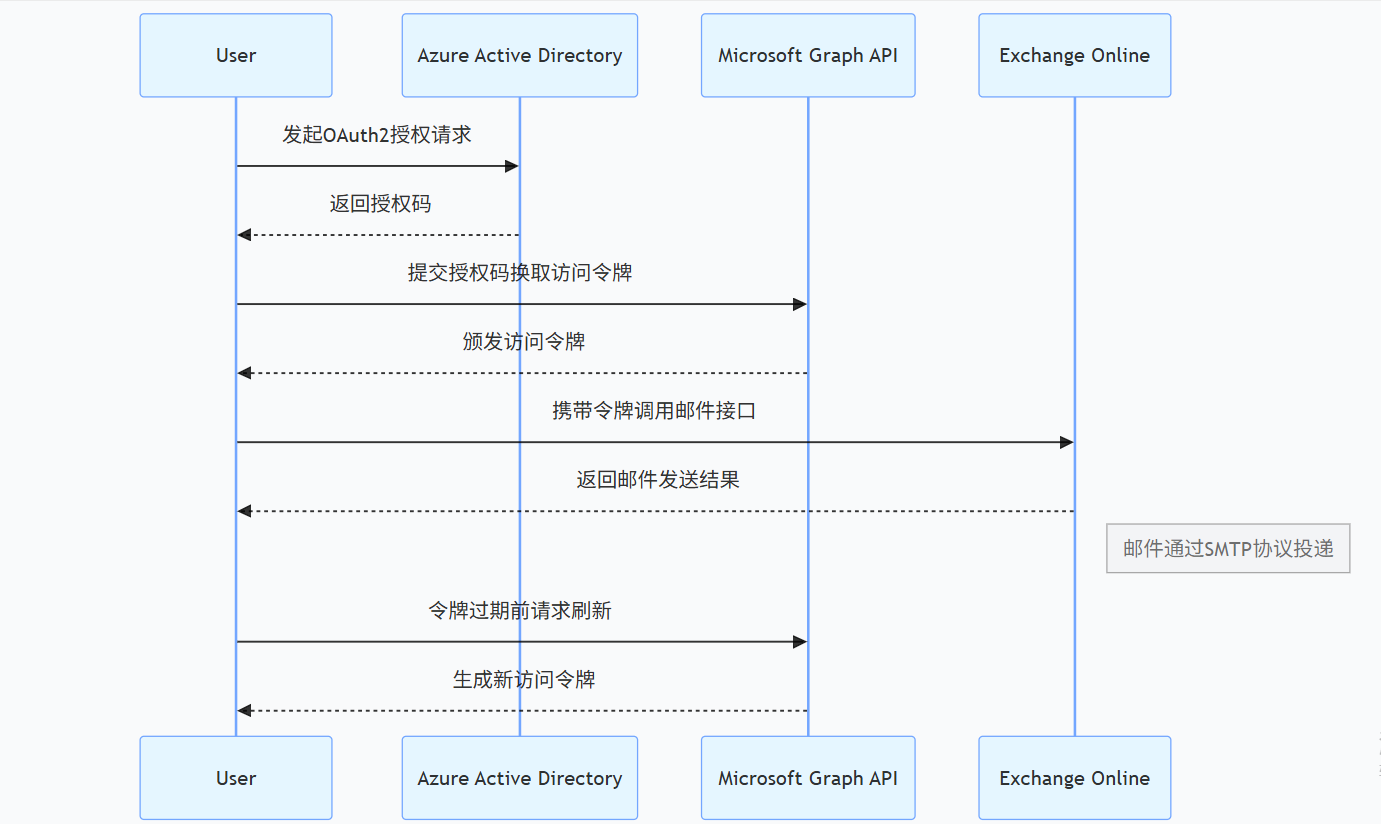
二、Azure AD 应用注册(分步教程)
-
创建应用
- 登录Azure 门户 → Azure AD → 应用注册 → 新建注册
- 记录:
Client ID、Client Secret、Tenant ID(租户域名或 ID)
-
配置权限
- 在API 权限 中添加
Microsoft Graph的Mail.Send权限(选择应用权限) - 点击授予管理员同意(需管理员账号操作)
- 在API 权限 中添加
-
获取令牌端点
plaintext
令牌URL:https://login.microsoftonline.com/{tenantId}/oauth2/v2.0/token
三、Java 原生 API 实现(JDK 8 兼容)
1. 核心依赖(Maven)
xml
<dependency>
    <groupId>com.sun.mail</groupId>
    <artifactId>mail</artifactId>
    <version>1.6.2</version> <!-- JDK8唯一兼容版本 -->
</dependency>
<dependency>
    <groupId>org.apache.httpcomponents</groupId>
    <artifactId>httpclient</artifactId>
    <version>4.5.13</version> <!-- HTTP请求工具 -->
</dependency>
2. 完整代码示例
java
import javax.mail.*;
import javax.mail.internet.*;
import java.util.Properties;
import java.util.concurrent.ConcurrentHashMap;

public class Office365MailClient {
    private static final String TOKEN_URL = "https://login.microsoftonline.com/%s/oauth2/v2.0/token";
    private static final String SCOPE = "https://outlook.office365.com/.default";
    private final String tenantId, clientId, clientSecret, senderEmail;
    private final ConcurrentHashMap<String, String> tokenCache = new ConcurrentHashMap<>();

    public Office365MailClient(String tenantId, String clientId, String clientSecret, String senderEmail) {
        this.tenantId = tenantId;
        this.clientId = clientId;
        this.clientSecret = clientSecret;
        this.senderEmail = senderEmail;
    }

    public void sendHtmlEmail(String to, String subject, String htmlContent) throws Exception {
        String accessToken = getAccessToken();
        Properties props = getSmtpProperties(accessToken);

        Session session = Session.getInstance(props);
        MimeMessage msg = createMimeMessage(session, to, subject, htmlContent);

        try (Transport transport = session.getTransport("smtp")) {
            transport.connect(); // 自动触发XOAUTH2认证
            transport.sendMessage(msg, msg.getAllRecipients());
            System.out.println("发送成功,响应码:" + ((SMTPTransport) transport).getLastServerResponse());
        }
    }

    private Properties getSmtpProperties(String accessToken) {
        Properties props = new Properties();
        props.put("mail.smtp.host", "smtp.office365.com");
        props.put("mail.smtp.port", "587");
        props.put("mail.smtp.auth", "true");
        props.put("mail.smtp.starttls.enable", "true");
        props.put("mail.smtp.auth.mechanisms", "XOAUTH2");

        // 注入OAuth2认证器
        props.put("mail.smtp.user", senderEmail);
        props.put("mail.smtp.password", accessToken);
        return props;
    }

    private MimeMessage createMimeMessage(Session session, String to, String subject, String htmlContent)
            throws MessagingException {
        MimeMessage msg = new MimeMessage(session);
        msg.setFrom(new InternetAddress(senderEmail));
        msg.setRecipients(Message.RecipientType.TO, InternetAddress.parse(to));
        msg.setSubject(subject, "UTF-8");
        msg.setContent(htmlContent, "text/html; charset=utf-8");
        return msg;
    }

    // 令牌获取与缓存(简化实现)
    private String getAccessToken() throws Exception {
        // 实际需实现HTTP请求获取令牌,参考后文Spring Boot方案
        return "your_oauth2_token";
    }
}
四、Spring Boot 集成方案(生产级)
1. 依赖配置
xml
<dependency>
    <groupId>org.springframework.boot</groupId>
    <artifactId>spring-boot-starter-mail</artifactId>
    <exclusions>
        <exclusion>
            <groupId>com.sun.mail</groupId>
            <artifactId>javax.mail</artifactId>
        </exclusion>
    </exclusions>
</dependency>
<dependency>
    <groupId>com.sun.mail</groupId>
    <artifactId>javax.mail</artifactId>
    <version>1.6.2</version>
</dependency>
2. 配置文件(application.properties)
properties
spring.mail.host=smtp.office365.com
spring.mail.port=587
spring.mail.properties.mail.smtp.auth=true
spring.mail.properties.mail.smtp.starttls.enable=true
spring.mail.properties.mail.smtp.auth.mechanisms=XOAUTH2

office365.tenant-id=your_tenant_id
office365.client-id=your_client_id
office365.client-secret=your_client_secret
office365.sender-email=your_sender@example.com
3. 服务类实现
java
import org.springframework.beans.factory.annotation.Value;
import org.springframework.mail.javamail.JavaMailSender;
import org.springframework.mail.javamail.MimeMessageHelper;
import org.springframework.stereotype.Service;
import javax.mail.MessagingException;
import javax.mail.internet.MimeMessage;

@Service
public class Office365MailService {
    private final JavaMailSender mailSender;
    private final String tenantId, clientId, clientSecret, senderEmail;
    private final Office365TokenProvider tokenProvider;

    public Office365MailService(JavaMailSender mailSender,
                               @Value("${office365.tenant-id}") String tenantId,
                               @Value("${office365.client-id}") String clientId,
                               @Value("${office365.client-secret}") String clientSecret,
                               @Value("${office365.sender-email}") String senderEmail) {
        this.mailSender = mailSender;
        this.tenantId = tenantId;
        this.clientId = clientId;
        this.clientSecret = clientSecret;
        this.senderEmail = senderEmail;
        this.tokenProvider = new Office365TokenProvider(tenantId, clientId, clientSecret);
    }

    public void sendEmail(String to, String subject, String htmlContent) throws MessagingException {
        MimeMessage message = mailSender.createMimeMessage();
        MimeMessageHelper helper = new MimeMessageHelper(message, true, "UTF-8");

        helper.setFrom(senderEmail);
        helper.setTo(to);
        helper.setSubject(subject);
        helper.setText(htmlContent, true); // 支持HTML

        // 注入令牌到邮件头(非必须,Spring自动处理认证)
        message.setHeader("Authorization", "Bearer " + tokenProvider.getAccessToken());

        mailSender.send(message);
    }
}
五、常见错误与解决方案
| 错误码 / 提示 | 原因分析 | 解决方案 |
|---|---|---|
535 Authentication failed |
令牌无效或权限不足 | 检查 Azure AD 应用权限,重新获取令牌 |
550 5.7.1 SendAs permission |
缺少发送权限 | 通过 PowerShell 分配SendAs权限 |
421 Service not available |
服务器临时繁忙 | 添加重试机制,设置指数退避(如 1s→2s→4s) |
ClassNotFoundException: SMTPTransport |
JDK 版本不兼容 | 确保使用 JavaMail 1.6.2+,JDK 8 需显式引入com.sun.mail:mail:1.6.2 |
六、性能优化与安全实践
-
令牌缓存
使用
ConcurrentHashMap或 Redis 缓存令牌,设置提前 5 分钟刷新:java
private static final long TOKEN_EXPIRE = 3600; // 有效期1小时 private static final long REFRESH_BUFFER = 300; // 提前5分钟刷新 -
连接池配置
在 Spring Boot 中配置连接池参数:
properties
spring.mail.properties.mail.smtp.connectionpool.size=20 spring.mail.properties.mail.smtp.connectionpool.timeout=5000 -
敏感信息管理
- 禁止硬编码,使用环境变量或 Spring 配置中心
- 通过
azure-keyvault组件从 Key Vault 获取Client Secret
七、权威参考
-
微软官方文档
-
JavaMail 最佳实践
🌟 总结
本文提供了 Java 对接 Office 365 邮箱的完整解决方案,覆盖原生 API 和 Spring Boot 集成,特别针对 JDK 8 兼容性和 OAuth 2.0 认证做了深度优化。