效果图展示
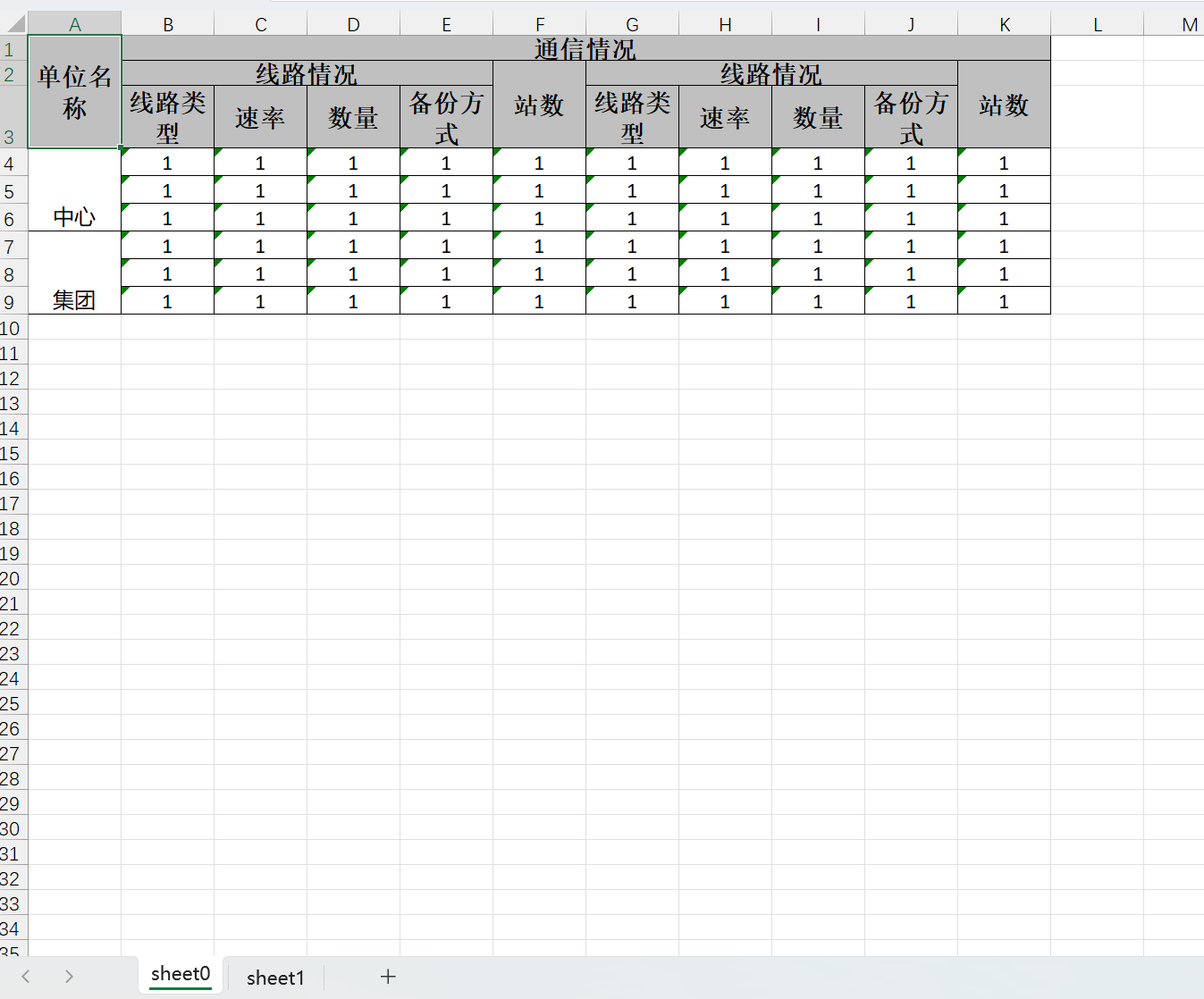
1、引入依赖
xml
<!-- easyExcel -->
<dependency>
    <groupId>com.alibaba</groupId>
    <artifactId>easyexcel</artifactId>
    <version>4.0.2</version>
</dependency>
2、实体类
java
import com.alibaba.excel.annotation.ExcelProperty;
import io.swagger.annotations.ApiModel;
import io.swagger.annotations.ApiModelProperty;
import lombok.Data;

/**
 * @Author: Harris
 * @Date: 2025/5/29
 * @Description:
 **/
@Data
public class AbroadDeptCommBo {

    @ApiModelProperty(value = "单位名称")
    @ExcelProperty(value = {"单位名称", "单位名称", "单位名称"})
    private String unitName;

    @ApiModelProperty(value = "线路类型-国际")
    @ExcelProperty(value = {"通信情况", "线路情况", "线路类型"})
    private String lineTypeInternational;

    @ApiModelProperty(value = "速率-国际")
    @ExcelProperty(value = {"通信情况", "线路情况", "速率"})
    private String rateInternational;

    @ApiModelProperty(value = "数量-国际")
    @ExcelProperty(value = {"通信情况", "线路情况", "数量"})
    private String quantityInternational;

    @ApiModelProperty(value = "备份方式-国际")
    @ExcelProperty(value = {"通信情况", "线路情况", "备份方式"})
    private String backupTypeInternational;

    @ApiModelProperty(value = "数量-国际")
    @ExcelProperty(value = {"通信情况", "站数", "站数"})
    private String cmacastReceiveNumInternational;

    @ApiModelProperty(value = "线路类型-国内")
    @ExcelProperty(value = {"通信情况", "线路情况", "线路类型"})
    private String lineTypeDomestic;

    @ApiModelProperty(value = "速率-国内")
    @ExcelProperty(value = {"通信情况", "线路情况", "速率"})
    private String rateDomestic;

    @ApiModelProperty(value = "数量-国内")
    @ExcelProperty(value = {"通信情况", "线路情况", "数量"})
    private String quantityDomestic;

    @ApiModelProperty(value = "备份方式-国内")
    @ExcelProperty(value = {"通信情况", "线路情况", "备份方式"})
    private String backupTypeDomestic;

    @ApiModelProperty(value = "站数量-国内")
    @ExcelProperty(value = {"通信情况", "站数", "站数"})
    private String cmacastReceiveNumDomestic;
}
3、excel 生成
java
@Test
    public void exportExcel() {
        String fileName = "./data/tmp/out.xlsx";

        WriteCellStyle writeCellStyle = getWriteCellStyle();
        //头策略使用默认
        WriteCellStyle headWriteCellStyle = new WriteCellStyle();

        List<AbroadDeptCommBo> dataList = new ArrayList<>(10);
        dataList.add(initData("中心"));
        dataList.add(initData("中心"));
        dataList.add(initData("中心"));
        dataList.add(initData("集团"));
        dataList.add(initData("集团"));
        dataList.add(initData("集团"));

        try (ExcelWriter build = EasyExcel.write(fileName).build()) {
            WriteSheet sheet0 = EasyExcel.writerSheet(0, "sheet0")
                    .head(AbroadDeptCommBo.class)
                    //设置拦截器或自定义样式
                    .registerWriteHandler(new HorizontalCellStyleStrategy(headWriteCellStyle, writeCellStyle))
                    .registerWriteHandler(new ExcelMergeHandler(3, new int[]{0}))
                    .useDefaultStyle(true)
                    .build();
            build.write(dataList, sheet0);
            WriteSheet sheet1 = EasyExcel.writerSheet(1, "sheet1")
                    .head(AbroadDeptCommBo.class)
                    //设置拦截器或自定义样式
                    .registerWriteHandler(new HorizontalCellStyleStrategy(headWriteCellStyle, writeCellStyle))
                    .registerWriteHandler(new ExcelMergeHandler(3, new int[]{0}))
                    .useDefaultStyle(true)
                    .build();
            build.write(dataList, sheet1);
            build.finish();
        } catch (Exception e) {
            // TODO catch block
        }
    }

    /**
     * 单元格样式设置
     *
     * @return WriteCellStyle
     */
    private static WriteCellStyle getWriteCellStyle() {
        WriteCellStyle writeCellStyle = new WriteCellStyle();
        writeCellStyle.setHorizontalAlignment(HorizontalAlignment.CENTER);
        writeCellStyle.setHorizontalAlignment(HorizontalAlignment.CENTER);
        writeCellStyle.setBorderLeft(BorderStyle.THIN);
        writeCellStyle.setBorderTop(BorderStyle.THIN);
        writeCellStyle.setBorderRight(BorderStyle.THIN);
        writeCellStyle.setBorderBottom(BorderStyle.THIN);
        //设置 自动换行
        writeCellStyle.setWrapped(true);
        // 字体策略
        WriteFont contentWriteFont = new WriteFont();
        // 字体大小
        contentWriteFont.setFontHeightInPoints((short) 12);
        writeCellStyle.setWriteFont(contentWriteFont);
        return writeCellStyle;
    }

    /**
     * 初始化数据
     *
     * @param unitName 单位名称
     * @return AbroadDeptCommBo
     */
    private static AbroadDeptCommBo initData(String unitName) {
        AbroadDeptCommBo abroadDeptCommBo = new AbroadDeptCommBo();
        abroadDeptCommBo.setUnitName(unitName);
        abroadDeptCommBo.setLineTypeInternational("1");
        abroadDeptCommBo.setRateInternational("1");
        abroadDeptCommBo.setQuantityInternational("1");
        abroadDeptCommBo.setBackupTypeInternational("1");
        abroadDeptCommBo.setCmacastReceiveNumInternational("1");
        abroadDeptCommBo.setLineTypeDomestic("1");
        abroadDeptCommBo.setRateDomestic("1");
        abroadDeptCommBo.setQuantityDomestic("1");
        abroadDeptCommBo.setBackupTypeDomestic("1");
        abroadDeptCommBo.setCmacastReceiveNumDomestic("1");
        return abroadDeptCommBo;
    }
合并单元格拦截器(纵向合并)
java
import com.alibaba.excel.metadata.Head;
import com.alibaba.excel.metadata.data.WriteCellData;
import com.alibaba.excel.write.handler.CellWriteHandler;
import com.alibaba.excel.write.metadata.holder.WriteSheetHolder;
import com.alibaba.excel.write.metadata.holder.WriteTableHolder;
import org.apache.poi.ss.usermodel.Cell;
import org.apache.poi.ss.usermodel.CellType;
import org.apache.poi.ss.usermodel.Row;
import org.apache.poi.ss.usermodel.Sheet;
import org.apache.poi.ss.util.CellRangeAddress;

import java.util.List;

/**
 * @Author: Harris
 * @Date: 2025/5/30
 * @Description:
 **/
public class ExcelMergeHandler implements CellWriteHandler {

    // 要合并的列索引数组
    private final int[] mergeColumnIndex;
    // 合并开始的行索引
    private final int mergeRowIndex;

    /**
     * 构造函数
     *
     * @param mergeRowIndex     合并开始的行索引
     * @param mergeColumnIndex  要合并的列索引数组
     */
    public ExcelMergeHandler(int mergeRowIndex, int[] mergeColumnIndex) {
        this.mergeRowIndex = mergeRowIndex;
        this.mergeColumnIndex = mergeColumnIndex;
    }

    @Override
    public void beforeCellCreate(WriteSheetHolder writeSheetHolder, WriteTableHolder writeTableHolder, Row row, Head head, Integer columnIndex, Integer relativeRowIndex, Boolean isHead) {
        // 单元格创建前的处理(这里不需要处理)
    }

    @Override
    public void afterCellCreate(WriteSheetHolder writeSheetHolder, WriteTableHolder writeTableHolder, Cell cell, Head head, Integer relativeRowIndex, Boolean isHead) {
        // 单元格创建后的处理(这里不需要处理)
    }

    @Override
    public void afterCellDispose(WriteSheetHolder writeSheetHolder, WriteTableHolder writeTableHolder, List<WriteCellData<?>> cellDataList, Cell cell, Head head, Integer relativeRowIndex, Boolean isHead) {
        // 当前行索引
        int curRowIndex = cell.getRowIndex();
        // 当前列索引
        int curColIndex = cell.getColumnIndex();

        // 如果当前行大于合并开始行且当前列在需要合并的列中
        if (curRowIndex > mergeRowIndex && isMergeColumn(curColIndex)) {
            // 进行合并操作
            mergeWithPrevRow(writeSheetHolder, cell, curRowIndex, curColIndex);
        }
    }

    /**
     * 检查当前列是否在需要合并的列中
     *
     * @param curColIndex 当前列索引
     * @return 如果是需要合并的列返回true,否则返回false
     */
    private boolean isMergeColumn(int curColIndex) {
        for (int columnIndex : mergeColumnIndex) {
            if (curColIndex == columnIndex) {
                return true;
            }
        }
        return false;
    }

    /**
     * 当前单元格向上合并
     *
     * @param writeSheetHolder 当前工作表持有者
     * @param cell             当前单元格
     * @param curRowIndex      当前行索引
     * @param curColIndex      当前列索引
     */
    private void mergeWithPrevRow(WriteSheetHolder writeSheetHolder, Cell cell, int curRowIndex, int curColIndex) {
        // 获取当前单元格的数据
        Object curData = getCellData(cell);
        // 获取前一个单元格的数据
        Cell preCell = cell.getSheet().getRow(curRowIndex - 1).getCell(curColIndex);
        Object preData = getCellData(preCell);

        // 判断当前单元格和前一个单元格的数据以及主键是否相同
        if (curData.equals(preData) && isSamePrimaryKey(cell, curRowIndex)) {
            // 获取工作表
            Sheet sheet = writeSheetHolder.getSheet();
            // 合并单元格
            mergeCells(sheet, curRowIndex, curColIndex);
        }
    }

    /**
     * 获取单元格的数据
     *
     * @param cell 单元格
     * @return 单元格数据
     */
    private Object getCellData(Cell cell) {
        return cell.getCellType() == CellType.STRING ? cell.getStringCellValue() : cell.getNumericCellValue();
    }

    /**
     * 判断当前单元格和前一个单元格的主键是否相同
     *
     * @param cell         当前单元格
     * @param curRowIndex  当前行索引
     * @return 如果主键相同返回true,否则返回false
     */
    private boolean isSamePrimaryKey(Cell cell, int curRowIndex) {
        String currentPrimaryKey = cell.getRow().getCell(0).getStringCellValue();
        String previousPrimaryKey = cell.getSheet().getRow(curRowIndex - 1).getCell(0).getStringCellValue();
        return currentPrimaryKey.equals(previousPrimaryKey);
    }

    /**
     * 合并单元格
     *
     * @param sheet        工作表
     * @param curRowIndex  当前行索引
     * @param curColIndex  当前列索引
     */
    private void mergeCells(Sheet sheet, int curRowIndex, int curColIndex) {
        // 获取已合并的区域
        List<CellRangeAddress> mergeRegions = sheet.getMergedRegions();
        boolean isMerged = false;

        // 检查前一个单元格是否已经被合并
        for (int i = 0; i < mergeRegions.size() && !isMerged; i++) {
            CellRangeAddress cellRangeAddr = mergeRegions.get(i);
            if (cellRangeAddr.isInRange(curRowIndex - 1, curColIndex)) {
                sheet.removeMergedRegion(i);
                cellRangeAddr.setLastRow(curRowIndex);
                sheet.addMergedRegion(cellRangeAddr);
                isMerged = true;
            }
        }

        // 如果前一个单元格未被合并,则新增合并区域
        if (!isMerged) {
            CellRangeAddress cellRangeAddress = new CellRangeAddress(curRowIndex - 1, curRowIndex, curColIndex, curColIndex);
            sheet.addMergedRegion(cellRangeAddress);
        }
    }
}
最主要的方法其实就是下面这段代码,可以通过这段合并任意单元格
CellRangeAddress cellRangeAddress = new CellRangeAddress(curRowIndex - 1, curRowIndex, curColIndex, curColIndex);
sheet.addMergedRegion(cellRangeAddress);
参考文档:
https://www.cnblogs.com/better-farther-world2099/articles/16106085.html
https://blog.csdn.net/ManGooo0/article/details/128094925