📅 我们继续 50 个小项目挑战!------ FormWave组件
仓库地址:https://github.com/SunACong/50-vue-projects
项目预览地址:https://50-vue-projects.vercel.app/
🎯 组件目标
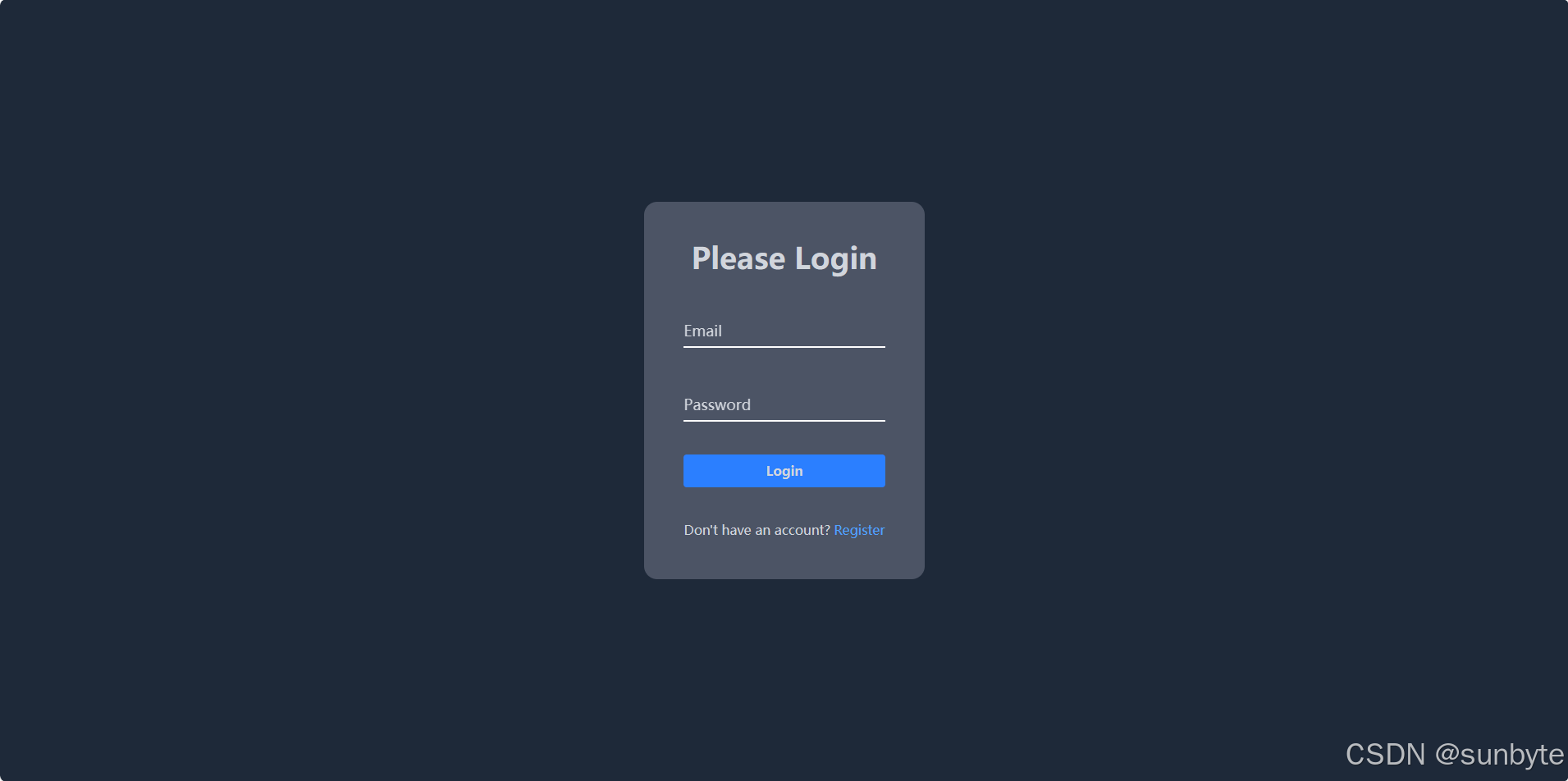
构建一个美观、动态的登录表单,重点在于实现带有浮动标签(floating label)的输入框体验,提升交互感知和视觉效果,适合作为任何登录注册模块的基础模板。
🛠️ 技术实现点
- 使用 Vue3 +
<script setup>编写响应式逻辑。 - 使用 TailwindCSS 完全控制样式,特别是浮动文字的动画。
- 实现
focus/blur状态下标签文字的动画浮动效果。 - 使用
v-model实现双向绑定,结合focus状态精准控制浮动逻辑。
🧱 组件实现
html
<!-- 🌈 模板部分 Template -->
<template>
    <div class="flex h-screen items-center justify-center bg-gray-800 text-gray-300">
        <div class="rounded-2xl bg-gray-500/60 p-12 text-center">
            <h1 class="text-4xl font-bold text-gray-300">Please Login</h1>
            <form>
                <!-- Email 输入框 -->
                <div class="form-control relative mt-10 border-b-2 border-b-white">
                    <input
                        class="peer relative z-10 w-full bg-transparent py-3 text-white focus:border-sky-300 focus:outline-none"
                        type="text"
                        required
                        v-model="emailValue"
                        @focus="activeInput = 'email'"
                        @blur="handleBlur('email')" />
                    <label class="pointer-events-none absolute top-4 left-0">
                        <!-- ✨ 字符级浮动动画 -->
                        <span
                            v-for="(letter, idx) in 'Email'.split('')"
                            :key="idx"
                            :class="[
                                'inline-block min-w-[5px] text-lg transition-all duration-300',
                                'transform-gpu',
                                {
                                    '-translate-y-8 text-sky-300':
                                        activeInput === 'email' || emailValue,
                                },
                            ]"
                            :style="{
                                transitionDelay: `${idx * 50}ms`,
                                transitionTimingFunction: 'cubic-bezier(0.68, -0.55, 0.265, 1.55)',
                            }">
                            {{ letter }}
                        </span>
                    </label>
                </div>

                <!-- Password 输入框 -->
                <div class="form-control relative mt-10 border-b-2 border-b-white">
                    <input
                        class="peer relative z-10 w-full bg-transparent py-3 text-white focus:border-sky-300 focus:outline-none"
                        type="password"
                        required
                        v-model="passwordValue"
                        @focus="activeInput = 'password'"
                        @blur="handleBlur('password')" />
                    <label class="pointer-events-none absolute top-4 left-0">
                        <!-- ✨ 字符级浮动动画 -->
                        <span
                            v-for="(letter, idx) in 'Password'.split('')"
                            :key="idx"
                            :class="[
                                'inline-block min-w-[5px] text-lg transition-all duration-300',
                                'transform-gpu',
                                {
                                    '-translate-y-8 text-sky-300':
                                        activeInput === 'password' || passwordValue,
                                },
                            ]"
                            :style="{
                                transitionDelay: `${idx * 50}ms`,
                                transitionTimingFunction: 'cubic-bezier(0.68, -0.55, 0.265, 1.55)',
                            }">
                            {{ letter }}
                        </span>
                    </label>
                </div>

                <!-- 登录按钮 -->
                <button
                    class="mt-10 w-full rounded bg-blue-500 px-4 py-2 font-bold hover:bg-blue-600 focus:ring-2 focus:ring-blue-400 focus:outline-none"
                    type="submit">
                    Login
                </button>

                <p class="mt-10">
                    Don't have an account?
                    <a href="#" class="text-blue-400 hover:underline">Register</a>
                </p>
            </form>
        </div>
    </div>
</template>
🧩 重点效果实现
js
<!-- ⚙️ 脚本部分 Script -->
<script setup>
import { ref } from 'vue'

// 输入值响应式变量
const emailValue = ref('')
const passwordValue = ref('')

// 当前聚焦的输入项
const activeInput = ref(null)

// 失焦逻辑:如果输入框为空,则取消浮动状态
const handleBlur = (inputName) => {
    if (
        (inputName === 'email' && !emailValue.value) ||
        (inputName === 'password' && !passwordValue.value)
    ) {
        activeInput.value = null
    }
}
</script>- 标签浮动是通过
translate-y配合activeInput或绑定值来实现的。 - 使用
transition-delay实现了字符级别的延迟动画,让文字一个个浮动。 - 利用
cubic-bezier定义自定义缓动函数,提升动画的弹性和自然感。
🎨 TailwindCSS 样式重点讲解
| 类名 | 作用 |
|---|---|
peer / relative z-10 |
确保 input 在 label 之上,供 label 状态判断使用 |
-translate-y-8 |
控制文字上浮距离 |
transition-delay |
实现文字一个个浮动的动画延迟 |
transform-gpu |
使用 GPU 加速动画,提高性能和流畅度 |
focus:outline-none / focus:ring-2 |
聚焦时视觉反馈 |
min-w-[5px] |
保证字符宽度一致,不会断行 |
🧾 常量定义 + 组件路由建议
constants/index.js 添加组件预览常量:
js
{
        id: 8,
        title: 'Form Wave',
        image: 'https://50projects50days.com/img/projects-img/8-form-wave.png',
        link: 'FormWave',
    },
router/index.js 中添加路由选项:
js
{
        path: '/FormWave',
        name: 'FormWave',
        component: () => import('@/projects/FormWave.vue'),
    },
路由守卫可后续扩展身份验证逻辑,跳转到注册或首页。
🧠 小结
完成了通用场景下的表单样式界面,可以为你以后的表单设计以及登录页面提供一些灵感进行参考!!!🚀
👉 下一篇,我们将完成声音组件 Sound Board组件,可以实现点击发出对应的声音!🚀