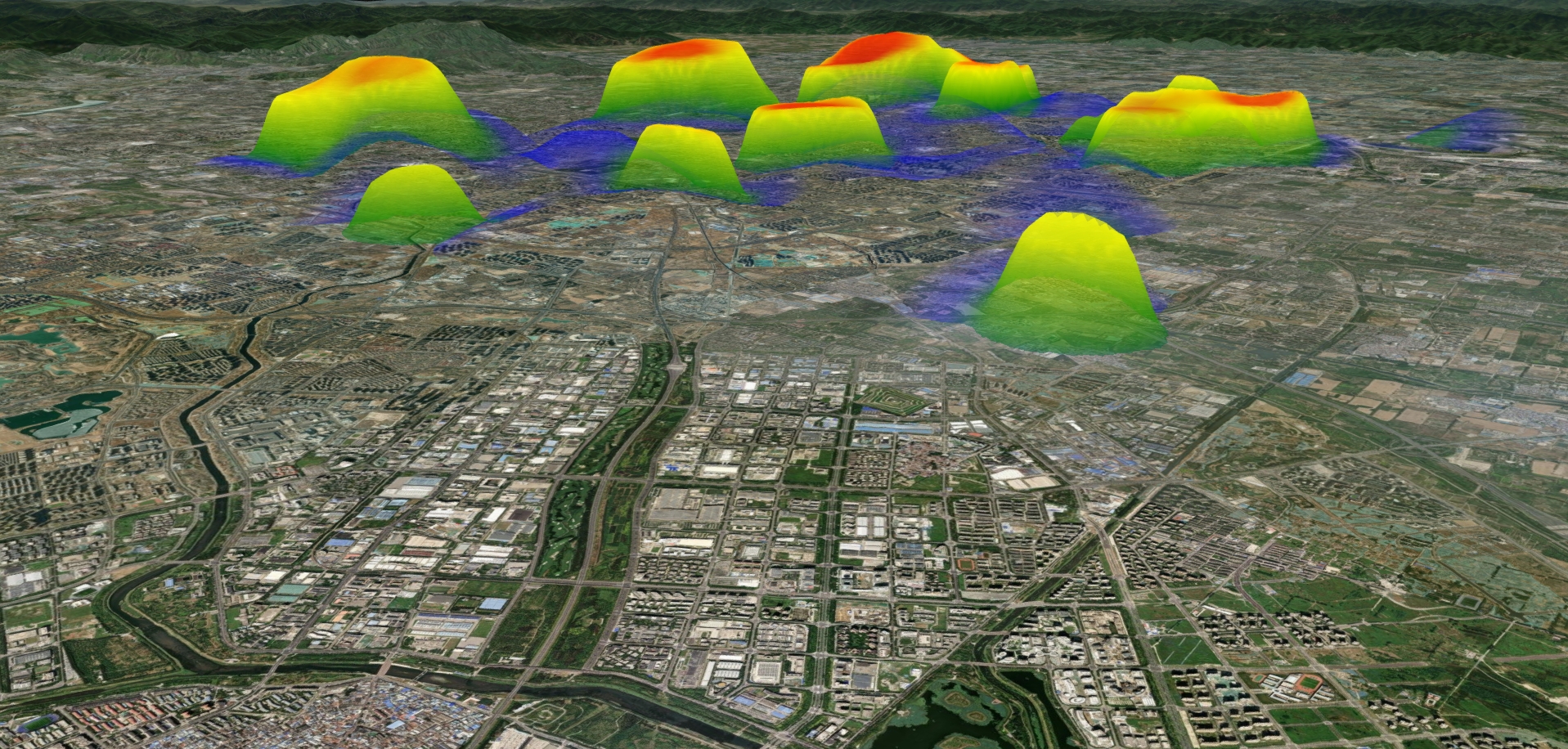
接到一位知识星友的邀请,随机模拟三维数据点,结合heatmap.js实现基于cesium+vue的3D热力图需求,适合学习Cesium与前端框架结合开发3D可视化项目。
demo源码运行环境以及配置
运行环境:依赖Node安装环境,demo本地Node版本:推荐v18+。
运行工具:vscode或者其他工具。
配置方式:下载demo源码,vscode打开,然后顺序执行以下命令:
(1)下载demo环境依赖包命令:npm install
(2)启动demo命令:npm run dev
(3)打包demo命令: npm run build
技术栈
Vue 3.5.13
Vite 6.2.0
Cesium 1.128.0
示例效果
核心源码
javascript
<template>
  <div id="cesiumContainer" class="cesium-container">
  </div>
</template>
<script setup>
import { onMounted, onUnmounted, ref } from 'vue';
import * as Cesium from 'cesium';
Cesium.Ion.defaultAccessToken = 'eyJhbGciOiJIUzI1NiIsInR5cCI6IkpXVCJ9.eyJqdGkiOiIxZjhjYjhkYS1jMzA1LTQ1MTEtYWE1Mi0zODc5NDljOGVkMDYiLCJpZCI6MTAzNjEsInNjb3BlcyI6WyJhc2wiLCJhc3IiLCJhc3ciLCJnYyJdLCJpYXQiOjE1NzA2MDY5ODV9.X7tj92tunUvx6PkDpj3LFsMVBs_SBYyKbIL_G9xKESA';
// 声明Cesium Viewer实例
let viewer = null;
// 组件挂载后初始化Cesium
onMounted(async () => {
  const files = [
    "./heatmap/heatmap.js"
  ];
  loadScripts(files, function () {
    console.log("All scripts loaded");
    initMap();
  });
});
const loadScripts = (files, callback) => {
  // Make Cesium available globally for the scripts
  // window.Cesium = Cesium;
  if (files.length === 0) {
    callback();
    return;
  }
  const file = files.shift();
  const script = document.createElement("script");
  script.onload = function () {
    loadScripts(files, callback);
  };
  script.src = file;
  document.head.appendChild(script);
};
const initMap = async () => {
  // 初始化Cesium Viewer
  viewer = new Cesium.Viewer('cesiumContainer', {
    // 基础配置
    animation: false, // 动画小部件
    baseLayerPicker: false, // 底图选择器
    fullscreenButton: false, // 全屏按钮
    vrButton: false, // VR按钮
    geocoder: false, // 地理编码搜索框
    homeButton: false, // 主页按钮
    infoBox: false, // 信息框 - 禁用点击弹窗
    sceneModePicker: false, // 场景模式选择器
    selectionIndicator: false, // 选择指示器
    timeline: false, // 时间轴
    navigationHelpButton: false, // 导航帮助按钮
    navigationInstructionsInitiallyVisible: false, // 导航说明初始可见性
    scene3DOnly: false, // 仅3D场景
    terrain: Cesium.Terrain.fromWorldTerrain(), // 使用世界地形
  });
  // 隐藏logo
  viewer.cesiumWidget.creditContainer.style.display = "none";
  viewer.scene.globe.enableLighting = true;
  // 禁用大气层和太阳
  viewer.scene.skyAtmosphere.show = false;
  //前提先把场景上的图层全部移除或者隐藏
  // viewer.scene.globe.baseColor = Cesium.Color.BLACK; //修改地图蓝色背景
  viewer.scene.globe.baseColor = new Cesium.Color(0.0, 0.1, 0.2, 1.0); //修改地图为暗蓝色背景
  // 设置抗锯齿
  viewer.scene.postProcessStages.fxaa.enabled = true;
  // 清除默认底图
  viewer.imageryLayers.remove(viewer.imageryLayers.get(0));
  // 加载底图 - 使用更暗的地图服务
  const imageryProvider = await Cesium.ArcGisMapServerImageryProvider.fromUrl("https://services.arcgisonline.com/ArcGIS/rest/services/World_Imagery/MapServer");
  viewer.imageryLayers.addImageryProvider(imageryProvider);
  // 设置默认视图位置 - 默认显示全球视图
  // viewer.camera.setView({
  //   destination: Cesium.Cartesian3.fromDegrees(104.0, 30.0, 10000000.0), // 中国中部上空
  //   orientation: {
  //     heading: 0.0,
  //     pitch: -Cesium.Math.PI_OVER_TWO,
  //     roll: 0.0
  //   }
  // });
  // 启用地形深度测试,确保地形正确渲染
  viewer.scene.globe.depthTestAgainstTerrain = true;
  // 模拟数值
  const points = new Array(50).fill("").map(() => {
    return {
      lnglat: [
        116.46 + Math.random() * 0.1 * (Math.random() > 0.5 ? 1 : -1),
        39.92 + Math.random() * 0.1 * (Math.random() > 0.5 ? 1 : -1),
      ],
      value: 1000 * Math.random(),
    };
  });
  // 创建热力图
  create3DHeatmap(viewer, {
    dataPoints: points,
    radius: 15,
    baseElevation: 0,
    primitiveType: "TRIANGLES",
    colorGradient: {
      ".3": "blue",
      ".5": "green",
      ".7": "yellow",
      ".95": "red",
    },
  });
  viewer.camera.flyTo({
    destination: Cesium.Cartesian3.fromDegrees(116.46, 39.92, 100000),
    orientation: {},
    duration: 3,
  });
}
// 组件卸载前清理资源
onUnmounted(() => {
  if (viewer) {
    viewer.destroy();
    viewer = null;
  }
});
/**
 * 创建三维热力图
 * @param {Cesium.Viewer} viewer 地图viewer对象
 * @param {Object} options 基础参数
 * @param {Array} options.dataPoints 热力值数组
 * @param {Array} options.radius 热力点半径
 * @param {Array} options.baseElevation 最低高度
 * @param {Array} options.colorGradient 颜色配置
 */
function create3DHeatmap(viewer, options = {}) {
  const heatmapState = {
    viewer,
    options,
    dataPoints: options.dataPoints || [],
    containerElement: undefined,
    instanceId: Number(
      `${new Date().getTime()}${Number(Math.random() * 1000).toFixed(0)}`
    ),
    canvasWidth: 200,
    boundingBox: undefined, // 四角坐标
    boundingRect: {}, // 经纬度范围
    xAxis: undefined, // x 轴
    yAxis: undefined, // y 轴
    xAxisLength: 0, // x轴长度
    yAxisLength: 0, // y轴长度
    baseElevation: options.baseElevation || 0,
    heatmapPrimitive: undefined,
    positionHierarchy: [],
    heatmapInstance: null,
  };
  if (!heatmapState.dataPoints || heatmapState.dataPoints.length < 2) {
    console.log("热力图点位不得少于3个!");
    return;
  }
  createHeatmapContainer(heatmapState);
  const heatmapConfig = {
    container: document.getElementById(`heatmap-${heatmapState.instanceId}`),
    radius: options.radius || 20,
    maxOpacity: 0.7,
    minOpacity: 0,
    blur: 0.75,
    gradient: options.colorGradient || {
      ".1": "blue",
      ".5": "yellow",
      ".7": "red",
      ".99": "white",
    },
  };
  heatmapState.primitiveType = options.primitiveType || "TRIANGLES";
  heatmapState.heatmapInstance = h337.create(heatmapConfig);
  initializeHeatmap(heatmapState);
  return {
    destroy: () => destroyHeatmap(heatmapState),
    heatmapState,
  };
}
......