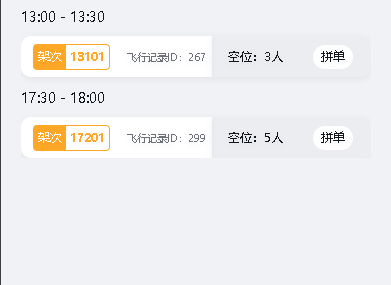
声明showEmpty 为false,在接口返回处判断有数据时设置showEmpty 为false,接口返回数据为空则判断showEmpty 为true (这样就解决有数据的时候会闪现暂无数据的问题啦)
<!--
 * @Date: 2024-02-26 03:38:52
 * @LastEditTime: 2025-06-05 09:02:58
 * @Description: 救援详情页面
-->
<template>
    <view class="consolidated-order">
        <view class="consolidated-order-filter">
            <view class="consolidated-order-filter-cont flex-center-between">
                <select-date ref="dateRef" @change-date="changeDate" />
                <select-time ref="timeRef" @change-time="changeTime" />
                <select-goods ref="goodsRef" @change-goods="changeGoods" />
            </view>
        </view>
        <scroll-view
            v-if="!showEmpty"
            scroll-with-animation
            :scroll-y="true"
            :show-scrollbar="false"
            class="consolidated-cont"
        >
            <view class="service-order-item-box">
                <view v-for="(item, index) in splicingOrdersList" :key="index" class="service-order-item">
                    <view class="service-order-item-time"
                        >{{ timeFormat(item.departureTime) }} - {{ timeFormat(item.arriveTime) }}</view
                    >
                    <view
                        v-for="(item1, index1) in item.flyRecordModelList"
                        :key="index1"
                        class="service-order-item-cont flex-center-start"
                    >
                        <view class="cont-left flex-center-between">
                            <view class="fly-no-box fly-no-yellow flex-center-start">
                                <view class="fly-no-text">架次</view
                                ><view class="fly-no-num">{{ item1.flyNo || '--' }}</view></view
                            >
                            <view class="fly-id">飞行记录ID:{{ item1.id }}</view>
                        </view>
                        <view class="cont-right flex-center-start">
                            <view class="balance-num">空位:{{ item1.balanceNum }}人</view>
                            <view class="service-order-item-btn" @click="splicingOrders(item1)">拼单</view>
                        </view>
                    </view>
                </view>
            </view>
        </scroll-view>
        <!-- 拼单空状态 -->
        <view v-if="showEmpty" class="empty-wrap">
            <empty-block :image-src="EMPTY_PNG" text="还没有拼单信息哦" />
        </view>
    </view>
</template>

<script setup lang="ts">
import config from '@/../config/config';
import { qryCanJoinFly, combineServerOrder } from '@/services/api-order';
import { timeFormat } from '@/utils/DateUtils';
import { onLoad } from '@dcloudio/uni-app';
import { computed, ref, onMounted } from 'vue';
const EMPTY_PNG = `${config.assetPath}/images/book/empty-order.png`;
import { useStore } from 'vuex';
const store = useStore();
const openId = computed(() => store.state.userStore?.userInfo.openId);
const changeDate = (e) => {};
const changeTime = (e) => {};
const changeGoods = (e) => {};
const splicingOrdersList = ref();
const orderNoVal = ref();
const showEmpty = ref(false); //是否显示空状态
// 拼单列表
const getCanJoinFly = async () => {
    // ATO24080900075466有数据
    await qryCanJoinFly({
        orderNo: orderNoVal.value,
    }).then((res) => {
        if (res?.code == 0 && res?.data) {
           if (res?.data.length <= 0) {
                showEmpty.value = true; //没有数据的时候展示空状态
            } else {
                showEmpty.value = false; //有数据则正常展示数据
            }
            splicingOrdersList.value = res?.data;
        }
    });
};
const splicingOrders = (item) => {
    uni.showModal({
        title: '',
        content: '是否选择拼机',
        confirmText: '确认',
        success: (data) => {
            if (data.confirm) {
                let params = {
                    orderNo: orderNoVal.value,
                    combineFlyId: item.id,
                    openId: openId.value,
                };
                combineServerOrder(params).then((res) => {
                    if (res?.code == 0) {
                        uni.showToast({
                            title: '拼机成功',
                            icon: 'success',
                        });
                    }
                });
            } else if (data.cancel) {
                console.log('用户取消了操作');
            }
        },
    });
};
onLoad((option) => {
    orderNoVal.value = option.orderNo || '';
});
onMounted(() => {
    getCanJoinFly();
});
</script>

<style lang="scss">
@import './index.scss';
</style>
有数据
空状态