目录
[stdin & stdout & stderr](#stdin & stdout & stderr)
C文件接口
以fopen函数为例,fopen的头文件也是<stdio.h>,参数path是要打开的文件所在的路径,mode是以什么方式(读/写)打开:
 在使用fopen写文件时,即"w",如果该文件不存在,fopen会创建文件。

写文件
cpp
#include <stdio.h>

int main()
{
    FILE *fp = fopen("log.txt", "w");
    if(!fp)
    {
        perror("fopen");
        return 1;
    }
    fclose(fp);
    return 0;
}
运行结果:

在上述代码中,我们并没有指定log.txt的位置,fopen默认在当前路径下创建log.txt。但是当前路径是从哪里来的呢?------每个进程都有自己的当前的工作目录,这个进程的工作目录就是当前路径。我们可以通过代码验证一下:
cpp
#include <stdio.h>
#include <unistd.h>

int main()
{
    printf("pid: %d\n", getpid());
    FILE *fp = fopen("log.txt", "w");
    if(!fp)
    {
        perror("fopen");
        return 1;
    }
    fclose(fp);
    sleep(1000);
    return 0;
}
进程的具体信息可以在/proc/pid目录中查看,上图中cwd即使current working directory,即当前工作目录,fopen就是通过这个确定当前路径。
假设我们通过chdir来改变进程的工作目录,那么创建的文件也会在该路径下:
cpp
#include <stdio.h>
#include <unistd.h>

int main()
{
    chdir("/home/hxqy");
    printf("pid: %d\n", getpid());
    FILE *fp = fopen("log1111111111111111.txt", "w");
    if(!fp)
    {
        perror("fopen");
        return 1;
    }
    fclose(fp);
    sleep(1000);
    return 0;
}
运行结果:

下面我们通过fwrite来向文件中写入一些内容:
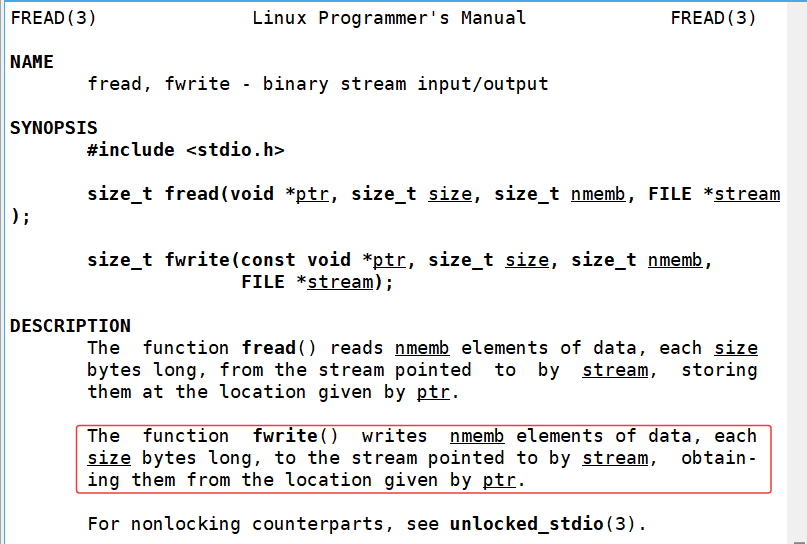
fwrite向stream中写入ptr指向的内容,size为写入内容的大小,nmemb是写入的次数:
cpp
#include <stdio.h>
#include <unistd.h>
#include <string.h>

int main()
{
    printf("pid: %d\n", getpid());
    FILE *fp = fopen("log.txt", "w");
    if(!fp)
    {
        perror("fopen");
        return 1;
    }
    const char *message = "hello Linux message";
    fwrite(message, strlen(message), 1, fp);
    fclose(fp);
    sleep(1000);
    return 0;
}
我们把上述代码中的message改为"abcd",重新运行:

可以看到log.txt中的内容变成了abcd,而原来的"hello Linux message"不见了。这是因为fopen在打开文件时会将内容清零并指向文件开头:

这一点也很方便验证,我们通过vim向log.txt写入一些内容,随后使用fopen打开log.txt,不再进行写入操作,可以看到log.txt的内容仍然被清空:
cpp
#include <stdio.h>
#include <unistd.h>
#include <string.h>

int main()
{
    printf("pid: %d\n", getpid());
    FILE *fp = fopen("log.txt", "w");
    if(!fp)
    {
        perror("fopen");
        return 1;
    }
    //const char *message = "hello Linux message";
    //fwrite(message, strlen(message), 1, fp);
    //fclose(fp);
    //sleep(1000);
    return 0;
}

还有一点我们需要思考,使用fwrite向文件中写入内容时,内容的长度应该是strlen(message)还是strlen(message)+1?
将fwrite中的strlen(message)改为strlen(message)+1:
cpp
#include <stdio.h>
#include <unistd.h>
#include <string.h>

int main()
{
    printf("pid: %d\n", getpid());
    FILE *fp = fopen("log.txt", "w");
    if(!fp)
    {
        perror("fopen");
        return 1;
    }
    const char *message = "abcd";
    fwrite(message, strlen(message)+1, 1, fp);
    fclose(fp);
    return 0;
}
运行结果:

其实此处的^@就是'\0',只不过用vim打开后显示出的是乱码。事实上我们并不需要将strlen(message)加一,因为字符串末尾为'\0'只是C语言的规定(C语言并没有字符串类型所以规定了字符串的结束标志),但这跟文件操作没有任何关系。
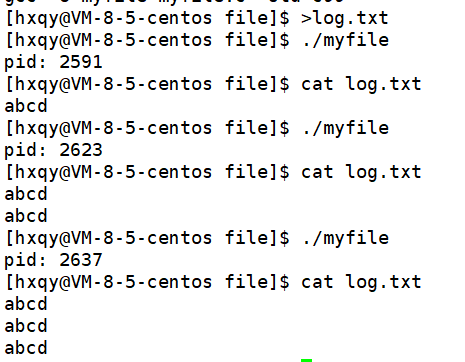
回到向文件中写入内容的话题上,刚才说明了fopen使用"w"打开文件会清空之前的内容,如果我们并不想使用覆盖写而想要在原有内容上追加内容则应该使用"a"即append:

此时fopen并不会清空之前的内容并且*fp会指向文件的末尾而不是开头:
fprintf也可以向文件中写入内容:
cpp
#include <stdio.h>
#include <unistd.h>

int main()
{
    printf("pid: %d\n", getpid());
    FILE *fp = fopen("log.txt", "a");
    if(!fp)
    {
        perror("fopen");
        return 1;
    }
    const char *message = "abcd";
    fprintf(fp, "%s: %d\n", message, 1234);
    fclose(fp);
    return 0;
}
stdin & stdout & stderr
- C默认会打开三个输入输出流,分别是stdin(键盘文件),stdout(显示器文件),stderr(显示器文件)
- 这三个流的类型都是FILE*,文件指针
输出信息到显示器
直接向stdout写入内容:
cpp
#include <stdio.h>
#include <unistd.h>
#include <string.h>

int main()
{
    printf("pid: %d\n", getpid());
    const char *message = "abcd";
    fwrite(message, strlen(message), 1, stdout);
    return 0;
}
向stderr写入内容:
cpp
#include <stdio.h>
#include <unistd.h>

int main()
{
    printf("pid: %d\n", getpid());
    const char *message = "abcd";
    fprintf(stderr, "%s: %d\n", message, 1234);
    return 0;
}
系统文件I/O
我们知道,文件是存储在磁盘上的,而磁盘是外部设备,操作系统访问磁盘文件就是在访问硬件。而几乎所有的库只要是访问硬件设备就必定要封装系统调用。下面我们直接使用系统接口来进行文件访问,可以实现与上面一模一样的操作。
接口介绍
open

- pathname:要打开或创建的目标文件
- flags:打开文件时,可以传入多个参数选项
参数:
O_RDONLY:只读打开
O_WRONLY:只写打开
O_RDWR:读,写打开
以上三个常量(宏)必须指定一个并且只能指定一个
O_CREAT:若文件不存在,则创建它。需要使用mode选项来指明新文件的访问权限
O_APPEND:追加写
返回值:
成功:新打开的文件描述符
失败:-1

man手册中有两个open函数,具体使用哪个和具体的应用场景相关,如目标文件不存在,需要open创建,则使用三个参数的open,第三个参数表示创建文件的默认权限,否则如果只打开文件就使用两个参数的open。
flags可以用以上的一个或多个常量进行"或"运算,构成flags。因为这些常量都是只有一个比特位为1,下面通过一个demo来说明:
cpp
#include <stdio.h>

#define ONE (1<<0)    // 1
#define TWO (1<<1)    // 2
#define THREE (1<<2)  // 4
#define FOUR (1<<3)   // 8

void show(int flags)
{
    if(flags & ONE) printf("hello function1\n");
    if(flags & TWO) printf("hello function2\n");
    if(flags & THREE) printf("hello function3\n");
    if(flags & FOUR) printf("hello function4\n");
}

int main()
{
    printf("----------------------------------------------\n");
    show(ONE);
    printf("----------------------------------------------\n");
    show(TWO);
    printf("----------------------------------------------\n");
    show(ONE|TWO|THREE);
    printf("----------------------------------------------\n");
    show(ONE|THREE);
    printf("----------------------------------------------\n");
    show(THREE|FOUR);
    printf("----------------------------------------------\n");
    return 0;
}
运行结果:

open函数返回值
在认识返回值之前,我们先认识一下两个概念:系统调用和库函数
- fopen、fclose、fread、fwrite都是C标准库当中的函数,我们称之为库函数(libc)
- 而open、close、read、write、lseek都属于系统提供的接口,称之为系统调用接口

如图,系统调用和库函数的关系一目了然。可以认为f#系列的函数都是对系统调用的封装,方便二次开发。
回到正题,open函数的返回值是一个整数fd-文件描述符(file descriptor)

如果open失败则会返回-1.
如果我们用写打开一个还不存在的文件 :
cpp
#include <stdio.h>
#include <sys/types.h>
#include <sys/stat.h>
#include <fcntl.h>

int main()
{
    int fd = open("log.txt", O_WRONLY);
    if(fd < 0)
    {
        perror("open file error\n");
        return 1;
    }
    return 0;
}
这里报错是因为这个文件现在并不存在,我们要想使用open打开这个文件其实就一定要创建这个文件,这时就必须或上O_CREAT:

cpp
#include <stdio.h>
#include <sys/types.h>
#include <sys/stat.h>
#include <fcntl.h>

int main()
{
    int fd = open("log.txt", O_WRONLY|O_CREAT);
    if(fd < 0)
    {
        perror("open file error\n");
        return 1;
    }
    return 0;
}
运行结果:

可以看到我们虽然成功创建了log.txt文件,但是文件的默认权限完全不对。这就是我们刚才说的如果要使用open创建文件,应该使用三个参数的open函数,其中第三个参数mode即指定文件的权限码:
cpp
#include <stdio.h>
#include <sys/types.h>
#include <sys/stat.h>
#include <fcntl.h>

int main()
{
    int fd = open("log.txt", O_WRONLY|O_CREAT, 0666);
    // 0666 即 -rw-rw-rw-
    if(fd < 0)
    {
        perror("open file error\n");
        return 1;
    }
    return 0;
}
运行结果:

这里看到文件的权限码并不是0666而是0664,这是因为权限掩码umask的存在------在创建文件时,最终文件的权限码是等于指定权限码 和 umask取反 相与得到的结果:

我们可以通过系统调用接口umask来设置umask的值:
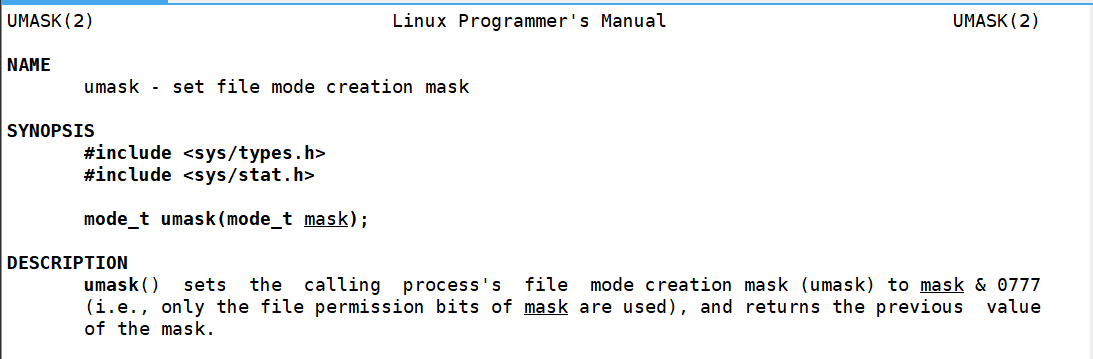
cpp
#include <stdio.h>
#include <sys/types.h>
#include <sys/stat.h>
#include <fcntl.h>

int main()
{
    umask(0); // 不影响整个系统的umask,只影响该进程的umask
    int fd = open("log.txt", O_WRONLY|O_CREAT, 0666);
    // 0666 即 -rw-rw-rw-
    if(fd < 0)
    {
        perror("open file error\n");
        return 1;
    }
    return 0;
}
close
close只有一个参数fd,要关闭某一个文件,直接将它的文件描述符传给close即可:

write
write共有三个参数:向文件描述符fd代表的文件中写入count字节的buf指向的内容

cpp
#include <stdio.h>
#include <sys/types.h>
#include <sys/stat.h>
#include <fcntl.h>
#include <unistd.h>
#include <string.h>

int main()
{
    int fd = open("log.txt", O_WRONLY|O_CREAT, 0666);
    // 0666 即 -rw-rw-rw-
    if(fd < 0)
    {
        perror("open file error\n");
        return 1;
    }
    const char *message = "hello file system call\n";
    write(fd, message, strlen(message));
    close(fd);
    return 0;
}
如果我们把要写入的message内容改为"aaa\n",再运行该代码,运行结果:

可以发现这里并没有清空之前的文件内容,如果想要清空,我们需要或上O_TRUNC:
cpp
#include <stdio.h>
#include <sys/types.h>
#include <sys/stat.h>
#include <fcntl.h>
#include <unistd.h>
#include <string.h>

int main()
{
    int fd = open("log.txt", O_WRONLY|O_CREAT|O_TRUNC, 0666);
    // 0666 即 -rw-rw-rw-
    if(fd < 0)
    {
        perror("open file error\n");
        return 1;
    }
    const char *message = "hello file system call\n";
    write(fd, message, strlen(message));
    close(fd);
    return 0;
}
此时运行代码:

同样地,如果我们想实现追加写,可以或上O_APPEND:
cpp
#include <stdio.h>
#include <sys/types.h>
#include <sys/stat.h>
#include <fcntl.h>
#include <unistd.h>
#include <string.h>

int main()
{
    int fd = open("log.txt", O_WRONLY|O_CREAT|O_APPEND, 0666);
    // 0666 即 -rw-rw-rw-
    if(fd < 0)
    {
        perror("open file error\n");
        return 1;
    }
    const char *message = "hello file system call\n";
    write(fd, message, strlen(message));
    close(fd);
    return 0;
}
实际上,之前封装的库函数
FILE *fp = fopen("log.txt", "w"); 就等价于
int fd = open("log.txt", O_WRONLY|O_CREAT|O_TRUNC, 0666);
FILE *fp = fopen("log.txt", "a"); 就等价于
int fd = open("log.txt", O_WRONLY|O_CREAT|O_APPEND, 0666);
那么文件指针fp和文件描述符fd之间是什么关系呢?
我们知道,操作系统肯定会需要打开很多个文件,这就需要它对打开的文件进行管理,要管理就要"先描述,再组织"------操作系统中存在描述打开文件的结构体,这个结构体中会直接或间接地包含文件的一些属性如:文件存储在磁盘的什么位置;权限、大小、谁打开的;文件的内核缓冲区信息等等。然后操作系统可能会把打开的文件以双链表的结构组织起来,这样对文件的管理就变成了对双链表的增删查改。
文件描述符fd是从0开始的小整数。当我们打开文件时,操作系统在内存中要创建相应的数据结构来描述目标文件。于是就有了file结构体。表示一个已经打开的文件对象。而进程执行open系统调用,所以必须让进程和文件关联起来。每个进程都有一个指针*files,指向一张表files_struct,该表最重要的部分就是一个指针数组,其中每个元素都是一个指向打开文件的指针。所以,**本质上文件描述符就是该数组的下标。**所以只要拿着文件描述符就可以找到对应的文件。

以下是linux-2.6.11.1的源码内容:
task_struct(PCB)中存在struct files_struct结构体:

查看相关定义:


我们写一个程序观察文件描述符:
cpp
#include <stdio.h>
#include <unistd.h>
#include <sys/types.h>
#include <sys/stat.h>
#include <fcntl.h>
#include <string.h>

int main()
{
    umask(0);
    int fd1 = open("log1.txt", O_WRONLY|O_CREAT|OAPPEND, 0666);
    int fd2 = open("log2.txt", O_WRONLY|O_CREAT|OAPPEND, 0666);
    int fd3 = open("log3.txt", O_WRONLY|O_CREAT|OAPPEND, 0666);
    int fd4 = open("log4.txt", O_WRONLY|O_CREAT|OAPPEND, 0666);

    printf("fd1: %d\n", fd1);
    printf("fd2: %d\n", fd2);
    printf("fd3: %d\n", fd3);
    printf("fd4: %d\n", fd4);
    return 0;
}
可以看到fd1、fd2、fd3、fd4都是连续的下标,但是是从3开始的,而下标0、1、2的文件就是每个进程都默认会打开的文件:标准输入、标准输出、标准错误。
cpp
int main()
{
    const char *msg = "hello Linux\n";
    write(1, msg, strlen(msg));
    return 0;
}
我们向下标为1的文件写入内容msg,可以看到msg就被打印(写入)到了显示器上:

但如果向下标为2的文件写入内容,即在上述代码中添加:write(2, msg, strlen(msg)),可以看到msg也被打印到了显示器上,那标准错误和标准输出有什么区别呢?这点我们放到后面解释:

文件描述符fd与FILE之间的关系:FILE是C语言封装的一个结构体,里面一定包含了文件描述符的信息。
read


read函数从打开的文件中读取count字节的内容到buf处,如果读取成功会返回实际读取的字节数,读取失败返回-1并会设置错误码。
cpp
#include <stdio.h>
#include <unistd.h>

int main()
{
    char buffer[1024];
    ssize_t s = read(0, buffer, sizeof(buffer));
    if(s < 0) return 1;
    buffer[s] = '\0';
    printf("echo: %s\n", buffer);
    return 0;
}
文件描述符的分配规则
直接观察代码:
cpp
#include <stdio.h>
#include <sys/types.h>
#include <sys/stat.h>
#include <fcntl.h>

int main()
{
    int fd = open("myfile", O_RDONLY);
    if(fd < 0)
    {
        perror("open");
        return 1;
    }
    printf("fd: %d\n", fd);
    close(fd);
    return 0;
}
运行结果:

现在我们关闭标准输入,也就是0:
cpp
#include <stdio.h>
#include <sys/types.h>
#include <sys/stat.h>
#include <fcntl.h>

int main()
{
    close(0);
    int fd = open("myfile", O_RDONLY);
    if(fd < 0)
    {
        perror("open");
        return 1;
    }
    printf("fd: %d\n", fd);
    close(fd);
    return 0;
}
运行结果:

文件描述符的分配规则:在files_struct的fd_array数组当中,找到当前没有被使用的最小的一个下标,作为新的文件描述符。
重定向
观察以下代码运行结果:
cpp
#include <stdio.h>
#include <sys/types.h>
#include <sys/stat.h>
#include <fcntl.h>

#define filename "log.txt"

int main()
{
    close(1);
    int fd = open(filename, O_WRONLY|O_CREAT|O_TRUNC, 0666);
    if(fd < 0)
    {
        perror("open");
        return 1;
    }
    printf("fd: %d\n", fd);
    close(fd);
    return 0;
}
我们发现本应该输出到显示器上的内容却输出到了log.txt文件当中。这种现象叫做输出重定向,本质其实是,关闭标准输出后,其文件描述符空出来后分配给了log.txt,此后fd_array1中的内容就是log.txt的地址,所以向1中写入就是向log.txt中写入:

dup2系统调用

dup2会将oldfd的内容拷贝至newfd。
cpp
#include <stdio.h>
#include <sys/types.h>
#include <sys/stat.h>
#include <fcntl.h>

#define filename "log.txt"

int main()
{
    int fd = open(filename, O_CREAT|O_WRONLY|O_TRUNC);
    if(fd < 0)
    {
        perror("open");
        return 1;
    }
    dup2(fd, 1);
    const char *msg = "hello Linux\n";
    int cnt = 5;
    while(cnt)
    {
        write(1, msg, strlen(msg));
        cnt--;
    }
    close(fd);
    return 0;
}
同样地
cpp
#include <stdio.h>
#include <sys/types.h>
#include <sys/stat.h>
#include <fcntl.h>

#define filename "log.txt"

int main()
{
    int fd = open(filename, O_RDONLY);
    if(fd < 0)
    {
        perror("open");
        return 1;
    }
    dup2(fd, 0);
    char inbuffer[1024];
    ssize_t s = read(0, inbuffer, sizeof(inbuffer) - 1);
    if(s > 0)
    {
        inbuffer[s] = '\0';
        printf("echo# %s\n", inbuffer);
    }
    close(fd);
    return 0;
}
本该从输入中读取内容,但由于重定向,程序从log.txt中读取内容并打印。