标题404路径没有映射到错误
404 - 请求的网页不
前面注解没有学好,只写了@ParamAuto String username,参数没有注入,找了半天,才发现是自己落下了参数,界面是最累的了
java
public Map<String,Object> login(
    @ParamAuto("username") String username,
    @ParamAuto("password") String password
) {}
几个input输入框里面插一行不一样的样式
验证码控件这块太麻烦了,最后还是flex布局,将其分为两份和一份,中间间隔一点点
java
<div class="input-group" id="input-group-email" style="display: flex; align-items: end; gap: 10px;">
    <!-- 验证码输入框:占 2 份 -->
        <div style="flex: 2; position: relative;">
            <input type="text" id="email-code" placeholder=" " required>
        <label for="email-code">验证码</label>
        </div>
    <!-- 发送按钮:占 1 份 -->
        <button type="button" id="send-code-btn" style="flex: 1; padding: 12px 0;
                font-size: 14px; border: none; border-radius: 5px;
                background: #4285f4; color: white; cursor: pointer;
                white-space: nowrap;">
            获取验证码
        </button>
    </div>
java
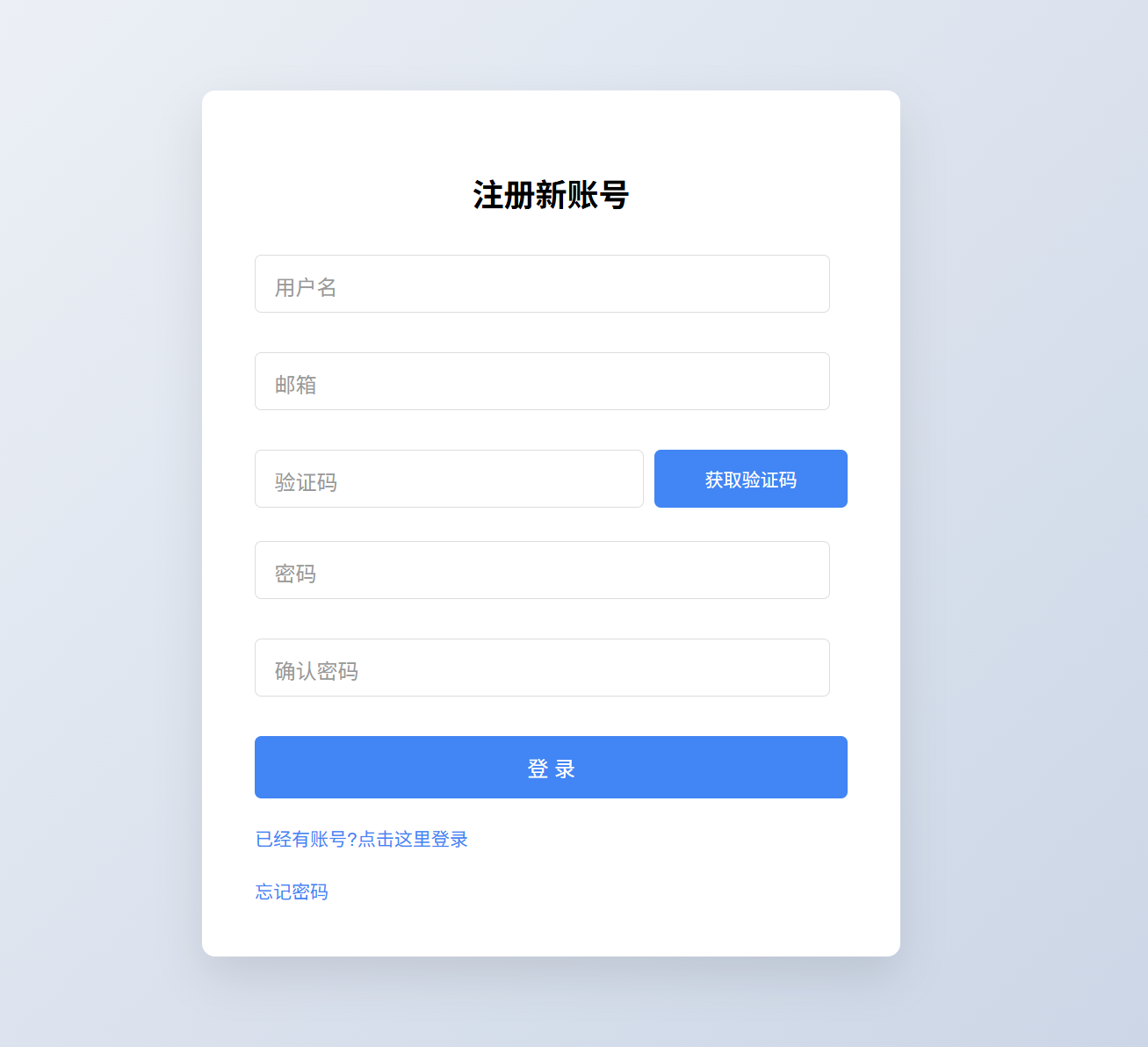
<form action="" id="registerForm">
        <div class="input-group">
            <input type="text" id="username" placeholder=" ">
            <label for="username"> 用户名</label>
            <div class="error-message" id="username-error"></div>
        </div>

        <div class="input-group">
            <input type="text" id="email" placeholder=" ">
            <label for="email"> 邮箱 </label>
            <div class="error-message" id="email-error"></div>
        </div>

        <!-- 邮箱验证码 -->
        <div class="input-group" id="input-group-email" style="display: flex; align-items: end; gap: 10px;">
            <!-- 验证码输入框:占 2 份 -->
            <div style="flex: 2; position: relative;">
                <input type="text" id="email-code" placeholder=" " required>
                <label for="email-code">验证码</label>
            </div>
            <!-- 发送按钮:占 1 份 -->
            <button type="button" id="send-code-btn" style="flex: 1; padding: 12px 0; font-size: 14px; border: none; border-radius: 5px; background: #4285f4; color: white; cursor: pointer; white-space: nowrap;">
                获取验证码
            </button>
        </div>

        <!-- 错误信息仍然放在整行下方 -->
        <div class="error-message" id="email-code-error" style="margin-top: 5px;"></div>


        <div class="input-group">
            <input type="password" id="password" placeholder=" ">
            <label for="password"> 密码</label>
            <div class="error-message" id="password-error"></div>
        </div>

        <div class="input-group">
            <input type="password" id="confirm-password" placeholder=" ">
            <label for="password"> 确认密码</label>
            <div class="error-message" id="confirm-password-error"></div>
        </div>

        <button type="submit">登 录</button>

        <div class="links">
            <a href="../index.html">已经有账号?点击这里登录</a>
        </div>

        <div class="links">
            <a href="forget-password.html">忘记密码</a>
        </div>

    </form>
css
/* Flex布局实现垂直水平居中 */
body {
  margin: 0;
  height: 100vh;
  display: flex;
  justify-content: center;
  align-items: center;
  background: linear-gradient(135deg, #f5f7fa 0%, #c3cfe2 100%);
  font-family: 'Arial', sans-serif;
}

.login-container {
  width: 400px;
  padding: 40px;
  background: white;
  border-radius: 10px;
  box-shadow: 0 15px 35px rgba(0, 0, 0, 0.1);
  animation: fadeIn 0.5s ease;
}

@keyframes fadeIn {
  from { opacity: 0; transform: translateY(-20px); }
  to { opacity: 1; transform: translateY(0); }
}

h2 {
  text-align: center;
  margin-bottom: 30px;
}

.input-group{
  margin-bottom: 5px;
  position: relative;
}

input {
  width: 90%;
  padding: 12px 15px;
  border: 1px solid #ddd;
  border-radius: 5px;
  font-size: 16px;
  transition: border 0.3s;
}

input:focus {
  border-color: #4285f4;
  outline: none;
  box-shadow: 0 0 0 2px rgba(66, 133, 244, 0.2);
}

label {
  position: absolute;
  left: 15px;
  top: 12px;
  color: #999;
  transition: all 0.3s;
  pointer-events: none;
}

input:focus + label,
input:not(:placeholder-shown) + label {
  top: -10px;
  left: 10px;
  font-size: 12px;
  background: white;
  padding: 0 5px;
  color: #4285f4;
}

button {
  width: 100%;
  padding: 12px;
  background: #4285f4;
  color: white;
  border: none;
  border-radius: 5px;
  font-size: 16px;
  cursor: pointer;
  transition: background 0.3s;
}
button:hover {
  background: #3367d6;
}

.error-message {
  color: #d32f2f;
  font-size: 14px;
  margin-top: 5px;
  height: 20px;
}
.links{
  display: flex;
  justify-content: space-between;
  margin-top: 20px;
  font-size: 14px;
}
.links a{
  color: #4285f4;
  text-decoration:none ;
  transition:0.3s;
}
.links a:hover{
  color: #3367d6;
  text-decoration: underline;
}
405错误
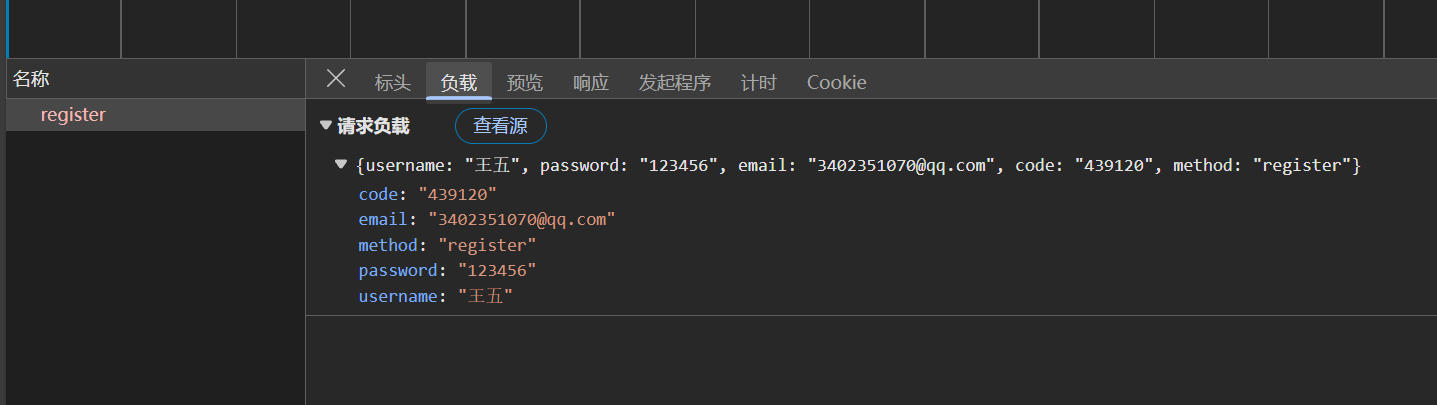
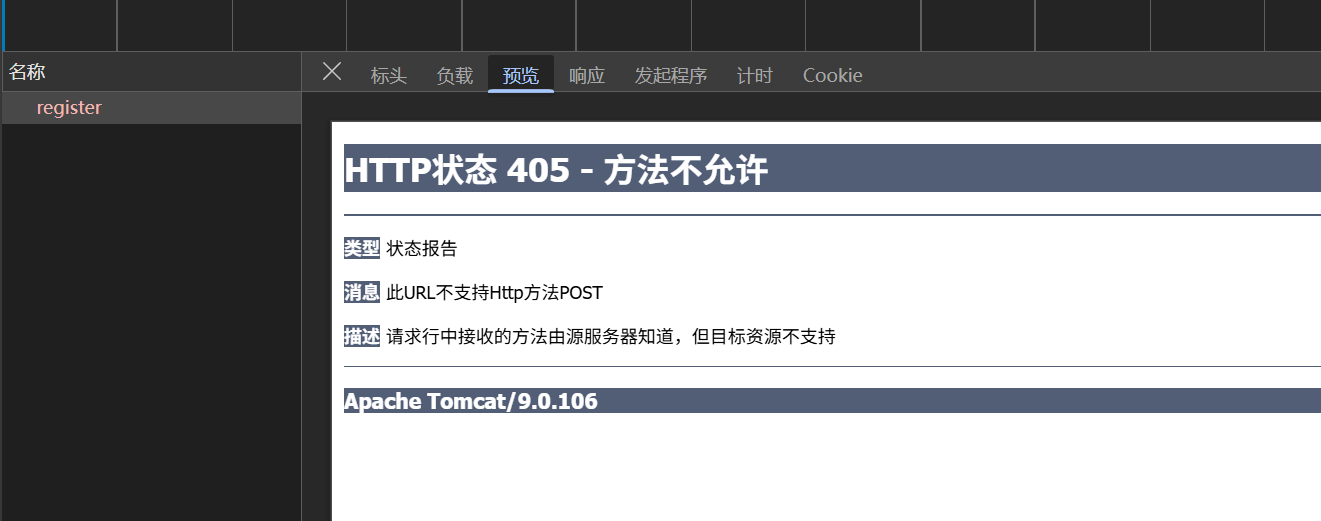
看了,原因就是因为我的数据发送过去,没有响应,但是发送成功了,就是servlet有问题,之前没有看懂,这算个总结吧.
第二次遇到这个问题了.
:::warning
这个就是因为我继承的时候用的是普通的HttpServlet的原因,我没有用到BaseServlet
:::
查了一下,是以下的原因
405 状态码表示 "方法不被允许(Method Not Allowed)"。这意味着客户端(通常是浏览器)试图使用一种服务器不允许的 HTTP 方法来访问某个资源。例如,服务器可能只允许使用 GET 方法来获取某个 HTML 文件,但客户端却使用了 POST 方法进行访问,此时就会出现 405 错误。
今天又吃亏了,写了半天验证码,结果要用双 token,原本写的时候是想用双token解决请求的,唉,没有把知识串联起来
得到一个经验教训,首先学什么东西的时候要心里有个数,知道这项技术大概适用于什么的,学了双token,结果不知道怎么使用,前后端交互还是用的Session,也怪我但是就真的只看了双token,没有看Session和Cookie,太可惜了