背景:
因一个特定的项目需要,将java对象内容以特定样式的PDF格式输出,查看了很多文档,有收费的、免费的、基础集成的。收费的工具就表现突出,免费的工具基本很难满足需求,故着手采用基础集成方案。过程中尝试了很多中技术组合,最后根据个人调试效果选择了"thymeleaf+htmltopdf"组合方案。
HTML转PDF效果:
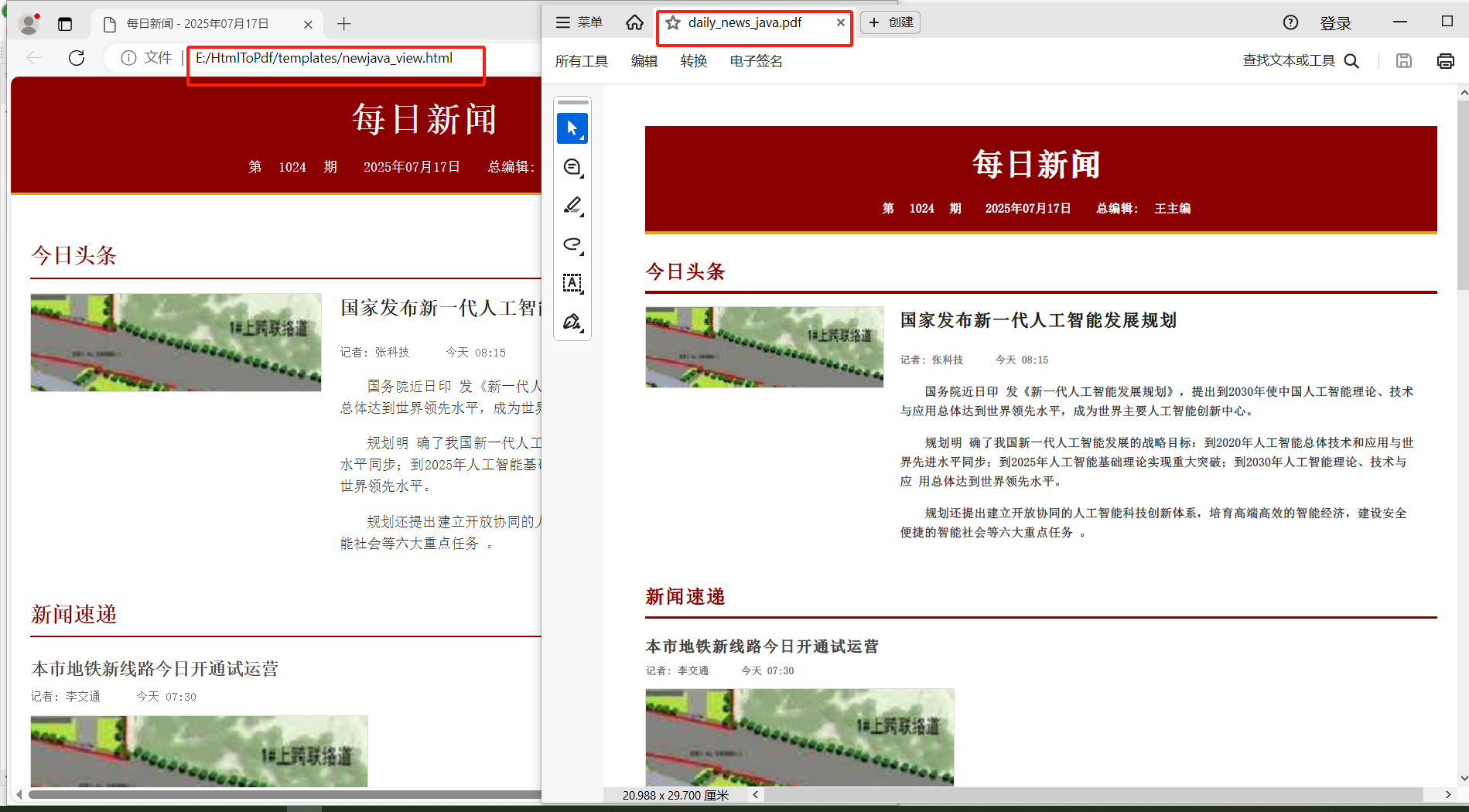
材料:
1、基础JAVA环境
2、测试数据:
{"newspaper_name":"每日新闻","issue_number":"1024","issue_date":"2025年07月17日","editor_in_chief":"王主编","current_year":2025,"contact_info":{"address":"北京市朝阳区新闻大厦18层","phone":"010-12345678","email":"info@dailynews.com"},"headline_news":{"title":"国家发布新一代人工智能发展规划","reporter":"张科技","time":"今天 08:15","image":"E:\\HtmlToPdf\\templates\\assets\\images\\headline.jpg","content":"\n <p>国务院近日印\r\n发《新一代人工智能发展规划》,提出到2030年使中国人工智能理论、技术与应用总体达到世界领先水平,成为世界主要人工智能创新中心。</p>\n <p>规划明 \r\n确了我国新一代人工智能发展的战略目标:到2020年人工智能总体技术和应用与世界先进水平同步;到2025年人工智能基础理论实现重大突破;到2030年人工智能理论、技术与应\r\n用总体达到世界领先水平。</p>\n <p>规划还提出建立开放协同的人工智能科技创新体系,培育高端高效的智能经济,建设安全便捷的智能社会等六大重点任务 \r\n。</p>\n "},"regular_news":[{"title":"本市地铁新线路今日开通试运营","reporter":"李交通","time":"今天 07:30","image":"E:\\HtmlToPdf\\templates\\assets\\images\\subway.jpg","content":"\n <p>经过四年建设,本市地铁14号线西段今日正式开通试运营。该线路全长16.5公里,设站8座,连\r\n接了多个商业区和居民区,将极大缓解西部城区的交通压力。</p>\n <p>地铁运营公司表示,试运营初期发车间隔为6分钟,未来将根据客流情况逐步缩短间\r\n隔时间。首班车时间为5:30,末班车时间为23:00。</p>\n "},{"title":"夏季旅游旺季来临 景区推出多项优惠","reporter":"赵旅游","time":"昨天 18:45","content":"\n <p>随着暑期来临,我市各大旅游景区迎来旅游旺季。为吸引游客,多家景区推出门票优惠活动。</p>\n <p>其\r\n中,著名5A级景区长城从即日起至8月31日,对全日制学生实行半价优惠;本市居民凭身份证可享受8折优惠。此外,多家景区还推出了夜游项目,丰富游客体验。</p>\n \r\n "}],"special_report":{"title":"乡村振兴战略实施五周年成果展","content":"\n <p>今年是乡村振兴战略实施五周年。五年来,我市农村面貌\r\n发生显著变化,农民收入持续增长,农业现代化水平明显提高。</p>\n <p>据统计,五年来我市农村居民人均可支配收入年均增长8.5%,高于城镇居民收入增速 \r\n;农村基础设施显著改善,所有行政村实现通硬化路、通宽带;特色农业发展迅速,形成了一批知名农产品品牌。</p>\n <p>下一步,我市将重点推进乡村产业 \r\n振兴、人才振兴、文化振兴、生态振兴和组织振兴,让农村成为安居乐业的美丽家园。</p>\n ","images":[{"url":"E:\\HtmlToPdf\\templates\\assets\\images\\country1.jpg","caption":"美丽乡村建设成果"},{"url":"E:\\HtmlToPdf\\templates\\assets\\images\\country2.jpg","caption":"现代化农业大棚"},{"url":"E:\\HtmlToPdf\\templates\\assets\\images\\country3.jpg","caption":"乡村旅游新业态"}]}}制作:
1、在java项目的pom.xml中添加如下配置
        <dependency>
	        <groupId>org.thymeleaf</groupId>
	        <artifactId>thymeleaf</artifactId>
	        <version>3.1.1.RELEASE</version>
	    </dependency>

	    <dependency>
		  <groupId>io.woo</groupId>
		  <artifactId>htmltopdf</artifactId>
		  <version>1.0.8</version>
		  <scope>compile</scope>
		</dependency>
解释:我们是利用thymeleaf 包进行java对象与HTML模板的赋值匹配
2、编写thymeleaf 风格的HTML模板(如下,注意参数格式不是{{}},而是${})
<!DOCTYPE html>
<html xmlns:th="http://www.thymeleaf.org" lang="zh-CN">
<head>
<meta charset="UTF-8"/>
<title th:text="${newspaper_name} + ' - ' + ${issue_date}">报纸名称 - 日期</title>
</head>
<body>
<header class="newspaper-header">
<div class="header-content">
<h1 th:text="${newspaper_name}">报纸名称</h1>
<div class="issue-info">
<span>第 <span th:text="${issue_number}">期号</span> 期</span>
<span th:text="${issue_date}">日期</span>
<span>总编辑: <span th:text="${editor_in_chief}">总编辑姓名</span></span>
</div>
</div>
</header>
<main class="content-container">
<!-- 头条新闻 -->
<section class="headline-news">
<h2 class="section-title">今日头条</h2>
<article class="headline-article">
<div class="headline-image">
<img th:src="${headline_news.image}" th:alt="${headline_news.title}" src="placeholder.jpg"/>
</div>
<div class="headline-content">
<h3 th:text="${headline_news.title}">头条标题</h3>
<p class="news-meta">
<span class="reporter">记者: <span th:text="${headline_news.reporter}">记者姓名</span></span>
<span class="publish-time" th:text="${headline_news.time}">发布时间</span>
</p>
<div class="news-content" th:utext="${headline_news.content}">
头条新闻内容
</div>
</div>
</article>
</section>
<!-- 新闻列表 -->
<section class="news-list">
<h2 class="section-title">新闻速递</h2>
<article class="news-item" th:each="news : ${regular_news}">
<h3 th:text="${news.title}">新闻标题</h3>
<p class="news-meta">
<span class="reporter">记者: <span th:text="${news.reporter}">记者姓名</span></span>
<span class="publish-time" th:text="${news.time}">发布时间</span>
</p>
<div class="news-image" th:if="${news.image}">
<img th:src="${news.image}" th:alt="${news.title}" src="placeholder.jpg"/>
</div>
<div class="news-content" th:utext="${news.content}">
新闻内容
</div>
</article>
</section>
<!-- 专题报道 -->
<section class="special-report" th:if="${special_report}">
<h2 class="section-title">专题报道</h2>
<article class="special-article">
<h3 th:text="${special_report.title}">专题标题</h3>
<div class="report-content" th:utext="${special_report.content}">
专题内容
</div>
<div class="report-gallery" th:if="${special_report.images}">
<div class="gallery-item" th:each="image : ${special_report.images}">
<img th:src="${image.url}" th:alt="${image.caption}" src="placeholder.jpg"/>
<p class="image-caption" th:text="${image.caption}">图片说明</p>
</div>
</div>
</article>
</section>
</main>
<footer class="newspaper-footer">
<p>地址: <span th:text="${contact_info.address}">地址</span> | 电话: <span th:text="${contact_info.phone}">电话</span> | 邮箱: <span th:text="${contact_info.email}">邮箱</span></p>
<p>版权所有 © <span th:text="${newspaper_name}">报纸名称</span> <span th:text="${current_year}">年份</span></p>
</footer>
</body>
</html>3、 模板对应的css样式
/* 基础样式 */
body {
    font-family: "SimSun", "宋体", serif;
    line-height: 1.6;
    color: #333333;
    margin: 0;
    padding: 0;
    font-size: 14px;
}

/* 报头样式 */
.newspaper-header {
    background-color: #8B0000;
    color: white;
    padding: 15px 0;
    text-align: center;
    border-bottom: 3px solid #DAA520;
}

.header-content h1 {
    font-size: 36px;
    margin: 0;
    font-weight: bold;
    letter-spacing: 2px;
}

.issue-info {
    margin-top: 10px;
    font-size: 14px;
}

.issue-info span {
    margin: 0 10px;
}

/* 内容容器 */
.content-container {
    padding: 20px;
    width: 1000px;
    margin: 0 auto;
}

.section-title {
    font-size: 22px;
    border-bottom: 2px solid #8B0000;
    padding-bottom: 5px;
    color: #8B0000;
    margin: 25px 0 15px;
}

/* 头条新闻 */
.headline-news {
    margin-bottom: 30px;
}

.headline-article {
    display: block;
    margin-top: 15px;
    overflow: hidden;
}

.headline-image {
    float: left;
    width: 30%;
    margin-right: 20px;
}

.headline-image img {
    width: 100%;
    height: auto;
    border: 1px solid #dddddd;
}

.headline-content {
    float: left;
    width: 65%;
}

.headline-content h3 {
    font-size: 20px;
    margin-top: 0;
    color: #222222;
}

/* 常规新闻 */
.news-item {
    margin-bottom: 25px;
    padding-bottom: 15px;
    border-bottom: 1px dashed #cccccc;
}

.news-item h3 {
    font-size: 18px;
    color: #444444;
    margin-bottom: 5px;
}

.news-meta {
    color: #666666;
    font-size: 12px;
    margin: 5px 0;
}

.news-meta span {
    margin-right: 15px;
}

.news-image {
    margin: 10px 0;
}

.news-image img {
    max-width: 100%;
    height: auto;
    border: 1px solid #dddddd;
}

.news-content {
    text-align: justify;
    text-indent: 2em;
}

/* 专题报道 */
.special-report {
    background-color: #f9f9f9;
    padding: 15px;
    margin-top: 30px;
    border: 1px solid #dddddd;
}

.special-article h3 {
    font-size: 20px;
    color: #8B0000;
    text-align: center;
}

.report-content {
    text-align: justify;
    margin: 15px 0;
}

.report-gallery {
    display: block;
    margin: 20px 0;
    overflow: hidden;
}

.gallery-item {
    float: left;
    width: 30%;
    margin-right: 3%;
    margin-bottom: 15px;
}

.gallery-item img {
    width: 100%;
    height: auto;
    border: 1px solid #dddddd;
}

.image-caption {
    font-size: 12px;
    color: #666666;
    text-align: center;
    margin-top: 5px;
    font-style: italic;
}

/* 清除浮动 */
.clearfix:after {
    content: ".";
    display: block;
    height: 0;
    clear: both;
    visibility: hidden;
}

/* 页脚 */
.newspaper-footer {
    text-align: center;
    padding: 15px;
    background-color: #f5f5f5;
    font-size: 12px;
    color: #666666;
    border-top: 1px solid #dddddd;
    margin-top: 30px;
}
4、编写PdfGenerator类
package com.powerbridge.pbplatformcarouteserver.utils;
import java.io.File;
import java.io.FileOutputStream;
import java.io.IOException;
import java.io.OutputStream;
import java.nio.file.Files;
import java.nio.file.Path;
import java.nio.file.Paths;
import java.util.Map;

import org.thymeleaf.TemplateEngine;
import org.thymeleaf.context.Context;
import org.thymeleaf.templateresolver.FileTemplateResolver;

import cn.hutool.json.JSONUtil;
import io.woo.htmltopdf.HtmlToPdf;
import io.woo.htmltopdf.HtmlToPdfObject;

public class PdfGenerator {

    private final String templateDir;
    private final TemplateEngine templateEngine;

    public PdfGenerator(String templateDir) {
        this.templateDir = templateDir.endsWith(File.separator) ?
                          templateDir : templateDir + File.separator;
        this.templateEngine = initializeTemplateEngine();
    }

    private TemplateEngine initializeTemplateEngine() {
        FileTemplateResolver templateResolver = new FileTemplateResolver();
        templateResolver.setPrefix(this.templateDir);
        templateResolver.setSuffix(".html");
        templateResolver.setTemplateMode("HTML");
        templateResolver.setCharacterEncoding("UTF-8");
        templateResolver.setCacheable(false);

        TemplateEngine engine = new TemplateEngine();
        engine.setTemplateResolver(templateResolver);
        return engine;
    }

    public void generatePdfFromTemplate(
            String templateName,
            Map<String, Object> context,
            String outputPath,
            String[] cssFiles) throws IOException {

        // Process the template with Thymeleaf
        Context thymeleafContext = new Context();
        thymeleafContext.setVariables(context);
        String processedTemplateName = templateName.endsWith(".html") ?
                                    templateName.substring(0, templateName.length() - 5) :
                                    templateName;
        String renderedHtml = templateEngine.process(processedTemplateName, thymeleafContext);

        // Generate PDF
        try (OutputStream outputStream = new FileOutputStream(outputPath)) {
//            ITextRenderer renderer = new ITextRenderer();
            Path basePath = Paths.get(templateDir).toAbsolutePath();

            // Add CSS if provided - CORRECTED APPROACH
            if (cssFiles != null) {
                for (String cssFile : cssFiles) {
                    File css = new File(cssFile);
                    if (css.exists()) {
                        // Correct way to add CSS - embed it directly in the HTML
                        renderedHtml = renderedHtml.replace("</head>",
                            "<style type=\"text/css\">" +
                            new String(Files.readAllBytes(css.toPath())) +
                            "</style></head>");
                    }
                }
                // Re-set the document with CSS included
                System.out.println(renderedHtml);
                boolean success = HtmlToPdf.create()
                	    .object(HtmlToPdfObject.forHtml(renderedHtml))
                	    .convert(outputPath);
            }

        } catch (Exception e) {
            throw new IOException("Failed to generate PDF: " + e.getMessage(), e);
        }
    }

}
6、测试main函数
    public static void main(String[] args) {
        try {
        	String worksPath="E:/HtmlToPdf/";
            PdfGenerator generator = new PdfGenerator(worksPath);
            String context = "{\"newspaper_name\":\"每日新闻\",\"issue_number\":\"1024\",\"issue_date\":\"2025年07月17日\",\"editor_in_chief\":\"王主编\",\"current_year\":2025,\"contact_info\":{\"address\":\"北京市朝阳区新闻大厦18层\",\"phone\":\"010-12345678\",\"email\":\"info@dailynews.com\"},\"headline_news\":{\"title\":\"国家发布新一代人工智能发展规划\",\"reporter\":\"张科技\",\"time\":\"今天 08:15\",\"image\":\"E:\\\\HtmlToPdf\\\\templates\\\\assets\\\\images\\\\headline.jpg\",\"content\":\"\\n                <p>国务院近日印\\r\\n发《新一代人工智能发展规划》,提出到2030年使中国人工智能理论、技术与应用总体达到世界领先水平,成为世界主要人工智能创新中心。</p>\\n                <p>规划明 \\r\\n确了我国新一代人工智能发展的战略目标:到2020年人工智能总体技术和应用与世界先进水平同步;到2025年人工智能基础理论实现重大突破;到2030年人工智能理论、技术与应\\r\\n用总体达到世界领先水平。</p>\\n                <p>规划还提出建立开放协同的人工智能科技创新体系,培育高端高效的智能经济,建设安全便捷的智能社会等六大重点任务 \\r\\n。</p>\\n            \"},\"regular_news\":[{\"title\":\"本市地铁新线路今日开通试运营\",\"reporter\":\"李交通\",\"time\":\"今天 07:30\",\"image\":\"E:\\\\HtmlToPdf\\\\templates\\\\assets\\\\images\\\\subway.jpg\",\"content\":\"\\n                    <p>经过四年建设,本市地铁14号线西段今日正式开通试运营。该线路全长16.5公里,设站8座,连\\r\\n接了多个商业区和居民区,将极大缓解西部城区的交通压力。</p>\\n                    <p>地铁运营公司表示,试运营初期发车间隔为6分钟,未来将根据客流情况逐步缩短间\\r\\n隔时间。首班车时间为5:30,末班车时间为23:00。</p>\\n                \"},{\"title\":\"夏季旅游旺季来临 景区推出多项优惠\",\"reporter\":\"赵旅游\",\"time\":\"昨天 18:45\",\"content\":\"\\n                    <p>随着暑期来临,我市各大旅游景区迎来旅游旺季。为吸引游客,多家景区推出门票优惠活动。</p>\\n                    <p>其\\r\\n中,著名5A级景区长城从即日起至8月31日,对全日制学生实行半价优惠;本市居民凭身份证可享受8折优惠。此外,多家景区还推出了夜游项目,丰富游客体验。</p>\\n        \\r\\n        \"}],\"special_report\":{\"title\":\"乡村振兴战略实施五周年成果展\",\"content\":\"\\n                <p>今年是乡村振兴战略实施五周年。五年来,我市农村面貌\\r\\n发生显著变化,农民收入持续增长,农业现代化水平明显提高。</p>\\n                <p>据统计,五年来我市农村居民人均可支配收入年均增长8.5%,高于城镇居民收入增速 \\r\\n;农村基础设施显著改善,所有行政村实现通硬化路、通宽带;特色农业发展迅速,形成了一批知名农产品品牌。</p>\\n                <p>下一步,我市将重点推进乡村产业 \\r\\n振兴、人才振兴、文化振兴、生态振兴和组织振兴,让农村成为安居乐业的美丽家园。</p>\\n            \",\"images\":[{\"url\":\"E:\\\\HtmlToPdf\\\\templates\\\\assets\\\\images\\\\country1.jpg\",\"caption\":\"美丽乡村建设成果\"},{\"url\":\"E:\\\\HtmlToPdf\\\\templates\\\\assets\\\\images\\\\country2.jpg\",\"caption\":\"现代化农业大棚\"},{\"url\":\"E:\\\\HtmlToPdf\\\\templates\\\\assets\\\\images\\\\country3.jpg\",\"caption\":\"乡村旅游新业态\"}]}}";
            Map<String, Object> contextObj = JSONUtil.parseObj(context,true).toBean(Map.class,true);
            generator.generatePdfFromTemplate(
                "templates/newsjava.html",
                contextObj,
                worksPath+"/daily_news_java.pdf",
                new String[]{worksPath+"templates/assets/css/news.css"}
            );

        } catch (Exception e) {
            System.err.println("Error generating PDF:");
            e.printStackTrace();
        }
    }
注意:1、如果直接cp上面的代码,需要在windows 系统的E盘下逐层创建 "E:\HtmlToPdf\templates\assets\css\"目录,并将上面的css 样式代码贴到当前目录新建的news.css文件。
2、逐层创建"E:\HtmlToPdf\templates\assets\images\"目录并在其目录下存入对应图片文件
3、逐层创建"E:\HtmlToPdf\templates\"目录并在其目录下创建名为"newsjava.html"的模板文件并将上面的HTML 内容贴到里面
6、修改PdfGenerator 类头的package com.powerbridge.pbplatformcarouteserver.utils;引用即可。
7、将上面的main函数直接贴到PdfGenerator中即可运行