1、运行报错
java.lang.IncompatibleClassChangeError:
05-04 17:41:56.859 27363 28646 E AndroidRuntime: FATAL EXCEPTION: pool-3-thread-1
05-04 17:41:56.859 27363 28646 E AndroidRuntime: Process: com.example.myapplication, PID: 27363
05-04 17:41:56.859 27363 28646 E AndroidRuntime: java.lang.IncompatibleClassChangeError: Class 'android.media.MediaRouter2$$ExternalSyntheticLambda10' does not implement interface 'java.util.concurrent.Executor' in call to 'void java.util.concurrent.Executor.execute(java.lang.Runnable)' (declaration of 'androidx.profileinstaller.DeviceProfileWriter' appears in /data/app/~~svR3htmbfvEDlCCIiGcGNw==/com.example.myapplication-FhvR86y0BnMoZLLx3gxZtA==/base.apk!classes7.dex)
05-04 17:41:56.859 27363 28646 E AndroidRuntime: at androidx.profileinstaller.DeviceProfileWriter.result(DeviceProfileWriter.java:87)
05-04 17:41:56.859 27363 28646 E AndroidRuntime: at androidx.profileinstaller.DeviceProfileWriter.deviceAllowsProfileInstallerAotWrites(DeviceProfileWriter.java:119)
05-04 17:41:56.859 27363 28646 E AndroidRuntime: at androidx.profileinstaller.ProfileInstaller.transcodeAndWrite(ProfileInstaller.java:440)
05-04 17:41:56.859 27363 28646 E AndroidRuntime: at androidx.profileinstaller.ProfileInstaller.writeProfile(ProfileInstaller.java:575)
05-04 17:41:56.859 27363 28646 E AndroidRuntime: at androidx.profileinstaller.ProfileInstaller.writeProfile(ProfileInstaller.java:515)
05-04 17:41:56.859 27363 28646 E AndroidRuntime: at androidx.profileinstaller.ProfileInstaller.writeProfile(ProfileInstaller.java:479)
05-04 17:41:56.859 27363 28646 E AndroidRuntime: at androidx.profileinstaller.ProfileInstallerInitializer.lambdawriteInBackground2(ProfileInstallerInitializer.java:145)
05-04 17:41:56.859 27363 28646 E AndroidRuntime: at androidx.profileinstaller.ProfileInstallerInitializerExternalSyntheticLambda2.run(D8SyntheticClass:0)
05-04 17:41:56.859 27363 28646 E AndroidRuntime: at java.util.concurrent.ThreadPoolExecutor.runWorker(ThreadPoolExecutor.java:1145)
05-04 17:41:56.859 27363 28646 E AndroidRuntime: at java.util.concurrent.ThreadPoolExecutor$Worker.run(ThreadPoolExecutor.java:644)
05-04 17:41:56.859 27363 28646 E AndroidRuntime: at java.lang.Thread.run(Thread.java:1012)
05-04 17:41:56.860 27363 28646 I ExceptionHandle: at androidx.profileinstaller.DeviceProfileWriter.result(DeviceProfileWriter.java:87)
05-04 17:41:56.860 27363 28646 I ExceptionHandle: at androidx.profileinstaller.DeviceProfileWriter.deviceAllowsProfileInstallerAotWrites(DeviceProfileWriter.java:119)
05-04 17:41:56.860 27363 28646 I ExceptionHandle: at androidx.profileinstaller.ProfileInstaller.transcodeAndWrite(ProfileInstaller.java:440)
05-04 17:41:56.860 27363 28646 I ExceptionHandle: at androidx.profileinstaller.ProfileInstaller.writeProfile(ProfileInstaller.java:575)
05-04 17:41:56.860 27363 28646 I ExceptionHandle: at androidx.profileinstaller.ProfileInstaller.writeProfile(ProfileInstaller.java:515)
05-04 17:41:56.860 27363 28646 I ExceptionHandle: at androidx.profileinstaller.ProfileInstaller.writeProfile(ProfileInstaller.java:479)
05-04 17:41:56.860 27363 28646 I ExceptionHandle: at androidx.profileinstaller.ProfileInstallerInitializer.lambdawriteInBackground2(ProfileInstallerInitializer.java:145)
05-04 17:41:56.860 27363 28646 I ExceptionHandle: at androidx.profileinstaller.ProfileInstallerInitializerExternalSyntheticLambda2.run(D8SyntheticClass:0)
05-04 17:41:56.860 27363 28646 I ExceptionHandle: at java.util.concurrent.ThreadPoolExecutor.runWorker(ThreadPoolExecutor.java:1145)
05-04 17:41:56.860 27363 28646 I ExceptionHandle: at java.util.concurrent.ThreadPoolExecutor$Worker.run(ThreadPoolExecutor.java:644)
05-04 17:41:56.861 27363 28646 I ExceptionHandle: at java.lang.Thread.run(Thread.java:1012)
尝试了DeepSeek多种解决方案,发现原因在于引入的lib包版本不匹配导致,替换对应Android版本jar包
implementation(fileTree("libs") { include("*.jar") })
2、SwipeRefreshLayout 与 CoordinatorLayout 嵌套刷新
XML
<androidx.coordinatorlayout.widget.CoordinatorLayout xmlns:android="http://schemas.android.com/apk/res/android"
        xmlns:app="http://schemas.android.com/apk/res-auto"
        xmlns:tools="http://schemas.android.com/tools"
        android:layout_width="match_parent"
        android:layout_height="match_parent"
        android:fitsSystemWindows="true"
        tools:context=".TestActivity">

    <com.google.android.material.appbar.AppBarLayout
        android:layout_width="match_parent"
        android:layout_height="wrap_content"
        android:id="@+id/appbar_layout"
        android:fitsSystemWindows="true">
        <com.google.android.material.appbar.MaterialToolbar
            android:id="@+id/toolbar"
            android:layout_width="match_parent"
            android:layout_height="?attr/actionBarSize" />
    </com.google.android.material.appbar.AppBarLayout>

    <androidx.swiperefreshlayout.widget.SwipeRefreshLayout
        android:id="@+id/srl_refresh_layout"
        android:layout_width="match_parent"
        android:layout_height="wrap_content"
        app:layout_behavior="@string/appbar_scrolling_view_behavior">

        <androidx.recyclerview.widget.RecyclerView
            android:id="@+id/rv_devices"
            android:layout_width="match_parent"
            android:layout_height="match_parent" />

    </androidx.swiperefreshlayout.widget.SwipeRefreshLayout>

</androidx.coordinatorlayout.widget.CoordinatorLayout>-
SwipeRefreshLayout 作为最外层布局
-
CoordinatorLayout 作为第二次布局
-
CoordinatorLayout 中嵌套 AppBarLayout 及 ListView 或 RecyclerView 注意 app:layout_behavior="@string/appbar_scrolling_view_behavior", 由于 CoordinatorLayout 是 FrameLayout 子类因此 app:layout_behavior 为必要属性,否则无法正常显示
3、ActivityMainBinding的使用
ActivityMainBinding.inflate()方法默认绑定的是与当前Activity关联的布局文件(如activity_main.xml),但可以通过以下方式间接实现指定布局的功能
自动生成的Binding类名称遵循<布局文件名>Binding规则,例如activity_other.xml会生成ActivityOtherBinding
4、布局从状态看顶部开始布局
<LinearLayout xmlns:android="http://schemas.android.com/apk/res/android"
    android:layout_width="match_parent"
    android:layout_height="match_parent">

    <FrameLayout
        android:id="@+id/settings"
        android:layout_width="match_parent"
        android:layout_height="match_parent"
        android:fitsSystemWindows="true"/>
</LinearLayout>
android:fitsSystemWindows="true" 是 Android 布局中用于处理系统窗口(如状态栏、导航栏)与应用内容区域关系的关键属性,其核心作用和行为如下:
自动调整内边距
当设置为 true 时,系统会为该 View 添加与系统窗口(状态栏/导航栏)等高的 padding,避免内容被遮挡24。
示例:若状态栏高度为 24dp,View 的顶部会自动增加 24dp 的 padding16。
生效条件
仅对 非嵌入型 Activity 的根布局有效(如普通 Activity,非 Fragment 或 Dialog)27。
需配合透明状态栏/导航栏使用(如 android:windowTranslucentStatus=true)56。
5、CursorLoader刷新问题
使用CursorLoader时,在onLoadFinished中不要关闭Cursor,系统会自动关闭,否者存在不刷新的情况
    public void onLoadFinished(Loader<Cursor> loader, Cursor cursor) {
        Log.i(TAG,"onLoadFinished = " +cursor.toString());
        messageList.clear();
        if (cursor != null) {
            try {
                if (cursor != null && cursor.moveToFirst()) {
                    do {
                        final String content = cursor.getString(cursor.getColumnIndex(MessageContract.MessageEntry.COLUMN_CONTENT));
                        final String sender = cursor.getString(cursor.getColumnIndex(MessageContract.MessageEntry.COLUMN_SENDER));
                        final String device = cursor.getString(cursor.getColumnIndex(MessageContract.MessageEntry.COLUMN_DEVICE));
                        final long timestamp = cursor.getInt(cursor.getColumnIndex(MessageContract.MessageEntry.COLUMN_TIMESTAMP));
                        final boolean isSent = (cursor.getInt(cursor.getColumnIndex(MessageContract.MessageEntry.COLUMN_IS_SENT)) != 0) ? true: false;
                        Message message = new Message(content,  sender,  device,  timestamp,  isSent);
                        messageList.add(message);
                    } while (cursor.moveToNext());
                }
            } finally {
//                cursor.close();
            }
        }
        messagesAdapter.notifyDataSetChanged();
    }
6、ConstraintLayout 中 adjustResize不生效
最下部的EditText无法点击后键盘覆盖了EditText,不向上挤压,解决方案,在ConstraintLayout中添加android:fitsSystemWindows="true"
<androidx.constraintlayout.widget.ConstraintLayout
    xmlns:android="http://schemas.android.com/apk/res/android"
    xmlns:app="http://schemas.android.com/apk/res-auto"
    xmlns:tools="http://schemas.android.com/tools"
    android:layout_width="match_parent"
    android:layout_height="match_parent"
    android:fitsSystemWindows="true">
7、ConstraintLayout layout_marginStart无效
未设置 layout_constraintStart_toStartOf 或 layout_constraintEnd_toEndOf 等水平约束时,marginStart 不会生效
8、Android studio Clip art无法使用
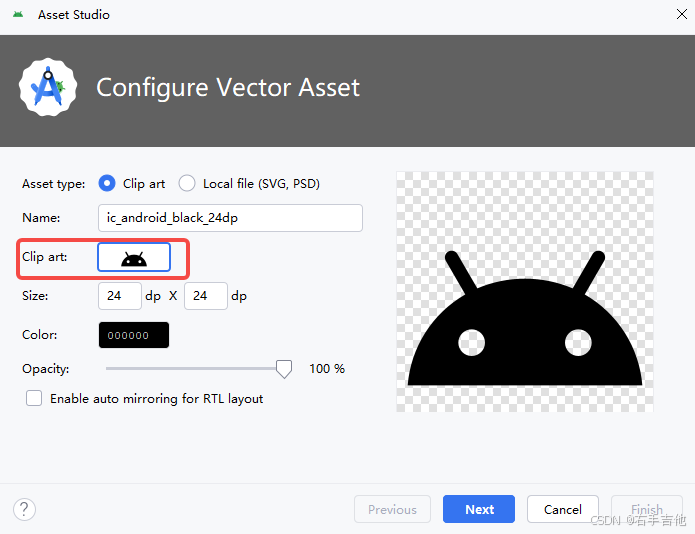
删除图标元数据缓存文件
定位到Android SDK安装目录下的icons/material文件夹(例如:C:\Users\用户名\AppData\Local\Android\Sdk\icons\material)3
删除其中的icons_metadata.txt文件
重启Android Studio后打开Vector Asset窗口,Clip Art图标即可正常显示
9、CheckBox 设置 android:button不生效
必须正确设置 buttonTint 和 backgroundTint 为 @null 才能让自定义背景生效。参考如下
彻底解决Android中CheckBox和Button自定义背景无效问题:关键属性解析与实践_android checkbox 自定义样式不生效-CSDN博客
10. RecyclerView 设置Item onClick不生效
最终发现是在Cusorload中的onLoadFinished调用修改数据库markUnread(mDevice.getIp());操作导致刷新频繁,ItemOnclick不生效
java
    public void onLoadFinished(Loader<Cursor> loader, Cursor cursor) {
        Log.i(TAG,"onLoadFinished = " +cursor.toString());
        SwapCusorAdapter(cursor);
        markUnread(mDevice.getIp());
        messagesAdapter.notifyDataSetChanged();
        scrollToBottom();
    }