三三要成为安卓糕手
零:需求引入
-
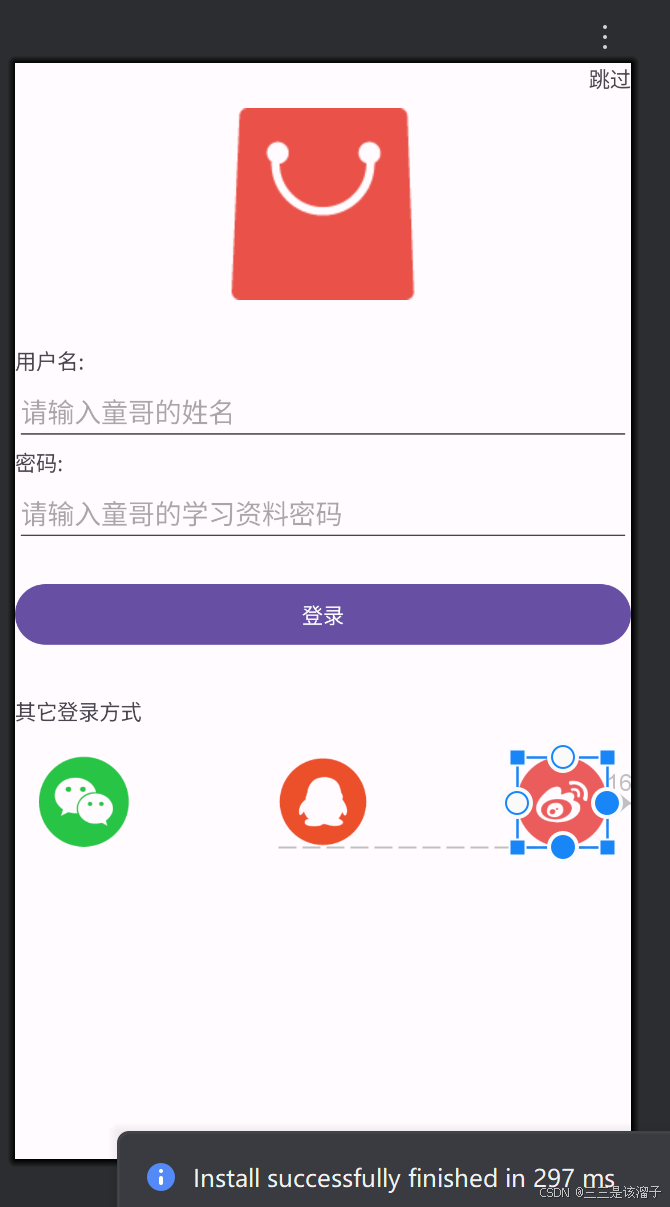
实现设计图中的效果,具体要求如下:
- 不管是根布局,还是其他登录方式时的嵌套布局,只能使用LinearLayout;
- 根布局:背景为白色、上下左右内边距16dp;
- 跳过按钮:在布局的右侧;
- 红色大logo:居中显示、上下外边距为30dp、引用图片在素材当中自行获取;
- 用户名标签:底部外边距8dp;
- 用户名输入框:宽度跟随父布局、高度自适应、提示"请输入用户名"、输入类型为textPersonName;
- 密码标签:顶部外边距16dp、底部外边距8dp;
- 密码输入框:宽度跟随父布局、高度自适应、提示"请输入密码"、输入类型为textPassword;
- 登录按钮:顶部外边距16dp、宽度跟随父布局、高度自适应、居中显示;
- 其他登录方式标签:顶部外边距32dp、文本颜色为#808080;
- 3种登录方式使用LinearLayout嵌套,父布局顶部外边距16dp、宽度跟随父布局、高度自适应;
- 3种登录方式:宽度平均分配父布局宽度、高度60dp;
- 使用xml的形式实现完后,学有余力再使用Java的方式实现一遍;
一:总体代码
xml
<?xml version="1.0" encoding="utf-8"?>
<RelativeLayout xmlns:android="http://schemas.android.com/apk/res/android"
    xmlns:app="http://schemas.android.com/apk/res-auto"
    xmlns:tools="http://schemas.android.com/tools"
    android:id="@+id/main"
    android:layout_width="match_parent"
    android:layout_height="match_parent"
    tools:context=".layout.RelativeLayout">

    <TextView
        android:layout_width="wrap_content"
        android:layout_height="wrap_content"
        android:layout_alignParentEnd="true"
        android:text="跳过" />

    <ImageView
        android:id="@+id/iv_logo"
        android:layout_width="wrap_content"
        android:layout_height="wrap_content"
        android:layout_centerHorizontal="true"
        android:layout_marginTop="30dp"
        android:layout_marginBottom="30dp"
        android:src="@drawable/icon_logo" />

    <TextView
        android:id="@+id/tv_user_name"
        android:layout_width="wrap_content"
        android:layout_height="wrap_content"
        android:layout_below="@+id/iv_logo"
        android:text="用户名:" />

    <EditText
        android:id="@+id/et_user_name"
        android:layout_width="match_parent"
        android:layout_height="wrap_content"
        android:layout_below="@+id/tv_user_name"
        android:hint="请输入童哥的姓名"
        android:inputType="textPersonName" />

    <TextView
        android:id="@+id/tv_password"
        android:layout_width="wrap_content"
        android:layout_height="wrap_content"
        android:layout_below="@+id/et_user_name"
        android:text="密码:" />

    <EditText
        android:id="@+id/et_password"
        android:layout_width="match_parent"
        android:layout_height="wrap_content"
        android:layout_below="@+id/tv_password"
        android:hint="请输入童哥的学习资料密码"
        android:inputType="textPassword" />

    <Button
        android:id="@+id/btn_login"
        android:layout_width="match_parent"
        android:layout_height="wrap_content"
        android:layout_below="@+id/et_password"
        android:layout_marginTop="20dp"
        android:text="登录" />

    <TextView
        android:id="@+id/tv_other"
        android:layout_width="wrap_content"
        android:layout_height="wrap_content"
        android:layout_below="@+id/btn_login"
        android:layout_marginTop="30dp"
        android:text="其它登录方式" />

    <ImageView
        android:id="@+id/iv_wechat"
        android:layout_width="60dp"
        android:layout_height="60dp"
        android:layout_alignBottom="@+id/iv_qq"
        android:layout_marginLeft="16dp"
        android:src="@drawable/icon_wechat" />

    <!--    想让qq的图标既居中,又靠着微信,qq作为一个基点-->
    <ImageView
        android:id="@id/iv_qq"
        android:layout_width="60dp"
        android:layout_height="60dp"
        android:layout_below="@+id/tv_other"
        android:layout_centerHorizontal="true"
        android:layout_marginTop="20dp"
        android:src="@drawable/icon_qq" />

    <ImageView
        android:id="@+id/iv_weibo"
        android:layout_width="60dp"
        android:layout_height="60dp"
        android:layout_alignBottom="@id/iv_qq"
        android:layout_alignParentEnd="true"
        android:layout_marginRight="16dp"
        android:src="@drawable/icon_weibo" />


</RelativeLayout>
二:效果
我们设置的30dp参数在不同分辨率的手机上可能大小不同,有些屏幕是2k,1k,4k不尽相同
三:代码分析
1:与父布局对齐
align əˈlaɪn对齐
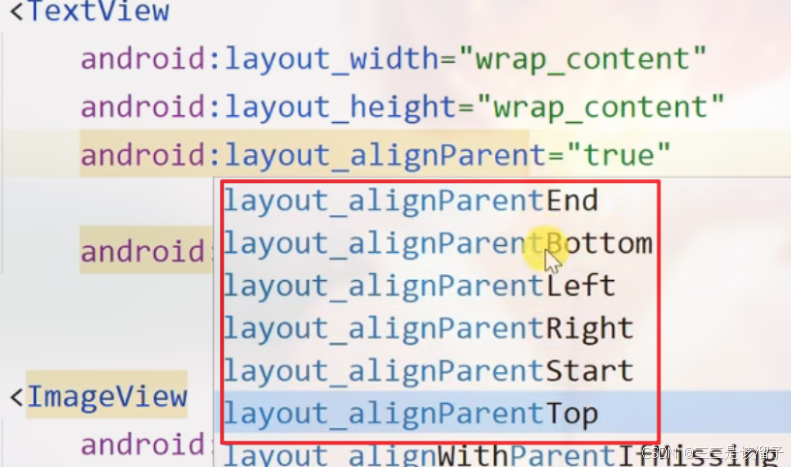
这两句代码是等价的,相对于父布局靠右
xml
android:layout_alignParentEnd="true"
android:layout_alignParentRight="true"
这两句代码是等价的,相对于父布局靠左
xml
		android:layout_alignParentBottom="true"
        android:layout_alignParentLeft="true"
总共有6个属性,慢慢了解吧
| 属性 | 对齐依据 | 适用场景 |
|---|---|---|
layout_alignParentRight |
固定物理右侧,不受语言阅读方向影响 | 需严格固定在父容器右侧,不考虑 RTL 排版的场景 |
layout_alignParentEnd |
随语言阅读方向变化(LTR 时为右,RTL 时为左 ) | 国际化 App,需适配从右往左阅读语言(如阿拉伯语)的场景 |
2:水平和垂直居中
xml
		android:layout_centerHorizontal="true"    //水平居中
android:layout_centerInParent="true" //水平和垂直方向都居中3:textPersonName 的作用
告诉系统当前输入框用于输入人名(如姓名、用户名等)
4:相对控件方向-在上或下面
xml
android:layout_above="@+id/et_password"  //在谁上面
android:layout_below="@+id/et_password" //在谁下面5:layout_alignBottom 的作用
当前视图的底部会和 iv_qq 视图的底部处于同一水平线上。
xml
android:layout_alignBottom="@+id/iv_qq"四:总结
关键的常用方法
layout_below=其它控件id 咋哪个空间下面
layout_alignBottom=其它控件id 底部对齐
layout_marginLeft=30dp 设置边距
layout_alignParentEnd=true 和 Start
layout_centerHorizontal 水平居中