背景:
在vue中的表格有合并行、合并列的情况,可以使用插件vxe-table实现各种样式的表格。就是不能跨框架运行,只能运行在 vue 框架中。对于表格中的每一个单元格可以编辑,配置table表格可以编辑。行可编辑或者单元格可编辑。
- 设置 edit-config={trigger: 'manual', mode: 'row'} 启用行编辑的功能
const editConfig = ref({ trigger: 'manual', mode: 'row' })
- 通过 edit-config.trigger=click 设置单元格单击模式
const editConfig = ref({ trigger: 'click', mode: 'cell' })
- 通过 edit-config.trigger=dblclick 设置单元格双击模式
const editConfig = ref({ trigger: 'dblclick', mode: 'cell' })
实现效果:
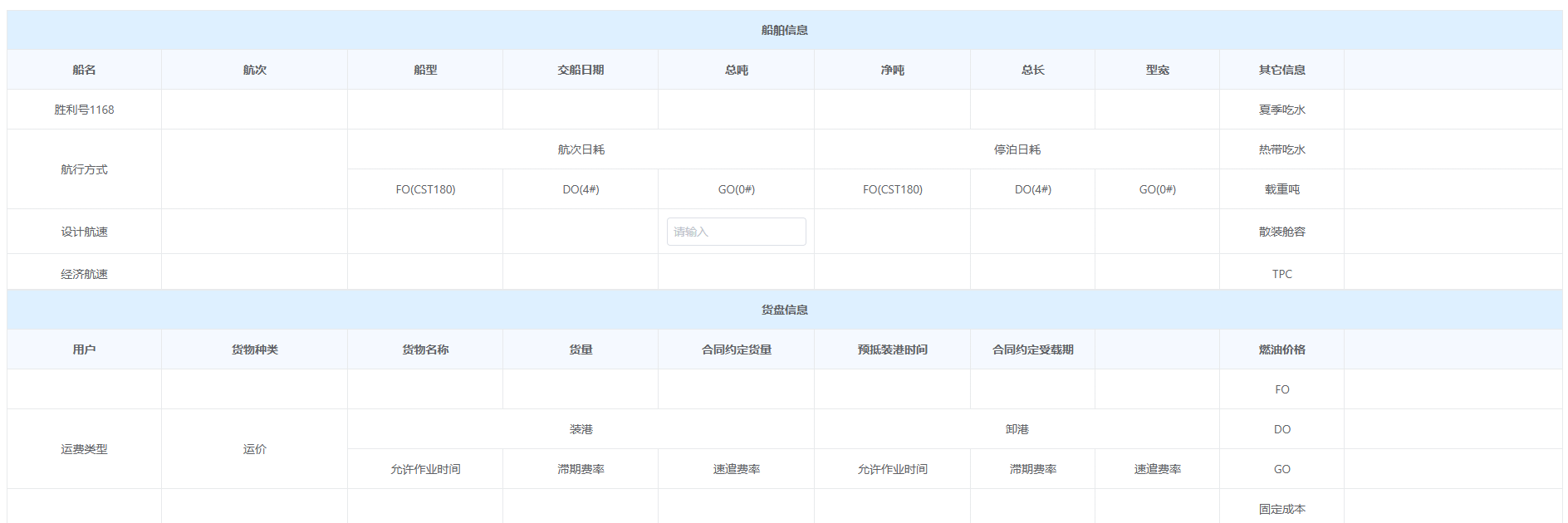 备注:单元格单击会触发表格的可编辑状态。:edit-render="{ name: 'VxeInput' }"编辑状态渲染的是input输入框,也可以写成下拉列表等表单组件。
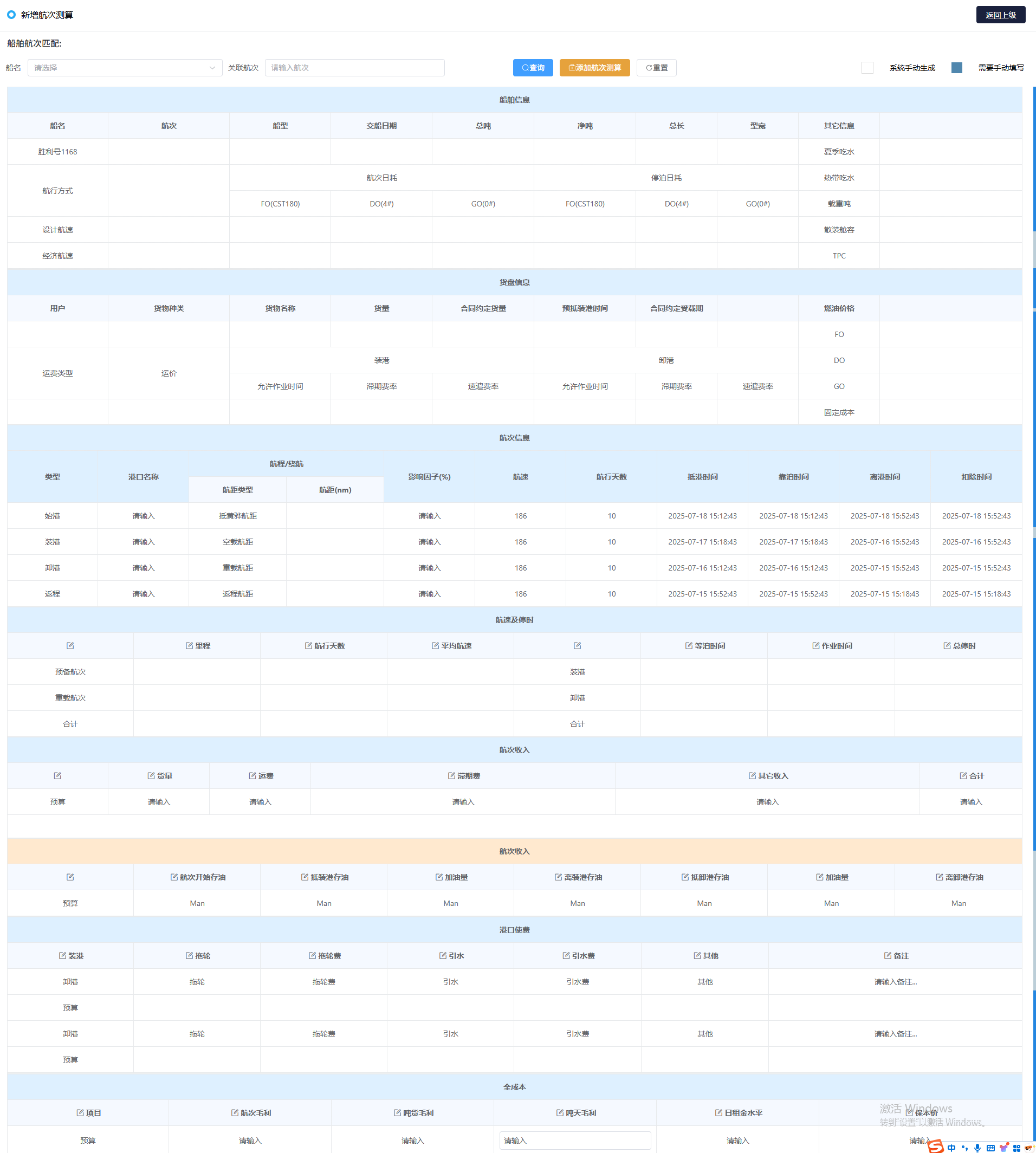
核心代码:
表格绑定属性:edit-config
const editConfig = ref({ trigger: 'manual', mode: 'row' })
const editConfig = ref({ trigger: 'click', mode: 'cell' })
const editConfig = ref({ trigger: 'dblclick', mode: 'cell' })
javascript
<div class="container1 infoState">
    <vxe-table :data="voyageCostState.tableData" empty-text="没有更多数据了!" :loading="voyageCostState.loading"
        :border="'full'" :align="'center'" :merge-cells="voyageCostState.mergeCells"
        :edit-config="voyageCostState.editConfig">
        <vxe-colgroup title="船舶信息" :header-cell-class-name="'header-cell'">
            <vxe-column v-for="(item, index) in voyageCostState.tableList" :field="item.prop" :title="item.label"
                :width="item.width" :key="index" :edit-render="{ name: 'VxeInput' }"></vxe-column>
        </vxe-colgroup>
    </vxe-table>
</div>官网链接:点击跳转官网
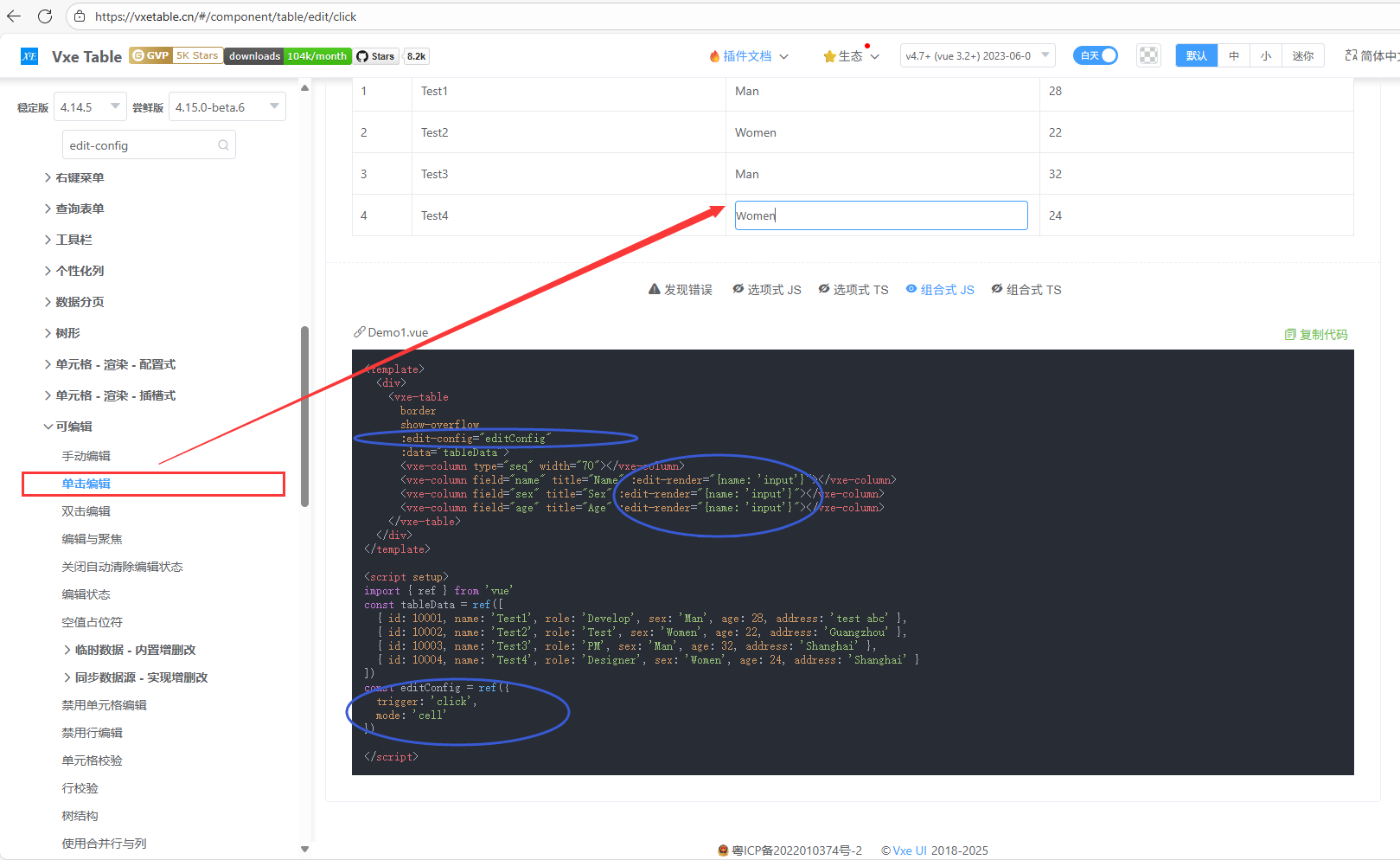
官网代码:
javascript
<template>
  <div>
    <vxe-table
      border
      show-overflow
      :edit-config="editConfig"
      :data="tableData">
      <vxe-column type="seq" width="70"></vxe-column>
      <vxe-column field="name" title="Name" :edit-render="{name: 'input'}"></vxe-column>
      <vxe-column field="sex" title="Sex" :edit-render="{name: 'input'}"></vxe-column>
      <vxe-column field="age" title="Age" :edit-render="{name: 'input'}"></vxe-column>
    </vxe-table>
  </div>
</template>

<script setup>
import { ref } from 'vue'
const tableData = ref([
  { id: 10001, name: 'Test1', role: 'Develop', sex: 'Man', age: 28, address: 'test abc' },
  { id: 10002, name: 'Test2', role: 'Test', sex: 'Women', age: 22, address: 'Guangzhou' },
  { id: 10003, name: 'Test3', role: 'PM', sex: 'Man', age: 32, address: 'Shanghai' },
  { id: 10004, name: 'Test4', role: 'Designer', sex: 'Women', age: 24, address: 'Shanghai' }
])
const editConfig = ref({
  trigger: 'click',
  mode: 'cell'
})

</script>
理论知识:
官网链接:点击跳转
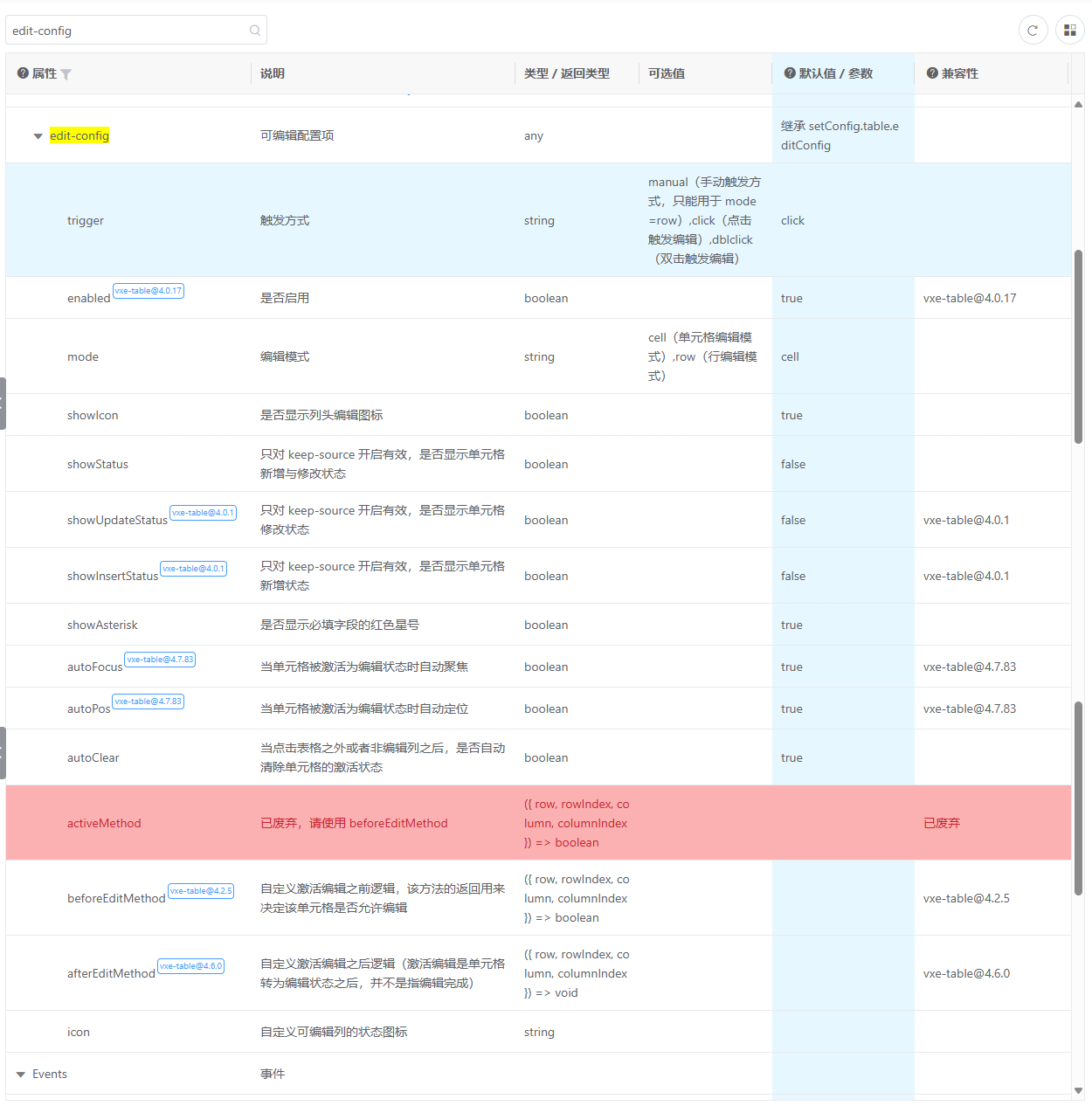
理论知识总结:
trigger: "click",//触发方式 manual(手动触发方式,只能用于 mode=row),click(点击触发编辑),dblclick(双击触发编辑)
mode: 'cell',//编辑模式cell(单元格编辑模式),row(行编辑模式)
showIcon: true,//是否显示列头编辑图标
beforeEditMethod: ({ row, rowIndex, column, columnIndex }) => {
console.log('beforeEditMethod>>>', row, rowIndex, column, columnIndex);
const _point = rowIndex, columnIndex;
return pointExists(voyageCostState.points, _point);
}//官方方法。用来自定义激活编辑之前逻辑,该方法的返回用来决定该单元格是否允许编辑
//自定义封装的方法,判断是否存在,存在返回true,否则返回false
const pointExists = (points, target) => {
for (let i = 0; i < points.length; i++) {
if (pointsi0 === target0 && pointsi1 === target1) {
return true;
}
}
return false;
}
- 触发方式分为三种:
manual(手动触发方式,只能用于 mode=row),
click(点击触发编辑),
dblclick(双击触发编辑)
- 编辑模式分为两种:
cell(单元格编辑模式),
row(行编辑模式)
完整代码:
javascript
<template>
    <div>
        <div class="container1 voyageCostState">
            <!-- 绑定:edit-config={}属性不生效 -->
            <vxe-table :data="voyageCostState.tableData" empty-text="没有更多数据了!" :loading="voyageCostState.loading"
                :border="'full'" :align="'center'" :merge-cells="voyageCostState.mergeCells"
                    :edit-config="voyageCostState.editConfig">
                <vxe-colgroup title="航次成本" :header-cell-class-name="'header-cell'">
                    <!-- 问题出在这儿,多级表头会不生效 -->
                    <template v-for="(item, index) in voyageCostState.tableList" :key="index">
                        <vxe-column :field="item.prop" :title="item.label" :width="item.width"
                            v-if="!item.children"></vxe-column>
                        <vxe-colgroup v-else :title="item.label" :header-cell-class-name="'header-cell'">
                            <vxe-column v-for="(item2, index2) in item.children" :field="item2.prop"
                                :title="item2.label" :width="item2.width" :key="index2"></vxe-column>
                        </vxe-colgroup>
                    </template>
                </vxe-colgroup>
            </vxe-table>
            <!-- 绑定:edit-config={}属性有效 -->
            <div class="container1 infoState">
                <vxe-table :data="voyageCostState.tableData" empty-text="没有更多数据了!" :loading="voyageCostState.loading"
                    :border="'full'" :align="'center'" :merge-cells="voyageCostState.mergeCells"
                    :edit-config="voyageCostState.editConfig">
                    <vxe-colgroup title="船舶信息" :header-cell-class-name="'header-cell'">
                        <vxe-column v-for="(item, index) in voyageCostState.tableList" :field="item.prop" :title="item.label"
                            :width="item.width" :key="index" :edit-render="{ name: 'VxeInput' }"></vxe-column>
                    </vxe-colgroup>
                </vxe-table>
            </div>
        </div>
    </div>
</template>

<script setup>
import { reactive, ref, watch } from "vue";

const voyageCostState = reactive({
    loading: false,
    isHeader: false,
    tableData: [
        {
            id: 10001,
            myType: '预算',
            actualQuantity: '请输入',
            cargoVolume: '请输入',
            freight: '请输入',
            actualQuantity: '请输入',
            actualQuantity: '请输入',
            actualQuantity: '请输入',
            fo_hcrh: '20',
            do_hcrh: '20',
            go_hcrh: '200',
        },
    ],
    tableList: [
        {
            label: "",
            prop: "myType",
            width: '10%',
        },
        {
            label: "燃油成本",
            prop: "actualQuantity",
            width: '30%',
            children: [
                {
                    label: "FO耗量",
                    prop: "fo_hcrh",
                    width: 180,
                },
                {
                    label: "DO耗量",
                    prop: "do_hcrh",
                    width: 180,
                },
                {
                    label: "GO耗量",
                    prop: "go_hcrh",
                    width: 180,
                },
                {
                    label: "燃油成本",
                    prop: "go_cost",
                    width: 180,
                },
            ]
        },
        {
            label: "其它收入",
            prop: "actualQuantity",
            width: '30%',
            children: [
                {
                    label: "装港",
                    prop: "loading_port",
                    width: 180,
                },
                {
                    label: "卸港",
                    prop: "do_hcrh",
                    width: 180,
                },
                {
                    label: "合计",
                    prop: "go_hcrh",
                    width: 180,
                },
            ]
        },
        {
            label: "其它收入",
            prop: "actualQuantity",
            width: '30%',
            children: [
                {
                    label: "航次天数",
                    prop: "fo_hcrh",
                    width: 180,
                },
                {
                    label: "固定成本",
                    prop: "do_hcrh",
                    width: 180,
                },
            ]
        },
        {
            label: "合计",
            prop: "actualQuantity",
            width: '12.5%',
        },
    ],
    mergeCells: [],
    points: [
        [0, 0],
        [0, 1], [0, 2], [0, 3], [0, 4], [0, 5], [0, 6], [0, 7], [0, 9],
        [1, 9],
        [2, 9],
        [3, 0],
        [3, 1], [3, 2], [3, 3], [3, 4], [3, 5], [3, 6], [3, 7], [3, 9],
    ],
    editConfig: {
        trigger: "click",
        mode: 'cell',
        showIcon: true,
        beforeEditMethod: ({ row, rowIndex, column, columnIndex }) => {
            console.log('beforeEditMethod>>>', row, rowIndex, column, columnIndex);
            const _point = [rowIndex, columnIndex];
            return pointExists(voyageCostState.points, _point);
        }
    },
})
const pointExists = (points, target) => {
    for (let i = 0; i < points.length; i++) {
        if (points[i][0] === target[0] && points[i][1] === target[1]) {
            return true;
        }
    }
    return false;
}
</script>

<style scoped>
:deep(.vxe-header--row) {
    background-color: #def0ff;

    &:last-child {
        background-color: #f5f9ff;
    }
}

.infoState {
    height: 400px;
}
</style>
写到这儿。。。发现有一个问题,多级表头无法触发可编辑状态。。。
示例代码:
示例一:没有多级表头
实现效果:

实现代码:
javascript
<template>
    <div>
       <div class="container1 fuelConsumptionState">
                <vxe-table :data="fuelConsumptionState.tableData" empty-text="没有更多数据了!"
                    :loading="fuelConsumptionState.loading" :border="'full'" :align="'center'"
                    :merge-cells="fuelConsumptionState.mergeCells" :edit-config="fuelConsumptionState.editConfig">
                    <vxe-colgroup title="燃油耗量" :header-cell-class-name="'header-cell'">
                        <vxe-column v-for="(item, index) in fuelConsumptionState.tableList" :field="item.prop"
                            :title="item.label" :width="item.width" :key="index"
                            :edit-render="{ name: 'VxeInput' }"></vxe-column>
                    </vxe-colgroup>
                </vxe-table>
            </div>
    </div>
</template>

<script setup>
import { reactive, ref, watch } from "vue";
const pointExists = (points, target) => {
    for (let i = 0; i < points.length; i++) {
        if (points[i][0] === target[0] && points[i][1] === target[1]) {
            return true;
        }
    }
    return false;
}
const fuelConsumptionState = reactive({
    loading: false,
    tableData: [
        {
            id: 10001,
            weikong: "预算",
            startOil: "Man",
            arrivalLoadingOil: "Man",
            pushOil: "Man",
            departureLoadingOil: "Man",
            arrivalDischargeOil: "Man",
            dischargeBunkering: "Man",
            departureDischargeOil: "Man",
        },
    ],
    tableList: [
        {
            label: "",
            prop: "weikong",
            width: "12.5%",
        },
        {
            label: "航次开始存油",
            prop: "startOil",
            width: "12.5%",
        },
        {
            label: "抵装港存油",
            prop: "arrivalLoadingOil",
            width: "12.5%",
        },
        {
            label: "加油量",
            prop: "pushOil",
            width: "12.5%",
        },
        {
            label: "离装港存油",
            prop: "departureLoadingOil",
            width: "12.5%",
        },
        {
            label: "抵卸港存油",
            prop: "arrivalDischargeOil",
            width: "12.5%",
        },
        {
            label: "加油量",
            prop: "dischargeBunkering",
            width: "12.5%",
        },
        {
            label: "离卸港存油",
            prop: "departureDischargeOil",
            width: "12.5%",
        },
    ],
    points: [
        [0, 0],
        [0, 1], [0, 2], [0, 3], [0, 4], [0, 5], [0, 6], [0, 7], [0, 9],
        [1, 9],
        [2, 9],
        [3, 0],
        [3, 1], [3, 2], [3, 3], [3, 4], [3, 5], [3, 6], [3, 7], [3, 9],
    ],
    editConfig: {
        trigger: 'click',
        mode: 'cell',
        showIcon: true,
        beforeEditMethod: ({ row, rowIndex, column, columnIndex }) => {
            console.log('ajing>>>', row, rowIndex, column, columnIndex);
            const _point = [rowIndex, columnIndex];
            return pointExists(fuelConsumptionState.points, _point);
        }
    },
});
</script>

<style scoped>
:deep(.vxe-header--row) {
    background-color: #def0ff;

    &:last-child {
        background-color: #f5f9ff;
    }
}

.infoState {
    height: 400px;
}
</style>
示例二:没有多级表头,有合并表格
实现效果:

实现代码:
javascript
<template>
    <div>
        <div class="container1 infoState">
            <vxe-table :data="infoState.tableData" empty-text="没有更多数据了!" :loading="infoState.loading" :border="'full'"
                :align="'center'" :merge-cells="infoState.mergeCells" :edit-config="infoState.editConfig">
                <vxe-colgroup title="船舶信息" :header-cell-class-name="'header-cell'">
                    <vxe-column v-for="(item, index) in infoState.tableList" :field="item.prop" :title="item.label"
                        :width="item.width" :key="index" :edit-render="{ name: 'VxeInput' }"></vxe-column>
                </vxe-colgroup>
            </vxe-table>
        </div>
    </div>
</template>

<script setup>
import { reactive, ref, watch } from "vue";
const pointExists = (points, target) => {
    for (let i = 0; i < points.length; i++) {
        if (points[i][0] === target[0] && points[i][1] === target[1]) {
            return true;
        }
    }
    return false;
}
const infoState = reactive({
    loading: false,
    tableData: [
        {
            id: 10001,
            name: "胜利号1168",
            cargoType: "",
            shipLook: "",
            shipTime: "",
            height: "",
            jHeight: "",
            length: "",
            width: "",
            xWidth: "",
            myType: "夏季吃水",
            draft: ""
        },
        {
            id: 10002,
            name: "航行方式",
            cargoType: "航速",
            shipLook: "航次日耗",
            shipTime: "航次日耗",
            height: "航次日耗",
            jHeight: "停泊日耗",
            length: "停泊日耗",
            width: "停泊日耗",
            xWidth: "31",
            myType: "热带吃水",
            draft: ""
        },
        {
            id: 10003,
            name: "航行方式",
            cargoType: "航速",
            shipLook: "FO(CST180)",
            shipTime: "DO(4#)",
            height: "GO(0#)",
            jHeight: "FO(CST180)",
            length: "DO(4#)",
            width: "GO(0#)",
            xWidth: "31",
            myType: "载重吨",
            draft: ""
        },
        {
            id: 10004,
            name: "设计航速",
            cargoType: "",
            shipLook: "",
            shipTime: "",
            height: "",
            jHeight: "",
            length: "",
            width: "",
            xWidth: "",
            myType: "散装舱容",
            draft: ""
        },
        {
            id: 10005,
            name: "经济航速",
            cargoType: "",
            shipLook: "",
            shipTime: "",
            height: "",
            jHeight: "",
            length: "",
            width: "",
            xWidth: "",
            myType: "TPC",
            draft: ""
        },
    ],
    tableList: [
        {
            label: "船名",
            prop: "name",
            width: '10%',
        },
        {
            label: "航次",
            prop: "hangci",
            width: '12%',
        },
        {
            label: "船型",
            prop: "shipLook",
            width: '10%',
        },
        {
            label: "交船日期",
            prop: "shipTime",
            width: '10%',
        },
        {
            label: "总吨",
            prop: "height",
            width: '10%',
        },
        {
            label: "净吨",
            prop: "jHeight",
            width: '10%',
        },
        {
            label: "总长",
            prop: "length",
            width: '8%',
        },
        {
            label: "型宽",
            prop: "width",
            width: '8%',
        },
        {
            label: "其它信息",
            prop: "myType",
            width: '8%',
        },
        {
            label: "",
            prop: "draft",
            width: '14%',
        },
    ],
    mergeCells: [
        {
            row: 1,
            col: 0,
            rowspan: 2,
            colspan: 1
        },
        {
            row: 1,
            col: 1,
            rowspan: 2,
            colspan: 1
        },
        {
            row: 1,
            col: 2,
            rowspan: 1,
            colspan: 3
        },
        {
            row: 1,
            col: 5,
            rowspan: 1,
            colspan: 3
        },
    ],
    points: [
        [0, 0],
        [0, 1], [0, 2], [0, 3], [0, 4], [0, 5], [0, 6], [0, 7], [0, 9],
        [1, 1], [1, 9],
        [2, 9],
        [3, 1], [3, 2], [3, 3], [3, 4], [3, 5], [3, 6], [3, 7], [3, 9],
        [4, 1], [4, 2], [4, 3], [4, 4], [4, 5], [4, 6], [4, 7], [4, 9],
    ],
    editConfig: {
        trigger: 'click',
        mode: 'cell',
        showIcon: false,
        beforeEditMethod: ({ row, rowIndex, column, columnIndex }) => {
            const _point = [rowIndex, columnIndex];
            return pointExists(infoState.points, _point);
        }
    },
});
</script>

<style scoped>
:deep(.vxe-header--row) {
    background-color: #def0ff;

    &:last-child {
        background-color: #f5f9ff;
    }
}

.infoState {
    height: 400px;
}
</style>
示例三:有多级表头
实现效果:
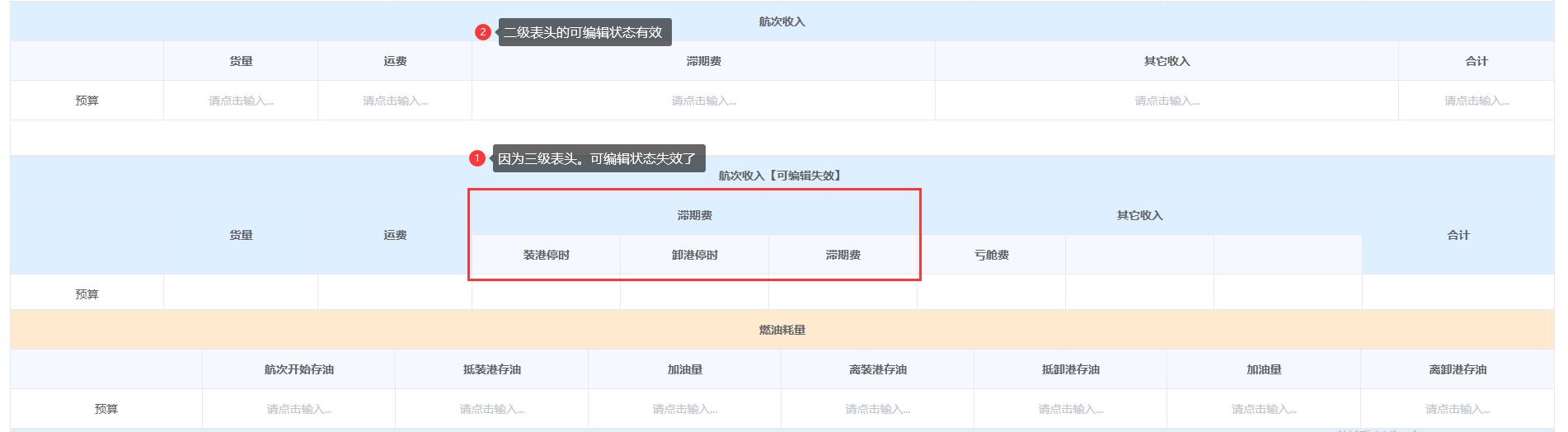
问题描述:
有多级表头的表格,配置属性就没有效果,具体原因还不知道。
二级表头有效,三级表头无效。
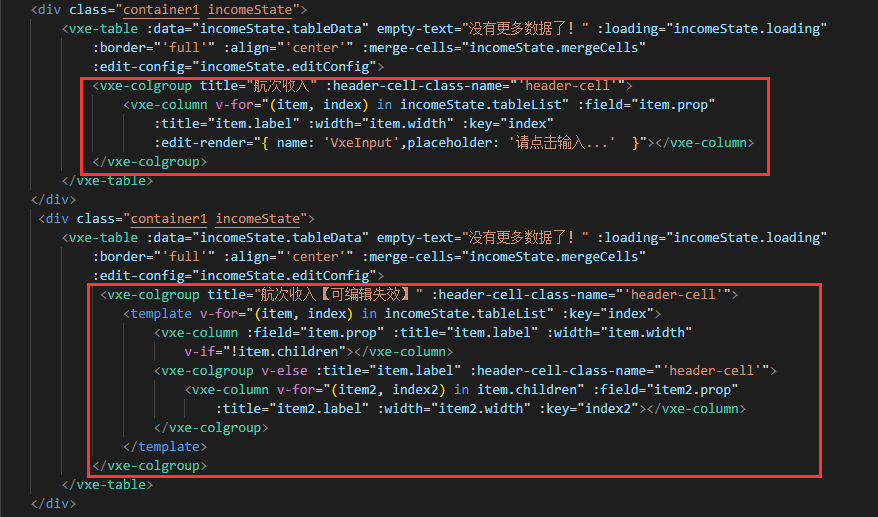
解决方式:
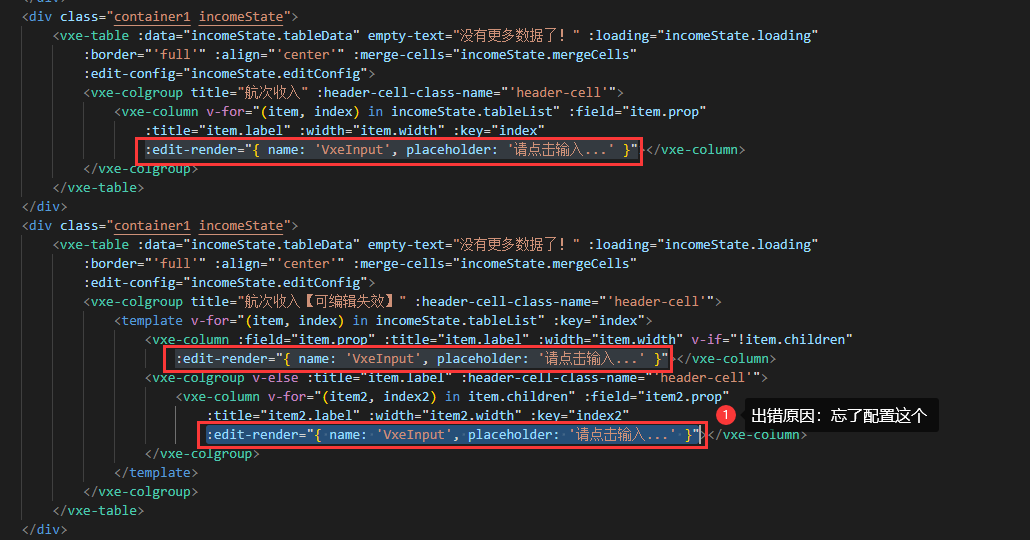 哈哈哈。。。真是粗心大意。。。好在解决了。。