一、数据处理
1.原始数据情况
python
!head -n1 /home/aistudio/data/data351965/train.jsonl
swift
{"id": "fs7sWG4EJmLR", "prompt": "我晚上难以入睡,我认为这是因为我对工作感到压力", "response": "你的情况是很多职场人都会遇到的困扰,工作压力导致的失眠往往是一个恶性循环:压力影响睡眠质量,睡眠不足又导致次日工作效率降低,进一步加重压力。以下是一些针对性建议,希望能帮助你逐步打破这个循环:\n\n**第一步:建立压力档案(当晚即可操作)**\n1. 准备笔记本记录:\n- 具体压力事件(如\"明早要向董事会汇报\")\n- 伴随的生理反应(手心出汗/心跳加速)\n- 脑海中的具体担忧(\"忘词怎么办?数据记错怎么办?\")\n- 实际发生概率(用百分比标注,如\"忘词概率约20%\")\n\n**第二步:90分钟睡眠周期调整法(3天内见效)**\n- 计算就寝时间:设定起床时间后倒推1.5小时的整数倍\n- 例:若需7点起床,可尝试11:30或1:00入睡\n- 使用SleepCycle等APP监测睡眠质量\n\n**第三歩:办公室微放松(工作中随时可用)**\n- 4-7-8呼吸法:吸气4秒→屏息7秒→呼气8秒(\n- 桌面减压神器:备握力球/指尖陀螺,在接电话时使用\n- 视觉放松:将电脑桌面换成动态自然景观(推荐Rainy Mood网站)\n\n**进阶方案:压力转化训练(需1-2周练习)**\n1. 压力具象化练习:\n- 每天花5分钟将压力想象成具体物体(如不断膨胀的气球)\n- 在脑海中为这个\"压力球\"设置安全阀,想象缓慢释放过程\n\n2. 焦虑时段专用笔记本:\n- 设定\"焦虑时间\"(如晚8-8:30)\n- 其他时间出现担忧时快速记录关键词,留到专用时段处理\n\n**重要提醒:**\n若出现以下情况建议立即就医:\n- 连续3天睡眠不足4小时\n- 出现心悸/手抖等躯体症状\n- 对原本爱好完全失去兴趣\n\n建议从今晚开始尝试\"压力档案\"记录,很多时候当我们把模糊的焦虑具体化后,它的压迫感就会明显减弱。这个过程可能需要持续记录3-5天才能看到明显效果,请给自己足够的耐心。记住,你不需要完美解决所有压力源,重点在于重建对压力的掌控感。"}
python
!wc -l /home/aistudio/data/data351965/train.jsonl
bash
8775 /home/aistudio/data/data351965/train.jsonl- 分析可见,数据为jsonl格式,每条记录含有id、prompt、response等3项
- 数据总共8775条
2.数据集比对
PaddleNLP 采用的 SFT 数据集(以 JSONL 格式存储)与常见的 SFT 数据集组织形式上稍有不同。PaddleNLP 支持的数据格式是每行包含一个字典,每个字典包含以下字段:
- src: str, List(str),模型的输入指令(instruction)、提示(prompt),即模型应该执行的任务。相当于 instrcution + input。
- tgt: str, List(str), 模型的输出,即 output。
目前只需要将格式转换过来即可。
3.数据处理
3.1字段处理
删除不必要的字段id,并更改字段prompt、response为src、tgt
python
import json


def read_jsonl(file_path):
    """读取JSONL文件并返回数据列表

    Args:
        file_path (str): JSONL文件路径

    Returns:
        list: 包含JSON对象的列表
    """
    data = []
    try:
        with open(file_path, 'r', encoding='utf-8') as f:
            for line_num, line in enumerate(f, 1):
                line = line.strip()
                if not line:
                    continue
                try:
                    json_obj = json.loads(line)
                    data.append(json_obj)
                except json.JSONDecodeError as e:
                    print(f"警告:第{line_num}行JSON解析失败: {e}")
        print(f"成功读取{len(data)}条记录")
        return data
    except FileNotFoundError:
        print(f"错误:文件'{file_path}'不存在")
        return []
    except Exception as e:
        print(f"读取文件时发生错误: {e}")
        return []


if __name__ == "__main__":
    # 读取当前目录下的train.jsonl文件
    jsonl_data = read_jsonl('/home/aistudio/data/data351965/train.jsonl')

    # 处理数据:删除id字段,重命名prompt为src,response为tgt
    processed_data = []
    for item in jsonl_data:
        # 删除id字段(如果存在)
        if 'id' in item:
            del item['id']

        # 重命名prompt为src
        if 'prompt' in item:
            item['src'] = item.pop('prompt')

        # 重命名response为tgt
        if 'response' in item:
            item['tgt'] = item.pop('response')

        processed_data.append(item)

    # 将处理后的数据保存为all.jsonl
    output_file = 'all.jsonl'
    try:
        with open(output_file, 'w', encoding='utf-8') as f:
            for item in processed_data:
                f.write(json.dumps(item, ensure_ascii=False) + '\n')
        print(f"成功将{len(processed_data)}条处理后的数据保存到{output_file}")
    except Exception as e:
        print(f"保存文件时发生错误: {e}")

    # 示例:打印前3条处理后的记录
    for i, item in enumerate(processed_data[:3], 1):
        print(f"第{i}条处理后记录: {item}")
rust
成功读取8775条记录
成功将8775条处理后的数据保存到all.jsonl
第1条处理后记录: {'src': '我晚上难以入睡,我认为这是因为我对工作感到压力', 'tgt': '你的情况是很多职场人都会遇到的困扰,工作压力导致的失眠往往是一个恶性循环:压力影响睡眠质量,睡眠不足又导致次日工作效率降低,进一步加重压力。以下是一些针对性建议,希望能帮助你逐步打破这个循环:\n\n**第一步:建立压力档案(当晚即可操作)**\n1. 准备笔记本记录:\n- 具体压力事件(如"明早要向董事会汇报")\n- 伴随的生理反应(手心出汗/心跳加速)\n- 脑海中的具体担忧("忘词怎么办?数据记错怎么办?")\n- 实际发生概率(用百分比标注,如"忘词概率约20%")\n\n**第二步:90分钟睡眠周期调整法(3天内见效)**\n- 计算就寝时间:设定起床时间后倒推1.5小时的整数倍\n- 例:若需7点起床,可尝试11:30或1:00入睡\n- 使用SleepCycle等APP监测睡眠质量\n\n**第三歩:办公室微放松(工作中随时可用)**\n- 4-7-8呼吸法:吸气4秒→屏息7秒→呼气8秒(\n- 桌面减压神器:备握力球/指尖陀螺,在接电话时使用\n- 视觉放松:将电脑桌面换成动态自然景观(推荐Rainy Mood网站)\n\n**进阶方案:压力转化训练(需1-2周练习)**\n1. 压力具象化练习:\n- 每天花5分钟将压力想象成具体物体(如不断膨胀的气球)\n- 在脑海中为这个"压力球"设置安全阀,想象缓慢释放过程\n\n2. 焦虑时段专用笔记本:\n- 设定"焦虑时间"(如晚8-8:30)\n- 其他时间出现担忧时快速记录关键词,留到专用时段处理\n\n**重要提醒:**\n若出现以下情况建议立即就医:\n- 连续3天睡眠不足4小时\n- 出现心悸/手抖等躯体症状\n- 对原本爱好完全失去兴趣\n\n建议从今晚开始尝试"压力档案"记录,很多时候当我们把模糊的焦虑具体化后,它的压迫感就会明显减弱。这个过程可能需要持续记录3-5天才能看到明显效果,请给自己足够的耐心。记住,你不需要完美解决所有压力源,重点在于重建对压力的掌控感。'}
。。。。。。
3.2划分训练集、测试集
- 按照8:2划分训练集、测试集
- 另存为psy_train.jsonl、psy_test.jsonl
python
import json
import random

def read_jsonl(file_path):
    """读取JSONL文件并返回数据列表"""
    data = []
    try:
        with open(file_path, 'r', encoding='utf-8') as f:
            for line_num, line in enumerate(f, 1):
                line = line.strip()
                if not line:
                    continue
                try:
                    json_obj = json.loads(line)
                    data.append(json_obj)
                except json.JSONDecodeError as e:
                    print(f"警告:第{line_num}行JSON解析失败: {e}")
        print(f"成功读取{len(data)}条记录")
        return data
    except FileNotFoundError:
        print(f"错误:文件'{file_path}'不存在")
        return []
    except Exception as e:
        print(f"读取文件时发生错误: {e}")
        return []

def save_jsonl(data, file_path):
    """将数据列表保存为JSONL文件"""
    try:
        with open(file_path, 'w', encoding='utf-8') as f:
            for item in data:
                f.write(json.dumps(item, ensure_ascii=False) + '\n')
        print(f"成功将{len(data)}条数据保存到{file_path}")
    except Exception as e:
        print(f"保存文件时发生错误: {e}")

def split_data(data, train_ratio=0.8, random_seed=42):
    """
    将数据按比例分割为训练集和测试集

    Args:
        data: 要分割的数据列表
        train_ratio: 训练集占比,默认为0.8
        random_seed: 随机种子,确保结果可复现

    Returns:
        训练集列表和测试集列表
    """
    # 设置随机种子,确保每次运行结果一致
    random.seed(random_seed)

    # 打乱数据顺序
    shuffled_data = data.copy()
    random.shuffle(shuffled_data)

    # 计算分割点
    split_index = int(len(shuffled_data) * train_ratio)

    # 分割数据
    train_data = shuffled_data[:split_index]
    test_data = shuffled_data[split_index:]

    return train_data, test_data

if __name__ == "__main__":
    # 读取all.jsonl文件
    input_file = 'all.jsonl'
    all_data = read_jsonl(input_file)

    if not all_data:
        print("没有数据可处理,程序退出")
    else:
        # 按8:2比例分割数据
        train_data, test_data = split_data(all_data, train_ratio=0.8)

        # 保存训练集和测试集
        save_jsonl(train_data, 'psy_train.jsonl')
        save_jsonl(test_data, 'psy_test.jsonl')

        # 打印分割统计信息
        print(f"数据分割完成:")
        print(f"训练集: {len(train_data)}条记录 (80%)")
        print(f"测试集: {len(test_data)}条记录 (20%)")
makefile
成功读取8775条记录
成功将7020条数据保存到psy_train.jsonl
成功将1755条数据保存到psy_test.jsonl
数据分割完成:
训练集: 7020条记录 (80%)
测试集: 1755条记录 (20%)
4.数据集分析
python
import os
import json

def read_jsonl(file_path):
    if not os.path.exists(file_path):
        print(file_path, "不存在")
        return []
    data = []
    with open(file_path, "r", encoding="utf-8") as f:
        for line in f.readlines():
            data.append(json.loads(line))
    return data

# 虽然文件扩展名是 json,但其实是 jsonl,需要按行读入后再解析。
train = read_jsonl("psy_train.jsonl")
dev = read_jsonl("psy_test.jsonl")

for i in range(1):
    print(train[i])
markdown
{'src': '我不知道该如何应对失去亲人的痛苦。', 'tgt': '失去至亲的痛苦是人类最深刻的情感体验之一,这种经历就像在内心撕裂一个永远无法完全愈合的伤口。在这个时刻,你可能感觉自己被困在暴风雨中的孤舟里,但请记住,这样的感受恰恰证明了你拥有爱与被爱的能力。以下这些建议不是要消除痛苦,而是陪伴你渡过这段艰难航程的浮木:\n\n**1. 允许自己成为「不完美」的幸存者**\n- 清晨突然爆发的哭泣,深夜翻看旧照片的恍惚,听到某个旋律时的心悸------这些都是心灵在进行自我修复的生理反应。不必为「为什么三个月了还走不出来」而自责,神经科学发现,悲伤会在脑部形成真实的物理印记,需要时间去重组神经通路\n\n**2. 建立「过渡性仪式」**\n- 在厨房保留Ta常用的那个缺口茶杯\n- 继续购买Ta喜欢的杂志放在床头\n- 每周给那个不会再接听的号码发条消息\n这些看似「非理性」的行为,其实是心理学中的过渡性客体(Transitional Object),能帮助我们在现实与回忆之间搭建缓冲带\n\n**3. 重构「存在」的定义**\n尝试在笔记本写下:\n「如果爱可以具象化,Ta留下的痕迹是什么?」\n可能是你烘焙时无意识模仿的揉面手法\n是某个总让你想起Ta笑颜的日落时分\n是逐渐内化成你性格一部分的某个习惯\n这种存在形式的转化,是量子物理中的能量守恒在情感世界的映射\n\n**4. 创建双向对话通道**\n在手机备忘录里开辟一个专属空间:\n「今天看到梧桐叶黄了,你曾说这是秋天写的信」\n「公司新来的实习生有和你一样的虎牙」\n这种单向对话看似徒劳,但镜像神经元会因此激活,让你在书写时产生被聆听的神经反馈\n\n**5. 寻找「创伤后成长」的可能性**\n研究显示,88%的丧亲者最终能找到积极的心理转变:\n- 更敏锐的共情能力\n- 对生命优先级的重新排序\n- 建立更深刻的人际联结\n这不是对痛苦的背叛,而是让失去成为生命韧性的锻造之火\n\n**重要提醒**:如果出现持续的身体疼痛(非器质性)、对日常事物完全丧失兴趣、或产生跟随离世者而去的念头,请立即寻求专业心理干预。这就像心灵骨折需要骨科医生一样正常且必要。\n\n在量子纠缠理论中,曾经紧密相连的粒子即使相隔光年也会保持感应。那些共同经历过的晨昏与四季,早已在原子层面让你们永恒联结。允许自己带着这种「柔软4.1 数据集大小统计
python
# 数据集大小统计
print(f"训练集样本数: {len(train)}")
print(f"验证集样本数: {len(dev)}")
print(f"总样本数: {len(train) + len(dev)}")
makefile
训练集样本数: 7020
验证集样本数: 1755
总样本数: 8775
4.2 字符分布统计
python
# 文本长度统计(按字符计算)
def analyze_data(data, name):
    src_lens = [len(d['src']) for d in data]
    tgt_lens = [len(d['tgt']) for d in data]

    print(f"\n{name}数据集统计:")
    print(f"• src平均长度: {sum(src_lens)/len(src_lens):.1f} 字符")
    print(f"• tgt平均长度: {sum(tgt_lens)/len(tgt_lens):.1f} 字符")
    print(f"• src最大长度: {max(src_lens)} 字符")
    print(f"• tgt最大长度: {max(tgt_lens)} 字符")
    print(f"• src最小长度: {min(src_lens)} 字符")
    print(f"• tgt最小长度: {min(tgt_lens)} 字符")
python
# 执行统计分析
analyze_data(train, "训练集")
analyze_data(dev, "验证集")
yaml
训练集数据集统计:
• src平均长度: 23.9 字符
• tgt平均长度: 1125.0 字符
• src最大长度: 63 字符
• tgt最大长度: 2295 字符
• src最小长度: 5 字符
• tgt最小长度: 0 字符

验证集数据集统计:
• src平均长度: 23.7 字符
• tgt平均长度: 1113.3 字符
• src最大长度: 57 字符
• tgt最大长度: 2323 字符
• src最小长度: 7 字符
• tgt最小长度: 247 字符
二、环境搭建
1.环境检查
1.1 PaddlePaddle版本检查
此次使用paddlepaddle-gpu==3.1版本
python
import warnings
warnings.filterwarnings('ignore')

# 验证安装
!python -c "import paddle;paddle.utils.run_check()"
vbnet
/opt/conda/envs/python35-paddle120-env/lib/python3.10/site-packages/paddle/utils/cpp_extension/extension_utils.py:715: UserWarning: No ccache found. Please be aware that recompiling all source files may be required. You can download and install ccache from: https://github.com/ccache/ccache/blob/master/doc/INSTALL.md
  warnings.warn(warning_message)
Running verify PaddlePaddle program ...
I0803 14:11:42.519806  2223 pir_interpreter.cc:1524] New Executor is Running ...
W0803 14:11:42.521167  2223 gpu_resources.cc:114] Please NOTE: device: 0, GPU Compute Capability: 8.0, Driver API Version: 12.8, Runtime API Version: 12.6
I0803 14:11:42.521916  2223 pir_interpreter.cc:1547] pir interpreter is running by multi-thread mode ...
PaddlePaddle works well on 1 GPU.
PaddlePaddle is installed successfully! Let's start deep learning with PaddlePaddle now.
1.2 ERNIE版本检查
python
pip list|grep ernie
bash
[33mWARNING: Ignoring invalid distribution -astapi (/opt/conda/envs/python35-paddle120-env/lib/python3.10/site-packages)[0m[33m
[0m[33mWARNING: Ignoring invalid distribution -okenizers (/opt/conda/envs/python35-paddle120-env/lib/python3.10/site-packages)[0m[33m
[0m[33mWARNING: Ignoring invalid distribution -radio (/opt/conda/envs/python35-paddle120-env/lib/python3.10/site-packages)[0m[33m
[0m[33mWARNING: Ignoring invalid distribution -tarlette (/opt/conda/envs/python35-paddle120-env/lib/python3.10/site-packages)[0m[33m
[0merniebot 0.5.0
erniebot_agent 0.5.0
erniekit 0.0.1 /home/ERNIE-develop
Note: you may need to restart the kernel to use updated packages.1.3 fastdeploy版本检查
python
pip list|grep fastdeploy
bash
[33mWARNING: Ignoring invalid distribution -astapi (/opt/conda/envs/python35-paddle120-env/lib/python3.10/site-packages)[0m[33m
[0m[33mWARNING: Ignoring invalid distribution -okenizers (/opt/conda/envs/python35-paddle120-env/lib/python3.10/site-packages)[0m[33m
[0m[33mWARNING: Ignoring invalid distribution -radio (/opt/conda/envs/python35-paddle120-env/lib/python3.10/site-packages)[0m[33m
[0m[33mWARNING: Ignoring invalid distribution -tarlette (/opt/conda/envs/python35-paddle120-env/lib/python3.10/site-packages)[0m[33m
[0mfastdeploy-gpu 2.0.0
Note: you may need to restart the kernel to use updated packages.以上环境AISTUDIO默认均已OK,如其他环境需要自己安装
2. 环境安装
2.1 PaddlePaddle-GPU安装
bash
# 源码安装
!python -m pip install paddlepaddle-gpu==3.1.0 -i https://www.paddlepaddle.org.cn/packages/stable/cu126/
2.2 ERNIE安装
bash
# !git clone https://gitclone.com/github.com/PaddlePaddle/ERNIE
%cd ERNIE
!python -m pip install -r requirements/gpu/requirements.txt
!python -m pip install -e . # 推荐使用可编辑模式安装
2.3 FastDeploy安装
bash
!python -m pip install fastdeploy-gpu -i https://www.paddlepaddle.org.cn/packages/stable/fastdeploy-gpu-80_90/ --extra-index-url https://mirrors.tuna.tsinghua.edu.cn/pypi/web/simple三、SFT训练
1.模型下载
在单台80G A/H GPU机器上训练,需先下载模型
python
# 首先请先安装aistudio-sdk库
!pip install --upgrade aistudio-sdk
# 使用aistudio cli下载模型(推荐)
!aistudio download --model PaddlePaddle/ERNIE-4.5-0.3B-Paddle --local_dir baidu/ERNIE-4.5-0.3B-Paddle
erlang
Downloading [model.safetensors]: 100%|████████| 688M/688M [00:01<00:00, 431MB/s][A[A[A[A
Processing 9 items: 100%|████████████████████| 9.00/9.00 [00:03<00:00, 2.90it/s]
Download model 'PaddlePaddle/ERNIE-4.5-0.3B-Paddle' successfully.
Target directory already exists, skipping creation.2.模型配置
/home/aistudio/run_sft_lora_8k.yaml
- 修改 数据集位置
- 修改 模型地址
- 修改 训练轮次
YAML
### data
train_dataset_type: "erniekit"
eval_dataset_type: "erniekit"
train_dataset_path: "/home/aistudio/psy_train.jsonl"
train_dataset_prob: "1.0"
eval_dataset_path: "/home/aistudio/psy_test.jsonl"
eval_dataset_prob: "1.0"
max_seq_len: 8192
num_samples_each_epoch: 6000000

### model
model_name_or_path: /home/aistudio/baidu/ERNIE-4.5-0.3B-Paddle
fine_tuning: LoRA
lora_rank: 32
fuse_rope: True
use_sparse_head_and_loss_fn: True

### finetuning
# base
stage: SFT
seed: 23
do_train: True
do_eval: True
distributed_dataloader: False
dataloader_num_workers: 1
batch_size: 1
num_train_epochs: 10
max_steps: 100
max_evaluate_steps: 10000
eval_steps: 10000
evaluation_strategy: steps
save_steps: 10000000
save_total_limit: 5
save_strategy: steps
logging_steps: 1
release_grads: True
gradient_accumulation_steps: 8
logging_dir: ./vdl_log
output_dir: ./output
disable_tqdm: True

# train
warmup_steps: 20
learning_rate: 3.0e-4
lr_scheduler_type: cosine
min_lr: 0
layerwise_lr_decay_bound: 1.0

# optimizer
weight_decay: 0.01
adam_epsilon: 1.0e-8
adam_beta1: 0.9
adam_beta2: 0.95
offload_optim: True

# performance
tensor_parallel_degree: 1
pipeline_parallel_degree: 1
sharding_parallel_degree: 1
sharding: stage1
sequence_parallel: True
pipeline_parallel_config: disable_partial_send_recv enable_clear_every_step_cache
recompute: False
recompute_use_reentrant: True
compute_type: bf16
fp16_opt_level: O2
disable_ckpt_quant: True
amp_master_grad: True
amp_custom_white_list:
  - lookup_table
  - lookup_table_v2
  - flash_attn
  - matmul
  - matmul_v2
  - fused_gemm_epilogue
amp_custom_black_list:
  - reduce_sum
  - softmax_with_cross_entropy
  - c_softmax_with_cross_entropy
  - elementwise_div
  - sin
  - cos
unified_checkpoint: True
unified_checkpoint_config: async_save
3.模型训练
python
# 8K序列长度SFT-LoRA训练
%cd ~/ERNIE
!erniekit train /home/aistudio/run_sft_lora_8k.yaml
4.权重合并
LoRA微调完成后,需要将LoRA权重与主模型权重合并。多机训练场景下需要注意:⚠️每台机器存储部分模型参数(检查点)⚠️必须同步所有机器的参数文件 后再进行LoRA权重合并或部署
训练完成后合并LoRA参数到基座模型:
注:需要将output中LoRA产生的权重新建checkpoint-1文件夹全部移入,方可运行下述命令。
python
%cd ~/ERNIE
!mkdir output/checkpoint-1
!mv output/*.* output/checkpoint-1
arduino
/home/aistudio/ERNIE修改run_export.yaml
- 主要是修改模型地址
yaml
### model
model_name_or_path: /home/aistudio/baidu/ERNIE-4.5-0.3B-Paddle
fine_tuning: LoRA

### split
max_shard_size: 5
hf_hub_id: null
output_dir: ./output

### performance
tensor_parallel_degree: 1
pipeline_parallel_degree: 1
sharding_parallel_degree: 1
sharding: stage1
pipeline_parallel_config: disable_partial_send_recv enable_clear_every_step_cache
sequence_parallel: True
compute_type: bf16
fp16_opt_level: O2
python
%cd ~/ERNIE
!erniekit export /home/aistudio/run_export.yaml lora=True
ini
Merging tensor: 0%| | 0/110 [00:00<?, ?it/s]W0803 14:28:23.709003 29982 gpu_resources.cc:114] Please NOTE: device: 0, GPU Compute Capability: 8.0, Driver API Version: 12.8, Runtime API Version: 12.6
Merging tensor: 1%| | 1/110 [00:00<01:22, 1.32it/s]
Merging tensor: 55%|█████▌ | 61/110 [00:00<00:00, 96.32it/s]
Merging tensor: 100%|██████████| 110/110 [00:00<00:00, 125.79it/s]
[32m[2025-08-03 14:28:24,221] [ INFO][0m - Merge tensors successfully.[0m
[32m[2025-08-03 14:28:24,974] [ INFO][0m - Model weights saved in ./output/export/model-00001-of-00001.safetensors.[0m
[32m[2025-08-03 14:28:24,984] [ INFO][0m - Model index file saved in ./output/export/model.safetensors.index.json.[0m
[32m[2025-08-03 14:28:24,985] [ INFO][0m - Merge config file saved in ./output/export/merge_config.json.[0m
[32m[2025-08-03 14:28:24,987] [ INFO][0m - ***** Successfully finished merging LoRA model. Time cost: 2.3652708530426025 s *****[0m
LAUNCH INFO 2025-08-03 14:28:26,390 Pod completed
LAUNCH INFO 2025-08-03 14:28:26,390 Exit code 0四、FastDeploy部署
python
import subprocess
import time
import requests
import threading

def start_fastdeploy():
    cmd = [
        "python", "-m", "fastdeploy.entrypoints.openai.api_server",
        "--model", "output/export",
        "--port", "8180",
        "--metrics-port", "8181",
        "--engine-worker-queue-port", "8182",
        "--max-model-len", "32768",
        "--max-num-seqs", "32"
    ]

    print("🚀 启动FastDeploy服务...")
    print("-" * 50)

    process = subprocess.Popen(
        cmd,
        stdout=subprocess.PIPE,
        stderr=subprocess.STDOUT,
        universal_newlines=True,
        bufsize=1
    )

    print(f"📝 PID: {process.pid}")

    service_ready = False

    def monitor_logs():
        nonlocal service_ready
        try:
            while True:
                output = process.stdout.readline()
                if output == '' and process.poll() is not None:
                    break
                if output:
                    line = output.strip()
                    print(f"[日志] {line}")

                    if "Loading Weights:" in line and "100%" in line:
                        print("✅ 权重加载完成")
                    elif "Loading Layers:" in line and "100%" in line:
                        print("✅ 层加载完成")
                    elif "Worker processes are launched" in line:
                        print("✅ 工作进程启动")
                    elif "Uvicorn running on" in line:
                        print("🎉 服务启动完成!")
                        service_ready = True
                        break
        except Exception as e:
            print(f"日志监控错误: {e}")

    log_thread = threading.Thread(target=monitor_logs, daemon=True)
    log_thread.start()

    start_time = time.time()
    while time.time() - start_time < 120:
        if service_ready:
            break
        if process.poll() is not None:
            print("❌ 进程退出")
            return None
        time.sleep(1)

    if not service_ready:
        print("❌ 启动超时")
        process.terminate()
        return None

    print("-" * 50)
    return process

def test_model():
    try:
        import openai

        print("🔌 测试模型连接...")

        client = openai.Client(base_url="http://localhost:8180/v1", api_key="null")

        response = client.chat.completions.create(
            model="null",
            messages=[
                {"role": "system", "content": "你是一个有用的AI助手。"},
                {"role": "user", "content": "你好"}
            ],
            max_tokens=50,
            stream=False
        )

        print("✅ 模型测试成功!")
        print(f"🤖 回复: {response.choices[0].message.content}")
        return True

    except Exception as e:
        print(f"❌ 测试失败: {e}")
        return False

def check_service():
    try:
        response = requests.get("http://localhost:8180/v1/models", timeout=3)
        return response.status_code == 200
    except:
        return False

def setup_service():

    print("=== ERNIE-4.5-0.3B-Paddle 服务启动 ===")

    if check_service():
        print("✅ 发现运行中的服务")
        if test_model():
            print("🎉 服务已就绪!")
            return True
        print("⚠️ 服务异常,重新启动")

    process = start_fastdeploy()

    if process is None:
        print("❌ 启动失败")
        return False

    if test_model():
        print("🎊 启动成功!现在可以运行知识图谱代码")
        return True
    else:
        print("❌ 启动但连接失败")
        return False

if __name__ == "__main__" or True:
    setup_service()
less
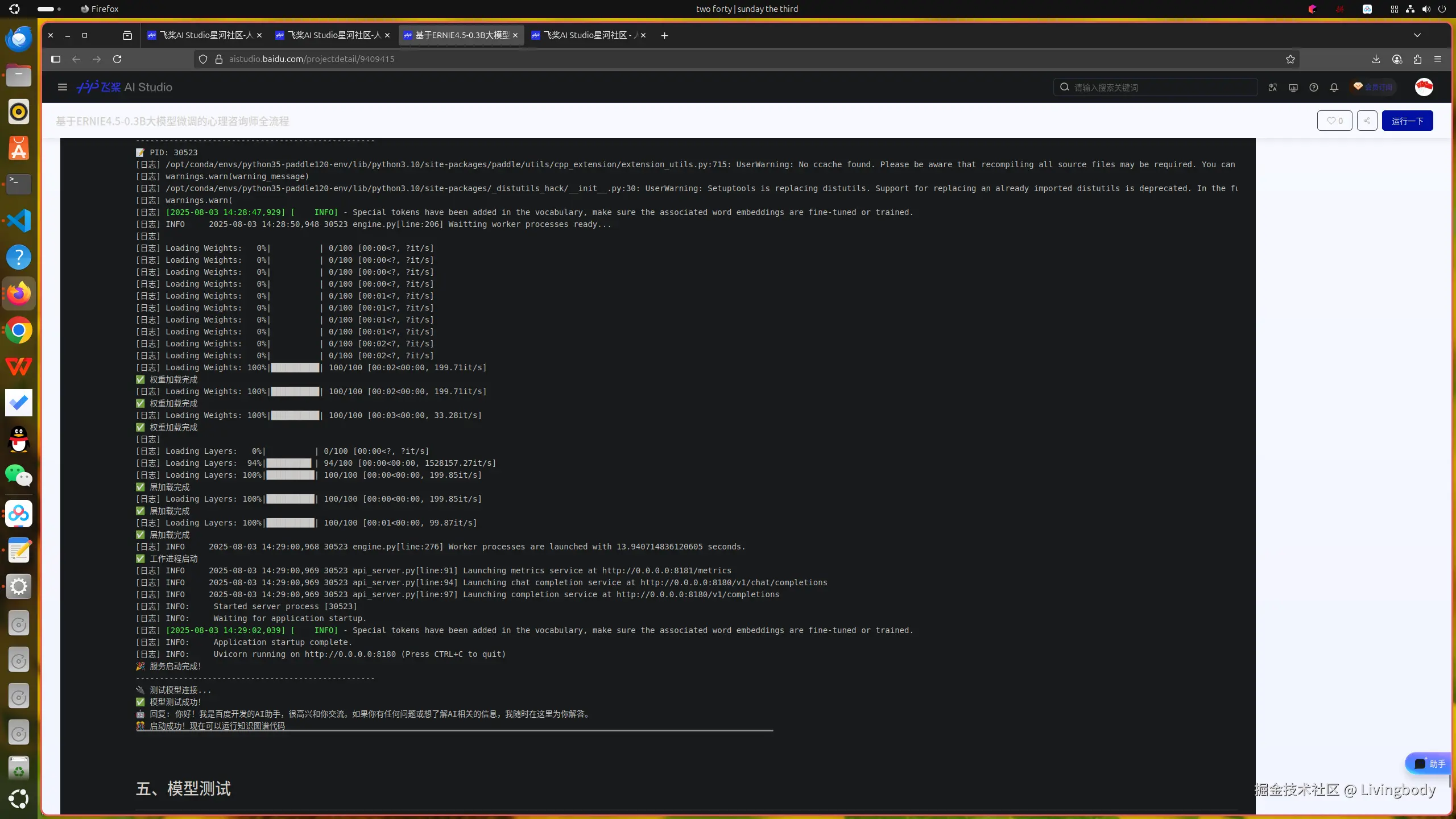
=== ERNIE-4.5-0.3B-Paddle 服务启动 ===
🚀 启动FastDeploy服务...
--------------------------------------------------
📝 PID: 30523
[日志]
[日志] Loading Weights: 0%| | 0/100 [00:00<?, ?it/s]
[日志] Loading Weights: 0%| | 0/100 [00:00<?, ?it/s]
[日志] Loading Weights: 0%| | 0/100 [00:00<?, ?it/s]
[日志] Loading Weights: 0%| | 0/100 [00:00<?, ?it/s]
[日志] Loading Weights: 0%| | 0/100 [00:01<?, ?it/s]
[日志] Loading Weights: 0%| | 0/100 [00:01<?, ?it/s]
[日志] Loading Weights: 0%| | 0/100 [00:01<?, ?it/s]
[日志] Loading Weights: 0%| | 0/100 [00:01<?, ?it/s]
[日志] Loading Weights: 0%| | 0/100 [00:02<?, ?it/s]
[日志] Loading Weights: 0%| | 0/100 [00:02<?, ?it/s]
[日志] Loading Weights: 100%|██████████| 100/100 [00:02<00:00, 199.71it/s]
✅ 权重加载完成
[日志] Loading Weights: 100%|██████████| 100/100 [00:02<00:00, 199.71it/s]
✅ 权重加载完成
[日志] Loading Weights: 100%|██████████| 100/100 [00:03<00:00, 33.28it/s]
✅ 权重加载完成
[日志]
[日志] Loading Layers: 0%| | 0/100 [00:00<?, ?it/s]
[日志] Loading Layers: 94%|█████████▍| 94/100 [00:00<00:00, 1528157.27it/s]
[日志] Loading Layers: 100%|██████████| 100/100 [00:00<00:00, 199.85it/s]
✅ 层加载完成
[日志] Loading Layers: 100%|██████████| 100/100 [00:00<00:00, 199.85it/s]
✅ 层加载完成
[日志] Loading Layers: 100%|██████████| 100/100 [00:01<00:00, 99.87it/s]
✅ 层加载完成
[日志] INFO 2025-08-03 14:29:00,968 30523 engine.py[line:276] Worker processes are launched with 13.940714836120605 seconds.
✅ 工作进程启动
[日志] INFO 2025-08-03 14:29:00,969 30523 api_server.py[line:91] Launching metrics service at http://0.0.0.0:8181/metrics
[日志] INFO 2025-08-03 14:29:00,969 30523 api_server.py[line:94] Launching chat completion service at http://0.0.0.0:8180/v1/chat/completions
[日志] INFO 2025-08-03 14:29:00,969 30523 api_server.py[line:97] Launching completion service at http://0.0.0.0:8180/v1/completions
[日志] INFO: Started server process [30523]
[日志] INFO: Waiting for application startup.
[日志] [32m[2025-08-03 14:29:02,039] [ INFO][0m - Special tokens have been added in the vocabulary, make sure the associated word embeddings are fine-tuned or trained.[0m[日志] INFO: Application startup complete.
[日志] INFO: Uvicorn running on http://0.0.0.0:8180 (Press CTRL+C to quit)
🎉 服务启动完成!
--------------------------------------------------
🔌 测试模型连接...
✅ 模型测试成功!
🤖 回复: 你好!我是百度开发的AI助手,很高兴和你交流。如果你有任何问题或想了解AI相关的信息,我随时在这里为你解答。
🎊 启动成功!现在可以运行知识图谱代码五、模型测试
python
import openai
host = "0.0.0.0"
port = "8180"
client = openai.Client(base_url=f"http://{host}:{port}/v1", api_key="null")

response = client.chat.completions.create(
    model="null",
    messages=[
        {"role": "system", "content": "您好,我是资深心理咨询师,有什么我可以帮助您的吗?"},
        {"role": "user", "content": "我对生活中的一切感到非常不堪重负,不知道该如何应对所有正在发生的事情。"},
    ],
    stream=True,
)
for chunk in response:
    if chunk.choices[0].delta:
        print(chunk.choices[0].delta.content, end='')
print('\n')
arduino
我能感受到你此刻的沉重和迷茫,这种被生活压得喘不过气的感觉真的很不容易。请先停下来,我们慢慢梳理。

或许可以试着给生活画一个"压力曲线":当生活让你感到焦虑时,在哪个时间段会有明显的压力感?这些时刻记录下来,看看它们是如何起因的。有时候我们可以调整自己的应对模式。

你愿意分享一下最近发生的事情吗?是工作、人际关系,还是某些具体场景?哪怕只是"被领导批评"或"家庭争吵",这些碎片都是未被察觉的痛。

如果愿意,我们可以一起做个小实验:用10分钟写下"今天我能做哪些小事"(哪怕只是整理桌面),你会发现很多灰色地带。有时候我们可以把模糊的焦虑转化为具体的小行动。

你愿意和我分享一个让你感到平静的瞬间吗?或许我们可以一起尝试着重建掌控感。你愿意先选择其中一项尝试吗?
六、模型上传
python
import os
# 需要填写aistudio-access-token, 位置在我的工作台--令牌获取
os.environ["AISTUDIO_ACCESS_TOKEN"] = "xxxxxxxxxxxxxxxxxxxxxxxxxxxxxxxxxxxx"

from aistudio_sdk.hub import upload
res = upload(
    # 填写模型详情页面中的repo_id
    repo_id='javaroom/ERNIE_PSY',
    # 填写要上传的文件在本地的路径,如'./ERNIE-X1/README.md'
    path_or_fileobj='/home/aistudio/ERNIE/output/export/model-00001-of-00001.safetensors',
    # 填写上传至repo后的文件路径及文件名,如填写"README.md",则会在master分支的根目录内,上传README.md
    path_in_repo='model-00001-of-00001.safetensors',
    # 填写commit信息,非必填
    commit_message='upload model file to repo'
)
print(res)
erlang
uploading file, checking params ..
checking file size ..
checking is file using lfs ..
Start uploading LFS file.
七、项目地址
aistudio.baidu.com/projectdeta...