【Java】使用模板方法模式设计EasyExcel批量导入导出
【一】需求描述
导入导出使用的是EasyExcel
(1)批量导出
支持列表的全部导出和选中导出
(2)下载批量导入模板
(3)批量导入
首先是上传文件到系统管理平台,返回fileId,然后导入接口传参fileId实现文件解析,步骤如下
1-获取模板文件
2-校验模板文件表头
3-校验文件格式并读取文件数据
4-校验数据,每一行数据的错误校验信息会拼在一起,放在最后一个errorMsg字段里
5-如果任意一行errorMsg不为空,导出异常数据模板,如果没有errorMsg,则批量保存数据
【二】痛点分析
每个功能板块要实现导入导出功能的时候,都要把上述的三个接口流程实现一遍,非常繁琐,并且代码冗余。希望使用模板方法模式把导入导出可复用部分的代码封装起来,而数据校验和批量保存等逻辑交给具体的实现类去实现。
以此达到模板方法封装复用和流程标准化的目的
【三】准备工作
【1】创建导入导出文件模板和对应的常量
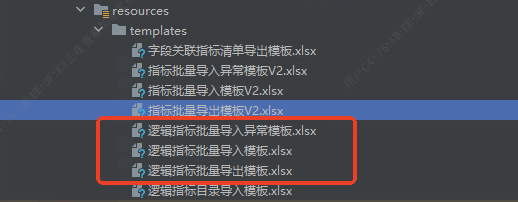
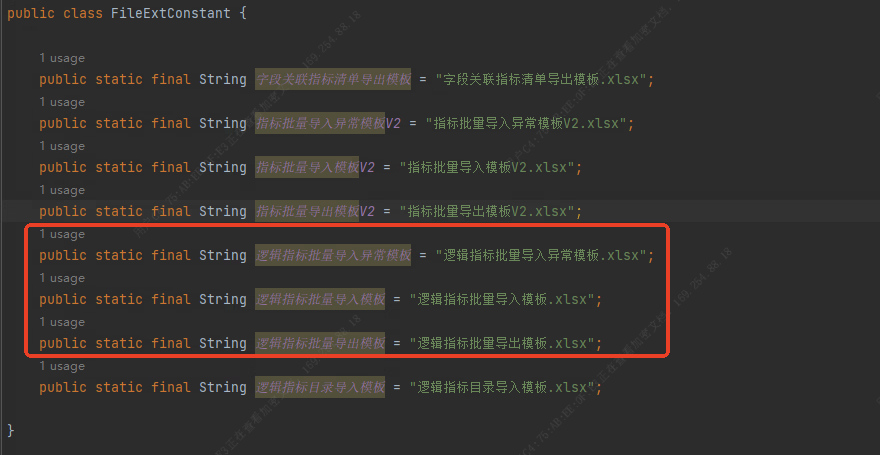
【2】创建导入导出专用的Vo实体类
(1)导入实体类
有errorMsg字段
java
@Data
public class LogicIndExcelVOExt {
    @ExcelProperty(index = 0, value = "*指标主题")
    private String indexThemeDirectionNames;
    @ExcelProperty(index = 1, value = "*逻辑指标编号")
    private String indexCode;
    @ExcelProperty(index = 2, value = "*逻辑指标中文名称")
    private String indexName;
    @ExcelProperty(index = 3, value = "*指标类型")
    private String indexTypeName;
    @ExcelProperty(index = 4, value = "依赖指标编号")
    private String relyIndexCode;
    @ExcelProperty(index = 5, value = "派生维度")
    private String derivedDim;
    @ExcelProperty(index = 6, value = "*业务定义")
    private String businessDef;
    @ExcelProperty(index = 7, value = "*业务口径")
    private String businessCali;
    @ExcelProperty(index = 8, value = "*统计维度")
    private String statisticalDim;
    @ExcelProperty(index = 9, value = "*统计规则")
    private String statisticalRuleName;
    @ExcelProperty(index = 10, value = "*统计频率")
    private String statPeriodName;
    @ExcelProperty(index = 11, value = "*常用度量")
    private String measureType;
    @ExcelProperty(index = 12, value = "常用度量单位")
    private String unit;
    @ExcelProperty(index = 13, value = "精度")
    private String precision;
    @ExcelProperty(index = 14, value = "应用场景")
    private String useScope;
    @ExcelProperty(index = 15, value = "是否监管报送指标")
    private String reIndexFlagName;
    @ExcelProperty(index = 16, value = "是否手工指标")
    private String handIndexFlagName;
    @ExcelProperty(index = 17, value = "*业务归口部门")
    private String handleDeptName;
    @ExcelProperty(index = 18, value = "开放类型")
    private String shareTypeName;
    @ExcelProperty(index = 19, value = "安全等级")
    private String securityLevelName;
    @ExcelProperty(index = 20, value = "所属系统路径")
    private String sysPath;
    @ExcelProperty(index = 21, value = "*指标技术口径")
    private String indTechCali;
    @ExcelProperty(value = "错误信息提示", index = 22)
    private String errorMsg;
}
(2)导出实体类
java
@Data
public class LogicIndExcelExportVOExt{
    @ExcelProperty(index = 0, value = "*指标主题")
    private String indexThemeDirectionNames;
    @ExcelProperty(index = 1, value = "*逻辑指标编号")
    private String indexCode;
    @ExcelProperty(index = 2, value = "*逻辑指标中文名称")
    private String indexName;
    @ExcelProperty(index = 3, value = "*指标类型")
    private String indexTypeName;
    @ExcelProperty(index = 4, value = "依赖指标编号")
    private String relyIndexCode;
    @ExcelProperty(index = 5, value = "派生维度")
    private String derivedDim;
    @ExcelProperty(index = 6, value = "*业务定义")
    private String businessDef;
    @ExcelProperty(index = 7, value = "*业务口径")
    private String businessCali;
    @ExcelProperty(index = 8, value = "*统计维度")
    private String statisticalDim;
    @ExcelProperty(index = 9, value = "*统计规则")
    private String statisticalRuleName;
    @ExcelProperty(index = 10, value = "*统计频率")
    private String statPeriodName;
    @ExcelProperty(index = 11, value = "*常用度量")
    private String measureType;
    @ExcelProperty(index = 12, value = "常用度量单位")
    private String unit;
    @ExcelProperty(index = 13, value = "精度")
    private String precision;
    @ExcelProperty(index = 14, value = "应用场景")
    private String useScope;
    @ExcelProperty(index = 15, value = "是否监管报送指标")
    private String reIndexFlagName;
    @ExcelProperty(index = 16, value = "是否手工指标")
    private String handIndexFlagName;
    @ExcelProperty(index = 17, value = "*业务归口部门")
    private String handleDeptName;
    @ExcelProperty(index = 18, value = "开放类型")
    private String shareTypeName;
    @ExcelProperty(index = 19, value = "安全等级")
    private String securityLevelName;
    @ExcelProperty(index = 20, value = "所属系统路径")
    private String sysPath;
    @ExcelProperty(index = 21, value = "*指标技术口径")
    private String indTechCali;
}
【四】模板方法实现过程
【1】创建抽象父类
创建抽象类GlobalExcelHandleService
java
@Service
@Slf4j
public abstract class GlobalExcelHandleService {

}
【2】批量导出
java
	public abstract String getExportTempName();

    /**
     * 数据导出
     * @param response
     * @param excelName
     * @param sheetName
     * @param clazz
     * @param data
     * @throws IOException
     */
    public <T> void dataExport(HttpServletResponse response, String excelName, String sheetName, Class<T> clazz, List<T> data) throws IOException {
        if (ObjectUtil.isNull(clazz)) {
            log.info(ExcelUtil.LOG_INFO);
        }
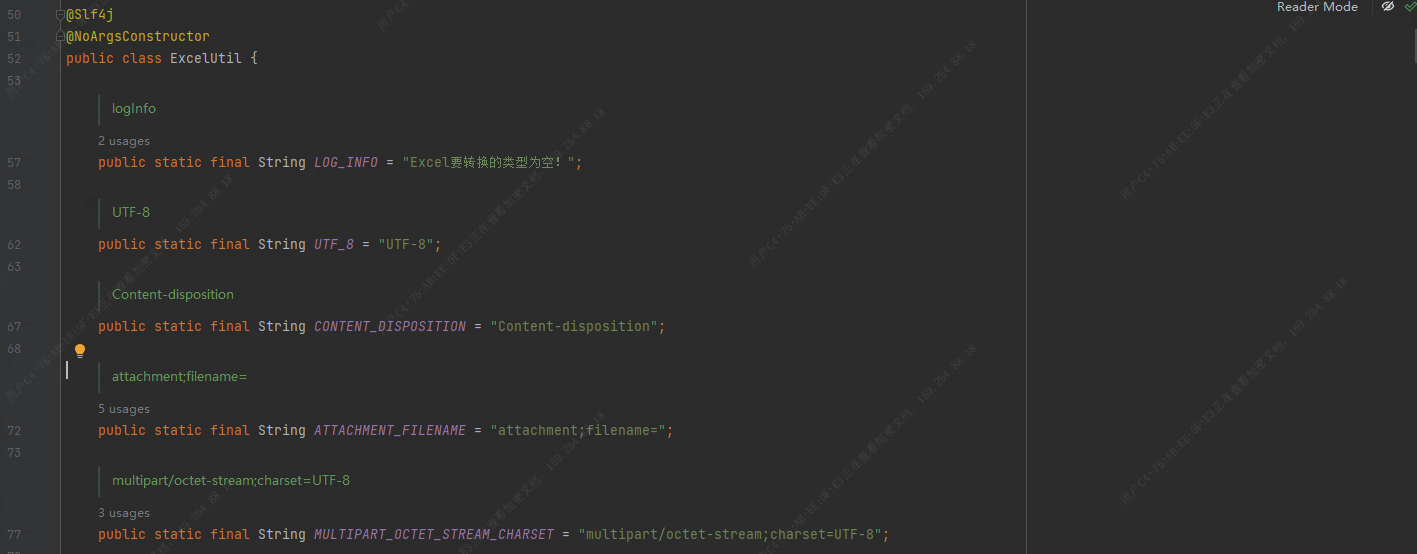
        response.setContentType(ExcelUtil.MULTIPART_OCTET_STREAM_CHARSET);
        String en = URLEncoder.encode(excelName, ExcelUtil.UTF_8);
        // 防止中文乱码
        response.setHeader(ExcelUtil.CONTENT_DISPOSITION, ExcelUtil.ATTACHMENT_FILENAME + en + ExcelTypeEnum.XLSX.getValue());
        // 模版文件
        ClassPathResource classPathResource = new ClassPathResource(getExportTempName());
        InputStream inputStream = classPathResource.getStream();

        ExcelWriter excelWriter =
                EasyExcelFactory.write(response.getOutputStream()).withTemplate(inputStream).excelType(ExcelTypeEnum.XLSX).build();
        WriteSheet writeSheet = EasyExcelFactory.writerSheet(0, sheetName).needHead(false)
                .build();
        writeSheet.setExcludeColumnFieldNames(ListUtil.of("errorMsg"));
        excelWriter.write(data, writeSheet);
        excelWriter.finish();
    }
【3】下载导入模板
java
	public abstract String getImportTempName();

    /**
     * 下载导入模板文件
     * @param response
     * @return
     */
    public ApiResponse<Void> downloadImportTemp(HttpServletResponse response) {
        YtFileUtil.downloadTemplate(response, this.getClass().getClassLoader(), getImportTempName());
        return ApiResponse.ok();
    }
【4】批量导入
java
    @Autowired
    private FileFeignClient fileFeignClient;

    public abstract String getErrorMsgTempName();

    public abstract <T,U> void verify (List<T> excelVOS, List<U> importDataList);

    public abstract <T> void saveImportDatas(List<T> importDataList);


    /**
     * 根据文件id从系统管理获取导入文件
     * @param fileId
     * @return
     */
    public File getImportFileById (Long fileId) {
        if (fileId == null) {
            throw new YTRuntimeException("未传入文档");
        }
        ResultResp<FileInfo> responseApiResponse = fileFeignClient.getById(fileId);
        FileInfo data = responseApiResponse.getData();
        if (ObjectUtils.isEmpty(data)) {
            throw new YTRuntimeException("无文件");
        }

        File tmpFile = FileUtils.createTmpFile(data.getFileName());
        MultipartFile importMultipartFile = ExcelUtils.getTempMultipartFile(data.getFileUrl(),false);
        try {
            importMultipartFile.transferTo(tmpFile);
        } catch (Exception e) {
            log.info("文件转换失败:{}",e);
            throw new YTRuntimeException("文件转换失败");
        }
        return tmpFile;
    }


    public <T> void checkImportFileHead (File tmpFile, Class<T> excelVoClass) {
        // 校验文件中的表头是否匹配
        List<Map<Integer, String>> sheet0List = Lists.newArrayList();
        try {
            sheet0List = IndIndexExcelListener.getDataList(tmpFile, 0, 2);
        } catch (Exception e) {
            log.info("导入文件表头解析失败:{}",e);
            throw new YTRuntimeException("导入文件表头解析失败");
        }

        if (CollectionUtils.isNotEmpty(sheet0List)) {
            Map<Integer, String> indexAndNmMapSheet0 = sheet0List.get(0);
            ApiResponse<Void> shee0tHeadResponse = this.indHeadCheck(indexAndNmMapSheet0,excelVoClass);
            StringBuilder sb = new StringBuilder();
            if (ExceptionCode.INTERNAL_SERVER_ERROR.getCode() == shee0tHeadResponse.getCode()) {
                sb.append(shee0tHeadResponse.getMessage());
            }
            if (StringUtils.isNotBlank(sb.toString())) {
                throw new YTRuntimeException(sb.toString());
            }
        } else {
            throw new YTRuntimeException("请检查上传文件的准确性");
        }
    }


    public <T> ApiResponse<Void> indHeadCheck(Map<Integer, String> indexAndNmMapSheet0, Class<T> importClass) {
        ApiResponse<Void> shee0tHeadResponse = ExcelUtil.invokeHeadMap("模板", indexAndNmMapSheet0, importClass);
        return shee0tHeadResponse;
    }

    public <T> List<T> readTempFileData (File tmpFile, Class<T> excelVoClass) {
        String name = tmpFile.getName();
        String extension = FilenameUtils.getExtension(name);
        // 读取文件到实体类
        List<T> excelVOS = new ArrayList<>();
        if (ListUtil.of("XLSX", "XLS").contains(extension.toUpperCase())) {
            EasyExcel.read(tmpFile, excelVoClass, new PageReadListener<T>(excelVOS::addAll)).sheet().headRowNumber(3).doRead();
        } else {
            throw new YTRuntimeException("文件格式不正确");
        }

        if (CollectionUtil.isEmpty(excelVOS)) {
            throw new YTRuntimeException("读取数据为空");
        }
        return excelVOS;
    }


    /**
     * 筛选出errorMsg字段不为空的T集合
     * @param excelVOS 包含errorMsg字段的VO对象集合
     * @param <T> 泛型类型(需包含errorMsg字段)
     * @return 筛选后的T集合
     */
    public <T> List<T> filterNonEmptyErrorMsg(List<T> excelVOS) {
        if (excelVOS == null || excelVOS.isEmpty()) {
            return Lists.newArrayList(); // 空集合处理
        }

        // 反射获取errorMsg字段(从第一个非空对象提取)
        Field errorMsgField = getErrorMsgField(excelVOS);
        if (errorMsgField == null) {
            return Lists.newArrayList(); // 无errorMsg字段时返回空集合
        }

        // 使用Stream流筛选
        return excelVOS.stream()
                .filter(vo -> vo != null) // 过滤null对象
                .filter(vo -> isErrorMsgValid(vo, errorMsgField)) // 过滤errorMsg为空的记录
                .collect(Collectors.toList()); // 收集结果
    }


    /**
     * 反射获取errorMsg字段(支持private字段)
     */
    public <T> Field getErrorMsgField(List<T> excelVOS) {
        // 从集合中第一个非空对象获取类信息
        return excelVOS.stream()
                .filter(vo -> vo != null)
                .findFirst()
                .map(vo -> {
                    try {
                        Field field = vo.getClass().getDeclaredField("errorMsg");
                        field.setAccessible(true); // 允许访问私有字段
                        return field;
                    } catch (NoSuchFieldException e) {
                        log.info("类 " + vo.getClass().getSimpleName() + " 不存在errorMsg字段");
                        return null;
                    }
                })
                .orElse(null); // 集合全为空时返回null
    }


    /**
     * 判断errorMsg字段是否有效(不为null且非空字符串)
     */
    public <T> boolean isErrorMsgValid(T vo, Field errorMsgField) {
        try {
            Object value = errorMsgField.get(vo);
            // 不为null,且不是空字符串(去除首尾空格后仍有内容)
            return value != null && !value.toString().trim().isEmpty();
        } catch (IllegalAccessException e) {
            log.info("访问errorMsg字段失败:" + e.getMessage());
            return false;
        }
    }


    public <T> SysFileResponse exportErrorMsgData (List<T> excelVOS) throws IOException {
        String parentDir = IndexSystemConstant.getTempFileRoot(DateUtil.format(new Date(), DatePattern.PURE_DATE_FORMAT), IndexSystemConstant.INDEX_TRANSFER_DIR);
        FileUtil.mkdir(parentDir);
        String excelName = YtFileUtil.getExcelName("导入异常");
        File file = new File(StrUtil.format("{}/{}", parentDir, excelName));

        // 模版文件
        ClassPathResource classPathResource = new ClassPathResource(getErrorMsgTempName());
        InputStream errMsgInputStream = classPathResource.getStream();

        EasyExcel.write(file).withTemplate(errMsgInputStream).excelType(ExcelTypeEnum.XLSX).needHead(false).sheet().doWrite(excelVOS);
        FileInfo fileInfo = YtFileUtil.uploadFile(file, FileEnum.INDEX_DIRECTION);
        SysFileResponse sysFileResponse = new SysFileResponse();
        sysFileResponse.setFileInfo(fileInfo);
        sysFileResponse.setHasError(true);
        return sysFileResponse;
    }


    /**
     * 数据导入
     * @param fileId
     * @param excelVoClass
     * @return
     * @throws IOException
     */
    public <T> SysFileResponse dataImport(Long fileId, Class<T> excelVoClass) throws IOException {
        // 获取模板文件
        log.info("开始下载模板文件");
        File tmpFile = getImportFileById(fileId);

        // 校验模板文件表头
        log.info("开始校验模板文件表头");
        checkImportFileHead(tmpFile, excelVoClass);

        // 读取文件数据
        log.info("开始读取文件数据");
        List<T> excelVOS = readTempFileData(tmpFile, excelVoClass);

        // 校验数据
        log.info("开始校验文件数据");
        List<T> importDataList = Lists.newArrayList();
        verify(excelVOS,importDataList);

        // 导出异常数据模板
        List<T> errorMsgExcelVOS = filterNonEmptyErrorMsg(excelVOS);
        long count = errorMsgExcelVOS.size();
        if (count != 0) {
            log.info("开始导出异常数据");
            return exportErrorMsgData(excelVOS);
        }
        log.info("开始保存导入数据");
        saveImportDatas(importDataList);

        SysFileResponse sysFileResponse = new SysFileResponse();
        sysFileResponse.setImportCount(importDataList.size());
        return sysFileResponse;
    }
【5】ExcelUtil添加校验excel表头的方法
java
    public static ApiResponse<Void> invokeHeadMap(String sheetNm, Map<Integer, String> headMap, Class clazz) {
        /*
        count 记录模板表头有几个,用以判断用户导入的表格是否和模板完全一致
        如果用户导入表格较模板的表头多,但其余符合模板,这样不影响则不需要
         */
        int count = 0;
        // 获取数据实体的字段列表
        Field[] fields = clazz.getDeclaredFields();
        // 遍历字段进行判断
        for (Field field : fields) {
            // 获取当前字段上的ExcelProperty注解信息
            ExcelProperty fieldAnnotation = field.getAnnotation(ExcelProperty.class);
            // 判断当前字段上是否存在ExcelProperty注解
            if (fieldAnnotation != null) {
                ++count;
                // 存在ExcelProperty注解则根据注解的index索引到表头中获取对应的表头名
                String headName = headMap.get(fieldAnnotation.index());
              	// 判断表头是否为空或是否和当前字段设置的表头名不相同
                String fieldName = fieldAnnotation.value()[0];
                if (!ObjectUtil.equals("错误信息提示", fieldName)) {
                    if (StringUtils.isEmpty(headName) || ObjectUtil.isNull(headName) || !ObjectUtil.equals(headName, fieldName)) {
                        // 如果为空或不相同,则抛出异常不再往下执行
                        throw new YTRuntimeException("模板错误,请检查" + sheetNm + "sheet页下的表头的【" + headName + "】列,应为【" + fieldName + "】");
                        //return ApiResponse.fail("模板错误,请检查表头的【" + headName + "】列,应为【"+fieldName+"】");
                    }
                } else {
                    --count;
                }

            }
        }

        // 判断用户导入表格的标题头是否完全符合模板
        List<String> headNameList = headMap.values().stream().filter(it -> ObjectUtil.isNotEmpty(it)).collect(Collectors.toList());
        if (count != headNameList.size()) {
            throw new YTRuntimeException(sheetNm+"模板错误,请检查导入模板");
        }
        return ApiResponse.ok();
    }
【五】实现某个功能的导入导出
(1)继承抽象父类GlobalExcelHandleService
(2)重写抽象方法
(3)调用父类方法
案例代码如下:
【1】Controller层
java
    /**
     * 下载导入逻辑指标模板
     *
     * @param response
     * @return
     */
    @GetMapping("/download")
    @Operation(summary = "下载导入逻辑指标模板", description = "下载导入逻辑指标模板")
    public ApiResponse<Void> download(HttpServletResponse response) {
        return indLogicIndexAppService.download(response);
    }


    /**
     * 导出指标列表
     *
     * @param queryRequest 参数
     * @return 导出结果
     * @throws IOException IOException
     */
    @PostMapping(value = "/export")
    @Operation(summary = "导出指标列表", description = "导出指标列表")
    public ApiResponse<String> export(@RequestBody @Valid IndLogicIndexQueryRequest queryRequest, HttpServletResponse response) throws IOException {
        return indLogicIndexAppService.export(queryRequest, response);
    }


    /**
     * 导入
     *
     * @param fileId 文件
     * @return 返回响应结果
     */
    @ResponseBody
    @PostMapping(value = "/{file_id}/import")
    @Operation(summary = "导入", description = "导入")
    public ApiResponse<SysFileResponse> importIndex(@PathVariable(name = "file_id") Long fileId) throws IOException {
        return indLogicIndexAppService.importIndex(fileId);
    }
【2】AppService层
java
@Service
@AllArgsConstructor
@Slf4j
public class IndLogicIndexAppService extends GlobalExcelHandleService {

    @Override
    public String getErrorMsgTempName() {
        return FileConstant.TEMPLATES.concat(FileExtConstant.逻辑指标批量导入异常模板);
    }

    @Override
    public String getExportTempName() {
        return FileConstant.TEMPLATES.concat(FileExtConstant.逻辑指标批量导出模板);
    }

    @Override
    public String getImportTempName() {
        return FileConstant.TEMPLATES.concat(FileExtConstant.逻辑指标批量导入模板);
    }


    /**
     * 批量导出
     * @param request
     * @param response
     * @return
     * @throws IOException
     */
    public ApiResponse<String> export(IndLogicIndexQueryRequest request, HttpServletResponse response) throws IOException {
        List<IndLogicIndexQueryResponse> list;
        if (ObjectUtil.isEmpty(request.getIndexIdList())) {
            // 导出全部
            request.setIndexType(null);
            list = indLogicIndexReadModelRepo.query(request);
        } else {
            // 导出选中
            List<IndLogicIndex> indLogicIndexList = indLogicIndexService.queryByIds(request.getIndexIdList()).getData();
            list = indLogicIndexDTOAssembler.toQueryResponse(indLogicIndexList);
        }
        // 数据统一处理
        fillProps(list);
        List<LogicIndExcelExportVOExt> indexExcelVOList = Lists.newArrayList();
        for (IndLogicIndexQueryResponse indLogicIndexQueryResponse : list) {
            LogicIndExcelExportVOExt logicIndExcelExportVOExt = new LogicIndExcelExportVOExt();
            BeanUtil.copyProperties(indLogicIndexQueryResponse,logicIndExcelExportVOExt);
            indindexExcelVOList.add(logicIndExcelExportVOExt);
        }
                //导出
        dataExport(response, "逻辑指标清单", "逻辑指标清单", LogicIndExcelExportVOExt.class, indexExcelVOList);
        return null;
    }


    /**
     * 下载导入模板文件
     * @param response
     * @return
     */
    public ApiResponse<Void> download(HttpServletResponse response) {
        downloadImportTemp(response);
        return ApiResponse.ok();
    }

	// 批量导入
    @Override
    public <T> void saveImportDatas(List<T> importDataList) {
        if (ObjectUtil.isEmpty(importDataList)) {
            return;
        }
        List<IndLogicIndex> indLogicIndexList = importDataList.stream().map(it->(IndLogicIndex)it).collect(Collectors.toList());
        indLogicIndexService.importBatchSave(indLogicIndexList);
    }

	// 校验数据
    @Override
    public <T,U> void verify(List<T> excelVOS, List<U> importDataList) {
        List<LogicIndExcelVOExt> logicIndExcelVOExts = excelVOS.stream().map(it->(LogicIndExcelVOExt)it).collect(Collectors.toList());
        // 校验信息
        int i = 4;
        for (LogicIndExcelVOExt vo : logicIndExcelVOExts) {
            IndLogicIndex index = new IndLogicIndex();

            List<String> errorMsgList = Lists.newArrayList();

            if (StringUtils.isBlank(vo.getBusinessCali())) {
                log.info("第{}行业务口径不可为空", i);
                errorMsgList.add(StrUtil.format("{}{}", "业务口径", FileConstant.ErrorTypeEnum.NULL.getDesc()));
            } else {
                index.setBusinessCali(vo.getBusinessCali());
            }
            // 省略更多校验细节

            if (CollectionUtil.isNotEmpty(errorMsgList)) {
                vo.setErrorMsg(Joiner.on(StringConstants.SEMICOLON).join(errorMsgList));
            } else {
                importDataList.add((U) index);
            }
            i++;
        }
    }

}
【六】总结
如果下一个功能要实现导入导出的功能,就可以继承抽象父类,然后重写和调用方法即可,开发人员只需要关注校验逻辑、导出逻辑、导入逻辑即可,而整个方法的流程模板已经实现封装,开发人员不用关注如何配置流程,且实现了大量代码的灵活复用
用到的知识点细节
(1)模板方法设计模式
(2)反射获取errorMsg字段值
(3)泛型参数传参
(4)Java对象多态
(5)抽象类和抽象方法的使用
(6)EasyExcel通过注解校验表头和实体类是否一致
(7)如果导入数据校验失败,可以下载数据和错误信息提示内容,方便修改和重新导入
功能优化点
(1)导入导出和校验比较耗时的操作,可以使用线程池异步执行