笔者今天给大家呈上一个tiktok爬虫代码,该方法采取拟人化策略,每个视频数据存储为一个data下的文件架,每个子文件架有三个文件,分别是"视频本身,视频元数据与一级评论",如下所示:
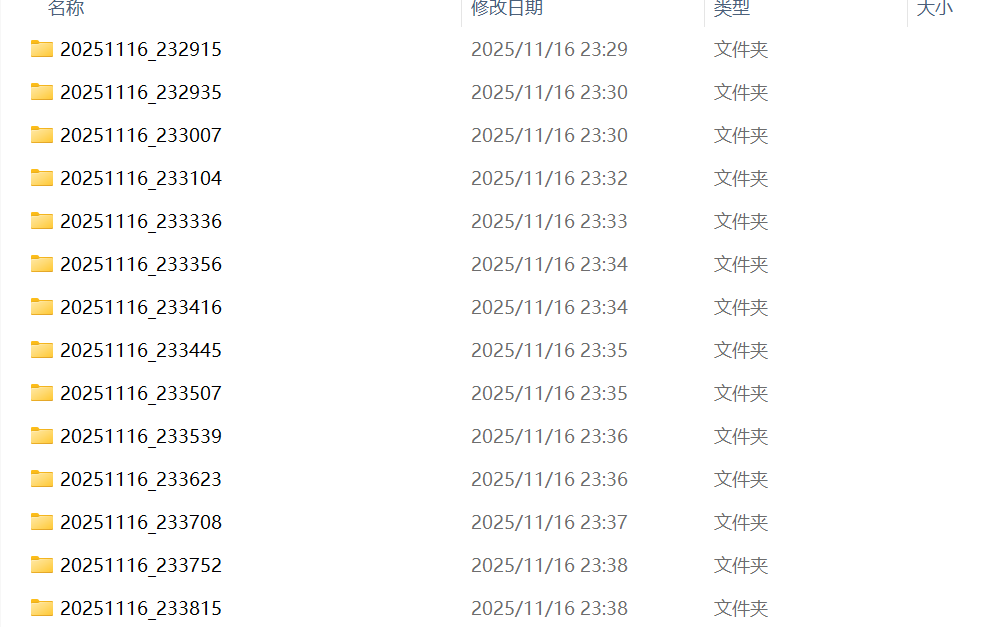

其中,元数据共有:username,title,like,comment,favorite,url六列。
爬虫代码如下所示:
导入selenium库
from selenium import webdriver
from selenium.webdriver.common.by import By
from selenium.webdriver.common.action_chains import ActionChains
from selenium.webdriver.common.keys import Keys
from selenium.webdriver.support.ui import WebDriverWait
from selenium.webdriver.support import expected_conditions as EC
import time
import csv
import os
import shutil
from datetime import datetime
准备工作
# -------------------------
# A. 连接已开启的 9222 调试端口并切至前台
# -------------------------
options = webdriver.ChromeOptions()
options.debugger_address = "127.0.0.1:9222"
driver = webdriver.Chrome(options=options)
time.sleep(0.5)

# -------------------------
# 创建 data 文件夹
# -------------------------
base_dir = os.path.join(os.getcwd(), "data")
os.makedirs(base_dir, exist_ok=True)
主循环(爬虫核心模块)
# -------------------------
# 主循环:抓取多个视频
# -------------------------
max_videos = 300  # 可修改为你想抓的视频数量
videos_captured = 0

while videos_captured < max_videos:
    timestamp = datetime.now().strftime("%Y%m%d_%H%M%S")
    video_dir = os.path.join(base_dir, timestamp)
    os.makedirs(video_dir, exist_ok=True)

    # -------------------------
    # B1.提取视频元数据
    # -------------------------
    def safe_get(selector):
        try:
            return driver.find_element(By.CSS_SELECTOR, selector).text.strip()
        except:
            return ""

    username = safe_get('[data-e2e="browse-username"] > span')
    video_title = safe_get('[data-e2e="browse-video-desc"]').replace('\n', ' ')
    video_url = driver.current_url

    like_count = safe_get('[data-e2e="browse-like-count"]')
    comment_count = safe_get('[data-e2e="browse-comment-count"]')
    favorite_count = safe_get('strong[data-e2e="undefined-count"]')

    # 保存视频元数据
    meta_csv_path = os.path.join(video_dir, "视频元数据.csv")
    with open(meta_csv_path, "w", newline="", encoding="utf-8-sig") as f:
        writer = csv.writer(f)
        writer.writerow(["username", "title", "like", "comment", "favorite", "url"])
        writer.writerow([username, video_title, like_count, comment_count, favorite_count, video_url])
    print(f"[{timestamp}] 视频元数据已保存:{meta_csv_path}")

    # -------------------------
    # B2.抓取一级评论
    # -------------------------
    try:
        comment_container = driver.find_element(By.CSS_SELECTOR, '[data-e2e="search-comment-container"] > div')
    except:
        comment_container = None
        print("未找到评论容器")

    comments = []
    seen_ids = set()
    max_scrolls = 200
    scroll_pause = 2
    scrolls = 0

    while comment_container and scrolls < max_scrolls:
        comment_elements = comment_container.find_elements(By.CSS_SELECTOR, '[data-e2e="comment-level-1"]')

        for elem in comment_elements:
            try:
                cid = elem.get_attribute("id") or elem.text.strip()
            except:
                continue
            if cid not in seen_ids:
                seen_ids.add(cid)
                try:
                    text = elem.text.strip()
                except:
                    text = ""
                comments.append(text.replace('\n', '\\n') if text else "")

        driver.execute_script("arguments[0].scrollTop = arguments[0].scrollHeight", comment_container)
        time.sleep(scroll_pause)

        new_scroll = driver.execute_script("return arguments[0].scrollTop", comment_container)
        new_height = driver.execute_script("return arguments[0].scrollHeight", comment_container)
        if new_scroll + comment_container.size['height'] >= new_height:
            break
        scrolls += 1

    comments_csv_path = os.path.join(video_dir, "一级评论.csv")
    with open(comments_csv_path, "w", newline="", encoding="utf-8-sig") as f:
        writer = csv.writer(f)
        writer.writerow(["comment"])
        for comment in comments:
            writer.writerow([comment])
    print(f"[{timestamp}] 评论已保存:{comments_csv_path}")

    # -------------------------
    # C.下载视频(略)
    # -------------------------
    若有爬取视频的需求,请私信笔者
    若无需爬取视频,则删掉该模块即可


    # -------------------------
    # D.向下翻到下一个视频
    # -------------------------
    def goto_next_video(max_retry=3):
        previous_url = driver.current_url

        for attempt in range(1, max_retry + 1):
            actions = ActionChains(driver)
            actions.send_keys(Keys.ARROW_DOWN).perform()
            time.sleep(3)  # 基础等待

            # 检查是否切换成功
            current_url = driver.current_url
            if current_url != previous_url:
                print(f"➡️ 已成功切换到下一个视频(第 {attempt} 次尝试)")
                return True

            print(f"⚠️ 第 {attempt} 次尝试后仍然是同一个视频,等待加载...")

            # 再给额外时间加载
            time.sleep(8)

        print("❌ 三次尝试仍未切换到下一个视频,可能到底了或网络卡顿")
        return False


    # 执行翻页
    goto_next_video()
    videos_captured += 1