在 Linux 驱动开发领域,平台总线驱动是连接硬件设备与内核的重要桥梁,它通过将设备和驱动分离管理,极大提升了驱动的复用性和系统的可维护性。本文将深入剖析平台总线驱动的工作原理,并结合完整代码示例,帮助开发者掌握其核心开发流程。
一、平台总线驱动基础概念
Linux 平台总线驱动基于设备、驱动和总线三者的协同工作,形成了一套高效的设备管理机制:
设备(Device): 代表具体的硬件实体,描述设备名称、资源占用(如内存地址、中断号)等信息。 驱动(Driver): 包含操作硬件的核心代码,通过probe、remove等回调函数完成设备初始化与资源释放。 总线(Bus): 负责两者的注册、匹配与通信,确保驱动能正确识别并控制设备。
平台总线的核心优势在于分离设备与驱动,同一驱动可适配多种同类设备,设备升级时仅需修改设备描述,无需改动驱动代码,显著提升开发效率。
二、核心数据结构解析
2.1 设备结构体 struct platform_device
c
struct platform_device {
    const char  *name;      // 设备名称,用于驱动匹配
    int         id;         // 设备ID(-1表示自动分配)
    struct device dev;      // 通用设备结构
    u32         num_resources;  // 资源数量
    struct resource *resource;  // 硬件资源数组
    // 其他字段
};
通过填充resource数组,可指定设备的内存、中断等资源。例如:
c
static struct resource my_gpio_resources[] = {
    [0] = {
       .start = 0xFDD60000,       // GPIO控制器基地址
       .end   = 0xFDD60004,
       .flags = IORESOURCE_MEM,
	},
    [1] = {
       .start = 15,
       .end   = 15,
       .flags = IORESOURCE_IRQ,
	}

};
2.2 驱动结构体 struct platform_driver
c
struct platform_driver {
    int (*probe)(struct platform_device *);  // 设备匹配成功时调用
    int (*remove)(struct platform_device *); // 设备移除时调用
    struct device_driver driver;             // 通用驱动结构
    const struct platform_device_id *id_table; // 支持的设备ID表
    // 其他字段
};
probe函数是驱动核心,用于初始化设备;id_table定义驱动支持的设备列表,辅助总线完成匹配。
2.3 资源结构体 struct resource
c
struct resource {
    resource_size_t start;  // 资源起始地址
    resource_size_t end;    // 资源结束地址
    unsigned long flags;    // 资源类型(如`IORESOURCE_MEM`、`IORESOURCE_IRQ`)
    // 其他字段
};
三、驱动开发完整流程
3.1 设备注册
定义设备资源: 通过struct resource数组描述硬件资源。 初始化设备结构体: 填充struct platform_device,指定名称、ID 和资源。 注册设备到总线: 调用platform_device_register函数。
c
#include <linux/module.h>
#include <linux/kernel.h>
#include <linux/init.h>
#include <linux/platform_device.h>
#include <linux/ioport.h>

// 设备名称(用于匹配驱动)
#define DEVICE_NAME "my_gpio_controller"

// 定义设备资源(内存区域和中断)
static struct resource my_gpio_resources[] = {
    [0] = {
       .start = 0xFDD60000,       // GPIO控制器基地址
       .end   = 0xFDD60004,
       .flags = IORESOURCE_MEM,
	},
    [1] = {
       .start = 15,
       .end   = 15,
       .flags = IORESOURCE_IRQ,
	}

};

static void my_gpio_release(struct device *dev){

    printk(KERN_ERR "my_gpio_release\n");
}

// 平台设备结构体
static struct platform_device my_gpio_device = {
    .name           = DEVICE_NAME,
    .id             = -1,          // 自动分配ID
    .num_resources  = ARRAY_SIZE(my_gpio_resources),
    .resource       = my_gpio_resources,
    .dev            = {
        .release    = my_gpio_release
    },
};

// 模块初始化函数
static int __init platform_device_init(void) {
    int ret;

    // 注册平台设备
    ret = platform_device_register(&my_gpio_device);
    if (ret) {
        printk(KERN_ERR "Failed to register platform device: %d\n", ret);
        return ret;
    }

    printk(KERN_INFO "Platform device registered: %s\n", DEVICE_NAME);
    return 0;
}

// 模块退出函数
static void __exit platform_device_exit(void) {
    // 注销平台设备
    platform_device_unregister(&my_gpio_device);
    printk(KERN_INFO "Platform device unregistered\n");
}

module_init(platform_device_init);
module_exit(platform_device_exit);

MODULE_LICENSE("GPL");
MODULE_DESCRIPTION("Example Platform Device");
MODULE_AUTHOR("cmy");
3.2 驱动注册
实现驱动回调函数: 编写probe、remove等核心函数。 初始化驱动结构体: 指定驱动名称、支持的设备列表等。 注册驱动到总线: 调用platform_driver_register函数。
c
#include <linux/module.h>
#include <linux/kernel.h>
#include <linux/init.h>
#include <linux/io.h>
#include <linux/fs.h>
#include <linux/uaccess.h>
#include <linux/cdev.h>
#include <linux/platform_device.h>
#include <linux/mod_devicetable.h>
#include <linux/device.h>

// 驱动支持的设备名称
#define DRIVER_NAME "my_gpio_controller"

// 寄存器偏移量
#define GPIO_SWPORT_DDR 0x0008 //输入输出偏移量
#define GPIO_SWPORT_DR 0x0000 //高低电平偏移量

// 设备私有数据结构
struct gpio_dev {
    struct device *dev;
    dev_t dev_num;
    void __iomem *regs;         // 映射后的寄存器基址
    int irq;                    // 中断号
    struct class *class;        // 设备类
	struct cdev cdev;			// 字符设备结构
};

// 文件操作函数
static ssize_t gpio_read(struct file *filp, char __user *buf, size_t count, loff_t *f_pos) {
    struct gpio_dev *gdev = filp->private_data;
    int value = 0;

    if (!gdev->regs)
    {
        printk(KERN_ERR "gpio_read gdev->regs can't be null\n");
        return -EFAULT;
    }


    u64 gp_cfg = ioread64(gdev->regs + GPIO_SWPORT_DR);
    value = (gp_cfg >> 15) & 1;//获取第15位

    printk(KERN_INFO "gpio_read value = %d\n", value);
    if (copy_to_user(buf, &value, sizeof(int))) {
        return -EFAULT;
    }

    return 0;
}

static ssize_t gpio_write(struct file *filp, const char __user *buf, size_t count, loff_t *f_pos) {
    struct gpio_dev *gdev = filp->private_data;

	int value = 0;
    if (copy_from_user(&value, buf, sizeof(int))) {
        return -EFAULT;
    }
    if (!gdev->regs)
    {
        printk(KERN_ERR "gpio_write gdev->regs can't be null\n");
        return -EFAULT;
    }

    u64 gp_cfg = ioread64(gdev->regs + GPIO_SWPORT_DR);
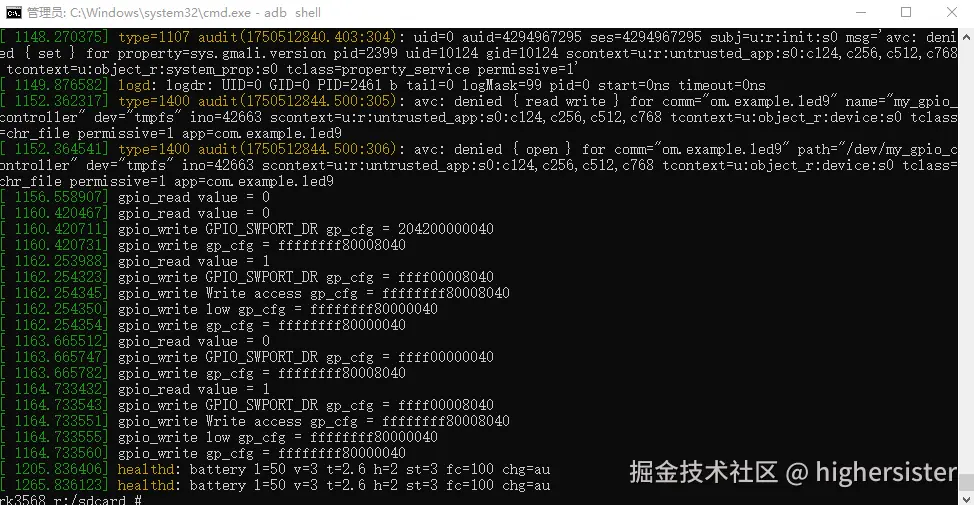
    printk(KERN_INFO "gpio_write GPIO_SWPORT_DR gp_cfg = %llx\n", gp_cfg);
    if(value)
    {
        gp_cfg |= 1 << 31;//Write access enable
        gp_cfg |= 1 << 15;//high

    }
    else
    {
        gp_cfg |= 1 << 31;//Write access enable
        printk(KERN_INFO " gpio_write Write access gp_cfg = %llx\n", gp_cfg);
        gp_cfg &= ~(1 << 15);//low
        printk(KERN_INFO " gpio_write low gp_cfg = %llx\n", gp_cfg);
    }


    iowrite64(gp_cfg, gdev->regs + GPIO_SWPORT_DR);

    printk(KERN_INFO " gpio_write gp_cfg = %llx\n", gp_cfg);

    return 0;
}

static int gpio_open(struct inode *inode, struct file *filp) {
    struct gpio_dev *gdev = container_of(inode->i_cdev, struct gpio_dev, cdev);
    filp->private_data = gdev;
    return 0;
}

static int gpio_release(struct inode *inode, struct file *filp) {
    return 0;
}

// 文件操作表
static const struct file_operations gpio_fops = {
    .owner = THIS_MODULE,
    .open = gpio_open,
    .read = gpio_read,
    .write = gpio_write,
    .release = gpio_release,
};


// 驱动probe函数(设备匹配成功时调用)
static int gpio_probe(struct platform_device *pdev) {
    struct gpio_dev *gdev;
    struct resource *res;
    int ret;

    // 分配并初始化设备结构体
    gdev = devm_kzalloc(&pdev->dev, sizeof(*gdev), GFP_KERNEL);
    if (!gdev) {
        dev_err(&pdev->dev, "Failed to allocate memory\n");
        return -ENOMEM;
    }

    gdev->dev = &pdev->dev;
    platform_set_drvdata(pdev, gdev);

    // 获取内存资源并映射
    res = platform_get_resource(pdev, IORESOURCE_MEM, 0);
    printk(KERN_INFO "gpio_probe res->start = %llx, res->end = %llx\n", res->start, res->end);
    /*if (!res) {
        dev_err(&pdev->dev, "Missing memory resource\n");
        return -ENODEV;
    }

    gdev->regs = devm_ioremap_resource(&pdev->dev, res);
    if (IS_ERR(gdev->regs)) {
        dev_err(&pdev->dev, "Failed to map memory resource\n");
        return PTR_ERR(gdev->regs);
    }*/


    // 注册字符设备
    ret = alloc_chrdev_region(&gdev->dev_num, 0, 1, pdev->name);
    if (ret) {
        dev_err(&pdev->dev, "Failed to allocate char device region\n");
        return ret;
    }

    cdev_init(&gdev->cdev, &gpio_fops);
    gdev->cdev.owner = THIS_MODULE;

    ret = cdev_add(&gdev->cdev, gdev->dev_num, 1);
    if (ret) {
        dev_err(&pdev->dev, "Failed to add char device\n");
        unregister_chrdev_region(gdev->dev_num, 1);
        return ret;
    }

    // 创建设备类
    gdev->class = class_create(THIS_MODULE, pdev->name);
    if (IS_ERR(gdev->class)) {
        dev_err(&pdev->dev, "Failed to create class\n");
        cdev_del(&gdev->cdev);
        unregister_chrdev_region(gdev->dev_num, 1);
        return PTR_ERR(gdev->class);
    }

    // 创建设备节点
    gdev->dev = device_create(gdev->class, NULL, gdev->dev_num, NULL, pdev->name);
    if (IS_ERR(gdev->dev)) {
        dev_err(&pdev->dev, "Failed to create device\n");
        class_destroy(gdev->class);
        cdev_del(&gdev->cdev);
        unregister_chrdev_region(gdev->dev_num, 1);
        return PTR_ERR(gdev->dev);
    }

    // 映射GPIO寄存器
    gdev->regs = ioremap(res->start, res->end - res->start);
    if (!gdev->regs) {
        printk(KERN_ERR "gpio_probe Failed to ioremap\n");
        cdev_del(&gdev->cdev);
        unregister_chrdev_region(gdev->dev_num, 1);
        return -ENOMEM;
    }
    printk(KERN_INFO "gpio_probe gdev->regs = %llx\n", gdev->regs);


    u64 gp_cfg = ioread64(gdev->regs + GPIO_SWPORT_DDR);
    printk(KERN_INFO "gpio_probe GPIO_SWPORT_DDR gp_cfg = %llx\n", gp_cfg);
    gp_cfg |= 1 << 31;// Write access enable
    gp_cfg |= 1 << 15;//Output

    //设置输出模式
    iowrite64(gp_cfg, gdev->regs + GPIO_SWPORT_DDR);
    gp_cfg = ioread64(gdev->regs + GPIO_SWPORT_DDR);


    printk(KERN_INFO "gpio_probe initialized successfully gp_cfg = %llx\n", gp_cfg);


    dev_info(&pdev->dev, "GPIO driver initialized\n");
    return 0;
}

// 驱动remove函数(设备移除时调用)
static int gpio_remove(struct platform_device *pdev) {
    struct gpio_dev *gdev = platform_get_drvdata(pdev);
    if (gdev->regs) {
        iounmap(gdev->regs);  // 解除映射
        gdev->regs = NULL;
    }

    // 清理资源
    device_destroy(gdev->class, gdev->dev_num);
    class_destroy(gdev->class);
    cdev_del(&gdev->cdev);
    unregister_chrdev_region(gdev->dev_num, 1);

    dev_info(&pdev->dev, "GPIO driver removed\n");
    return 0;
}

// 驱动支持的设备ID表
 const struct platform_device_id gpio_device_id = {
    .name = DRIVER_NAME,
};


// 平台驱动结构体
static struct platform_driver gpio_driver = {
    .probe      = gpio_probe,
    .remove     = gpio_remove,
    .driver     = {
        .name   = DRIVER_NAME,
        .owner  = THIS_MODULE,
    },
    .id_table   = &gpio_device_id,
};

// 模块初始化
static int __init gpio_driver_init(void) {
    return platform_driver_register(&gpio_driver);
}

// 模块退出
static void __exit gpio_driver_exit(void) {
    platform_driver_unregister(&gpio_driver);
}

module_init(gpio_driver_init);
module_exit(gpio_driver_exit);

MODULE_LICENSE("GPL");
MODULE_DESCRIPTION("Example Platform Driver");
MODULE_AUTHOR("cmy");
3.3 设备与驱动匹配
总线通过设备和驱动的name字段进行匹配,匹配成功后自动调用驱动的probe函数初始化设备。若id_table存在,总线会优先检查设备是否在支持列表中。
四、编译与测试
4.1 编译模块
创建Makefile:
bash
export ARCH=arm64

export CROSS_COMPILE=/home/chenmy/rk356x/RK356X_Android11.0/prebuilts/gcc/linux-x86/aarch64/gcc-linaro-6.3.1-2017.05-x86_64_aarch64-linux-gnu/bin/aarch64-linux-gnu-

obj-m += platform_device_example.o

obj-m += platform_driver_example.o

KERNEL_DIR:=/home/chenmy/rk356x/RK356X_Android11.0/kernel

all:
	make -C $(KERNEL_DIR) M=$(PWD) modules
clean:
	make -C $(KERNEL_DIR) M=$(PWD) clean
执行make生成.ko模块文件。
4.2 加载与验证
bash
 # 加载设备模块
insmod platform_device_example.ko
# 加载驱动模块
insmod platform_driver_example.ko

# 查看设备与驱动状态
ls /sys/bus/platform/devices | grep "my"
ls /sys/bus/platform/drivers | grep "my"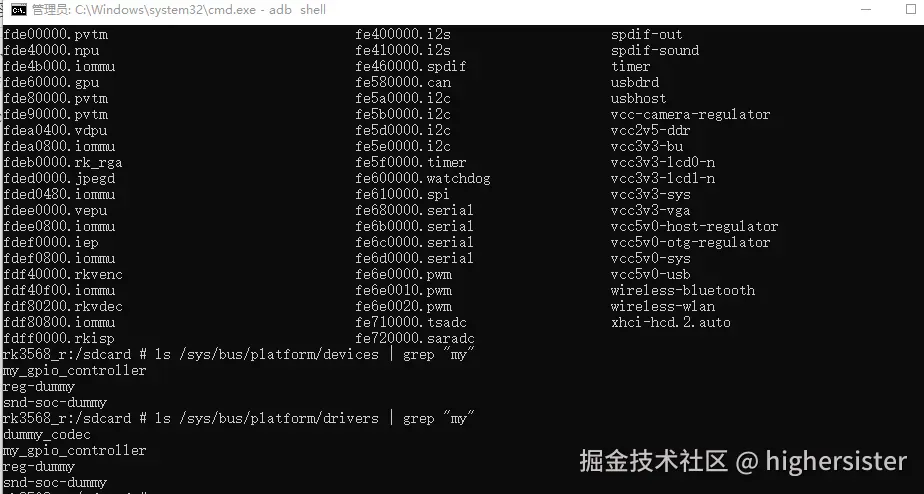
五、总结
Linux 平台总线驱动通过标准化的设备与驱动分离模型,显著提升了驱动开发的效率与代码复用性。本文通过原理解析与完整代码示例,展示了从设备注册、驱动实现到匹配测试的全流程。在实际开发中,开发者可根据硬件需求灵活调整资源配置与回调函数逻辑,构建稳定高效的驱动程序。