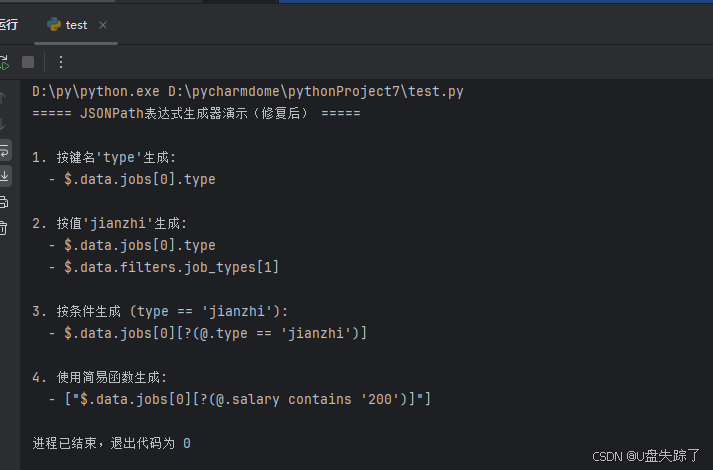
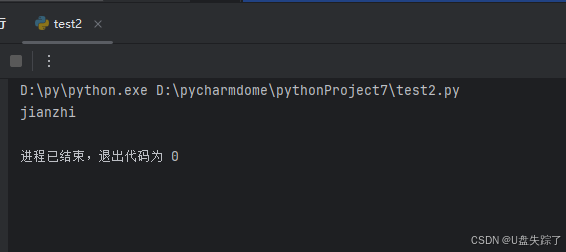
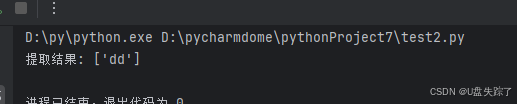
import json
from typing import Dict, List, Any, Optional


class JSONPathGenerator:
    """JSONPath表达式生成器,纯Python实现,无外部依赖"""

    def __init__(self):
        self.json_data = None
        self.all_paths = []  # 存储所有可能的JSON路径

    def load_json(self, json_data: Dict[str, Any]) -> None:
        """加载JSON数据并解析所有路径"""
        self.json_data = json_data
        self.all_paths = []
        self._recursive_parse(json_data, [])

    def _recursive_parse(self, data: Any, current_path: List[str]) -> None:
        """递归解析JSON结构,收集所有路径"""
        if isinstance(data, dict):
            for key, value in data.items():
                new_path = current_path + [key]
                self.all_paths.append(self._format_path(new_path))
                self._recursive_parse(value, new_path)
        elif isinstance(data, list) and data:
            # 解析数组路径
            array_path = current_path + ["[*]"]
            self.all_paths.append(self._format_path(array_path))
            # 解析第一个元素的路径(假设数组元素结构一致)
            self._recursive_parse(data[0], current_path + [0])

    def _format_path(self, path_parts: List[str]) -> str:
        """格式化路径部分为JSONPath表达式(彻底修复根节点点符号问题)"""
        formatted_parts = []
        for part in path_parts:
            if isinstance(part, int):
                formatted_parts.append(f"[{part}]")
            elif part.startswith("["):
                formatted_parts.append(part)
            else:
                formatted_parts.append(f".{part}")  # 确保每个键名前都有.

        # 根节点处理:确保以$.开头
        return "$" + "".join(formatted_parts) if formatted_parts else "$"

    def generate_by_key(self, target_key: str) -> List[str]:
        """根据键名生成JSONPath表达式"""
        if not self.json_data:
            raise ValueError("请先调用load_json加载数据")

        return [path for path in self.all_paths
                if f".{target_key}" in path or path.endswith(f".{target_key}")]

    def generate_by_value(self, target_value: Any) -> List[str]:
        """根据值生成JSONPath表达式"""
        if not self.json_data:
            raise ValueError("请先调用load_json加载数据")

        value_paths = []
        self._find_value_paths(self.json_data, [], target_value, value_paths)
        return [self._format_path(path) for path in value_paths]

    def _find_value_paths(self, data: Any, current_path: List[str],
                          target_value: Any, result: List[List[str]]) -> None:
        """递归查找包含目标值的路径"""
        if data == target_value:
            result.append(current_path.copy())
            return

        if isinstance(data, dict):
            for key, value in data.items():
                current_path.append(key)
                self._find_value_paths(value, current_path, target_value, result)
                current_path.pop()
        elif isinstance(data, list):
            for index, item in enumerate(data):
                current_path.append(index)
                self._find_value_paths(item, current_path, target_value, result)
                current_path.pop()

    def generate_by_condition(self, key: str, operator: str, value: Any) -> str:
        """根据条件生成JSONPath表达式(修复条件位置问题)"""
        operators = {
            "==": "==", "!=": "!=", ">": ">", "<": "<",
            ">=": ">=", "<=": "<=", "contains": "contains"
        }

        if operator not in operators:
            raise ValueError(f"不支持的操作符,支持: {list(operators.keys())}")

        key_paths = self.generate_by_key(key)
        if not key_paths:
            raise ValueError(f"未找到键名: {key}")

        # 取最短的键路径作为基础
        base_path = min(key_paths, key=len)
        # 提取父路径,确保条件应用于数组
        parent_path = ".".join(base_path.split(".")[:-1]) if "." in base_path else "$"

        if operator == "contains":
            return f"{parent_path}[?(@.{key} contains '{value}')]"
        else:
            value_str = f"'{value}'" if isinstance(value, str) else str(value)
            return f"{parent_path}[?(@.{key} {operators[operator]} {value_str})]"


def simple_jsonpath_generator(json_data: Dict, target_key: str = None,
                              target_value: Any = None, condition: tuple = None) -> List[str]:
    """简易JSONPath生成函数,无需类实例化"""
    generator = JSONPathGenerator()
    generator.load_json(json_data)

    if condition:
        key, operator, value = condition
        return [generator.generate_by_condition(key, operator, value)]
    elif target_value is not None:
        return generator.generate_by_value(target_value)
    elif target_key:
        return generator.generate_by_key(target_key)
    else:
        raise ValueError("必须指定target_key、target_value或condition")


# 修复后的演示代码
def run_demo():
    """运行演示示例(修复后)"""
    # 示例JSON数据
    demo_data = {
        "code": 200,
        "message": "操作成功",
        "data": {
            "jobs": [
                {
                    "id": 1,
                    "title": "Python开发兼职",
                    "type": "jianzhi",  # 键名为"type",值为"jianzhi"
                    "salary": "200-300元/小时",
                    "requirements": ["熟练Python", "有兼职经验"]
                },
                {
                    "id": 2,
                    "title": "全职数据分析师",
                    "type": "fulltime",
                    "salary": "15000-20000元/月"
                }
            ],
            "filters": {
                "job_types": ["fulltime", "jianzhi", "internship"]
            }
        }
    }

    print("===== JSONPath表达式生成器演示(修复后) =====")
    generator = JSONPathGenerator()
    generator.load_json(demo_data)

    # 1. 按键名'type'生成(用户之前误用'jianzhi'作为键名,实际键名是'type')
    print("\n1. 按键名'type'生成:")
    for path in generator.generate_by_key("type"):
        print(f"  - {path}")

    # 2. 按值'jianzhi'生成(正确用法:值为'jianzhi')
    print("\n2. 按值'jianzhi'生成:")
    for path in generator.generate_by_value("jianzhi"):
        print(f"  - {path}")

    # 3. 按条件生成 (type == 'jianzhi')(修复条件位置和根节点问题)
    print("\n3. 按条件生成 (type == 'jianzhi'):")
    print(f"  - {generator.generate_by_condition('type', '==', 'jianzhi')}")

    # 4. 使用简易函数生成(修复根节点问题)
    print("\n4. 使用简易函数生成:")
    print(f"  - {simple_jsonpath_generator(demo_data, condition=('salary', 'contains', '200'))}")


if __name__ == "__main__":
    run_demo()
import json
import sys
import re
# Tkinter导入检查与处理
try:
import tkinter as tk
from tkinter import ttk, scrolledtext, messagebox
HAS_TKINTER = True
except ImportError:
HAS_TKINTER = False
from typing import Dict, List, Any, Optional
class JSONPathGenerator:
"""JSONPath表达式生成器,纯Python实现,无外部依赖"""
def __init__(self):
self.json_data = None
self.all_paths = [] # 存储所有可能的JSON路径
def load_json(self, json_data: Dict[str, Any]) -> None:
"""加载JSON数据并解析所有路径"""
self.json_data = json_data
self.all_paths = []
self._recursive_parse(json_data, [])
def _recursive_parse(self, data: Any, current_path: List[str]) -> None:
"""递归解析JSON结构,收集所有路径"""
if isinstance(data, dict):
for key, value in data.items():
new_path = current_path + [key]
self.all_paths.append(self._format_path(new_path))
self._recursive_parse(value, new_path)
elif isinstance(data, list) and data:
# 解析数组路径
array_path = current_path + ["[*]"]
self.all_paths.append(self._format_path(array_path))
# 解析第一个元素的路径(假设数组元素结构一致)
self._recursive_parse(data[0], current_path + [0])
def _format_path(self, path_parts: List[str]) -> str:
"""格式化路径部分为JSONPath表达式"""
formatted_parts = []
for part in path_parts:
if isinstance(part, int):
formatted_parts.append(f"[{part}]")
elif part.startswith("["):
formatted_parts.append(part)
else:
formatted_parts.append(f".{part}") # 确保每个键名前都有.
# 根节点处理:确保以$.开头
return "$" + "".join(formatted_parts) if formatted_parts else "$"
def generate_by_key(self, target_key: str) -> List[str]:
"""根据键名生成JSONPath表达式"""
if not self.json_data:
raise ValueError("请先加载JSON数据")
return [path for path in self.all_paths
if f".{target_key}" in path or path.endswith(f".{target_key}")]
def generate_by_value(self, target_value: Any) -> List[str]:
"""根据值生成JSONPath表达式"""
if not self.json_data:
raise ValueError("请先加载JSON数据")
value_paths = []
self._find_value_paths(self.json_data, [], target_value, value_paths)
return [self._format_path(path) for path in value_paths]
def _find_value_paths(self, data: Any, current_path: List[str],
target_value: Any, result: List[List[str]]) -> None:
"""递归查找包含目标值的路径"""
if data == target_value:
result.append(current_path.copy())
return
if isinstance(data, dict):
for key, value in data.items():
current_path.append(key)
self._find_value_paths(value, current_path, target_value, result)
current_path.pop()
elif isinstance(data, list):
for index, item in enumerate(data):
current_path.append(index)
self._find_value_paths(item, current_path, target_value, result)
current_path.pop()
def generate_by_condition(self, key: str, operator: str, value: Any) -> str:
"""根据条件生成JSONPath表达式"""
operators = {
"==": "==", "!=": "!=", ">": ">", "<": "<",
">=": ">=", "<=": "<=", "contains": "contains"
}
if operator not in operators:
raise ValueError(f"不支持的操作符,支持: {list(operators.keys())}")
key_paths = self.generate_by_key(key)
if not key_paths:
raise ValueError(f"未找到键名: {key}")
# 取最短的键路径作为基础
base_path = min(key_paths, key=len)
# 提取父路径,确保条件应用于数组
parent_path = ".".join(base_path.split(".")[:-1]) if "." in base_path else "$"
if operator == "contains":
return f"{parent_path}[?(@.{key} contains '{value}')]"
else:
value_str = f"'{value}'" if isinstance(value, str) else str(value)
return f"{parent_path}[?(@.{key} {operators[operator]} {value_str})]"
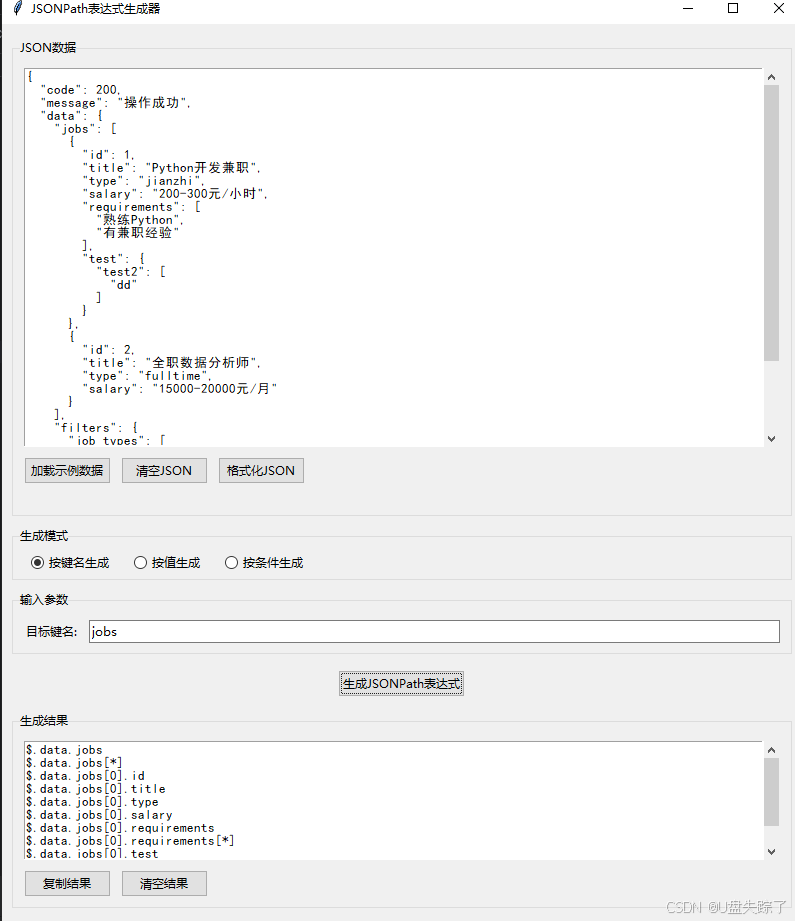
class JSONPathGeneratorGUI:
"""JSONPath表达式生成器的GUI界面"""
def __init__(self, root):
self.root = root
self.root.title("JSONPath表达式生成器")
self.root.geometry("800x900")
self.root.resizable(True, True)
# 创建生成器实例
self.generator = JSONPathGenerator()
# 设置字体
self.font = ('SimHei', 10)
# 创建界面组件
self._create_widgets()
# 初始化示例数据
self._load_example_data()
def _create_widgets(self):
"""创建GUI组件"""
# 创建主框架
main_frame = ttk.Frame(self.root, padding="10")
main_frame.pack(fill=tk.BOTH, expand=True)
# JSON数据输入区域
data_frame = ttk.LabelFrame(main_frame, text="JSON数据", padding="5")
data_frame.pack(fill=tk.BOTH, expand=True, pady=5)
# 数据输入控件(使用文本框,保留多行编辑功能)
self.json_text = scrolledtext.ScrolledText(data_frame, width=80, height=25, font=self.font)
self.json_text.pack(fill=tk.BOTH, expand=True, padx=5, pady=5)
# 数据操作按钮框架(单独一行)
data_btn_frame = ttk.Frame(data_frame)
data_btn_frame.pack(fill=tk.X, pady=5)
# 数据操作按钮
ttk.Button(data_btn_frame, text="加载示例数据", command=self._load_example_data).pack(side=tk.LEFT, padx=5)
ttk.Button(data_btn_frame, text="清空JSON", command=self._clear_json).pack(side=tk.LEFT, padx=5)
ttk.Button(data_btn_frame, text="格式化JSON", command=self._format_json).pack(side=tk.LEFT, padx=5)
# ttk.Button(data_btn_frame, text="强制修复JSON", command=self._force_repair_json).pack(side=tk.LEFT, padx=5)
# 错误信息显示区域
self.error_label = ttk.Label(data_frame, text="", foreground="red", font=self.font)
self.error_label.pack(anchor="w", padx=5, pady=2)
# 生成模式选择区域
mode_frame = ttk.LabelFrame(main_frame, text="生成模式", padding="5")
mode_frame.pack(fill=tk.X, pady=5)
self.mode_var = tk.StringVar(value="by_key")
ttk.Radiobutton(mode_frame, text="按键名生成", variable=self.mode_var, value="by_key",
command=self._update_input_fields).pack(side=tk.LEFT, padx=10)
ttk.Radiobutton(mode_frame, text="按值生成", variable=self.mode_var, value="by_value",
command=self._update_input_fields).pack(side=tk.LEFT, padx=10)
ttk.Radiobutton(mode_frame, text="按条件生成", variable=self.mode_var, value="by_condition",
command=self._update_input_fields).pack(side=tk.LEFT, padx=10)
# 输入参数区域
self.input_frame = ttk.LabelFrame(main_frame, text="输入参数", padding="5")
self.input_frame.pack(fill=tk.X, pady=5)
# 按键名生成的输入框
self.key_frame = ttk.Frame(self.input_frame)
ttk.Label(self.key_frame, text="目标键名:").pack(side=tk.LEFT, padx=5)
self.key_entry = ttk.Entry(self.key_frame, width=50)
self.key_entry.pack(side=tk.LEFT, padx=5, fill=tk.X, expand=True)
# 按值生成的输入框
self.value_frame = ttk.Frame(self.input_frame)
ttk.Label(self.value_frame, text="目标值:").pack(side=tk.LEFT, padx=5)
self.value_entry = ttk.Entry(self.value_frame, width=50)
self.value_entry.pack(side=tk.LEFT, padx=5, fill=tk.X, expand=True)
# 按条件生成的输入框
self.condition_frame = ttk.Frame(self.input_frame)
ttk.Label(self.condition_frame, text="键名:").pack(side=tk.LEFT, padx=5)
self.condition_key_entry = ttk.Entry(self.condition_frame, width=15)
self.condition_key_entry.pack(side=tk.LEFT, padx=5)
self.operator_var = tk.StringVar(value="==")
operator_combo = ttk.Combobox(self.condition_frame, textvariable=self.operator_var,
values=["==", "!=", ">", "<", ">=", "<=", "contains"], width=8)
operator_combo.pack(side=tk.LEFT, padx=5)
ttk.Label(self.condition_frame, text="值:").pack(side=tk.LEFT, padx=5)
self.condition_value_entry = ttk.Entry(self.condition_frame, width=20)
self.condition_value_entry.pack(side=tk.LEFT, padx=5)
# 生成按钮
self.generate_btn = ttk.Button(main_frame, text="生成JSONPath表达式", command=self._generate_jsonpath)
self.generate_btn.pack(pady=10)
# 结果显示区域
result_frame = ttk.LabelFrame(main_frame, text="生成结果", padding="5")
result_frame.pack(fill=tk.BOTH, expand=True, pady=5)
self.result_text = scrolledtext.ScrolledText(result_frame, width=80, height=5, font=self.font)
self.result_text.pack(fill=tk.BOTH, expand=True, padx=5, pady=5)
# 结果操作按钮
result_btn_frame = ttk.Frame(result_frame)
result_btn_frame.pack(fill=tk.X, pady=5)
ttk.Button(result_btn_frame, text="复制结果", command=self._copy_result).pack(side=tk.LEFT, padx=5)
ttk.Button(result_btn_frame, text="清空结果", command=self._clear_result).pack(side=tk.LEFT, padx=5)
# 初始显示按键名生成的输入框
self._update_input_fields()
def _update_input_fields(self):
"""根据选择的模式更新输入字段"""
# 隐藏所有输入框
for frame in [self.key_frame, self.value_frame, self.condition_frame]:
frame.pack_forget()
# 显示选中的输入框
mode = self.mode_var.get()
if mode == "by_key":
self.key_frame.pack(fill=tk.X, pady=5)
elif mode == "by_value":
self.value_frame.pack(fill=tk.X, pady=5)
elif mode == "by_condition":
self.condition_frame.pack(fill=tk.X, pady=5)
def _load_example_data(self):
"""加载示例JSON数据"""
example_data = {
"code": 200,
"message": "操作成功",
"data": {
"jobs": [
{
"id": 1,
"title": "Python开发兼职",
"type": "jianzhi",
"salary": "200-300元/小时",
"requirements": ["熟练Python", "有兼职经验"],
"test": {"test2": ["dd"]}
},
{
"id": 2,
"title": "全职数据分析师",
"type": "fulltime",
"salary": "15000-20000元/月"
}
],
"filters": {
"job_types": ["fulltime", "jianzhi", "internship"]
}
}
}
self.json_text.delete(1.0, tk.END)
self.json_text.insert(tk.END, json.dumps(example_data, ensure_ascii=False, indent=2))
self.error_label.config(text="")
# 自动解析JSON数据
self._auto_parse_json()
def _sanitize_json(self, json_str: str) -> str:
"""净化JSON文本,移除注释和修复常见格式问题"""
# 移除单行注释 (// ...)
json_str = re.sub(r'//.*$', '', json_str, flags=re.MULTILINE)
# 移除多行注释 (/* ... */)
json_str = re.sub(r'/\*.*?\*/', '', json_str, flags=re.DOTALL)
# 替换单引号为双引号
json_str = re.sub(r"'", '"', json_str)
# 修复未闭合的引号(简单处理)
json_str = re.sub(r'([{,:]\s*"[^"]*)$', r'\1"', json_str)
# 移除尾部逗号
json_str = re.sub(r',\s*([\]}])', r'\1', json_str)
# 修复键名缺少双引号的问题
json_str = re.sub(r'([{,]\s*)(\w+)(\s*:)', r'\1"\2"\3', json_str)
return json_str
def _force_repair_json(self):
"""强制修复JSON,处理更复杂的格式问题"""
try:
json_str = self.json_text.get(1.0, tk.END)
# 执行增强净化
sanitized = self._sanitize_json(json_str)
# 尝试解析和重新序列化
data = json.loads(sanitized)
formatted = json.dumps(data, ensure_ascii=False, indent=2)
# 更新文本框
self.json_text.delete(1.0, tk.END)
self.json_text.insert(tk.END, formatted)
self.error_label.config(text="")
# 自动解析
self._auto_parse_json()
messagebox.showinfo("成功", "JSON强制修复成功")
except Exception as e:
# 获取详细错误信息
error_msg = str(e)
# 提取错误位置
match = re.search(r'line (\d+) column (\d+)', error_msg)
if match:
line = int(match.group(1))
col = int(match.group(2))
self.error_label.config(text=f"JSON格式错误 (行{line}, 列{col}): {error_msg}")
# 高亮错误位置
self._highlight_error(line, col)
else:
self.error_label.config(text=f"JSON强制修复失败: {error_msg}")
def _highlight_error(self, line_num, col_num):
"""高亮显示JSON中的错误位置"""
# 清除之前的高亮
self.json_text.tag_remove("error", "1.0", tk.END)
# 计算错误位置 (Tkinter文本框索引从1.0开始)
line_start = f"{line_num}.0"
line_end = f"{line_num}.end"
# 获取该行文本
line_text = self.json_text.get(line_start, line_end)
# 确保列号不超出范围
col_num = min(col_num, len(line_text))
# 标记错误位置
error_start = f"{line_num}.{col_num - 1}"
error_end = f"{line_num}.{col_num}"
# 添加错误标记
self.json_text.tag_add("error", error_start, error_end)
self.json_text.tag_config("error", background="yellow", foreground="red")
# 滚动到错误位置
self.json_text.see(error_start)
def _format_json(self):
"""格式化JSON数据"""
try:
self.error_label.config(text="")
json_str = self.json_text.get(1.0, tk.END)
# 净化JSON
sanitized = self._sanitize_json(json_str)
# 解析JSON
data = json.loads(sanitized)
# 格式化JSON
formatted = json.dumps(data, ensure_ascii=False, indent=2)
# 更新文本框
self.json_text.delete(1.0, tk.END)
self.json_text.insert(tk.END, formatted)
# 自动解析
self._auto_parse_json()
messagebox.showinfo("成功", "JSON格式化成功")
except json.JSONDecodeError as e:
# 显示详细错误信息
error_msg = f"JSON格式化失败: {str(e)}"
self.error_label.config(text=error_msg)
# 提取错误位置
match = re.search(r'line (\d+) column (\d+)', str(e))
if match:
line = int(match.group(1))
col = int(match.group(2))
self._highlight_error(line, col)
# 提供强制修复选项
if messagebox.askyesno("修复失败", f"标准格式化失败,请检查格式!\n{error_msg}"):
self._force_repair_json()
except Exception as e:
error_msg = f"JSON格式化失败: {str(e)}"
self.error_label.config(text=error_msg)
messagebox.showerror("错误", error_msg)
def _auto_parse_json(self):
"""自动解析JSON数据"""
try:
json_str = self.json_text.get(1.0, tk.END)
# 先净化JSON
sanitized = self._sanitize_json(json_str)
json_data = json.loads(sanitized)
self.generator.load_json(json_data)
return True
except Exception as e:
# 解析失败时不提示,生成表达式时会处理
self.generator.json_data = None
return False
def _clear_json(self):
"""清空JSON数据输入框"""
self.json_text.delete(1.0, tk.END)
self.generator.json_data = None
self.error_label.config(text="")
self.json_text.tag_remove("error", "1.0", tk.END)
def _generate_jsonpath(self):
"""生成JSONPath表达式"""
try:
# 清除之前的错误标记
self.error_label.config(text="")
self.json_text.tag_remove("error", "1.0", tk.END)
# 自动解析JSON数据(包含净化步骤)
parse_success = self._auto_parse_json()
if not parse_success or not self.generator.json_data:
# 提供格式化建议
if messagebox.askyesno("解析失败", "JSON格式错误,请检查格式"):
# 尝试格式化修复
self._force_repair_json()
# 重新解析
parse_success = self._auto_parse_json()
if not parse_success:
messagebox.showwarning("警告", "JSON数据解析失败,请检查格式")
return
else:
return
mode = self.mode_var.get()
result = []
if mode == "by_key":
target_key = self.key_entry.get().strip()
if not target_key:
messagebox.showwarning("警告", "请输入目标键名")
return
result = self.generator.generate_by_key(target_key)
elif mode == "by_value":
target_value = self.value_entry.get().strip()
if not target_value:
messagebox.showwarning("警告", "请输入目标值")
return
# 尝试转换值类型
try:
target_value = int(target_value)
except ValueError:
try:
target_value = float(target_value)
except ValueError:
if target_value.lower() == "true":
target_value = True
elif target_value.lower() == "false":
target_value = False
elif target_value.lower() == "null":
target_value = None
else:
target_value = target_value # 字符串类型
result = self.generator.generate_by_value(target_value)
elif mode == "by_condition":
key = self.condition_key_entry.get().strip()
value = self.condition_value_entry.get().strip()
operator = self.operator_var.get()
if not key or not value:
messagebox.showwarning("警告", "请输入键名和值")
return
# 尝试转换值类型
try:
value = int(value)
except ValueError:
try:
value = float(value)
except ValueError:
pass # 保持字符串类型
result = [self.generator.generate_by_condition(key, operator, value)]
# 显示结果(仅输出纯表达式,不带序号)
self.result_text.delete(1.0, tk.END)
if result:
# 将结果转换为字符串
result_str = "\n".join(result)
self.result_text.insert(tk.END, result_str)
else:
self.result_text.insert(tk.END, "未找到匹配的JSONPath表达式")
except Exception as e:
messagebox.showerror("错误", f"生成JSONPath失败: {str(e)}")
def _copy_result(self):
"""复制结果到剪贴板"""
result = self.result_text.get(1.0, tk.END).strip()
if result:
self.root.clipboard_clear()
self.root.clipboard_append(result)
messagebox.showinfo("成功", "结果已复制到剪贴板")
def _clear_result(self):
"""清空结果"""
self.result_text.delete(1.0, tk.END)
def main():
"""主函数,包含Tkinter可用性检查"""
if not HAS_TKINTER:
print("错误: 未找到Tkinter库,无法运行GUI界面。")
print("请按照以下说明安装Tkinter:")
print("\nWindows系统:")
print(" Tkinter通常随Python一起安装,尝试重新安装Python并确保勾选Tkinter组件")
print("\nmacOS系统:")
print(" 安装命令: brew install python-tk")
print("\nLinux系统 (Debian/Ubuntu):")
print(" 安装命令: sudo apt-get install python3-tk")
print("\nLinux系统 (CentOS/RHEL):")
print(" 安装命令: sudo yum install python3-tkinter")
sys.exit(1)
root = tk.Tk()
app = JSONPathGeneratorGUI(root)
root.mainloop()
if __name__ == "__main__":
main()
# 创建用户问题中的JSON修复示例
def fix_user_json():
user_json = """{
"code": 200,
"message": "操作成功",
"data": {
"jobs": [
{
"id": 1,
"title": "Python开发兼职",
"type': "jianzhi", # 键名为"type",值为"jianzhi"
"salary": "200-300元/小时",
"requirements": ["熟练Python", "有兼职经验"],
"test":{"test2":['dd']}
}, { "id": 2, "title": "全职数据分析师", "type": "fulltime", "salary": "15000-20000元/月" } ], "filters": { "job_types": ["fulltime", "jianzhi", "internship"] } } }"""
# 修复步骤
fixed_json = re.sub(r"#.*$", "", user_json, flags=re.MULTILINE) # 移除注释
fixed_json = re.sub(r"'", '"', fixed_json) # 单引号转双引号
fixed_json = re.sub(r'"type":', '"type":', fixed_json) # 修复键名引号
fixed_json = re.sub(r',\s*([\]}])', r'\1', fixed_json) # 移除尾部逗号
try:
data = json.loads(fixed_json)
return json.dumps(data, indent=2, ensure_ascii=False)
except Exception as e:
return f"修复失败: {str(e)}\n{fixed_json}"
# 保存成功消息
print("JSONPath表达式生成器GUI.py 文件生成成功")