测试效果
首先拿到点云
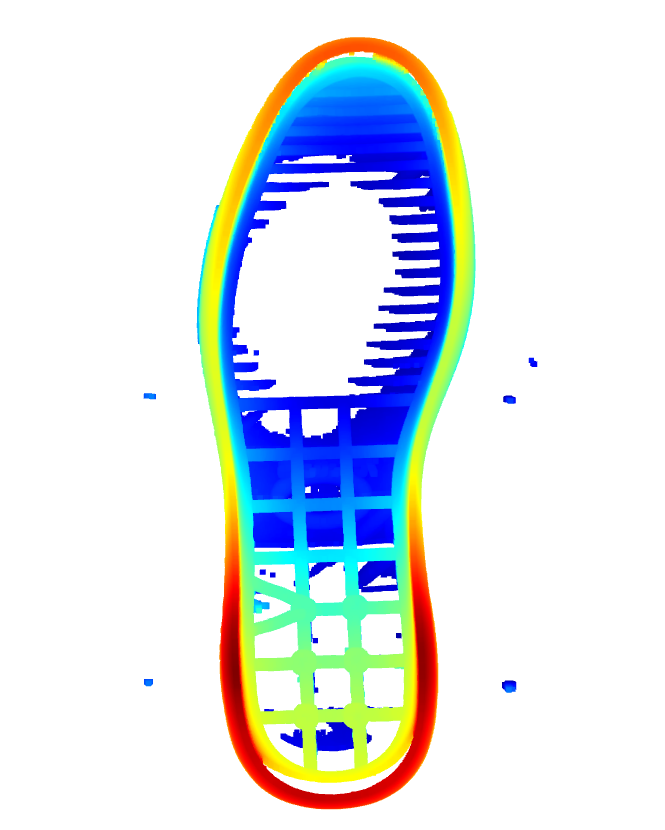
去除点云周围的杂点,可以通过高度,可以通过聚类,半径滤波都行
、
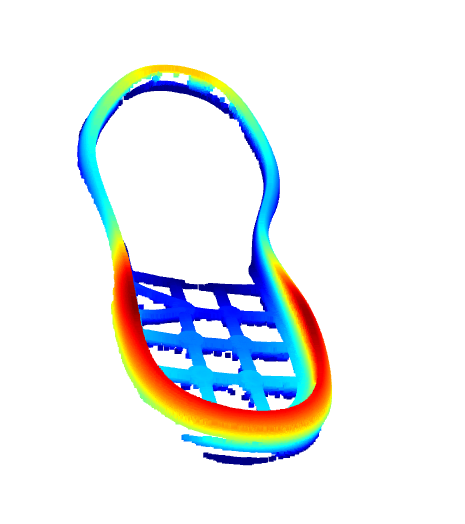
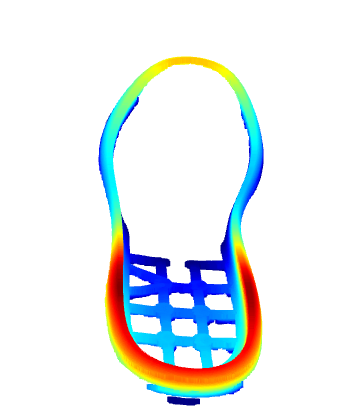
识别点云的边缘
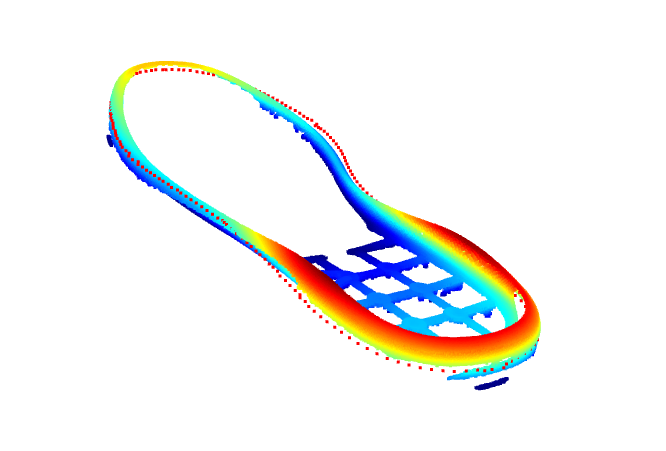
这一圈大约200个点
识别到的边缘点 向内寻找最高点
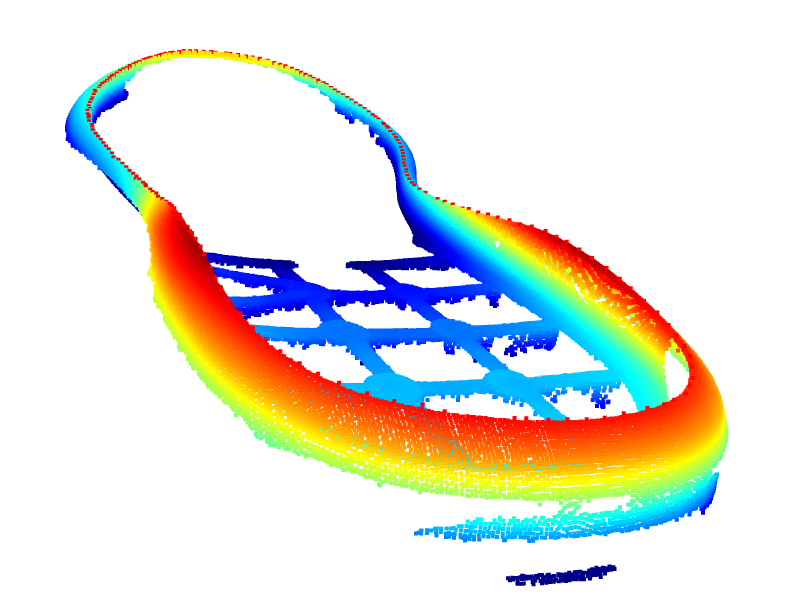
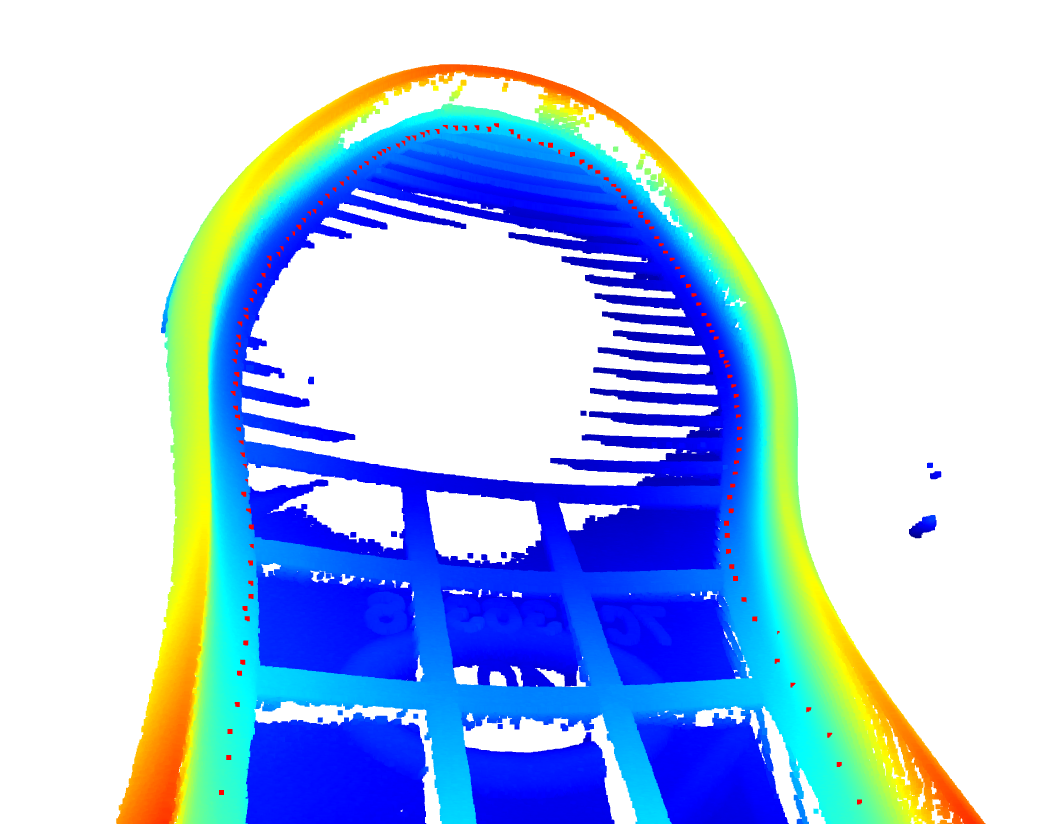
识别到最高点后 向内推固定距离
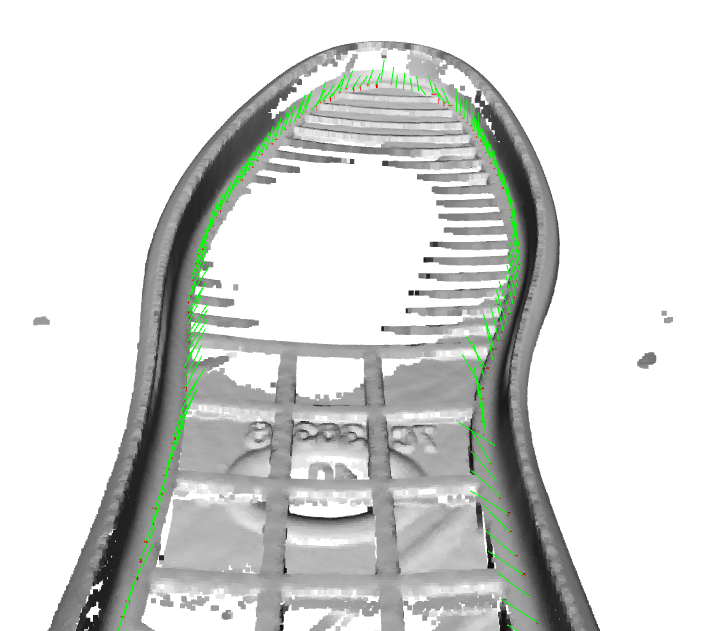
计算点胶路径的法向量,方便六轴机械手点胶位姿
测试代码
python
import open3d as o3d
import numpy as np
from scipy.interpolate import splprep, splev
from scipy.spatial import ConvexHull
import cv2
from scipy.spatial import KDTree
import copy

# 2. 栅格化点云为二值图像
def points_to_binary_image(points_2d, resolution=0.1):
    """将点云转换为二值图像(1:有点,0:无点)"""
    # 计算图像范围和尺寸
    x_min, y_min = np.min(points_2d, axis=0)
    x_max, y_max = np.max(points_2d, axis=0)
    width = int((x_max - x_min) / resolution) + 1
    height = int((y_max - y_min) / resolution) + 1

    # 初始化图像
    image = np.zeros((height, width), dtype=np.uint8)

    # 填充点云位置为1
    coords = ((points_2d - [x_min, y_min]) / resolution).astype(int)
    image[coords[:, 1], coords[:, 0]] = 255

    return image, (x_min, y_min, resolution)


# 2. 计算边缘点的法线方向(指向内部)
def compute_inward_normals(points_2d):
    """计算指向内部的法线(垂直于边界,朝向点云中心)"""
    centroid = np.mean(points_2d, axis=0)
    normals = points_2d - centroid
    normals = normals / np.linalg.norm(normals, axis=1, keepdims=True)
    return normals


# 3. 对每个边缘点生成截面线并找最高点
def find_highest_point_on_section(pcd, edge_point, normal, length=5.0, steps=100):
    """
    沿法线方向生成截面线,并找最高Z值点
    :param edge_point: 边缘点坐标(3D)
    :param normal:     法线方向(3D,XY平面内)
    :param length:     截面线长度(mm)
    :param steps:      截面线采样点数
    """
    # 生成截面线点(沿法线方向向内延伸)
    t = np.linspace(0, length, steps)
    section_points = edge_point + t[:, np.newaxis] * normal

    # 找到截面线附近的原始点云中的点
    kdtree = KDTree(np.asarray(pcd.points))
    distances, indices = kdtree.query(section_points, k=1)

    # 筛选有效点(距离阈值避免噪声)
    valid_mask = distances < 20  # 阈值1mm
    if not np.any(valid_mask):
        return edge_point  # 无交点则返回边缘点

    # 取Z值最高的点
    valid_points = np.asarray(pcd.points)[indices[valid_mask]]
    highest_point = valid_points[np.argmax(valid_points[:, 2])]
    return highest_point


print('Start')
# 加载点云(假设是PLY或PCD格式)
pcd = o3d.io.read_point_cloud("E:\\K_Project\\20250720_Shoe\\1.pcd")
print('Load Cloud')
o3d.visualization.draw_geometries([pcd])
# 定义AABB边界框的min和max点
min_bound = np.array([-900, -900, 16])  # 替换为你的最小值
max_bound = np.array([900, 900, 100])  # 替换为你的最大值

# 创建AABB
aabb = o3d.geometry.AxisAlignedBoundingBox(min_bound, max_bound)

# 截取点云
pcd_deepcopy = copy.deepcopy(pcd)
pcd = pcd.crop(aabb)


voxel_size = 0.5  # 调整体素大小(单位:mm)
pcd = pcd.voxel_down_sample(voxel_size)
print('voxel_down_sample')
# 可视化
o3d.visualization.draw_geometries([pcd])

# 统计滤波去噪(去除离群点)
cl, ind = pcd.remove_statistical_outlier(nb_neighbors=20, std_ratio=2.0)
pcd = pcd.select_by_index(ind)
print('remove_statistical_outlier')


# 可选:DBSCAN聚类(如果点云包含非鞋底部分)
labels = np.array(pcd.cluster_dbscan(eps=5, min_points=50))
max_label = labels.max()
largest_cluster_idx = np.argmax(np.bincount(labels[labels >= 0]))
pcd = pcd.select_by_index(np.where(labels == largest_cluster_idx)[0])
print('cluster_dbscan')
o3d.visualization.draw_geometries([pcd])

# 投影到XOY平面(Z=0)
points = np.asarray(pcd.points)
points_2d = points[:, :2]  # 只取XY坐标

binary_image, (x_min, y_min, res) = points_to_binary_image(points_2d, resolution=0.1)

# cv2.imshow('1',binary_image)
# cv2.waitKey()

# 3. 图像形态学处理(填充孔洞 + 提取外轮廓)
kernel = np.ones((3, 3), np.uint8)
closed_image = cv2.morphologyEx(binary_image, cv2.MORPH_CLOSE, kernel, iterations=2)
contours, _ = cv2.findContours(closed_image, cv2.RETR_EXTERNAL, cv2.CHAIN_APPROX_SIMPLE)

# 4. 提取最长轮廓(主边界)并采样
max_contour = max(contours, key=lambda x: cv2.contourArea(x))
boundary_points = max_contour.squeeze(1)  # (N, 1, 2) -> (N, 2)
boundary_points = boundary_points * res + [x_min, y_min]  # 转换回原始坐标


# 5. 均匀采样200个点
tck, u = splprep([boundary_points[:, 0], boundary_points[:, 1]], s=0, per=True)
u_new = np.linspace(0, 1, 200, endpoint=False)
x_new, y_new = splev(u_new, tck)
z_mean = np.mean(points[:, 2])
edge_points = np.column_stack([x_new, y_new, np.full(200, z_mean)])

print('均匀采样200个点')

# 6. 可视化
edge_pcd = o3d.geometry.PointCloud()
edge_pcd.points = o3d.utility.Vector3dVector(edge_points)
edge_pcd.paint_uniform_color([1, 0, 0])  # 红色边缘点
o3d.visualization.draw_geometries([pcd, edge_pcd])

# 向内推 找最高点
def estimate_simple_edge_normals_2d(points, k=5, inward=True):
    """
    简化版的二维边缘法向量计算,使用中心点校正方向
    :param points: 边缘点(Nx3或Nx2数组)
    :param k: 用于计算切线的相邻点数
    :param inward: 是否返回向内法向量(True为向内,False为向外)
    :return: 单位法向量数组(Nx2)
    """
    xy_points = points[:, :2]  # 只取XY坐标
    tree = KDTree(xy_points)

    # 计算整个边缘的中心点
    center = np.mean(xy_points, axis=0)

    normals = np.zeros_like(xy_points)

    for i, point in enumerate(xy_points):
        # 查找k个最近邻点(排除自己)
        distances, indices = tree.query(point, k=k + 1)
        neighbor_indices = indices[1:] if indices[0] == i else indices[:k]
        neighbors = xy_points[neighbor_indices]

        # PCA计算切线方向
        centered = neighbors - point
        cov = np.cov(centered, rowvar=False)
        eigvals, eigvecs = np.linalg.eig(cov)
        tangent = eigvecs[:, np.argmax(eigvals)]
        normal = np.array([-tangent[1], tangent[0]])  # 旋转90度得到法线

        # 使用中心点校正方向
        # 法向量应该大致指向外侧(与点指向中心的方向相反)
        to_center = center - point
        if np.dot(normal, to_center) > 0:
            normal = -normal  # 翻转法向量

        normals[i] = normal

    # 根据需求返回向内或向外法向量
    return -normals if inward else normals


def generate_glue_path_improved(sole_pcd, edge_points, search_distance=20, search_step=0.1):
    """
    改进版的鞋底点胶路径生成算法
    在XY平面内沿着向内方向搜索,找到每个位置Z值最高的点

    参数:
        sole_pcd: 鞋底点云(Open3D.PointCloud)
        edge_points: 边缘点坐标(Nx3 numpy数组)
        search_distance: 向内搜索的距离(米)
        search_step: 搜索步长(米)

    返回:
        glue_path_pcd: 点胶路径点云
        glue_path_points: 点胶路径点坐标(Nx3 numpy数组)
    """
    sole_points = np.asarray(sole_pcd.points)

    # 创建仅XY坐标的KDTree用于快速搜索
    xy_tree = KDTree(sole_points[:, :2])

    # 估计向内方向(指向鞋底中心)
    edge_normals = estimate_simple_edge_normals_2d(edge_points)  # 取反得到向内方向

    glue_path_points = []

    for i, (point, direction) in enumerate(zip(edge_points, edge_normals)):
        max_z = -np.inf
        best_point = None

        # 沿着向内方向逐步搜索
        for d in np.arange(0, search_distance, search_step):
            # 计算当前XY位置
            current_xy = point[:2] + direction * d

            # 在XY平面内查找最近的点(不考虑Z坐标)
            _, indices = xy_tree.query(current_xy, k=10, distance_upper_bound=search_step * 2)

            # 过滤无效索引
            valid_indices = indices[indices < len(sole_points)]
            if len(valid_indices) == 0:
                continue

            # 获取这些点的Z值
            nearby_z = sole_points[valid_indices, 2]

            # 找到Z值最大的点
            current_max_z = nearby_z.max()
            if current_max_z > max_z:
                max_z = current_max_z
                best_point = sole_points[valid_indices[np.argmax(nearby_z)]]

        if best_point is not None:
            glue_path_points.append(best_point)

    # 创建点胶路径点云
    glue_path_pcd = o3d.geometry.PointCloud()
    glue_path_pcd.points = o3d.utility.Vector3dVector(np.array(glue_path_points))

    return glue_path_pcd, np.array(glue_path_points)


glue_path_pcd_new, glue_points = generate_glue_path_improved(pcd, edge_points)


glue_path_pcd_new.paint_uniform_color([1, 0, 0])  # 红色边缘点
# pcd.paint_uniform_color([0.5, 0.5, 0.5])  # 红色边缘点
glue_path_pcd_new = glue_path_pcd_new.translate([0,0,0.5])
o3d.visualization.draw_geometries([pcd, glue_path_pcd_new])


def offset_points_to_cloud(original_points, cloud_points, offset_distance=4.0):
    """
    将一组点向内偏移指定距离,并在点云上找到对应位置

    参数:
        original_points: 原始点集(Nx3 numpy数组,单位mm)
        cloud_points: 点云数据(Mx3 numpy数组,单位mm)
        offset_distance: 向内偏移距离(mm)

    返回:
        new_points: 偏移后的点集(Nx3 numpy数组)
    """
    # 转换为毫米单位(如果输入是米)
    if np.max(original_points) < 1.0:  # 假设如果最大值小于1,单位是米
        original_points = original_points * 1000
        cloud_points = cloud_points * 1000
        offset_distance = offset_distance * 1000

    # 计算向内方向(指向点云中心)
    center = np.mean(cloud_points, axis=0)
    directions = center[:2] - original_points[:, :2]  # 只在XY平面计算方向
    directions = directions / np.linalg.norm(directions, axis=1, keepdims=True)

    # 计算偏移后的XY位置
    offset_xy = original_points[:, :2] + directions * offset_distance

    # 创建点云的XY KDTree
    xy_tree = KDTree(cloud_points[:, :2])

    new_points = []
    for i, xy in enumerate(offset_xy):
        # 查找偏移位置附近的点
        distances, indices = xy_tree.query(xy, k=10, distance_upper_bound=offset_distance * 1.5)

        # 过滤无效索引
        valid_indices = indices[indices < len(cloud_points)]
        if len(valid_indices) == 0:
            new_points.append(original_points[i])  # 如果没有找到,保留原位置
            continue

        # 获取这些点的Z值
        nearby_z = cloud_points[valid_indices, 2]

        # 找到Z值最大的点
        max_z_idx = valid_indices[np.argmax(nearby_z)]
        new_points.append(cloud_points[max_z_idx])

    return np.array(new_points)

cloud_points = np.asarray(pcd_deepcopy.points)
new_points = offset_points_to_cloud(glue_points, cloud_points, offset_distance=5.0)

FinalPointPCD = o3d.geometry.PointCloud()
FinalPointPCD.points = o3d.utility.Vector3dVector(np.array(new_points))
FinalPointPCD.paint_uniform_color([1, 0, 0])
FinalPointPCD = FinalPointPCD.translate([0,0,0.5])
o3d.visualization.draw_geometries([pcd_deepcopy, FinalPointPCD])


def compute_and_visualize_normals_correct(cloud_pcd, path_points, search_radius=5.0):
    """
    修正版:正确计算并显示点胶路径点的法向量
    """
    # 转换为numpy数组
    path_points = np.asarray(path_points) if isinstance(path_points, o3d.geometry.PointCloud) else path_points

    # 创建路径点云对象
    path_pcd = o3d.geometry.PointCloud()
    path_pcd.points = o3d.utility.Vector3dVector(path_points)

    # 计算原始点云法线(必须提前计算)
    voxel_size = 0.5  # 调整体素大小(单位:mm)
    cloud_pcd = cloud_pcd.voxel_down_sample(voxel_size)

    if not cloud_pcd.has_normals():
        cloud_pcd.estimate_normals(
            search_param=o3d.geometry.KDTreeSearchParamHybrid(
                radius=search_radius, max_nn=30))
        cloud_pcd.orient_normals_consistent_tangent_plane(15)  # 统一法线方向

    # 创建原始点云的KDTree
    cloud_tree = KDTree(np.asarray(cloud_pcd.points))
    cloud_normals = np.asarray(cloud_pcd.normals)

    # 为每个路径点分配法线
    path_normals = []
    for point in path_points:
        _, idx = cloud_tree.query(point, k=1)  # 找最近的原始点
        path_normals.append(cloud_normals[idx])

    # 关键修正步骤:必须显式设置法线并标记为已计算
    path_pcd.normals = o3d.utility.Vector3dVector(np.array(path_normals))
    path_pcd.normalize_normals()  # 确保法线单位化

    def create_normal_lines_pcd(pcd, normal_length=10.0, upward=True):
        """
        创建法线线段点云(可控制法线朝向)

        :param pcd: 输入点云(必须包含法线)
        :param normal_length: 法线显示长度(mm)
        :param upward: 是否强制法线朝Z轴正方向(XOY平面上方)
        :return: LineSet对象
        """
        if not pcd.has_normals():
            raise ValueError("输入点云必须包含法线信息")

        points = np.asarray(pcd.points)
        normals = np.asarray(pcd.normals)

        # 法线方向修正(确保朝向Z轴正方向)
        if upward:
            for i in range(len(normals)):
                if normals[i][2] < 0:  # 如果Z分量为负
                    normals[i] *= -1  # 翻转法线

        # 创建线段端点(毫米转米)
        line_points = np.vstack([
            points,  # 起点
            points + normals * (normal_length / 1.0)  # 终点(单位:米)
        ])

        # 创建线段连接关系
        lines = np.array([[i, i + len(points)] for i in range(len(points))])

        # 构建LineSet
        line_set = o3d.geometry.LineSet()
        line_set.points = o3d.utility.Vector3dVector(line_points)
        line_set.lines = o3d.utility.Vector2iVector(lines)
        line_set.colors = o3d.utility.Vector3dVector(np.tile([0, 1, 0], (len(lines), 1)))  # 绿色

        return line_set

    normal_lines = create_normal_lines_pcd(path_pcd, 10)
    # 设置颜色
    cloud_pcd.paint_uniform_color([0.7, 0.7, 0.7])  # 灰色鞋底
    path_pcd.paint_uniform_color([1, 0, 0])  # 红色路径点

    # o3d.visualization.draw_geometries([normal_lines])
    # 可视化
    o3d.visualization.draw_geometries(
        [cloud_pcd, path_pcd, normal_lines],
        window_name="Glue Path Visualization",
        width=1024,
        height=768,
        point_show_normal=False  # 禁用默认法线显示
    )


    return path_pcd

path_with_normals = compute_and_visualize_normals_correct(
        pcd_deepcopy,
        new_points,
        search_radius=3 # 根据点云密度调整
    )