文章目录
- 一、概览
- 二、关键实现技巧拆解
-
- [1. 文本"下边朝向圆心"的旋转](#1. 文本“下边朝向圆心”的旋转)
- [2. 主方向字母与普通数字差异化](#2. 主方向字母与普通数字差异化)
- 三、指南针
- [四、UI 与交互增强建议(适用于无人机控制台)](#四、UI 与交互增强建议(适用于无人机控制台))
- 五、代码
Gitee 源码: QmlLearningPro ,选择子工程 RotatingDial.pro
QML 其它文章请点击这里: QT QUICK QML 学习笔记
在无人机系统中,"航向"是一个核心的导航维度:你需要知道机头朝向哪里、当前航向与目标的偏差。
本文基于一个用 QtQuick Canvas + 2D 绘制 实现的旋转刻度圆 Demo,逐步拆解其设计原理、文字定向技巧。
一、概览
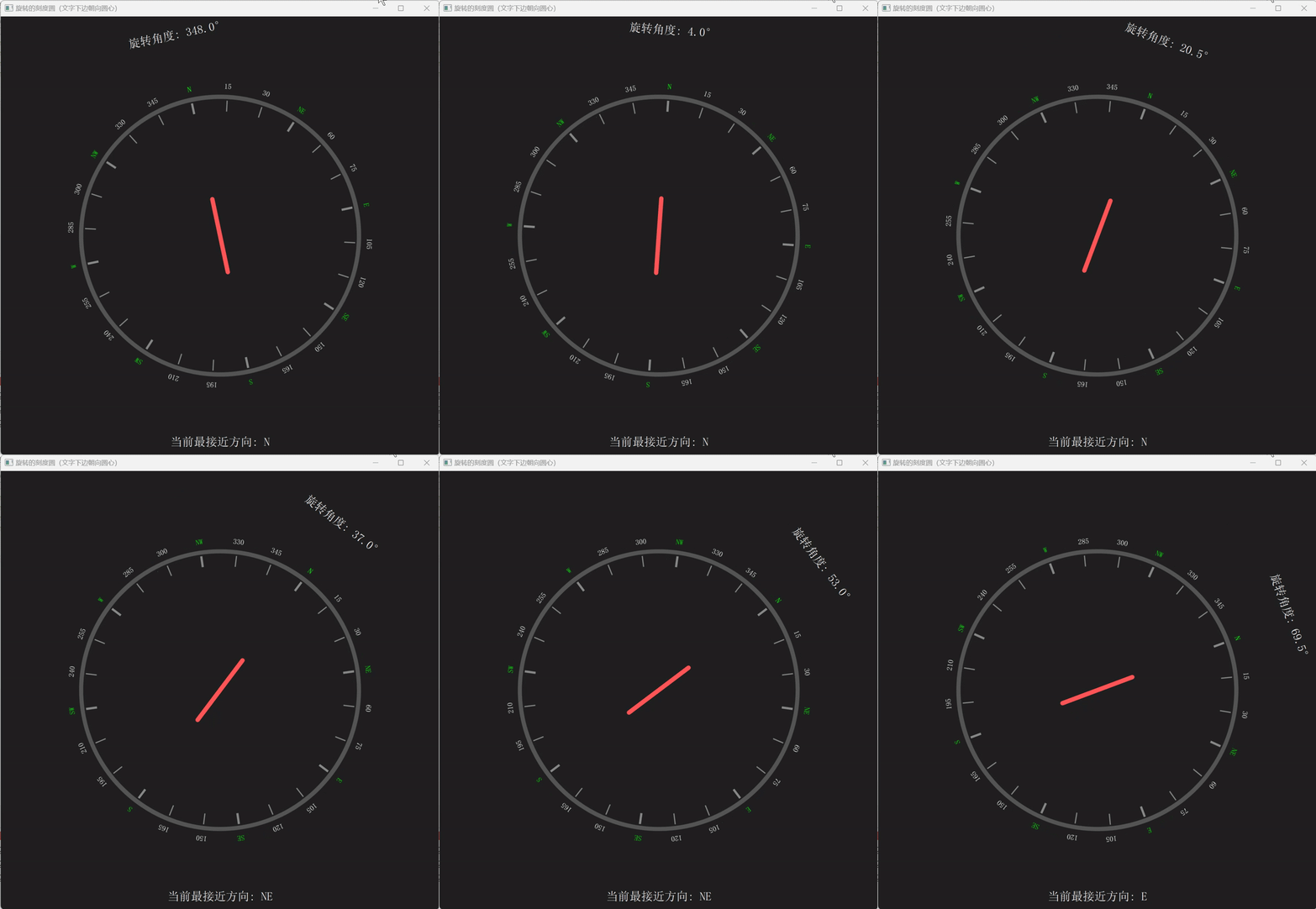
演示:
功能:
-
每 15° 一个刻度,其中 45° 的(即主方向 N, NE, E...)有加粗,并用字母标出方向(N, NE 等),其他标出角度数字。
-
所有文字都做了"下边朝向圆心"的旋转处理 ------ 这样无论圆怎么转,外圈方向标注都是"朝外看"的自然视觉效果。
-
中心有一个固定指针,代表界面参考方向(通常是"机体前方"/北)。
-
模拟的 rotationAngle 每 50ms 递增一点,用来驱动圆整体的旋转(在真机中这会来自磁力计/融合后的航向)。
-
底部显示当前最接近的八个主方向(N, NE, ...)。
二、关键实现技巧拆解
1. 文本"下边朝向圆心"的旋转
计算该标签位置向量 (lx, ly)(相对于中心)。
计算从标签指向圆心的向心向量 (-lx, -ly) ,得到它的角度 angleToCenter = atan2(-ly, -lx)。
文字默认"下边"是朝 +Y 方向,因此需要旋转 angleToCenter - 90°(即 angleToCenter - π/2)使文字底部对齐该向心方向。
通过 Canvas 的 ctx.rotate(...) 做局部变换然后绘制。
这个技巧避免了文字"倒着"或"横着"难以辨认的问题,即使盘在高速旋转,标签方向始终有一种"朝外"的、一致的视觉习惯。
2. 主方向字母与普通数字差异化
代码中用正则 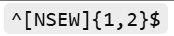
判断是方向字母,对它们赋予不同颜色(例:绿色),使关键方向一目了然。
三、指南针
在真实无人机中,航向(heading)不是靠模拟自增给出的,而是来自一套传感器融合系统。要把这个 UI Demo 和实际传感器融合。
四、UI 与交互增强建议(适用于无人机控制台)
北向锁定切换:用户可以选择"磁北/真北/机头"模式,UI 上文字颜色/标签备注随之变化。
过渡动画:航向突变时用缓动处理防止跳变,避免飞控短时波动造成 UI 抖动。
偏差提示:例如显示"偏离目标航向 X°",配合目标箭头指示(用另一层小箭头叠加)。
可配置刻度与单位:让用户切换 360°、16 分度、甚至自定义方向标签(比如航线编号)。
五、代码
具体见 QmlLearningPro ,选择子工程 RotatingDial.pro
javascript
import QtQuick 2.15
import QtQuick.Window 2.15
import QtQuick.Controls 2.11
import QtQml 2.15


Window {
    id:     root
    width:  600
    height: 600
    visible: true
    color: "#202020"
    title: "旋转的刻度圆(文字下边朝向圆心)"

    property real rotationAngle: 0   // 当前旋转角度(模拟数据)
    property real radius: Math.min(width, height) * 0.3

    // 方向映射(假设 NW 是 315°)
    readonly property var directionMap: {
        "0": "N",
        "45": "NE",
        "90": "E",
        "135": "SE",
        "180": "S",
        "225": "SW",
        "270": "W",
        "315": "NW",
        "360": "N"
    }

    // 模拟数据:每 50ms 递增一点角度
    Timer {
        interval: 50
        repeat: true
        running: true
        onTriggered: {
            root.rotationAngle = (root.rotationAngle + 0.5) % 360
        }
    }

    // 中心容器
    Item {
        id: dial
        anchors.centerIn: parent
        width: parent.width
        height: parent.height
        transform: Rotation {
            origin.x: root.width/2
            origin.y: root.height/2
            angle: root.rotationAngle
        }

        // 圆盘背景 + 刻度
        Canvas {
            id: circleCanvas
            anchors.centerIn: parent
            width:  parent.width
            height: parent.height
            onPaint: {
                var ctx = getContext("2d")
                ctx.reset()
                ctx.translate(width/2, height/2)

                // 画外圈
                ctx.beginPath()
                ctx.lineWidth = 6
                ctx.strokeStyle = "#555555"
                ctx.arc(0,0, root.radius + 10, 0, Math.PI*2)
                ctx.stroke()

                // 每 15° 画刻度
                for (var deg=0; deg<=360; deg += 15) {
                    var rad = (deg - 90) * Math.PI / 180  // 0° 在顶部
                    var innerR = root.radius - 10
                    var outerR = root.radius + 5

                    ctx.beginPath()
                    ctx.lineWidth = (deg % 45 === 0) ? 3 : 1.5
                    ctx.strokeStyle = "#888888"
                    var x1 = Math.cos(rad) * innerR
                    var y1 = Math.sin(rad) * innerR
                    var x2 = Math.cos(rad) * outerR
                    var y2 = Math.sin(rad) * outerR
                    ctx.moveTo(x1, y1)
                    ctx.lineTo(x2, y2)
                    ctx.stroke()
                }

                // 每 15° 画标签,文字下边朝向圆心
                for (var deg=0; deg<=360; deg += 15) {
                    var rad = (deg - 90) * Math.PI / 180  // 0° 在顶部
                    var labelR = root.radius + 25
                    var lx = Math.cos(rad) * labelR
                    var ly = Math.sin(rad) * labelR

                    // 决定要显示什么:方向字母优先
                    var text = ""
                    if (directionMap.hasOwnProperty(deg.toString())) {
                        text = directionMap[deg.toString()]
                    } else if (deg === 360) {
                        text = directionMap["360"]
                    } else {
                        text = deg.toString()
                    }

                    // 文字旋转:使"下边"朝向圆心
                    // 向心向量是 (-lx, -ly),其角度:
                    var angleToCenter = Math.atan2(-ly, -lx)  // 弧度
                    // 需要把文字的"下边"(正 y 方向,角度 90°)对齐到这个向量:
                    var rotateRad = angleToCenter - Math.PI/2

                    ctx.save()
                    ctx.translate(lx, ly)
                    ctx.rotate(rotateRad)

                    // 文字样式
                    ctx.font = "bold 14px Sans"
                    ctx.textAlign = "center"
                    ctx.textBaseline = "middle"
                    if (/^[NSEW]{1,2}$/.test(text)) {
                        ctx.fillStyle = "#00ff00" // 方向:绿
                    } else {
                        ctx.fillStyle = "#ffffff" // 数字:白
                    }
                    ctx.fillText(text, 0, 0)
                    ctx.restore()
                }
            }
            onWidthChanged: requestPaint()
            onHeightChanged: requestPaint()
            Component.onCompleted: requestPaint()
        }

        // 中心指针(可选,标示当前 0 方向)
        Rectangle {
            width: 6
            height: root.radius * 0.6
            anchors.horizontalCenter: parent.horizontalCenter
            anchors.verticalCenter: parent.verticalCenter
            color: "#ff5555"
            radius: 3
            y: parent.height/2 - height
        }

        // 当前角度显示(不随着圆盘转动,固定在界面)
        Text {
            id: angleLabel
            text: "旋转角度: " + rotationAngle.toFixed(1) + "°"
            color: "#ffffff"
            font.pixelSize: 16
            anchors.horizontalCenter: parent.horizontalCenter
            anchors.top: parent.top
            anchors.topMargin: 10
        }
    }

    // 外圈当前方向提示
    Text {
        id: currentDir
        anchors.bottom: parent.bottom
        anchors.horizontalCenter: parent.horizontalCenter
        anchors.bottomMargin: 10
        font.pixelSize: 16
        color: "#ffffff"
        text: {
            var normalized = (rotationAngle % 360 + 360) % 360
            var closest = Math.round(normalized / 45) * 45
            if (closest === 360) closest = 0
            var dir = directionMap[closest.toString()] || closest + "°"
            return "当前最接近方向: " + dir
        }
    }
}