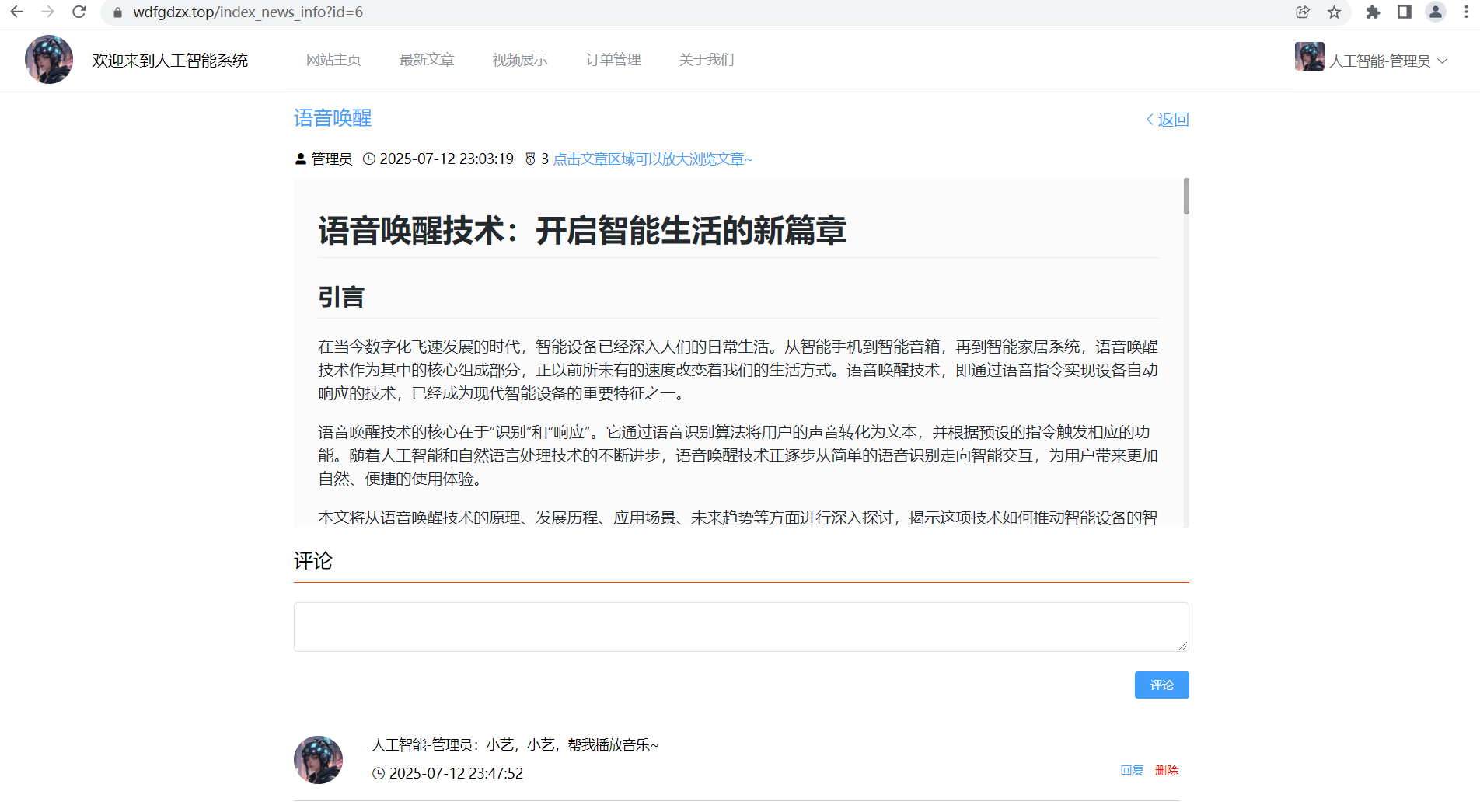
在现代Web应用中,新闻详情页和评论系统是非常常见的功能模块。本文将详细介绍如何使用Vue.js前端框架和Spring Boot后端框架实现一个完整的新闻详情展示页面,包括新闻内容展示、点赞功能、评论与回复功能等。
一、系统架构概述
本系统采用前后端分离的架构:
-
前端:使用Vue.js框架,配合Element UI组件库实现页面交互
-
后端:基于Spring Boot框架,MyBatis Plus作为ORM框架
-
数据库:MySQL关系型数据库
二、前端实现细节
1. 新闻详情页组件结构
<template>
  <div class="IndexNewsInfo-container" style="width:60%;margin: 5px auto 10px;">
    <!-- 标题区 -->
    <div>
      <div class="pd-10" style="font-size: 20px;color: #409EFF;cursor: pointer;">
        {{ send.title }}
        <span @click="$router.back()" style="cursor: pointer;float: right;font-size: 16px;margin-top: 5px;">
          <i class="el-icon-arrow-left"></i>返回
        </span>
      </div>
      <!-- 作者、时间等信息 -->
    </div>

    <!-- 内容区 -->
    <div>
      <!-- 原始内容区域 - 点击可放大 -->
      <div @click="showDialog = true" class="clickable-content">
        <mavon-editor :value="send.content" ... />
      </div>
      <!-- 弹窗组件 -->
      <el-dialog :title="send.title" :visible.sync="showDialog" width="80%">
        <mavon-editor :value="send.content" ... />
      </el-dialog>
    </div>

    <!-- 评论区域 -->
    <div style="margin:10px 0">
      <!-- 评论输入框 -->
      <!-- 评论列表 -->
      <!-- 回复弹窗 -->
    </div>
  </div>
</template>
2. 核心功能实现
2.1 内容展示与放大功能
使用mavon-editor作为Markdown渲染器,实现了点击内容区域放大查看的功能:
<div @click="showDialog = true" class="clickable-content">
  <mavon-editor :value="send.content" ... />
</div>

<el-dialog :title="send.title" :visible.sync="showDialog" width="80%">
  <mavon-editor :value="send.content" ... />
</el-dialog>
2.2 点赞功能
add_praise(id) {
  this.send.id = id
  this.$http.post("/news/add_praise", this.send).then(res => {
    if (res.data.code === "200") {
      this.$message.success("点赞成功");
      this.select()
    }
  })
}
2.3 评论系统
评论系统实现了多级回复功能,主要包含:
-
评论提交
-
回复功能
-
评论删除
-
评论列表展示
// 保存评论
confirmInsertOrUpdate() {
  if (!this.user.id) {
    this.$message.warning("请登录后操作~")
    return false
  }
  this.sendForm.newsId = this.$route.query.id
  this.sendForm.userId = this.user.id
  if (this.answerContent) {
    this.sendForm.content = this.answerContent
  }
  this.$http.post("/discuss/insertOrUpdate", this.sendForm).then(res => {
    if (res.data.code === "200") {
      this.$message.success('评论成功')
      this.sendForm = {}
      this.answerFlag = false
      this.answerContent = null
    }
    this.select_tree_by_news_id()
  })
}
3. SEO优化
通过Vue的head()方法实现了SEO相关的元标签设置:
head() {
  return {
    title: this.send.title + ' - 人工智能系统',
    meta: [
      {
        hid: 'description',
        name: 'description',
        content: this.send.content ? this.send.content.substring(0, 150) : '人工智能新闻详情'
      },
      // 社交分享 meta
      {hid: 'og-title', property: 'og:title', content: this.send.title + ' - 人工智能系统'},
      {
        hid: 'og-desc',
        property: 'og:description',
        content: this.send.content ? this.send.content.substring(0, 150) : '人工智能新闻详情'
      },
      {hid: 'og-type', property: 'og:type', content: 'article'}
    ],
    script: [
      {
        type: 'application/ld+json',
        json: {
          "@context": "https://wdfgdzx.top/",
          "@type": "NewsArticle",
          "headline": this.send.title,
          "description": this.send.content ? this.send.content.substring(0, 150) : '',
          "datePublished": this.send.time,
          "author": {
            "@type": "Person",
            "name": this.send.author || '人工智能系统管理员'
          }
        }
      }
    ]
  }
}
三、后端实现细节
1. 新闻相关接口
@RestController
@RequestMapping("/news")
public class NewsController {

    @Resource
    NewsMapper newsMapper;

    // 点赞功能
    @PostMapping("/add_praise")
    public Res add_praise(@RequestBody News news) {
        News existNews = newsMapper.selectById(news.getId());
        existNews.setPraise(existNews.getPraise() + 1);
        newsMapper.updateById(existNews);
        return Res.success(null);
    }

    // 分页查询
    @PostMapping("/list_page")
    public Res list_page(@RequestBody News news) {
        QueryWrapper<News> queryWrapper = new QueryWrapper<>();
        if (!MyUtils.blankFlag(news.getTitle())) {
            queryWrapper.like("title", news.getTitle());
        }
        queryWrapper.orderByDesc("time");
        Integer total = Math.toIntExact(newsMapper.selectCount(queryWrapper));

        MyUtils.selectByPageManage(total, news);
        queryWrapper.last("limit " + news.getStart() + "," + news.getEnd());
        List<News> dataList = newsMapper.selectList(queryWrapper);

        HashMap<Object, Object> hashMap = new HashMap<>();
        hashMap.put("total", total);
        hashMap.put("data", dataList);
        return Res.success(hashMap);
    }
}
2. 评论系统设计
评论系统采用树形结构存储,支持多级回复:
-
rootId: 根评论ID -
fatherId: 直接父评论ID -
newsId: 关联的新闻ID -
userId: 评论用户ID
四、关键技术与优化点
-
内容展示优化:使用mavon-editor实现Markdown内容的优雅展示,并添加点击放大功能提升用户体验
-
评论性能优化:后端一次性查询所有评论并按树形结构组织,减少前端请求次数
-
SEO优化:通过动态设置meta标签和结构化数据提升搜索引擎友好度
-
响应式设计:适配不同屏幕尺寸,确保移动端良好体验
-
交互优化:点赞、评论等操作提供即时反馈,增强用户参与感
五、总结
本文详细介绍了一个完整的新闻详情页与评论系统的实现方案。通过Vue.js和Spring Boot的组合,我们能够快速构建功能丰富、用户体验良好的新闻展示页面。系统特别注重以下几个方面:
-
内容展示:支持Markdown格式,提供放大阅读功能
-
用户互动:完善的点赞和评论系统
-
性能考虑:合理的数据加载策略
-
SEO友好:完善的元信息设置
这种架构和实现方式可以广泛应用于各种内容型网站,如新闻门户、博客系统、知识库等场景。开发者可以根据实际需求进行进一步的功能扩展和优化。