💡 前言:为何需要自动添加注释?
在实际开发中,我们经常遇到如下需求:
- 当我们完成一个功能或修复一个 bug 后,需要在提交代码的同时记录其对应的 issue 编号;
- 或者我们希望在每次
git add阶段就自动生成注释格式,如:
javascript
// Start: Added for CN-XXXXX
    const newFunction = () => {
        return 'New content added for this task'
    }
// End: Added for CN-XXXXX
这样的做法能显著增强版本历史的可读性与追溯能力。传统的解决方式通常是手动插入注释,效率低且容易遗漏。
本文将介绍一个实用的 PowerShell 脚本 ,它可以在 git add 上运行,自动识别出新增的代码块,并自动在其前后插入预定义注释标签。该方法非常适合本地使用或集成到构建流水线中。
❓ 第一部分:这个 PowerShell 脚本能解决什么问题?
假设你正在为多个 feature 新增代码并准备提交,但忘记为每一个新方法添加 issue 标记,后续追踪时便困难重重。这个问题可以通过下面几个步骤解决:
| 目标 | 功能描述 |
|---|---|
| ✅ 获取 staged 区域的所有 diff | 使用 git diff --cached 获取当前暂存的内容 |
| ✅ 解析 diff 提取所有新增代码 | 提取 git hunk 中以 + 开头的有效行 |
| ✅ 找回这些代码在文件中的位置 | 在原文件中进行逐行比对 |
| ✅ 插入 marker 注释 | 将 start/end 索引注释写入实际文件中 |
🚀 脚本结构简化示意
以下是简化版逻辑流程图:
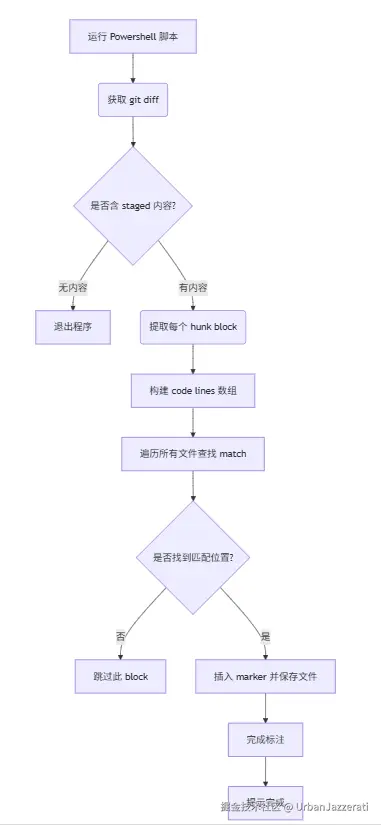
🧠 第二部分:代码结构详解 + 示例分析
完整的 PowerShell 脚本如下(已隐藏真实项目路径和 issue number):
🔧 脚本核心变量介绍
ini
$issueNumber = "CN XXXXXX"
$lines         = $gitDiff -split "`n"
$currentFile   = $null
$patchBlocks   = @()
$currentPatch  = @()
$inHunk = $false$issueNumber:当前任务对应的 issue 编号$lines:来自git diff --cached的每行内容$currentFile:当前解析中的文件路径$patchBlocks:最终提取出来的 patch 列表集合$currentPatch:正在解析的 diff code 行数组$inHunk:判断是否处在 git diff 的 block 内部
📂 文件识别 & Diff Block 提取
处理 git diff 的关键是提取每个 patch block 中的真实代码行。关键逻辑如下:
bash
if ($line -like "+++ b/*") {
    $currentFile = $line.Substring(5).Trim()
    continue
}
if ($line -match "^@@ -\d+,?\d* +(\d+),?(\d*) @@") {
    if ($inHunk) {
        $patchBlocks += @{
            File    = $currentFile
            Lines   = $currentPatch
        }
    }
    $inHunk     = $true
    $currentPatch = @()
}
当脚本检测到一个新的 patch 区块起点(由 @@ ... @@ 标签决定),就会把之前收集的一组 code line 存入 patch blocks 数组中。
✨ 有效代码清洗逻辑
为了仅提取真正的新增代码行,过滤掉空白、上下文无关信息等,脚本使用了以下逻辑:
perl
if ($line.StartsWith("+") -and -not ($line.StartsWith("++"))) {
    $code = $line.Substring(1).TrimEnd()
    if ($code.Trim() -ne "") {
        $currentPatch += $code
    }
}
上述逻辑确保我们只保留非空、真实的新增代码行,并去除多余的缩进或前缀字符。
🔁 第三部分:匹配与注释插入算法详解
🔑 Step 1:文件路径重建
ini
$filePath = Join-Path $PWD.Path $block.FileJoin-Path 将相对路径转换为绝对路径,比如:
bash
$PSScriptRoot → C:\MyProject\src\
$file →       lwc/deal.js
→ full path = C:\MyProject\src\lwc\deal.js
🛠️ Step 2:查找 patch 在文件中的位置
perl
for ($i = 0; $i -lt $contentArr.Length; $i++) {
    $match = $true
    for ($j = 0; $j -lt $block.Lines.Count; $j++) {
        ...
    }
    if ($match) {
        # 插入 marker ...
    }
}这部分是典型的"逐行比较算法",目的是确定当前 patch 是否已经存在于原文件中。如果存在,则插入 marker。
注意:由于直接字符比对,所以要求源文件内容与 patch 完全一致才能插入,否则无法匹配上。
🖋️ Step 3:插入 marker 注释
bash
$newContent = $contentArray[0..$i] +
              $markerStart +
              $contentArray[i..(i + count)] +
              $markerEnd +
              $contentArray[(i + count)..]
这是一个构造新的内容数组的方法,通过拼接原内容与 mark 注释的方式实现插入效果。
🧹 结语:小技巧带来大便利
虽然这个 PowerShell 脚本看似简单,但它完美地解决了在本地工作流中自动标注代码与 issue 编号的需求。这不仅让开发者省去了手动标注的时间,还提高了团队协作效率和代码透明度。
如果你也在寻找一款提升本地开发自动化的小工具,不妨试着将此脚本嵌入你的 Git 工作流中!
🔗 附录:完整 PowerShell 脚本
php
# 定义 Issue 编号
$issueNumber = "CN XXXXXX"
Write-Host "Analyzing staged changes..."
# 获取 staged 的 git diff
$gitDiff = git diff --cached -U0
if (-not $gitDiff) {
    Write-Host "No changes are currently staged."
    exit
}
# 按行处理 diff 内容
$lines = $gitDiff -split "`n"
$currentFile = $null
$patchBlocks = @()
$currentPatch = @()
$inHunk = $false
foreach ($line in $lines) {
    if ($line.StartsWith("diff ")) { continue }
    if ($line -match "^index .+$") { continue }
    if ($line -like "+++ b/*") {
        $currentFile = $line.Substring(5).Trim()
        continue
    }
    if ($line -match "^@@ -\d+,?\d* +(\d+),?(\d*) @@") {
        if ($inHunk) {
            $patchBlocks += @{ File = $currentFile; Lines = $currentPatch }
        }
        $inHunk = $true
        $currentPatch = @()
    }
    if ($inHunk) {
        if ($line.StartsWith("+") -and -not ($line.StartsWith("++"))) {
            $code = $line.Substring(1).TrimEnd()
            if ($code.Trim() -ne "") {
                $currentPatch += $code
            }
        }
    }
}
if ($inHunk -and $currentPatch.Count -gt 0) {
    $patchBlocks += @{ File = $currentFile; Lines = $currentPatch }
}
$markerStart = "    // Start: Added for $issueNumber"
$markerEnd = "    // End: Added for $issueNumber"
foreach ($block in $patchBlocks) {
    $filePath = Join-Path $PWD.Path $block.File
    if (-not (Test-Path $filePath)) {
        Write-Warning "File not found: $filePath"
        continue
    }
    $contentArr = Get-Content -Path $filePath
    for ($i = 0; $i -lt $contentArr.Length; $i++) {
        $match = $true
        for ($j = 0; $j -lt $block.Lines.Count; $j++) {
            if ($i + $j -ge $contentArr.Length -or
                $contentArr[$i + $j].Trim() -ne $block.Lines[$j].Trim()) {
                $match = $false
                break
            }
        }
        if ($match) {
            $newContent = @()
            for ($k = 0; $k -lt $i; $k++) {
                $newContent += $contentArr[$k]
            }
            $newContent += $markerStart
            for ($k = 0; $k -lt $block.Lines.Count; $k++) {
                $newContent += $contentArr[$i + $k]
            }
            $newContent += $markerEnd
            for ($k = ($i + $block.Lines.Count); $k -lt $contentArr.Length; $k++) {
                $newContent += $contentArr[$k]
            }
            Set-Content -Path $filePath -Value $newContent
            Write-Host "Added markers to file '$filePath' at line(s): $($i) to $(($i + $block.Lines.Count - 1))"
            break
        }
    }
}
Write-Host "Markers added where applicable."
🙌 最后说句
如果你觉得这类"轻量级却高效的自动化工具"对你有用,请收藏、点赞或分享。也欢迎留言交流你的自动化经验,或告诉我你在脚本上还可以如何拓展!