
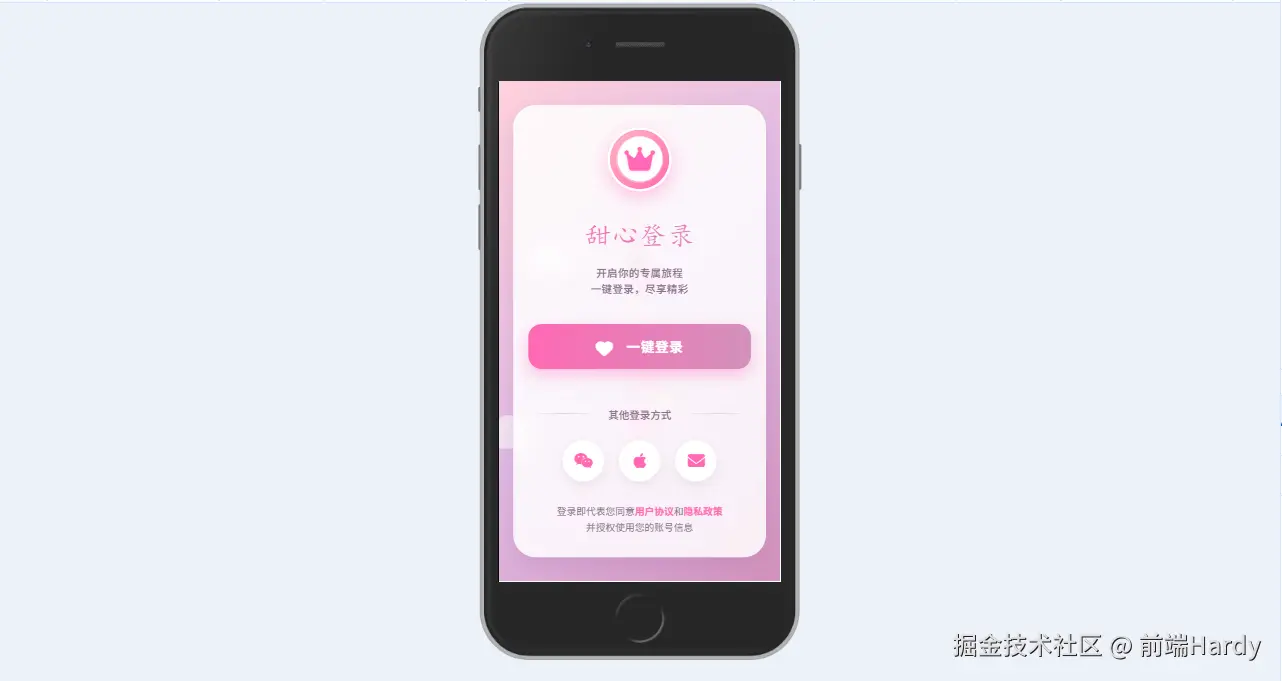
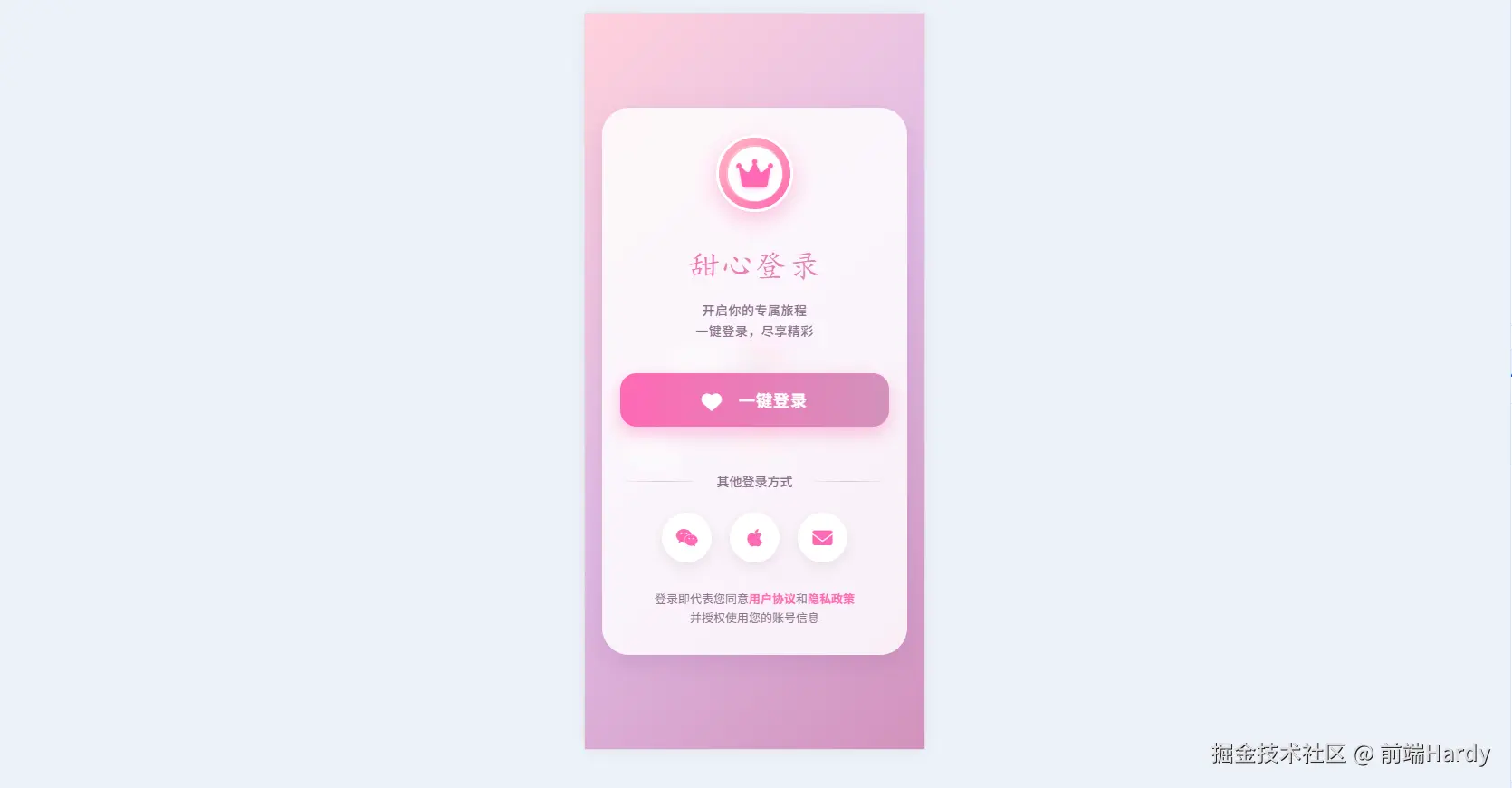
这个HTML页面通过精心设计的视觉效果和交互体验,创造了一个温馨、友好的用户一键登录界面。
大家复制代码时,可能会因格式转换出现错乱,导致样式失效。建议先少量复制代码进行测试,若未能解决问题,私信回复源码两字,我会发送完整的压缩包给你。
演示效果
HTML&CSS
html
<!DOCTYPE html>
<html lang="zh-CN">

<head>
    <meta charset="UTF-8">
    <meta name="viewport" content="width=device-width, initial-scale=1.0">
    <title>一键登录</title>
    <link rel="stylesheet" href="https://cdnjs.cloudflare.com/ajax/libs/font-awesome/6.4.0/css/all.min.css">
    <link href="https://fonts.googleapis.com/css2?family=Pacifico&family=Quicksand:wght@400;500;700&display=swap"
        rel="stylesheet">
    <style>
        * {
            margin: 0;
            padding: 0;
            box-sizing: border-box;
        }

        body {
            background: linear-gradient(135deg, #ffd1dc, #e0bbe4, #d291bc);
            color: #5a3d5c;
            min-height: 100vh;
            display: flex;
            justify-content: center;
            align-items: center;
            font-family: 'Quicksand', sans-serif;
            overflow: hidden;
            position: relative;
        }

        /* 装饰元素 */
        .decoration {
            position: absolute;
            z-index: 0;
        }

        .heart {
            position: absolute;
            color: rgba(255, 105, 180, 0.3);
            font-size: 24px;
            animation: float 8s infinite ease-in-out;
        }

        .flower {
            position: absolute;
            color: rgba(255, 215, 0, 0.3);
            font-size: 28px;
            animation: rotate 20s infinite linear;
        }

        .cloud {
            position: absolute;
            color: rgba(255, 255, 255, 0.6);
            font-size: 50px;
            animation: drift 30s infinite linear;
        }

        /* 登录容器 */
        .login-container {
            position: relative;
            z-index: 10;
            width: 90%;
            max-width: 420px;
            background: rgba(255, 255, 255, 0.85);
            backdrop-filter: blur(10px);
            border-radius: 30px;
            padding: 40px 30px;
            box-shadow: 0 10px 30px rgba(146, 84, 150, 0.2);
            text-align: center;
        }

        .logo {
            margin-bottom: 25px;
            display: flex;
            justify-content: center;
        }

        .logo-circle {
            width: 100px;
            height: 100px;
            border-radius: 50%;
            background: linear-gradient(135deg, #ffb6c1, #ff69b4);
            display: flex;
            align-items: center;
            justify-content: center;
            box-shadow: 0 8px 25px rgba(255, 105, 180, 0.4);
            position: relative;
            overflow: hidden;
            border: 3px solid white;
        }

        .logo-circle::before {
            content: '';
            position: absolute;
            width: 80%;
            height: 80%;
            border-radius: 50%;
            background: rgba(255, 255, 255, 0.3);
        }

        .logo-inner {
            width: 70px;
            height: 70px;
            border-radius: 50%;
            background: white;
            display: flex;
            align-items: center;
            justify-content: center;
            z-index: 2;
        }

        .logo-inner i {
            font-size: 36px;
            color: #ff69b4;
            text-shadow: 0 2px 5px rgba(255, 105, 180, 0.3);
        }

        h1 {
            font-family: 'Pacifico', cursive;
            font-size: 42px;
            font-weight: 400;
            margin-bottom: 10px;
            background: linear-gradient(90deg, #ff69b4, #d291bc);
            -webkit-background-clip: text;
            background-clip: text;
            color: transparent;
            letter-spacing: 1px;
        }

        .subtitle {
            font-size: 16px;
            color: #8a6d8b;
            margin-bottom: 35px;
            font-weight: 500;
            letter-spacing: 0.5px;
            line-height: 1.6;
        }

        .login-btn {
            width: 100%;
            padding: 18px;
            background: linear-gradient(90deg, #ff69b4, #d291bc);
            border: none;
            border-radius: 18px;
            color: white;
            font-size: 20px;
            font-weight: 700;
            cursor: pointer;
            transition: all 0.3s ease;
            position: relative;
            overflow: hidden;
            box-shadow: 0 8px 20px rgba(255, 105, 180, 0.4);
            margin-bottom: 25px;
            z-index: 2;
            letter-spacing: 1px;
        }

        .login-btn:hover {
            transform: translateY(-5px);
            box-shadow: 0 12px 25px rgba(255, 105, 180, 0.5);
        }

        .login-btn:active {
            transform: translateY(2px);
        }

        .login-btn i {
            margin-right: 12px;
            font-size: 22px;
            vertical-align: middle;
        }

        .login-btn::after {
            content: '';
            position: absolute;
            top: 0;
            left: -100%;
            width: 100%;
            height: 100%;
            background: linear-gradient(90deg, transparent, rgba(255, 255, 255, 0.4), transparent);
            transition: 0.5s;
            z-index: -1;
        }

        .login-btn:hover::after {
            left: 100%;
        }

        .divider {
            display: flex;
            align-items: center;
            margin: 25px 0;
        }

        .divider-line {
            flex: 1;
            height: 1px;
            background: linear-gradient(90deg, transparent, rgba(146, 84, 150, 0.3), transparent);
        }

        .divider-text {
            padding: 0 15px;
            color: #8a6d8b;
            font-size: 14px;
            font-weight: 500;
        }

        .other-options {
            display: flex;
            justify-content: center;
            gap: 20px;
            margin-top: 20px;
        }

        .option-btn {
            width: 55px;
            height: 55px;
            border-radius: 50%;
            background: white;
            border: none;
            display: flex;
            align-items: center;
            justify-content: center;
            color: #ff69b4;
            font-size: 22px;
            cursor: pointer;
            transition: all 0.3s ease;
            box-shadow: 0 5px 15px rgba(146, 84, 150, 0.15);
        }

        .option-btn:hover {
            transform: translateY(-5px);
            box-shadow: 0 8px 20px rgba(255, 105, 180, 0.3);
            background: #fff0f5;
        }

        .terms {
            margin-top: 30px;
            font-size: 13px;
            color: #8a6d8b;
            line-height: 1.6;
        }

        .terms a {
            color: #ff69b4;
            text-decoration: none;
            font-weight: 600;
        }

        /* 动画 */
        @keyframes float {

            0%,
            100% {
                transform: translateY(0) rotate(0deg);
            }

            50% {
                transform: translateY(-20px) rotate(10deg);
            }
        }

        @keyframes rotate {
            0% {
                transform: rotate(0deg);
            }

            100% {
                transform: rotate(360deg);
            }
        }

        @keyframes drift {
            0% {
                transform: translateX(-100px);
            }

            100% {
                transform: translateX(calc(100vw + 100px));
            }
        }

        /* 响应式调整 */
        @media (max-width: 480px) {
            .login-container {
                padding: 30px 20px;
            }

            h1 {
                font-size: 36px;
            }

            .subtitle {
                font-size: 14px;
            }

            .login-btn {
                padding: 16px;
                font-size: 18px;
            }

            .logo-circle {
                width: 85px;
                height: 85px;
            }

            .logo-inner {
                width: 60px;
                height: 60px;
            }
        }
    </style>
</head>

<body>
    <!-- 装饰元素 -->
    <div class="decoration">
        <div class="heart" style="top: 10%; left: 15%;"><i class="fas fa-heart"></i></div>
        <div class="heart" style="top: 25%; left: 85%;"><i class="fas fa-heart"></i></div>
        <div class="heart" style="top: 80%; left: 10%;"><i class="fas fa-heart"></i></div>
        <div class="heart" style="top: 65%; left: 90%;"><i class="fas fa-heart"></i></div>

        <div class="flower" style="top: 15%; left: 5%;"><i class="fas fa-seedling"></i></div>
        <div class="flower" style="top: 75%; left: 80%;"><i class="fas fa-spa"></i></div>

        <div class="cloud" style="top: 5%; left: -50px;"><i class="fas fa-cloud"></i></div>
        <div class="cloud" style="top: 85%; left: -100px;"><i class="fas fa-cloud"></i></div>
    </div>

    <!-- 登录容器 -->
    <div class="login-container">
        <div class="logo">
            <div class="logo-circle">
                <div class="logo-inner">
                    <i class="fas fa-crown"></i>
                </div>
            </div>
        </div>

        <h1>甜心登录</h1>
        <p class="subtitle">开启你的专属旅程<br>一键登录,尽享精彩</p>

        <button class="login-btn">
            <i class="fas fa-heart"></i> 一键登录
        </button>

        <div class="divider">
            <div class="divider-line"></div>
            <div class="divider-text">其他登录方式</div>
            <div class="divider-line"></div>
        </div>

        <div class="other-options">
            <div class="option-btn">
                <i class="fab fa-weixin"></i>
            </div>
            <div class="option-btn">
                <i class="fab fa-apple"></i>
            </div>
            <div class="option-btn">
                <i class="fas fa-envelope"></i>
            </div>
        </div>

        <div class="terms">
            登录即代表您同意<a href="#">用户协议</a>和<a href="#">隐私政策</a><br>并授权使用您的账号信息
        </div>
    </div>

    <script>
        // 创建更多装饰元素
        function createDecorations() {
            const container = document.querySelector('.decoration');
            const types = ['heart', 'flower', 'star'];

            for (let i = 0; i < 15; i++) {
                const type = types[Math.floor(Math.random() * types.length)];
                const element = document.createElement('div');
                element.classList.add(type);

                // 随机图标
                let iconClass;
                if (type === 'heart') {
                    iconClass = 'fas fa-heart';
                } else if (type === 'flower') {
                    iconClass = Math.random() > 0.5 ? 'fas fa-seedling' : 'fas fa-spa';
                } else {
                    iconClass = 'fas fa-star';
                }

                element.innerHTML = `<i class="${iconClass}"></i>`;

                // 随机位置
                element.style.left = `${Math.random() * 100}%`;
                element.style.top = `${Math.random() * 100}%`;

                // 随机大小
                const size = Math.random() * 25 + 15;
                element.style.fontSize = `${size}px`;

                // 随机颜色和透明度
                const colors = ['#ff69b4', '#d291bc', '#ffb6c1', '#e0bbe4', '#957dad'];
                const color = colors[Math.floor(Math.random() * colors.length)];
                element.style.color = color.replace(')', `, ${Math.random() * 0.4 + 0.2})`);

                // 随机动画延迟和时长
                element.style.animationDelay = `${Math.random() * 5}s`;
                element.style.animationDuration = `${Math.random() * 10 + 10}s`;

                container.appendChild(element);
            }
        }

        // 登录按钮交互效果
        function setupLoginButton() {
            const loginBtn = document.querySelector('.login-btn');

            loginBtn.addEventListener('click', function () {
                // 添加点击效果
                const originalHTML = this.innerHTML;
                this.innerHTML = '<i class="fas fa-spinner fa-spin"></i> 登录中...';
                this.style.background = 'linear-gradient(90deg, #d291bc, #957dad)';

                // 模拟登录过程
                setTimeout(() => {
                    this.innerHTML = '<i class="fas fa-check"></i> 登录成功';
                    this.style.background = 'linear-gradient(90deg, #9acd32, #32cd32)';

                    // 创建庆祝效果
                    createCelebration();

                    // 成功后跳转(此处模拟)
                    setTimeout(() => {
                        this.innerHTML = originalHTML;
                        this.style.background = 'linear-gradient(90deg, #ff69b4, #d291bc)';
                    }, 1000);
                }, 1500);
            });
        }

        // 创建庆祝效果
        function createCelebration() {
            for (let i = 0; i < 30; i++) {
                setTimeout(() => {
                    const confetti = document.createElement('div');
                    confetti.innerHTML = '<i class="fas fa-heart"></i>';
                    confetti.style.position = 'fixed';
                    confetti.style.left = `${Math.random() * 100}%`;
                    confetti.style.top = '0';
                    confetti.style.fontSize = `${Math.random() * 20 + 15}px`;
                    confetti.style.color = ['#ff69b4', '#ff1493', '#c71585', '#db7093'][Math.floor(Math.random() * 4)];
                    confetti.style.zIndex = '100';
                    confetti.style.opacity = '0.8';
                    confetti.style.animation = `confetti-fall ${Math.random() * 2 + 1}s ease-in forwards`;

                    document.body.appendChild(confetti);

                    // 动画结束后移除元素
                    setTimeout(() => {
                        confetti.remove();
                    }, 3000);
                }, i * 100);
            }

            // 添加CSS动画
            const style = document.createElement('style');
            style.innerHTML = `
                @keyframes confetti-fall {
                    0% { transform: translateY(0) rotate(0deg); opacity: 0.8; }
                    100% { transform: translateY(100vh) rotate(${Math.random() > 0.5 ? '' : '-'}360deg); opacity: 0; }
                }
            `;
            document.head.appendChild(style);
        }

        // 初始化
        document.addEventListener('DOMContentLoaded', function () {
            createDecorations();
            setupLoginButton();
        });
    </script>
</body>

</html>
HTML
- 装饰元素容器(.decoration):包含漂浮的心形、花朵和云朵图标
- 登录容器(.login-container):包含所有登录相关元素
- 登录表单元素:logo、标题、登录按钮、其他登录方式选项等
CSS
- *{margin:0;padding:0;box-sizing:border-box} 清零、统一盒模型。
- body:渐变背景、弹性居中、溢出隐藏,为后续动画做准备。
- .heart / .flower / .cloud 绝对定位,使用 animation-* 系列属性完成:
- heart:上下漂浮 float
- flower:匀速旋转 rotate
- cloud:水平漂移 drift
- 帧动画定义在 @keyframes float / rotate / drift。
- .login-container:玻璃拟态:background: rgba(255,255,255,.85); backdrop-filter: blur(10px);圆角、阴影、内边距,形成卡片。
- 外层 .logo-circle:径向渐变粉色背景 + 白色边框 + 阴影。
- 内层 .logo-inner:白色圆形叠在上面,放皇冠图标。
- h1:Pacifico 手写体,再用 linear-gradient + background-clip 做「渐变色填充字」。
- .subtitle:Quicksand 细体,颜色 #8a6d8b。
- .login-btn:粉色渐变、圆角、阴影,含 hover/active 位移+阴影变化;
- 使用 ::after 伪元素做「扫光」滑动高亮。
- .option-btn:圆形图标按钮,hover 上浮+背景微变。
- @media (max-width: 480px):缩小卡片、字号、按钮、logo 尺寸,保证手机端舒适。
JavaScript
createDecorations()
动态生成 15 个额外装饰元素(随机 heart / flower / star)。
随机位置、大小、颜色透明度、动画延迟/时长,追加到 .decoration 容器。
setupLoginButton()
给「一键登录」按钮绑定点击事件:
a. 立即替换 HTML 为fa-spinner fa-spin 登录中...,背景色改为紫灰渐变;
b. setTimeout 1.5s 模拟接口返回 → 显示绿色「登录成功」;
c. 再 setTimeout 1s 后恢复按钮原状(方便演示)。
createCelebration()
在「登录成功」瞬间触发:
• 循环 30 次,每 100 ms 创建一个fa-heart小图标;
• 随机水平位置、颜色、大小,应用 confetti-fall 动画:从顶部落到底部并旋转淡出;
• 动画完成后自动 remove(),避免内存泄漏。
动态插入style定义 @keyframes confetti-fall。
各位互联网搭子,要是这篇文章成功引起了你的注意,别犹豫,关注、点赞、评论、分享走一波,让我们把这份默契延续下去,一起在知识的海洋里乘风破浪!