技术栈
UE小:编辑器模式下「窗口/鼠标不在焦点」时仍保持高帧率
Dawn·张
2025-08-15 8:31
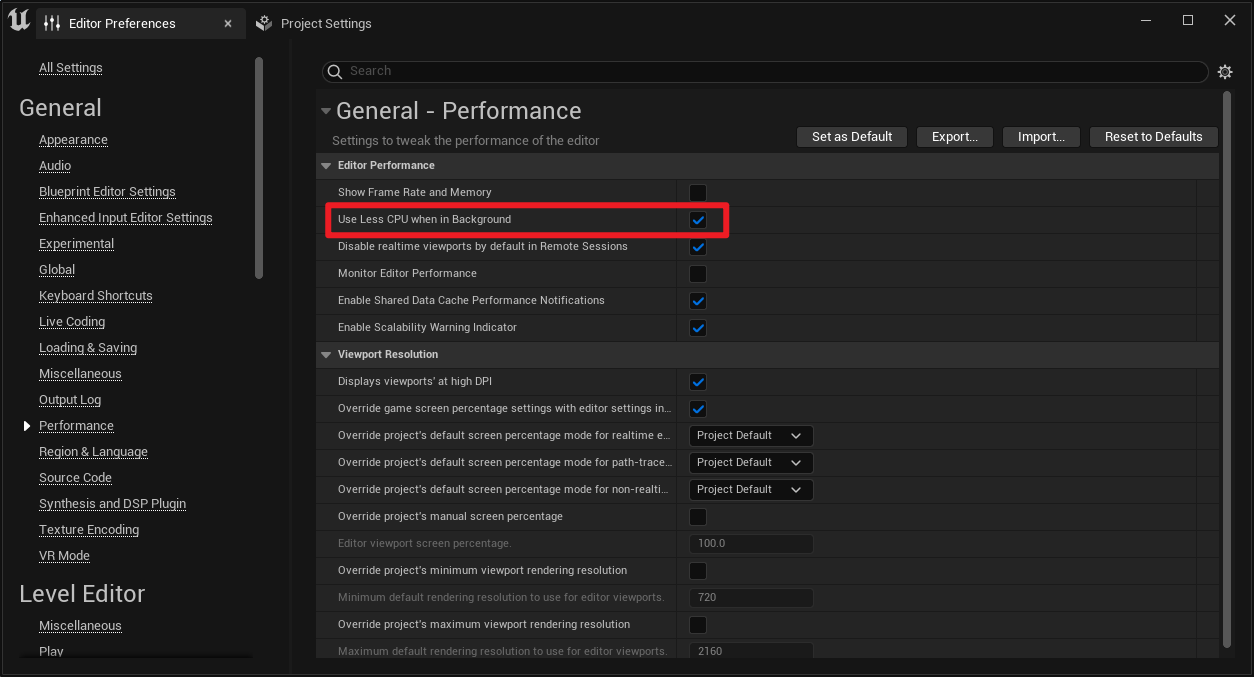
要在UE编辑器模式下「窗口/鼠标不在焦点」时仍保持高帧率,可按下面做法:
关闭编辑器的后台降频选项:在 Edit -> Editor Preferences -> General -> Performance 中取消勾选 "Use Less CPU when in Background"。
编辑器
上一篇:
论,物联网日志系统架构如何设计?
下一篇:
Redis的 散列(Hash) 和 列表(List) 数据结构操作详解
相关推荐
Highcharts.js
18 小时前
BI可视化图表“维护难”问题的解决方案
开发语言
·
前端
·
javascript
·
编辑器
·
ecmascript
·
bi
·
highcharts
叼烟扛炮
1 天前
Linux 学习笔记(七):软件安装与 Vim 编辑器极速入门
linux
·
学习
·
编辑器
幸运小圣
1 天前
fs 模块完全指南:文件读写、移动删除与文件夹操作(新手友好)【Node.js】
node.js
·
编辑器
·
vim
纪伊路上盛名在
2 天前
windows 配置vscode x11转发
ide
·
vscode
·
编辑器
hkj8808
2 天前
VsCode的使用
ide
·
vscode
·
编辑器
广东帝工
2 天前
智慧航道:技术体系
编辑器
丑大王
3 天前
ultralytics 环境安装与正确使用Vscode
ide
·
yolo
·
编辑器
鸽芷咕
3 天前
把 SQL 编辑器用顺:KSQL Developer 从补全到事务的实战笔记
笔记
·
sql
·
编辑器
广东帝工
3 天前
智慧航道:建设路径
编辑器
哎写bug的程序员
5 天前
关于VSCode上gcc,gdb的安装配置问题
ide
·
vscode
·
编辑器
热门推荐
01
ai安全工具:CyberStrikeAI安装部署与使用
02
国内可直接用、免费额度/永久免费的大模型API清单(含 SiliconFlow、火山、阿里、智谱、百度、Kimi、DeepSeek、DMXAPI 等)
03
如何新建文件夹? 电脑新建文件夹的4种方法
04
GitHub 镜像站点
05
历年考研数学一、数学二、数学三真题试卷及答案PDF
06
几个好用的ip纯净度检测网站
07
乙二醇水溶液物性参数
08
昇腾910B系列芯片完全指南:四款型号对比、服务器选型与大模型部署实战
09
苹果iPA游戏软件资源下载网站
10
「全语录+省流版」邵艾伦 × 孙宇晨:聊风口、聊个人IP、聊年轻人如何抓住 AI 时代的机会