SD-WAN场景丢包类问题定位
现象描述
SD-WAN场景报文转发路径比较复杂,遇到丢包类问题,建议通过流量统计分析报文转发路径,从而定位丢包类问题。

网络拓扑与流量转发路径
SD-WAN分为集中上网和本地上网两种场景,不同的场景流量的转发路径有所不同。集中上网的场景下,流量通过业务隧道进行封装转发到HUB;而在本地上网的场景下,流量是通过内环隧道不做封装转发。
流量统计通常需要部署的位置有:LAN口,WAN口,业务隧道口,内环隧道口,双网关InterLink口。
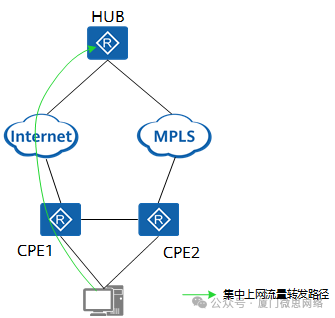
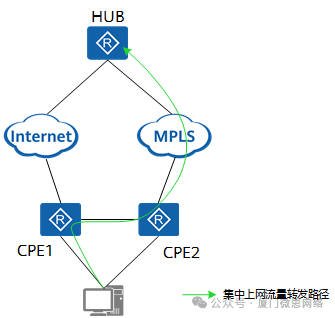
集中上网场景下,流量的通常的转发路径有两种:
-
转发路径:LAN口(CPE1)------>业务隧道口(CPE1的Tunnel0/0/601)------>WAN(CPE1的Underlay口):
-
转发路径:LAN口(CPE1)------>双网关InterLink口(CPE1)------>业务隧道口(CPE2的Tunnel0/0/601)------>WAN(CPE2的Underlay口):
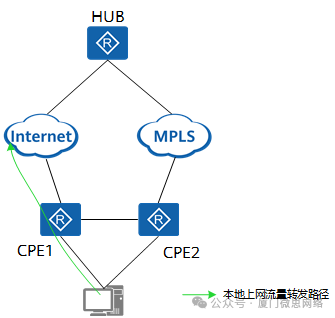
本地上网场景下,转发路径如下所示:
转发路径:LAN口(CPE1)------>内环隧道(CPE1 Tunnel0/0/1)------>WAN(CPE1的underlay口):
部署流量统计
可以通过控制器或者通过命令行部署流量统计,建议通过控制器完成。
通过控制器的操作如下所示:
-
在主菜单中选择"网络维护 > 网络诊断 > 诊断工具",单击"流量统计任务"页签。
-
创建流量统计任务:单击"创建"。
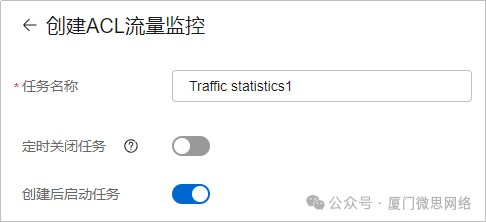
-
在"选择站点"处,单击"新增",选择需要创建流量统计任务的站点。
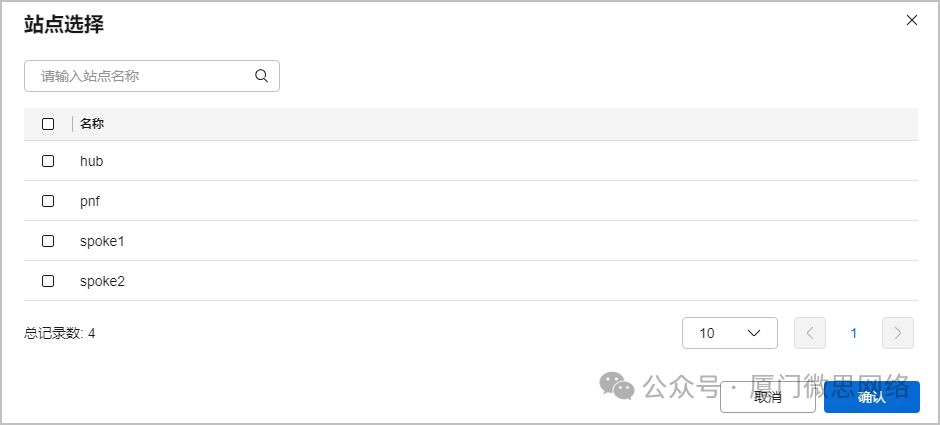
-
在设备列表中单击"新增",增加需要进行流量统计的设备和接口,配置完成后,单击

保存该条配置,若需要对该设备的多个接口进行流量统计,可以继续单击"新增"进行增加。

-
若需要在同一任务里对多个站点进行流量统计,可以在"选择站点"页签单击增加,继续增加设备,并在该设备的接口上配置流量统计。
-
配置完成后单击"确认",可以在流量统计任务界面查看已创建的流量统计任务。
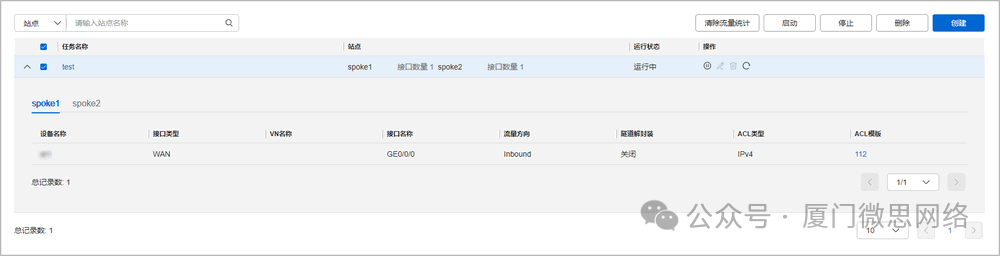
-
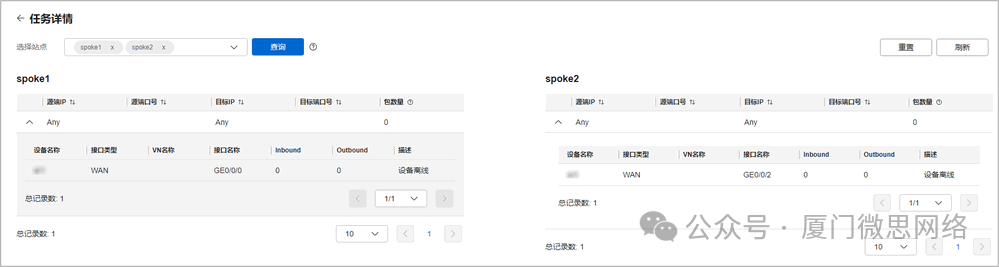
单击任务名称,进入"任务详情"页面,可以查看详细的流量统计。单击"重置",可清除此任务的流量统计。
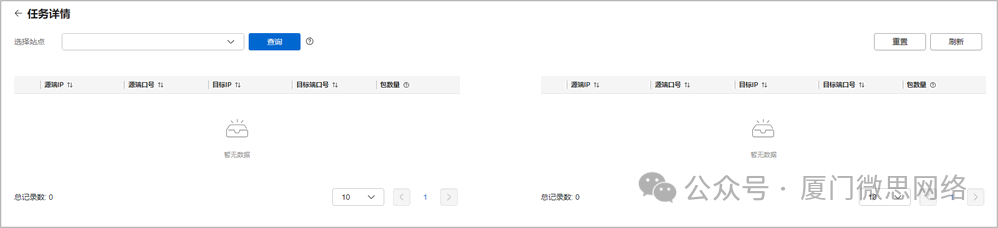

在执行查询功能或者清除流量统计功能时,需要设备在线才能生效。
-
选择站点,可以同时选择两个站点查看站点上不同设备的接口的流量统计信息。
通过命令行的方式如下所示:
1:跟客户确定存在丢包的业务流特征,源目的IP地址、协议号端口号,配置未使用的ACL,用于部署在LAN口、业务隧道口、双网关InterLink口、内环隧道口、WAN口。
配置部署在LAN口的ACL:
acl number 3000description LAN rule5 permit ip source 172.16.1.10 destination 172.16.2.20rule10 permit ip source 172.16.2.20 destination 172.16.1.10 配置部署在业务隧道口的ACL:
acl number 3001description ServiceTunnel rule5 permit ip source 172.16.1.10 destination 172.16.2.20rule10 permit ip source 172.16.2.20 destination 172.16.1.10 配置部署在双网关InterLink口的ACL:
acl number 3002description interlink rule5 permit ip source 172.16.1.10 destination 172.16.2.20rule10 permit ip source 172.16.2.20 destination 172.16.1.10 配置部署在内环隧道口的ACL:
acl number 3003description UnderlayTunnel rule5 permit ip source 172.16.1.10 destination 172.16.2.20rule10 permit ip source 172.16.2.20 destination 172.16.1.10 配置部署在WAN口的ACL:
acl number 3004description Underlay rule5 permit ip source 172.16.1.10 destination 172.16.2.20rule10 permit ip source 172.16.2.20 destination 172.16.1.102:在相应的接口下部署对应的ACL。
在LAN口部署对应的ACL。
interface Vlanif2ip binding vpn-instance vpn1tcp adjust-mss 1200ip address 192.168.103.1255.255.255.0traffic-policy mqcinAcl1 inbound preprocesstraffic-filter inbound acl 3000traffic-filter outbound acl 3000sa application-statistic enable在WAN口部署对应的ACL。其中R23C00版本后支持解封装后统计,且隧道口配置了对原始报文信息的预提取,可以匹配原始报文,多个Underlay口能区分从哪个WAN口发送出去。
interface GigabitEthernet0/0/8set flow-stat interval 10ip binding vpn-instance underlay_1tcp adjust-mss 1200ip address 192.168.12.55255.255.255.240nat static protocol tcp global current-interface 50000 inside 192.168.233.2344000 vpn-instance OPENSSHLINKVPORT netmask 255.255.255.255nat static protocol tcp global current-interface 50001 inside 192.168.233.2344001 vpn-instance OPENSSHLINKVPORT netmask 255.255.255.255nat outbound 3178qos pre-natqos gts cir 102400 cbs 2560000traffic-filter inbound acl 3004 decap-processtraffic-filter outbound acl 3004 在双网关InterLink口部署对应的ACL。
interface GigabitEthernet0/0/9.4000dot1q termination vid 4000ip binding vpn-instance vpn1ip address 192.168.22.33255.255.255.0traffic-filter inbound acl 3002traffic-filter outbound acl 3002sa application-statistic enable在内环隧道口部署对应的ACL,用于本地上网的场景。
interface Tunnel0/0/1description physical port: GigabitEthernet0/0/8ip binding vpn-instance vpn1ip address 10.10.0.27255.255.255.248tunnel-protocol gresource LoopBack101destination vpn-instance vpn1 10.10.0.26ip netstream sampler fix-packets 1 inboundip netstream sampler fix-packets 1 outboundip netstream inboundip netstream outboundqos group 1traffic-filter inbound acl 3003traffic-filter outbound acl 3003sa application-statistic enable在业务隧道口部署对应的ACL,可以判断是否走隧道封装。
interface Tunnel0/0/600description evpn tunneltcp adjust-mss 1102vpn-mapping enableip address 10.10.0.236255.255.255.255tunnel-protocol svpnip netstream sampler fix-packets 1 inboundip netstream sampler fix-packets 1 outboundip netstream inboundip netstream outboundqos pre-classifyipsec p2mp-policy enableweak-state-control enablesa application-statistic enable#interface Tunnel0/0/601description evpn tunnelip binding vpn-instance vpn1tcp adjust-mss 1102vpn-mapping enableip address 10.10.0.238255.255.255.255tunnel-protocol svpnip netstream sampler fix-packets 1 inboundip netstream sampler fix-packets 1 outboundip netstream inboundip netstream outboundqos pre-classifyqos group 1weak-state-control enabletraffic-filter decap-process enable traffic-filter inbound acl 3001traffic-filter outbound acl 3001sa application-statistic enable- 查询流量统计信息。
基于ACL的查询:
[huawei]display acl 3000AdvancedACL3000, 2 rulesLAN Acl's step is5 rule 5 permit ip source 172.16.1.10 destination 172.16.2.20 (5 matches) rule 10 permit ip source 172.16.2.20 destination 10.1.1.10 (5 matches)基于接口的查询:
[Huawei]display traffic-filter statistics interfaceGigabitEthernet 0/0/8 outboundverboserule-base-----------------------------------------------------------*interfaceGigabitEthernet0/0/8 outboundrule 5 permit ip source 172.16.1.10 destination 172.16.2.20Passed Packet 0,Passed Bytes 0Dropped Packet 0,Dropped Bytes 0rule 10 permit ip source 172.16.2.20 destination 172.16.1.10Passed Packet 5,Passed Bytes 610Dropped Packet 0,Dropped Bytes 0FAQ
问题:怎么确定流量走了哪个connect连接,然后在对端设备部署流量统计?
回答:转发面可以通过打印connect模块确定流量走了哪个connect连接。步骤如下:
设置报文特征。
[diagnose]set forward debug-packet-filter destination-ip 10.252.5.5打印Connect 模块看encap走哪个connectid。
[diagnose]debugging forward connect packet debug-num 20 verbose
查看连接信息,找到对应connectid对应的源和目的IP地址,通过Destnation IP地址找到对端的设备。
[diagnose]display evpn connection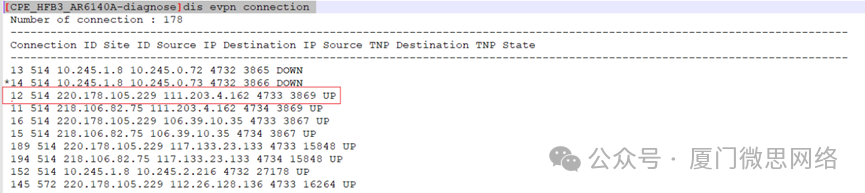
清除debug报文特征。
[diagnose]clear forward debug-packet-filter问题:如何判断流量是走本地上网还是走集中上网?
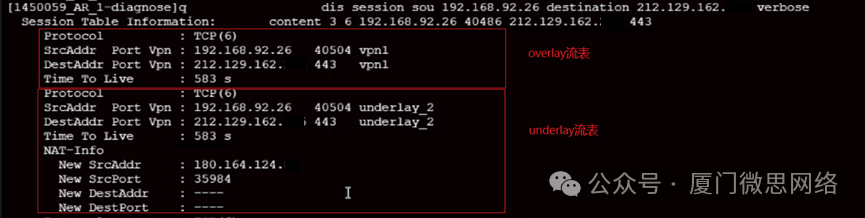
回答:本地上网会做underlay的nat,通常有两张流表,一个是underlay的流表,一个是overlay的流表。可通过以下命令查询流表,如果存在两张流表说明流量是走本地上网,反之如果只有overlay的流表则流量走集中上网。
[diagnose]display session source 192.168.92.26 destination 212.129.162.xxx verbose