"老虎吃小鸡"听上去就很有童趣:玩家操控一只机敏的老虎,在草地上自由奔跑,捕捉那些四处乱窜的小鸡。但这并不是一场毫无压力的盛宴------猎人随时可能出现,想要把老虎一举抓住。于是,这场小游戏瞬间变成了紧张又带点搞笑的追逐战。
如果是以前,要写出这样的游戏,得考虑老虎的移动逻辑 、小鸡的生成与逃跑算法 、猎人的 AI 追击路径 ,再加上碰撞检测、得分系统......听起来就让人头大。可现在,有了 Trae IDE,这一切复杂逻辑都能一句话搞定。
💡 我的需求超简单
我最初的想法其实只有三点:
- 老虎能动:玩家能控制老虎,用方向键移动,操作一定要顺手。
- 小鸡乱跑:小鸡在场景中随机生成,老虎碰到它们就能吃掉得分。
- 猎人追击:猎人会不断靠近老虎,如果老虎被抓住,游戏结束。
说白了,就是要一个简单却好玩的"追逐+逃跑"机制,能让人一玩就上瘾。
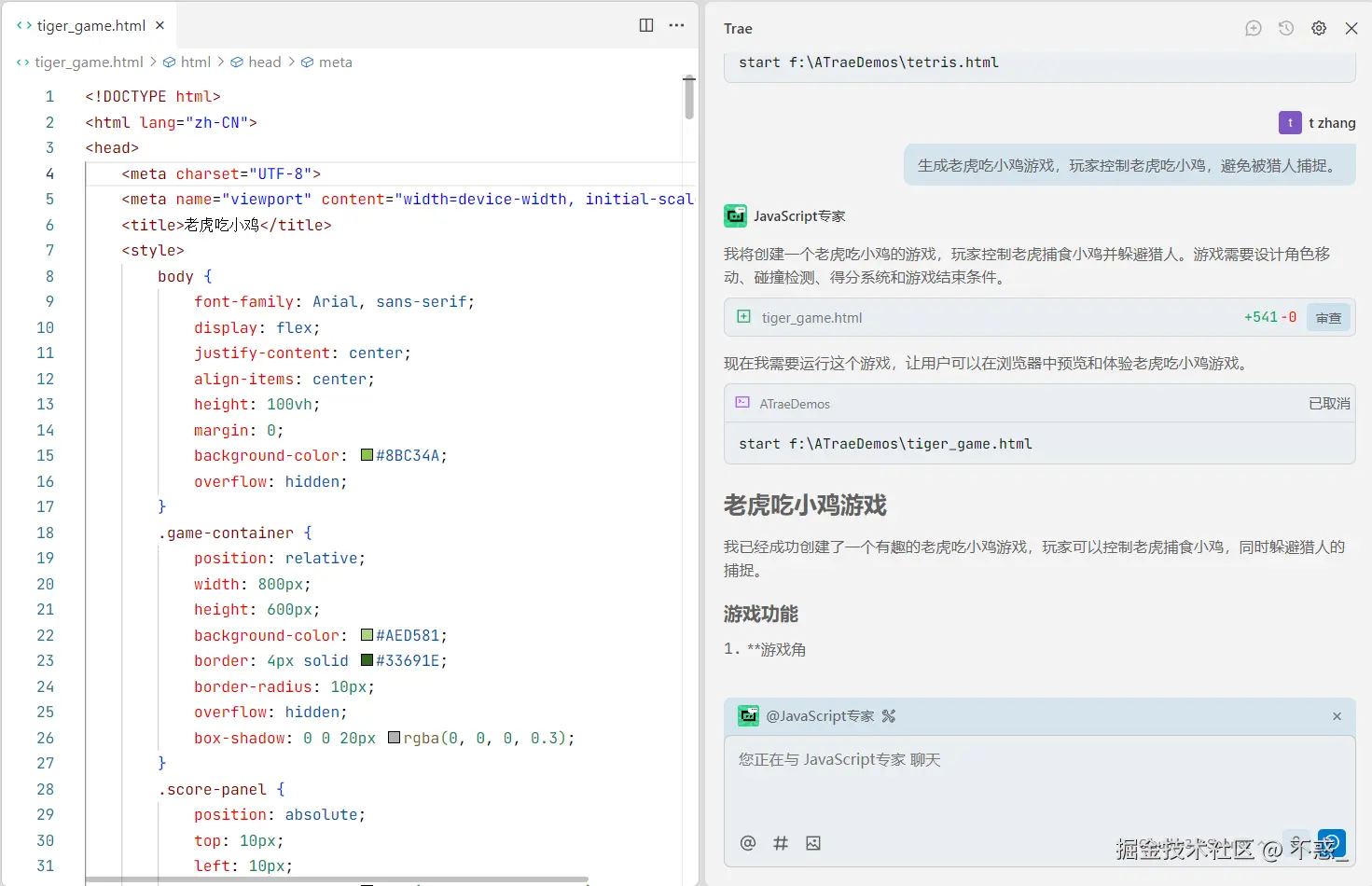
于是我在 Trae 里打下一句话:
"生成老虎吃小鸡游戏,玩家控制老虎吃小鸡,避免被猎人捕捉。"
✨ Trae 怎么"读懂"并搞定
几秒钟后,Trae 就给了我一个完整可跑的游戏,里面包含了:
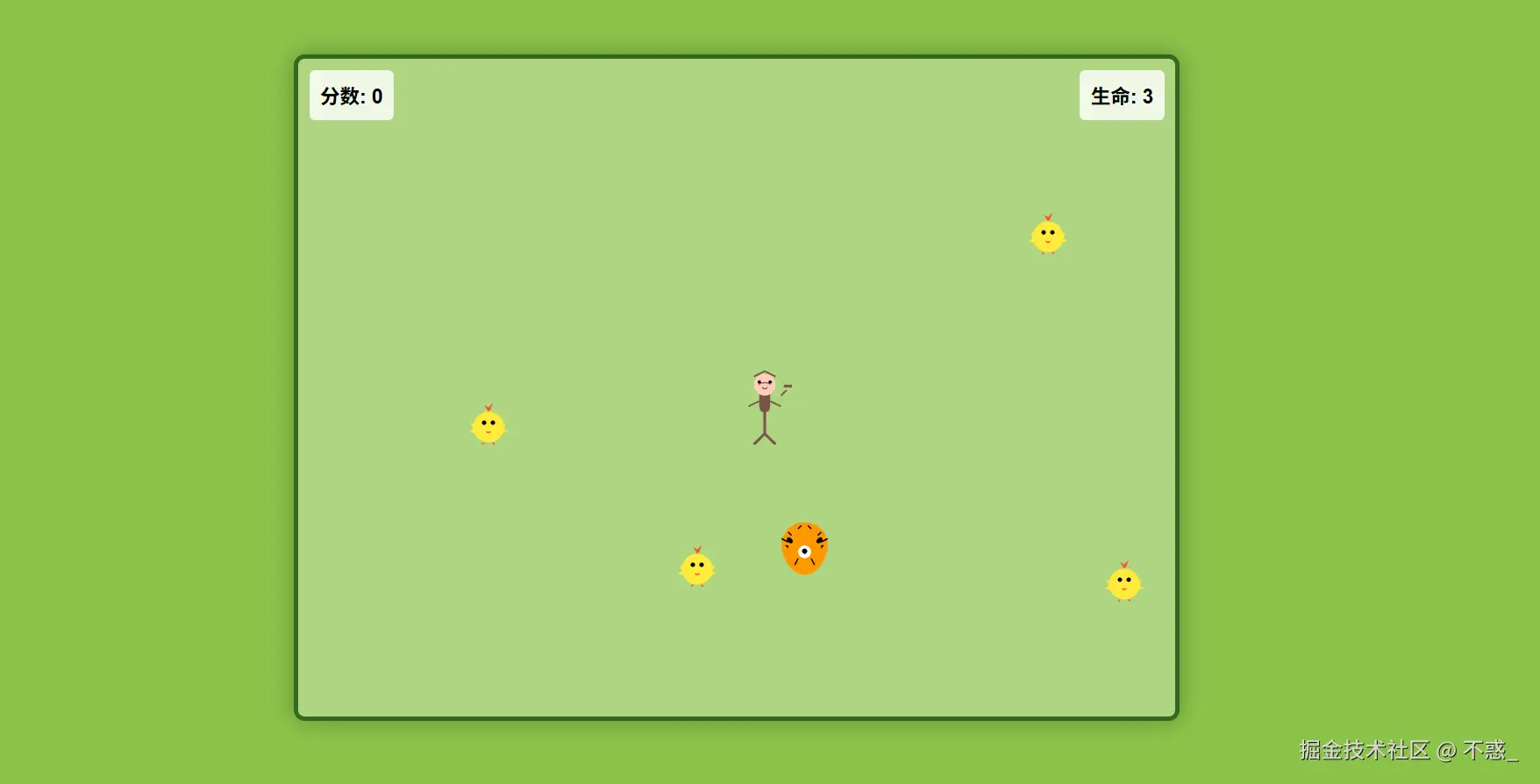
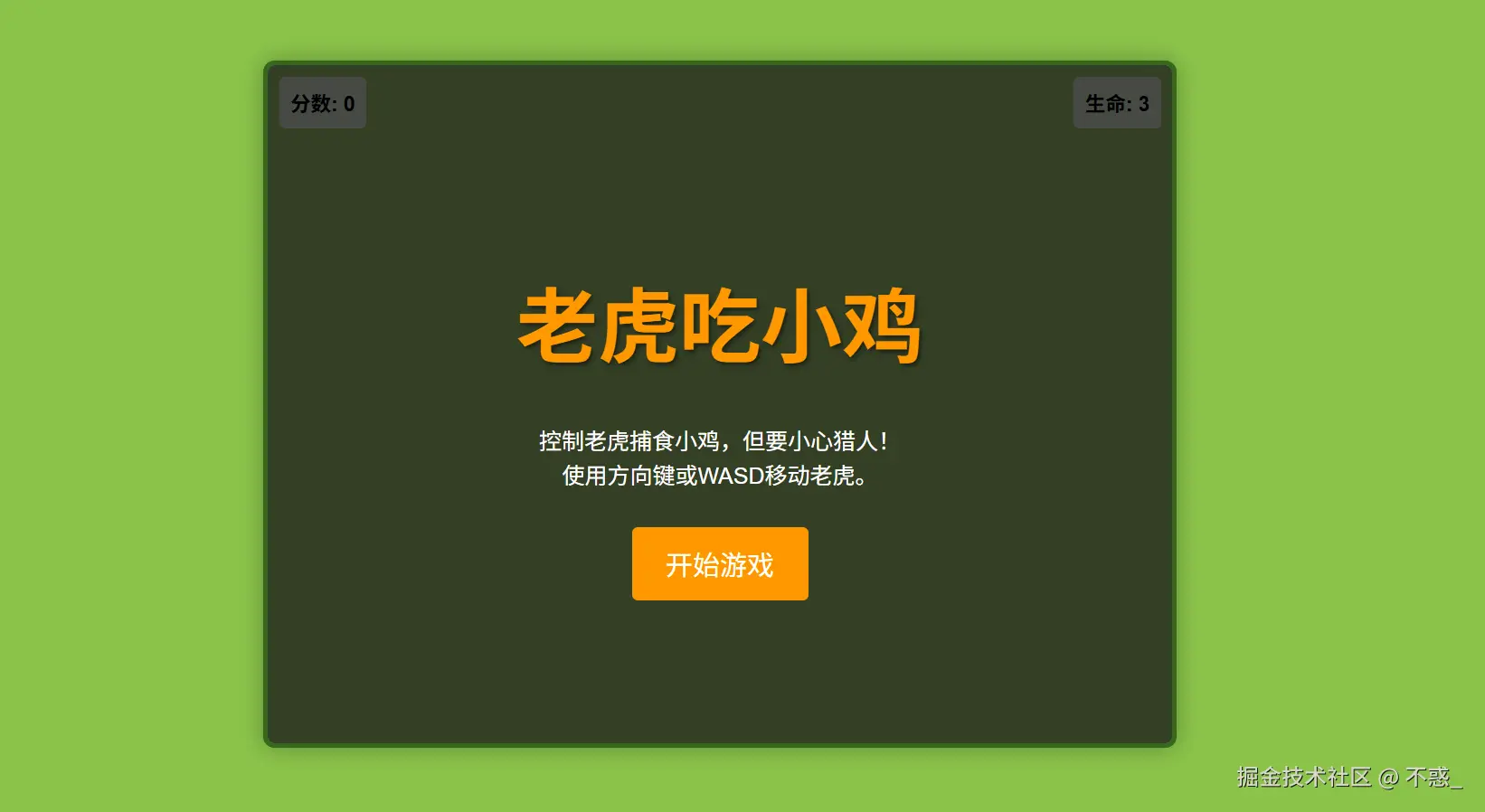
✅ 玩家控制系统 :方向键左右移动、上下走位非常灵敏,操作毫无延迟感。 ✅ 小鸡生成逻辑 :小鸡会不断随机刷新,还会"傻傻"乱跑,让你忍不住追上去"咬一口"。 ✅ 猎人 AI :猎人不会瞎跑,而是智能追踪老虎 ,让游戏多了一点紧张感。 ✅ 得分与失败判定 :吃一只小鸡加分,被猎人抓住直接 Game Over,界面还会弹出提示。 ✅ 简洁 UI:绿色草地背景、卡通老虎、小鸡和猎人角色都安排好了,看着舒服,玩起来轻松。
🧩 玩起来是什么感觉?
第一次试玩时,我就笑出声:
🎮 老虎追小鸡 → 有一种"狩猎快感"; 🚨 猎人靠近 → 心里紧张,手指拼命乱按方向键; 💥 被抓住的瞬间 → 屏幕一黑,"游戏结束",非常有街机风味。
整个游戏操作简单,玩法直接,但乐趣十足,那种"越危险越想玩"的感觉立刻被勾了起来。
🛠 想加料?一句话搞定
Trae 的好处在于,你想加功能不需要重新写,只要再给一句自然语言指令,比如:
- "加个限时模式" → 游戏 60 秒内看你能吃几只小鸡。
- "让猎人越来越快" → 游戏后期难度自动上升。
- "加个'隐身道具'" → 老虎吃到后能短暂隐身,猎人追不到。
- "把场景换成森林+加上背景音乐" → 整个游戏更有沉浸感。
Trae 会直接在现有代码上补齐逻辑,几乎不用手动改动,体验真的像"给游戏下达命令"。
🎮 这才是小游戏开发该有的样子
过去写这种小游戏,过程是这样的:
- 画草图 →
- 设计角色逻辑 →
- 写控制代码 →
- 调 AI 行为 →
- 一堆 bug 调到头秃
而现在,有了 Trae,流程就变成了:
👉 说一句话 → 看游戏自动生成 → 试玩、改进、加点料
从体力活 变成了创意活,开发效率翻好几倍。
✅ 结语
如果你也想写一款"老虎吃小鸡",根本不用绞尽脑汁去实现那些 AI 和碰撞逻辑。只要打开 Trae,输入一句:
"生成老虎吃小鸡游戏,玩家控制老虎吃小鸡,避免被猎人捕捉。"
几秒后,一个可玩的游戏就会出现在你眼前,老虎能跑、小鸡能吃、猎人会追,操作简单,却有让人停不下来的乐趣。
这就是 Trae 带来的改变 ------ 写游戏不再是代码战斗,而是一个随时能点子变现实的创作过程。
html
<!DOCTYPE html>
<html lang="zh-CN">
<head>
<meta charset="UTF-8">
<meta name="viewport" content="width=device-width, initial-scale=1.0">
<title>老虎吃小鸡</title>
<style>
body {
font-family: Arial, sans-serif;
display: flex;
justify-content: center;
align-items: center;
height: 100vh;
margin: 0;
background-color: #8BC34A;
overflow: hidden;
}
.game-container {
position: relative;
width: 800px;
height: 600px;
background-color: #AED581;
border: 4px solid #33691E;
border-radius: 10px;
overflow: hidden;
box-shadow: 0 0 20px rgba(0, 0, 0, 0.3);
}
.score-panel {
position: absolute;
top: 10px;
left: 10px;
background-color: rgba(255, 255, 255, 0.8);
padding: 10px;
border-radius: 5px;
font-size: 18px;
font-weight: bold;
z-index: 10;
}
.lives-panel {
position: absolute;
top: 10px;
right: 10px;
background-color: rgba(255, 255, 255, 0.8);
padding: 10px;
border-radius: 5px;
font-size: 18px;
font-weight: bold;
z-index: 10;
}
.tiger {
position: absolute;
width: 60px;
height: 60px;
background-image: url('data:image/svg+xml;utf8,<svg xmlns="http://www.w3.org/2000/svg" viewBox="0 0 100 100"><path d="M50,10 C30,10 15,25 15,45 C15,65 30,90 50,90 C70,90 85,65 85,45 C85,25 70,10 50,10 Z" fill="%23FF9800"/><path d="M30,35 C25,30 20,35 25,40 C30,45 35,40 30,35 Z" fill="black"/><path d="M70,35 C75,30 80,35 75,40 C70,45 65,40 70,35 Z" fill="black"/><path d="M50,45 C45,45 40,50 40,55 C40,60 45,65 50,65 C55,65 60,60 60,55 C60,50 55,45 50,45 Z" fill="white"/><path d="M50,50 C48,50 46,52 46,54 C46,56 48,58 50,58 C52,58 54,56 54,54 C54,52 52,50 50,50 Z" fill="black"/><path d="M30,30 L25,25 M70,30 L75,25 M40,65 L35,75 M60,65 L65,75 M25,40 L15,35 M75,40 L85,35" stroke="black" stroke-width="2"/><path d="M25,45 L20,45 L25,50 Z M75,45 L80,45 L75,50 Z" fill="black"/><path d="M40,20 L45,15 M60,20 L55,15" stroke="black" stroke-width="2"/></svg>');
background-size: contain;
background-repeat: no-repeat;
z-index: 5;
}
.chicken {
position: absolute;
width: 40px;
height: 40px;
background-image: url('data:image/svg+xml;utf8,<svg xmlns="http://www.w3.org/2000/svg" viewBox="0 0 100 100"><circle cx="50" cy="60" r="35" fill="%23FFEB3B"/><circle cx="40" cy="50" r="5" fill="black"/><circle cx="60" cy="50" r="5" fill="black"/><path d="M45,70 Q50,75 55,70" stroke="%23FF5722" stroke-width="3" fill="none"/><path d="M50,25 L40,10 L50,15 L60,5 L55,20" fill="%23FF5722"/><path d="M30,60 L10,50 L15,65 L5,70 L25,75" fill="%23FFEB3B"/><path d="M70,60 L90,50 L85,65 L95,70 L75,75" fill="%23FFEB3B"/><path d="M40,95 L30,110 M60,95 L70,110" stroke="%23FF5722" stroke-width="3"/></svg>');
background-size: contain;
background-repeat: no-repeat;
z-index: 3;
}
.hunter {
position: absolute;
width: 50px;
height: 70px;
background-image: url('data:image/svg+xml;utf8,<svg xmlns="http://www.w3.org/2000/svg" viewBox="0 0 100 140"><path d="M40,40 C40,20 60,20 60,40 L60,70 C60,85 40,85 40,70 Z" fill="%23795548"/><circle cx="50" cy="30" r="20" fill="%23FFCCBC"/><path d="M40,30 C40,25 60,25 60,30" stroke="%23795548" stroke-width="2" fill="none"/><circle cx="40" cy="25" r="3" fill="black"/><circle cx="60" cy="25" r="3" fill="black"/><path d="M45,35 Q50,40 55,35" stroke="%23795548" stroke-width="2" fill="none"/><path d="M30,15 L40,10 L50,5 L60,10 L70,15" stroke="%23795548" stroke-width="3" fill="none"/><path d="M20,70 L40,60 M80,70 L60,60" stroke="%23795548" stroke-width="3" fill="none"/><path d="M50,70 L50,120" stroke="%23795548" stroke-width="5" fill="none"/><path d="M50,120 L30,140 M50,120 L70,140" stroke="%23795548" stroke-width="5" fill="none"/><path d="M80,50 L90,40" stroke="%23795548" stroke-width="3" fill="none"/><rect x="85" y="30" width="15" height="5" fill="%23795548"/></svg>');
background-size: contain;
background-repeat: no-repeat;
z-index: 4;
}
.game-over {
position: absolute;
top: 0;
left: 0;
width: 100%;
height: 100%;
background-color: rgba(0, 0, 0, 0.7);
display: flex;
flex-direction: column;
justify-content: center;
align-items: center;
color: white;
font-size: 36px;
z-index: 20;
display: none;
}
.game-over button {
margin-top: 20px;
padding: 10px 20px;
font-size: 20px;
background-color: #FF9800;
color: white;
border: none;
border-radius: 5px;
cursor: pointer;
}
.game-over button:hover {
background-color: #F57C00;
}
.start-screen {
position: absolute;
top: 0;
left: 0;
width: 100%;
height: 100%;
background-color: rgba(0, 0, 0, 0.7);
display: flex;
flex-direction: column;
justify-content: center;
align-items: center;
color: white;
font-size: 36px;
z-index: 20;
}
.start-screen h1 {
color: #FF9800;
text-shadow: 2px 2px 4px rgba(0, 0, 0, 0.5);
margin-bottom: 20px;
}
.start-screen p {
font-size: 20px;
margin-bottom: 30px;
text-align: center;
max-width: 80%;
line-height: 1.5;
}
.start-screen button {
padding: 15px 30px;
font-size: 24px;
background-color: #FF9800;
color: white;
border: none;
border-radius: 5px;
cursor: pointer;
transition: transform 0.1s;
}
.start-screen button:hover {
background-color: #F57C00;
transform: scale(1.05);
}
</style>
</head>
<body>
<div class="game-container" id="game-container">
<div class="score-panel">分数: <span id="score">0</span></div>
<div class="lives-panel">生命: <span id="lives">3</span></div>
<div class="start-screen" id="start-screen">
<h1>老虎吃小鸡</h1>
<p>控制老虎捕食小鸡,但要小心猎人!<br>使用方向键或WASD移动老虎。</p>
<button id="start-button">开始游戏</button>
</div>
<div class="game-over" id="game-over">
<div>游戏结束</div>
<div>最终得分: <span id="final-score">0</span></div>
<button id="restart-button">再来一次</button>
</div>
</div>
<script>
// 游戏元素
const gameContainer = document.getElementById('game-container');
const scoreElement = document.getElementById('score');
const livesElement = document.getElementById('lives');
const finalScoreElement = document.getElementById('final-score');
const gameOverScreen = document.getElementById('game-over');
const startScreen = document.getElementById('start-screen');
const startButton = document.getElementById('start-button');
const restartButton = document.getElementById('restart-button');
// 游戏状态
let score = 0;
let lives = 3;
let gameRunning = false;
let gameLoop;
// 游戏对象
let tiger;
let chickens = [];
let hunters = [];
// 移动控制
const keys = {
ArrowUp: false,
ArrowDown: false,
ArrowLeft: false,
ArrowRight: false,
w: false,
a: false,
s: false,
d: false
};
// 游戏参数
const gameWidth = 800;
const gameHeight = 600;
const tigerSpeed = 5;
const chickenSpeed = 2;
const hunterSpeed = 3;
const chickenSpawnRate = 2000; // 每2秒生成一只小鸡
const hunterSpawnRate = 5000; // 每5秒生成一个猎人
let chickenSpawnTimer;
let hunterSpawnTimer;
// 初始化游戏
function initGame() {
// 重置游戏状态
score = 0;
lives = 3;
chickens = [];
hunters = [];
// 更新显示
scoreElement.textContent = score;
livesElement.textContent = lives;
// 清除游戏容器中的所有元素(除了固定UI)
const elementsToRemove = document.querySelectorAll('.tiger, .chicken, .hunter');
elementsToRemove.forEach(element => element.remove());
// 创建老虎
tiger = createTiger();
// 设置生成计时器
chickenSpawnTimer = setInterval(spawnChicken, chickenSpawnRate);
hunterSpawnTimer = setInterval(spawnHunter, hunterSpawnRate);
// 启动游戏循环
if (gameLoop) clearInterval(gameLoop);
gameLoop = setInterval(updateGame, 20);
gameRunning = true;
}
// 创建老虎
function createTiger() {
const tigerElement = document.createElement('div');
tigerElement.className = 'tiger';
tigerElement.style.left = (gameWidth / 2 - 30) + 'px';
tigerElement.style.top = (gameHeight / 2 - 30) + 'px';
gameContainer.appendChild(tigerElement);
return {
element: tigerElement,
x: gameWidth / 2 - 30,
y: gameHeight / 2 - 30,
width: 60,
height: 60,
speed: tigerSpeed
};
}
// 生成小鸡
function spawnChicken() {
if (!gameRunning) return;
const chickenElement = document.createElement('div');
chickenElement.className = 'chicken';
// 随机位置(在边缘生成)
let x, y;
const side = Math.floor(Math.random() * 4); // 0: 上, 1: 右, 2: 下, 3: 左
switch (side) {
case 0: // 上
x = Math.random() * gameWidth;
y = -40;
break;
case 1: // 右
x = gameWidth;
y = Math.random() * gameHeight;
break;
case 2: // 下
x = Math.random() * gameWidth;
y = gameHeight;
break;
case 3: // 左
x = -40;
y = Math.random() * gameHeight;
break;
}
chickenElement.style.left = x + 'px';
chickenElement.style.top = y + 'px';
gameContainer.appendChild(chickenElement);
chickens.push({
element: chickenElement,
x: x,
y: y,
width: 40,
height: 40,
speed: chickenSpeed,
direction: {
x: Math.random() * 2 - 1, // -1 到 1 之间的随机值
y: Math.random() * 2 - 1
}
});
}
// 生成猎人
function spawnHunter() {
if (!gameRunning) return;
const hunterElement = document.createElement('div');
hunterElement.className = 'hunter';
// 随机位置(在边缘生成)
let x, y;
const side = Math.floor(Math.random() * 4); // 0: 上, 1: 右, 2: 下, 3: 左
switch (side) {
case 0: // 上
x = Math.random() * gameWidth;
y = -70;
break;
case 1: // 右
x = gameWidth;
y = Math.random() * gameHeight;
break;
case 2: // 下
x = Math.random() * gameWidth;
y = gameHeight;
break;
case 3: // 左
x = -50;
y = Math.random() * gameHeight;
break;
}
hunterElement.style.left = x + 'px';
hunterElement.style.top = y + 'px';
gameContainer.appendChild(hunterElement);
hunters.push({
element: hunterElement,
x: x,
y: y,
width: 50,
height: 70,
speed: hunterSpeed
});
}
// 更新游戏状态
function updateGame() {
if (!gameRunning) return;
// 更新老虎位置
updateTiger();
// 更新小鸡位置
updateChickens();
// 更新猎人位置
updateHunters();
// 检测碰撞
checkCollisions();
}
// 更新老虎位置
function updateTiger() {
let dx = 0;
let dy = 0;
// 根据按键状态更新方向
if (keys.ArrowUp || keys.w) dy -= tiger.speed;
if (keys.ArrowDown || keys.s) dy += tiger.speed;
if (keys.ArrowLeft || keys.a) dx -= tiger.speed;
if (keys.ArrowRight || keys.d) dx += tiger.speed;
// 对角线移动速度修正
if (dx !== 0 && dy !== 0) {
dx *= 0.7071; // 1/sqrt(2)
dy *= 0.7071;
}
// 更新位置
tiger.x += dx;
tiger.y += dy;
// 边界检查
if (tiger.x < 0) tiger.x = 0;
if (tiger.x > gameWidth - tiger.width) tiger.x = gameWidth - tiger.width;
if (tiger.y < 0) tiger.y = 0;
if (tiger.y > gameHeight - tiger.height) tiger.y = gameHeight - tiger.height;
// 更新元素位置
tiger.element.style.left = tiger.x + 'px';
tiger.element.style.top = tiger.y + 'px';
}
// 更新小鸡位置
function updateChickens() {
for (let i = 0; i < chickens.length; i++) {
const chicken = chickens[i];
// 随机移动
if (Math.random() < 0.02) { // 2% 的几率改变方向
chicken.direction.x = Math.random() * 2 - 1;
chicken.direction.y = Math.random() * 2 - 1;
}
// 更新位置
chicken.x += chicken.direction.x * chicken.speed;
chicken.y += chicken.direction.y * chicken.speed;
// 边界检查和反弹
if (chicken.x < 0) {
chicken.x = 0;
chicken.direction.x *= -1;
}
if (chicken.x > gameWidth - chicken.width) {
chicken.x = gameWidth - chicken.width;
chicken.direction.x *= -1;
}
if (chicken.y < 0) {
chicken.y = 0;
chicken.direction.y *= -1;
}
if (chicken.y > gameHeight - chicken.height) {
chicken.y = gameHeight - chicken.height;
chicken.direction.y *= -1;
}
// 更新元素位置
chicken.element.style.left = chicken.x + 'px';
chicken.element.style.top = chicken.y + 'px';
}
}
// 更新猎人位置
function updateHunters() {
for (let i = 0; i < hunters.length; i++) {
const hunter = hunters[i];
// 向老虎移动
const dx = tiger.x - hunter.x;
const dy = tiger.y - hunter.y;
const distance = Math.sqrt(dx * dx + dy * dy);
if (distance > 0) {
hunter.x += (dx / distance) * hunter.speed;
hunter.y += (dy / distance) * hunter.speed;
}
// 更新元素位置
hunter.element.style.left = hunter.x + 'px';
hunter.element.style.top = hunter.y + 'px';
}
}
// 检测碰撞
function checkCollisions() {
// 老虎吃小鸡
for (let i = chickens.length - 1; i >= 0; i--) {
if (isColliding(tiger, chickens[i])) {
// 移除小鸡
chickens[i].element.remove();
chickens.splice(i, 1);
// 增加分数
score += 10;
scoreElement.textContent = score;
}
}
// 猎人捕获老虎
for (let i = hunters.length - 1; i >= 0; i--) {
if (isColliding(tiger, hunters[i])) {
// 移除猎人
hunters[i].element.remove();
hunters.splice(i, 1);
// 减少生命
lives--;
livesElement.textContent = lives;
// 检查游戏结束
if (lives <= 0) {
endGame();
}
}
}
}
// 碰撞检测
function isColliding(obj1, obj2) {
return obj1.x < obj2.x + obj2.width &&
obj1.x + obj1.width > obj2.x &&
obj1.y < obj2.y + obj2.height &&
obj1.y + obj1.height > obj2.y;
}
// 结束游戏
function endGame() {
gameRunning = false;
clearInterval(gameLoop);
clearInterval(chickenSpawnTimer);
clearInterval(hunterSpawnTimer);
finalScoreElement.textContent = score;
gameOverScreen.style.display = 'flex';
}
// 键盘事件监听
document.addEventListener('keydown', (e) => {
if (keys.hasOwnProperty(e.key)) {
keys[e.key] = true;
e.preventDefault();
}
});
document.addEventListener('keyup', (e) => {
if (keys.hasOwnProperty(e.key)) {
keys[e.key] = false;
e.preventDefault();
}
});
// 按钮事件
startButton.addEventListener('click', () => {
startScreen.style.display = 'none';
initGame();
});
restartButton.addEventListener('click', () => {
gameOverScreen.style.display = 'none';
initGame();
});
</script>
</body>
</html>