Vue生命周期常用的onMounted挂载后执行和onUnmounted卸载前以及onupdated更新后实际上用react对比就是useEffect,而且挂载顺序也是子组件先于父组件然后往外的栈结构,先进后出。
1.Vue的生命周期
xml
<template>
  <h2>当前求和为{{ sum }}</h2>
  <button @click="add">点为sum+1</button>
</template>
<script setup name="Person" lang="ts">
   import { ref,onBeforeMount,onMounted, onUpdated,onBeforeUpdate,onBeforeUnmount,onUnmounted} from 'vue';
    let sum =ref(0)
    const add=()=>{
        sum.value+=1
    }
    //创建
    console.log('组件创建');
    //挂载
    onBeforeMount(()=>{
        console.log('租借挂载之前');
    })
    //挂载完毕
    onMounted(()=>{
        console.log('person挂载完毕');
    })
    //更新前
    onBeforeUpdate(()=>{
        console.log('更新前');
    })
    //更新完毕
    onUpdated(()=>{
      console.log(' 更新后', )
    })
    //卸载前
    onBeforeUnmount(()=>{
      console.log(' 卸载前', )
    })
    //卸载后
    onUnmounted(()=>{
      console.log(' 卸载后', )
    })
</script>
<!-- scoped局部样式 类似于module.css -->
<style scoped>
</style>
这些就是vue3的生命周期常用的挂载前挂载后以及更新后。
2.watchEffect
watch监听方法可以监听多个需要用{}这样写法,而且如果对象的属性需要函数式也就是()=>person.car这种。
watchEffect可以自己分析监听数据,只要里面的数据发生改变就会重新执行函数而且上来就会执行一次。
xml
<template>
    <h1>水位达到60度或者水位达到80cm 服务器发送请求</h1>
   <h2>当前水温为{{ temp }}</h2>
   <h2>当前水位{{  height}}</h2>
   <button @click="changetemp">水温加10</button>
   <button @click="changeheight">水位加10</button>
</template>
<script setup name="Person" lang="ts">
   import { ref,watch,watchEffect } from 'vue';
    let temp =ref(10)
    let height=ref(0)
    const changetemp=()=>{
        temp.value+=10
    }
    const changeheight=()=>{
        height.value+=10
    }
    //监视
    //watch必须指定监视谁
    // watch([temp,height],(value)=>{
    //     let [newtemp,newheight] = value
    //     if(newtemp>=60||newheight>=80){
    //         console.log('发送请求');
    //     }
    // })
    //watchEffect可以直接用回自己分析监视谁?
    // 响应式的追踪其依赖 并且依赖更改之后重新执行函数
    //上来就会执行一次
    watchEffect(()=>{
        if(temp.value>=60||height.value>=80){
            console.log('发送请求');        }
    })
</script>
<style>
</style>
3.hooks和props传递
hooks当我们操作的方法和数据很多组件要使用或者很明显重复代码过多,那么就可以提取到一个ts文件也就是包裹一个匿名函数里面,文件名use开头。
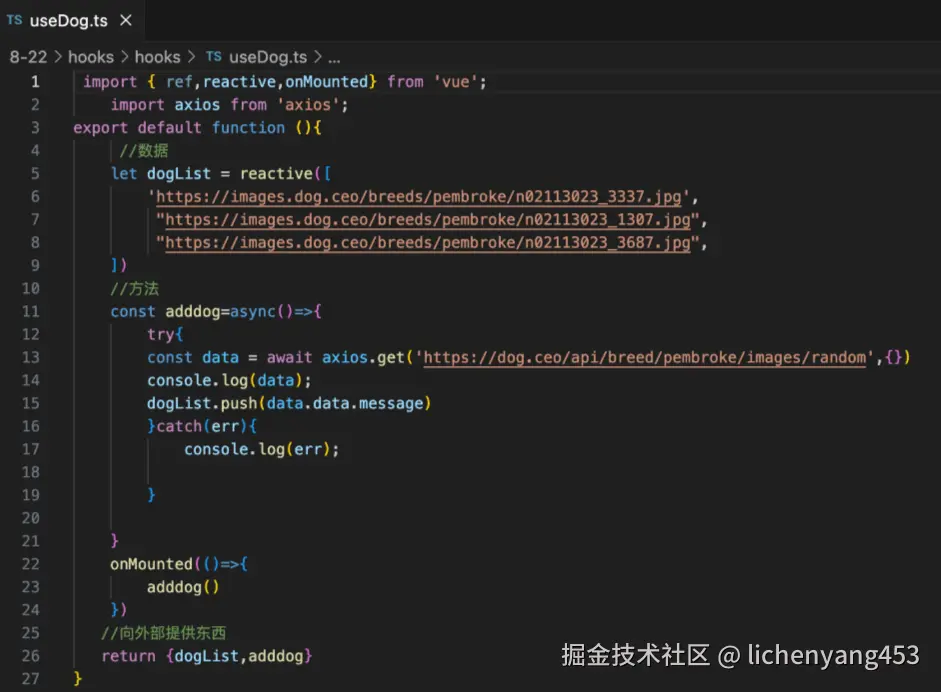 编辑
编辑
组件之间的props传递也是和react一样,只不过需要用defineProps()传递如果没有指定类型那么就需要指定接收的属性名,如果指名了接收的数据类型就可以参数可以为().
xml
<template>
  <ul>
    <li v-for="item in x.personlist" :key="item.id">{{ item.name }}--{{ item.age }}</li>
  </ul>
  <h2>{{ x.a }}</h2>
</template>
<script setup name="Person" lang="ts">
   import { ref,watch,watchEffect,defineExpose,defineProps,withDefaults} from 'vue';
   import type { Person } from '@/types';
   //接收数组并且保存到x变量上
   //let x = defineProps(['personlist'])
   //可以声明类型 这里传什么接收什么
   //let x = defineProps<{personlist:Person[],a:number}>()
   //可以设置默认值
   let x =withDefaults(defineProps<{personlist?:Person[],a:number}>(),{
    personlist:()=>[{id:'a',name:'s',age:1}],
    a:2
   })
</script>
<!-- scoped局部样式 类似于module.css -->
<style scoped>
</style>
4.路由组件的参数传递
vue3的路由组件定义以及跳转连接link和react几乎一致,
php
//创建一个路由器并且暴露出去
import { createRouter,createWebHistory } from "vue-router";
//创建路由器
import Home from "@/components/Home.vue";
import News from "@/components/News.vue";
import About from "@/components/About.vue";
import Detail from "@/components/Detail.vue";
const router = createRouter({
    history:createWebHistory(),
    routes:[//一个个路由规则
        {
            path:'/home',
            component:Home
        },
        {
            path:'/about',
            component:About
        },
        {
            path:'/news',
            component:News,
            children:[
                {
                    name:'xiang',
                    path:'detail',
                    component:Detail,
                    //第一种写法
                    //props:true
                    //将所有params参数作为props传递给组件
                    //第二种写法 可以指定query
                    props(route){
                        return  route.query
                    }
                }
            ]
        }
    ]
})
/*
    history两种模式
        url更加美观 接近传统完整的url 不加#
       vue3 createWebhistrry() React
       缺点 上线需要服务端配合 否则刷新会404
        <createBrowserRouter></createBrowserRouter>
       <Router Provider></Router>
    hash模式
        url带有# SEO优化方面相对较差
        createWebHashhsitory
*/
//暴露操作
export default router
也是两种路由表模式一种是createWebhistory另一种是hash模式多了个#和react的createBrowserRouter以及createHashrouter差不多,然后嵌套路由也是直接children直接写。
子路由展示区域需要用RouterView,React用outlet组件。RouterLinkl跳转路径组件,然后就是传递参数,父路由组件路由像子路由组件传递参数。比较繁琐而且在写项目的时候没有使用过,只是前端像后端发送请求会携带参数,比如/:id不过一般都是在get('',{id;})这样携带,params参数。
xml
<template>
    <h1>我是news</h1>
    <ul>
        <li v-for="item in newslist" :key="item.id">
            <!-- 第一种写法 query传递参数 -->
            <RouterLink :to="/news/detail?id=${item.id}&title=${item.title}">
                {{ item.title }}--{{ item.content }}
            </RouterLink>
            <!-- 第二种写法query -->
             <!-- <RouterLink :to="{path:'/news/detail',query:{id:item.id,title:item.title}}">
                {{ item.title }}--{{ item.content }}
            </RouterLink> -->
            <!-- params传递 第一种写法 params传递需要占位-->
             <!-- <RouterLink :to="/news/detail/${item.id}/${item.title}">
                {{ item.title }}--{{ item.content }}
            </RouterLink>  -->
            <!-- 需要在定义路由的时候接收/:id/:title -->
             <!-- 第二种写法 如果使用to的对象写法必须使用name配置项不能用path 需要用name 不能传数组-->
               <!-- <RouterLink :to="{name:'xiang',params:{id:item.id,title:item.title}}">
                {{ item.title }}--{{ item.content }}
            </RouterLink>  -->
            <!-- 路由规则props配置 props:true -->


        </li>
    </ul>
    <div><RouterView></RouterView></div>

</template>

<script setup name="News" lang="ts">
    import { reactive } from 'vue';
    import { RouterView, RouterLink} from 'vue-router';
    const newslist=reactive([
        {
            id:1,
            title:'十种食物',
            content:'系懒觉'
        },
         {
            id:2,
            title:'十种测试',
            content:'系懒觉'
        },
         {
            id:3,
            title:'好消息',
            content:'震惊'
        },
         {
            id:4,
            title:'坏消息',
            content:'周一'
        }
    ])
</script>
<style>
</style>
两种一种是query一种是params,写法是固定的,不用记忆。接收的话用useRoute钩子
xml
<template>
    <ul>
        <!-- <li>{{ query.id }}</li>
        <li>{{ query.title }}</li> -->
        <li>{{ x.id }}</li>
        <li>{{ x.title }}</li>
    </ul>
</template>

<script setup name="Detail" lang="ts">
    import { reactive, toRefs ,defineProps} from 'vue';
    //从响应式对象结构属性需要加toRefs包裹不然丢失响应功能
    import { RouterView, useRoute} from 'vue-router';
    //获取父路由组件通过路径传递query的参数
    // let data = useRoute()
    // let {query}=toRefs(data)
   //获取params参数
    // let data = useRoute()
    // let {params}=toRefs(data)
    let x = defineProps(['id','title'])
    console.log(x);

</script>
<style>
</style>
如果在定义路由组件规则的时候声明props:true那么可以用接收props的方式接收params参数,如果props(route){return route.query}可以用接收props方式接收query参数。