通过使用Spring AI Alibaba 框架开发 MCP Server, 可以在 MCP Server启动后动态注册至 Nacos,并对齐进统一管理,支持以下能力:
- MCP Server 服务动态管理:通过 MCP 服务列表增删改查服务信息
- 描述动态生效:工具描述、参数定义等元信息支持运行时热更新,无需重启服务。
- MCP Server Tools 动态开关:支持 MCP Server 服务 Tools 运行时动态开启和关闭,无需重启服务。
- 全链路集成:服务注册信息自动同步至 Nacos 配置中心与服务发现模块,适配 AI Agent 调用需求。
注册到 Nacos MCP Registry 中的服务,可以通过 Spring AI Alibaba 框架进行发现和调用。
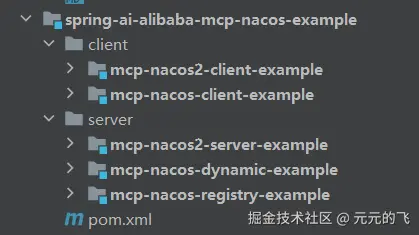
官方Spring-ai-alibaba-mcp-nacos-example样列代码如下(macp-nacos-*为nacos3版本、map-nacos2为nacos2版本):
一、docker启动nacos3服务
ini
docker run --name nacos-standalone-derby \
    -e MODE=standalone \
    -e NACOS_AUTH_TOKEN=SFBXQXpLSm5RYlBXeGQxNGRxc2syQVBYUE95UjczUWs= \
    -e NACOS_AUTH_IDENTITY_KEY=nacos \
    -e NACOS_AUTH_IDENTITY_VALUE=****** \
    -p 8080:8080 \
    -p 8848:8848 \
    -p 9848:9848 \
    -d nacos/nacos-server:latest
一、MCP 服务注册到 Nacos
mcp-nacos-registry-example工程
1.依赖引入
xml
<!-- Spring Boot Starter Web -->
<dependency>
    <groupId>org.springframework.boot</groupId>
    <artifactId>spring-boot-starter-web</artifactId>
</dependency>

<!-- MCP Nacos 注册支持 -->
<dependency>
    <groupId>com.alibaba.cloud.ai</groupId>
    <artifactId>spring-ai-alibaba-starter-nacos-mcp-server</artifactId>
    <version>${spring-ai-alibaba.version}</version>
</dependency>

<!-- MCP Server WebMvc 支持(也可换成 WebFlux) -->
<dependency>
    <groupId>org.springframework.ai</groupId>
    <artifactId>spring-ai-starter-mcp-server-webmvc</artifactId>
</dependency>
2.服务定义(实例)
typescript
@Service
public class TimeService {

    private static final Logger logger = LoggerFactory.getLogger(TimeService.class);

    @Tool(description = "Get the time of a specified city.")
    public String  getCityTimeMethod(@ToolParam(description = "Time zone id, such as Asia/Shanghai") String timeZoneId) {
        logger.info("The current time zone is {}", timeZoneId);
        return String.format("The current time zone is %s and the current time is " + "%s", timeZoneId,
                getTimeByZoneId(timeZoneId));
    }

    private String getTimeByZoneId(String zoneId) {

        // Get the time zone using ZoneId
        ZoneId zid = ZoneId.of(zoneId);

        // Get the current time in this time zone
        ZonedDateTime zonedDateTime = ZonedDateTime.now(zid);

        // Defining a formatter
        DateTimeFormatter formatter = DateTimeFormatter.ofPattern("yyyy-MM-dd HH:mm:ss z");

        // Format ZonedDateTime as a string
        String formattedDateTime = zonedDateTime.format(formatter);

        return formattedDateTime;
    }
}
3.自动注册参数配置
yaml
server:
  port: 21000

spring:
  application:
    name: mcp-nacos-registry-example
  ai:
    mcp:
      server:
        name: webflux-mcp-server
        version: 1.0.0
        type: ASYNC  # Recommended for reactive applications
        instructions: "This reactive server provides time information tools and resources"
        sse-message-endpoint: /mcp/messages
        capabilities:
          tool: true
          resource: true
          prompt: true
          completion: true

    alibaba:
      mcp:
        nacos:
          server-addr: 127.0.0.1:8848
          username: nacos
          password: nacos
          registry:
            enabled: true
            service-group: mcp-server
            service-name: webflux-mcp-server
4.服务启动
typescript
@SpringBootApplication
public class Application {

    public static void main(String[] args) {
        SpringApplication.run(Application.class, args);
    }

    @Bean
    public ToolCallbackProvider tools(TimeService timeService) {
        return MethodToolCallbackProvider.builder().toolObjects(timeService).build();
    }

}
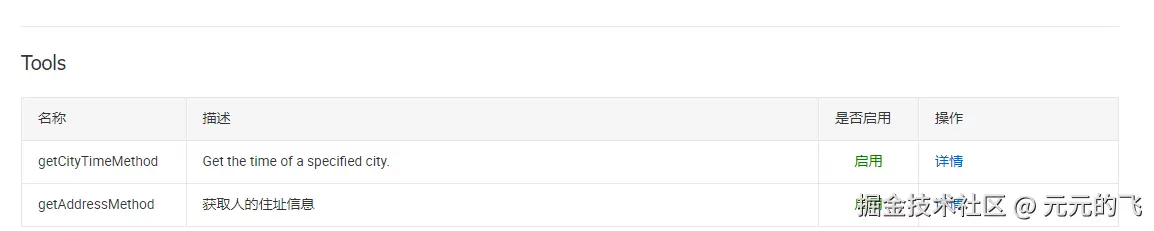
在nacos可以查看到注册的MCP服务及工具列表 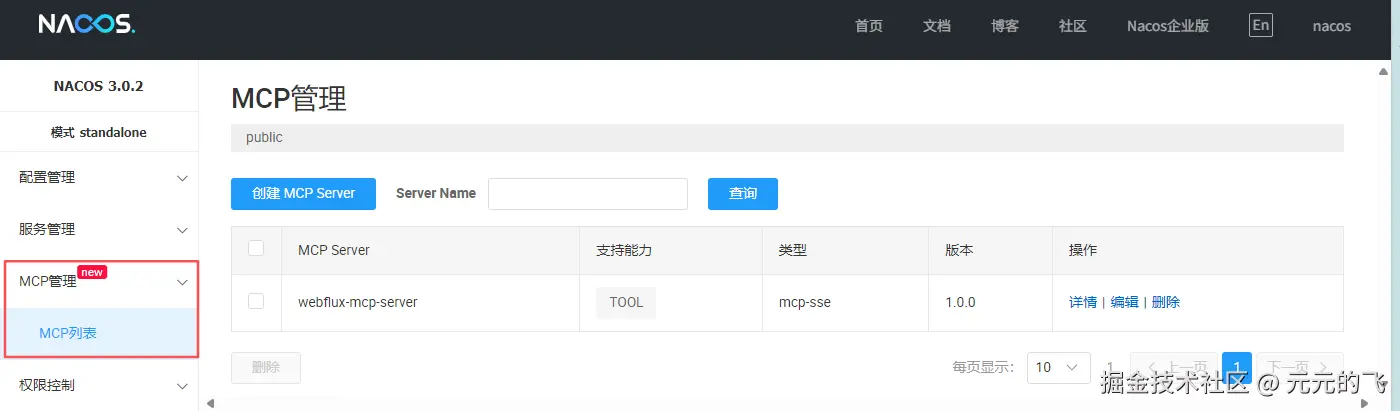

二、Client 发现 MCP
mcp-nacos-client-example工程
1.依赖引入
xml
<dependency>
    <groupId>org.springframework.ai</groupId>
    <artifactId>spring-ai-autoconfigure-model-openai</artifactId>
</dependency>

<dependency>
    <groupId>org.springframework.ai</groupId>
    <artifactId>spring-ai-autoconfigure-model-chat-client</artifactId>
</dependency>

<dependency>
    <groupId>com.alibaba.cloud.ai</groupId>
    <artifactId>spring-ai-alibaba-starter-nacos-mcp-client</artifactId>
    <version>${spring-ai-alibaba.version}</version>
</dependency>

<dependency>
    <groupId>org.springframework.ai</groupId>
    <artifactId>spring-ai-starter-mcp-client-webflux</artifactId>
</dependency>
2.自动发现参数配置
yaml
server:
  port: 8080

spring:
  main:
    web-application-type: none
  application:
    name: mcp-nacos-client-example
  ai:
    openai:
      api-key: ${AI_DASHSCOPE_API_KEY}
      base-url: https://dashscope.aliyuncs.com/compatible-mode
      chat:
        options:
          model: qwen-max
    mcp:
      client:
        enabled: true
        name: my-mcp-client
        version: 1.0.0
        request-timeout: 30s
        type: ASYNC  # or ASYNC for reactive applications

    alibaba:
      mcp:
        nacos:
          server-addr: 127.0.0.1:8848
          username: nacos
          password: nacos
          client:
            enabled: true
            sse:
              connections:
                server1:
                  service-name: webflux-mcp-server
                  version: 1.0.0

# 调试日志
logging:
  level:
    io:
      modelcontextprotocol:
        client: DEBUG
        spec: DEBUG
3.服务启动
typescript
@SpringBootApplication
public class NacosMcpSseClientApplication {


    public static void main(String[] args) {
        SpringApplication.run(NacosMcpSseClientApplication.class, args);
    }

    @Bean
    public CommandLineRunner predefinedQuestions(ChatClient.Builder chatClientBuilder, @Qualifier("loadbalancedMcpAsyncToolCallbacks") ToolCallbackProvider tools,
                                                 ConfigurableApplicationContext context) {

        return args -> {
            var chatClient = chatClientBuilder
                    .defaultToolCallbacks(tools.getToolCallbacks())
                    .build();

            Scanner scanner = new Scanner(System.in);
            while (true) {
                System.out.print("\n>>> QUESTION: ");
                String userInput = scanner.nextLine();
                if (userInput.equalsIgnoreCase("exit")) {
                    break;
                }
                if (userInput.isEmpty()) {
                    userInput = "北京时间现在几点钟";
                }
                System.out.println("\n>>> ASSISTANT: " + chatClient.prompt(userInput).call().content());
            }
            scanner.close();
            context.close();
        };
    }
}
三、结论
大模型跟据用户提出的问题来判断应该使用哪一个函数。每个函数都有其特定的功能和输入参数要求,这些信息在函数定义时的描述中已经给出。例如,如果你询问某个城市当前的时间,大模型就会识别到需要调用 webflux_mcp_server_getCityTimeMethod 函数,并且会准备相应的参数如 timeZoneId 来满足函数的调用需求。
一旦确定了要使用的函数,就会构造一个符合该函数输入参数要求的JSON对象,并通过特定的命令格式来调用它。调用后,大模型会收到函数返回的结果,并基于这个结果来构建答案。 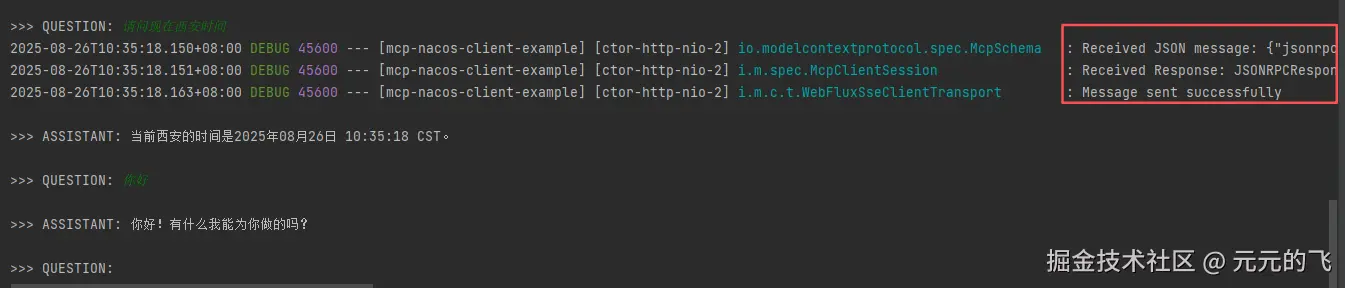
四、扩展
1.添加一个工具
typescript
@Service
public class NameService {

    private static final Logger logger = LoggerFactory.getLogger(NameService.class);

    @Tool(description = "获取人的住址信息")
    public String  getAddressMethod(@ToolParam(description = "人名,比如小明") String name) {
        Map<String, String> nameMap = new HashMap<>();
        nameMap.put("小明", "陕西西安");
        nameMap.put("小王", "陕西宝鸡");
        nameMap.put("小张", "西安汉中");
        nameMap.put("小李", "西安渭南");
        logger.info("The name is {}", name);
        return nameMap.get(name);
    }
}
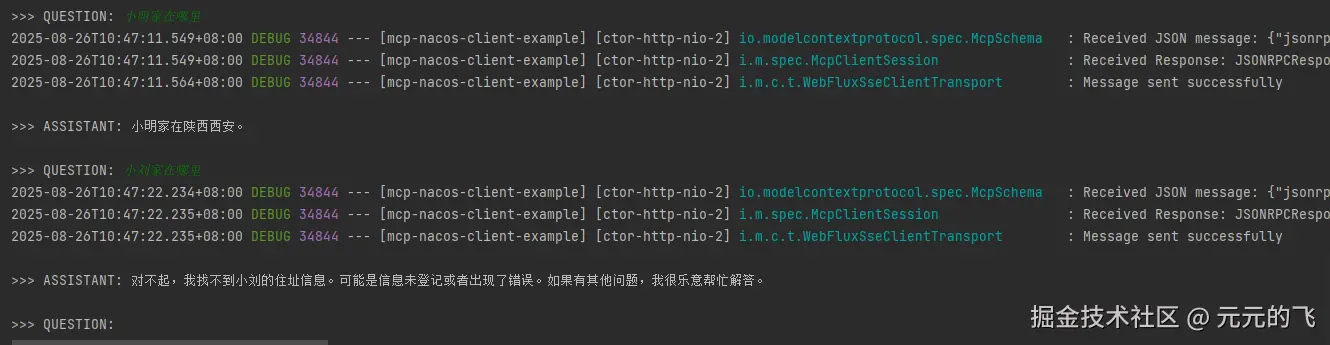
提问触发了MCP工具调用,这样我么就可以把接口能力包装成工具提供给大模型调用。nacos3目前已经和dify集成,直接提供mcp能力。