本文为【编程达人挑战赛】参赛文章,首发于CSDN,三天后可转载至其他平台。
作者:禹曦a
日期:2026年1月9日
目录
[一、引言:为什么Java开发者需要掌握Spring Boot?](#一、引言:为什么Java开发者需要掌握Spring Boot?)
[2.1 开发环境要求](#2.1 开发环境要求)
[2.2 创建Spring Boot项目](#2.2 创建Spring Boot项目)
[方式一:使用Spring Initializr在线生成](#方式一:使用Spring Initializr在线生成)
[2.3 项目结构说明](#2.3 项目结构说明)
[3.1 数据库表设计](#3.1 数据库表设计)
[3.2 实体类实现](#3.2 实体类实现)
[4.1 Repository接口](#4.1 Repository接口)
[5.1 DTO设计(数据传输对象)](#5.1 DTO设计(数据传输对象))
[5.2 Service层实现](#5.2 Service层实现)
[6.1 订单控制器](#6.1 订单控制器)
[6.2 产品控制器](#6.2 产品控制器)
[8.1 应用配置](#8.1 应用配置)
[8.2 使用Postman测试API](#8.2 使用Postman测试API)
[9.1 掌握的核心技术](#9.1 掌握的核心技术)
[9.2 扩展建议](#9.2 扩展建议)
[9.3 开发心得](#9.3 开发心得)
一、引言:为什么Java开发者需要掌握Spring Boot?
在当今的软件开发领域,微服务架构已经成为主流。Java作为企业级应用开发的首选语言,其生态系统中Spring框架占据着核心地位。然而,传统的Spring MVC配置复杂,项目搭建繁琐,这让很多开发者望而却步。
Spring Boot应运而生,它通过"约定优于配置"的理念,极大地简化了Spring应用的初始搭建和开发过程。作为Java开发者,掌握Spring Boot不仅能够提升开发效率,更是适应现代微服务开发的必备技能。
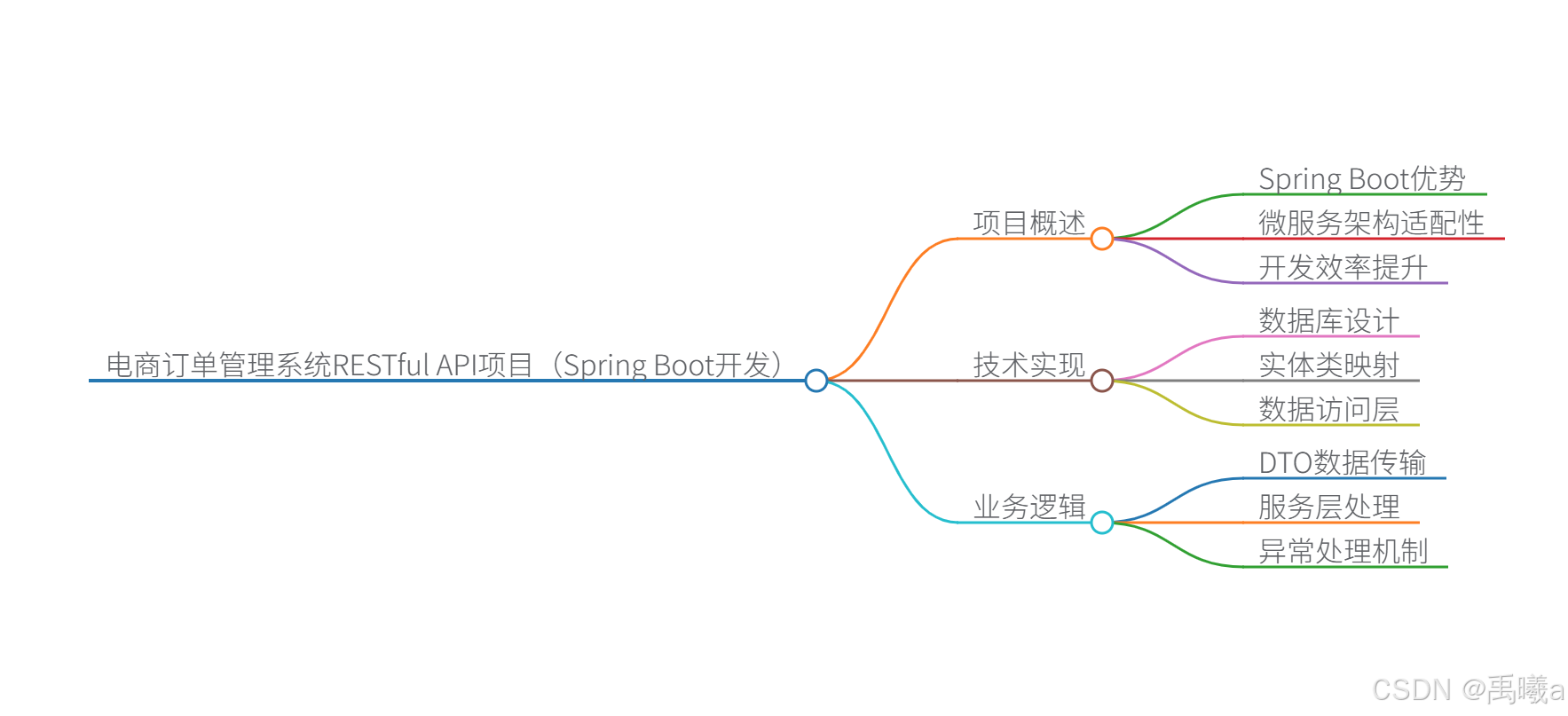
今天,我们将通过一个完整的电商订单管理系统RESTful API实战项目,带你从零掌握Spring Boot的核心用法,包括项目搭建、数据访问、业务逻辑实现和API测试。
二、环境准备与项目搭建
2.1 开发环境要求
-
JDK 11或更高版本
-
Maven 3.6+ 或 Gradle
-
IntelliJ IDEA 或 Eclipse(建议使用IDEA)
-
MySQL 8.0 或 PostgreSQL
2.2 创建Spring Boot项目
方式一:使用Spring Initializr在线生成
访问 start.spring.io,选择以下配置:
-
Project: Maven Project
-
Language: Java
-
Spring Boot: 3.1.5
-
Group: com.example
-
Artifact: ecommerce-order
-
Dependencies:
-
Spring Web
-
Spring Data JPA
-
MySQL Driver
-
Lombok
-
方式二:使用IDEA创建
-
打开IDEA → New Project → Spring Initializr
-
配置项目信息
-
选择依赖:Web、JPA、MySQL、Lombok
2.3 项目结构说明
ecommerce-order/
├── src/
│   ├── main/
│   │   ├── java/com/example/ecommerceorder/
│   │   │   ├── EcommerceOrderApplication.java
│   │   │   ├── controller/
│   │   │   ├── service/
│   │   │   ├── repository/
│   │   │   ├── entity/
│   │   │   └── dto/
│   │   └── resources/
│   │       ├── application.properties
│   │       └── data.sql
│   └── test/
└── pom.xml
三、数据库设计与实体类实现
3.1 数据库表设计
创建以下表:
sql
-- 用户表
CREATE TABLE users (
    id BIGINT AUTO_INCREMENT PRIMARY KEY,
    username VARCHAR(50) NOT NULL UNIQUE,
    email VARCHAR(100) NOT NULL UNIQUE,
    phone VARCHAR(20),
    address VARCHAR(200),
    created_at TIMESTAMP DEFAULT CURRENT_TIMESTAMP
);

-- 商品表
CREATE TABLE products (
    id BIGINT AUTO_INCREMENT PRIMARY KEY,
    name VARCHAR(100) NOT NULL,
    category VARCHAR(50) NOT NULL,
    price DECIMAL(10, 2) NOT NULL,
    stock INT NOT NULL DEFAULT 0,
    description TEXT,
    created_at TIMESTAMP DEFAULT CURRENT_TIMESTAMP
);

-- 订单表
CREATE TABLE orders (
    id BIGINT AUTO_INCREMENT PRIMARY KEY,
    order_no VARCHAR(50) NOT NULL UNIQUE,
    user_id BIGINT NOT NULL,
    total_amount DECIMAL(10, 2) NOT NULL,
    status VARCHAR(20) DEFAULT 'PENDING',
    order_date TIMESTAMP DEFAULT CURRENT_TIMESTAMP,
    FOREIGN KEY (user_id) REFERENCES users(id)
);

-- 订单项表
CREATE TABLE order_items (
    id BIGINT AUTO_INCREMENT PRIMARY KEY,
    order_id BIGINT NOT NULL,
    product_id BIGINT NOT NULL,
    quantity INT NOT NULL,
    price DECIMAL(10, 2) NOT NULL,
    FOREIGN KEY (order_id) REFERENCES orders(id),
    FOREIGN KEY (product_id) REFERENCES products(id)
);
3.2 实体类实现
User实体类
java
package com.example.ecommerceorder.entity;

import jakarta.persistence.*;
import lombok.Data;
import java.time.LocalDateTime;

@Entity
@Table(name = "users")
@Data
public class User {
    @Id
    @GeneratedValue(strategy = GenerationType.IDENTITY)
    private Long id;

    @Column(nullable = false, unique = true)
    private String username;

    @Column(nullable = false, unique = true)
    private String email;

    private String phone;

    private String address;

    @Column(name = "created_at")
    private LocalDateTime createdAt = LocalDateTime.now();
}
Product实体类
java
package com.example.ecommerceorder.entity;

import jakarta.persistence.*;
import lombok.Data;
import java.math.BigDecimal;
import java.time.LocalDateTime;

@Entity
@Table(name = "products")
@Data
public class Product {
    @Id
    @GeneratedValue(strategy = GenerationType.IDENTITY)
    private Long id;

    @Column(nullable = false)
    private String name;

    @Column(nullable = false)
    private String category;

    @Column(nullable = false, precision = 10, scale = 2)
    private BigDecimal price;

    @Column(nullable = false)
    private Integer stock;

    @Column(length = 500)
    private String description;

    @Column(name = "created_at")
    private LocalDateTime createdAt = LocalDateTime.now();
}
Order和OrderItem实体类
java
package com.example.ecommerceorder.entity;

import jakarta.persistence.*;
import lombok.Data;
import java.math.BigDecimal;
import java.time.LocalDateTime;
import java.util.ArrayList;
import java.util.List;

@Entity
@Table(name = "orders")
@Data
public class Order {
    @Id
    @GeneratedValue(strategy = GenerationType.IDENTITY)
    private Long id;

    @Column(name = "order_no", nullable = false, unique = true)
    private String orderNo;

    @ManyToOne(fetch = FetchType.LAZY)
    @JoinColumn(name = "user_id", nullable = false)
    private User user;

    @Column(name = "total_amount", nullable = false, precision = 10, scale = 2)
    private BigDecimal totalAmount;

    @Column(nullable = false)
    private String status = "PENDING";

    @Column(name = "order_date")
    private LocalDateTime orderDate = LocalDateTime.now();

    @OneToMany(mappedBy = "order", cascade = CascadeType.ALL, orphanRemoval = true)
    private List<OrderItem> items = new ArrayList<>();

    // 添加订单项的方法
    public void addOrderItem(OrderItem item) {
        items.add(item);
        item.setOrder(this);
    }
}

@Entity
@Table(name = "order_items")
@Data
public class OrderItem {
    @Id
    @GeneratedValue(strategy = GenerationType.IDENTITY)
    private Long id;

    @ManyToOne(fetch = FetchType.LAZY)
    @JoinColumn(name = "order_id", nullable = false)
    private Order order;

    @ManyToOne(fetch = FetchType.LAZY)
    @JoinColumn(name = "product_id", nullable = false)
    private Product product;

    @Column(nullable = false)
    private Integer quantity;

    @Column(nullable = false, precision = 10, scale = 2)
    private BigDecimal price;
}
四、数据访问层实现
4.1 Repository接口
java
package com.example.ecommerceorder.repository;

import com.example.ecommerceorder.entity.Order;
import com.example.ecommerceorder.entity.Product;
import com.example.ecommerceorder.entity.User;
import org.springframework.data.jpa.repository.JpaRepository;
import org.springframework.data.jpa.repository.Query;
import org.springframework.data.repository.query.Param;
import org.springframework.stereotype.Repository;

import java.time.LocalDateTime;
import java.util.List;

@Repository
public interface UserRepository extends JpaRepository<User, Long> {
    User findByUsername(String username);
    User findByEmail(String email);
}

@Repository
public interface ProductRepository extends JpaRepository<Product, Long> {
    List<Product> findByCategory(String category);
    List<Product> findByNameContaining(String keyword);

    @Query("SELECT p FROM Product p WHERE p.price BETWEEN :minPrice AND :maxPrice")
    List<Product> findByPriceRange(@Param("minPrice") BigDecimal minPrice,
                                  @Param("maxPrice") BigDecimal maxPrice);
}

@Repository
public interface OrderRepository extends JpaRepository<Order, Long> {
    List<Order> findByUserId(Long userId);
    List<Order> findByStatus(String status);

    @Query("SELECT o FROM Order o WHERE o.orderDate BETWEEN :startDate AND :endDate")
    List<Order> findByDateRange(@Param("startDate") LocalDateTime startDate,
                               @Param("endDate") LocalDateTime endDate);

    @Query("SELECT o FROM Order o JOIN o.user u WHERE u.username = :username")
    List<Order> findByUsername(@Param("username") String username);
}
五、业务逻辑层实现
5.1 DTO设计(数据传输对象)
java
package com.example.ecommerceorder.dto;

import lombok.Data;
import jakarta.validation.constraints.*;

import java.math.BigDecimal;

@Data
public class CreateOrderRequest {
    @NotNull(message = "用户ID不能为空")
    private Long userId;

    @NotEmpty(message = "订单项不能为空")
    private List<OrderItemRequest> items;

    @Data
    public static class OrderItemRequest {
        @NotNull(message = "商品ID不能为空")
        private Long productId;

        @Min(value = 1, message = "购买数量至少为1")
        private Integer quantity;
    }
}

@Data
public class ProductDTO {
    private Long id;
    private String name;
    private String category;
    private BigDecimal price;
    private Integer stock;
    private String description;
}
5.2 Service层实现
java
package com.example.ecommerceorder.service;

import com.example.ecommerceorder.dto.CreateOrderRequest;
import com.example.ecommerceorder.dto.ProductDTO;
import com.example.ecommerceorder.entity.*;
import com.example.ecommerceorder.exception.BusinessException;
import com.example.ecommerceorder.repository.*;
import lombok.RequiredArgsConstructor;
import org.springframework.stereotype.Service;
import org.springframework.transaction.annotation.Transactional;

import java.math.BigDecimal;
import java.time.LocalDateTime;
import java.util.List;
import java.util.UUID;
import java.util.stream.Collectors;

@Service
@RequiredArgsConstructor
public class OrderService {
    private final OrderRepository orderRepository;
    private final UserRepository userRepository;
    private final ProductRepository productRepository;

    @Transactional
    public Order createOrder(CreateOrderRequest request) {
        // 1. 验证用户
        User user = userRepository.findById(request.getUserId())
                .orElseThrow(() -> new BusinessException("用户不存在"));

        // 2. 创建订单
        Order order = new Order();
        order.setOrderNo(generateOrderNo());
        order.setUser(user);
        order.setStatus("PENDING");

        BigDecimal totalAmount = BigDecimal.ZERO;

        // 3. 处理订单项
        for (CreateOrderRequest.OrderItemRequest itemRequest : request.getItems()) {
            Product product = productRepository.findById(itemRequest.getProductId())
                    .orElseThrow(() -> new BusinessException("商品不存在: " + itemRequest.getProductId()));

            // 检查库存
            if (product.getStock() < itemRequest.getQuantity()) {
                throw new BusinessException("商品库存不足: " + product.getName());
            }

            // 创建订单项
            OrderItem orderItem = new OrderItem();
            orderItem.setProduct(product);
            orderItem.setQuantity(itemRequest.getQuantity());
            orderItem.setPrice(product.getPrice());

            order.addOrderItem(orderItem);

            // 计算总金额
            BigDecimal itemTotal = product.getPrice()
                    .multiply(BigDecimal.valueOf(itemRequest.getQuantity()));
            totalAmount = totalAmount.add(itemTotal);

            // 扣减库存
            product.setStock(product.getStock() - itemRequest.getQuantity());
            productRepository.save(product);
        }

        order.setTotalAmount(totalAmount);

        // 4. 保存订单
        return orderRepository.save(order);
    }

    private String generateOrderNo() {
        return "ORD" + LocalDateTime.now().format(java.time.format.DateTimeFormatter.ofPattern("yyyyMMdd"))
                + UUID.randomUUID().toString().substring(0, 8).toUpperCase();
    }

    @Transactional(readOnly = true)
    public List<Order> getUserOrders(Long userId) {
        return orderRepository.findByUserId(userId);
    }

    @Transactional
    public Order updateOrderStatus(Long orderId, String status) {
        Order order = orderRepository.findById(orderId)
                .orElseThrow(() -> new BusinessException("订单不存在"));

        order.setStatus(status);
        return orderRepository.save(order);
    }
}

@Service
@RequiredArgsConstructor
public class ProductService {
    private final ProductRepository productRepository;

    @Transactional(readOnly = true)
    public List<ProductDTO> getAllProducts() {
        return productRepository.findAll().stream()
                .map(this::convertToDTO)
                .collect(Collectors.toList());
    }

    @Transactional(readOnly = true)
    public List<ProductDTO> getProductsByCategory(String category) {
        return productRepository.findByCategory(category).stream()
                .map(this::convertToDTO)
                .collect(Collectors.toList());
    }

    @Transactional
    public ProductDTO createProduct(ProductDTO productDTO) {
        Product product = new Product();
        product.setName(productDTO.getName());
        product.setCategory(productDTO.getCategory());
        product.setPrice(productDTO.getPrice());
        product.setStock(productDTO.getStock());
        product.setDescription(productDTO.getDescription());

        Product savedProduct = productRepository.save(product);
        return convertToDTO(savedProduct);
    }

    @Transactional
    public ProductDTO updateProduct(Long id, ProductDTO productDTO) {
        Product product = productRepository.findById(id)
                .orElseThrow(() -> new BusinessException("商品不存在"));

        product.setName(productDTO.getName());
        product.setCategory(productDTO.getCategory());
        product.setPrice(productDTO.getPrice());
        product.setStock(productDTO.getStock());
        product.setDescription(productDTO.getDescription());

        Product updatedProduct = productRepository.save(product);
        return convertToDTO(updatedProduct);
    }

    private ProductDTO convertToDTO(Product product) {
        ProductDTO dto = new ProductDTO();
        dto.setId(product.getId());
        dto.setName(product.getName());
        dto.setCategory(product.getCategory());
        dto.setPrice(product.getPrice());
        dto.setStock(product.getStock());
        dto.setDescription(product.getDescription());
        return dto;
    }
}
六、控制器层实现
6.1 订单控制器
java
package com.example.ecommerceorder.controller;

import com.example.ecommerceorder.dto.CreateOrderRequest;
import com.example.ecommerceorder.entity.Order;
import com.example.ecommerceorder.service.OrderService;
import jakarta.validation.Valid;
import lombok.RequiredArgsConstructor;
import org.springframework.http.HttpStatus;
import org.springframework.http.ResponseEntity;
import org.springframework.web.bind.annotation.*;

import java.util.HashMap;
import java.util.List;
import java.util.Map;

@RestController
@RequestMapping("/api/orders")
@RequiredArgsConstructor
@CrossOrigin(origins = "*")
public class OrderController {
    private final OrderService orderService;

    @PostMapping
    public ResponseEntity<?> createOrder(@Valid @RequestBody CreateOrderRequest request) {
        try {
            Order order = orderService.createOrder(request);
            return ResponseEntity.status(HttpStatus.CREATED).body(buildResponse(
                "订单创建成功",
                order,
                HttpStatus.CREATED.value()
            ));
        } catch (Exception e) {
            return ResponseEntity.status(HttpStatus.BAD_REQUEST).body(buildResponse(
                "订单创建失败: " + e.getMessage(),
                null,
                HttpStatus.BAD_REQUEST.value()
            ));
        }
    }

    @GetMapping("/user/{userId}")
    public ResponseEntity<?> getUserOrders(@PathVariable Long userId) {
        try {
            List<Order> orders = orderService.getUserOrders(userId);
            return ResponseEntity.ok(buildResponse(
                "获取用户订单成功",
                orders,
                HttpStatus.OK.value()
            ));
        } catch (Exception e) {
            return ResponseEntity.status(HttpStatus.NOT_FOUND).body(buildResponse(
                "获取订单失败: " + e.getMessage(),
                null,
                HttpStatus.NOT_FOUND.value()
            ));
        }
    }

    @PutMapping("/{orderId}/status")
    public ResponseEntity<?> updateOrderStatus(
            @PathVariable Long orderId,
            @RequestParam String status) {
        try {
            Order order = orderService.updateOrderStatus(orderId, status);
            return ResponseEntity.ok(buildResponse(
                "订单状态更新成功",
                order,
                HttpStatus.OK.value()
            ));
        } catch (Exception e) {
            return ResponseEntity.status(HttpStatus.NOT_FOUND).body(buildResponse(
                "更新订单状态失败: " + e.getMessage(),
                null,
                HttpStatus.NOT_FOUND.value()
            ));
        }
    }

    private Map<String, Object> buildResponse(String message, Object data, int status) {
        Map<String, Object> response = new HashMap<>();
        response.put("message", message);
        response.put("data", data);
        response.put("status", status);
        response.put("timestamp", System.currentTimeMillis());
        return response;
    }
}
6.2 产品控制器
java
package com.example.ecommerceorder.controller;

import com.example.ecommerceorder.dto.ProductDTO;
import com.example.ecommerceorder.service.ProductService;
import jakarta.validation.Valid;
import lombok.RequiredArgsConstructor;
import org.springframework.http.HttpStatus;
import org.springframework.http.ResponseEntity;
import org.springframework.web.bind.annotation.*;

import java.util.List;

@RestController
@RequestMapping("/api/products")
@RequiredArgsConstructor
@CrossOrigin(origins = "*")
public class ProductController {
    private final ProductService productService;

    @GetMapping
    public ResponseEntity<List<ProductDTO>> getAllProducts() {
        return ResponseEntity.ok(productService.getAllProducts());
    }

    @GetMapping("/category/{category}")
    public ResponseEntity<List<ProductDTO>> getProductsByCategory(
            @PathVariable String category) {
        return ResponseEntity.ok(productService.getProductsByCategory(category));
    }

    @PostMapping
    public ResponseEntity<ProductDTO> createProduct(
            @Valid @RequestBody ProductDTO productDTO) {
        return ResponseEntity.status(HttpStatus.CREATED)
                .body(productService.createProduct(productDTO));
    }

    @PutMapping("/{id}")
    public ResponseEntity<ProductDTO> updateProduct(
            @PathVariable Long id,
            @Valid @RequestBody ProductDTO productDTO) {
        return ResponseEntity.ok(productService.updateProduct(id, productDTO));
    }
}
七、全局异常处理
java
package com.example.ecommerceorder.exception;

import org.springframework.http.HttpStatus;
import org.springframework.http.ResponseEntity;
import org.springframework.validation.FieldError;
import org.springframework.web.bind.MethodArgumentNotValidException;
import org.springframework.web.bind.annotation.ExceptionHandler;
import org.springframework.web.bind.annotation.RestControllerAdvice;

import java.util.HashMap;
import java.util.Map;

@RestControllerAdvice
public class GlobalExceptionHandler {

    @ExceptionHandler(BusinessException.class)
    public ResponseEntity<Map<String, Object>> handleBusinessException(
            BusinessException ex) {
        Map<String, Object> response = new HashMap<>();
        response.put("message", ex.getMessage());
        response.put("status", HttpStatus.BAD_REQUEST.value());
        response.put("timestamp", System.currentTimeMillis());

        return ResponseEntity.status(HttpStatus.BAD_REQUEST).body(response);
    }

    @ExceptionHandler(MethodArgumentNotValidException.class)
    public ResponseEntity<Map<String, Object>> handleValidationExceptions(
            MethodArgumentNotValidException ex) {
        Map<String, String> errors = new HashMap<>();
        ex.getBindingResult().getAllErrors().forEach((error) -> {
            String fieldName = ((FieldError) error).getField();
            String errorMessage = error.getDefaultMessage();
            errors.put(fieldName, errorMessage);
        });

        Map<String, Object> response = new HashMap<>();
        response.put("message", "参数验证失败");
        response.put("errors", errors);
        response.put("status", HttpStatus.BAD_REQUEST.value());
        response.put("timestamp", System.currentTimeMillis());

        return ResponseEntity.status(HttpStatus.BAD_REQUEST).body(response);
    }

    @ExceptionHandler(Exception.class)
    public ResponseEntity<Map<String, Object>> handleGeneralException(Exception ex) {
        Map<String, Object> response = new HashMap<>();
        response.put("message", "服务器内部错误: " + ex.getMessage());
        response.put("status", HttpStatus.INTERNAL_SERVER_ERROR.value());
        response.put("timestamp", System.currentTimeMillis());

        return ResponseEntity.status(HttpStatus.INTERNAL_SERVER_ERROR).body(response);
    }
}
八、配置与测试
8.1 应用配置
java
# application.properties
server.port=8080

# 数据库配置
spring.datasource.url=jdbc:mysql://localhost:3306/ecommerce_db?useSSL=false&serverTimezone=UTC
spring.datasource.username=root
spring.datasource.password=yourpassword
spring.datasource.driver-class-name=com.mysql.cj.jdbc.Driver

# JPA配置
spring.jpa.hibernate.ddl-auto=update
spring.jpa.show-sql=true
spring.jpa.properties.hibernate.format_sql=true
spring.jpa.database-platform=org.hibernate.dialect.MySQL8Dialect

# 日志配置
logging.level.com.example.ecommerceorder=DEBUG
8.2 使用Postman测试API
测试创建订单
POST http://localhost:8080/api/orders
Content-Type: application/json

{
    "userId": 1,
    "items": [
        {
            "productId": 1,
            "quantity": 2
        },
        {
            "productId": 2,
            "quantity": 1
        }
    ]
}
测试获取用户订单
GET http://localhost:8080/api/orders/user/1
测试获取所有商品
GET http://localhost:8080/api/products
九、项目总结与扩展建议
通过这个电商订单管理系统的实战开发,我们掌握了以下Spring Boot核心技能:
9.1 掌握的核心技术
-
Spring Boot项目搭建:使用Spring Initializr快速创建项目
-
数据持久化:Spring Data JPA与MySQL集成
-
RESTful API设计:遵循REST原则设计API接口
-
分层架构:Controller-Service-Repository三层架构
-
事务管理:使用@Transactional注解管理事务
-
异常处理:全局异常处理与自定义异常
-
参数验证:使用Jakarta Validation API
9.2 扩展建议
-
添加身份认证:集成Spring Security实现JWT令牌认证
-
缓存优化:使用Redis缓存热点数据
-
消息队列:集成RabbitMQ处理异步任务
-
微服务拆分:将订单、商品、用户拆分为独立服务
-
容器化部署:使用Docker打包应用
-
API文档:集成Swagger生成API文档
9.3 开发心得
Spring Boot通过自动配置和起步依赖,极大地简化了Java Web应用的开发。掌握Spring Boot不仅需要理解框架本身,更重要的是理解其背后的设计思想。在实际开发中,我们应该:
-
遵循约定优于配置的原则
-
合理设计项目结构
-
编写清晰的业务逻辑
-
做好异常处理和日志记录
-
编写单元测试保证代码质量