git-Linux中的使用
一、下载git
版本信息
root@rocky \~# cat /etc/rocky-release
Rocky Linux release 9.4 (Blue Onyx)
root@rocky \~# cat /etc/rocky-release-upstream
Derived from Red Hat Enterprise Linux 9.4
root@rocky \~# uname -r
5.14.0-427.13.1.el9_4.x86_64
安装git并查看版本
root@rocky \~#
yum install git -yroot@rocky shell# git --version
git version 2.47.3
二、https方式上传
-
在gitee里新建仓库
-
Linux中进入要项目目录
root@rocky \~# cd /shell
- 初始化
root@rocky shell# git init
提示: 使用 'master' 作为初始分支的名称。这个默认分支名称可能会更改。要在新仓库中
提示: 配置使用初始分支名,并消除这条警告,请执行:
提示:
提示: git config --global init.defaultBranch <名称>
提示:
提示: 除了 'master' 之外,通常选定的名字有 'main'、'trunk' 和 'development'。
提示: 可以通过以下命令重命名刚创建的分支:
提示:
提示: git branch -m
已初始化空的 Git 仓库于 /shell/.git/
- 在Linux客户机上配置好用户名和邮箱
root@rocky shell#
git config --global user.name'Code Rhythm'root@rocky shell#
git config --global user.email'example@qq.com'
- 克隆gitee中新建的仓库到Linux中
git clone "仓库地址"
root@rocky shell#
git clonehttps://gitee.com/code-rhythm/shell.git正克隆到 'shell'...
remote: Enumerating objects: 3, done.
remote: Counting objects: 100% (3/3), done.
remote: Compressing objects: 100% (2/2), done.
remote: Total 3 (delta 0), reused 0 (delta 0), pack-reused 0 (from 0)
接收对象中: 100% (3/3), 完成.
- 将文件提交到暂存区
root@rocky shell#
git addread.sh
- 提交暂存区文件到本地仓库
root@rocky shell#
git commit-m "read传参"master(根提交) 41e27e8 read传参
1 file changed, 15 insertions(+)
create mode 100644 read.sh
- 关联远程仓库,可自己命名
git remote add 别名 仓库地址
root@rocky shell#
git remote addshell https://gitee.com/code-rhythm/shell.git
- 推送分支
首次推送可push -fshell master强制推送或git push -uorigin master 推送
bash
[root@rocky shell]# git push shell
致命错误:当前分支 master 没有对应的上游分支。
为推送当前分支并建立与远程上游的跟踪,使用

    git push --set-upstream shell master

为了让没有追踪上游的分支自动配置,参见 'git help config' 中的 push.autoSetupRemote。

[root@rocky shell]#  git push --set-upstream shell master
Username for 'https://gitee.com': code-rhythm
Password for 'https://code-rhythm@gitee.com':
To https://gitee.com/code-rhythm/shell.git
 ! [rejected]        master -> master (fetch first)
错误:无法推送一些引用到 'https://gitee.com/code-rhythm/shell.git'
提示: 更新被拒绝,因为远程仓库包含您本地尚不存在的提交。这通常是因为另外
提示: 一个仓库已向该引用进行了推送。如果您希望先与远程变更合并,请在推送
提示: 前执行 'git pull'。
提示: 详见 'git push --help' 中的 'Note about fast-forwards' 小节。

[root@rocky shell]# git pull shell master
来自 https://gitee.com/code-rhythm/shell
 * branch            master     -> FETCH_HEAD
提示: 您有偏离的分支,需要指定如何调和它们。您可以在执行下一次
提示: pull 操作之前执行下面一条命令来抑制本消息:
提示:
提示:   git config pull.rebase false  # 合并
提示:   git config pull.rebase true   # 变基
提示:   git config pull.ff only       # 仅快进
提示:
提示: 您可以将 "git config" 替换为 "git config --global" 以便为所有仓库设置
提示: 缺省的配置项。您也可以在每次执行 pull 命令时添加 --rebase、--no-rebase,
提示: 或者 --ff-only 参数覆盖缺省设置。
致命错误:需要指定如何调和偏离的分支。
[root@rocky shell]# git config pull.rebase false --global
强制推送
bash
[root@rocky shell]# git push -f shell master
Username for 'https://gitee.com': code-rhythm
Password for 'https://code-rhythm@gitee.com':
枚举对象中: 3, 完成.
对象计数中: 100% (3/3), 完成.
使用 2 个线程进行压缩
压缩对象中: 100% (2/2), 完成.
写入对象中: 100% (3/3), 425 字节 | 425.00 KiB/s, 完成.
总共 3(差异 0),复用 0(差异 0),包复用 0(来自  0 个包)
remote: Powered by GITEE.COM [1.1.5]
remote: Set trace flag 6d4ad285
To https://gitee.com/code-rhythm/shell.git
+ 097e4e5...41e27e8 master -> master (forced update)- 再次上传
bash
[root@rocky shell]# git add install_mysql.sh
[root@rocky shell]# git commit -m "安装mysql"
[master ed4047c] 安装mysql
 1 file changed, 16 insertions(+)
 create mode 100644 install_mysql.sh

[root@rocky shell]# git push shell master
Username for 'https://gitee.com': code-rhythm
Password for 'https://code-rhythm@gitee.com':
枚举对象中: 4, 完成.
对象计数中: 100% (4/4), 完成.
使用 2 个线程进行压缩
压缩对象中: 100% (3/3), 完成.
写入对象中: 100% (3/3), 518 字节 | 518.00 KiB/s, 完成.
总共 3(差异 0),复用 0(差异 0),包复用 0(来自  0 个包)
remote: Powered by GITEE.COM [1.1.5]
remote: Set trace flag 5b42008e
To https://gitee.com/code-rhythm/shell.git
   41e27e8..ed4047c  master -> master
痛点:每次上传都要输入用户名和密码,效率低
-> 配置秘钥
三、ssh秘钥方式上传
- ssh-keygen:SSH 密钥生成工具的核心命令
- -t ed25519:指定密钥算法为 ed25519(目前最安全、高效的算法之一,优于传统的 RSA,推荐优先使用)
- -C "Gitee SSH Key":为密钥添加注释(comment),方便区分不同密钥的用途
root@rocky shell#
ssh-keygen-t ed25519 -C "Gitee SSH Key"Generating public/private ed25519 key pair.
Enter file in which to save the key (/root/.ssh/id_ed25519):
Enter passphrase (empty for no passphrase):
Enter same passphrase again:
Your identification has been saved in /root/.ssh/id_ed25519
Your public key has been saved in /root/.ssh/id_ed25519.pub
The key fingerprint is:
SHA256:2KmPYsCZPRSVuQRWj8ViH1iT3BmG+Ah8ERsQSmYC8gw Gitee SSH Key
The key's randomart image is:
±-ED25519 256--+
|E +.=@++oo |
|.O o+ X oo || + o ... |
| . ooo. |
| . = . S |
| = o . |
| . ... |
| o o |
| . ... . |
±---SHA256-----+
查看秘钥
root@rocky .ssh#
cat /root/.ssh/id_ed25519.pub
!!注意
eployKey,只读
复制生成后的 ssh key ,通过仓库主页 管理 -> 部署公钥管理 -> 添加部署公钥,将生成的公钥添加到仓库中
DeployKey错误示例
bash
[root@rocky .ssh]# ssh -T git@gitee.com
The authenticity of host 'gitee.com (180.76.199.13)' can't be established.
ED25519 key fingerprint is SHA256:+ULzij2u99B9eWYFTw1Q4ErYG/aepHLbu96PAUCoV88.
This key is not known by any other names
Are you sure you want to continue connecting (yes/no/[fingerprint])? yes
Warning: Permanently added 'gitee.com' (ED25519) to the list of known hosts.
Hi Anonymous (DeployKey)! You've successfully authenticated, but GITEE.COM does not provide shell access.
Note: Perhaps the current use is DeployKey.
Note: DeployKey only supports pull/fetch operations

[root@rocky .ssh]# ssh 'code-rhythm'@gitee.com
Hi Anonymous (DeployKey)! You've successfully authenticated, but GITEE.COM does not provide shell access.
Note: Perhaps the current use is DeployKey.
Note: DeployKey only supports pull/fetch operations
Connection to gitee.com closed.

[root@rocky shell]# git add full_backup.sh
[root@rocky shell]# git commit -m "全备"
[master bd2b821] 全备
 1 file changed, 52 insertions(+)
 create mode 100644 full_backup.sh
[root@rocky shell]# git push shell master
[session-754d88b7] Auth error: DeployKey does not support push code
致命错误:无法读取远程仓库。

请确认您有正确的访问权限并且仓库存在。
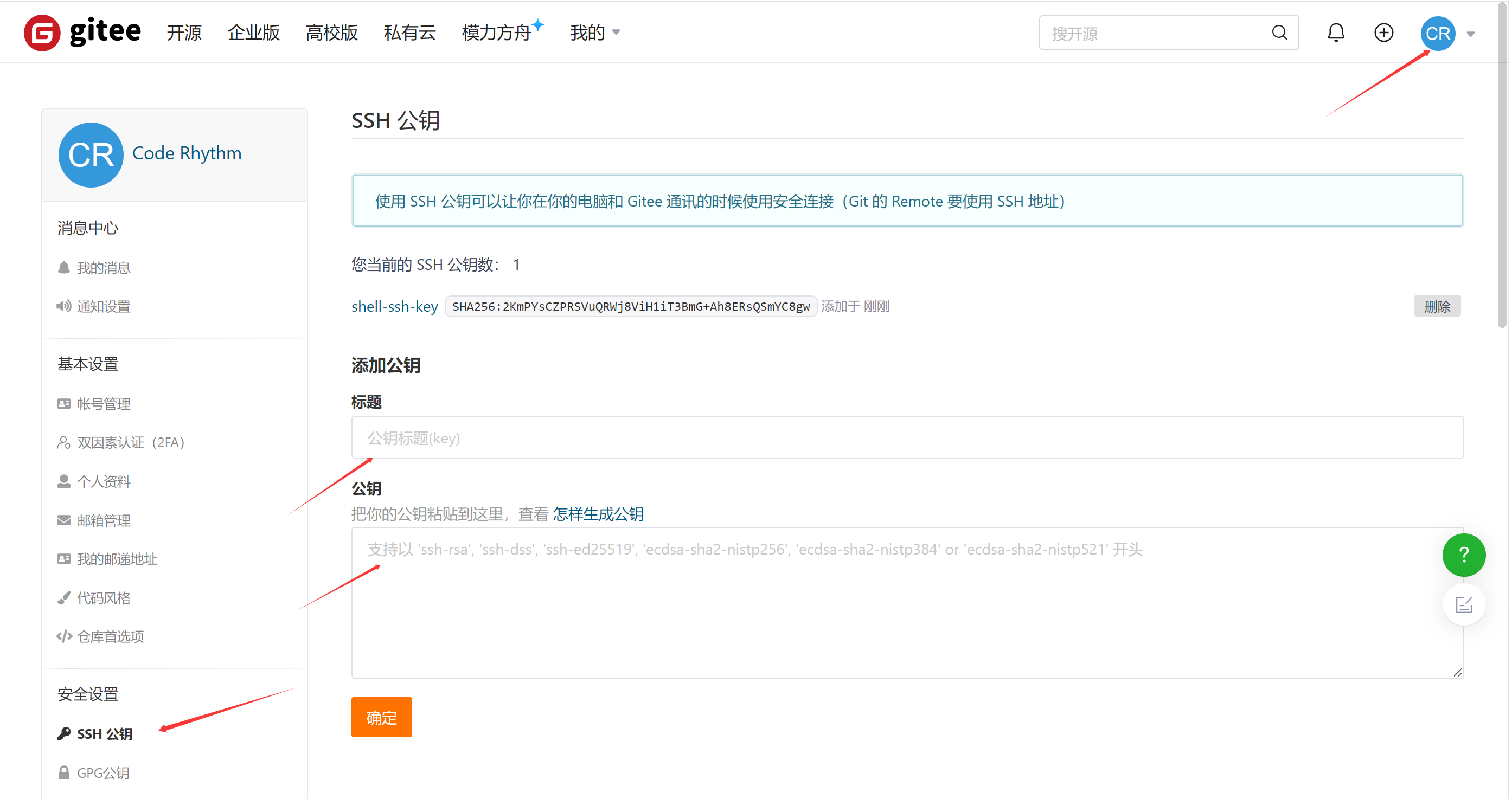
右上角头像 →「设置」→「SSH 公钥」(这里添加的是用户密钥,有推送权限)
验证密钥是否生效
root@rocky shell#
ssh -T git@gitee.comHi Code Rhythm(@code-rhythm)! You've successfully authenticated, but GITEE.COM does not provide shell access.
root@rocky shell# git push shell master
枚举对象中: 4, 完成.
对象计数中: 100% (4/4), 完成.
使用 2 个线程进行压缩
压缩对象中: 100% (3/3), 完成.
写入对象中: 100% (3/3), 925 字节 | 925.00 KiB/s, 完成.
总共 3(差异 1),复用 0(差异 0),包复用 0(来自 0 个包)
remote: Powered by GITEE.COM 1.1.5
remote: Set trace flag 0245859e
To gitee.com:code-rhythm/shell.git
b708fc8...bd2b821 master -> master
通过 HTTPS 克隆过仓库,需修改现有仓库的远程协议
或者在新目录中重新克隆ssh仓库
- 查看远程地址
root@rocky shell#
git remote -vshell https://gitee.com/code-rhythm/shell.git (fetch)
shell https://gitee.com/code-rhythm/shell.git (push)
- 修改远程地址为 SSH 协议
git remote set-url 别名 SSH 协议的仓库
root@rocky shell#
git remote set-urlshell git@gitee.com:code-rhythm/shell.gitroot@rocky shell# git remote -v
shell git@gitee.com:code-rhythm/shell.git (fetch)
shell git@gitee.com:code-rhythm/shell.git (push)
其他常用命令
git log 查看提交历史(详细)
bash
[root@rocky shell]# git log
commit bd2b82109188dd24bf066f348cfd202897b26fd1 (HEAD -> master, shell/master)
Author: Code Rhythm <...@qq.com>
Date:   Thu Sep 4 21:08:46 2025 +0800

    全备

commit b708fc88c98db79d4c55fbd8812f979260c44470
...
git log --oneline 查看提交历史(简化版,一行显示)
bash
[root@rocky shell]# git log --oneline
bd2b821 (HEAD -> master, shell/master) 全备
b708fc8 安装xtrabackup
ed4047c 安装mysql
41e27e8 read传参
git log -n 1 查看最近 n 次提交
bash
[root@rocky shell]# git log -n 1
commit bd2b82109188dd24bf066f348cfd202897b26fd1 (HEAD -> master, shell/master)
Author: Code Rhythm <...@qq.com>
Date:   Thu Sep 4 21:08:46 2025 +0800

    全备
git status 查看文件状态
bash
[root@rocky shell]# git add for.sh
[root@rocky shell]# git status
位于分支 master
要提交的变更:
  (使用 "git restore --staged <文件>..." 以取消暂存)
	新文件:   for.sh

未跟踪的文件:
  (使用 "git add <文件>..." 以包含要提交的内容)
	.txt
	PS3.sh
	access_web.py
	back_log.sh
git restore --staged 取消暂存
bash
[root@rocky shell]# git restore --staged for.sh
[root@rocky shell]# git status
位于分支 master
未跟踪的文件:
  (使用 "git add <文件>..." 以包含要提交的内容)
	.txt
	PS3.sh
	access_web.py
	back_log.sh
提交为空,但是存在尚未跟踪的文件(使用 "git add" 建立跟踪)
git restore --staged + git restore 取消暂存和丢弃工作区的改动
bash
[root@rocky shell]# vim install_mysql.sh
[root@rocky shell]# git add install_mysql.sh
[root@rocky shell]# git status
位于分支 master
要提交的变更:
  (使用 "git restore --staged <文件>..." 以取消暂存)
	修改:     install_mysql.sh

未跟踪的文件:
  (使用 "git add <文件>..." 以包含要提交的内容)
	.gitignore
	PS3.sh
	access_web.py

[root@rocky shell]# git restore --staged install_mysql.sh
[root@rocky shell]# git status
位于分支 master
尚未暂存以备提交的变更:
  (使用 "git add <文件>..." 更新要提交的内容)
  (使用 "git restore <文件>..." 丢弃工作区的改动)
	修改:     install_mysql.sh

未跟踪的文件:
  (使用 "git add <文件>..." 以包含要提交的内容)
	.gitignore
	PS3.sh
修改尚未加入提交(使用 "git add" 和/或 "git commit -a")
[root@rocky shell]# git restore install_mysql.sh
创建新分支(不切换)
root@rocky shell#
git branchtestingroot@rocky shell# git branch
* master
testing
切换分支
root@rocky shell#
git checkouttesting切换到分支 'testing'
root@rocky shell# git branch
master
/* testing
分支测试:git分支是相互独立的代码线
bash
[root@rocky shell]# git add test.txt
[root@rocky shell]# git commit -m "test"
[testing 109925c] test
 1 file changed, 3 insertions(+)
 create mode 100644 test.txt
[root@rocky shell]# cat test.txt
1
2
3
[root@rocky shell]# git push shell testing
枚举对象中: 4, 完成.
对象计数中: 100% (4/4), 完成.
使用 2 个线程进行压缩
压缩对象中: 100% (2/2), 完成.
写入对象中: 100% (3/3), 270 字节 | 54.00 KiB/s, 完成.
总共 3(差异 1),复用 0(差异 0),包复用 0(来自  0 个包)
remote: Powered by GITEE.COM [1.1.5]
remote: Set trace flag 3e483fb5
remote: Create a pull request for 'testing' on Gitee by visiting:
remote: https://gitee.com/code-rhythm/shell/pull/new/code-rhythm:testing...code-rhythm:master
To gitee.com:code-rhythm/shell.git
 * [new branch]      testing -> testing

[root@rocky shell]# git checkout master
切换到分支 'master'
[root@rocky shell]# cat test.txt
cat: test.txt: 没有那个文件或目录
创建并切换分支
root@rocky shell#
git checkout -btest2切换到一个新分支 'test2'
root@rocky shell# git branch
master
* test2
testing
删除分支
root@rocky shell# git checkout master
切换到分支 'master'
root@rocky shell#
git branch -dtest2已删除分支 test2(曾为 bd2b821)。
root@rocky shell# git branch
* master
testing