kotlin - 平板分屏,左右拖动,2个Activity计算宽度,使用ActivityOptions、Rect
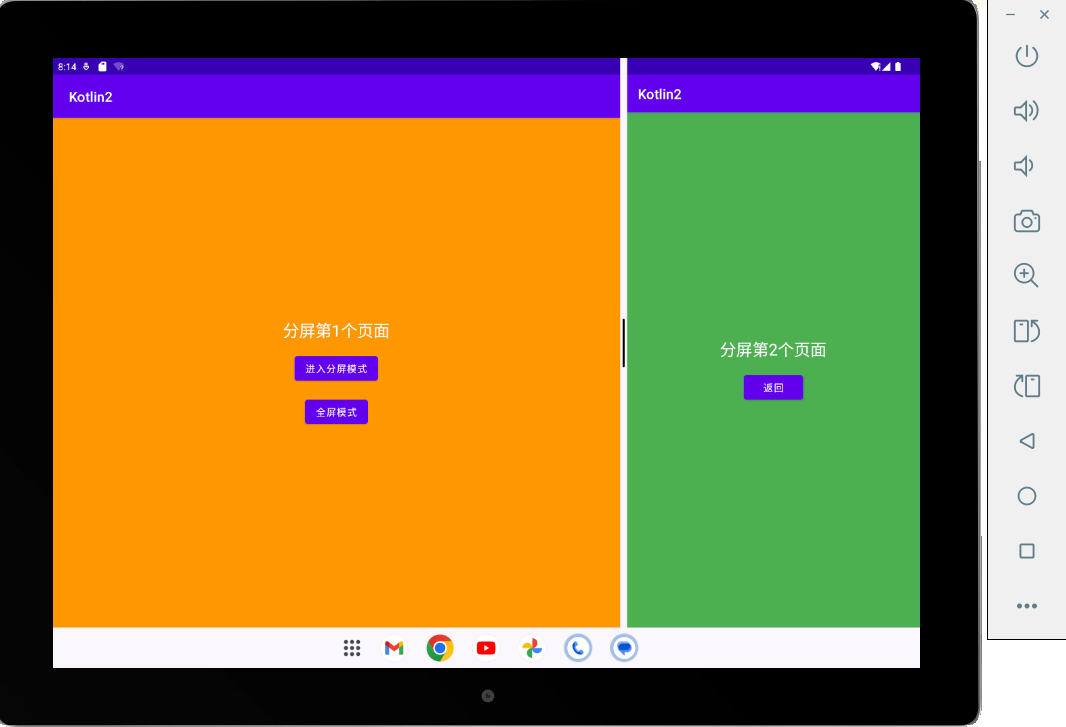
使用平板,api33才支持,可以左右拖动,分屏第一个页面 , 思考:分屏后,对整个app的影响,包括屏幕旋转android:configChanges,点击跳转,传递参数,屏幕变小后的布局、影响。
分屏有3种方式(这里实现第一种):
一:任务栈中有Main,A页面,A打开全新的B页面分屏,A左边, B右边
二:任务栈中有Main,A页面,Main和A页面分屏,Main在左边,A在右边
三:任务栈中只有Main页面,分屏左右2部分(left,right),把右部分的view缓存到新打开的A页面显示。分屏后Main页面显示left的视图,A页面显示right的视图
package com.example.androidkotlindemo2.pad.splitscreen;

import android.app.ActivityOptions;
import android.content.Intent;
import android.graphics.Rect;
import android.os.Build;
import android.os.Bundle;
import android.util.DisplayMetrics;
import android.widget.Button;

import androidx.appcompat.app.AppCompatActivity;

import com.example.androidkotlindemo2.R;
import com.example.androidkotlindemo2.utils.LogUtils;

/**
 * Author : wn
 * Email : maoning20080808@163.com
 * Date : 2025/8/10 10:24
 * Description :  使用平板,api33才支持,可以左右拖动,分屏第一个页面 , 思考:分屏后,对整个app的影响,包括屏幕旋转android:configChanges,点击跳转,传递参数,屏幕变小后的布局、影响。
 * 分屏有3种方式(这里实现第一种):
 * 一:任务栈中有Main,A页面,A打开全新的B页面分屏,A左边, B右边
 * 二:任务栈中有Main,A页面,Main和A页面分屏,Main在左边,A在右边
 * 三:任务栈中只有Main页面,分屏左右2部分(left,right),把右部分的view缓存到新打开的A页面显示。分屏后Main页面显示left的视图,A页面显示right的视图
 * 官方分屏窗口:https://github.com/googlearchive/android-MultiWindowPlayground
 */
public class SplitScreenAActivity extends AppCompatActivity {

    @Override
    protected void onCreate(Bundle savedInstanceState) {
        super.onCreate(savedInstanceState);
        setContentView(R.layout.split_screen_a);

        Button btnSplitScreen = findViewById(R.id.btn_split_screen_a);
        Button btnFullScreen = findViewById(R.id.btn_full_screen_a);

        btnSplitScreen.setOnClickListener(v -> {
            // 启动分屏模式
            if (isInMultiWindowMode()) {
                LogUtils.Companion.d("启动分屏if");
                // 如果已经在分屏模式,直接启动SplitScreenAActivity
                startActivity(new Intent(this, SplitScreenAActivity.class));
            } else {
                LogUtils.Companion.d("启动分屏else");
                // 进入分屏模式并启动SplitScreenAActivity
                enterSplitScreen();
            }
        });

        btnFullScreen.setOnClickListener(v -> {
            // 退出分屏模式(如果正在分屏)
            if (isInMultiWindowMode()) {
                exitSplitScreen();
            }
        });

    }


    private void enterSplitScreen() {
        if (Build.VERSION.SDK_INT >= Build.VERSION_CODES.N) {
            // 1. 首先进入多窗口模式
            if (!isInMultiWindowMode()) {
                LogUtils.Companion.d("enterSplitScreen 11");
                // 启动自己进入多窗口模式
                Intent selfIntent = new Intent(this, SplitScreenAActivity.class);
                selfIntent.addFlags(Intent.FLAG_ACTIVITY_LAUNCH_ADJACENT |
                        Intent.FLAG_ACTIVITY_NEW_TASK);

                DisplayMetrics metrics = new DisplayMetrics();
                getWindowManager().getDefaultDisplay().getMetrics(metrics);
                // 配置SecondaryActivity的边界(右侧)
                Rect leftBounds = new Rect(0, 0, metrics.widthPixels/2, metrics.heightPixels);
                ActivityOptions options = ActivityOptions.makeBasic();
                options.setLaunchBounds(leftBounds);
                startActivity(selfIntent, options.toBundle());
                //return;
            }

            // 2. 现在已经在多窗口模式,启动第二个Activity
            DisplayMetrics metrics = new DisplayMetrics();
            getWindowManager().getDefaultDisplay().getMetrics(metrics);
            int halfWidth = metrics.widthPixels / 2;

            // 配置SecondaryActivity的边界(右侧)
            Rect rightBounds = new Rect(halfWidth, 0, metrics.widthPixels, metrics.heightPixels);

            ActivityOptions options = ActivityOptions.makeBasic();
            options.setLaunchBounds(rightBounds);
            LogUtils.Companion.d("enterSplitScreen 22");
            Intent secondaryIntent = new Intent(this, SplitScreenBActivity.class);
            secondaryIntent.addFlags(Intent.FLAG_ACTIVITY_LAUNCH_ADJACENT |
                    Intent.FLAG_ACTIVITY_NEW_TASK);

            startActivity(secondaryIntent, options.toBundle());
        } else {
            // 不支持分屏的设备,简单启动Activity
            startActivity(new Intent(this, SplitScreenBActivity.class));
        }
    }


    private void exitSplitScreen() {
        SplitScreenBActivity.mActivity.finish();
        /*// 关闭SplitScreenBActivity
        Intent intent = new Intent(this, SplitScreenBActivity.class);
        //intent.addFlags(Intent.FLAG_ACTIVITY_CLEAR_TOP |Intent.FLAG_ACTIVITY_SINGLE_TOP);
        intent.addFlags(Intent.FLAG_ACTIVITY_NEW_TASK | Intent.FLAG_ACTIVITY_CLEAR_TOP);
        startActivity(intent);
        //finish();*/
    }
}package com.example.androidkotlindemo2.pad.splitscreen;
import android.content.res.Configuration;
import android.os.Bundle;
import android.widget.Button;
import androidx.appcompat.app.AppCompatActivity;
import com.example.androidkotlindemo2.R;
/**
* Author : wn
* Email : maoning20080808@163.com
* Date : 2025/8/10 10:24
* Description :
*/
public class SplitScreenBActivity extends AppCompatActivity {
//这里简单使用,可以使用广播,获取任务栈的方式实现。
public static SplitScreenBActivity mActivity;
@Override
protected void onCreate(Bundle savedInstanceState) {
super.onCreate(savedInstanceState);
setContentView(R.layout.split_screen_b);
mActivity = this;
Button btnBack = findViewById(R.id.btn_back);
btnBack.setOnClickListener(v -> finish());
}
@Override
public void onMultiWindowModeChanged(boolean isInMultiWindowMode, Configuration newConfig) {
super.onMultiWindowModeChanged(isInMultiWindowMode, newConfig);
}
@Override
protected void onStop() {
super.onStop();
// 当ActivityB停止时(例如用户退出分屏),可以执行一些清理操作
}
}split_screen_a.xml布局<?xml version="1.0" encoding="utf-8"?>
<LinearLayout xmlns:android="http://schemas.android.com/apk/res/android"
android:layout_width="match_parent"
android:layout_height="match_parent"
android:orientation="vertical"
android:gravity="center"
android:background="#FF9800">
<TextView
android:layout_width="wrap_content"
android:layout_height="wrap_content"
android:text="分屏第1个页面"
android:textSize="24sp"
android:textColor="#FFFFFF"/>
<Button
android:id="@+id/btn_split_screen_a"
android:layout_width="wrap_content"
android:layout_height="wrap_content"
android:layout_marginTop="16dp"
android:text="进入分屏模式"/>
<Button
android:id="@+id/btn_full_screen_a"
android:layout_width="wrap_content"
android:layout_height="wrap_content"
android:layout_marginTop="16dp"
android:text="全屏模式"/>
</LinearLayout>split_screen_b.xml布局<?xml version="1.0" encoding="utf-8"?>
<LinearLayout xmlns:android="http://schemas.android.com/apk/res/android"
android:layout_width="match_parent"
android:layout_height="match_parent"
android:orientation="vertical"
android:gravity="center"
android:background="#4CAF50">
<TextView
android:layout_width="wrap_content"
android:layout_height="wrap_content"
android:text="分屏第2个页面"
android:textSize="24sp"
android:textColor="#FFFFFF"/>
<Button
android:id="@+id/btn_back"
android:layout_width="wrap_content"
android:layout_height="wrap_content"
android:layout_marginTop="16dp"
android:text="返回"/>
</LinearLayout>