SystemUI Plugins
SystemUI插件提供了一种快速替换SystemUI原有组件的方法,可以在运行时更改SystemUI的行为。
现在已有插件: here
一、使用方法
1. Plugin 接口
在包com.android.systemui.plugins中定义SystemUI 和 Plugin 中共同使用的接口:
java
@ProvidesInterface(action = MyPlugin.ACTION, version = MyPlugin.VERSION)
@DependsOn(target = OtherInterface.class)
public interface MyPlugin extends Plugin {
    String ACTION = "com.android.systemui.action.PLUGIN_MY_PLUGIN";
    int VERSION = 1;
    ...
}- VERSION: 解决兼容性问题,每次增加或者修改接口,VERSION需要增大, 以避免Plugin接口没有默认实现
- ACTION: 用于关联Plugin apk 中声明的组件
2. Plugin Listener
可以通过 PluginManager注册监听器PluginListener, 可以实现在相应插件安装时调用方法
java
public interface PluginListener<T extends Plugin> {
    /**
     * Called when the plugin has been loaded and is ready to be used.
     * This may be called multiple times if multiple plugins are allowed.
     * It may also be called in the future if the plugin package changes
     * and needs to be reloaded.
     */
    void onPluginConnected(T plugin);

    /**
     * Called when a plugin has been uninstalled/updated and should be removed
     * from use.
     */
    default void onPluginDisconnected(T plugin) {
        // Optional.
    }
}
3. 使用实例
-
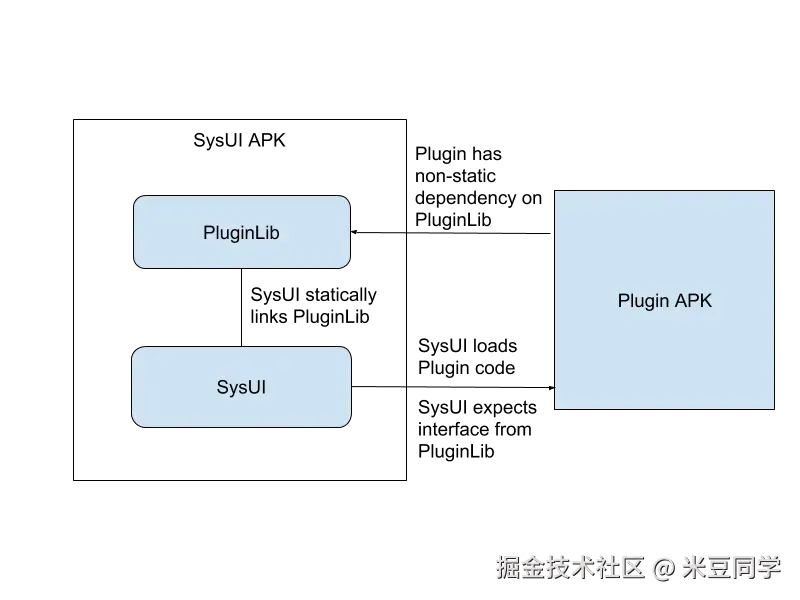
在SystemUI编译PluginLib.aar, 让Plugin apk 依赖这个lib
-
AndroidManifest.xml
xml
       <service android:name=".SampleOverlayPlugin"
            android:label="@string/plugin_label">
            <intent-filter>
                <action android:name="com.android.systemui.action.PLUGIN_OVERLAY" />
            </intent-filter>
</service>-
可以通过PackageManagerService 去查找组件
-
可以方便的通过PMS 结果禁用/启用组件
permission
xml
<uses-permission android:name="com.android.systemui.permission.PLUGIN" />- 实现接口
java
@Requires(target = OverlayPlugin.class, version = OverlayPlugin.VERSION)
public class SampleOverlayPlugin implements OverlayPlugin {
    ...
    public void onCreate(Context sysuiContext, Context pluginContext) {

    }

    public void onDestroy() {

    }
}
二、设计原理
1. crash处理
PluginManagerImpl中定义了一个UncaughtExceptionHandler, 在发生crash 时检查是否为插件引起,如果是,并且插件不在白名单中,则禁用插件
白名单配置: res/values/config.xml
xml
    <!-- SystemUI Plugins that can be loaded on user builds. -->
    <string-array name="config_pluginWhitelist" translatable="false">
        <item>com.android.systemui</item>
        <item>com.systemui.plugin</item>
    </string-array>
白名单中插件在每次SystemUI 进程启动时加载
2. 插件加载流程
插件加载时机: SystemUI 进程启动 或者 插件apk 安装(监听 Intent.ACTION_PACKAGE_ADDED 广播)
rust
SystemUIService.onCreate

 -> VolumeUI.start()

-> new VolumeDialogComponent()

-> ExtensionBuilder.withPlugin

-> PluginManagerImpl.addPluginListener

->PluginInstanceManagerFactory.createPluginInstanceManager
一个插件组件对应一个PluginInstanceManager
com/android/systemui/plugins/PluginInstanceManager.java
java
        protected PluginInfo<T> handleLoadPlugin(ComponentName component) {
            ... ...
            try {
                ApplicationInfo info = mPm.getApplicationInfo(pkg, 0);
                // TODO: This probably isn't needed given that we don't have IGNORE_SECURITY on
                if (mPm.checkPermission(PLUGIN_PERMISSION, pkg)
                        != PackageManager.PERMISSION_GRANTED) {
                    Log.d(TAG, "Plugin doesn't have permission: " + pkg);
                    return null;
                }
                // Create our own ClassLoader so we can use our own code as the parent.
                //1. 创建plugin classloader
                ClassLoader classLoader = mManager.getClassLoader(info);
                 //2. 创建plugin Context
                Context pluginContext = new PluginContextWrapper(
                        mContext.createApplicationContext(info, 0), classLoader);
                Class<?> pluginClass = Class.forName(cls, true, classLoader);
                // TODO: Only create the plugin before version check if we need it for
                // legacy version check.
                T plugin = (T) pluginClass.newInstance();
                try {
                    //3. 检查版本
                    VersionInfo version = checkVersion(pluginClass, plugin, mVersion);
                    if (DEBUG) Log.d(TAG, "createPlugin");
                    return new PluginInfo(pkg, cls, plugin, pluginContext, version);
                } catch (InvalidVersionException e) {
                    // 处理版本不一致情况 ...
                  ... ...
            } catch (Throwable e) {
                Log.w(TAG, "Couldn't load plugin: " + pkg, e);
                return null;
            }
        }
这个方法中做了以下工作:
-
创建plugin classloader
-
创建plugin Context
-
检查version :
版本不一致会弹出通知 : "Plugin xxx is too old..." 或者 "Plugin xxx is too new...", 也不会继续加再这个插件了
3. ClassLoader
只有"com.android.systemui.plugin" 包名为这个时,使用SystemUI 类加载器, 即PluginLib 中类
SystemUI/shared/src/com/android/systemui/shared/plugins/PluginManagerImpl.java
java
    private static class ClassLoaderFilter extends ClassLoader {
        private final String mPackage;
        private final ClassLoader mBase;

        public ClassLoaderFilter(ClassLoader base, String pkg) {
            super(ClassLoader.getSystemClassLoader());
            mBase = base;
            mPackage = pkg;
        }

        @Override
        protected Class<?> loadClass(String name, boolean resolve) throws ClassNotFoundException {
            if (!name.startsWith(mPackage)) super.loadClass(name, resolve);
            return mBase.loadClass(name);
        }
    }
4. Plugin Context
Context 创建
java
                Context pluginContext = new PluginContextWrapper(
                        mContext.createApplicationContext(info, 0), classLoader);
注意事项
1.PluginDependency
SystemUI中 通过 Dependency.get(XXX.class)获取依赖项
Plugin 中可以通过PluginDependency 获取的SystemUI 组件
-
VolumeDialogController - Mostly just API for the volume plugin
-
ActivityStarter - Allows starting of intents while co-operating with keyguard unlocks.
如何添加:
- 将接口放到com.android.systemui.plugins包下面
- 调用PluginDependencyProvider.allowPluginDependency
src/com/android/systemui/volume/VolumeDialogComponent.java
java
    @Inject
    public VolumeDialogComponent(Context context, KeyguardViewMediator keyguardViewMediator,
            VolumeDialogControllerImpl volumeDialogController) {
                ...
                 // Allow plugins to reference the VolumeDialogController.
                Dependency.get(PluginDependencyProvider.class)
                        .allowPluginDependency(VolumeDialogController.class);
            }
2.注解
Requires , DependsOn
java
@Requires(target = VolumeDialog.class, version = VolumeDialog.VERSION)
@DependsOn(target = Callback.class)
@Requires(target = VolumeDialogController.class, version = VolumeDialogController.VERSION)
@Requires(target = PluginDependency.class, version = PluginDependency.VERSION)
@Dependencies({@DependsOn(
        target = VolumeDialogController.StreamState.class
), @DependsOn(
        target = VolumeDialogController.State.class
), @DependsOn(
        target = VolumeDialogController.Callbacks.class
)})
public class VolumeDialogPlugin implements VolumeDialog {

    private  VolumeDialogController mController;
    @Override
    public void init(int i, Callback callback) {
    }

    @Override
    public void destroy() {
    }

    @Override
    public void onCreate(Context sysuiContext, Context pluginContext) {
    }

    @Override
    public void onDestroy() {
    }

    private final VolumeDialog.Callback mVolumeDialogCallback = new VolumeDialog.Callback() {
        @Override
        public void onZenSettingsClicked() {
        }

        @Override
        public void onZenPrioritySettingsClicked() {
        }
    };
}
3. ClassNotFoundException
plugin context 中Resources 对象 ClassLoader对象 为null,在加载资源时候,如果没用Context ClassLoader ,如 DrawableInflater ,会抛找不到类异常,用下面方法可以解决
java
    setResourceClassLoader(context.getResources(), context.getClassLoader());


    public void setResourceClassLoader(Resources resources, ClassLoader classLoader) {
        try {
            Field field = Resources.class.getDeclaredField("mClassLoader");
            field.setAccessible(true);
            Object object = field.get(resources);
            field.set(resources, classLoader);
        } catch (IllegalAccessException | NoSuchFieldException e) {
            e.printStackTrace();
        }
    }