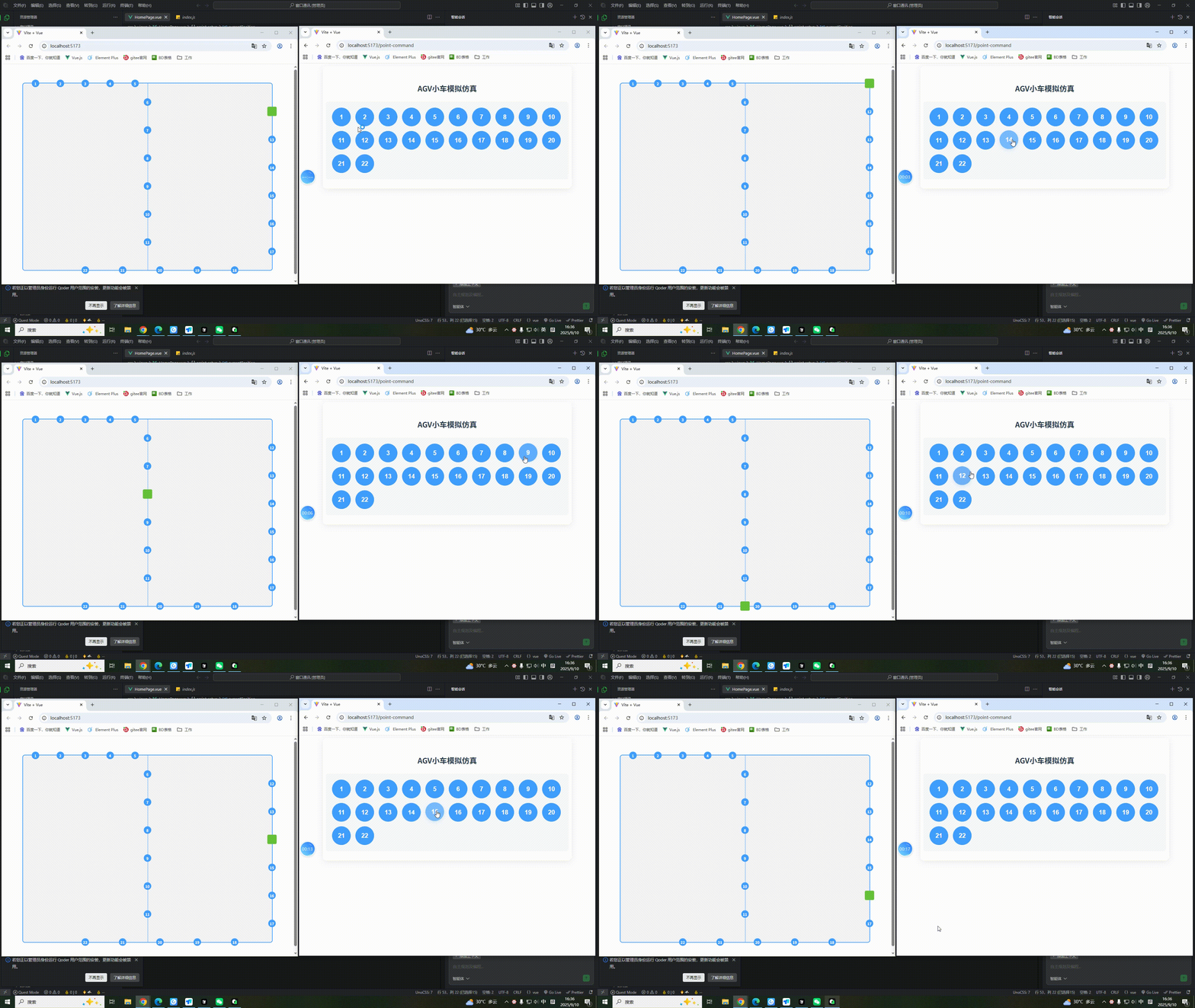
1.右侧控制页面
html
<template>
  <div class="point-command">
    <h3>AGV小车模拟仿真</h3>
    <div class="point-container">
      <el-button
        v-for="n in 22"
        :key="n"
        :class="{ 'active-point': activePoint === n }"
        type="primary"
        circle
        @click="handlePointClick(n)"
        >{{ n }}</el-button
      >
    </div>
  </div>
</template>

<script setup>
import { ref, onMounted, onBeforeUnmount } from 'vue'

const channel = ref(null)
const activePoint = ref(null)

const handlePointClick = (pointNumber) => {
  // 发送消息
  channel.value.postMessage({
    type: "POINT_SELECTED",
    pointId: pointNumber,
    timestamp: Date.now(),
  })

  // 按钮动画效果
  activePoint.value = pointNumber
  setTimeout(() => {
    activePoint.value = null
  }, 300)
}

onMounted(() => {
  channel.value = new BroadcastChannel("agv-channel")
})

onBeforeUnmount(() => {
  channel.value?.close()
})
</script>

<style scoped>
.point-command {
  padding: 30px;
  background: #fff;
  border-radius: 12px;
  box-shadow: 0 4px 20px rgba(0, 0, 0, 0.08);
  max-width: 800px;
  margin: 0 auto;
  display: flex;
  flex-direction: column;
  align-items: center;
}

h3 {
  color: #2c3e50;
  font-size: 24px;
  margin-bottom: 25px;
  font-weight: 600;
}

.point-container {
  width: 100%;
  background: #f8f9fa;
  border-radius: 8px;
  padding: 20px;
  display: flex;
  flex-wrap: wrap;
  gap: 15px;
}

.el-button.is-circle {
  width: 60px;
  height: 60px;
  font-size: 20px;
  font-weight: 600;
  transition: all 0.3s ease;
  margin: 0;
}

.el-button.is-circle:hover {
  transform: translateY(-2px);
  box-shadow: 0 4px 12px rgba(64, 158, 255, 0.2);
}

/* 添加按钮激活效果 */
.active-point {
  transform: scale(1.15);
  box-shadow: 0 0 15px rgba(64, 158, 255, 0.4);
  transition: all 0.3s cubic-bezier(0.4, 0, 0.2, 1);
}
</style>
2.左侧小车移动页面
html
<template>
  <div class="home-page">
    <div class="path-container">
      <div class="center-line"></div>
      <div
        v-for="point in points"
        :key="point.id"
        class="point"
        :style="{ left: point.x + '%', top: point.y + '%' }"
      >
        <span class="point-number">{{ point.id }}</span>
      </div>
      <div
        class="moving-box"
        :style="{ left: currentPosition.x + '%', top: currentPosition.y + '%' }"
      ></div>
    </div>
  </div>
</template>

<script setup>
import { ref, onMounted, onBeforeUnmount } from 'vue'

const channel = ref(null)
const points = ref([
  // 上边框
  { id: 1, x: 5, y: 0 },
  { id: 2, x: 15, y: 0 },
  { id: 3, x: 25, y: 0 },
  { id: 4, x: 35, y: 0 },
  { id: 5, x: 45, y: 0 },
  // 中间线
  { id: 6, x: 50, y: 10 },
  { id: 7, x: 50, y: 25 },
  { id: 8, x: 50, y: 40 },
  { id: 9, x: 50, y: 55 },
  { id: 10, x: 50, y: 70 },
  { id: 11, x: 50, y: 85 },
  // 右边框
  { id: 12, x: 100, y: 15 },
  { id: 13, x: 100, y: 30 },
  { id: 14, x: 100, y: 45 },
  { id: 15, x: 100, y: 60 },
  { id: 16, x: 100, y: 75 },
  { id: 17, x: 100, y: 90 },
  // 下边框
  { id: 18, x: 85, y: 100 },
  { id: 19, x: 70, y: 100 },
  { id: 20, x: 55, y: 100 },
  { id: 21, x: 40, y: 100 },
  { id: 22, x: 25, y: 100 }
])
const currentPosition = ref({
  x: 5,
  y: 0
})

const handleChannelMessage = (event) => {
  if (event.data.type === "POINT_SELECTED") {
    moveToPoint(event.data.pointId)
  }
}

const moveToPoint = (pointId) => {
  const targetPoint = points.value.find(p => p.id === pointId)
  if (targetPoint) {
    moveAlongPath(targetPoint)
  }
}

// 计算并执行路径移动 - 沿着边线和中心线移动
const moveAlongPath = (targetPoint) => {
  const current = { ...currentPosition.value }
  const target = { ...targetPoint }

  // 如果已经在目标位置,直接返回
  if (current.x === target.x && current.y === target.y) {
    return
  }

  // 计算路径
  const path = calculatePath(current, target)

  // 执行路径移动
  executePath(path)
}

// 计算沿边线的路径
const calculatePath = (start, end) => {
  const path = []

  // 定义关键路径点
  const pathNodes = {
    // 上边框节点
    topBorder: (x) => ({ x, y: 0 }),
    // 右边框节点
    rightBorder: (y) => ({ x: 100, y }),
    // 下边框节点
    bottomBorder: (x) => ({ x, y: 100 }),
    // 左边框节点
    leftBorder: (y) => ({ x: 0, y }),
    // 中心线节点
    centerLine: (y) => ({ x: 50, y })
  }

  // 判断点在哪条线上
  const getLineType = (point) => {
    if (point.y === 0) return 'top'
    if (point.x === 100) return 'right'
    if (point.y === 100) return 'bottom'
    if (point.x === 0) return 'left'
    if (point.x === 50) return 'center'
    return 'unknown'
  }

  const startLine = getLineType(start)
  const endLine = getLineType(end)

  // 如果在同一条线上,直接移动
  if (startLine === endLine) {
    path.push(end)
    return path
  }

  // 不同线之间的移动策略
  if (startLine === 'top') {
    if (endLine === 'center') {
      // 从上边框到中心线:先到(50,0)再到目标
      path.push({ x: 50, y: 0 })
      path.push(end)
    } else if (endLine === 'right') {
      // 从上边框到右边框:先到(100,0)再到目标
      path.push({ x: 100, y: 0 })
      path.push(end)
    } else if (endLine === 'bottom') {
      // 从上边框到下边框:通过中心线
      path.push({ x: 50, y: 0 })
      path.push({ x: 50, y: 100 })
      path.push(end)
    }
  } else if (startLine === 'center') {
    if (endLine === 'top') {
      // 从中心线到上边框:先到(50,0)再到目标
      path.push({ x: 50, y: 0 })
      path.push(end)
    } else if (endLine === 'right') {
      // 从中心线到右边框:找最近的转折点
      if (start.y <= 50) {
        // 上半部分:通过上边框
        path.push({ x: 50, y: 0 })
        path.push({ x: 100, y: 0 })
        path.push(end)
      } else {
        // 下半部分:通过下边框
        path.push({ x: 50, y: 100 })
        path.push({ x: 100, y: 100 })
        path.push(end)
      }
    } else if (endLine === 'bottom') {
      // 从中心线到下边框:先到(50,100)再到目标
      path.push({ x: 50, y: 100 })
      path.push(end)
    }
  } else if (startLine === 'right') {
    if (endLine === 'top') {
      // 从右边框到上边框:先到(100,0)再到目标
      path.push({ x: 100, y: 0 })
      path.push(end)
    } else if (endLine === 'center') {
      // 从右边框到中心线:找最近的路径
      if (start.y <= 50) {
        // 上半部分:通过上边框
        path.push({ x: 100, y: 0 })
        path.push({ x: 50, y: 0 })
        path.push(end)
      } else {
        // 下半部分:通过下边框
        path.push({ x: 100, y: 100 })
        path.push({ x: 50, y: 100 })
        path.push(end)
      }
    } else if (endLine === 'bottom') {
      // 从右边框到下边框:先到(100,100)再到目标
      path.push({ x: 100, y: 100 })
      path.push(end)
    }
  } else if (startLine === 'bottom') {
    if (endLine === 'center') {
      // 从下边框到中心线:先到(50,100)再到目标
      path.push({ x: 50, y: 100 })
      path.push(end)
    } else if (endLine === 'right') {
      // 从下边框到右边框:先到(100,100)再到目标
      path.push({ x: 100, y: 100 })
      path.push(end)
    } else if (endLine === 'top') {
      // 从下边框到上边框:通过中心线
      path.push({ x: 50, y: 100 })
      path.push({ x: 50, y: 0 })
      path.push(end)
    }
  }

  return path
}

// 执行路径移动
const executePath = (path) => {
  if (path.length === 0) return

  let currentIndex = 0

  const moveToNext = () => {
    if (currentIndex < path.length) {
      currentPosition.value = { ...path[currentIndex] }
      currentIndex++

      // 如果还有下一个点,延迟后继续移动
      if (currentIndex < path.length) {
        setTimeout(moveToNext, 600) // 0.6秒间隔
      }
    }
  }

  moveToNext()
}

onMounted(() => {
  channel.value = new BroadcastChannel("agv-channel")
  channel.value.addEventListener("message", handleChannelMessage)
})

onBeforeUnmount(() => {
  channel.value?.close()
})
</script>

<style scoped>
.home-page {
  padding: 20px;
  height: 100vh;
  display: flex;
  justify-content: center;
  align-items: center;
}

.path-container {
  position: relative;
  width: 800px;
  height: 600px;
  background: #f5f5f5;
  border-radius: 8px;
  border: 2px solid #409eff;
}

.center-line {
  position: absolute;
  top: 0;
  left: 50%;
  width: 2px;
  height: 100%;
  background: #409eff;
  opacity: 0.5;
}

.point {
  position: absolute;
  width: 24px;
  height: 24px;
  background: #409eff;
  border-radius: 50%;
  transform: translate(-50%, -50%);
  display: flex;
  justify-content: center;
  align-items: center;
  cursor: pointer;
  transition: all 0.3s ease;
}

.point:hover {
  transform: translate(-50%, -50%) scale(1.2);
  box-shadow: 0 0 10px #409eff;
}

.point-number {
  color: white;
  font-size: 12px;
  font-weight: bold;
}

.moving-box {
  position: absolute;
  width: 30px;
  height: 30px;
  background: #67c23a;
  border-radius: 4px;
  transform: translate(-50%, -50%);
  transition: all 0.5s ease;
  z-index: 1;
}
</style>