ResponseWriter响应
http.ResponseWriter是Go标准库net/http中的一个核心接口,用于构造HTTP响应。它定义了三个基本方法:
go
type ResponseWriter interface {
    Header() Header
    Write([]byte) (int, error)
    WriteHeader(statusCode int)
}- 底层实现 :实际运行时,
ResponseWriter由http.response结构体实现,该结构体封装了响应状态码、头部字段和响应体缓冲区 - 接口与实现分离:通过接口设计,开发者无需关注底层实现细节,只需通过接口方法操作响应。
Header() 方法
- 功能::获取响应头管理对象(
http.Header类型),用于设置HTTP响应头。 - 使用场景:在调用
Write()或WriteHeader()之前设置响应头 - 设置
Set-Cookie管理会话信息。
sql
w.Header().Set("Content-Type", "application/json")
w.Header().Add("X-Custom-Header", "value")
Write() 方法
-
功能:写入响应体内容
-
特点:
- 自动调用
WriteHeader(http.StatusOK)如果尚未调用,首次写入时会隐式设置状态码为200。
- 自动调用
-
返回写入的字节数和可能的错误
gon, err := w.Write([]byte("Hello, World!")) if err != nil { // 处理错误 }WriteHeader()方法 -
功能:显式设置HTTP状态码(如404、500)。
-
注意事项:
- 必须在
Write()之前调用 - 一旦调用后,头部的修改将无效
- 必须在
scss
w.WriteHeader(http.StatusNotFound)案例:
返回JSON响应
go
func handler(w http.ResponseWriter, r *http.Request) {
    data := map[string]interface{}{
        "status":  "success",
        "message": "Hello, World!",
    }

    w.Header().Set("Content-Type", "application/json")
    json.NewEncoder(w).Encode(data)
}
文件下载
scss
func downloadHandler(w http.ResponseWriter, r *http.Request) {
    file, _ := os.Open("example.pdf")
    defer file.Close()

    w.Header().Set("Content-Disposition", "attachment; filename=example.pdf")
    w.Header().Set("Content-Type", "application/pdf")
    io.Copy(w, file) // 直接传输文件内容
}
重定向
go
func redirectHandler(w http.ResponseWriter, r *http.Request) {
    http.Redirect(w, r, "/new-path", http.StatusFound) // 302重定向
}
模板引擎
核心组件
Go标准库提供html/template(HTML专用模板(自动转义HTML特殊字符))和text/template(通用文本渲染)两个包,其核心流程分为三步:
-
模板解析:将模板文件编译为可执行结构体
arduinot := template.Must(template.ParseFiles("hello.html")) -
数据绑定:将动态数据注入模板上下文
godata := struct{ Title string }{Title: "用户列表"} -
响应渲染 :将数据与模板合并输出到
ResponseWritervbscripterr := t.Execute(w, data) if err != nil { http.Error(w, err.Error(), http.StatusInternalServerError) }
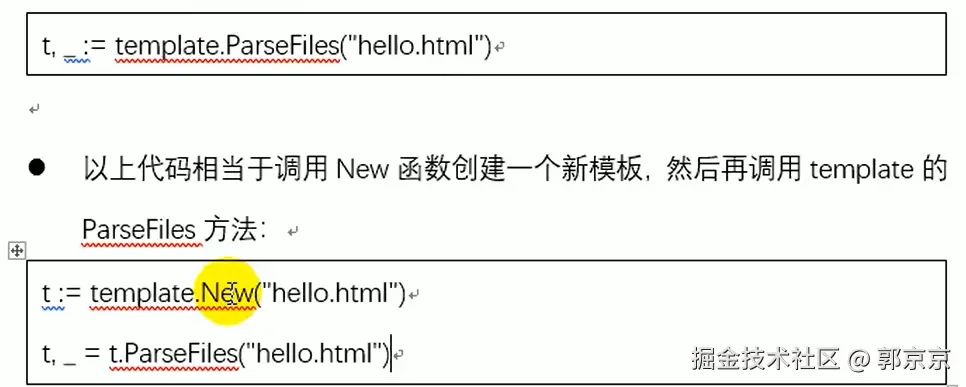
模板对象生命周期
- 解析阶段 :通过
ParseFiles/ParseGlob/Parse方法构建模板AST(抽象语法树) - 执行阶段 :调用
Execute方法触发数据替换,生成最终响应内容 - 错误处理 :推荐使用
template.Must包装解析逻辑,避免panic传播
静态资源
http.FileServer
go
func FileServer(root FileSystem) Handler-
参数:
root FileSystem:实现http.FileSystem接口的对象(如http.Dir)
-
实现原理:
- 解析请求路径并清理路径遍历字符(如
..) - 调用
serveFile方法判断目标是否为目录 - 目录则生成索引列表,文件则调用
serveContent传输内容
- 解析请求路径并清理路径遍历字符(如
-
典型用法:
cssfs := http.FileServer(http.Dir("/var/www/static")) http.Handle("/static/", http.StripPrefix("/static/", fs))
http.ServeFile
go
func ServeFile(w ResponseWriter, r *Request, name string)-
参数:
w ResponseWriter:响应写入器r *Request:HTTP请求对象name string:文件系统绝对路径或相对路径
-
实现原理:
- 检查路径安全性(防止目录遍历)
- 打开文件并处理
If-Modified-Since等条件请求 - 设置
Content-Type(基于文件扩展名) - 支持
Range请求实现断点下载
go
  http.HandleFunc("/download", func(w http.ResponseWriter, r *http.Request) {
      http.ServeFile(w, r, "/path/to/file.zip")
  })
使用场景对比
1. 推荐使用http.FileServer的场景
-
静态资源托管:如CSS/JS/图片等文件服务
-
目录浏览需求:需要自动生成文件列表
-
自定义文件系统:需对接云存储或加密文件系统
scss// 示例:带路由前缀的静态服务 fs := http.FileServer(http.Dir("./public")) http.Handle("/assets/", http.StripPrefix("/assets/", fs))
2. 推荐使用http.ServeFile的场景
-
特定文件下载:如用户上传的附件下载
-
动态文件路径:根据请求参数选择文件
-
强制下载行为 :设置
Content-Disposition头javascript// 示例:强制下载PDF文件 http.HandleFunc("/download-pdf", func(w http.ResponseWriter, r *http.Request) { w.Header().Set("Content-Disposition", "attachment; filename=document.pdf") http.ServeFile(w, r, "/templates/document.pdf") })
性能优化技巧
1.缓存控制:
scss
// 为FileServer添加缓存头
fs := http.FileServer(http.Dir("/data"))
http.HandleFunc("/static/", func(w http.ResponseWriter, r *http.Request) {
    w.Header().Set("Cache-Control", "public, max-age=3600")
    http.StripPrefix("/static/", fs).ServeHTTP(w, r)
})
2. 安全注意事项
-
路径净化 :始终使用
http.StripPrefix清理路径前缀 -
权限控制:避免直接暴露敏感目录
less// 错误示例:可能导致路径遍历 http.Handle("/", http.FileServer(http.Dir("/"))) -
文件类型限制 :通过
http.DetectContentType验证MIME类型
3. 错误处理对比
| 场景 | http.FileServer行为 |
http.ServeFile行为 |
|---|---|---|
| 文件不存在 | 自动返回404页面 | 需手动处理错误 |
| 目录访问 | 自动生成索引列表(需IndexFiles配置) |
返回403 Forbidden |
| 权限不足 | 依赖操作系统权限控制 | 依赖文件系统权限 |