效果图:
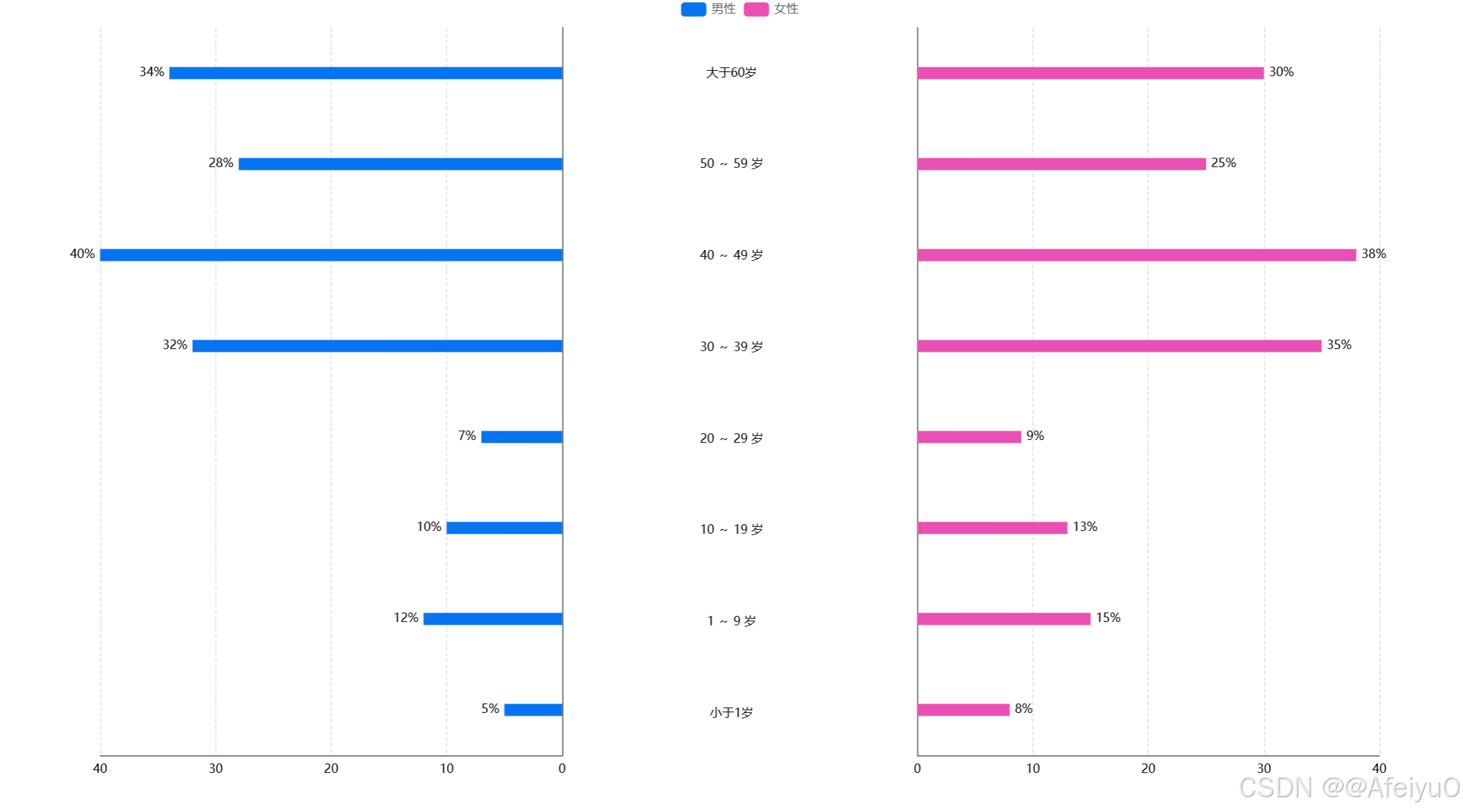
需求:男女年龄段占比
html
<template>
  <div class="go-ClassifyBar01">
    <v-chart
      ref="vChartRef"
      :option="option"
      style="width: 100%; height: 800px"
    >
    </v-chart>
  </div>
</template>

<script setup lang="ts">
import { ref, reactive, watch, onMounted } from "vue";
import VChart from "vue-echarts";
import { use } from "echarts/core";
import { CanvasRenderer } from "echarts/renderers";
import { BarChart } from "echarts/charts";
import {
  GridComponent,
  TooltipComponent,
  LegendComponent,
} from "echarts/components";

use([
  CanvasRenderer,
  BarChart,
  GridComponent,
  TooltipComponent,
  LegendComponent,
]);

// 获取图表实例
const vChartRef = ref();

// 定义数据类型
interface ChartDataItem {
  name: string;
  data: Array<{
    value: number;
    label: string;
  }>;
}

// 模拟接口数据数组
const chartData = ref<ChartDataItem[]>([
  {
    name: "男性",
    data: [
      { value: 5, label: "小于1岁" },
      { value: 12, label: "1 ~ 9 岁" },
      { value: 10, label: "10 ~ 19 岁" },
      { value: 7, label: "20 ~ 29 岁" },
      { value: 32, label: "30 ~ 39 岁" },
      { value: 40, label: "40 ~ 49 岁" },
      { value: 28, label: "50 ~ 59 岁" },
      { value: 34, label: "大于60岁" },
    ],
  },
  {
    name: "女性",
    data: [
      { value: 8, label: "小于1岁" },
      { value: 15, label: "1 ~ 9 岁" },
      { value: 13, label: "10 ~ 19 岁" },
      { value: 9, label: "20 ~ 29 岁" },
      { value: 35, label: "30 ~ 39 岁" },
      { value: 38, label: "40 ~ 49 岁" },
      { value: 25, label: "50 ~ 59 岁" },
      { value: 30, label: "大于60岁" },
    ],
  },
]);

const option = reactive({
  // 图位置定制
  grid: [
    {
      left: "12%",
      width: "28%",
      containLabel: true,
      bottom: 30,
      top: 30,
    },
    {
      left: "50%",
      width: "0%",
      bottom: 46,
      top: 30,
    },
    {
      right: "12%",
      width: "28%",
      containLabel: true,
      bottom: 30,
      top: 30,
    },
  ],
  legend: {
    show: true,
    left: "center",
    top: 0,
    data: <any>[],
  },
  xAxis: [
    {
      type: "value",
      inverse: true,
      axisLabel: {
        show: true,
        color: "#000",
        margin: 8,
      },
      axisLine: {
        show: true,
      },
      axisTick: {
        show: false,
      },
      splitLine: {
        show: true,
        lineStyle: {
          type: "dashed",
        },
      },
    },
    {
      gridIndex: 1,
      show: true,
      splitLine: {
        show: true,
        lineStyle: {
          type: "dashed",
        },
      },
      axisLabel: {
        show: true,
        color: "#000",
        margin: 0,
      },
    },
    {
      gridIndex: 2,
      type: "value",
      axisLabel: {
        show: true,
        color: "#000",
        margin: 8,
      },
      axisLine: {
        show: true,
      },
      axisTick: {
        show: false,
      },
      splitLine: {
        show: true,
        lineStyle: {
          type: "dashed",
        },
      },
    },
  ],
  yAxis: [
    {
      type: "category",
      position: "right",
      inverse: false,
      axisLine: {
        show: true,
      },
      axisTick: {
        show: false,
      },
      axisLabel: {
        show: false,
      },
      data: <any>[],
    },
    {
      type: "category",
      inverse: false,
      gridIndex: 1,
      position: "center",
      axisLabel: {
        align: "center",
        padding: [8, 0, 0, 0],
        fontSize: 12,
        color: "#000",
      },
      axisLine: {
        show: false,
      },
      axisTick: {
        show: false,
      },
      data: <any>[],
    },
    {
      type: "category",
      inverse: false,
      gridIndex: 2,
      position: "left",
      axisLabel: {
        show: false,
      },
      axisLine: {
        show: true,
      },
      axisTick: {
        show: false,
      },
      data: <any>[],
    },
  ],
  series: [] as any[],
});

// 更新图表数据
const updateChart = () => {
  if (!chartData.value.length) return;

  // 更新图例数据
  option.legend.data = chartData.value.map((item) => item.name);

  // 提取y轴标签(年龄段)
  const yAxisData = chartData.value[0].data.map((item) => item.label);

  // 更新y轴数据
  option.yAxis[0].data = yAxisData;
  option.yAxis[1].data = yAxisData;
  option.yAxis[2].data = yAxisData;

  // 动态生成系列数据
  option.series = chartData.value.map((item, index) => {
    if (index === 0) {
      return {
        type: "bar",
        name: item.name,
        barWidth: 12,
        label: {
          show: true,
          position: "left",
          color: "#000",
          fontWeight: "BoldMT",
          fontFamily: "Arial-BoldMT",
          fontSize: 14,
          formatter: "{c}%",
        },
        itemStyle: {
          color: "#0674F1FF",
          borderRadius: 0,
        },
        data: item.data.map((d) => d.value),
      };
    } else {
      return {
        xAxisIndex: 2,
        yAxisIndex: 2,
        type: "bar",
        name: item.name,
        barWidth: 12,
        label: {
          show: true,
          position: "right",
          color: "#000",
          fontWeight: "BoldMT",
          fontFamily: "Arial-BoldMT",
          fontSize: 14,
          formatter: "{c}%",
        },
        itemStyle: {
          color: "#E851B3FF",
          borderRadius: 0,
        },
        data: item.data.map((d) => d.value),
      };
    }
  });
};

// 监听数据变化
watch(
  chartData,
  () => {
    updateChart();
  },
  { immediate: true }
);

// 组件挂载后更新图表
onMounted(() => {
  updateChart();
});
</script>

<style scoped>
.go-ClassifyBar01 {
  width: 100%;
  height: 100%;
}
</style>