1. 数据准备
java
1.	在mysql-server01服务器上, 创建数据库 course_db
2.	创建表 t_course_1 、 t_course_2
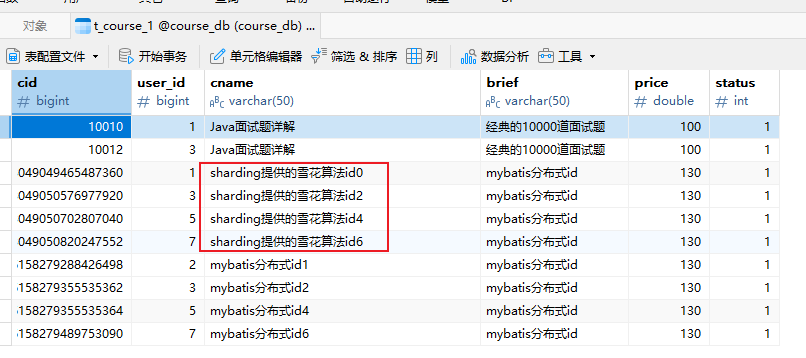
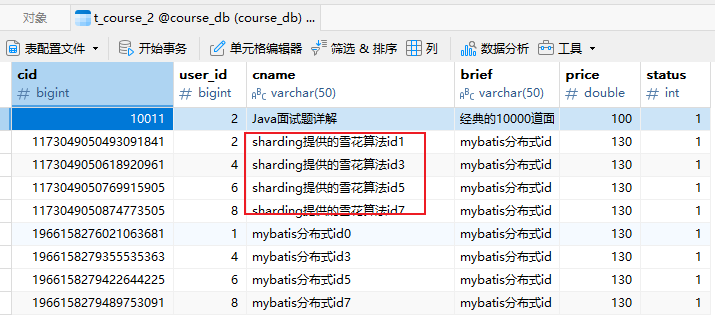
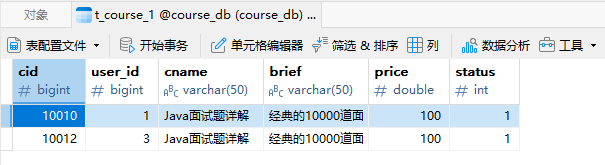
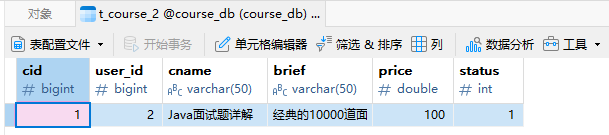
3.	约定规则:如果添加的课程 id 为偶数添加到 t_course_1 中,奇数添加到t_course_2 中。
java
水平分片的id需要在业务层实现,不能依赖数据库的主键自增
sql
CREATE TABLE t_course_1 (
`cid` BIGINT(20) NOT NULL,
`user_id` BIGINT(20) DEFAULT NULL,
`cname` VARCHAR(50) DEFAULT NULL,
`brief` VARCHAR(50) DEFAULT NULL,
`price` DOUBLE DEFAULT NULL,
`status` INT(11) DEFAULT NULL,
PRIMARY KEY (`cid`)
) ENGINE=INNODB DEFAULT CHARSET=utf8
sql
CREATE TABLE t_course_2 (
`cid` BIGINT(20) NOT NULL,
`user_id` BIGINT(20) DEFAULT NULL,
`cname` VARCHAR(50) DEFAULT NULL,
`brief` VARCHAR(50) DEFAULT NULL,
`price` DOUBLE DEFAULT NULL,
`status` INT(11) DEFAULT NULL,
PRIMARY KEY (`cid`)
) ENGINE=INNODB DEFAULT CHARSET=utf8
2. 配置文件
java
# 应用名称
spring.application.name=sharding-jdbc
# 打印SQl
spring.shardingsphere.props.sql-show=true

# 定义多个数据源
spring.shardingsphere.datasource.names = db1

#数据源1
spring.shardingsphere.datasource.db1.type=com.zaxxer.hikari.HikariDataSource
spring.shardingsphere.datasource.db1.driver-class-name=com.mysql.jdbc.Driver
spring.shardingsphere.datasource.db1.jdbc-url=jdbc:mysql://localhost:3306/course_db?useUnicode=true&characterEncoding=utf-8&useSSL=false
spring.shardingsphere.datasource.db1.username=root
spring.shardingsphere.datasource.db1.password=root

#1.配置数据节点 指定t_course逻辑表表的真实分布情况
# t_course: 逻辑表
spring.shardingsphere.rules.sharding.tables.t_course.actual-data-nodes=db1.t_course_$->{1..2}

#2.配置分片策略(包括分片键和分片算法)
#2.1 分片键名称 cid
spring.shardingsphere.rules.sharding.tables.t_course.table-strategy.standard.sharding-column=cid

#2.2 分片算法
#----分片算法名称
spring.shardingsphere.rules.sharding.tables.t_course.table-strategy.standard.sharding-algorithm-name=table-inline
#----分片算法类型  --> 行表达式分片算法
spring.shardingsphere.rules.sharding.sharding-algorithms.table-inline.type=INLINE
#---分片算法的属性配置
spring.shardingsphere.rules.sharding.sharding-algorithms.table-inline.props.algorithm-expression=t_course_$->{cid % 2 + 1}
注意 :
分片算法名称table-inline是自定义的
行表达式的使用: https://shardingsphere.apache.org/document/5.1.1/cn/features/sharding/concept/inline-expression/)
3 测试
java
import com.baomidou.mybatisplus.annotation.TableName;
import lombok.Data;
import lombok.ToString;

@TableName("t_course")
@Data
@ToString
public class Course {

    private Long cid;
    private Long userId;
    private String cname;
    private String brief;
    private double price;
    private int status;

}
java
@Mapper
public interface CourseMapper extends BaseMapper<Course> {
}
java
import com.simon.shardingjdbc.entity.Course;
import com.simon.shardingjdbc.mapper.CourseMapper;
import org.junit.jupiter.api.Test;
import org.springframework.beans.factory.annotation.Autowired;
import org.springframework.boot.test.context.SpringBootTest;

@SpringBootTest
public class ShardingjdbcApplicationTests {

    @Autowired
    private CourseMapper courseMapper;

    @Test
    public void testInsertCourse(){

        for (int i = 0; i < 3; i++) {
            Course course = new Course();
            course.setCid(10010L + i);
            course.setUserId(1L+i);
            course.setCname("Java面试题详解");
            course.setBrief("经典的10000道面试题");
            course.setPrice(100.00);
            course.setStatus(1);

            courseMapper.insert(course);
        }
    }

}
4. 分布式序列算法
雪花算法:
https://shardingsphere.apache.org/document/5.1.1/cn/features/sharding/concept/key-generator/
水平分片需要关注全局序列,因为不能简单的使用基于数据库的主键自增。
解决方案
java
一种是基于MyBatisPlus的id策略
一种是ShardingSphereJDBC的全局序列配置
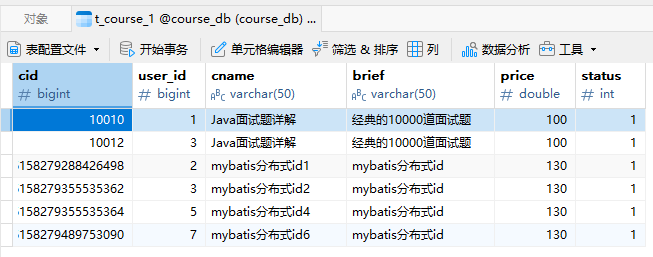
基于MyBatisPlus的id策略:将Course类的id设置成如下形式
java
@TableName("t_course")
@Data
@ToString
public class Course {

    @TableId(value = "cid",type = IdType.ASSIGN_ID)
    private Long cid;

    private Long userId;
    private String cname;
    private String brief;
    private double price;
    private int status;

}
java
import com.simon.shardingjdbc.entity.Course;
import com.simon.shardingjdbc.mapper.CourseMapper;
import org.junit.jupiter.api.Test;
import org.springframework.beans.factory.annotation.Autowired;
import org.springframework.boot.test.context.SpringBootTest;

@SpringBootTest
public class ShardingjdbcApplicationTests {

    @Autowired
    private CourseMapper courseMapper;

    @Test
    public void testInsertCourse(){
        for (int i = 0; i < 8; i++) {
            Course course = new Course();
            course.setUserId(1L+i);
            course.setCname("mybatis分布式id" + i);
            course.setBrief("mybatis分布式id");
            course.setPrice(130.00);
            course.setStatus(1);
            courseMapper.insert(course);
        }
    }

}
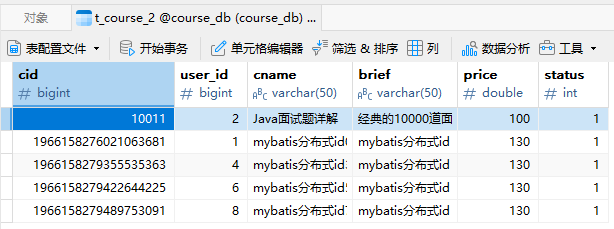
基于ShardingSphere-JDBC的全局序列配置
java
#2.3 分布式序列配置
#---- 分布式序列的列名
spring.shardingsphere.rules.sharding.tables.t_course.key-generate-strategy.column=cid
#--- 分布式序列-算法名称
spring.shardingsphere.rules.sharding.tables.t_course.key-generate-strategy.key-generator-name=alg-snowflake
#--- 分布式序列-算法类型
spring.shardingsphere.rules.sharding.key-generators.alg-snowflake.type=SNOWFLAKE
完整的配置文件
java
# 应用名称
spring.application.name=sharding-jdbc
# 打印SQl
spring.shardingsphere.props.sql-show=true

# 定义多个数据源
spring.shardingsphere.datasource.names = db1

#数据源1
spring.shardingsphere.datasource.db1.type=com.zaxxer.hikari.HikariDataSource
spring.shardingsphere.datasource.db1.driver-class-name=com.mysql.jdbc.Driver
spring.shardingsphere.datasource.db1.jdbc-url=jdbc:mysql://localhost:3306/course_db?useUnicode=true&characterEncoding=utf-8&useSSL=false
spring.shardingsphere.datasource.db1.username=root
spring.shardingsphere.datasource.db1.password=root

#1.配置数据节点 指定t_course逻辑表表的真实分布情况
# t_course: 逻辑表
spring.shardingsphere.rules.sharding.tables.t_course.actual-data-nodes=db1.t_course_$->{1..2}

#2.配置分片策略(包括分片键和分片算法)
#2.1 分片键名称 cid
spring.shardingsphere.rules.sharding.tables.t_course.table-strategy.standard.sharding-column=cid

#2.2 分片算法
#----分片算法名称
spring.shardingsphere.rules.sharding.tables.t_course.table-strategy.standard.sharding-algorithm-name=table-inline
#----分片算法类型  --> 行表达式分片算法
spring.shardingsphere.rules.sharding.sharding-algorithms.table-inline.type=INLINE
#---分片算法的属性配置
spring.shardingsphere.rules.sharding.sharding-algorithms.table-inline.props.algorithm-expression=t_course_$->{cid % 2 + 1}

#2.3 分布式序列配置
#---- 分布式序列的列名
spring.shardingsphere.rules.sharding.tables.t_course.key-generate-strategy.column=cid
#--- 分布式序列-算法名称
spring.shardingsphere.rules.sharding.tables.t_course.key-generate-strategy.key-generator-name=alg-snowflake
#--- 分布式序列-算法类型
spring.shardingsphere.rules.sharding.key-generators.alg-snowflake.type=SNOWFLAKE
去除mybatis的分布式id注解
java
@TableName("t_course")
@Data
@ToString
public class Course {

    private Long cid;
    private Long userId;
    private String cname;
    private String brief;
    private double price;
    private int status;

}测试:
java
@SpringBootTest
public class ShardingjdbcApplicationTests {

    @Autowired
    private CourseMapper courseMapper;

    @Test
    public void testInsertCourse(){
        for (int i = 0; i < 8; i++) {
            Course course = new Course();
            course.setUserId(1L+i);
            course.setCname("sharding提供的雪花算法id" + i);
            course.setBrief("mybatis分布式id");
            course.setPrice(130.00);
            course.setStatus(1);
            courseMapper.insert(course);
        }
    }

}