1. 使用gitlab提供的registry的考虑
GitLab 完全能胜任 Docker 镜像 & 通用包仓库,功能可用、社区文档丰富。但在企业级镜像治理、安全合规、高可用场景,Harbor / Artifactory 仍是更主流的选择。我计划先用 GitLab Registry 跑通整条流水线,日后规模扩大再 harbor-migrate 也不复杂------只需重新 docker tag && docker push 即可。
当前:
- 团队 < 50 人,镜像数量 < 100 GB;
- 不需要漏洞扫描、签名、多集群复制;
- 希望"一站式"代码+构建+存储,快速落地
我就考虑使用gitlab的仓库了。
2. 配置文件内打开
寻找到你的gitlab.rb文件。一般在/etc/gitlab/gitlab.rb内。如果找不到可以使用find命令搜索:sudo find -name gitlab.rb。注:使用sudo的原因是麒麟系统权限设置非常死,不实用管理员权限搜索不到。
使用命令:sudo vi /etc/gitlab/gitlab.rb修改内容,我的版本是gitlab17,不是很新,仅供参考。
在文档内搜索"registry_external_url",找到如下内容的位置。我们需要改的其实不多。
################################################################################
## Container Registry settings
##! Docs: https://docs.gitlab.com/ee/administration/packages/container_registry.html
################################################################################

# registry_external_url 'https://registry.example.com '

### Settings used by GitLab application
# gitlab_rails['registry_enabled'] = true
# gitlab_rails['registry_host'] = "registry.gitlab.example.com"
# gitlab_rails['registry_port'] = "5005"
# gitlab_rails['registry_path'] = "/var/opt/gitlab/gitlab-rails/shared/registry"

# Notification secret, it's used to authenticate notification requests to GitLab application
# You only need to change this when you use external Registry service, otherwise
# it will be taken directly from notification settings of your Registry
# gitlab_rails['registry_notification_secret'] = nil

###! **Do not change the following 3 settings unless you know what you are
###!   doing**
# gitlab_rails['registry_api_url'] = "http://127.0.0.1:5000 "
# gitlab_rails['registry_key_path'] = "/var/opt/gitlab/gitlab-rails/certificate.key"
# gitlab_rails['registry_issuer'] = "omnibus-gitlab-issuer"
我计划通过5050端口提供服务。修改如下:
registry_external_url 'http://你的gitlabIP地址:5050'

### Settings used by GitLab application
gitlab_rails['registry_enabled'] = true
gitlab_rails['registry_host'] = "你的gitlabIP地址"
gitlab_rails['registry_port'] = "5050"
gitlab_rails['registry_path'] = "/var/opt/gitlab/gitlab-rails/shared/registry"

# Notification secret, it's used to authenticate notification requests to GitLab application
# You only need to change this when you use external Registry service, otherwise
# it will be taken directly from notification settings of your Registry
# gitlab_rails['registry_notification_secret'] = nil

###! **Do not change the following 3 settings unless you know what you are
###!   doing**
gitlab_rails['registry_api_url'] = "http://127.0.0.1:5050 "
# gitlab_rails['registry_key_path'] = "/var/opt/gitlab/gitlab-rails/certificate.key"
# gitlab_rails['registry_issuer'] = "omnibus-gitlab-issuer"
注意:改成你的IP地址;把修改部分前面的#注释符号去掉;我将registry_external_url从https改成了http,https还需要证书,内网环境我不需要真么复杂。
对文件进行保存。
3. (原神) 启动
这实际上是对gitlab进行的配置,自然是重启gitlab。
bash
# 重新加载配置
sudo gitlab-ctl reconfigure
# 重启gitlab
sudo gitlab-ctl restart
# 检查gitlab运行状态
sudo gitlab-ctl status
4. 预防性检查
4.1 仓库权限检查
首先仓库文件的存储位置/var/opt/gitlab/gitlab-rails/shared/registry。因为众所周知的麒麟系统文件系统权限管理比较严格,检查一下是否拥有读写权限。
sudo ls -la /var/opt/gitlab/gitlab-rails/shared/你可以看到这个文件夹被正确的划分到git用户组,registry用户下。

目前这个文件夹权限不存在问题。如果你更改了默认的存储地址,请使用上述方法检查权限。
4.2 服务启动检查
-
使用端口检测是否正常启动

-
使用gitlab-ctl status检查启动情况
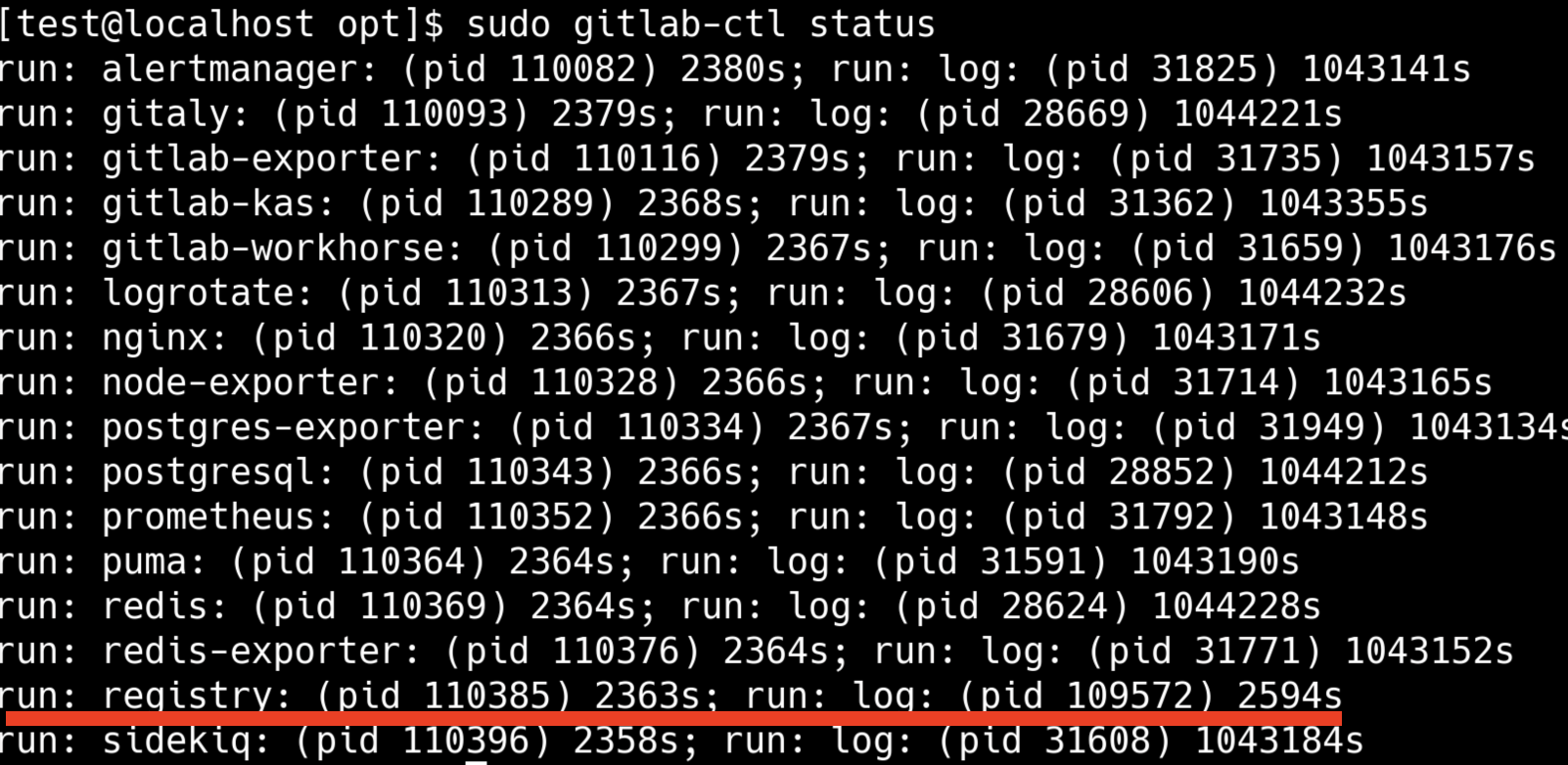
-
在gitlab页面检查启动情况
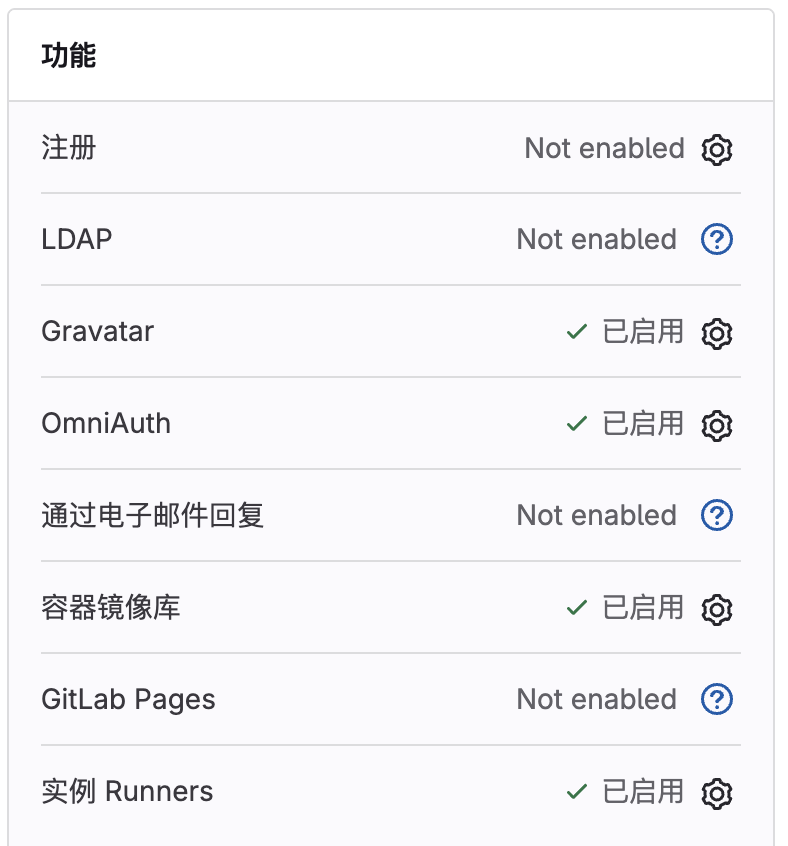
-
使用docker检查启动情况
bash
docker login 我的ip:5050 -u root -p <your_gitlab_root_password>哎嘿,报错了你说奇不奇怪。
5. 解决http和https问题
docker默认使用https协议访问了 IP:5050,我们刚才在gitlab.rb中设置为http。在docker运行主机添加如下:
bash
sudo mkdir -p /etc/docker
sudo tee /etc/docker/daemon.json <<-'EOF'
{
  "insecure-registries": ["我的ip:5050"]
}
EOF

sudo systemctl daemon-reload
sudo systemctl restart docker
再次检查
bash
docker login 我的ip:5050 -u root -p <your_gitlab_root_password>

#出现Login Succeeded,登录成功
注意,比如我要用k8s部署项目,那么k8s也要访问这个仓库。同样对面机器也要执行上述命令,完成对该端口的http访问。