1.代码
1.1后端
java
package com.bite.springmvc;

import ch.qos.logback.core.util.StringUtil;
import jakarta.servlet.http.HttpSession;
import org.springframework.util.StringUtils;
import org.springframework.web.bind.annotation.RequestMapping;
import org.springframework.web.bind.annotation.RestController;

@RequestMapping("/user")
@RestController
public class UserController {
@RequestMapping("/login")
    public boolean login(String userName, String password, HttpSession session){
    if (!StringUtils.hasLength(userName) || !StringUtils.hasLength(password)){
        return false;
    }
    //校验账号和密码
    //当前还未学习数据库的操作,先写死
    if ("zhangsan".equals(userName) && "123456".equals(password)){
        //存储Session
        session.setAttribute("userName", userName);
        return true;
    }
    return false;
    }

    @RequestMapping("/getUserInfo")
    public String getUserInfo(HttpSession session){
    String userName = (String) session.getAttribute("userName");
    return userName==null?"":userName;
    }
}
1.2前端
login
html
<!DOCTYPE html>
<html lang="en">

<head>
  <meta charset="UTF-8">
  <title>登录页面</title>
</head>

<body>
  <h1>用户登录</h1>
  用户名:<input name="userName" type="text" id="userName"><br>
  密码:<input name="password" type="password" id="password"><br>
  <input type="button" value="登录" onclick="login()">

  <script src="https://cdn.bootcdn.net/ajax/libs/jquery/3.6.4/jquery.min.js"></script>
  <script>
    function login() {
    $.ajax({
      url:"/user/login",
      type:"post",
      data:{
        "userName":$("#userName").val(),
        "password":$("#password").val()
      },
      success:function(result){
        //返回结果为true,页面跳转
        if(result){
          location.href = "index.html";
        }else{
          //密码错误
          alert("密码错误")
        }
      }
    });
    }

  </script>
</body>

</html>
index
java
<!doctype html>
<html lang="en">

<head>
    <meta charset="UTF-8">
    <meta name="viewport"
        content="width=device-width, user-scalable=no, initial-scale=1.0, maximum-scale=1.0, minimum-scale=1.0">
    <meta http-equiv="X-UA-Compatible" content="ie=edge">
    <title>用户登录首页</title>
</head>

<body>
    登录人: <span id="loginUser"></span>

    <script src="https://cdn.bootcdn.net/ajax/libs/jquery/3.6.4/jquery.min.js"></script>
    <script>
        $.ajax({
            url:"/user/getUserInfo",
            type:"get",
            success:function(result){
                //把result放在loginUser这个spn下面
                $("#loginUser").text(result);
            }
        });
    </script>
</body>

</html>
2.测试
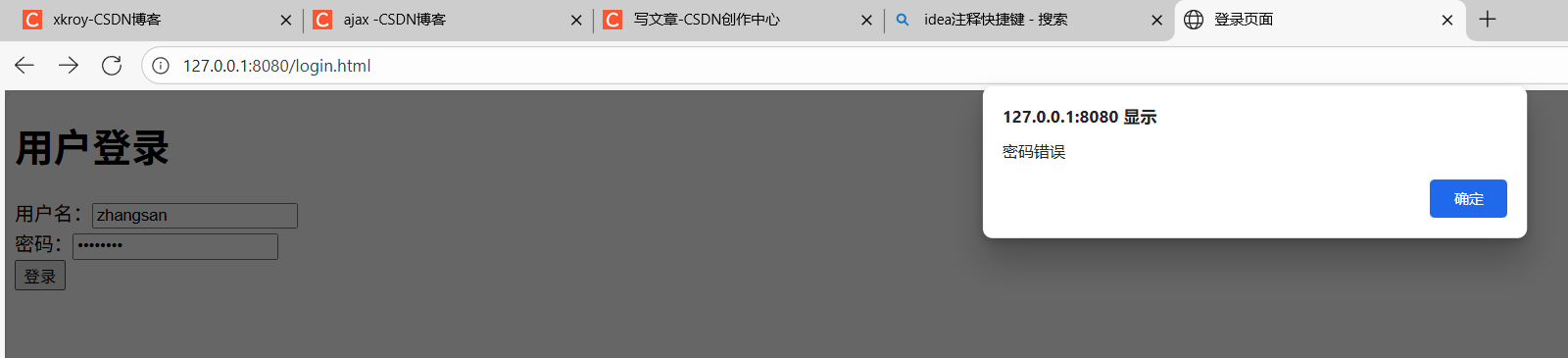
密码错误时:
登录成功时
