作者:来自 Elastic Dave Erickson
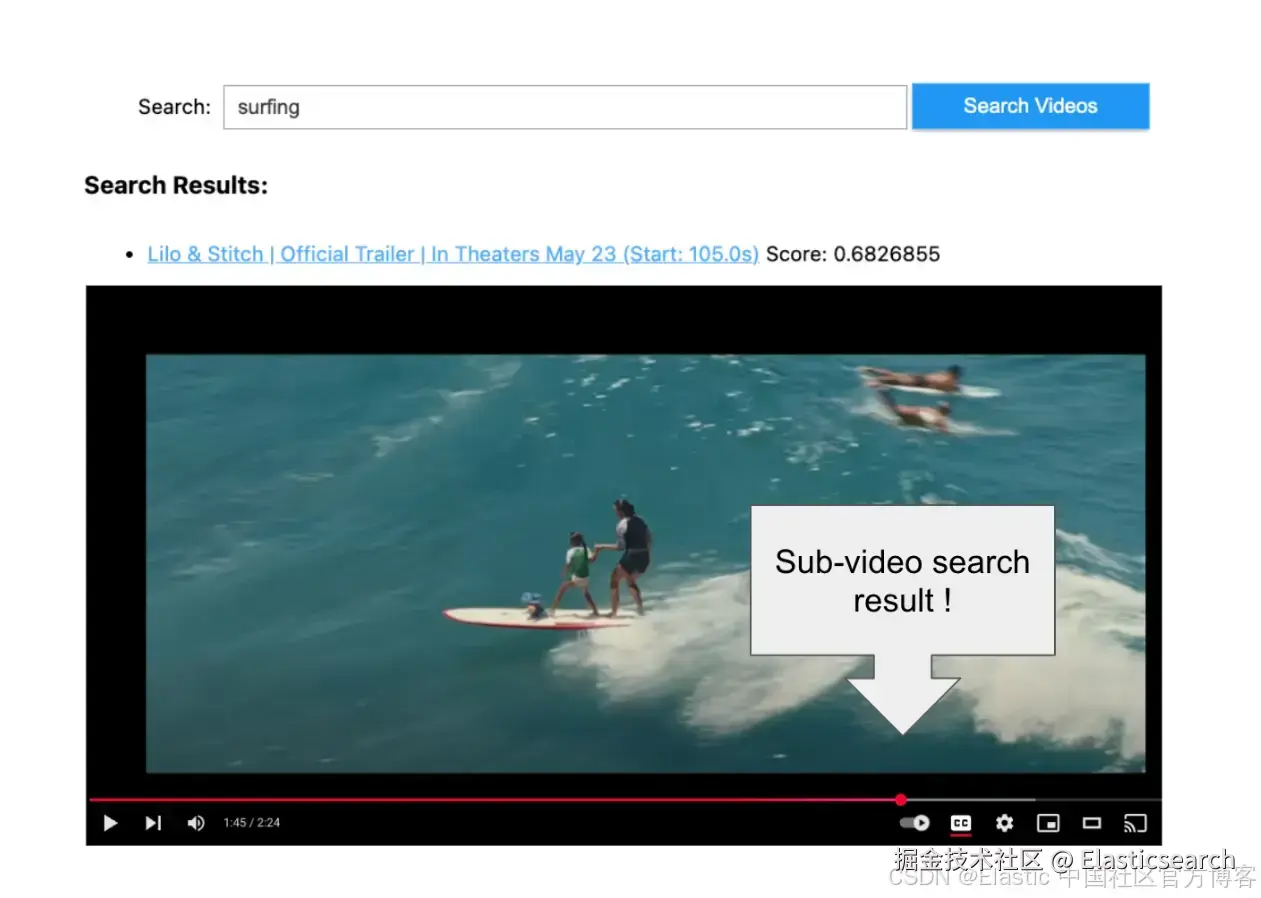
创建一个小应用来搜索来自 TwelveLabs 的 Marengo 模型的视频嵌入
从向量搜索到强大的 REST API,Elasticsearch 为开发者提供了最全面的搜索工具包。深入 GitHub 上的示例笔记本来尝试新东西。你也可以立即开始免费试用或在本地运行 Elasticsearch。
这篇博客文章探讨了 TwelveLabs 为其视频嵌入模型 Marengo 推出的新的 Bedrock 集成,并演示了如何将生成的视频嵌入与 Elasticsearch 向量数据库一起使用。下面的演练详细说明了如何利用这一组合来搜索近期夏季大片的预告片。
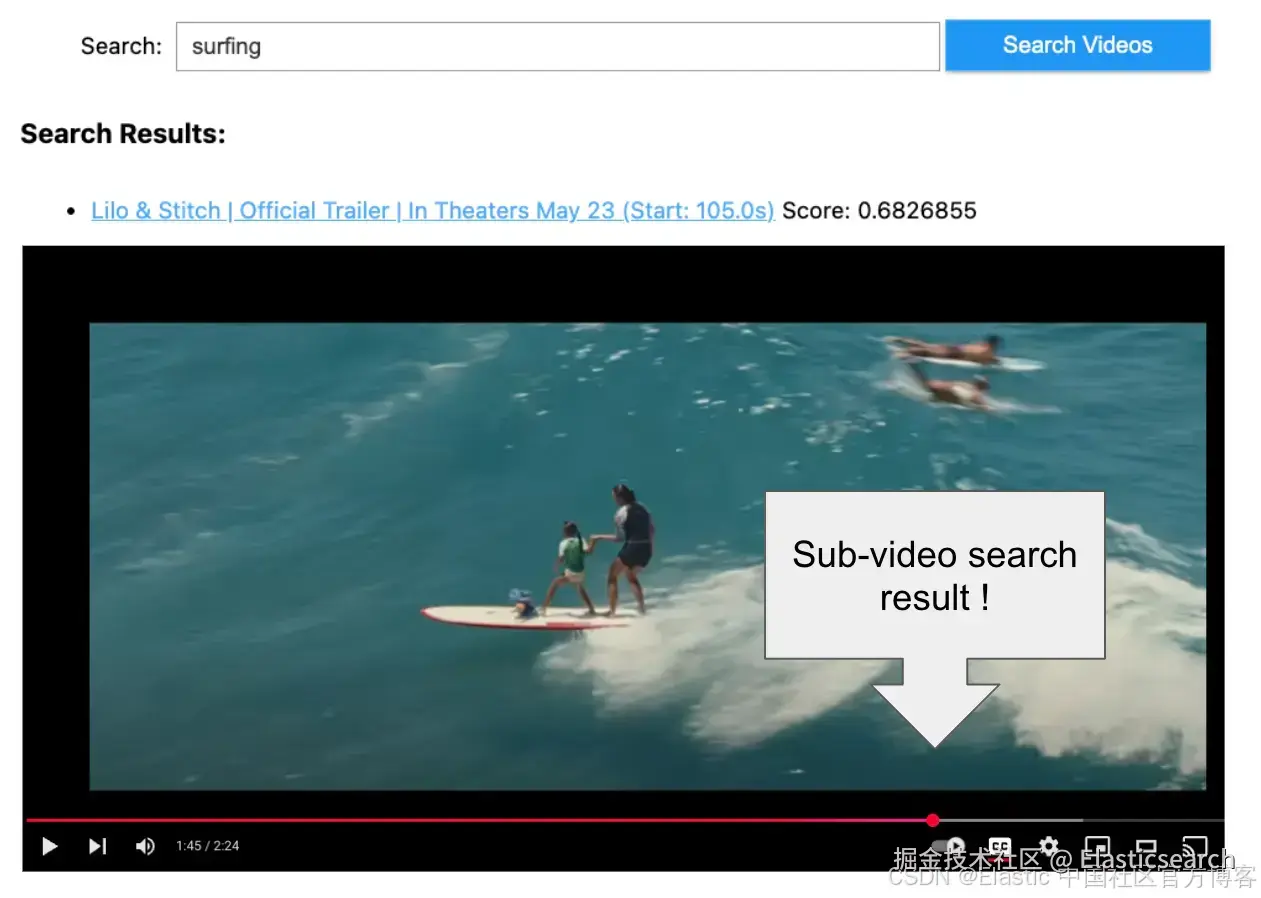
动机
真实数据不仅仅是文本。在当今的 TikTok、工作视频通话和直播会议的世界里,内容越来越多地基于视频。在企业领域也是如此。无论是为了公共安全、合规审计,还是客户满意度,多模态 AI 都有潜力为知识应用解锁音频和视频。
然而,当我在大量内容中搜索时,我经常感到沮丧,因为除非我搜索的词语被捕捉到元数据里或在录制中被说出,否则我找不到视频。在移动应用时代的"它就是能用"的期望,已经在 AI 时代转变为 "它就是理解我的数据"。要实现这一点,AI 需要能够原生访问视频,而不是先将其转换为文本。
空间推理和视频理解这样的术语在视频和机器人领域都有应用。将视频理解加入到我们的工具集中,将是构建能够超越文本的 AI 系统的重要一步。
视频模型的超级能力
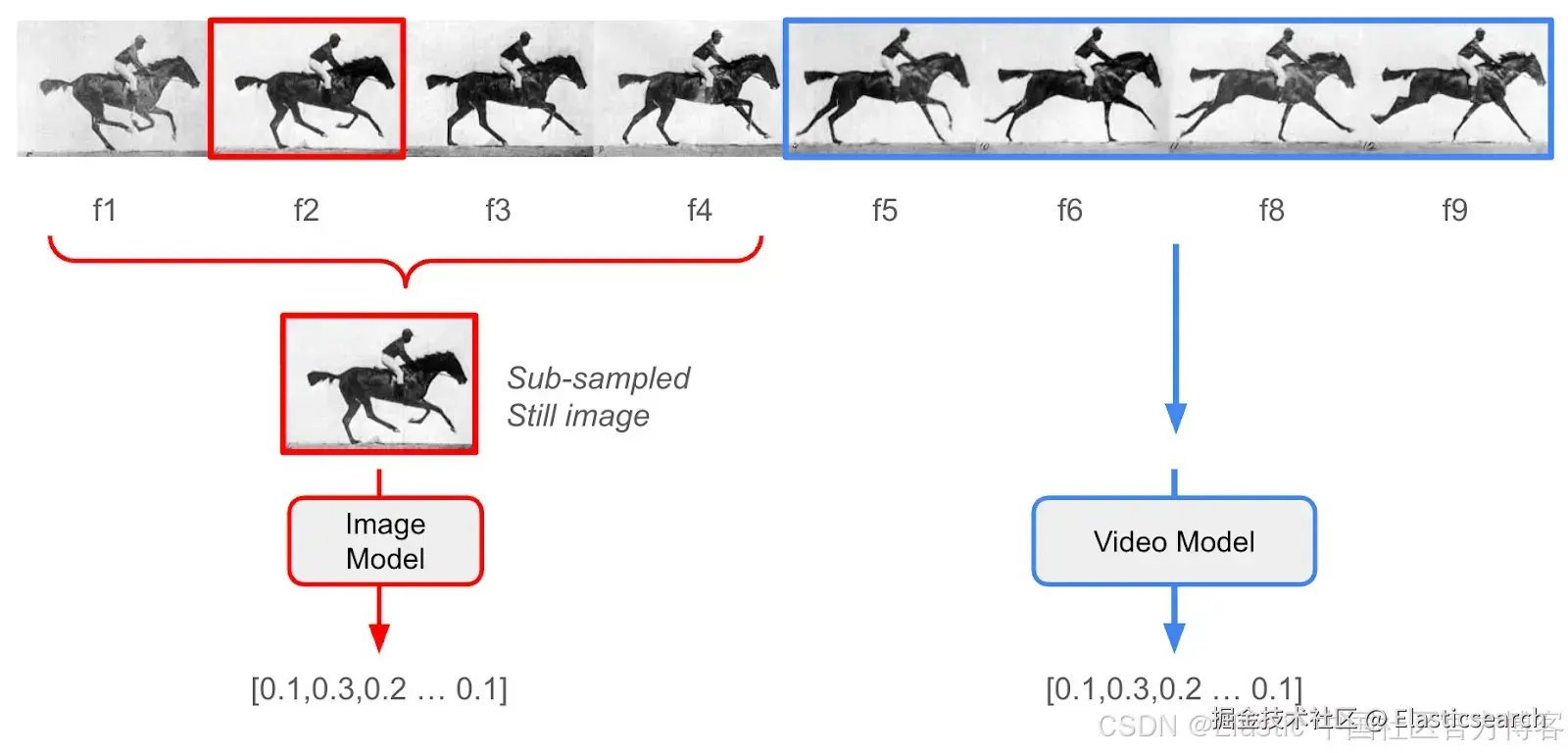
在使用专门的视频模型之前,我的常规方法是使用像 Whisper 这样的模型生成音频转录,再结合来自图像模型的密集向量嵌入,用于视频中提取的静态帧。这种方法在一些视频中效果不错,但当主题快速变化,或者关键信息实际上存在于拍摄对象的运动中时,就会失败。
简单来说,仅仅依赖图像模型会遗漏视频内容中大量的信息。
几个月前,我第一次通过 TwelveLabs 的 SaaS 平台接触到他们,它允许你上传视频进行一站式异步处理。他们有两个模型系列:
- Marengo 是一个多模态嵌入模型,它不仅能从静态图像中捕捉含义,还能从动态视频片段中捕捉含义 ------ 类似于文本嵌入模型能够从整段文字中捕捉含义,而不仅仅是单词。
- Pegasus 是一个视频理解模型,可以用来生成字幕,或在片段上下文中回答类似 RAG 的问题。
虽然我喜欢这个 SaaS 服务的易用性和 API,但上传数据并不总是可行的。我的客户往往有数 TB 的敏感数据,不允许离开他们的控制范围。这就是 AWS Bedrock 发挥作用的地方。
TwelveLabs 已经将他们的核心模型提供在按需的 Bedrock 平台上,使源数据可以保存在我控制的 S3 存储桶中,并且只在安全计算模式下访问,而无需持久化在第三方系统中。这是个好消息,因为企业客户的视频用例通常包含商业机密、带有 PII 的记录,或其他受严格安全和隐私法规约束的信息。
我认为 Bedrock 集成能够解锁许多用例。
让我们搜索一些电影预告片
注意:Python 导入和通过 .env 文件处理环境变量的完整代码在 Python notebook 版本中。
依赖项:
-
你需要一个可以由你的 AWS ID 写入的 S3 存储桶
-
你需要 Elasticsearch 的主机 URL 和 API key,可以是本地部署或 Elastic Cloud
-
这段代码假设 Elasticsearch 版本为 8.17+ 或 9.0+
-
一个很好的快速测试数据源是电影预告片。它们剪辑快速、视觉效果惊艳,并且通常包含高动作场景。你可以获取自己的 .mp4 文件,或者使用 github.com/yt-dlp/yt-d... 从 YouTube 获取小规模的文件。
一旦文件在我们的本地文件系统中,我们需要将它们上传到我们的 S3 存储桶:
python
`
1. # Initialize AWS session
2. session = boto3.session.Session(
3. aws_access_key_id=AWS_ACCESS_KEY_ID,
4. aws_secret_access_key=AWS_SECRET_ACCESS_KEY,
5. region_name=AWS_REGION
6. )
8. #########
9. ## Validate S3 Configuration
10. #########
12. aws_account_id = session.client('sts').get_caller_identity()["Account"]
13. print(f"AWS Account ID: {aws_account_id}")
14. s3_client = session.client('s3')
16. # Verify bucket access
17. try:
18. s3_client.head_bucket(Bucket=S3_BUCKET_NAME)
19. print(f"✅ Successfully connected to S3 bucket: {S3_BUCKET_NAME}")
20. except Exception as e:
21. print(f"❌ Error accessing S3 bucket: {e}")
22. print("Please ensure the bucket exists and you have proper permissions.")
25. #########
26. ## Upload videos to S3, and make note of where we put them in data object
27. #########
29. for video_object in video_objects:
30. # Get the video file path
31. video_path = video_object.get_video_path()
33. # Skip if video path is not set
34. if not video_path:
35. print(f"Skipping {video_object.get_video_string()} - No video path set")
36. continue
38. # Define S3 destination key - organize by platform and video ID
39. # put this information in our data object for later
40. s3_key = video_object.get_s3_key()
41. if not s3_key:
42. s3_key = f"{S3_VIDEOS_PATH}/{video_object.get_platform()}/{video_object.get_video_id()}/{os.path.basename(video_path)}"
43. video_object.set_s3_key(s3_key)
45. try:
46. # Check if file already exists in S3
47. try:
48. s3_client.head_object(Bucket=S3_BUCKET_NAME, Key=s3_key)
49. print(f"Video {video_object.get_video_string()} already exists in S3. Skipping upload.")
50. continue
51. except botocore.exceptions.ClientError as e:
52. if e.response['Error']['Code'] == '404':
53. # File doesn't exist in S3, proceed with upload
54. pass
55. else:
56. # Some other error occurred
57. raise e
59. # Upload the video to S3
60. print(f"Uploading {video_object.get_video_string()} to S3...")
61. s3_client.upload_file(video_path, S3_BUCKET_NAME, s3_key)
62. print(f"Successfully uploaded {video_object.get_video_string()} to S3")
65. except Exception as e:
66. print(f"Error uploading {video_object.get_video_string()} to S3: {str(e)}")
`AI写代码现在我们可以使用异步 Bedrock 调用来创建视频嵌入:
python
`
1. #########
2. ## Use Bedrock hosted Twelve Labs models to create video embeddings
3. #########
6. # Helper function to wait for async embedding results
7. def wait_for_embedding_output(s3_bucket: str, s3_prefix: str, invocation_arn: str, verbose: bool = False) -> list:
8. """
9. Wait for Bedrock async embedding task to complete and retrieve results
11. Args:
12. s3_bucket (str): The S3 bucket name
13. s3_prefix (str): The S3 prefix for the embeddings
14. invocation_arn (str): The ARN of the Bedrock async embedding task
16. Returns:
17. list: A list of embedding data
19. Raises:
20. Exception: If the embedding task fails or no output.json is found
21. """
23. # Wait until task completes
24. status = None
25. while status not in ["Completed", "Failed", "Expired"]:
26. response = bedrock_client.get_async_invoke(invocationArn=invocation_arn)
27. status = response['status']
28. if verbose:
29. clear_output(wait=True)
30. tqdm.tqdm.write(f"Embedding task status: {status}")
31. time.sleep(5)
33. if status != "Completed":
34. raise Exception(f"Embedding task failed with status: {status}")
36. # Retrieve the output from S3
37. response = s3_client.list_objects_v2(Bucket=s3_bucket, Prefix=s3_prefix)
39. for obj in response.get('Contents', []):
40. if obj['Key'].endswith('output.json'):
41. output_key = obj['Key']
42. obj = s3_client.get_object(Bucket=s3_bucket, Key=output_key)
43. content = obj['Body'].read().decode('utf-8')
44. data = json.loads(content).get("data", [])
45. return data
47. raise Exception("No output.json found in S3 prefix")
50. # Create video embedding
51. def create_video_embedding(video_s3_uri: str, video_id: str) -> list:
52. """
53. Create embeddings for video using Marengo on Bedrock
55. Args:
56. video_s3_uri (str): The S3 URI of the video to create an embedding for
57. video_id (str): the identifying unique id of the video, to be used as a uuid
59. Returns:
60. list: A list of embedding data
61. """
63. unique_id = video_id
64. s3_output_prefix = f'{S3_EMBEDDINGS_PATH}/{S3_VIDEOS_PATH}/{unique_id}'
66. response = bedrock_client.start_async_invoke(
67. modelId=MARENGO_MODEL_ID,
68. modelInput={
69. "inputType": "video",
70. "mediaSource": {
71. "s3Location": {
72. "uri": video_s3_uri,
73. "bucketOwner": aws_account_id
74. }
75. }
76. },
77. outputDataConfig={
78. "s3OutputDataConfig": {
79. "s3Uri": f's3://{S3_BUCKET_NAME}/{s3_output_prefix}'
80. }
81. }
82. )
84. invocation_arn = response["invocationArn"]
85. print(f"Video embedding task started: {invocation_arn}")
87. # Wait for completion and get results
88. try:
89. embedding_data = wait_for_embedding_output(S3_BUCKET_NAME, s3_output_prefix, invocation_arn)
90. except Exception as e:
91. print(f"Error waiting for embedding output: {e}")
92. return None
94. return embedding_data
97. def check_existing_embedding(video_id: str) -> bool:
98. """Check S3 folder to see if this video already has an embedding created to avoid re-inference"""
100. s3_output_prefix = f'{S3_EMBEDDINGS_PATH}/{S3_VIDEOS_PATH}/{video_id}'
101. print(s3_output_prefix)
103. try:
104. # Check if any files exist at this prefix
105. response = s3_client.list_objects_v2(Bucket=S3_BUCKET_NAME, Prefix=s3_output_prefix)
107. if 'Contents' in response and any(obj['Key'].endswith('output.json') for obj in response.get('Contents', [])):
108. print(f"Embedding {video_object.get_video_string()} already has an embedding. Skipping embedding creation.")
109. # Find the output.json file
110. for obj in response.get('Contents', []):
111. if obj['Key'].endswith('output.json'):
112. output_key = obj['Key']
113. # Get the object from S3
114. obj = s3_client.get_object(Bucket=S3_BUCKET_NAME, Key=output_key)
115. # Read the content and parse as JSON
116. content = obj['Body'].read().decode('utf-8')
117. embedding_data = json.loads(content).get("data", [])
118. return embedding_data
119. else:
120. print(f"No existing embedding found for {video_object.get_video_string()}.")
121. return None
122. except botocore.exceptions.ClientError as e:
123. if e.response['Error']['Code'] == '404':
124. # File doesn't exist in S3, proceed with upload
125. print("Did not find embedding in s3")
126. return None
127. else:
128. # Some other error occurred
129. raise e
131. def create_s3_uri(bucket_name: str, key: str)-> str:
132. video_uri = f"s3://{bucket_name}/{key}"
133. return video_uri
137. ## Generate the embeddings one at a time, use S3 as cache to prevent double embedding generations
138. for video_object in tqdm.tqdm(video_objects, desc="Processing videos"):
139. s3_key = video_object.get_s3_key()
140. video_id = video_object.get_video_id()
141. video_uri = create_s3_uri(S3_BUCKET_NAME, s3_key)
143. retrieved_embeddings = check_existing_embedding(video_id)
144. if retrieved_embeddings:
145. video_object.set_embeddings_list(retrieved_embeddings)
146. else:
147. video_embedding_data = create_video_embedding(video_uri, video_id)
148. video_object.set_embeddings_list(video_embedding_data)
`AI写代码现在我们已经在本地内存中的视频对象里得到了嵌入,这里做一个快速打印测试,看看返回了什么:
python
`
1. video_embedding_data = video_objects[0].get_embeddings_list()
3. ##Preview Print
4. for i, embedding in enumerate(video_embedding_data[:3]):
5. print(f"{i}")
6. for key in embedding:
7. if "embedding" == key:
8. print(f"\t{key}: len {len(embedding[key])}")
9. else:
10. print(f"\t{key}: {embedding[key]}")
`AI写代码输出如下:
markdown
`
1. 0
2. embedding: len 1024
3. embeddingOption: visual-text
4. startSec: 0.0
5. endSec: 6.199999809265137
6. 1
7. embedding: len 1024
8. embeddingOption: visual-text
9. startSec: 6.199999809265137
10. endSec: 10.399999618530273
11. 2
12. embedding: len 1024
13. embeddingOption: visual-text
14. startSec: 10.399999618530273
15. endSec: 17.299999237060547
`AI写代码插入到 Elasticsearch
我们将把对象上传到 Elasticsearch ------ 在我的例子中,大约有 155 个视频片段的元数据和嵌入。在如此小的规模下,使用平铺的 float32 索引进行暴力最近邻搜索是最有效且最经济的方法。不过,下面的示例演示了如何为 Elasticsearch 支持的大规模用例中的每个流行量化级别创建不同的索引。参见 Elastic 关于更好的二进制量化(BBQ)功能的这篇文章。
python
`
1. es = Elasticsearch(
2. hosts=[ELASTICSEARCH_ENDPOINT],
3. api_key=ELASTICSEARCH_API_KEY
4. )
6. es_detail = es.info().body
7. if "version" in es_detail:
8. identifier = es_detail['version']['build_flavor'] if 'build_flavor' in es_detail['version'] else es_detail['version']['number']
9. print(f"✅ Successfully connected to Elasticsearch: {es_detail['version']['build_flavor']}")
12. docs = []
14. for video_object in video_objects:
16. persist_object = video_object.get_video_object()
17. embeddings = video_object.get_embeddings_list()
19. for embedding in embeddings:
20. if embedding["embeddingOption"] == "visual-image":
22. # Create a copy of the persist object and add embedding details
23. doc = copy.deepcopy(persist_object)
24. doc["embedding"] = embedding["embedding"]
25. doc["start_sec"] = embedding["startSec"]
26. doc["end_sec"] = embedding["endSec"]
28. docs.append(doc)
30. index_varieties = [
31. "flat", ## brute force float32
32. "hnsw", ## float32 hnsw graph data structure
33. "int8_hnsw", ## int8 hnsw graph data structure, default for lower dimension models
34. "bbq_hnsw", ## Better Binary Qunatization HNSW, default for higher dimension models
35. "bbq_flat" ## brute force + Better Binary Quantization
36. ]
38. for index_variety in index_varieties:
39. # Create an index for the movie trailer embeddings
40. # Define mapping with proper settings for dense vector search
41. index_name = f"twelvelabs-movie-trailer-{index_variety}"
42. mappings = {
43. "properties": {
44. "url": {"type": "keyword"},
45. "platform": {"type": "keyword"},
46. "video_id": {"type": "keyword"},
47. "title": {"type": "text", "analyzer": "standard"},
48. "embedding": {
49. "type": "dense_vector",
50. "dims": 1024,
51. "similarity": "cosine",
52. "index_options": {
53. "type": index_variety
54. }
55. },
56. "start_sec": {"type": "float"},
57. "end_sec": {"type": "float"}
58. }
59. }
63. # Check if index already exists
64. if es.indices.exists(index=index_name):
65. print(f"Deleting Index '{index_name}' and then sleeping for 2 seconds")
66. es.indices.delete(index=index_name)
67. sleep(2)
68. # Create the index
69. es.indices.create(index=index_name, mappings=mappings)
70. print(f"Index '{index_name}' created successfully")
72. for index_variety in index_varieties:
73. # Create an index for the movie trailer embeddings
74. # Define mapping with proper settings for dense vector search
75. index_name = f"twelvelabs-movie-trailer-{index_variety}"
77. # Bulk insert docs into Elasticsearch index
78. print(f"Indexing {len(docs)} documents into {index_name}...")
81. # Create actions for bulk API
82. actions = []
83. for doc in docs:
84. actions.append({
85. "_index": index_name,
86. "_source": doc
87. })
89. # Perform bulk indexing with error handling
90. try:
91. success, failed = bulk(es, actions, chunk_size=100, max_retries=3,
92. initial_backoff=2, max_backoff=60)
93. print(f"\tSuccessfully indexed {success} documents into {index_name}")
94. if failed:
95. print(f"\tFailed to index {len(failed)} documents")
96. except Exception as e:
97. print(f"Error during bulk indexing: {e}")
99. print(f"Completed indexing documents into {index_name}")
`AI写代码运行搜索
TwelveLabs 的 Bedrock 实现允许异步调用将文本生成向量嵌入到 S3。然而,下面我们将使用延迟更低的同步 invoke_model,直接为我们的搜索查询获取文本嵌入。(文本 Marengo 文档示例在这里。)
python
`
1. # Create text embedding
2. def create_text_embedding(text_query: str) -> list:
3. text_model_id = TEXT_EMBEDDING_MODEL_ID
4. text_model_input = {
5. "inputType": "text",
6. "inputText": text_query
7. }
8. response = bedrock_client.invoke_model(
9. modelId=text_model_id,
10. body=json.dumps(text_model_input)
11. )
12. response_body = json.loads(response['body'].read().decode('utf-8'))
13. embedding_data = response_body.get("data", [])
14. if embedding_data:
15. return embedding_data[0]["embedding"]
16. else:
17. return None
22. def vector_query(index_name: str, text_query: str) -> dict:
24. query_embedding = create_text_embedding(text_query)
25. query = {
26. "retriever": {
27. "knn": {
28. "field": "embedding",
29. "query_vector": query_embedding,
30. "k": 10,
31. "num_candidates": "25"
32. }
33. },
34. "size": 10,
35. "_source": False,
36. "fields": ["title", "video_id", "start_sec"]
37. }
38. return es.search(index=index_name, body=query).body
41. text_query = "Show me scenes with dinosaurs"
42. print (vector_query("twelvelabs-movie-trailer-flat", text_query))
`AI写代码返回的 JSON 就是我们的搜索结果!但为了创建一个更易用的测试界面,我们可以使用一些快速的 iPython 小部件:
python
`
1. from ipywidgets import widgets, HTML as WHTML, HBox, Layout
2. from IPython.display import display
4. def display_search_results_html(query):
5. results = vector_query("twelvelabs-movie-trailer-flat", query)
6. hits = results.get('hits', {}).get('hits', [])
8. if not hits:
9. return "<p>No results found</p>"
11. items = []
12. for hit in hits:
13. fields = hit.get('fields', {})
14. title = fields.get('title', ['No Title'])[0]
15. score = hit.get('_score', 0)
16. video_id = fields.get('video_id', [''])[0]
17. start_sec = fields.get('start_sec', [0])[0]
18. url =
19. f"https://www.youtube.com/watch?v={video_id}&t={int(start_sec)}s"
20. items.append(f'<li><a href="{url}" target="_blank">{title} (Start: {float(start_sec):.1f}s)</a> <span>Score: {score}</span></li>')
22. return "<h3>Search Results:</h3><ul>" + "\n".join(items) + "</ul>"
24. def search_videos():
25. search_input = widgets.Text(
26. value='',
27. placeholder='Enter your search query...',
28. description='Search:',
29. layout=Layout(width='70%')
30. )
32. search_button = widgets.Button(
33. description='Search Videos',
34. button_style='primary',
35. layout=Layout(width='20%')
36. )
38. # Use a single HTML widget for output; update its .value to avoid double-rendering
39. results_box = WHTML(value="")
41. def on_button_click(_):
42. q = search_input.value.strip()
43. if not q:
44. results_box.value = "<p>Please enter a search query</p>"
45. return
46. results_box.value = "<p>Searching...</p>"
47. results_box.value = display_search_results_html(q)
49. # Avoid multiple handler attachments if the cell is re-run
50. try:
51. search_button._click_handlers.callbacks.clear()
52. except Exception:
53. pass
54. search_button.on_click(on_button_click)
56. display(HBox([search_input, search_button]))
57. display(results_box)
59. # Call this to create the UI
60. search_videos()
`AI写代码让我们在预告片中搜索一些视觉内容。
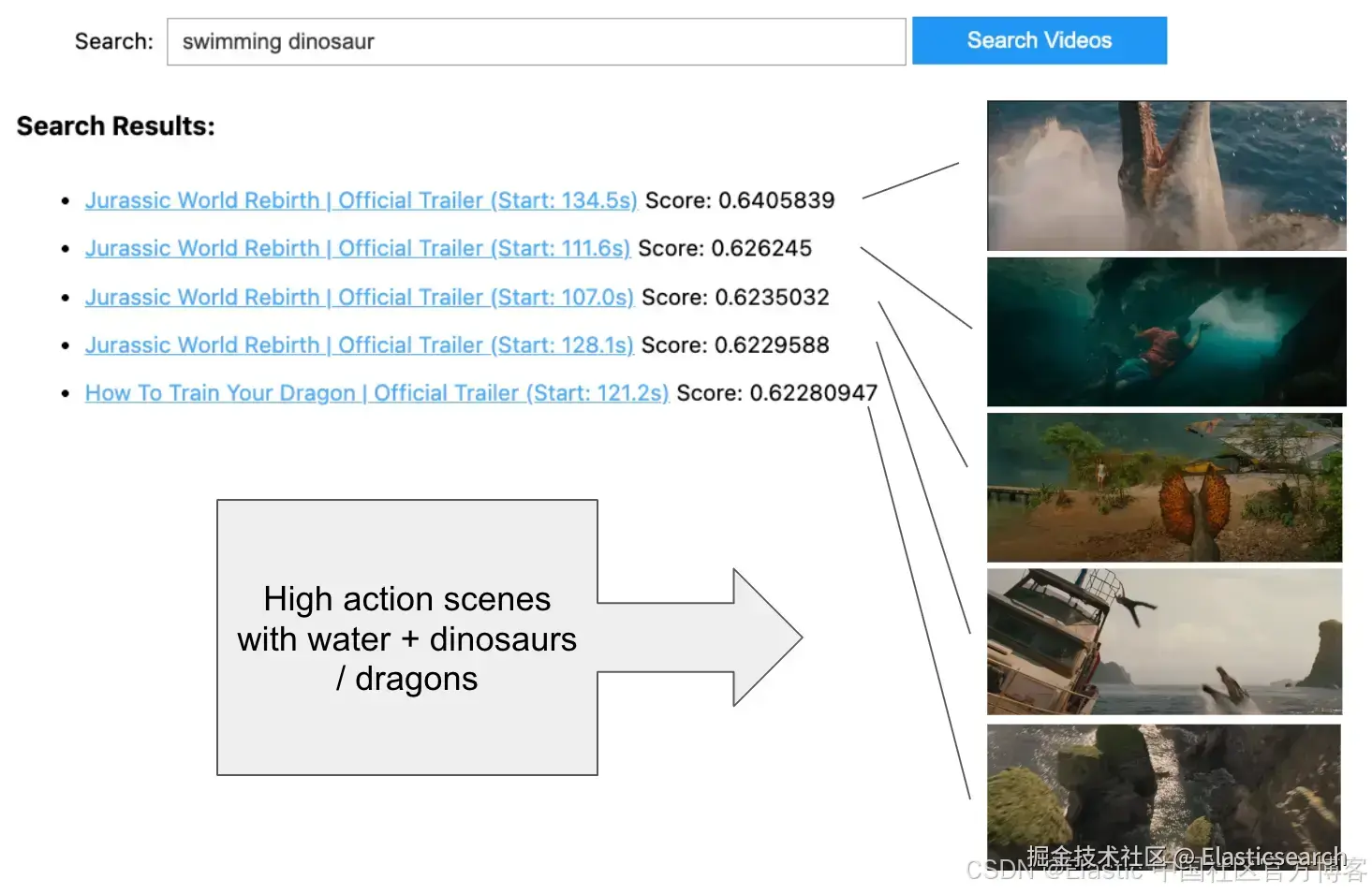
比较量化方法
较新的 Elasticsearch 版本默认对 1024 维密集向量使用 bbq_hnsw,它在通过对原始 float32 在过采样候选窗口中重评分来保持准确性的同时,提供最佳的速度和可扩展性。
为了通过简单的 UI 比较量化对搜索结果的影响,可以查看一个名为 Relevance Studio 的新项目。
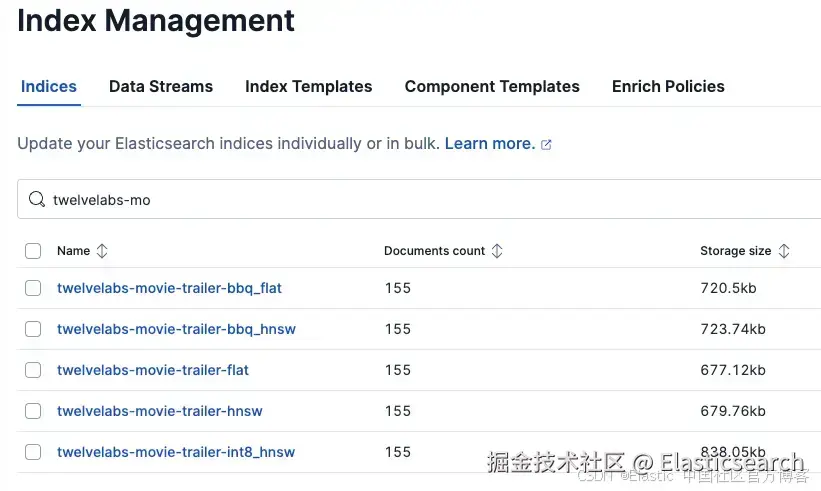
如果我们在 Kibana 中检查索引管理,或使用 curl 执行 GET /_cat/indices ,我们会看到每个选项的存储大小大致相同。乍一看,这可能会让人困惑,但请记住存储大小大致相等,因为索引包含用于重评分的向量 float32 表示。在 bbq_hnsw 中,图中只使用量化的二进制向量表示,从而在索引和搜索时节省成本并提高性能。
最后的想法
对于单个 1024 维密集向量来说,这些结果令人印象深刻。我很期待尝试将 Marengo 模型的强大功能与混合搜索方法结合,包括音频转录,以及 Elasticsearch 的地理空间过滤和 RBAC/ABAC 访问控制。你希望 AI 对哪些视频了解一切?