idea中使用database TLS异常提示
08S01 Communications link failure The last packet sent successfully to the server was 0 milliseconds ago. The driver has not received any packets from the server. No appropriate protocol (protocol is disabled or cipher suites are inappropriate) The following required algorithms might be disabled: SSLv3, TLSv1, TLSv1.1, DTLSv1.0, RC4, DES, MD5withRSA, DH keySize < 1024, EC keySize < 224, 3DES_EDE_CBC, anon, NULL, ECDH. Edit the list of disabled algorithms to include required algorithms. You can try to enable TLSv1 or TLSv1.1 first. JDBC driver may have disabled TLS 1.1 and its earlier versions.
原因:
JDBC 客户端支持的 TLS 版本/套件 和 MySQL 服务器端启用的 TLS 不匹配
解决方案:
方案一 idea中database中的advanced下的useSSL改成false
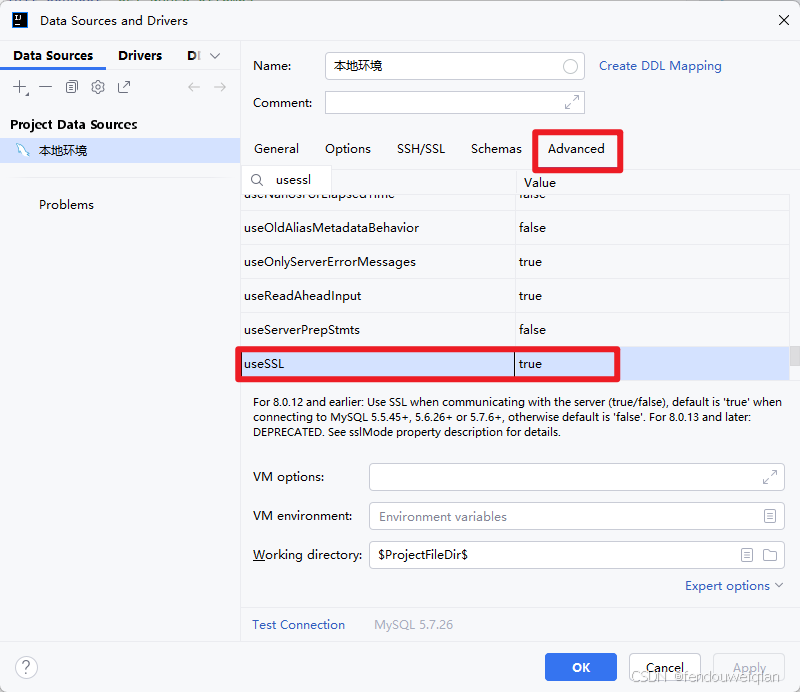
方案二 升级mysql的TLS,让他支持TLSv1.2,TLSv1.3
mysql版本要求:MySQL 5.7.10+
- 先看版本与SSL库
shell
SELECT VERSION();
SHOW VARIABLES LIKE 'have_ssl';
SHOW VARIABLES LIKE 'ssl_cipher';
SHOW VARIABLES LIKE 'tls_version';- 配置 my.cnf/mysqld.cnf
shell
[mysqld]
# 开启现代协议
tls_version=TLSv1.2,TLSv1.3   # 至少包含 TLSv1.2

# 指定证书(PEM)
ssl_ca=/etc/mysql/ssl/ca.pem
ssl_cert=/etc/mysql/ssl/server-cert.pem
ssl_key=/etc/mysql/ssl/server-key.pem
证书生成
# 生成 CA 私钥和证书
openssl genrsa 2048 > ca-key.pem
openssl req -new -x509 -nodes -days 3650 -key ca-key.pem -out ca.pem

# 生成服务端私钥和证书请求
openssl genrsa 2048 > server-key.pem
openssl req -new -key server-key.pem -out server-req.pem

# 用 CA 签发服务端证书
openssl x509 -req -in server-req.pem -days 3650 -CA ca.pem -CAkey ca-key.pem -set_serial 01 -out server-cert.pem

# 生成客户端私钥和证书
openssl genrsa 2048 > client-key.pem
openssl req -new -key client-key.pem -out client-req.pem
openssl x509 -req -in client-req.pem -days 3650 -CA ca.pem -CAkey ca-key.pem -set_serial 01 -out client-cert.pem
最终你会得到:
ca.pem(CA 证书)
server-cert.pem / server-key.pem(服务端证书和私钥)
client-cert.pem / client-key.pem(客户端证书和私钥)
然后你将证书拷贝到 my.cnf/mysqld.cnf 配置的证书地方