为单选按钮绑定事件(QRadioButton)
QRadioButton 是 Qt Widgets 框架中用于提供单项选择功能的按钮控件。通常情况下,同一组内的单选按钮呈互斥关系,即任意时刻只能有一个按钮处于选中状态。
在实际开发中,需要为单选按钮绑定事件,以便在用户切换选项时执行特定逻辑。本节介绍两种常用的事件绑定方式:
- 直接连接单个 QRadioButton 的信号
- 使用 QButtonGroup 对多个按钮进行统一管理
1. 直接为 QRadioButton 绑定事件
QRadioButton 继承自 QAbstractButton,其常用事件信号包括:
- toggled(bool checked)
在按钮的选中状态发生改变时发出。 - clicked(bool checked)
在按钮被点击时发出。
通常建议使用 toggled(bool),因为它能够准确反映按钮状态是否被选中。
示例:为单个 QRadioButton 绑定事件
QRadioButton* radioButton1 = new QRadioButton("选项 1", this);
QRadioButton* radioButton2 = new QRadioButton("选项 2", this);
connect(radioButton1, &QRadioButton::toggled, this, =(bool checked){
if (checked ) {
qDebug() << "选项 1 被选中";
}
});
connect(radioButton2, &QRadioButton::toggled, this, =(bool checked){
if (checked ) {
qDebug() << "选项 2 被选中";
}
});
说明
- 仅当 checked == true 时,按钮处于选中状态。
- 若多个单选按钮位于同一父布局内,Qt 会自动处理其互斥关系,无需额外设置。
2. 使用 QButtonGroup 对按钮统一绑定事件
当需要管理多个 QRadioButton 时,使用 QButtonGroup 能够使事件绑定和逻辑处理更加集中和清晰。
QButtonGroup 提供多个与按钮交互相关的信号,其中常用信号包括:
- buttonClicked(int id)
当组内任一按钮被点击时触发,并返回按钮对应的 ID。
示例:为按钮组绑定事件
QRadioButton* radio1 = new QRadioButton("选项 1", this);
QRadioButton* radio2 = new QRadioButton("选项 2", this);
QRadioButton* radio3 = new QRadioButton("选项 3", this);
QButtonGroup* group = new QButtonGroup(this);
group->addButton(radio1, 1); // 指定按钮 ID
group->addButton(radio2, 2);
group->addButton(radio3, 3);
connect(group, QOverload<int>::of (&QButtonGroup::buttonClicked),
this, =(int id){
qDebug() << "选择的按钮 ID:" << id;
switch (id) {
case 1: qDebug() << "当前选中: 选项 1"; break;
case 2: qDebug() << "当前选中: 选项 2"; break;
case 3: qDebug() << "当前选中: 选项 3"; break;
}
});
说明
- 为每个按钮设置 ID,使得事件回调更容易区分按钮来源。
- 推荐使用 QButtonGroup 管理多个按钮,以便统一处理事件、增强代码可扩展性。
- QButtonGroup 不会自动创建视觉上的分组,视觉分组仍需使用布局管理或 QGroupBox。
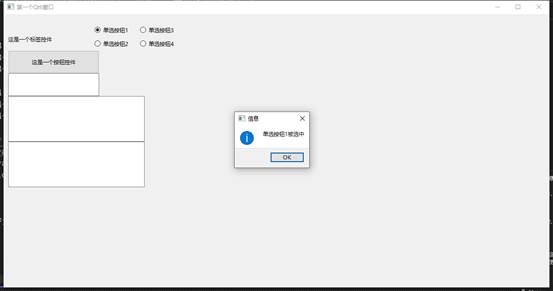
首先我们为按钮1和2绑定
connect(radioButton1, &QRadioButton::toggled, this, =(bool checked) {
if (checked ) {
QMessageBox::information(this, "信息", "单选按钮1被选中");
}
});
connect(radioButton2, &QRadioButton::toggled, this, =(bool checked) {
if (checked ) {
QMessageBox::information(this, "信息", "单选按钮2被选中");
}
});
这里我们使用了lambda匿名函数
接着为按钮3和4绑定
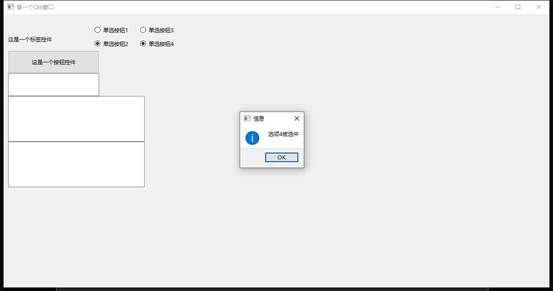
因为我们的3和4是分配了一个组,所以我们可以为它们统一绑定事件
先在头文件中声明函数
private slots:
void onButtonClicked ();
void onRadioButtonToggled (int id);
定义函数方法
void MyFirstQt6::onRadioButtonToggled(int id )
{
QMessageBox::information(this, "信息", "选项" + QString::number(id) + "被选中");
}
最后绑定事件
connect(radioGroup, &QButtonGroup::idClicked, this, &MyFirstQt6::onRadioButtonToggled);
完整代码
#include "MyFirstQt6.h"
#include <iostream>
#include <QtWidgets>
MyFirstQt6::MyFirstQt6(QWidget* parent)
: QMainWindow(parent)
{
setWindowTitle("第一个Qt6窗口");
resize(1200, 600);
QLabel* label = new QLabel(this);
label->setText("这是一个标签控件");
label->setGeometry(10, 30, 200, 50);
QPushButton* button = new QPushButton(this);
button->setText("这是一个按钮控件");
button->setGeometry(10, 80, 200, 50);
connect(button, &QPushButton::clicked, this, &MyFirstQt6::onButtonClicked);
lineEdit = new QLineEdit(this);
lineEdit->setGeometry(10, 130, 200, 50);
TextEdit = new QTextEdit(this);
TextEdit->setGeometry(10, 180, 300, 100);
PlainTextEdit = new QPlainTextEdit(this);
PlainTextEdit->setGeometry(10, 280, 300, 100);
radioButton1 = new QRadioButton(this);
radioButton1->setText("单选按钮1");
radioButton1->setGeometry(200, 20, 100, 30);
connect(radioButton1, &QRadioButton::toggled, this, =(bool checked) {
if (checked) {
QMessageBox::information(this, "信息", "单选按钮1被选中");
}
});
radioButton2 = new QRadioButton(this);
radioButton2->setText("单选按钮2");
radioButton2->setGeometry(200, 50, 100, 30);
connect(radioButton2, &QRadioButton::toggled, this, =(bool checked) {
if (checked) {
QMessageBox::information(this, "信息", "单选按钮2被选中");
}
});
radioButton3 = new QRadioButton(this);
radioButton3->setText("单选按钮3");
radioButton3->setGeometry(300, 20, 100, 30);
radioButton4 = new QRadioButton(this);
radioButton4->setText("单选按钮4");
radioButton4->setGeometry(300, 50, 100, 30);
radioGroup = new QButtonGroup(this);
radioGroup->addButton(radioButton3, 3);
radioGroup->addButton(radioButton4, 4);
connect(radioGroup, &QButtonGroup::idClicked, this, &MyFirstQt6::onRadioButtonToggled);
}
MyFirstQt6::~MyFirstQt6()
{}
void MyFirstQt6::onButtonClicked()
{
QString text = TextEdit->to PlainText();
QMessageBox::information(this, "信息", "你输入的内容是: " + text);
}
void MyFirstQt6::onRadioButtonToggled(int id)
{
QMessageBox::information(this, "信息", "选项" + QString::number(id) + "被选中");
}
部分内容省略了,课程内容有完整的详细教程。
计算机技术课程 https://blog.csdn.net/2301_76542477/article/details/149032632?spm=1011.2415.3001.5331