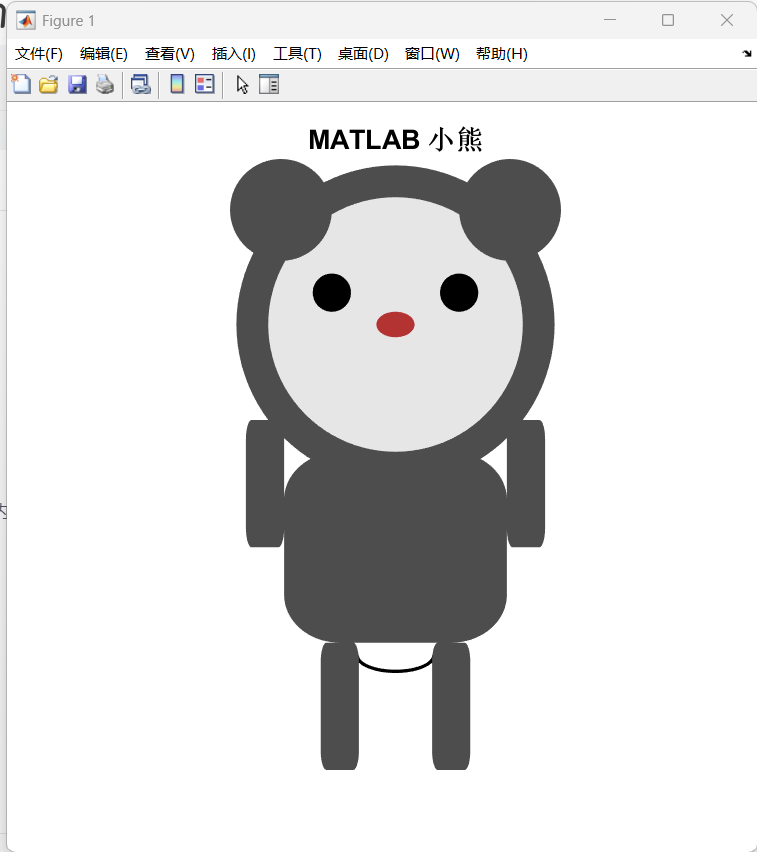
本文介绍了一个使用MATLAB绘制可爱小熊的代码实现。
通过定义身体各部分的参数(如头部半径、耳朵位置、四肢尺寸等),利用rectangle函数绘制圆形和圆角矩形,组合成完整的小熊形象。代码设置了不同颜色区分身体(深灰)、脸部(浅灰)、眼睛(黑)和鼻子(棕),并添加微笑曲线作为嘴巴。程序包含缩放比例调整功能,可整体改变小熊大小。最终生成一个600×600像素的白色背景图形,隐藏坐标轴,呈现出一个比例协调的卡通小熊形象。
可爱的小熊
Matlab
%% MATLAB绘制可爱小熊

% 清理工作区
clear; clc; close all;

% --- 1. 定义小熊身体各部分的参数 ---
% 这些参数可以调整,以改变小熊的大小和比例
body_scale = 1; % 整体缩放比例

% 头部
head_center = [0, 5]; % 头部中心坐标
head_radius = 2.5 * body_scale; % 头部半径

% 耳朵
ear_radius = 0.8 * body_scale; % 耳朵半径
ear_offset_x = 1.8 * body_scale; % 耳朵在x方向上的偏移
ear_offset_y = 1.8 * body_scale; % 耳朵在y方向上的偏移

% 眼睛
eye_radius = 0.3 * body_scale; % 眼睛半径
eye_offset_x = 1.0 * body_scale; % 眼睛在x方向上的偏移
eye_offset_y = 0.5 * body_scale; % 眼睛在y方向上的偏移

% 鼻子
nose_width = 0.6 * body_scale; % 鼻子宽度
nose_height = 0.4 * body_scale; % 鼻子高度

% 嘴巴
mouth_width = 1.2 * body_scale; % 嘴巴宽度
mouth_height = 0.5 * body_scale; % 嘴巴高度

% 身体
body_width = 3.5 * body_scale; % 身体宽度
body_height = 3.0 * body_scale; % 身体高度

% 四肢
limb_width = 0.6 * body_scale; % 四肢宽度
limb_height = 2.0 * body_scale; % 四肢长度

% --- 2. 绘制小熊 ---
figure('Color', 'w', 'Position', [100, 100, 600, 600]);
hold on;
axis equal;
axis off; % 隐藏坐标轴

% 定义颜色
bear_color = [0.3, 0.3, 0.3]; % 小熊身体颜色 (深灰色)
face_color = [0.9, 0.9, 0.9]; % 小熊脸部颜色 (浅灰色)
eye_color = [0, 0, 0];        % 眼睛颜色 (黑色)
nose_color = [0.7, 0.2, 0.2]; % 鼻子颜色 (棕色)

% --- 开始绘制 ---

% 绘制身体 (使用rectangle函数绘制圆角矩形)
rectangle('Position', [-body_width/2, 0, body_width, body_height], ...
          'Curvature', [0.5, 0.5], 'FaceColor', bear_color, 'EdgeColor', 'none');

% 绘制头部 (使用rectangle函数绘制一个圆形)
rectangle('Position', [head_center(1)-head_radius, head_center(2)-head_radius, ...
                       2*head_radius, 2*head_radius], ...
          'Curvature', [1, 1], 'FaceColor', bear_color, 'EdgeColor', 'none');

% 绘制脸部 (一个稍小的圆形)
rectangle('Position', [head_center(1)-head_radius+0.5, head_center(2)-head_radius+0.5, ...
                       2*head_radius-1, 2*head_radius-1], ...
          'Curvature', [1, 1], 'FaceColor', face_color, 'EdgeColor', 'none');

% 绘制耳朵
% 左耳
rectangle('Position', [head_center(1)-ear_offset_x-ear_radius, head_center(2)+ear_offset_y-ear_radius, ...
                       2*ear_radius, 2*ear_radius], ...
          'Curvature', [1, 1], 'FaceColor', bear_color, 'EdgeColor', 'none');
% 右耳
rectangle('Position', [head_center(1)+ear_offset_x-ear_radius, head_center(2)+ear_offset_y-ear_radius, ...
                       2*ear_radius, 2*ear_radius], ...
          'Curvature', [1, 1], 'FaceColor', bear_color, 'EdgeColor', 'none');

% 绘制眼睛
% 左眼
rectangle('Position', [head_center(1)-eye_offset_x-eye_radius, head_center(2)+eye_offset_y-eye_radius, ...
                       2*eye_radius, 2*eye_radius], ...
          'Curvature', [1, 1], 'FaceColor', eye_color, 'EdgeColor', 'none');
% 右眼
rectangle('Position', [head_center(1)+eye_offset_x-eye_radius, head_center(2)+eye_offset_y-eye_radius, ...
                       2*eye_radius, 2*eye_radius], ...
          'Curvature', [1, 1], 'FaceColor', eye_color, 'EdgeColor', 'none');

% 绘制鼻子 (一个椭圆形)
rectangle('Position', [-nose_width/2, head_center(2)-nose_height/2, nose_width, nose_height], ...
          'Curvature', [1, 1], 'FaceColor', nose_color, 'EdgeColor', 'none');

% 绘制嘴巴 (一个微笑的弧线)
theta = linspace(pi, 2*pi, 100); % 角度从180度到360度
mouth_x = (mouth_width/2) * cos(theta);
mouth_y = -0.2 + (mouth_height/2) * sin(theta); % -0.2是为了让嘴巴位置下移一点
plot(mouth_x, mouth_y, 'k', 'LineWidth', 2);

% 绘制四肢
% 左手臂
rectangle('Position', [-body_width/2-limb_width, body_height/2, limb_width, limb_height], ...
          'Curvature', [0.3, 0.3], 'FaceColor', bear_color, 'EdgeColor', 'none');
% 右手臂
rectangle('Position', [body_width/2, body_height/2, limb_width, limb_height], ...
          'Curvature', [0.3, 0.3], 'FaceColor', bear_color, 'EdgeColor', 'none');
% 左腿部
rectangle('Position', [-body_width/4-limb_width/2, -limb_height, limb_width, limb_height], ...
          'Curvature', [0.3, 0.3], 'FaceColor', bear_color, 'EdgeColor', 'none');
% 右腿部
rectangle('Position', [body_width/4-limb_width/2, -limb_height, limb_width, limb_height], ...
          'Curvature', [0.3, 0.3], 'FaceColor', bear_color, 'EdgeColor', 'none');

% 添加标题
title('MATLAB 小熊', 'FontSize', 16, 'FontWeight', 'bold');

hold off;