Keepalived 高可用配置文档
一、Keepalived 简介
1.1 什么是 Keepalived?
Keepalived 是一款基于 VRRP 协议 的高可用性解决方案软件,最初用于管理和监控 LVS 集群节点状态,现已扩展支持 Nginx、Haproxy、MySQL 等服务的高可用。
Keepalived软件主要是通过VRRP协议实现高可用功能的。VRRP是Virtual Router RedundancyProtocol(虚拟路由器冗余协议)的缩写,VRRP出现的目的就是为了解决静态路由单点故障问题的,它能够保证当个别节点宕机时,整个网络可以不间断地运行。
主要作用:
- 管理 LVS 负载均衡
- 对 LVS 节点进行健康检查
- 实现网络服务的高可用
1.2 Keepalived 的核心功能
- 管理 LVS 负载均衡软件
- 实现 LVS 集群节点的健康检查
- 作为系统网络服务的高可用方案
二、Keepalived 高可用原理
2.1 VRRP 协议
- VRRP:虚拟路由器冗余协议,解决静态路由单点故障问题。
- 通过 IP 多播(默认地址 224.0.0.18)实现主备节点通信。
- 主节点定期发送心跳包,备节点监听;若主节点不可用,备节点接管其 IP 资源和服务。
2.2 Keepalived 工作机制
- 主节点(Master)持续发送 VRRP 组播包
- 备节点(Backup)监听主节点状态
- 主节点故障时,备节点接管服务,切换时间可小于 1 秒
- 主 Master 节点恢复时,备 Backup 节点又会释放主节点故障时自身接管的IP资源及服务,恢复到原来的备用角色
2.3Keepalived原理
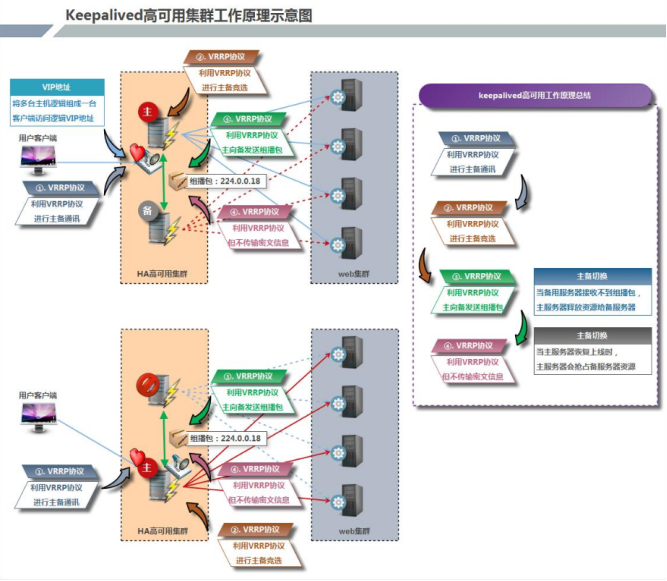
- VRRP全称 Virtual Router Redundancy Protocol,中文名为虚拟路由冗余协议,VRRP的出现是为了解决静态路由的单点故障
- VRRP是通过一种竟选协议机制来将路由任务交给某台 VRRP路由器的
- VRRP用 IP多播的方式(默认多播地址(224.0.0.18))实现高可用对之间通信
- 工作时主节点发包,备节点接包,当备节点接收不到主节点发的数据包的时候,就启动接管程序接管主节点的资源。备节点可以有多个,通过优先级竞选,但一般 Keepalived系统运维工作中都是一对
- VRRP使用了加密协议加密数据,但Keepalived官方目前还是推荐用明文的方式配置认证类型和密码
三、Keepalived 部署
3.1 环境准备
| 主机名 | IP 地址 | 系统 | 角色 |
|---|---|---|---|
| Master | 192.168.100.100 | RHEL 8 | 主节点 |
| Slave | 192.168.100.200 | RHEL 8 | 备节点 |
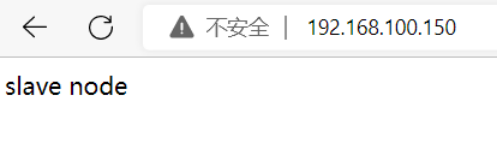
| VIP | 192.168.100.150 | - | 虚拟 IP |
3.2 基础环境配置
bash
# 关闭防火墙和 SELinux
systemctl stop firewalld
setenforce 0

# 配置 yum 源(阿里源 + EPEL)
# 安装常用工具
yum -y install vim wget gcc gcc-c++
3.3 安装 Keepalived
bash
[root@master ~] yum -y install keepalived3.4 安装并配置 Nginx
Master 节点:
bash
[root@master ~] yum -y install nginx
[root@master ~] systemctl start nginx && systemctl enable nginx
# 在nginx中添加测试网页
[root@master ~] cd /usr/share/nginx/html/
[root@master html] echo "master node" > /usr/share/nginx/html/index.html
Slave 节点:
bash
[root@master ~] yum -y install nginx
[root@master ~] systemctl start nginx && systemctl enable nginx
# 在nginx中添加测试网页
[root@master ~] cd /usr/share/nginx/html/
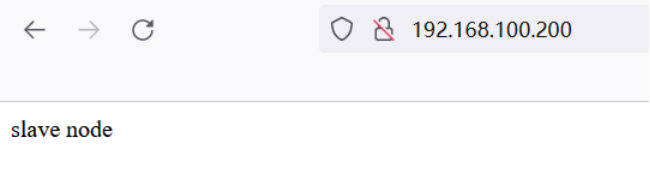
[root@master html] echo "slave node" > /usr/share/nginx/html/index.html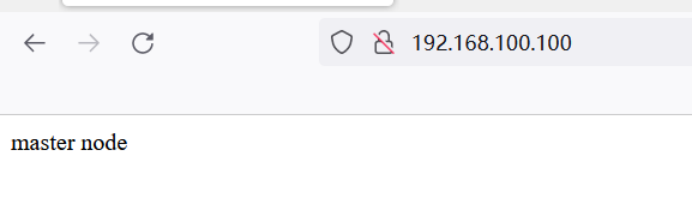
四、Keepalived 配置
4.1 Master 节点配置
bash
[root@master ~] cd /etc/keepalived/
[root@master keepalived] cp keepalived.conf keepalived.conf.bak
[root@master keepalived] vim /etc/keepalived/keepalived.conf
[root@master keepalived] cat keepalived.conf   #查看配置文件
bash
! Configuration File for keepalived

global_defs {              # 全局配置
   notification_email {     # 定义报警收件人邮件地址
     acassen@firewall.loc
     failover@firewall.loc
     sysadmin@firewall.loc
   }
   notification_email_from Alexandre.Cassen@firewall.loc   # 定义报警发件人邮箱
   smtp_server 192.168.200.1    # 邮箱服务器地址
   smtp_connect_timeout 30     # 定义邮箱超时时间
   router_id LVS_DEVEL         # 定义路由标识信息,同局域网内唯一
   vrrp_skip_check_adv_addr
   vrrp_strict
   vrrp_garp_interval 0
   vrrp_gna_interval 0
}

vrrp_instance VI_1 {           # 定义实例
    state MASTER           # 指定keepalived节点的初始状态,可选值为MASTER/BACKUP
    interface eth0       # VRRP实例绑定的网卡接口,用户发送VRRP包
    virtual_router_id 51  # 虚拟路由的ID,同一集群要一致
    priority 100   # 定义优先级,按优先级来决定主备角色,优先级越大越优先
    advert_int 1  # 主备通讯时间间隔
    authentication {       # 配置认证
        auth_type PASS   # 认证方式,此处为密码
        auth_pass 1111    # 同一集群中的keepalived配置里此处必须一致,推荐使用8为随机数
    }
    virtual_ipaddress {         # 配置要使用的VIP
        192.168.200.16
        192.168.200.17
        192.168.200.18
    }
}

virtual_server 192.168.200.100 443 {       # 配置虚拟服务器
    delay_loop 6                  # 健康检查的时间间隔
    lb_algo rr                    # lvs调度算法
    lb_kind NAT                 # lvs模式
    persistence_timeout 50       # 持久化超时时间,单位为秒
    protocol TCP               # 4层协议

sorry_server  192.168.200.200 1358  # 定义备用服务器,当所有RS都故障时,用sorry_server来响应客户端

    real_server 192.168.201.100 443 {   # 定义真实处理请求的服务器
        weight 1        # 给服务器指定权重,默认为1
        SSL_GET {
            url {
              path /         # 指定要检查的URL路径
              digest ff20ad2481f97b1754ef3e12ecd3a9cc     # 摘要信息
            }
            url {
              path /mrtg/
              digest 9b3a0c85a887a256d6939da88aabd8cd
            }
            connect_timeout 3       # 连接超时时间
            retry 3             # get尝试次数
            delay_before_retry 3   # 在尝试之前延迟多长时间
        }
    }
}

virtual_server 10.10.10.2 1358 {
    delay_loop 6
    lb_algo rr
    lb_kind NAT
    persistence_timeout 50
    protocol TCP

    sorry_server 192.168.200.200 1358

    real_server 192.168.200.2 1358 {
        weight 1
        HTTP_GET {
            url {
              path /testurl/test.jsp
              digest 640205b7b0fc66c1ea91c463fac6334d
            }
            url {
              path /testurl2/test.jsp
              digest 640205b7b0fc66c1ea91c463fac6334d
            }
            url {
              path /testurl3/test.jsp
              digest 640205b7b0fc66c1ea91c463fac6334d
            }
            connect_timeout 3
            retry 3
            delay_before_retry 3
        }
    }

    real_server 192.168.200.3 1358 {
        weight 1
        HTTP_GET {
            url {
              path /testurl/test.jsp
              digest 640205b7b0fc66c1ea91c463fac6334c
            }
            url {
              path /testurl2/test.jsp
              digest 640205b7b0fc66c1ea91c463fac6334c
            }
            connect_timeout 3
            retry 3
            delay_before_retry 3
        }
    }
}

virtual_server 10.10.10.3 1358 {
    delay_loop 3
    lb_algo rr
    lb_kind NAT
    persistence_timeout 50
    protocol TCP

    real_server 192.168.200.4 1358 {
        weight 1
        HTTP_GET {
            url {
              path /testurl/test.jsp
              digest 640205b7b0fc66c1ea91c463fac6334d
            }
            url {
              path /testurl2/test.jsp
              digest 640205b7b0fc66c1ea91c463fac6334d
            }
            url {
              path /testurl3/test.jsp
              digest 640205b7b0fc66c1ea91c463fac6334d
            }
            connect_timeout 3
            retry 3
            delay_before_retry 3
        }
    }

    real_server 192.168.200.5 1358 {
        weight 1
        HTTP_GET {
            url {
              path /testurl/test.jsp
              digest 640205b7b0fc66c1ea91c463fac6334d
            }
            url {
              path /testurl2/test.jsp
              digest 640205b7b0fc66c1ea91c463fac6334d
            }
            url {
              path /testurl3/test.jsp
              digest 640205b7b0fc66c1ea91c463fac6334d
            }
            connect_timeout 3
            retry 3
            delay_before_retry 3
        }
    }
}
更改keepalived.conf配置文件为以下内容:
shell
! Configuration File for keepalived
global_defs {
    router_id cy01
}

vrrp_instance VI_1 {
    state MASTER
    interface ens160
    virtual_router_id 51
    priority 100
    advert_int 1
    authentication {
        auth_type PASS
        auth_pass 1111
    }
    virtual_ipaddress {
        192.168.100.150
    }
}

virtual_server 192.168.100.150 80 {
    delay_loop 6
    lb_algo rr
    lb_kind DR
    persistence_timeout 50
    protocol TCP
    real_server 192.168.100.100 80 {
        weight 1
        TCP_CHECK {
            connect_port 80		# 连接端口
            connect_timeout 3		# 连接超时时间,默认为5秒
            nb_get_retry 3
            delay_before_retry 3		# 在重试之前延迟多少秒
        }
    }
    real_server 192.168.100.200 80 {
        weight 1
        TCP_CHECK {
            connect_port 80
            connect_timeout 3
            nb_get_retry 3
            delay_before_retry 3
        }
    }
}
bash
# 重启keepalived,并设置下次启动生效
[root@master keepalived] systemctl restart keepalived.service
[root@master keepalived] systemctl enable keepalived.service
4.2 Slave 节点配置
bash
[root@slave html] cd /etc/keepalived/
[root@slave keepalived] cp keepalived.conf keepalived.conf.bak
[root@slave keepalived] vim keepalived.conf
shell
! Configuration File for keepalived

global_defs {
    router_id cy02
}

vrrp_instance VI_1 {
    state BACKUP
    interface ens160
    virtual_router_id 51
    priority 90
    advert_int 1
    authentication {
        auth_type PASS
        auth_pass 1111
    }
    virtual_ipaddress {
        192.168.100.150
    }
}

# 虚拟服务器配置与 Master 相同(略)
4.3 启动服务
bash
[root@slave keepalived] systemctl restart keepalived
[root@slave keepalived] systemctl enable keepalived
五、Nginx 服务监控与自动切换
5.1 编写监控脚本
bash
[root@master ~] mkdir /scripts
[root@master ~] cd /scripts/check.sh:检查 Nginx 状态
shell
#!/bin/bash
nginx_status=$(ps -ef | grep -v "grep" | grep "nginx" | wc -l)
if [ $nginx_status -lt 1 ]; then
    systemctl stop keepalived
finotify.sh:状态切换通知
shell
#!/bin/bash
VIP=$2

sendmail() {
    subject="${VIP}'s server keepalived state is translate"
    content="$(date +'%F %T'): $(hostname)'s state change to master"
    echo $content | mail -s "$subject" cy18271663615@163.com
}

case "$1" in
master)
    nginx_status=$(ps -ef | grep -Ev "grep|$0" | grep '\bnginx\b' | wc -l)
    if [ $nginx_status -lt 1 ]; then
        systemctl start nginx
    fi
    sendmail
    ;;
backup)
    nginx_status=$(ps -ef | grep -Ev "grep|$0" | grep '\bnginx\b' | wc -l)
    if [ $nginx_status -gt 0 ]; then
        systemctl stop nginx
    fi
    ;;
*)
    echo "Usage:$0 master|backup VIP"
    ;;
esac
在slave上编写脚本
bash
[root@slave keepalived] mkdir /scripts
[root@slave keepalived] cd /scripts/
[root@slave scripts] scp root@192.168.100.100:/scripts/check.sh .
root@192.168.100.100's password:
check.sh                                                                           100%  137   296.3KB/s   00:00
[root@slave scripts] scp root@192.168.100.100:/scripts/notify.sh .
root@192.168.100.100's password:
notify.sh                                                                          100%  594     1.0MB/s   00:00
[root@slave scripts] chmod +x check.sh
[root@slave scripts] chmod +x notify.sh
5.2 配置master的 Keepalived 调用脚本
修改配置文件/etc/keepalived/keepalived.conf:
shell
! Configuration File for keepalived

global_defs {
   router_id cy01
}

vrrp_script nginx_check {
    script "/scripts/check.sh"
    interval 10
    weight -20
}

vrrp_instance VI_1 {
    state MASTER
    interface ens160
    virtual_router_id 51
    priority 100
    advert_int 1
    authentication {
        auth_type PASS
        auth_pass 1111
    }
    virtual_ipaddress {
        192.168.100.150
    }
    track_script {
	nginx_check
    }
    notify_master "/scripts/notify.sh master 192.168.100.150"
    notify_backup "/scripts/notify.sh backup 192.168.100.150"
}

virtual_server 192.168.100.150 80 {
    delay_loop 6
    lb_algo rr
    lb_kind DR
    persistence_timeout 50
    protocol TCP

    real_server 192.168.100.100 80 {
        weight 1
        TCP_CHECK {
	    connect_port 80
            connect_timeout 3
	        nb_get_retry 3
            delay_before_retry 3
        }
    }


    real_server 192.168.100.200 80 {
        weight 1
        TCP_CHECK {
	    connect_port 80
            connect_timeout 3
            nb_get_retry 3
            delay_before_retry 3
        }
    }
}


[root@master scripts] systemctl restart keepalived.service
配置slave的keepalived
修改配置文件/etc/keepalived/keepalived.conf:
shell
! Configuration File for keepalived

global_defs {
   router_id cy02
}

vrrp_instance VI_1 {
    state BACKUP
    interface ens160
    virtual_router_id 51
    priority 90
    advert_int 1
    authentication {
        auth_type PASS
        auth_pass 1111
    }
    virtual_ipaddress {
        192.168.100.150
    }
    notify_master "/scripts/notify.sh master 192.168.100.150"
    notify_backup "/scripts/notify.sh backup 192.168.100.150"
}

virtual_server 192.168.100.150 80 {
    delay_loop 6
    lb_algo rr
    lb_kind DR
    persistence_timeout 50
    protocol TCP

    real_server 192.168.100.100 80 {
        weight 1
        TCP_CHECK {
	    connect_port 80
            connect_timeout 3
	    nb_get_retry 3
            delay_before_retry 3
        }
    }


    real_server 192.168.100.200 80 {
        weight 1
        TCP_CHECK {
	    connect_port 80
            connect_timeout 3
            nb_get_retry 3
            delay_before_retry 3
        }
    }
}
重启服务
bash
# 启用keepalived,开启nginx服务
[root@master scripts] systemctl restart keepalived.service
[root@master scripts] systemctl enable keepalived
[root@master scripts] systemctl restart nginx
[root@master scripts] systemctl enable nginx

# 在slave中查看端口80是否开启
[root@slave scripts] ss -anlt
六、故障模拟测试
6.1 验证 VIP 绑定
bash
ip a show ens33应看到 VIP 192.168.100.150 绑定在 Master 节点。
6.2 模拟 Nginx 故障
在 Master 节点停止 Nginx:
bash
systemctl stop nginx检查 Slave 节点是否接管 VIP 并启动 Nginx。