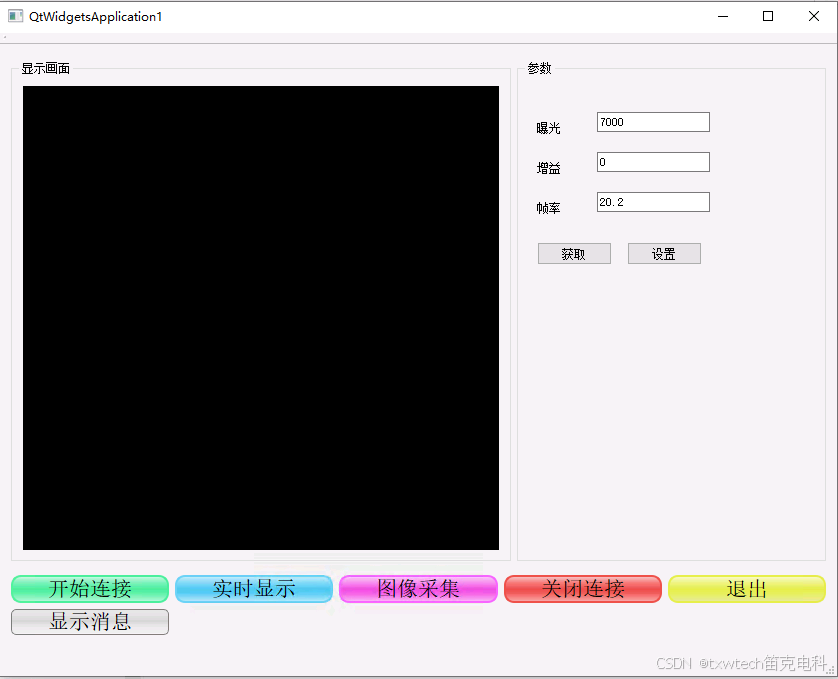
vs2019+QT调用SDK连接海康相机显示图片
连接,采图,获取与设置参数,曝光,增益,帧率
新建项目-文件结构:
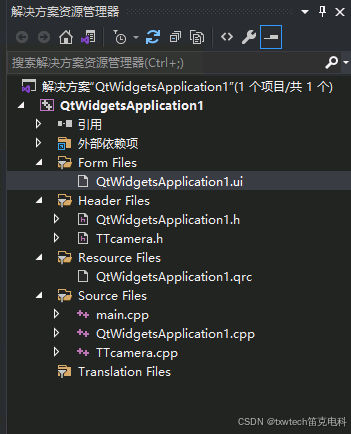

debug x64
调用类:
TTcamera.cpp
#include "TTcamera.h"
#include <QDebug>
TTcamera::TTcamera()
{
    m_hDevHandle = NULL;
    m_pBufForSaveImage = nullptr;
    m_nBufSizeForSaveImage = 0;
    m_pBufForDriver = nullptr;
    m_nBufSizeForDriver = 0;
    memset(&m_stDevList, 0, sizeof(MV_CC_DEVICE_INFO_LIST));
    m_Device = NULL;

}

TTcamera::~TTcamera()
{
    if (m_pBufForDriver != nullptr) {
        free(m_pBufForDriver);
        m_pBufForDriver = nullptr;
    }
    if (m_pBufForSaveImage != nullptr) {
        free(m_pBufForSaveImage);
        m_pBufForSaveImage = nullptr;
    }

    if (m_hDevHandle) {
        MV_CC_DestroyHandle(m_hDevHandle);
        m_hDevHandle = NULL;
    }
}

int TTcamera::InitSDK()
{
    return MV_CC_Initialize();
}
// ch:反初始化SDK | en:Finalize SDK
int TTcamera::FinalizeSDK()
{
    return MV_CC_Finalize();
}

//查询设备列表
int TTcamera::EnumDevices(MV_CC_DEVICE_INFO_LIST* pstDevList)
{
    int temp = MV_CC_EnumDevices(MV_GIGE_DEVICE | MV_USB_DEVICE, pstDevList);
    if (MV_OK != temp)
    {
        return -1;
    }
    return 0;
}

//连接相机
//id:自定义相机名称
int TTcamera::connectCamera(string id)
{
    int temp = EnumDevices(&m_stDevList);
    if (temp != 0) {
        qDebug() << "枚举设备失败,错误码:" << temp;
        return -1;
    }

    if (m_stDevList.nDeviceNum == 0) {
        qDebug() << "未找到任何相机";
        return 2;
    }

    m_Device = NULL;
    for (unsigned int i = 0; i < m_stDevList.nDeviceNum; i++)
    {
        MV_CC_DEVICE_INFO* pDeviceInfo = m_stDevList.pDeviceInfo[i];
        if (NULL == pDeviceInfo)
        {
            continue;
        }

        if (id == (char*)pDeviceInfo->SpecialInfo.stGigEInfo.chUserDefinedName ||
            id == (char*)pDeviceInfo->SpecialInfo.stGigEInfo.chSerialNumber)
        {
            m_Device = m_stDevList.pDeviceInfo[i];
            break;
        }
    }

    if (m_Device == NULL) {
        qDebug() << "未找到指定名称的相机";
        return 3;
    }

    temp = MV_CC_CreateHandle(&m_hDevHandle, m_Device);
    if (temp != MV_OK) {
        qDebug() << "创建句柄失败,错误码:" << temp;
        return -1;
    }

    temp = MV_CC_OpenDevice(m_hDevHandle);
    if (temp != MV_OK) {
        qDebug() << "打开设备失败,错误码:" << temp;
        MV_CC_DestroyHandle(m_hDevHandle);
        m_hDevHandle = NULL;
        return -1;
    }

    // 设置触发模式为关闭(连续采集模式)
    int triggerResult = setTriggerMode(0);
    if (triggerResult != 0) {
        qDebug() << "设置触发模式失败";
        MV_CC_CloseDevice(m_hDevHandle);
        MV_CC_DestroyHandle(m_hDevHandle);
        m_hDevHandle = NULL;
        return -1;
    }

    return 0;
}
//设置相机是否开启触发模式
int TTcamera::setTriggerMode(unsigned int TriggerModeNum)
{
    int nRet = MV_CC_SetTriggerMode(m_hDevHandle, TriggerModeNum);
    if (MV_OK != nRet)
    {
        return -1;
    }

}
//启动相机采集
int TTcamera::startCamera()
{
    if (m_hDevHandle == NULL) {
        qDebug() << "相机句柄为空,无法启动采集";
        return -1;
    }

    int temp = MV_CC_StartGrabbing(m_hDevHandle);
    if (temp != 0)
    {
        qDebug() << "抓图失败,错误码:" << temp;
        return -1;
    }
    else
    {
        qDebug() << "抓图成功";
        return 0;
    }
}
//发送软触发
int TTcamera::softTrigger()
{
    int enumValue = MV_CC_SetEnumValue(m_hDevHandle, "TriggerSource", MV_TRIGGER_SOURCE_SOFTWARE);
    if (enumValue != 0) {
        qDebug() << "设置软触发失败";
        return -1;
    }
    else {
        qDebug() << "设置软触发";
    }
    int comdValue = MV_CC_SetCommandValue(m_hDevHandle, "TriggerSoftware");
    if (comdValue != 0)
    {
        qDebug() << "软触发失败";
        return -1;
    }
    else
    {
        qDebug() << "软触发一次";
        return 0;
    }
}
//读取相机中的图像
int TTcamera::ReadBuffer(Mat& image)
{
    if (m_hDevHandle == NULL) {
        qDebug() << "相机句柄为空,无法读取图像";
        return -1;
    }

    // 释放之前分配的内存
    if (m_pBufForDriver != nullptr) {
        free(m_pBufForDriver);
        m_pBufForDriver = nullptr;
    }
    if (m_pBufForSaveImage != nullptr) {
        free(m_pBufForSaveImage);
        m_pBufForSaveImage = nullptr;
    }

    unsigned int nBufSize = 0;
    MVCC_INTVALUE stIntvalue;
    memset(&stIntvalue, 0, sizeof(MVCC_INTVALUE));

    int tempValue = MV_CC_GetIntValue(m_hDevHandle, "PayloadSize", &stIntvalue);
    if (tempValue != 0)
    {
        qDebug() << "GetIntValue失败,错误码:" << tempValue;
        return -1;
    }

    nBufSize = stIntvalue.nCurValue;
    m_pBufForDriver = (unsigned char*)malloc(nBufSize);
    if (m_pBufForDriver == nullptr) {
        qDebug() << "内存分配失败";
        return -1;
    }

    MV_FRAME_OUT_INFO_EX stImageInfo;
    memset(&stImageInfo, 0, sizeof(MV_FRAME_OUT_INFO_EX));

    int timeout = MV_CC_GetOneFrameTimeout(m_hDevHandle, m_pBufForDriver, nBufSize, &stImageInfo, 1000);
    if (timeout != 0)
    {
        qDebug() << "GetOneFrameTimeout失败,错误码:" << timeout;
        free(m_pBufForDriver);
        m_pBufForDriver = nullptr;
        return -1;
    }

    m_nBufSizeForSaveImage = stImageInfo.nWidth * stImageInfo.nHeight * 3 + 2048;
    m_pBufForSaveImage = (unsigned char*)malloc(m_nBufSizeForSaveImage);
    if (m_pBufForSaveImage == nullptr) {
        qDebug() << "内存分配失败";
        free(m_pBufForDriver);
        m_pBufForDriver = nullptr;
        return -1;
    }

    bool isMono;
    switch (stImageInfo.enPixelType)
    {
    case PixelType_Gvsp_Mono8:
    case PixelType_Gvsp_Mono10:
    case PixelType_Gvsp_Mono10_Packed:
    case PixelType_Gvsp_Mono12:
    case PixelType_Gvsp_Mono12_Packed:
        isMono = true;
        break;
    default:
        isMono = false;
        break;
    }

    if (isMono)
    {
        image = Mat(stImageInfo.nHeight, stImageInfo.nWidth, CV_8UC1, m_pBufForDriver);
    }
    else
    {
        MV_CC_PIXEL_CONVERT_PARAM stConvertParam = { 0 };
        stConvertParam.nWidth = stImageInfo.nWidth;
        stConvertParam.nHeight = stImageInfo.nHeight;
        stConvertParam.pSrcData = m_pBufForDriver;
        stConvertParam.nSrcDataLen = stImageInfo.nFrameLen;
        stConvertParam.enSrcPixelType = stImageInfo.enPixelType;
        stConvertParam.enDstPixelType = PixelType_Gvsp_RGB8_Packed;
        stConvertParam.pDstBuffer = m_pBufForSaveImage;
        stConvertParam.nDstBufferSize = m_nBufSizeForSaveImage;

        int convertResult = MV_CC_ConvertPixelType(m_hDevHandle, &stConvertParam);
        if (convertResult != MV_OK) {
            qDebug() << "像素格式转换失败,错误码:" << convertResult;
            free(m_pBufForDriver);
            free(m_pBufForSaveImage);
            m_pBufForDriver = nullptr;
            m_pBufForSaveImage = nullptr;
            return -1;
        }

        image = Mat(stImageInfo.nHeight, stImageInfo.nWidth, CV_8UC3, m_pBufForSaveImage);
    }

    return 0;
}
//设置心跳时间
int TTcamera::setHeartBeatTime(unsigned int time)
{
    //心跳时间最小为500ms
    if (time < 500)
        time = 500;
    int temp = MV_CC_SetIntValue(m_hDevHandle, "GevHeartbeatTimeout", time);
    if (temp != 0)
    {
        return -1;
    }
    else
    {
        return 0;
    }
}
//设置曝光时间
int TTcamera::setExposureTime(float ExposureTimeNum)
{
    int temp = MV_CC_SetFloatValue(m_hDevHandle, "ExposureTime", ExposureTimeNum);
    if (temp != 0)
        return -1;
    return 0;
}
// ch:获取和设置Enum型参数,如 PixelFormat
// en:Get Enum type parameters, such as PixelFormat
int TTcamera::GetEnumValue(  char* strKey,  MVCC_ENUMVALUE* pEnumValue)
{
    return MV_CC_GetEnumValue(m_hDevHandle, strKey, pEnumValue);
}
int TTcamera::GetSDKVersion()
{
    return MV_CC_GetSDKVersion();
}
// ch:获取和设置Float型参数,如 ExposureTime和Gain
// en:Get Float type parameters, such as ExposureTime and Gain
int TTcamera::GetFloatValue(char* strKey,  MVCC_FLOATVALUE* pFloatValue)
{
    return MV_CC_GetFloatValue(m_hDevHandle, strKey, pFloatValue);
}
int TTcamera::SetEnumValue( char* strKey, unsigned int nValue)
{
    return MV_CC_SetEnumValue(m_hDevHandle, strKey, nValue);
}
int TTcamera::SetFloatValue( char* strKey, float fValue)
{
    return MV_CC_SetFloatValue(m_hDevHandle, strKey, fValue);
}
int TTcamera::SetBoolValue( char* strKey,  bool bValue)
{
    return MV_CC_SetBoolValue(m_hDevHandle, strKey, bValue);
}
//关闭相机
int TTcamera::closeCamera()
{
    int nRet = MV_OK;
    if (NULL == m_hDevHandle)
    {
        qDebug() << "没有句柄,不用关闭";
        return -1;
    }
    MV_CC_CloseDevice(m_hDevHandle);
    nRet = MV_CC_DestroyHandle(m_hDevHandle);
    m_hDevHandle = NULL;
    return nRet;
}
TTcamera.h
#ifndef TTcamera_H
#define TTcamera_H
#include "MvCameraControl.h"
#pragma execution_character_set("utf-8")   //设置当前文件为UTF-8编码
#pragma warning( disable : 4819 )    //解决SDK中包含中文问题;忽略C4819错误
#include <stdio.h>
#include <iostream>
#include "opencv2/core/core.hpp"
#include "opencv2/opencv.hpp"
#include "opencv2/highgui/highgui.hpp"
#include <string>
#include <QDebug>
#include <QDateTime> // 用于生成时间戳文件名

using namespace std;
using namespace cv;
class TTcamera
{
public:
    TTcamera();
    ~TTcamera();
    static int InitSDK();
    static int FinalizeSDK();
    //声明相关变量及函数等
    //枚举相机设备列表
    static int EnumDevices(MV_CC_DEVICE_INFO_LIST* pstDevList);
    static int GetSDKVersion();

    // ch:连接相机
    int connectCamera(string id);

    //设置相机触发模式
    int setTriggerMode(unsigned int TriggerModeNum);

    //开启相机采集
    int startCamera();

    //发送软触发
    int softTrigger();

    //读取buffer
    int ReadBuffer(Mat& image);

    //设置心跳时间
    int setHeartBeatTime(unsigned int time);

    //设置曝光时间
    int setExposureTime(float ExposureTimeNum);
    //关闭相机
    int closeCamera();
    int TTcamera::GetFloatValue(char* strKey, MVCC_FLOATVALUE* pFloatValue);
    int TTcamera::GetEnumValue(char* strKey, MVCC_ENUMVALUE* pEnumValue);
    int TTcamera::SetEnumValue(char* strKey, unsigned int nValue);
    int TTcamera::SetFloatValue( char* strKey, float fValue);
    int TTcamera::SetBoolValue(char* strKey, bool bValue);
private:
    void* m_hDevHandle;
public:
    unsigned char* m_pBufForSaveImage; // 用于保存图像的缓存
    unsigned int m_nBufSizeForSaveImage;
    unsigned char* m_pBufForDriver; // 用于从驱动获取图像的缓存
    unsigned int m_nBufSizeForDriver;
    MV_CC_DEVICE_INFO_LIST m_stDevList; // ch:设备信息列表结构体变量,用来存储设备列表
    MV_CC_DEVICE_INFO* m_Device = NULL; //设备对象
};
#endif // TTcamera_H
QtWidgetsApplication1.h
#pragma once

#include <QtWidgets/QMainWindow>
#include "ui_QtWidgetsApplication1.h"
#include "TTcamera.h"
#include <QCloseEvent>
#include <Qtimer>

class QtWidgetsApplication1 : public QMainWindow
{
    Q_OBJECT

public:
    QtWidgetsApplication1(QWidget *parent = nullptr);
    ~QtWidgetsApplication1();


    TTcamera* m_pcMycamera;
    MV_CC_DEVICE_INFO_LIST m_stDevList;//设备列表
    string cameraName; //相机名称
    Mat imageMat; //使用OpenCV接受采集图像
    QImage cvMat2QImage(const cv::Mat& mat);
    QImage image;


private:
    Ui::QtWidgetsApplication1Class ui;
    QTimer* m_timer; // 用于定时获取图像
    bool m_bIsGrabbing; // 标记是否正在连续采集
    void closeEvent(QCloseEvent* e);
    int GetExposureTime();
    // 定时器超时槽函数
    int GetTriggerMode();
    int GetGain();
    int                     m_nTriggerMode;                       // ch:触发模式 | en:Trigger Mode
    bool                    m_bSoftWareTriggerCheck;
private slots:
    void on_pushButton_link_clicked();

    void on_pushButton_close_clicked();

    void on_pushButton_caiji_clicked();
    void on_pushButton_realtime_clicked(); // 实时显示按钮
    int GetFrameRate();
    void updateFrame();


    void GetPara();
    int GetTriggerSource();
    int SetExposureTime();
    int SetGain();

    int SetFrameRate();
    void SetPara();
    void ShowMsg(QString msg);
    void CloseWindow();

private:
  //  Ui::MainWindow* ui;


};
QtWidgetsApplication1.cpp
#include "QtWidgetsApplication1.h"
#include "qmessagebox.h"


QtWidgetsApplication1::QtWidgetsApplication1(QWidget *parent)
    : QMainWindow(parent)
{
    ui.setupUi(this);
    TTcamera::InitSDK();
    int i_version = TTcamera::GetSDKVersion();
    connect(ui.pushButton_start, &QPushButton::clicked, this, [=] {
        QMessageBox::information(this,"title","btn test");

        });
    connect(ui.pushButton_realtime, &QPushButton::clicked, this, [=] {
       // on_pushButton_realtime_clicked();

        });
    connect(ui.on_pushButton_caiji, &QPushButton::clicked, this, [=] {

        on_pushButton_caiji_clicked();
        });
    connect(ui.on_pushButton_close, &QPushButton::clicked, this, [=] {
        on_pushButton_close_clicked();

        });
    connect(ui.on_pushButton_link, &QPushButton::clicked, this, [=] {
        on_pushButton_link_clicked();

        });
    connect(ui.pushButton_exit, &QPushButton::clicked, this, &QtWidgetsApplication1::CloseWindow);

    connect(ui.pushButton_get_para, &QPushButton::clicked, this, &QtWidgetsApplication1::GetPara);
    connect(ui.pushButton_set_para, &QPushButton::clicked, this, &QtWidgetsApplication1::SetPara);

   // ui->setupUi(this);
    // 初始化定时器和状态变量
    m_timer = new QTimer(this);
    m_bIsGrabbing = false;
    connect(m_timer, SIGNAL(timeout()), this, SLOT(updateFrame()));

    m_pcMycamera = new TTcamera;
    int neRt = m_pcMycamera->EnumDevices(&m_stDevList);
    qDebug() << neRt;
    qDebug() << m_stDevList.pDeviceInfo[0]->nTLayerType;
    //获取相机的IP地址
    if (1 == m_stDevList.pDeviceInfo[0]->nTLayerType) {
        int nIp1, nIp2, nIp3, nIp4;
        nIp1 = ((m_stDevList.pDeviceInfo[0]->SpecialInfo.stGigEInfo.nCurrentIp & 0xff000000) >> 24);
        nIp2 = ((m_stDevList.pDeviceInfo[0]->SpecialInfo.stGigEInfo.nCurrentIp & 0x00ff0000) >> 16);
        nIp3 = ((m_stDevList.pDeviceInfo[0]->SpecialInfo.stGigEInfo.nCurrentIp & 0x0000ff00) >> 8);
        nIp4 = (m_stDevList.pDeviceInfo[0]->SpecialInfo.stGigEInfo.nCurrentIp & 0x000000ff);
        QString nIp = QString("%1.%2.%3.%4").arg(nIp1).arg(nIp2).arg(nIp3).arg(nIp4);
        qDebug() << nIp;
    }


}

QtWidgetsApplication1::~QtWidgetsApplication1()
{}

//连接相机
void QtWidgetsApplication1::on_pushButton_link_clicked()
{
    cameraName = (char*)m_stDevList.pDeviceInfo[0]->SpecialInfo.stGigEInfo.chUserDefinedName;
    //cameraName = (char*)m_stDevList.pDeviceInfo[0]->SpecialInfo.stGigEInfo.chSerialNumber;
    qDebug() << "尝试连接相机:" << QString::fromStdString(cameraName);

    int linkCamera = m_pcMycamera->connectCamera(cameraName);
    qDebug() << "连接结果:" << linkCamera;

    if (linkCamera == 0) {
        qDebug() << "连接相机成功";

        // 开启抓图
        int satrtCamera = m_pcMycamera->startCamera();
        if (satrtCamera != 0) {
            qDebug() << "启动相机采集失败";

        }
        else {
            qDebug() << "正在启动相机采集信息";
            QMessageBox::information(this, "title", "已连接相机");
        }
    }
    else {
        qDebug() << "连接相机失败,错误码:" << linkCamera;

        // 尝试使用序列号连接
        QString serialNumber = QString::fromLocal8Bit((char*)m_stDevList.pDeviceInfo[0]->SpecialInfo.stGigEInfo.chSerialNumber);
        qDebug() << "尝试使用序列号连接:" << serialNumber;

        int linkBySerial = m_pcMycamera->connectCamera(serialNumber.toStdString());
        qDebug() << "使用序列号连接结果:" << linkBySerial;
    }
}
//添加实时显示按钮的槽函数
void QtWidgetsApplication1::on_pushButton_realtime_clicked()
{
    if (!m_bIsGrabbing) {
        // 开始实时显示
        if (m_pcMycamera->setTriggerMode(0) == 0) { // 设置为连续采集模式
            m_timer->start(33); // 约30帧/秒
            m_bIsGrabbing = true;
            ui.pushButton_realtime->setText("停止实时显示");
        }
    }
    else {
        // 停止实时显示
        m_timer->stop();
        m_bIsGrabbing = false;
        ui.pushButton_realtime->setText("开始实时显示");
    }
}
// ch:获取帧率 | en:Get Frame Rate
int QtWidgetsApplication1::GetFrameRate()
{
    MVCC_FLOATVALUE stFloatValue = { 0 };
    char temp_info[] = "ResultingFrameRate";
    int nRet = m_pcMycamera->GetFloatValue(temp_info, &stFloatValue);
    if (MV_OK != nRet)
    {
        return nRet;
    }
   // m_dFrameRateEdit = stFloatValue.fCurValue;
    ui.lineEdit_frame_rate->setText(QString::number(stFloatValue.fCurValue));

    return MV_OK;
}

// 定时器超时槽函数,用于更新画面
void QtWidgetsApplication1::updateFrame()
{
    // 读取相机中的图像
    int readInt = m_pcMycamera->ReadBuffer(imageMat);
    if (readInt != 0) {
        qDebug() << "读取图像失败";
        return;
    }

    // 转换并显示图像
    image = cvMat2QImage(imageMat);
    ui.label_image->setPixmap(QPixmap::fromImage(image).scaled(
        ui.label_image->width(),
        ui.label_image->height(),
        Qt::KeepAspectRatio));
}
// ch:获取曝光时间 | en:Get Exposure Time
int QtWidgetsApplication1::GetExposureTime()
{
    MVCC_FLOATVALUE stFloatValue = { 0 };
    char temp_info[] = "ExposureTime";
    int nRet = m_pcMycamera->GetFloatValue(temp_info, &stFloatValue);
    if (MV_OK != nRet)
    {
        return nRet;
    }

   ui.lineEdit_expose->setText(QString::number(stFloatValue.fCurValue));

    return MV_OK;
}
int QtWidgetsApplication1::GetTriggerMode()
{
    MVCC_ENUMVALUE stEnumValue = { 0 };
    char temp_info[] = "TriggerMode";
    int nRet = m_pcMycamera->GetEnumValue(temp_info, &stEnumValue);
    if (MV_OK != nRet)
    {
        return nRet;
    }

    m_nTriggerMode = stEnumValue.nCurValue;
    if (MV_TRIGGER_MODE_ON == m_nTriggerMode)
    {
        //OnBnClickedTriggerModeRadio();
    }
    else
    {
        m_nTriggerMode = MV_TRIGGER_MODE_OFF;
        //OnBnClickedContinusModeRadio();
    }

    return MV_OK;
}
// ch:获取增益 | en:Get Gain
int QtWidgetsApplication1::GetGain()
{
    MVCC_FLOATVALUE stFloatValue = { 0 };
    char temp_info[] = "Gain";
    int nRet = m_pcMycamera->GetFloatValue(temp_info, &stFloatValue);
    if (MV_OK != nRet)
    {
        return nRet;
    }
    ui.lineEdit_gain->setText(QString::number(stFloatValue.fCurValue));

    return MV_OK;
}
void QtWidgetsApplication1::GetPara()
{
    int nRet = GetTriggerMode();
    if (nRet != MV_OK)
    {
       // ShowErrorMsg(TEXT("Get Trigger Mode Fail"), nRet);
        ShowMsg("Get Trigger Mode Fail");
    }

    nRet = GetExposureTime();
    if (nRet != MV_OK)
    {
       // ShowErrorMsg(TEXT("Get Exposure Time Fail"), nRet);
        ShowMsg("Get Exposure Time Fail");
    }

    nRet = GetGain();
    if (nRet != MV_OK)
    {
       // ShowErrorMsg(TEXT("Get Gain Fail"), nRet);
        ShowMsg("Get Gain Fail");
    }

    nRet = GetFrameRate();
    if (nRet != MV_OK)
    {
       // ShowErrorMsg(TEXT("Get Frame Rate Fail"), nRet);
        ShowMsg("Get Frame Rate Fail");
    }

    nRet = GetTriggerSource();
    if (nRet != MV_OK)
    {
       // ShowErrorMsg(TEXT("Get Trigger Source Fail"), nRet);
        ShowMsg("Get Trigger Source Fail");
    }


}
// ch:获取触发源 | en:Get Trigger Source
int QtWidgetsApplication1::GetTriggerSource()
{
    MVCC_ENUMVALUE stEnumValue = { 0 };
    char temp_info[] = "TriggerSource";
    int nRet = m_pcMycamera->GetEnumValue(temp_info, &stEnumValue);
    if (MV_OK != nRet)
    {
        return nRet;
    }

    if ((unsigned int)MV_TRIGGER_SOURCE_SOFTWARE == stEnumValue.nCurValue)
    {
        m_bSoftWareTriggerCheck = true;
    }
    else
    {
        m_bSoftWareTriggerCheck = false;
    }

    return MV_OK;
}
// ch:设置曝光时间 | en:Set Exposure Time
int QtWidgetsApplication1::SetExposureTime()
{
    char temp_info[] = "ExposureAuto";
    m_pcMycamera->SetEnumValue(temp_info, MV_EXPOSURE_AUTO_MODE_OFF);

    char temp_info2[] = "ExposureTime";
    return m_pcMycamera->SetFloatValue(temp_info2, ui.lineEdit_expose->text().toFloat());
}
// ch:设置增益 | en:Set Gain
int QtWidgetsApplication1::SetGain()
{
    // ch:设置增益前先把自动增益关闭,失败无需返回
    //en:Set Gain after Auto Gain is turned off, this failure does not need to return
    char temp_info[] = "GainAuto";
    m_pcMycamera->SetEnumValue(temp_info, 0);
    char temp_info2[] = "Gain";
    return m_pcMycamera->SetFloatValue(temp_info2, ui.lineEdit_gain->text().toFloat());
}


// ch:设置帧率 | en:Set Frame Rate
int QtWidgetsApplication1::SetFrameRate()
{
    char temp_info[] = "AcquisitionFrameRateEnable";
    int nRet = m_pcMycamera->SetBoolValue(temp_info, true);
    if (MV_OK != nRet)
    {
        return nRet;
    }
    char temp_info2[] = "AcquisitionFrameRate";
    return m_pcMycamera->SetFloatValue(temp_info2, ui.lineEdit_frame_rate->text().toFloat());
}
void QtWidgetsApplication1::SetPara()
{
    bool bIsSetSucceed = true;
    int nRet = SetExposureTime();
    if (nRet != MV_OK)
    {
        bIsSetSucceed = false;
       // ShowErrorMsg(TEXT("Set Exposure Time Fail"), nRet);
        ShowMsg("Set Exposure Time Fail");
    }
    nRet = SetGain();
    if (nRet != MV_OK)
    {
        bIsSetSucceed = false;
        //ShowErrorMsg(TEXT("Set Gain Fail"), nRet);

        ShowMsg("Set Gain Fail");
    }
    nRet = SetFrameRate();
    if (nRet != MV_OK)
    {
        bIsSetSucceed = false;
        //ShowErrorMsg(TEXT("Set Frame Rate Fail"), nRet);
        ShowMsg("Set Frame Rate Fail");
    }

    if (true == bIsSetSucceed)
    {

       // ShowErrorMsg(TEXT("Set Parameter Succeed"), nRet);
        ShowMsg("Set Parameter Succeed");

    }
}
void QtWidgetsApplication1::ShowMsg(QString msg)
{
    QMessageBox::information(this,"title",msg);
}
void QtWidgetsApplication1::CloseWindow()
{
    if (QMessageBox::question(this, tr("Tips"), tr("退出程序吗?"), QMessageBox::Yes, QMessageBox::No) == QMessageBox::Yes)
    {
        on_pushButton_close_clicked();
        QApplication::exit();
    }

}

// 修改单张采集函数,确保在单张采集时使用触发模式
void QtWidgetsApplication1::on_pushButton_caiji_clicked()
{
    // 如果正在实时显示,先停止
    if (m_bIsGrabbing) {
        m_timer->stop();
        m_bIsGrabbing = false;
        ui.pushButton_realtime->setText("开始实时显示");
    }

    // 设置为触发模式
    m_pcMycamera->setTriggerMode(1);

    // 发送软触发
    int softTrigger = m_pcMycamera->softTrigger();
    if (softTrigger != 0) {
        qDebug() << "软触发失败";
    }
    else {
        qDebug() << "成功触发一次";
    }

    // 读取相机中的图像
    int readInt = m_pcMycamera->ReadBuffer(imageMat);
    if (readInt != 0) {
        qDebug() << "读取图像失败";
    }
    image = cvMat2QImage(imageMat);
    ui.label_image->setPixmap(QPixmap::fromImage(image).scaled(
        ui.label_image->width(),
        ui.label_image->height(),
        Qt::KeepAspectRatio));
}
void QtWidgetsApplication1::closeEvent(QCloseEvent* ee)
{
    if (QMessageBox::question(this, tr("Tips"), tr("关闭程序吗?"), QMessageBox::Yes, QMessageBox::No) == QMessageBox::Yes)
    {
      //  setWindowState(Qt::WindowMinimized);
       // emit SigToMainLog("已执行最小化");
        on_pushButton_close_clicked();

        ee->accept();

    }
    else
    {
        ee->ignore();
        // return;
       //
    }
}
//关闭设备
void QtWidgetsApplication1::on_pushButton_close_clicked()
{
    //关闭设备,释放资源
    int close = m_pcMycamera->closeCamera();
    if (close != 0) {
        qDebug() << "相机关闭失败";
        QMessageBox::information(this,"title","相机关闭失败");
    }
    else
    {
        QMessageBox::information(this, "title", "相机已经关闭");
    }
    TTcamera::FinalizeSDK();

}

//Mat转QImage函数
QImage QtWidgetsApplication1::cvMat2QImage(const cv::Mat& mat)
{
    // 8-bits unsigned, NO. OF CHANNELS = 1
    if (mat.type() == CV_8UC1)
    {
        QImage qimage(mat.cols, mat.rows, QImage::Format_Indexed8);
        // Set the color table (used to translate colour indexes to qRgb values)
        qimage.setColorCount(256);
        for (int i = 0; i < 256; i++)
        {
            qimage.setColor(i, qRgb(i, i, i));
        }
        // Copy input Mat
        uchar* pSrc = mat.data;
        for (int row = 0; row < mat.rows; row++)
        {
            uchar* pDest = qimage.scanLine(row);
            memcpy(pDest, pSrc, mat.cols);
            pSrc += mat.step;
        }
        return qimage;
    }
    // 8-bits unsigned, NO. OF CHANNELS = 3
    else if (mat.type() == CV_8UC3)
    {
        // Copy input Mat
        const uchar* pSrc = (const uchar*)mat.data;
        // Create QImage with same dimensions as input Mat
        QImage image(pSrc, mat.cols, mat.rows, mat.step, QImage::Format_RGB888);
        return image.rgbSwapped();
    }
    else if (mat.type() == CV_8UC4)
    {
        // Copy input Mat
        const uchar* pSrc = (const uchar*)mat.data;
        // Create QImage with same dimensions as input Mat
        QImage image(pSrc, mat.cols, mat.rows, mat.step, QImage::Format_ARGB32);
        return image.copy();
    }
    else
    {
        return QImage();
    }
}
QtWidgetsApplication1.ui
<?xml version="1.0" encoding="UTF-8"?>
<ui version="4.0">
<class>QtWidgetsApplication1Class</class>
<widget class="QMainWindow" name="QtWidgetsApplication1Class">
<property name="geometry">
<rect>
<x>0</x>
<y>0</y>
<width>837</width>
<height>644</height>
</rect>
</property>
<property name="windowTitle">
<string>QtWidgetsApplication1</string>
</property>
<widget class="QWidget" name="centralWidget">
<layout class="QVBoxLayout" name="verticalLayout">
<item>
<layout class="QHBoxLayout" name="horizontalLayout">
<item>
<widget class="QGroupBox" name="groupBox">
<property name="minimumSize">
<size>
<width>500</width>
<height>500</height>
</size>
</property>
<property name="maximumSize">
<size>
<width>16777215</width>
<height>500</height>
</size>
</property>
<property name="title">
<string>显示画面</string>
</property>
<layout class="QGridLayout" name="gridLayout">
<item row="0" column="0">
<widget class="QLabel" name="label_image">
<property name="styleSheet">
<string notr="true">background-color: rgb(0, 0, 0);</string>
</property>
<property name="frameShadow">
<enum>QFrame::Sunken</enum>
</property>
<property name="text">
<string/>
</property>
</widget>
</item>
</layout>
</widget>
</item>
<item>
<widget class="QGroupBox" name="groupBox_2">
<property name="minimumSize">
<size>
<width>0</width>
<height>500</height>
</size>
</property>
<property name="maximumSize">
<size>
<width>16777215</width>
<height>500</height>
</size>
</property>
<property name="title">
<string>参数</string>
</property>
<widget class="QLabel" name="label">
<property name="geometry">
<rect>
<x>20</x>
<y>60</y>
<width>54</width>
<height>12</height>
</rect>
</property>
<property name="text">
<string>曝光</string>
</property>
</widget>
<widget class="QLabel" name="label_2">
<property name="geometry">
<rect>
<x>20</x>
<y>100</y>
<width>54</width>
<height>12</height>
</rect>
</property>
<property name="text">
<string>增益</string>
</property>
</widget>
<widget class="QLabel" name="label_3">
<property name="geometry">
<rect>
<x>20</x>
<y>140</y>
<width>54</width>
<height>12</height>
</rect>
</property>
<property name="text">
<string>帧率</string>
</property>
</widget>
<widget class="QPushButton" name="pushButton_get_para">
<property name="geometry">
<rect>
<x>20</x>
<y>180</y>
<width>75</width>
<height>23</height>
</rect>
</property>
<property name="text">
<string>获取</string>
</property>
</widget>
<widget class="QPushButton" name="pushButton_set_para">
<property name="geometry">
<rect>
<x>110</x>
<y>180</y>
<width>75</width>
<height>23</height>
</rect>
</property>
<property name="text">
<string>设置</string>
</property>
</widget>
<widget class="QLineEdit" name="lineEdit_expose">
<property name="geometry">
<rect>
<x>80</x>
<y>50</y>
<width>113</width>
<height>20</height>
</rect>
</property>
</widget>
<widget class="QLineEdit" name="lineEdit_gain">
<property name="geometry">
<rect>
<x>80</x>
<y>90</y>
<width>113</width>
<height>20</height>
</rect>
</property>
</widget>
<widget class="QLineEdit" name="lineEdit_frame_rate">
<property name="geometry">
<rect>
<x>80</x>
<y>130</y>
<width>113</width>
<height>20</height>
</rect>
</property>
</widget>
</widget>
</item>
</layout>
</item>
<item>
<layout class="QGridLayout" name="gridLayout_2">
<item row="0" column="0">
<widget class="QPushButton" name="on_pushButton_link">
<property name="styleSheet">
<string notr="true">background:qlineargradient(spread:pad, x1:0, y1:0, x2:0, y2:1,
stop:0 rgba(204, 250, 227, 255), /*第1个颜色值*/
stop:0.25 rgba(126, 242, 185, 255), /*第2个颜色值*/
stop:0.5 rgba(76, 237, 157, 255), /*第3个颜色值*/
stop:0.65 rgba(91, 239, 166, 255), /*第4个颜色值*/
stop:1 rgba(184, 248, 217, 255));/*第5个颜色值*/
border: 2px solid rgb(78,238,158);/*边框颜色值*/
border-radius: 10px;
font: 16pt "Arial";
</string>
</property>
<property name="text">
<string>开始连接</string>
</property>
</widget>
</item>
<item row="0" column="1">
<widget class="QPushButton" name="pushButton_realtime">
<property name="styleSheet">
<string notr="true">background:qlineargradient(spread:pad, x1:0, y1:0, x2:0, y2:1,
stop:0 rgba(199, 238, 249, 255),
stop:0.25 rgba(132, 217, 243, 255),
stop:0.5 rgba(80, 200, 238, 255),
stop:0.65 rgba(87, 203, 239, 255),
stop:1 rgba(186, 233, 249, 255));
border: 2px solid rgb(106,208,240);
border-radius: 10px;
font: 16pt "Arial";
</string>
</property>
<property name="text">
<string>实时显示</string>
</property>
</widget>
</item>
<item row="0" column="2">
<widget class="QPushButton" name="on_pushButton_caiji">
<property name="styleSheet">
<string notr="true">background:qlineargradient(spread:pad, x1:0, y1:0, x2:0, y2:1,
stop:0 rgba(250, 204, 246, 255), /*第1个颜色值*/
stop:0.25 rgba(243, 144, 236, 255), /*第2个颜色值*/
stop:0.5 rgba(238, 81, 223, 255), /*第3个颜色值*/
stop:0.65 rgba(239, 92, 225, 255), /*第4个颜色值*/
stop:1 rgba(249, 186, 243, 255));/*第5个颜色值*/
border: 2px solid rgb(240,102,255);/*边框颜色值*/
border-radius: 10px;
font: 16pt "Arial";
</string>
</property>
<property name="text">
<string>图像采集</string>
</property>
</widget>
</item>
<item row="0" column="3">
<widget class="QPushButton" name="on_pushButton_close">
<property name="styleSheet">
<string notr="true">background:qlineargradient(spread:pad, x1:0, y1:0, x2:0, y2:1,
stop:0 rgba(249, 202, 201, 255), /*第1个颜色值*/
stop:0.25 rgba(242, 126, 126, 255), /*第2个颜色值*/
stop:0.5 rgba(237, 78, 78, 255), /*第3个颜色值*/
stop:0.65 rgba(238, 89, 89, 255), /*第4个颜色值*/
stop:1 rgba(247, 175, 175, 255));/*第5个颜色值*/
border: 2px solid rgb(237,80,78);/*边框颜色值*/
border-radius: 10px;
font: 16pt "Arial";</string>
</property>
<property name="text">
<string>关闭连接</string>
</property>
</widget>
</item>
<item row="0" column="4">
<widget class="QPushButton" name="pushButton_exit">
<property name="styleSheet">
<string notr="true">background:qlineargradient(spread:pad, x1:0, y1:0, x2:0, y2:1,
stop:0 rgba(247, 250, 204, 255),
stop:0.25 rgba(236, 243, 133, 255),
stop:0.5 rgba(226, 237, 76, 255),
stop:0.65 rgba(229, 239, 91, 255),
stop:1 rgba(229, 233, 160, 255));
border: 2px solid rgb(225,238,78);
border-radius: 10px;
font: 16pt "Arial";
</string>
</property>
<property name="text">
<string>退出</string>
</property>
</widget>
</item>
<item row="1" column="0">
<widget class="QPushButton" name="pushButton_start">
<property name="styleSheet">
<string notr="true">.QPushButton {
background:qlineargradient(spread:pad, x1:0, y1:0, x2:0, y2:1,
stop:0 rgba(233, 233, 233, 255),
stop:0.35 rgba(220, 220, 220, 255),
stop:0.5 rgba(213, 213, 213, 255),
stop:0.65 rgba(230, 230, 230, 255),
stop:1 rgba(242, 242, 242, 255));
border: 1px solid rgb(128,126,126);
border-radius: 5px;
font: 16pt "Arial";
}
.QPushButton:hover{
background:qlineargradient(spread:pad, x1:0, y1:0, x2:0, y2:1,
stop:0 rgba(250, 250, 250, 255),
stop:0.5 rgba(255, 255, 255, 255),
stop:1 rgba(250, 250, 250, 255));
border: 1px solid rgb(63,140,161);
border-radius: 5px;
}
.QPushButton:pressed{
background:qlineargradient(spread:pad, x1:0, y1:0, x2:0, y2:1,
stop:0 rgba(255, 255, 255, 255),
stop:0.5 rgba(235, 247, 253, 255),
stop:1 rgba(213, 237, 250, 255));
border: 1px solid rgb(3,110,183);
border-radius: 5px;
}
</string>
</property>
<property name="text">
<string>显示消息</string>
</property>
</widget>
</item>
</layout>
</item>
</layout>
</widget>
<widget class="QMenuBar" name="menuBar">
<property name="geometry">
<rect>
<x>0</x>
<y>0</y>
<width>837</width>
<height>23</height>
</rect>
</property>
</widget>
<widget class="QToolBar" name="mainToolBar">
<attribute name="toolBarArea">
<enum>TopToolBarArea</enum>
</attribute>
<attribute name="toolBarBreak">
<bool>false</bool>
</attribute>
</widget>
<widget class="QStatusBar" name="statusBar"/>
</widget>
<layoutdefault spacing="6" margin="11"/>
<resources>
<include location="QtWidgetsApplication1.qrc"/>
</resources>
<connections/>
</ui>海康官网下载最新SDK,如:MVS_STD_4.3.2_240529.zip
安装后:项目属性,包含目录:
C:\Program Files (x86)\MVS\Development\Includes
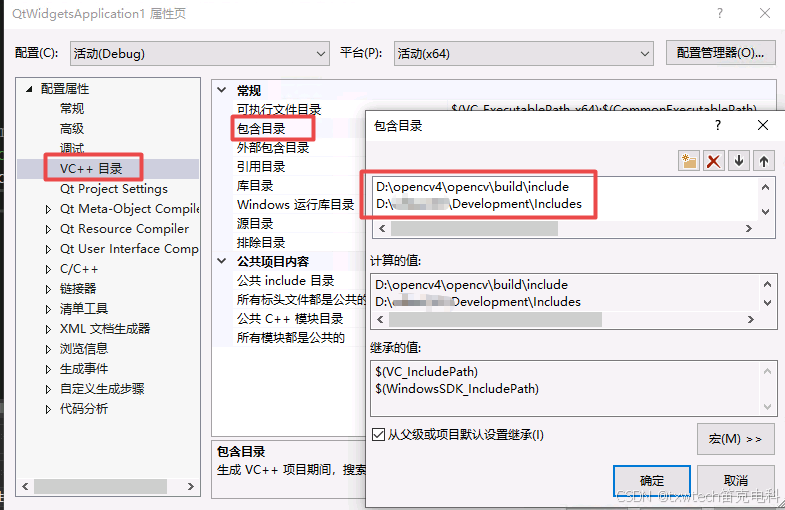
库目录添加:
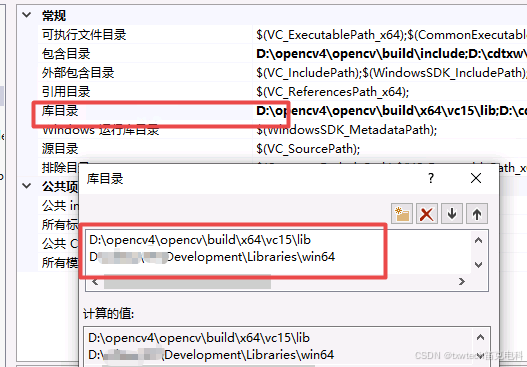
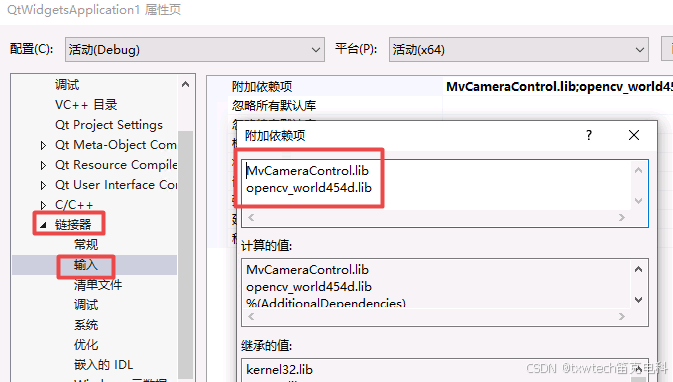
链接器-》输入: