文章的目的为了记录使用C# 开发学习的经历。开发流程和要点有些记忆模糊,赶紧记录,防止忘记。
相关链接:
推荐链接:
开源 C# .net mvc 开发(一)WEB搭建_c#部署web程序-CSDN博客
开源 C# .net mvc 开发(二)网站快速搭建_c#网站开发-CSDN博客
开源 C# .net mvc 开发(三)WEB内外网访问-CSDN博客
开源 C# .net mvc 开发(四)工程结构、页面提交以及显示-CSDN博客
开源 C# .net mvc 开发(五)常用代码快速开发_c# mvc开发-CSDN博客
开源 C# .net mvc 开发(六)发送邮件、定时以及CMD编程-CSDN博客
开源 C# .net mvc 开发(七)动态图片、动态表格和json数据生成-CSDN博客
开源 C# .net mvc 开发(八)IIS Express轻量化Web服务器的配置和使用-CSDN博客
开源 C# .net mvc 开发(九)websocket--服务器与客户端的实时通信-CSDN博客
本章节主要内容是:进程间 Windows 消息通信的例子。
目录:
1.源码分析
2.所有源码
3.效果演示
一、源码分析
- MessageHelper.cs 分析
Windows API 声明
[DllImport("user32.dll", SetLastError = true)]
public static extern IntPtr FindWindow(string lpClassName, string lpWindowName);
功能:根据类名或窗口标题查找窗口句柄
参数:
lpClassName:窗口类名,为null时按窗口标题查找
lpWindowName:窗口标题文本
返回值:找到的窗口句柄,未找到返回IntPtr.Zero
[DllImport("user32.dll", SetLastError = true)]
public static extern IntPtr SendMessage(IntPtr hWnd, uint Msg, IntPtr wParam, IntPtr lParam);
功能:向指定窗口发送消息
参数:
hWnd:目标窗口句柄
Msg:消息类型(如WM_COPYDATA)
wParam:附加消息参数
lParam:附加消息参数(通常指向数据结构的指针)
数据结构定义
[StructLayout(LayoutKind.Sequential)]
public struct COPYDATASTRUCT
{
    public IntPtr dwData;  // 自定义数据,可用于标识消息类型
    public int cbData;     // 数据长度(字节数)
    public IntPtr lpData;  // 指向实际数据的指针
}
作用:用于WM_COPYDATA消息的数据包装结构
LayoutKind.Sequential:确保字段在内存中按声明顺序排列
核心函数分析
SendMessageToProcess 函数
public static bool SendMessageToProcess(string windowName, string message)
{
    // 1. 查找目标窗口
    IntPtr targetWindow = FindWindow(null, windowName);

    // 2. 字符串编码和内存分配
    byte[] data = Encoding.Unicode.GetBytes(message);
    IntPtr pData = Marshal.AllocCoTaskMem(data.Length);
    Marshal.Copy(data, 0, pData, data.Length);

    // 3. 构建COPYDATASTRUCT
    COPYDATASTRUCT cds = new COPYDATASTRUCT();
    cds.dwData = IntPtr.Zero;      // 不使用自定义标识
    cds.cbData = data.Length;      // 数据长度
    cds.lpData = pData;            // 数据指针

    // 4. 结构体序列化到指针
    IntPtr pCds = Marshal.AllocCoTaskMem(Marshal.SizeOf(cds));
    Marshal.StructureToPtr(cds, pCds, false);

    // 5. 发送消息
    IntPtr result = SendMessage(targetWindow, WM_COPYDATA, IntPtr.Zero, pCds);

    // 6. 资源清理
    Marshal.FreeCoTaskMem(pData);
    Marshal.FreeCoTaskMem(pCds);

    return result != IntPtr.Zero;
}
执行流程:
窗口查找 → 2. 数据编码 → 3. 内存分配 → 4. 结构构建 → 5. 消息发送 → 6. 资源清理
SendCustomMessage 函数
public static bool SendCustomMessage(string windowName, string message)
{
    // 1. 注册系统唯一消息ID
    uint customMsg = (uint)RegisterWindowMessage("MyCustomMessage");

    // 2. 查找目标窗口
    IntPtr targetWindow = FindWindow(null, windowName);

    // 3. 字符串内存分配
    IntPtr pData = Marshal.StringToHGlobalUni(message);

    // 4. 发送自定义消息
    IntPtr result = SendMessage(targetWindow, customMsg, IntPtr.Zero, pData);

    // 5. 资源清理
    Marshal.FreeHGlobal(pData);

    return result != IntPtr.Zero;
}
特点:使用RegisterWindowMessage确保消息ID在系统范围内唯一
- MessageReceiverForm.cs 分析
构造函数
public MessageReceiverForm()
{
    InitializeComponent();
    customMessage = (uint)RegisterWindowMessage("MyCustomMessage");
    this.Text = $"消息接收器 - PID: {Process.GetCurrentProcess().Id}";
    UpdateStatus("就绪 - 等待接收消息");
}
注册与发送方相同的自定义消息ID
在窗口标题显示进程ID便于调试
消息处理核心 - WndProc
protected override void WndProc(ref Message m)
{
    switch (m.Msg)
    {
        case WM_COPYDATA:
            HandleCopyData(ref m);          // 处理WM_COPYDATA
            break;
        case int msg when customMessage != 0 && msg == customMessage:
            HandleCustomMessage(ref m);     // 处理自定义消息
            break;
        default:
            base.WndProc(ref m);           // 其他消息交给基类处理
            break;
    }
}
消息路由机制:
所有Windows消息都经过此方法
根据消息类型分发给对应的处理器
未处理的消息传递给基类
WM_COPYDATA 消息处理
private void HandleCopyData(ref Message m)
{
    // 1. 反序列化COPYDATASTRUCT
    COPYDATASTRUCT cds = (COPYDATASTRUCT)Marshal.PtrToStructure(
        m.LParam, typeof(COPYDATASTRUCT));

    // 2. 从指针复制数据到字节数组
    byte[] data = new byte[cds.cbData];
    Marshal.Copy(cds.lpData, data, 0, cds.cbData);

    // 3. 字节数组解码为字符串
    string message = Encoding.Unicode.GetString(data);

    // 4. UI线程安全更新
    this.Invoke(new Action(() =>
    {
        listBoxMessages.Items.Add($"[WM_COPYDATA] {DateTime.Now:HH:mm:ss}: {message}");
        listBoxMessages.SelectedIndex = listBoxMessages.Items.Count - 1;
        UpdateStatus($"收到 WM_COPYDATA 消息: {message}");
    }));

    m.Result = (IntPtr)1;  // 告知发送方处理成功
}
关键点:
Marshal.PtrToStructure:将指针转换为结构体
Marshal.Copy:从非托管内存复制到托管数组
this.Invoke:确保UI操作在正确的线程执行
自定义消息处理
private void HandleCustomMessage(ref Message m)
{
    // 直接从指针读取字符串
    string message = Marshal.PtrToStringUni(m.LParam);

    this.Invoke(new Action(() =>
    {
        listBoxMessages.Items.Add($"[自定义消息] {DateTime.Now:HH:mm:ss}: {message}");
        listBoxMessages.SelectedIndex = listBoxMessages.Items.Count - 1;
        UpdateStatus($"收到自定义消息: {message}");
    }));

    m.Result = (IntPtr)1;
}
简化处理:直接使用Marshal.PtrToStringUni转换字符串
UI交互函数
private void btnSendToSender_Click(object sender, EventArgs e)
{
    string message = txtSendMessage.Text.Trim();
    if (!string.IsNullOrEmpty(message))
    {
        // 双向通信:接收方也可以发送消息
        bool success = MessageHelper.SendMessageToProcess("消息发送器", message);
        if (success)
        {
            listBoxMessages.Items.Add($"[发送] {DateTime.Now:HH:mm:ss}: {message}");
            listBoxMessages.SelectedIndex = listBoxMessages.Items.Count - 1;
            UpdateStatus($"已发送消息到发送器: {message}");
        }
    }
}
线程安全的状态更新
private void UpdateStatus(string status)
{
    if (lblStatus.InvokeRequired)
    {
        lblStatus.Invoke(new Action<string>(UpdateStatus), status);
    }
    else
    {
        lblStatus.Text = $"{DateTime.Now:HH:mm:ss} - {status}";
    }
}
InvokeRequired机制:
检查调用线程是否是创建控件的线程
如果不是,通过Invoke跨线程安全更新UI
- MessageSenderForm.cs 分析
消息发送函数
private void btnSendCopyData_Click(object sender, EventArgs e)
{
    string message = txtMessage.Text.Trim();
    string receiverWindow = txtReceiverWindow.Text.Trim();

    if (!string.IsNullOrEmpty(message) && !string.IsNullOrEmpty(receiverWindow))
    {
        bool success = MessageHelper.SendMessageToProcess(receiverWindow, message);
        if (success)
        {
            // 本地记录发送历史
            listBoxSent.Items.Add($"[WM_COPYDATA] {DateTime.Now:HH:mm:ss}: {message}");
            listBoxSent.SelectedIndex = listBoxSent.Items.Count - 1;
            UpdateStatus($"WM_COPYDATA 消息发送成功: {message}");
        }
    }
}
进程启动功能
private void btnStartReceiver_Click(object sender, EventArgs e)
{
    // 构建接收器程序路径
    string receiverPath = System.IO.Path.Combine(
        AppDomain.CurrentDomain.BaseDirectory,
        "MessageReceiver.exe");

    if (System.IO.File.Exists(receiverPath))
    {
        Process.Start(receiverPath);  // 启动外部进程
        UpdateStatus("接收器进程已启动");
    }
}- 通信流程总结
WM_COPYDATA 通信流程:
发送方:
-
FindWindow("消息接收器") → 获取窗口句柄
-
Encoding.Unicode.GetBytes() → 字符串转字节数组
-
Marshal.AllocCoTaskMem() → 分配非托管内存
-
Marshal.StructureToPtr() → 结构体序列化
-
SendMessage(WM_COPYDATA) → 发送消息
接收方:
-
WndProc(WM_COPYDATA) → 接收消息
-
Marshal.PtrToStructure() → 反序列化结构体
-
Marshal.Copy() → 复制数据到托管内存
-
Encoding.Unicode.GetString() → 字节数组转字符串
-
UI更新 → 显示接收到的消息
二、所有源码
项目源码由2部分组成,windowsmessageRecv和windowsmessageSend
windowsmessageRecv中包括MessageHelper.cs和MessageReceiverForm。
windowsmessageSend中包括MessageHelper.cs和MessageSenderForm。
MessageHelper.cs文件源码
using System;
using System.Runtime.InteropServices;
using System.Text;
using System.Windows.Forms;

namespace windowsmessageRecv
{
    public static class MessageHelper
    {
        // Windows API
        [DllImport("user32.dll", SetLastError = true)]
        public static extern IntPtr FindWindow(string lpClassName, string lpWindowName);

        [DllImport("user32.dll", SetLastError = true)]
        public static extern IntPtr SendMessage(IntPtr hWnd, uint Msg, IntPtr wParam, IntPtr lParam);

        [DllImport("user32.dll")]
        public static extern int RegisterWindowMessage(string lpString);

        [DllImport("user32.dll")]
        public static extern IntPtr SendMessage(IntPtr hWnd, uint msg, IntPtr wParam, string lParam);

        // 常量
        public const int WM_COPYDATA = 0x004A;
        public const int WM_SETTEXT = 0x000C;

        // COPYDATASTRUCT 结构
        [StructLayout(LayoutKind.Sequential)]
        public struct COPYDATASTRUCT
        {
            public IntPtr dwData;
            public int cbData;
            public IntPtr lpData;
        }

        public static bool SendMessageToProcess(string windowName, string message)
        {
            try
            {
                // 查找接收窗口
                IntPtr targetWindow = FindWindow(null, windowName);

                if (targetWindow == IntPtr.Zero)
                {
                    MessageBox.Show($"未找到目标窗口: {windowName}");
                    return false;
                }

                // 准备数据
                byte[] data = Encoding.Unicode.GetBytes(message);
                IntPtr pData = Marshal.AllocCoTaskMem(data.Length);
                Marshal.Copy(data, 0, pData, data.Length);

                // 创建 COPYDATASTRUCT
                COPYDATASTRUCT cds = new COPYDATASTRUCT();
                cds.dwData = IntPtr.Zero;
                cds.cbData = data.Length;
                cds.lpData = pData;

                IntPtr pCds = Marshal.AllocCoTaskMem(Marshal.SizeOf(cds));
                Marshal.StructureToPtr(cds, pCds, false);

                // 发送消息
                IntPtr result = SendMessage(targetWindow, WM_COPYDATA, IntPtr.Zero, pCds);

                // 清理资源
                Marshal.FreeCoTaskMem(pData);
                Marshal.FreeCoTaskMem(pCds);

                return result != IntPtr.Zero;
            }
            catch (Exception ex)
            {
                MessageBox.Show($"发送消息时出错: {ex.Message}");
                return false;
            }
        }

        public static bool SendCustomMessage(string windowName, string message)
        {
            try
            {
                // 注册自定义消息
                uint customMsg = (uint)RegisterWindowMessage("MyCustomMessage");

                if (customMsg == 0)
                {
                    MessageBox.Show("注册自定义消息失败");
                    return false;
                }

                IntPtr targetWindow = FindWindow(null, windowName);

                if (targetWindow == IntPtr.Zero)
                {
                    MessageBox.Show($"未找到目标窗口: {windowName}");
                    return false;
                }

                // 发送字符串消息
                IntPtr pData = Marshal.StringToHGlobalUni(message);
                IntPtr result = SendMessage(targetWindow, customMsg, IntPtr.Zero, pData);
                Marshal.FreeHGlobal(pData);

                return result != IntPtr.Zero;
            }
            catch (Exception ex)
            {
                MessageBox.Show($"发送自定义消息时出错: {ex.Message}");
                return false;
            }
        }

        public static bool SendTextMessage(string windowName, string message)
        {
            try
            {
                IntPtr targetWindow = FindWindow(null, windowName);

                if (targetWindow == IntPtr.Zero)
                {
                    MessageBox.Show($"未找到目标窗口: {windowName}");
                    return false;
                }

                IntPtr result = SendMessage(targetWindow, WM_SETTEXT, IntPtr.Zero, message);
                return result != IntPtr.Zero;
            }
            catch (Exception ex)
            {
                MessageBox.Show($"发送文本消息时出错: {ex.Message}");
                return false;
            }
        }
    }
}
MessageReceiverForm.cs文件源码
using System;
using System.Drawing;
using System.Runtime.InteropServices;
using System.Text;
using System.Windows.Forms;
using System.Diagnostics;

namespace windowsmessageRecv
{
    public partial class MessageReceiverForm : Form
    {
        // Windows API 常量
        private const int WM_COPYDATA = 0x004A;

        // 注册自定义消息
        [DllImport("user32.dll")]
        private static extern int RegisterWindowMessage(string lpString);

        private uint customMessage;
        private ListBox listBoxMessages;
        private Button btnClear;
        private Button btnStartSender;
        private Label lblStatus;
        private TextBox txtSendMessage;
        private Button btnSendToSender;
        private Process senderProcess;

        public MessageReceiverForm()
        {
            InitializeComponent();

            // 注册自定义消息
            customMessage = (uint)RegisterWindowMessage("MyCustomMessage");

            // 显示当前进程ID,方便调试
            //this.Text = $"消息接收器 - PID: {Process.GetCurrentProcess().Id}";
            this.Text = "消息接收器";
            UpdateStatus("就绪 - 等待接收消息");
        }

        private void InitializeComponent()
        {
            this.listBoxMessages = new ListBox();
            this.btnClear = new Button();
            this.btnStartSender = new Button();
            this.lblStatus = new Label();
            this.txtSendMessage = new TextBox();
            this.btnSendToSender = new Button();
            this.SuspendLayout();

            // listBoxMessages
            this.listBoxMessages.Dock = DockStyle.Top;
            this.listBoxMessages.FormattingEnabled = true;
            this.listBoxMessages.Location = new Point(0, 0);
            this.listBoxMessages.Size = new Size(500, 200);
            this.listBoxMessages.BackColor = Color.LightYellow;

            // lblStatus
            this.lblStatus.Dock = DockStyle.Top;
            this.lblStatus.Location = new Point(0, 200);
            this.lblStatus.Size = new Size(500, 25);
            this.lblStatus.BackColor = Color.LightBlue;
            this.lblStatus.TextAlign = ContentAlignment.MiddleCenter;

            // txtSendMessage
            this.txtSendMessage.Location = new Point(10, 235);
            this.txtSendMessage.Size = new Size(300, 20);
            this.txtSendMessage.Text = "这是来自接收器的回复消息";

            // btnSendToSender
            this.btnSendToSender.Location = new Point(320, 235);
            this.btnSendToSender.Size = new Size(80, 23);
            this.btnSendToSender.Text = "发送回复";
            this.btnSendToSender.Click += new EventHandler(this.btnSendToSender_Click);

            // btnStartSender
            this.btnStartSender.Location = new Point(410, 235);
            this.btnStartSender.Size = new Size(80, 23);
            this.btnStartSender.Text = "启动发送器";
            this.btnStartSender.Click += new EventHandler(this.btnStartSender_Click);

            // btnClear
            this.btnClear.Location = new Point(210, 265);
            this.btnClear.Size = new Size(80, 23);
            this.btnClear.Text = "清空消息";
            this.btnClear.Click += new EventHandler(this.btnClear_Click);

            // MessageReceiverForm
            this.ClientSize = new Size(500, 300);
            this.Controls.Add(this.btnClear);
            this.Controls.Add(this.btnStartSender);
            this.Controls.Add(this.btnSendToSender);
            this.Controls.Add(this.txtSendMessage);
            this.Controls.Add(this.lblStatus);
            this.Controls.Add(this.listBoxMessages);
            this.Text = "消息接收器";
            this.StartPosition = FormStartPosition.CenterScreen;

            this.ResumeLayout(false);
            this.PerformLayout();
        }

        // 重写 WndProc 方法来处理 Windows 消息
        protected override void WndProc(ref Message m)
        {
            switch (m.Msg)
            {
                case WM_COPYDATA:
                    HandleCopyData(ref m);
                    break;

                case int msg when customMessage != 0 && msg == customMessage:
                    HandleCustomMessage(ref m);
                    break;

                default:
                    base.WndProc(ref m);
                    break;
            }
        }

        // 处理 WM_COPYDATA 消息
        private void HandleCopyData(ref Message m)
        {
            try
            {
                // 解析 COPYDATASTRUCT
                COPYDATASTRUCT cds = (COPYDATASTRUCT)Marshal.PtrToStructure(
                    m.LParam, typeof(COPYDATASTRUCT));

                // 读取数据
                byte[] data = new byte[cds.cbData];
                Marshal.Copy(cds.lpData, data, 0, cds.cbData);

                string message = Encoding.Unicode.GetString(data);

                // 在 UI 线程中更新界面
                this.Invoke(new Action(() =>
                {
                    listBoxMessages.Items.Add($"[WM_COPYDATA] {DateTime.Now:HH:mm:ss}: {message}");
                    listBoxMessages.SelectedIndex = listBoxMessages.Items.Count - 1;
                    UpdateStatus($"收到 WM_COPYDATA 消息: {message}");
                }));

                m.Result = (IntPtr)1; // 表示消息处理成功
            }
            catch (Exception ex)
            {
                MessageBox.Show("处理 WM_COPYDATA 消息时出错: " + ex.Message);
                m.Result = IntPtr.Zero;
            }
        }

        // 处理自定义消息
        private void HandleCustomMessage(ref Message m)
        {
            try
            {
                // 读取字符串数据
                string message = Marshal.PtrToStringUni(m.LParam);

                this.Invoke(new Action(() =>
                {
                    listBoxMessages.Items.Add($"[自定义消息] {DateTime.Now:HH:mm:ss}: {message}");
                    listBoxMessages.SelectedIndex = listBoxMessages.Items.Count - 1;
                    UpdateStatus($"收到自定义消息: {message}");
                }));

                m.Result = (IntPtr)1;
            }
            catch (Exception ex)
            {
                MessageBox.Show("处理自定义消息时出错: " + ex.Message);
                m.Result = IntPtr.Zero;
            }
        }

        private void btnClear_Click(object sender, EventArgs e)
        {
            listBoxMessages.Items.Clear();
            UpdateStatus("消息列表已清空");
        }

        private void btnStartSender_Click(object sender, EventArgs e)
        {
            try
            {
                // 启动发送器进程
                string senderPath = System.IO.Path.Combine(
                    AppDomain.CurrentDomain.BaseDirectory,
                    "windowsmessageSend.exe");

                if (System.IO.File.Exists(senderPath))
                {
                    senderProcess = Process.Start(senderPath);
                    UpdateStatus("发送器进程已启动");
                }
                else
                {
                    MessageBox.Show($"找不到发送器程序: {senderPath}\n请先编译 MessageSender 项目。");
                }
            }
            catch (Exception ex)
            {
                MessageBox.Show("启动发送器失败: " + ex.Message);
            }
        }

        private void btnSendToSender_Click(object sender, EventArgs e)
        {
            string message = txtSendMessage.Text.Trim();
            if (!string.IsNullOrEmpty(message))
            {
                // 发送消息到发送器窗口
                bool success = MessageHelper.SendMessageToProcess("消息发送器", message);
                if (success)
                {
                    listBoxMessages.Items.Add($"[发送] {DateTime.Now:HH:mm:ss}: {message}");
                    listBoxMessages.SelectedIndex = listBoxMessages.Items.Count - 1;
                    UpdateStatus($"已发送消息到发送器: {message}");
                }
                else
                {
                    UpdateStatus($"发送失败,请确保发送器正在运行");
                }
            }
        }

        private void UpdateStatus(string status)
        {
            if (lblStatus.InvokeRequired)
            {
                lblStatus.Invoke(new Action<string>(UpdateStatus), status);
            }
            else
            {
                lblStatus.Text = $"{DateTime.Now:HH:mm:ss} - {status}";
            }
        }

        // COPYDATASTRUCT 结构定义
        [StructLayout(LayoutKind.Sequential)]
        public struct COPYDATASTRUCT
        {
            public IntPtr dwData;
            public int cbData;
            public IntPtr lpData;
        }
    }

    // 程序入口

}
MessageSenderForm.cs文件源码
using System;
using System.Drawing;
using System.Windows.Forms;
using System.Diagnostics;

namespace windowsmessageSend
{
    public partial class MessageSenderForm : Form
    {
        private TextBox txtMessage;
        private Button btnSendCopyData;
        private Button btnSendCustom;
        private ListBox listBoxSent;
        private Button btnClear;
        private TextBox txtReceiverWindow;
        private Label lblStatus;
        private Button btnStartReceiver;

        public MessageSenderForm()
        {
            InitializeComponent();
            //this.Text = $"消息发送器 - PID: {Process.GetCurrentProcess().Id}";
            this.Text = "消息发送器";
            UpdateStatus("就绪 - 可以发送消息");
        }

        private void InitializeComponent()
        {
            this.txtMessage = new TextBox();
            this.btnSendCopyData = new Button();
            this.btnSendCustom = new Button();
            this.listBoxSent = new ListBox();
            this.btnClear = new Button();
            this.txtReceiverWindow = new TextBox();
            this.lblStatus = new Label();
            this.btnStartReceiver = new Button();
            this.SuspendLayout();

            // txtReceiverWindow
            this.txtReceiverWindow.Location = new Point(10, 10);
            this.txtReceiverWindow.Size = new Size(300, 20);
            this.txtReceiverWindow.Text = "消息接收器";

            // txtMessage
            this.txtMessage.Location = new Point(10, 40);
            this.txtMessage.Size = new Size(300, 20);
            this.txtMessage.Text = "这是一条测试消息";

            // btnSendCopyData
            this.btnSendCopyData.Location = new Point(320, 40);
            this.btnSendCopyData.Size = new Size(100, 23);
            this.btnSendCopyData.Text = "发送 WM_COPYDATA";
            this.btnSendCopyData.Click += new EventHandler(this.btnSendCopyData_Click);

            // btnSendCustom
            this.btnSendCustom.Location = new Point(430, 40);
            this.btnSendCustom.Size = new Size(100, 23);
            this.btnSendCustom.Text = "发送自定义消息";
            this.btnSendCustom.Click += new EventHandler(this.btnSendCustom_Click);

            // btnStartReceiver
            this.btnStartReceiver.Location = new Point(320, 10);
            this.btnStartReceiver.Size = new Size(100, 23);
            this.btnStartReceiver.Text = "启动接收器";
            this.btnStartReceiver.Click += new EventHandler(this.btnStartReceiver_Click);

            // listBoxSent
            this.listBoxSent.Dock = DockStyle.Bottom;
            this.listBoxSent.FormattingEnabled = true;
            this.listBoxSent.Location = new Point(0, 120);
            this.listBoxSent.Size = new Size(550, 150);
            this.listBoxSent.BackColor = Color.LightGreen;

            // lblStatus
            this.lblStatus.Dock = DockStyle.Bottom;
            this.lblStatus.Location = new Point(0, 100);
            this.lblStatus.Size = new Size(550, 20);
            this.lblStatus.BackColor = Color.LightBlue;
            this.lblStatus.TextAlign = ContentAlignment.MiddleCenter;

            // btnClear
            this.btnClear.Location = new Point(230, 70);
            this.btnClear.Size = new Size(80, 23);
            this.btnClear.Text = "清空列表";
            this.btnClear.Click += new EventHandler(this.btnClear_Click);

            // MessageSenderForm
            this.ClientSize = new Size(550, 270);
            this.Controls.Add(this.btnClear);
            this.Controls.Add(this.listBoxSent);
            this.Controls.Add(this.lblStatus);
            this.Controls.Add(this.btnStartReceiver);
            this.Controls.Add(this.btnSendCustom);
            this.Controls.Add(this.btnSendCopyData);
            this.Controls.Add(this.txtMessage);
            this.Controls.Add(this.txtReceiverWindow);
            this.Text = "消息发送器";
            this.StartPosition = FormStartPosition.CenterScreen;

            this.ResumeLayout(false);
            this.PerformLayout();
        }

        private void btnSendCopyData_Click(object sender, EventArgs e)
        {
            string message = txtMessage.Text.Trim();
            string receiverWindow = txtReceiverWindow.Text.Trim();

            if (!string.IsNullOrEmpty(message) && !string.IsNullOrEmpty(receiverWindow))
            {
                try
                {
                    bool success = MessageHelper.SendMessageToProcess(receiverWindow, message);
                    if (success)
                    {
                        listBoxSent.Items.Add($"[WM_COPYDATA] {DateTime.Now:HH:mm:ss}: {message}");
                        listBoxSent.SelectedIndex = listBoxSent.Items.Count - 1;
                        UpdateStatus($"WM_COPYDATA 消息发送成功: {message}");
                    }
                    else
                    {
                        UpdateStatus($"发送失败,请确保接收器正在运行");
                    }
                }
                catch (Exception ex)
                {
                    MessageBox.Show($"发送消息失败: {ex.Message}");
                    UpdateStatus($"发送失败: {ex.Message}");
                }
            }
            else
            {
                MessageBox.Show("请输入消息内容和接收窗口标题");
            }
        }

        private void btnSendCustom_Click(object sender, EventArgs e)
        {
            string message = txtMessage.Text.Trim();
            string receiverWindow = txtReceiverWindow.Text.Trim();

            if (!string.IsNullOrEmpty(message) && !string.IsNullOrEmpty(receiverWindow))
            {
                try
                {
                    bool success = MessageHelper.SendCustomMessage(receiverWindow, message);
                    if (success)
                    {
                        listBoxSent.Items.Add($"[自定义消息] {DateTime.Now:HH:mm:ss}: {message}");
                        listBoxSent.SelectedIndex = listBoxSent.Items.Count - 1;
                        UpdateStatus($"自定义消息发送成功: {message}");
                    }
                    else
                    {
                        UpdateStatus($"发送失败,请确保接收器正在运行");
                    }
                }
                catch (Exception ex)
                {
                    MessageBox.Show($"发送自定义消息失败: {ex.Message}");
                    UpdateStatus($"发送失败: {ex.Message}");
                }
            }
            else
            {
                MessageBox.Show("请输入消息内容和接收窗口标题");
            }
        }

        private void btnStartReceiver_Click(object sender, EventArgs e)
        {
            try
            {
                // 启动接收器进程
                string receiverPath = System.IO.Path.Combine(
                    AppDomain.CurrentDomain.BaseDirectory,
                    "MessageReceiver.exe");

                if (System.IO.File.Exists(receiverPath))
                {
                    Process.Start(receiverPath);
                    UpdateStatus("接收器进程已启动");
                }
                else
                {
                    MessageBox.Show($"找不到接收器程序: {receiverPath}\n请先编译 MessageReceiver 项目。");
                }
            }
            catch (Exception ex)
            {
                MessageBox.Show("启动接收器失败: " + ex.Message);
            }
        }

        private void btnClear_Click(object sender, EventArgs e)
        {
            listBoxSent.Items.Clear();
            UpdateStatus("发送列表已清空");
        }

        private void UpdateStatus(string status)
        {
            if (lblStatus.InvokeRequired)
            {
                lblStatus.Invoke(new Action<string>(UpdateStatus), status);
            }
            else
            {
                lblStatus.Text = $"{DateTime.Now:HH:mm:ss} - {status}";
            }
        }
    }


}
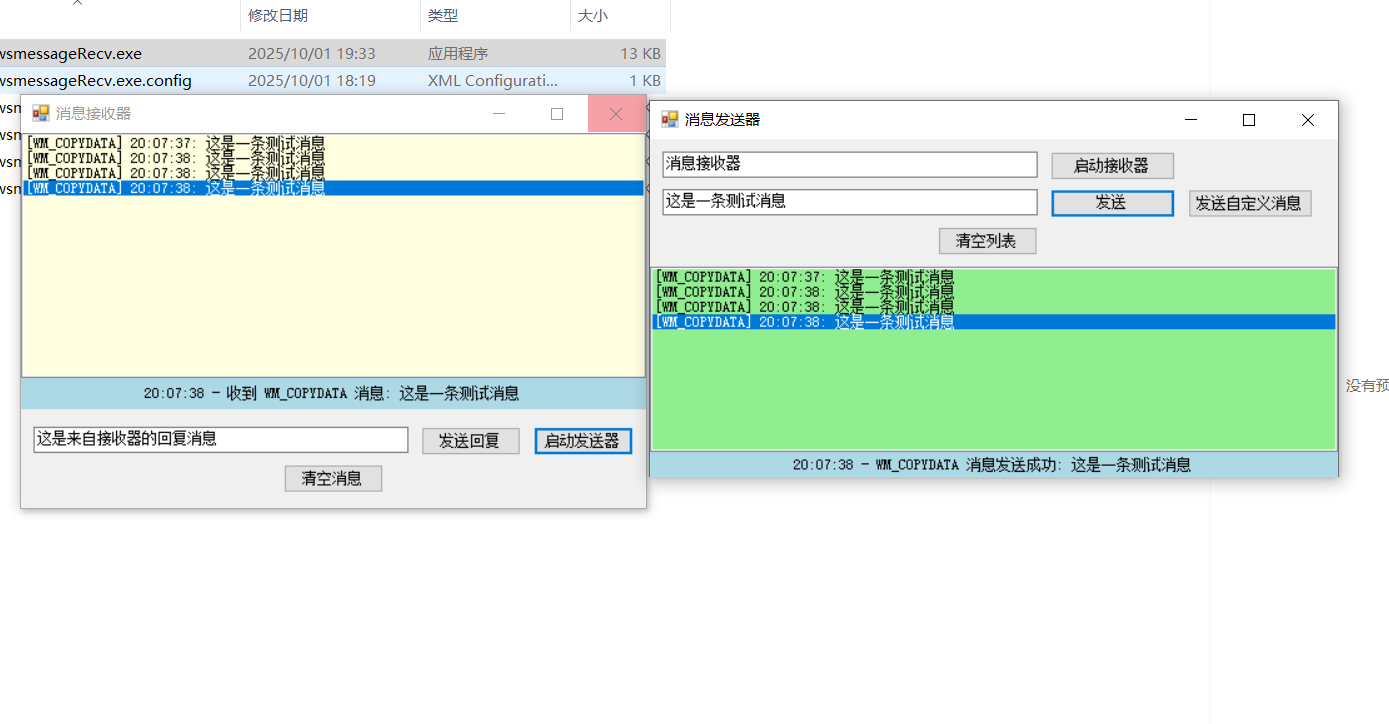
三、效果演示
启动接收器和发送器的exe,发送器中点击发送,接收器收到消息。