文章的目的为了记录使用C# 开发学习的经历。开发流程和要点有些记忆模糊,赶紧记录,防止忘记。
相关链接:
推荐链接:
开源 C# .net mvc 开发(一)WEB搭建_c#部署web程序-CSDN博客
开源 C# .net mvc 开发(二)网站快速搭建_c#网站开发-CSDN博客
开源 C# .net mvc 开发(三)WEB内外网访问-CSDN博客
开源 C# .net mvc 开发(四)工程结构、页面提交以及显示-CSDN博客
开源 C# .net mvc 开发(五)常用代码快速开发_c# mvc开发-CSDN博客
开源 C# .net mvc 开发(六)发送邮件、定时以及CMD编程-CSDN博客
开源 C# .net mvc 开发(七)动态图片、动态表格和json数据生成-CSDN博客
开源 C# .net mvc 开发(八)IIS Express轻量化Web服务器的配置和使用-CSDN博客
开源 C# .net mvc 开发(九)websocket--服务器与客户端的实时通信-CSDN博客
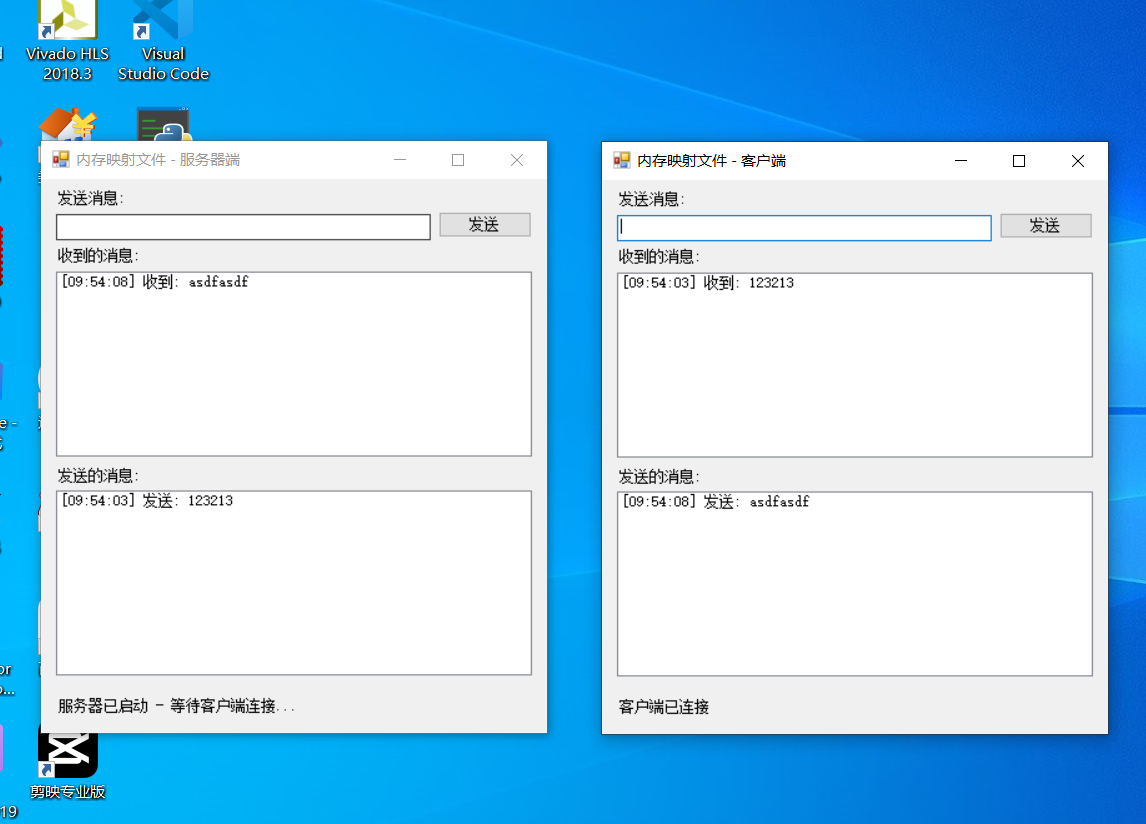
本章节主要内容是:内存映射文件在C#进程间进行的数据通信,服务器端和客户端之间的通讯。
内存映射文件(Memory-Mapped Files)是一种将磁盘文件或共享内存区域直接映射到进程虚拟地址空间的技术。通过这种技术,应用程序可以像访问普通内存一样访问文件内容,而无需使用传统的文件I/O操作。
目录:
1.源码分析
2.所有源码
3.效果演示
一、源码分析
服务器端代码分析
-
服务器初始化 InitializeServer()
private void InitializeServer()
{
try
{
// 创建或打开内存映射文件
mmf = MemoryMappedFile.CreateOrOpen(MapName, Capacity);
accessor = mmf.CreateViewAccessor();// 初始化共享内存:在位置0写入0(数据长度) accessor.Write(0, 0); // 启动读取线程 isRunning = true; readThread = new Thread(ReadFromSharedMemory); readThread.IsBackground = true; // 设为后台线程,主线程退出时自动终止 readThread.Start(); UpdateStatus("服务器已启动 - 等待客户端连接..."); } catch (Exception ex) { MessageBox.Show($"服务器启动失败: {ex.Message}"); }}
关键点:
CreateOrOpen:如果文件不存在则创建,存在则打开
前4字节用于存储数据长度,初始化为0
启动后台线程持续监听消息
-
读取线程函数 ReadFromSharedMemory()
private void ReadFromSharedMemory()
{
while (isRunning) // 循环直到停止标志为false
{
try
{
// 读取前4字节获取数据长度
int dataLength = accessor.ReadInt32(0);if (dataLength > 0) // 有数据需要读取 { // 读取实际数据(从第4字节开始) byte[] buffer = new byte[dataLength]; accessor.ReadArray(4, buffer, 0, dataLength); string receivedMessage = Encoding.UTF8.GetString(buffer); // 在UI线程上安全更新界面 Invoke(new Action(() => { lstReceivedMessages.Items.Add($"[{DateTime.Now:HH:mm:ss}] 收到: {receivedMessage}"); lstReceivedMessages.TopIndex = lstReceivedMessages.Items.Count - 1; })); // 清空数据长度标记,表示数据已处理 accessor.Write(0, 0); } Thread.Sleep(100); // 降低CPU使用率 } catch (ThreadAbortException) { break; // 线程被中止时退出循环 } catch (Exception ex) { // 在UI线程显示错误信息 Invoke(new Action(() => UpdateStatus($"读取错误: {ex.Message}"))); Thread.Sleep(1000); } }}
数据格式:text
0-3字节 数据长度 (int32)
4-...字节 实际数据 (UTF-8编码的字符串)
-
发送消息 SendMessage(string message)
private void SendMessage(string message)
{
if (string.IsNullOrWhiteSpace(message))
{
MessageBox.Show("请输入要发送的消息");
return;
}try { // 将字符串转换为字节数组 byte[] buffer = Encoding.UTF8.GetBytes(message); int dataLength = buffer.Length; // 检查消息长度是否超出容量 if (dataLength > Capacity - 4) // 减去存储长度的4字节 { MessageBox.Show("消息太长,无法发送"); return; } // 写入数据:先写长度,再写数据 accessor.Write(0, dataLength); accessor.WriteArray(4, buffer, 0, dataLength); // 更新发送历史 lstSentMessages.Items.Add($"[{DateTime.Now:HH:mm:ss}] 发送: {message}"); lstSentMessages.TopIndex = lstSentMessages.Items.Count - 1; txtMessage.Clear(); txtMessage.Focus(); } catch (Exception ex) { MessageBox.Show($"发送失败: {ex.Message}"); }}
-
事件处理函数
btnSend_Click
private void btnSend_Click(object sender, EventArgs e)
{
    SendMessage(txtMessage.Text);  // 调用发送消息函数
}
txtMessage_KeyPress
private void txtMessage_KeyPress(object sender, KeyPressEventArgs e)
{
    if (e.KeyChar == (char)Keys.Enter)  // 按Enter键发送
    {
        btnSend_Click(sender, e);
        e.Handled = true;  // 阻止系统处理Enter键
    }
}
ServerForm_FormClosing
private void ServerForm_FormClosing(object sender, FormClosingEventArgs e)
{
    isRunning = false;           // 设置停止标志
    readThread?.Join(1000);      // 等待读取线程结束,最多等待1秒

    // 释放资源
    accessor?.Dispose();
    mmf?.Dispose();
}-
辅助函数 UpdateStatus(string status)
private void UpdateStatus(string status)
{
lblStatus.Text = status; // 更新状态标签
}
客户端代码分析
客户端的函数与服务器端非常相似,主要区别在于初始化部分:
-
客户端初始化 InitializeClient()
private void InitializeClient()
{
try
{
// 连接到现有的内存映射文件(必须已由服务器创建)
mmf = MemoryMappedFile.OpenExisting(MapName);
accessor = mmf.CreateViewAccessor();isRunning = true; readThread = new Thread(ReadFromSharedMemory); readThread.IsBackground = true; readThread.Start(); UpdateStatus("客户端已连接"); } catch (FileNotFoundException) { MessageBox.Show("服务器未启动,请先启动服务器端程序"); UpdateStatus("连接失败 - 服务器未启动"); } catch (Exception ex) { MessageBox.Show($"客户端启动失败: {ex.Message}"); UpdateStatus($"连接失败: {ex.Message}"); }}
关键区别:
使用 OpenExisting 而不是 CreateOrOpen
需要处理 FileNotFoundException(服务器未启动的情况)
二、所有源码
ServerForm.cs文件源码
using System;
using System.IO;
using System.IO.MemoryMappedFiles;
using System.Text;
using System.Threading;
using System.Windows.Forms;
namespace MemoryMappedFileDemo
{
public partial class ServerForm : Form
{
private MemoryMappedFile mmf;
private MemoryMappedViewAccessor accessor;
private const string MapName = "MySharedMemory";
private const int Capacity = 1024; // 1KB共享内存
private Thread readThread;
private bool isRunning = false;
public ServerForm()
{
InitializeComponent();
InitializeServer();
}
private void InitializeServer()
{
try
{
// 创建内存映射文件
mmf = MemoryMappedFile.CreateOrOpen(MapName, Capacity);
accessor = mmf.CreateViewAccessor();
// 初始化共享内存
accessor.Write(0, 0); // 写入数据长度
isRunning = true;
readThread = new Thread(ReadFromSharedMemory);
readThread.IsBackground = true;
readThread.Start();
UpdateStatus("服务器已启动 - 等待客户端连接...");
}
catch (Exception ex)
{
MessageBox.Show($"服务器启动失败: {ex.Message}");
}
}
private void ReadFromSharedMemory()
{
while (isRunning)
{
try
{
// 读取数据长度
int dataLength = accessor.ReadInt32(0);
if (dataLength > 0)
{
// 读取实际数据
byte[] buffer = new byte[dataLength];
accessor.ReadArray(4, buffer, 0, dataLength);
string receivedMessage = Encoding.UTF8.GetString(buffer);
// 在UI线程上更新接收到的消息
Invoke(new Action(() =>
{
lstReceivedMessages.Items.Add($"[{DateTime.Now:HH:mm:ss}] 收到: {receivedMessage}");
lstReceivedMessages.TopIndex = lstReceivedMessages.Items.Count - 1;
}));
// 清空数据长度标记,表示数据已读取
accessor.Write(0, 0);
}
Thread.Sleep(100); // 降低CPU使用率
}
catch (ThreadAbortException)
{
break;
}
catch (Exception ex)
{
Invoke(new Action(() =>
UpdateStatus($"读取错误: {ex.Message}")));
Thread.Sleep(1000);
}
}
}
private void btnSend_Click(object sender, EventArgs e)
{
SendMessage(txtMessage.Text);
}
private void SendMessage(string message)
{
if (string.IsNullOrWhiteSpace(message))
{
MessageBox.Show("请输入要发送的消息");
return;
}
try
{
byte[] buffer = Encoding.UTF8.GetBytes(message);
int dataLength = buffer.Length;
if (dataLength > Capacity - 4) // 减去存储长度的4字节
{
MessageBox.Show("消息太长,无法发送");
return;
}
// 写入数据长度和实际数据
accessor.Write(0, dataLength);
accessor.WriteArray(4, buffer, 0, dataLength);
lstSentMessages.Items.Add($"[{DateTime.Now:HH:mm:ss}] 发送: {message}");
lstSentMessages.TopIndex = lstSentMessages.Items.Count - 1;
txtMessage.Clear();
txtMessage.Focus();
}
catch (Exception ex)
{
MessageBox.Show($"发送失败: {ex.Message}");
}
}
private void UpdateStatus(string status)
{
lblStatus.Text = status;
}
private void ServerForm_FormClosing(object sender, FormClosingEventArgs e)
{
isRunning = false;
readThread?.Join(1000);
accessor?.Dispose();
mmf?.Dispose();
}
private void txtMessage_KeyPress(object sender, KeyPressEventArgs e)
{
if (e.KeyChar == (char)Keys.Enter)
{
btnSend_Click(sender, e);
e.Handled = true;
}
}
#region Windows Form Designer generated code
private System.ComponentModel.IContainer components = null;
private TextBox txtMessage;
private Button btnSend;
private ListBox lstReceivedMessages;
private ListBox lstSentMessages;
private Label lblStatus;
private Label label1;
private Label label2;
private Label label3;
protected override void Dispose(bool disposing)
{
if (disposing && (components != null))
{
components.Dispose();
}
base.Dispose(disposing);
}
private void InitializeComponent()
{
this.txtMessage = new System.Windows.Forms.TextBox();
this.btnSend = new System.Windows.Forms.Button();
this.lstReceivedMessages = new System.Windows.Forms.ListBox();
this.lstSentMessages = new System.Windows.Forms.ListBox();
this.lblStatus = new System.Windows.Forms.Label();
this.label1 = new System.Windows.Forms.Label();
this.label2 = new System.Windows.Forms.Label();
this.label3 = new System.Windows.Forms.Label();
this.SuspendLayout();
// txtMessage
this.txtMessage.Location = new System.Drawing.Point(12, 30);
this.txtMessage.Name = "txtMessage";
this.txtMessage.Size = new System.Drawing.Size(300, 20);
this.txtMessage.TabIndex = 0;
this.txtMessage.KeyPress += new System.Windows.Forms.KeyPressEventHandler(this.txtMessage_KeyPress);
// btnSend
this.btnSend.Location = new System.Drawing.Point(318, 28);
this.btnSend.Name = "btnSend";
this.btnSend.Size = new System.Drawing.Size(75, 23);
this.btnSend.TabIndex = 1;
this.btnSend.Text = "发送";
this.btnSend.UseVisualStyleBackColor = true;
this.btnSend.Click += new System.EventHandler(this.btnSend_Click);
// lstReceivedMessages
this.lstReceivedMessages.FormattingEnabled = true;
this.lstReceivedMessages.HorizontalScrollbar = true;
this.lstReceivedMessages.Location = new System.Drawing.Point(12, 80);
this.lstReceivedMessages.Name = "lstReceivedMessages";
this.lstReceivedMessages.Size = new System.Drawing.Size(381, 160);
this.lstReceivedMessages.TabIndex = 2;
// lstSentMessages
this.lstSentMessages.FormattingEnabled = true;
this.lstSentMessages.HorizontalScrollbar = true;
this.lstSentMessages.Location = new System.Drawing.Point(12, 270);
this.lstSentMessages.Name = "lstSentMessages";
this.lstSentMessages.Size = new System.Drawing.Size(381, 160);
this.lstSentMessages.TabIndex = 3;
// lblStatus
this.lblStatus.AutoSize = true;
this.lblStatus.Location = new System.Drawing.Point(12, 450);
this.lblStatus.Name = "lblStatus";
this.lblStatus.Size = new System.Drawing.Size(55, 13);
this.lblStatus.TabIndex = 4;
this.lblStatus.Text = "状态: 离线";
// label1
this.label1.AutoSize = true;
this.label1.Location = new System.Drawing.Point(12, 10);
this.label1.Name = "label1";
this.label1.Size = new System.Drawing.Size(58, 13);
this.label1.TabIndex = 5;
this.label1.Text = "发送消息:";
// label2
this.label2.AutoSize = true;
this.label2.Location = new System.Drawing.Point(12, 60);
this.label2.Name = "label2";
this.label2.Size = new System.Drawing.Size(82, 13);
this.label2.TabIndex = 6;
this.label2.Text = "收到的消息:";
// label3
this.label3.AutoSize = true;
this.label3.Location = new System.Drawing.Point(12, 250);
this.label3.Name = "label3";
this.label3.Size = new System.Drawing.Size(82, 13);
this.label3.TabIndex = 7;
this.label3.Text = "发送的消息:";
// ServerForm
this.AutoScaleDimensions = new System.Drawing.SizeF(6F, 13F);
this.AutoScaleMode = System.Windows.Forms.AutoScaleMode.Font;
this.ClientSize = new System.Drawing.Size(405, 480);
this.Controls.Add(this.label3);
this.Controls.Add(this.label2);
this.Controls.Add(this.label1);
this.Controls.Add(this.lblStatus);
this.Controls.Add(this.lstSentMessages);
this.Controls.Add(this.lstReceivedMessages);
this.Controls.Add(this.btnSend);
this.Controls.Add(this.txtMessage);
this.Name = "ServerForm";
this.Text = "内存映射文件 - 服务器端";
this.FormClosing += new System.Windows.Forms.FormClosingEventHandler(this.ServerForm_FormClosing);
this.ResumeLayout(false);
this.PerformLayout();
}
#endregion
}
}ClientForm.cs文件源码
using System;
using System.IO;
using System.IO.MemoryMappedFiles;
using System.Text;
using System.Threading;
using System.Windows.Forms;
namespace MemoryClientDemo
{
public partial class ClientForm : Form
{
private MemoryMappedFile mmf;
private MemoryMappedViewAccessor accessor;
private const string MapName = "MySharedMemory";
private const int Capacity = 1024;
private Thread readThread;
private bool isRunning = false;
public ClientForm()
{
InitializeComponent();
InitializeClient();
}
private void InitializeClient()
{
try
{
// 连接到现有的内存映射文件
mmf = MemoryMappedFile.OpenExisting(MapName);
accessor = mmf.CreateViewAccessor();
     isRunning = true;
     readThread = new Thread(ReadFromSharedMemory);
     readThread.IsBackground = true;
     readThread.Start();

     UpdateStatus("客户端已连接");
 }
 catch (FileNotFoundException)
 {
     MessageBox.Show("服务器未启动,请先启动服务器端程序");
     UpdateStatus("连接失败 - 服务器未启动");
 }
 catch (Exception ex)
 {
     MessageBox.Show($"客户端启动失败: {ex.Message}");
     UpdateStatus($"连接失败: {ex.Message}");
 }
}
private void ReadFromSharedMemory()
{
while (isRunning)
{
try
{
// 读取数据长度
int dataLength = accessor.ReadInt32(0);
if (dataLength > 0)
{
// 读取实际数据
byte[] buffer = new byte[dataLength];
accessor.ReadArray(4, buffer, 0, dataLength);
string receivedMessage = Encoding.UTF8.GetString(buffer);
// 在UI线程上更新接收到的消息
Invoke(new Action(() =>
{
lstReceivedMessages.Items.Add($"[{DateTime.Now:HH:mm:ss}] 收到: {receivedMessage}");
lstReceivedMessages.TopIndex = lstReceivedMessages.Items.Count - 1;
}));
// 清空数据长度标记,表示数据已读取
accessor.Write(0, 0);
}
Thread.Sleep(100);
}
catch (ThreadAbortException)
{
break;
}
catch (Exception ex)
{
Invoke(new Action(() =>
UpdateStatus($"读取错误: {ex.Message}")));
Thread.Sleep(1000);
}
}
}
private void btnSend_Click(object sender, EventArgs e)
{
SendMessage(txtMessage.Text);
}
private void SendMessage(string message)
{
if (string.IsNullOrWhiteSpace(message))
{
MessageBox.Show("请输入要发送的消息");
return;
}
try
{
byte[] buffer = Encoding.UTF8.GetBytes(message);
int dataLength = buffer.Length;
if (dataLength > Capacity - 4)
{
MessageBox.Show("消息太长,无法发送");
return;
}
// 写入数据长度和实际数据
accessor.Write(0, dataLength);
accessor.WriteArray(4, buffer, 0, dataLength);
lstSentMessages.Items.Add($"[{DateTime.Now:HH:mm:ss}] 发送: {message}");
lstSentMessages.TopIndex = lstSentMessages.Items.Count - 1;
txtMessage.Clear();
txtMessage.Focus();
}
catch (Exception ex)
{
MessageBox.Show($"发送失败: {ex.Message}");
}
}
private void UpdateStatus(string status)
{
lblStatus.Text = status;
}
private void ClientForm_FormClosing(object sender, FormClosingEventArgs e)
{
isRunning = false;
readThread?.Join(1000);
accessor?.Dispose();
mmf?.Dispose();
}
private void txtMessage_KeyPress(object sender, KeyPressEventArgs e)
{
if (e.KeyChar == (char)Keys.Enter)
{
btnSend_Click(sender, e);
e.Handled = true;
}
}
#region Windows Form Designer generated code
private System.ComponentModel.IContainer components = null;
private TextBox txtMessage;
private Button btnSend;
private ListBox lstReceivedMessages;
private ListBox lstSentMessages;
private Label lblStatus;
private Label label1;
private Label label2;
private Label label3;
protected override void Dispose(bool disposing)
{
if (disposing && (components != null))
{
components.Dispose();
}
base.Dispose(disposing);
}
private void InitializeComponent()
{
this.txtMessage = new System.Windows.Forms.TextBox();
this.btnSend = new System.Windows.Forms.Button();
this.lstReceivedMessages = new System.Windows.Forms.ListBox();
this.lstSentMessages = new System.Windows.Forms.ListBox();
this.lblStatus = new System.Windows.Forms.Label();
this.label1 = new System.Windows.Forms.Label();
this.label2 = new System.Windows.Forms.Label();
this.label3 = new System.Windows.Forms.Label();
this.SuspendLayout();
// txtMessage
this.txtMessage.Location = new System.Drawing.Point(12, 30);
this.txtMessage.Name = "txtMessage";
this.txtMessage.Size = new System.Drawing.Size(300, 20);
this.txtMessage.TabIndex = 0;
this.txtMessage.KeyPress += new System.Windows.Forms.KeyPressEventHandler(this.txtMessage_KeyPress);
// btnSend
this.btnSend.Location = new System.Drawing.Point(318, 28);
this.btnSend.Name = "btnSend";
this.btnSend.Size = new System.Drawing.Size(75, 23);
this.btnSend.TabIndex = 1;
this.btnSend.Text = "发送";
this.btnSend.UseVisualStyleBackColor = true;
this.btnSend.Click += new System.EventHandler(this.btnSend_Click);
// lstReceivedMessages
this.lstReceivedMessages.FormattingEnabled = true;
this.lstReceivedMessages.HorizontalScrollbar = true;
this.lstReceivedMessages.Location = new System.Drawing.Point(12, 80);
this.lstReceivedMessages.Name = "lstReceivedMessages";
this.lstReceivedMessages.Size = new System.Drawing.Size(381, 160);
this.lstReceivedMessages.TabIndex = 2;
// lstSentMessages
this.lstSentMessages.FormattingEnabled = true;
this.lstSentMessages.HorizontalScrollbar = true;
this.lstSentMessages.Location = new System.Drawing.Point(12, 270);
this.lstSentMessages.Name = "lstSentMessages";
this.lstSentMessages.Size = new System.Drawing.Size(381, 160);
this.lstSentMessages.TabIndex = 3;
// lblStatus
this.lblStatus.AutoSize = true;
this.lblStatus.Location = new System.Drawing.Point(12, 450);
this.lblStatus.Name = "lblStatus";
this.lblStatus.Size = new System.Drawing.Size(55, 13);
this.lblStatus.TabIndex = 4;
this.lblStatus.Text = "状态: 离线";
// label1
this.label1.AutoSize = true;
this.label1.Location = new System.Drawing.Point(12, 10);
this.label1.Name = "label1";
this.label1.Size = new System.Drawing.Size(58, 13);
this.label1.TabIndex = 5;
this.label1.Text = "发送消息:";
// label2
this.label2.AutoSize = true;
this.label2.Location = new System.Drawing.Point(12, 60);
this.label2.Name = "label2";
this.label2.Size = new System.Drawing.Size(82, 13);
this.label2.TabIndex = 6;
this.label2.Text = "收到的消息:";
// label3
this.label3.AutoSize = true;
this.label3.Location = new System.Drawing.Point(12, 250);
this.label3.Name = "label3";
this.label3.Size = new System.Drawing.Size(82, 13);
this.label3.TabIndex = 7;
this.label3.Text = "发送的消息:";
// ClientForm
this.AutoScaleDimensions = new System.Drawing.SizeF(6F, 13F);
this.AutoScaleMode = System.Windows.Forms.AutoScaleMode.Font;
this.ClientSize = new System.Drawing.Size(405, 480);
this.Controls.Add(this.label3);
this.Controls.Add(this.label2);
this.Controls.Add(this.label1);
this.Controls.Add(this.lblStatus);
this.Controls.Add(this.lstSentMessages);
this.Controls.Add(this.lstReceivedMessages);
this.Controls.Add(this.btnSend);
this.Controls.Add(this.txtMessage);
this.Name = "ClientForm";
this.Text = "内存映射文件 - 客户端";
this.FormClosing += new System.Windows.Forms.FormClosingEventHandler(this.ClientForm_FormClosing);
this.ResumeLayout(false);
this.PerformLayout();
}
#endregion
}
}三、效果演示