需要将 deepseek网页上的内容全部导出成 word和pdf,其流程分为三步
1.从deepseek的网页端 导出 json
2.使用一份python代码 切分总的json,导出成一个 若干个标准命名的json,一个对话一个
3.使用 nodejs 多线程并行处理,得到word和pdf
效果:
1.pdf可以,对话和 deepseek基本保持
2.word效果不是很好,建议自己修复一下
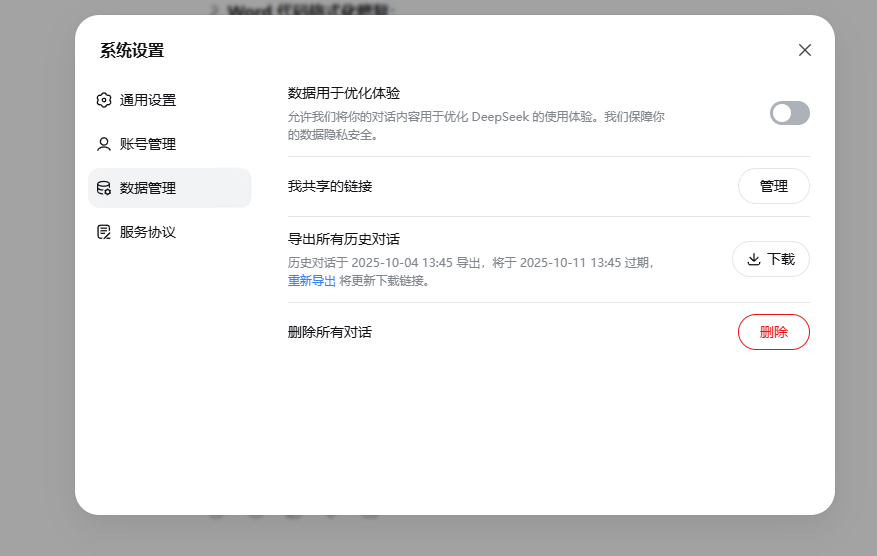
1.deepseek导出界面,得到一个conversations.json
2.将json切分成若干个小的 对话json
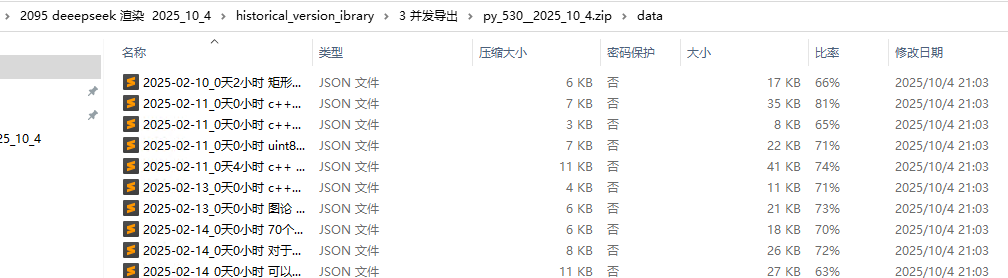
对应的代码是:
python
def printline(*args):
print('-'*50,*args,'-'*50)
#
# by 广都
# 1975767630
#
import traceback
import os
import shutil
import sys
# # dll搜索路径,修改值。
# for key, value in os.environ.items():
# if key == 'PATH':
# for c in value.split(';'):
# # print(f"{key}={c}")
# try:
# os.add_dll_directory(c)
# except:
# pass
import os
def get_path_list(file_path):
directory = os.path.dirname(file_path)
filename = os.path.basename(file_path)
file_name, file_extension = os.path.splitext(filename)
return directory, file_name, file_extension
from datetime import datetime
from datetime import datetime, timedelta
def days_to_date(days):# 字母转文字
try:
try:
days = int(float(days))
dt_object = datetime(1900, 1,1) + timedelta(days=days)
except:
pass
return days
return dt_object.strftime("%Y-%m-%d")
except:
pass
return str(days)
def weite_xlsx_wps():
pass
# import os
# import time
# import win32com.client as win32
# # import win32com
# # excel = win32.Dispatch("Excel.Application")
# excel = win32.Dispatch('Ket.Application')
# excel.DisplayAlerts = False # 关闭警告
# excel.Visible = False # 程序可见
# try:
# pwd = os.getcwd()
# myexcel = excel.Workbooks.Open(new_file.replace('/','\\')) # 打开一个已有的表格
# print('当前改写文件名 ',myexcel.Name)
# mysheet = myexcel.Sheets(1)
# ci=0
# for mi,one in enumerate(end_list):
# try:
# if ci%100==0:
# print(ci,one)
# ci=ci+1
# # print(mi,one)
# # one[0] +=1
# mysheet.Range(f'S{one[0]}').Value = str(one[2])
# mysheet.Range(f'R{one[0]}').Value = str(one[3])
# # mysheet.Range('P'+str(vone[0])).Value = str(vone[1][1][0])
# except Exception as e0:
# pass
# print(e0)
# print('本行错误 ',vone)
# myexcel.SaveAs(new_file.replace('/','\\')) # 保存
# except Exception as e:
# pass
# print('发生错误',e)
# excel.Quit() # 退出
# shutil.copy(new_file,'最新结果.xlsx')
# print('计算结束')
def get_all_file(path):
# import os
return_list=[]
for root,dirs,files in os.walk(path,topdown=True):
for file_one in files:
use_path=root+'/'+file_one
return_list.append(use_path.replace('/','\\'))
return return_list
def del_file(path):
#!/usr/bin/env python
import os
import shutil
filelist=[]
rootdir=path
filelist=os.listdir(rootdir)
for f in filelist:
filepath = os.path.join( rootdir, f )
if os.path.isfile(filepath):
os.remove(filepath)
#print filepath+" removed!"
elif os.path.isdir(filepath):
shutil.rmtree(filepath,True)
#print "dir "+filepath+" removed!"
def make_file(path):
try:
os.makedirs(path)
except:
pass
def get_all_txt(txt_path):
return_list=[]
lines = open(txt_path,'r',encoding='utf8',errors='ignore')
for line in lines:
# print(line)
# line=line.replace(' ','')
line=line.replace('\n','')
return_list.append(line)
# if 'def ' in line and '(' in line and ')' in line:
# return_list.append(str(line))
# return_list.append(int(line))
lines.close()
return return_list
import os
# 获得打包以后得路径。
def get_exe_path(relative_path=''):
if hasattr(sys, '_MEIPASS'):
return os.path.join(sys._MEIPASS, relative_path)
return os.path.join(os.path.abspath("."), relative_path)[:-1]
def get_year_month_day_number():
import datetime
year=str(int(datetime.datetime.now().year))
month=str(int(datetime.datetime.now().month))
day=str(int(datetime.datetime.now().day))
return year+'-'+month+'-'+day
import xlsxwriter
def write_xlsx_list(path,write_list):
workbook_zheng = xlsxwriter.Workbook(path) #新建excel表
worksheet_zheng = workbook_zheng.add_worksheet('sheet1') #新建sheet(sheet的名称为"sheet1")
# worksheet_zheng.set_column(0,1,50)
# worksheet_zheng.set_column(1,2,20)
# worksheet_zheng.set_column(2,10,50)
for fx in range(0,len(write_list)):
try:
x_list=write_list[fx]
for fy in range(0,len(x_list)):
y_v=x_list[fy]
worksheet_zheng.write(fx,fy,y_v)
# print(x_list)
except:
pass
workbook_zheng.close()
# def ocr_func_list():
# # from ocr_system import *
# ocr = GetOcrApi()
# png_json = get_png_json(read_one) # 输入图片,返回jso格式得结果
# get_ocr_png_list(pdfPath, imagePath,num=1)
# read_file_to_json()
# write_json_to_file()
# ocr_show(png_json)
# ocr.close()
# pass
#---------------------------------------------------------------------------------------------------------------------------------------------------------------------
def get_xlsx_list(xlsx_path,sign=0):
import xlrd
read_one=xlsx_path
match_write_in_fp=xlrd.open_workbook(xlsx_path)
sheet_names_list = match_write_in_fp.sheet_names()
sh_read=match_write_in_fp.sheet_by_name(sheet_names_list[0]) #根据sheet索引获得第一个sheet。
# print(sh_read.row_values(0))
sum_list=[]
for line_number in range(sign,sh_read.nrows):
try:
alone_line=sh_read.row_values(line_number)
sum_list.append(alone_line)
except:
pass
return sum_list
def div_data_fuc(datalist,namelist):
mlen = int(len(datalist)/len(namelist))
div_len = len(datalist) - mlen
print(mlen,div_len)
# print(mlen)
# if mlen >= int(mlen):
# mlen=mlen+1
cx_len =0
re_list =[]
for mi,one in enumerate(namelist):
if mi<= div_len:
re_list.append(datalist[cx_len:cx_len+mlen+1])
cx_len= cx_len+ mlen+1
else:
re_list.append(datalist[cx_len:cx_len+mlen])
cx_len= cx_len+ mlen
# return [[]]
return re_list
# import shutil
# import os
# import time
# import win32com.client as win32
# def get_all_sheet_content(excel_file):
# excel = win32.Dispatch('Ket.Application')
# excel.DisplayAlerts = False
# excel.Visible = False
# try:
# p,n = os.path.split(excel_file)
# workbook = excel.Workbooks.Open(excel_file.replace('/', '\\'))
# worksheet = workbook.Sheets(1)
# name_list =[x.Name for x in workbook.Sheets]
# ss_list =[]
# for xxx in workbook.Sheets:
# worksheet= xxx
# data = worksheet.UsedRange.Value
# re_name = worksheet.Name
# content = [list(row) for row in data]
# re_list =[]
# for x in data:
# ts=[]
# for cx in x:
# if cx==None:
# ts.append('')
# else:
# ts.append(cx)
# re_list.append(ts)
# ss_list.append([xxx.Name,re_list])
# workbook.Close()
# return ss_list
# except Exception as e:
# print("Error:", e)
# finally:
# excel.Quit()
# return ['',[]]
def rgb_to_hex(r, g, b):
return (r << 16) + (g << 8) + b
# target_cell.Interior.Color = rgb_to_hex(255, 255, 0) # 将颜色设置为黄色
# 数据ok了,开始写
def write_xlsx_dict_list(path,write_list_2):
workbook_zheng = xlsxwriter.Workbook(path) #新建excel表
worksheet_zheng = workbook_zheng.add_worksheet('Lead') #新建sheet(sheet的名称为"sheet1")
# worksheet_zheng.set_column(0,1,50)
write_list= write_list_2[0]
for fx in range(0,len(write_list)):
try:
x_list=write_list[fx]
red_font = workbook_zheng.add_format(x_list[1])
# print(x_list[1])
for fy in range(0,len(x_list[0])):
y_v=x_list[0][fy]
y_v= str(y_v)
if y_v[-2:]=='.0':
y_v=y_v[:-2]
worksheet_zheng.write(fx,fy,y_v,red_font)
# print(x_list)
except Exception as e:
pass
# print(e)
worksheet_zheng = workbook_zheng.add_worksheet('更多信息') #新建sheet(sheet的名称为"sheet1")
# worksheet_zheng.set_column(0,1,50)
write_list=write_list_2[1]
for fx in range(0,len(write_list)):
try:
x_list=write_list[fx]
red_font = workbook_zheng.add_format(x_list[1])
# print(x_list[1])
for fy in range(0,len(x_list[0])):
y_v=x_list[0][fy]
y_v= str(y_v)
if y_v[-2:]=='.0':
y_v=y_v[:-2]
worksheet_zheng.write(fx,fy,y_v,red_font)
# print(x_list)
except Exception as e:
pass
# print(e)
workbook_zheng.close()
def get_current_time():
from datetime import datetime
now = datetime.now()
return str(now.strftime("%Y_%m_%d %H_%M_%S"))
import json
def read_file_to_json(file_path):
with open(file_path, 'r', encoding='utf-8') as file:
try:
json_data = json.load(file)
except UnicodeDecodeError:
file.seek(0)
json_data = json.load(file, encoding='gbk')
return json_data
import json
def write_json_to_file(file_path, data_list):
with open(file_path, 'w', encoding='utf-8') as file:
json.dump(data_list, file, ensure_ascii=False, indent=4)
import pickle
def write_dict_to_file(dict_obj, file_path):
with open(file_path, 'wb') as file:
pickle.dump(dict_obj, file)
def read_dict_from_file(file_path):
with open(file_path, 'rb') as file:
dict_obj = pickle.load(file)
return dict_obj
def json_to_string(data):
"""
将JSON对象转换为字符串
"""
return json.dumps(data)
def string_to_json(string):
"""
将字符串转换为JSON对象
"""
# print('str ',string )
return json.loads(string)
def extract_numbers2(string):
numbers = re.findall(r'\d+', string)
return [int(num) for num in numbers]
def num_col(number):
number=number+1
column = ""
while number > 0:
number -= 1
column = chr(number % 26 + 65) + column
number //= 26
return column
def col_num(column):
column=str(column).upper()
number = 0
for i in range(len(column)):
number = number * 26 + ord(column[i]) - 64
return number - 1
def move_file(p1,p2):
xx= p1.replace('\\','/').split('/')[-1]
ss= p2+'/'+xx
make_file(ss)
for x in get_all_file(p1):
shutil.copy(x,ss)
import copy
def fill_list_fuc(lst,mlen):
lst =copy.deepcopy(lst)
# 如果列表长度小于6,则在列表末尾添加空字符串,直到长度为6
while len(lst) < mlen:
lst.append("")
return lst
def split_list_fuc(l, n=2):
"""
把一个list切分为n份,返回n个list
:param l: 要切分的列表
:param n: 切分的份数
:return: 切分后的列表
"""
if l is None or n < 1:
return []
if n >= len(l):
return [l[i:i+1] for i in range(len(l))]
return [l[i:i + len(l)//n + 1] for i in range(0, len(l), len(l)//n + 1)]
import copy
import random
# 给定一个list,打乱顺序
def shuffle_list_fuc(data_list):
re_list = data_list.copy()
for i in range(len(re_list)-1, 0, -1):
j = random.randint(0, i)
re_list[i], re_list[j] = re_list[j], re_list[i]
return re_list
def num_col(number):
number=number+1
column = ""
while number > 0:
number -= 1
column = chr(number % 26 + 65) + column
number //= 26
return column
def col_num(column):
column=str(column).upper()
number = 0
for i in range(len(column)):
number = number * 26 + ord(column[i]) - 64
return number - 1
import re
def get_parse_excel_formula_fuc(formula):
pattern = r'([A-Za-z]+)(\d+)'
matches = re.findall(pattern, formula)
results = []
for match in matches:
alpha = match[0]
num = int(match[1])
results.append((alpha, num))
return results
def get_range_fuc(main_list, range_str):
# 解析范围区域
range_list = get_parse_excel_formula_fuc(range_str)[:2]
if len(range_list) == 0:
return None
if len(range_list) == 1:
# 单个单元格
col = col_num(range_list[0][0])
row = range_list[0][1] - 1
if col < len(main_list[0]) and row < len(main_list):
return main_list[row][col]
else:
return None
else:
# 区域范围
start_col = col_num(range_list[0][0])
start_row = range_list[0][1] - 1
end_col = col_num(range_list[1][0])
end_row = range_list[1][1] - 1
if (start_col < len(main_list[0]) and start_row < len(main_list) and
end_col < len(main_list[0]) and end_row < len(main_list)):
result = []
for row_index in range(start_row, end_row + 1):
row_result = []
for col_index in range(start_col, end_col + 1):
row_result.append(main_list[row_index][col_index])
result.append(row_result)
return result
else:
return None
def get_xlsx_all_list_fuc(xlsx_path,sign=0):
import xlrd
read_one=xlsx_path
match_write_in_fp=xlrd.open_workbook(xlsx_path)
sheet_names_list = match_write_in_fp.sheet_names()
re_list =[]
for one in sheet_names_list[:]:
sh_read=match_write_in_fp.sheet_by_name(one) #根据sheet索引获得第一个sheet。
sum_list=[]
for line_number in range(sign,sh_read.nrows):
try:
alone_line1=sh_read.row_values(line_number)
# alone_line= [int(x) for x in alone_line]
alone_line=[]
for x in alone_line1:
if x=='':
alone_line.append('')
else:
try:
alone_line.append(int(x))
except:
pass
alone_line.append(x)
sum_list.append(alone_line)
except Exception as e:
pass
print(e)
# return sum_list
re_list.append([one,sum_list])
return re_list
import datetime
class TimeLogger:
def __init__(self):
import datetime
self.start_time = datetime.datetime.now()
self.previous_time = self.start_time
self.time_log = []
self.time_number = 0
def get_now_time(self,show_str = ''):
current_time = datetime.datetime.now()
time_diff = current_time - self.previous_time
self.previous_time = current_time
self.time_log.append((current_time, time_diff))
current_time_str = current_time.strftime("%Y-%m-%d %H:%M:%S.%f")
time_diff_str = str(time_diff)
# time_log,append()
if str(show_str)=='':
print(["时间差值: ",self.time_number,time_diff_str, current_time_str])
else:
print(["时间差值: ",self.time_number,time_diff_str, current_time_str,show_str])
self.time_number=self.time_number+1
# from basci_fuc import *
# 示例用法
logger = TimeLogger()
logger.get_now_time()
def get_sanitize_filename_fuc(input_str: str) -> str:
"""
将输入字符串转换为合法的Windows 10文件名:
1. 替换所有禁止字符(\ / : * ? " < > |)为空格
2. 合并连续空格为单个,并去除首尾空格
"""
# 定义Windows 10禁止的文件名字符集合
forbidden_chars = {'\\', '/', ':', '*', '?', '"', '<', '>', '|'}
# 步骤1:替换禁止字符为空格
temp_str = ''.join(' ' if char in forbidden_chars else char for char in input_str)
# 步骤2:合并连续空格并去除首尾空格(split默认分割所有空白,join用单空格连接)
return ' '.join(temp_str.split())
def get_sanitize_filename_fuc(input_str: str) -> str:
"""
将输入字符串转换为合法的Windows文件名:
1. 替换Windows禁止字符(\ / : * ? " < > |)和中文标点为空格
2. 合并连续空格为单个,并去除首尾空格
"""
# 1. 定义需要替换的字符集合(Windows禁止字符 + 常见中文标点)
forbidden_chars = {
'\\', '/', ':', '*', '?', '"', '<', '>', '|', # Windows原生禁止字符
',', '。', '!', '?', '、', ';', ':', '"', '"', ''', ''', # 中文常用标点
'(', ')', '【', '】', '《', '》', '...', '---', '~', '·' # 扩展中文标点(可根据需求增减)
}
# 2. 替换所有禁止字符/中文标点为空格
cleaned_str = ''.join(' ' if char in forbidden_chars else char for char in input_str)
# 3. 合并连续空格 + 去除首尾空格(split默认按所有空白分割,join用单空格连接)
return ' '.join(cleaned_str.split())
from datetime import datetime
def generate_file_name(data: dict, lang: str = "zh", compact_date: bool = False) -> str:
"""
从JSON数据中生成包含「创建时间」和「对话时长」的合法文件名:
- 创建时间:提取inserted_at的年月日(支持紧凑格式如YYYYMMDD)
- 对话时长:updated_at - inserted_at 的「天数+小时」
- 参数:
- lang: 时长语言("zh"=中文,"en"=英文)
- compact_date: 是否用紧凑日期格式(默认False,即YYYY-MM-DD)
- 返回:合法文件名(无Windows禁止字符)
"""
# 1. 提取时间字段(处理缺失情况)
inserted_at_str = data.get("inserted_at", "")
updated_at_str = data.get("updated_at", "")
if not inserted_at_str or not updated_at_str:
return "missing_time_info" # 时间缺失的默认值
# 2. 解析时间字符串为datetime对象(支持时区)
try:
inserted_dt = datetime.fromisoformat(inserted_at_str)
updated_dt = datetime.fromisoformat(updated_at_str)
except ValueError:
return "invalid_time_format" # 时间格式错误的默认值
# 3. 计算时长(确保updated在inserted之后)
delta = updated_dt - inserted_dt
total_seconds = delta.total_seconds()
# 处理时间倒序(如updated比inserted早)
if total_seconds < 0:
days = 0
hours = 0
else:
days = int(total_seconds // 86400) # 总天数(向下取整)
hours = int((total_seconds % 86400) // 3600) # 剩余小时数(向下取整)
# 4. 格式化创建时间(年月日)
date_format = "%Y%m%d" if compact_date else "%Y-%m-%d"
created_date_str = inserted_dt.strftime(date_format) # 如20250210 或 2025-02-10
# 5. 生成时长字符串(支持中英文)
duration_str = (
f"{days}d{hours}h" if lang == "en" else f"{days}天{hours}小时"
) # 如0d2h 或 0天2小时
# 6. 组合文件名(合法字符:中文/英文/数字/-/_/空格)
file_name = f"{created_date_str}_{duration_str}"
# (可选)去除可能的法律字符(如多余的空格或符号,此处已处理)
return file_name
# # ------------------- 测试用例 -------------------
# data = {
# "id": "f6952608-3a92-4b66-8400-cc2aedab0b42",
# "title": "矩形下料的算法都有哪学",
# "inserted_at": "2025-02-10T19:35:14.921000+08:00",
# "updated_at": "2025-02-10T22:07:14.030000+08:00" # 时长:2小时31分 → 0天2小时
# }
# # 测试1:中文+默认日期格式
# print(generate_file_name(data)) # 输出:2025-02-10_0天2小时
# # 测试2:英文+紧凑日期格式
# print(generate_file_name(data, lang="en", compact_date=True)) # 输出:20250210_0d2h
# # 测试3:长时间对话(假设updated_at是2天后)
# data["updated_at"] = "2025-02-12T10:00:00+08:00" # 时长:1天14小时34分 → 1天14小时
# print(generate_file_name(data)) # 输出:2025-02-10_1天14小时
# w文件区域。
main_path=os.getcwd() # exe文件存放的路径。
exe_path=get_exe_path() # 打包以后资源文件存放的路径。
read_path=main_path+'/读取文件'
write_path=main_path+'/写入文件'
# temp_path=main_path+'/临时文件'
# make_file(read_path)
make_file(write_path)
json_dict = read_file_to_json("conversations.json")
write_json_to_file("格式化导出文件.json",json_dict)
del_file(write_path)
for mi,chat in enumerate(json_dict):
name = chat['title']
name_new= get_sanitize_filename_fuc(name)
print([mi,name,name_new])
time_str=generate_file_name(chat)
print(time_str) # 输出:2025-02-10_0天2小时
# write_json_to_file(f'{write_path }/{mi}.json',chat)
write_json_to_file(f'{write_path }/{time_str} {name_new}.json',chat)
'''
3.导出得到 小json了,自己用nodejs的代码处理一下即可
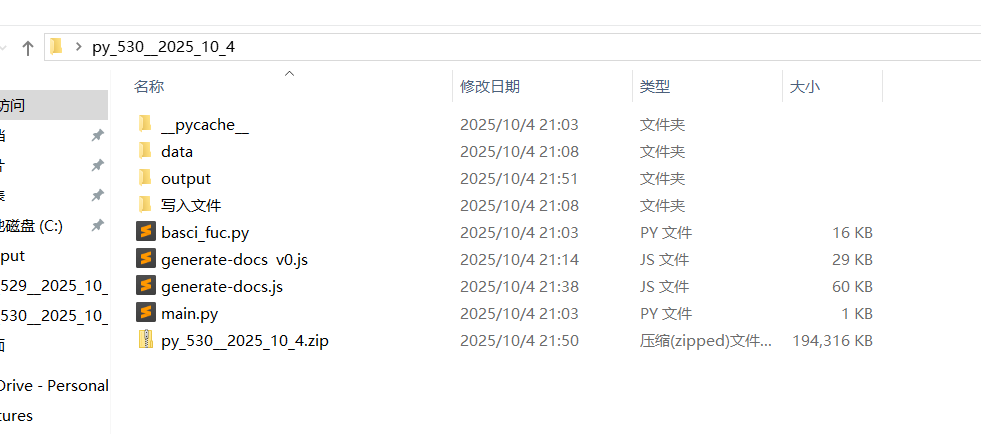
对应的js代码如下
```javascript
// const fs = require('fs-extra');
// const path = require('path');
// const puppeteer = require('puppeteer-core');
// const { Document, Paragraph, TextRun, HeadingLevel, AlignmentType, Table, TableCell, TableRow, BorderStyle, ShadingType, convertInchesToTwip, Packer } = require('docx');
// const markdownIt = require('markdown-it');
// const hljs = require('highlight.js');
// class DeepSeekRenderer {
// constructor() {
// this.md = new markdownIt({
// html: true,
// linkify: true,
// typographer: true,
// highlight: function (str, lang) {
// if (lang && hljs.getLanguage(lang)) {
// try {
// return '<pre class="hljs"><code>' +
// hljs.highlight(str, { language: lang, ignoreIllegals: true }).value +
// '</code></pre>';
// } catch (__) {}
// }
// return '<pre class="hljs"><code>' + this.md.utils.escapeHtml(str) + '</code></pre>';
// }
// });
// // Chrome 路径配置(Windows)
// this.chromePaths = [
// 'C:\\Program Files\\Google\\Chrome\\Application\\chrome.exe',
// 'C:\\Program Files (x86)\\Google\\Chrome\\Application\\chrome.exe',
// process.env.LOCALAPPDATA + '\\Google\\Chrome\\Application\\chrome.exe',
// process.env.PROGRAMFILES + '\\Google\\Chrome\\Application\\chrome.exe',
// process.env['PROGRAMFILES(X86)'] + '\\Google\\Chrome\\Application\\chrome.exe'
// ];
// }
// /**
// * 主函数:处理 JSON 文件并生成 PDF 和 Word 文档
// */
// async main(jsonFile, pdfOutput, docxOutput) {
// try {
// console.log('🚀 开始处理对话文件...');
// // 读取和解析 JSON
// const data = await this.loadJSON(jsonFile);
// const conversation = this.flattenConversation(data);
// console.log(`📊 解析完成:共 ${conversation.length} 条消息`);
// // 并行生成 PDF 和 Word
// await Promise.all([
// this.generatePDF(conversation, data.title || 'DeepSeek对话', pdfOutput),
// this.generateWord(conversation, data.title || 'DeepSeek对话', docxOutput)
// ]);
// console.log('✅ 文档生成完成!');
// console.log(`📄 PDF: ${pdfOutput}`);
// console.log(`📝 Word: ${docxOutput}`);
// } catch (error) {
// console.error('❌ 处理失败:', error);
// throw error;
// }
// }
// /**
// * 读取 JSON 文件
// */
// async loadJSON(filePath) {
// try {
// const data = await fs.readFile(filePath, 'utf8');
// return JSON.parse(data);
// } catch (error) {
// throw new Error(`读取 JSON 文件失败: ${error.message}`);
// }
// }
// /**
// * 扁平化对话树结构为线性消息列表
// */
// flattenConversation(data) {
// const messages = [];
// const mapping = data.mapping || {};
// // 从 root 开始遍历对话树
// let currentNode = 'root';
// while (currentNode && mapping[currentNode]) {
// const node = mapping[currentNode];
// const messageData = node.message;
// if (messageData) {
// const fragments = messageData.fragments || [];
// fragments.forEach(fragment => {
// if (fragment.content && fragment.content.trim()) {
// messages.push({
// type: fragment.type,
// content: fragment.content.trim(),
// timestamp: messageData.inserted_at,
// model: messageData.model || 'unknown',
// nodeId: currentNode
// });
// }
// });
// }
// // 移动到下一个节点
// const children = node.children || [];
// currentNode = children[0] || null;
// }
// return messages;
// }
// /**
// * 查找 Chrome 浏览器路径
// */
// async findChromePath() {
// for (const chromePath of this.chromePaths) {
// try {
// await fs.access(chromePath);
// console.log(`🔍 找到 Chrome: ${chromePath}`);
// return chromePath;
// } catch (e) {
// // 继续查找
// }
// }
// throw new Error('未找到 Chrome 浏览器,请确保已安装 Chrome');
// }
// /**
// * 生成 PDF 文档
// */
// async generatePDF(conversation, title, outputPath) {
// console.log('📄 开始生成 PDF...');
// const browser = await puppeteer.launch({
// executablePath: await this.findChromePath(),
// headless: true,
// args: ['--no-sandbox', '--disable-setuid-sandbox', '--disable-dev-shm-usage']
// });
// try {
// const page = await browser.newPage();
// const htmlContent = this.generateHTML(conversation, title);
// await page.setContent(htmlContent, { waitUntil: 'networkidle0' });
// await page.pdf({
// path: outputPath,
// format: 'A4',
// printBackground: true,
// margin: {
// top: '20mm',
// right: '20mm',
// bottom: '20mm',
// left: '20mm'
// }
// });
// await page.close();
// } finally {
// await browser.close();
// }
// }
// /**
// * 生成 HTML 内容(用于 PDF 转换)
// */
// generateHTML(conversation, title) {
// const messagesHTML = conversation.map(msg => {
// const content = this.formatContent(msg.content);
// const timestamp = this.formatTimestamp(msg.timestamp);
// switch (msg.type) {
// case 'REQUEST':
// return `
// <div class="message user-message">
// <div class="message-content">
// <div class="message-text">${content}</div>
// <div class="message-time">${timestamp}</div>
// </div>
// <div class="message-avatar">👤</div>
// </div>
// `;
// case 'THINK':
// return `
// <div class="message think-message">
// <div class="message-avatar">💭</div>
// <div class="message-content">
// <div class="message-header">思考过程</div>
// <div class="message-text think-text">${content}</div>
// </div>
// </div>
// `;
// case 'RESPONSE':
// return `
// <div class="message ai-message">
// <div class="message-avatar">🤖</div>
// <div class="message-content">
// <div class="message-header">AI 回复</div>
// <div class="message-text">${content}</div>
// <div class="message-time">${timestamp}</div>
// </div>
// </div>
// `;
// default:
// return '';
// }
// }).join('');
// return `
// <!DOCTYPE html>
// <html>
// <head>
// <meta charset="UTF-8">
// <title>${title}</title>
// <link rel="stylesheet" href="https://cdnjs.cloudflare.com/ajax/libs/highlight.js/11.0.0/styles/github-dark.min.css">
// <style>
// @import url('https://fonts.googleapis.com/css2?family=Inter:wght@300;400;500;600;700&display=swap');
// * {
// margin: 0;
// padding: 0;
// box-sizing: border-box;
// }
// body {
// font-family: 'Inter', -apple-system, BlinkMacSystemFont, 'Segoe UI', Roboto, sans-serif;
// line-height: 1.6;
// color: #1a1a1a;
// background: #f8f9fa;
// padding: 20px;
// }
// .chat-container {
// max-width: 800px;
// margin: 0 auto;
// background: white;
// border-radius: 12px;
// box-shadow: 0 4px 20px rgba(0, 0, 0, 0.1);
// overflow: hidden;
// }
// .chat-header {
// background: linear-gradient(135deg, #667eea 0%, #764ba2 100%);
// color: white;
// padding: 30px;
// text-align: center;
// }
// .chat-title {
// font-size: 24px;
// font-weight: 700;
// margin-bottom: 8px;
// }
// .chat-subtitle {
// font-size: 14px;
// opacity: 0.9;
// }
// .messages-container {
// padding: 30px;
// }
// .message {
// display: flex;
// margin-bottom: 20px;
// animation: fadeIn 0.3s ease-in;
// }
// .user-message {
// justify-content: flex-end;
// }
// .message-avatar {
// width: 40px;
// height: 40px;
// border-radius: 50%;
// display: flex;
// align-items: center;
// justify-content: center;
// font-size: 18px;
// flex-shrink: 0;
// }
// .user-message .message-avatar {
// order: 2;
// margin-left: 12px;
// background: #007AFF;
// }
// .ai-message .message-avatar,
// .think-message .message-avatar {
// margin-right: 12px;
// background: #34C759;
// }
// .think-message .message-avatar {
// background: #FF9500;
// }
// .message-content {
// max-width: 85%;
// padding: 16px 20px;
// border-radius: 18px;
// position: relative;
// }
// .user-message .message-content {
// background: #007AFF;
// color: white;
// border-bottom-right-radius: 4px;
// }
// .ai-message .message-content {
// background: white;
// border: 1px solid #E5E5EA;
// border-bottom-left-radius: 4px;
// box-shadow: 0 2px 8px rgba(0, 0, 0, 0.1);
// }
// .think-message .message-content {
// background: #FFF3CD;
// border: 1px solid #FFEAA7;
// border-bottom-left-radius: 4px;
// border-left: 4px solid #FFA500;
// }
// .message-header {
// font-size: 12px;
// font-weight: 600;
// margin-bottom: 6px;
// opacity: 0.8;
// text-transform: uppercase;
// }
// .think-message .message-header {
// color: #856404;
// }
// .message-text {
// font-size: 14px;
// line-height: 1.5;
// }
// .think-text {
// font-style: italic;
// color: #856404;
// font-size: 13px;
// }
// .message-time {
// font-size: 11px;
// opacity: 0.7;
// margin-top: 6px;
// }
// .user-message .message-time {
// text-align: right;
// }
// /* 代码高亮样式 */
// .hljs {
// background: #1a1a1a !important;
// border-radius: 8px;
// padding: 16px !important;
// font-family: 'Consolas', 'Monaco', 'Courier New', monospace;
// font-size: 13px;
// line-height: 1.4;
// margin: 12px 0;
// }
// .hljs-keyword {
// color: #ff79c6 !important;
// }
// .hljs-string {
// color: #f1fa8c !important;
// }
// .hljs-function {
// color: #50fa7b !important;
// }
// .hljs-comment {
// color: #6272a4 !important;
// }
// .inline-code {
// background: #f1f3f4;
// color: #e91e63;
// padding: 2px 6px;
// border-radius: 4px;
// font-family: 'Consolas', 'Monaco', 'Courier New', monospace;
// font-size: 12px;
// border: 1px solid #e1e5e9;
// }
// /* Markdown 样式 */
// .message-text h1, .message-text h2, .message-text h3 {
// margin: 16px 0 8px 0;
// font-weight: 600;
// }
// .message-text h1 { font-size: 18px; }
// .message-text h2 { font-size: 16px; }
// .message-text h3 { font-size: 14px; }
// .message-text ul, .message-text ol {
// margin: 8px 0;
// padding-left: 24px;
// }
// .message-text li {
// margin: 4px 0;
// }
// .message-text blockquote {
// border-left: 4px solid #007AFF;
// padding-left: 16px;
// margin: 12px 0;
// color: #666;
// font-style: italic;
// }
// @keyframes fadeIn {
// from { opacity: 0; transform: translateY(10px); }
// to { opacity: 1; transform: translateY(0); }
// }
// @media print {
// body {
// background: white !important;
// padding: 0 !important;
// }
// .chat-container {
// box-shadow: none !important;
// border-radius: 0 !important;
// }
// }
// </style>
// </head>
// <body>
// <div class="chat-container">
// <div class="chat-header">
// <h1 class="chat-title">${title}</h1>
// <div class="chat-subtitle">AI对话记录 · ${new Date().toLocaleDateString('zh-CN')}</div>
// </div>
// <div class="messages-container">
// ${messagesHTML}
// </div>
// </div>
// <script src="https://cdnjs.cloudflare.com/ajax/libs/highlight.js/11.0.0/highlight.min.js"></script>
// <script>hljs.highlightAll();</script>
// </body>
// </html>
// `;
// }
// /**
// * 格式化内容(Markdown 转 HTML)
// */
// formatContent(content) {
// // 先处理代码块,避免被 Markdown 解析干扰
// let processed = content.replace(/```(\w+)?\n([\s\S]*?)```/g, (match, lang, code) => {
// return `\n\n\`\`\`${lang || ''}\n${code}\n\`\`\`\n\n`;
// });
// // 使用 markdown-it 转换
// processed = this.md.render(processed);
// return processed;
// }
// /**
// * 格式化时间戳
// */
// formatTimestamp(timestamp) {
// try {
// const date = new Date(timestamp);
// return date.toLocaleString('zh-CN', {
// year: 'numeric',
// month: '2-digit',
// day: '2-digit',
// hour: '2-digit',
// minute: '2-digit'
// });
// } catch (e) {
// return '';
// }
// }
// /**
// * 生成 Word 文档
// */
// async generateWord(conversation, title, outputPath) {
// console.log('📝 开始生成 Word 文档...');
// const children = [];
// // 添加标题
// children.push(
// new Paragraph({
// text: title,
// heading: HeadingLevel.HEADING_1,
// alignment: AlignmentType.CENTER,
// spacing: { after: 400 }
// })
// );
// // 添加元信息
// children.push(
// new Paragraph({
// text: `生成时间: ${new Date().toLocaleString('zh-CN')}`,
// alignment: AlignmentType.CENTER,
// spacing: { after: 600 }
// })
// );
// // 添加对话内容
// for (const msg of conversation) {
// children.push(...this.createWordMessage(msg));
// children.push(new Paragraph({ text: '', spacing: { after: 200 } }));
// }
// // 创建文档
// const doc = new Document({
// sections: [{
// properties: {},
// children: children
// }]
// });
// // 保存文档 - 修复这里,使用 Packer 而不是 docx.Packer
// const buffer = await Packer.toBuffer(doc);
// await fs.writeFile(outputPath, buffer);
// }
// /**
// * 创建 Word 消息元素
// */
// createWordMessage(msg) {
// const elements = [];
// const timestamp = this.formatTimestamp(msg.timestamp);
// switch (msg.type) {
// case 'REQUEST':
// // 用户消息 - 右侧蓝色
// elements.push(
// new Paragraph({
// alignment: AlignmentType.RIGHT,
// spacing: { after: 200 },
// children: [
// new TextRun({
// text: msg.content,
// color: 'FFFFFF',
// size: 20
// })
// ],
// border: {
// bottom: { style: BorderStyle.NONE },
// top: { style: BorderStyle.NONE },
// left: { style: BorderStyle.NONE },
// right: { style: BorderStyle.NONE }
// },
// shading: {
// type: ShadingType.SOLID,
// color: '007AFF',
// fill: '007AFF'
// }
// }),
// new Paragraph({
// alignment: AlignmentType.RIGHT,
// children: [
// new TextRun({
// text: `👤 用户 · ${timestamp}`,
// color: '666666',
// size: 16,
// italics: true
// })
// ]
// })
// );
// break;
// case 'THINK':
// // 思考过程 - 左侧灰色
// elements.push(
// new Paragraph({
// alignment: AlignmentType.LEFT,
// spacing: { after: 200 },
// children: [
// new TextRun({
// text: '💭 思考过程: ',
// color: 'FF9500',
// size: 18,
// bold: true
// }),
// new TextRun({
// text: msg.content,
// color: '8B8000',
// size: 18,
// italics: true
// })
// ]
// })
// );
// break;
// case 'RESPONSE':
// // AI 回复 - 左侧带样式
// elements.push(
// new Paragraph({
// alignment: AlignmentType.LEFT,
// spacing: { after: 200 },
// children: [
// new TextRun({
// text: '🤖 AI回复',
// color: '34C759',
// size: 18,
// bold: true
// })
// ]
// }),
// new Paragraph({
// alignment: AlignmentType.LEFT,
// spacing: { after: 200 },
// children: [
// new TextRun({
// text: msg.content,
// color: '000000',
// size: 20
// })
// ],
// border: {
// bottom: { style: BorderStyle.SINGLE, color: 'E5E5EA', size: 1 },
// top: { style: BorderStyle.SINGLE, color: 'E5E5EA', size: 1 },
// left: { style: BorderStyle.SINGLE, color: 'E5E5EA', size: 1 },
// right: { style: BorderStyle.SINGLE, color: 'E5E5EA', size: 1 }
// },
// shading: {
// type: ShadingType.SOLID,
// color: 'F2F2F7',
// fill: 'F2F2F7'
// }
// }),
// new Paragraph({
// alignment: AlignmentType.LEFT,
// children: [
// new TextRun({
// text: timestamp,
// color: '666666',
// size: 16,
// italics: true
// })
// ]
// })
// );
// break;
// }
// return elements;
// }
// }
// // 并发处理函数
// async function processAllFiles() {
// const renderer = new DeepSeekRenderer();
// try {
// // 确保输出目录存在
// await fs.mkdir('./output', { recursive: true });
// // 读取 data 目录下的所有 JSON 文件
// const dataDir = './data';
// const files = await fs.readdir(dataDir);
// const jsonFiles = files.filter(file => file.endsWith('.json'));
// if (jsonFiles.length === 0) {
// console.log('在 ./data 目录中没有找到 JSON 文件');
// return;
// }
// console.log(`找到 ${jsonFiles.length} 个 JSON 文件,开始并发处理...`);
// // 设置并发数(根据你的CPU核心数调整)
// const CONCURRENCY = 12;
// // 创建任务数组
// const tasks = jsonFiles.map(jsonFile => {
// const jsonPath = path.join(dataDir, jsonFile);
// const baseName = path.basename(jsonFile, '.json');
// const PDF_OUTPUT = path.join('./output', `${baseName}.pdf`);
// const DOCX_OUTPUT = path.join('./output', `${baseName}.docx`);
// return {
// jsonFile,
// jsonPath,
// PDF_OUTPUT,
// DOCX_OUTPUT
// };
// });
// // 并发执行函数
// const processFile = async (task) => {
// try {
// console.log(`开始处理: ${task.jsonFile}`);
// await renderer.main(task.jsonPath, task.PDF_OUTPUT, task.DOCX_OUTPUT);
// console.log(`完成: ${task.jsonFile}`);
// return { success: true, file: task.jsonFile };
// } catch (error) {
// console.error(`处理文件 ${task.jsonFile} 时出错:`, error);
// return { success: false, file: task.jsonFile, error };
// }
// };
// // 使用并发控制执行所有任务
// const results = await runConcurrent(tasks, processFile, CONCURRENCY);
// // 统计结果
// const successful = results.filter(r => r.success).length;
// const failed = results.filter(r => !r.success).length;
// console.log(`\n处理完成! 成功: ${successful}, 失败: ${failed}`);
// } catch (error) {
// console.error('程序执行失败:', error);
// process.exit(1);
// }
// }
// // 并发控制函数
// async function runConcurrent(tasks, worker, concurrency) {
// const results = [];
// const executing = [];
// for (const task of tasks) {
// // 创建 Promise
// const p = worker(task).then(result => {
// results.push(result);
// // 任务完成后从执行队列中移除
// executing.splice(executing.indexOf(p), 1);
// });
// executing.push(p);
// // 如果达到并发限制,等待一个任务完成
// if (executing.length >= concurrency) {
// await Promise.race(executing);
// }
// }
// // 等待所有剩余任务完成
// await Promise.all(executing);
// return results;
// }
// // 运行程序
// if (require.main === module) {
// processAllFiles();
// }
// module.exports = DeepSeekRenderer;
const fs = require('fs-extra');
const path = require('path');
const puppeteer = require('puppeteer-core');
const { Document, Paragraph, TextRun, HeadingLevel, AlignmentType, BorderStyle, ShadingType, Packer } = require('docx');
const markdownIt = require('markdown-it');
const hljs = require('highlight.js');
class DeepSeekRenderer {
constructor() {
this.md = new markdownIt({
html: true,
linkify: true,
typographer: true,
highlight: (str, lang) => {
if (lang && hljs.getLanguage(lang)) {
try {
return '<pre class="hljs"><code>' +
hljs.highlight(str, { language: lang, ignoreIllegals: true }).value +
'</code></pre>';
} catch (__) {}
}
return '<pre class="hljs"><code>' + this.md.utils.escapeHtml(str) + '</code></pre>';
}
});
// Chrome 路径配置
this.chromePaths = [
'C:\\Program Files\\Google\\Chrome\\Application\\chrome.exe',
'C:\\Program Files (x86)\\Google\\Chrome\\Application\\chrome.exe',
process.env.LOCALAPPDATA + '\\Google\\Chrome\\Application\\chrome.exe',
process.env.PROGRAMFILES + '\\Google\\Chrome\\Application\\chrome.exe',
process.env['PROGRAMFILES(X86)'] + '\\Google\\Chrome\\Application\\chrome.exe'
];
this.browser = null;
}
/**
* 初始化浏览器实例(单例模式)
*/
async getBrowser() {
if (!this.browser) {
const chromePath = await this.findChromePath();
this.browser = await puppeteer.launch({
executablePath: chromePath,
headless: true,
args: [
'--no-sandbox',
'--disable-setuid-sandbox',
'--disable-dev-shm-usage',
'--disable-gpu',
'--disable-web-security',
'--disable-features=VizDisplayCompositor'
],
timeout: 120000 // 120秒超时
});
}
return this.browser;
}
/**
* 关闭浏览器
*/
async closeBrowser() {
if (this.browser) {
await this.browser.close();
this.browser = null;
}
}
/**
* 主函数:处理 JSON 文件并生成 PDF 和 Word 文档
*/
async main(jsonFile, pdfOutput, docxOutput, retryCount = 0) {
const maxRetries = 2;
try {
console.log('🚀 开始处理对话文件...');
// 读取和解析 JSON
const data = await this.loadJSON(jsonFile);
const conversation = this.flattenConversation(data);
console.log(`📊 解析完成:共 ${conversation.length} 条消息`);
// 生成 PDF 和 Word
await this.generatePDF(conversation, data.title || 'DeepSeek对话', pdfOutput);
await this.generateWord(conversation, data.title || 'DeepSeek对话', docxOutput);
console.log('✅ 文档生成完成!');
console.log(`📄 PDF: ${pdfOutput}`);
console.log(`📝 Word: ${docxOutput}`);
} catch (error) {
console.error('❌ 处理失败:', error.message);
if (retryCount < maxRetries) {
console.log(`🔄 重试中... (${retryCount + 1}/${maxRetries})`);
await this.delay(2000); // 等待2秒后重试
return await this.main(jsonFile, pdfOutput, docxOutput, retryCount + 1);
}
throw error;
}
}
/**
* 延迟函数
*/
delay(ms) {
return new Promise(resolve => setTimeout(resolve, ms));
}
/**
* 读取 JSON 文件
*/
async loadJSON(filePath) {
try {
const data = await fs.readFile(filePath, 'utf8');
return JSON.parse(data);
} catch (error) {
throw new Error(`读取 JSON 文件失败: ${error.message}`);
}
}
/**
* 扁平化对话树结构为线性消息列表
*/
flattenConversation(data) {
const messages = [];
const mapping = data.mapping || {};
let currentNode = 'root';
while (currentNode && mapping[currentNode]) {
const node = mapping[currentNode];
const messageData = node.message;
if (messageData) {
const fragments = messageData.fragments || [];
fragments.forEach(fragment => {
if (fragment.content && fragment.content.trim()) {
messages.push({
type: fragment.type,
content: fragment.content.trim(),
timestamp: messageData.inserted_at,
model: messageData.model || 'unknown',
nodeId: currentNode
});
}
});
}
// 移动到下一个节点
const children = node.children || [];
currentNode = children[0] || null;
}
return messages;
}
/**
* 查找 Chrome 浏览器路径
*/
async findChromePath() {
for (const chromePath of this.chromePaths) {
try {
await fs.access(chromePath);
console.log(`🔍 找到 Chrome: ${chromePath}`);
return chromePath;
} catch (e) {
// 继续查找
}
}
throw new Error('未找到 Chrome 浏览器,请确保已安装 Chrome');
}
/**
* 生成 PDF 文档
*/
async generatePDF(conversation, title, outputPath) {
console.log('📄 开始生成 PDF...');
const browser = await this.getBrowser();
const page = await browser.newPage();
try {
// 设置页面超时
page.setDefaultTimeout(120000);
page.setDefaultNavigationTimeout(120000);
const htmlContent = this.generateHTML(conversation, title);
await page.setContent(htmlContent, {
waitUntil: ['networkidle0', 'domcontentloaded'],
timeout: 1200000
});
// 等待所有资源加载完成
await page.evaluate(async () => {
await new Promise((resolve) => {
if (document.readyState === 'complete') {
resolve();
} else {
window.addEventListener('load', resolve, { once: true });
}
});
});
await page.pdf({
path: outputPath,
format: 'A4',
printBackground: true,
margin: {
top: '20mm',
right: '20mm',
bottom: '20mm',
left: '20mm'
},
timeout: 1200000
});
} finally {
await page.close().catch(() => {}); // 忽略页面关闭错误
}
}
/**
* 生成 HTML 内容(用于 PDF 转换)
*/
generateHTML(conversation, title) {
const messagesHTML = conversation.map(msg => {
const content = this.formatContent(msg.content);
const timestamp = this.formatTimestamp(msg.timestamp);
switch (msg.type) {
case 'REQUEST':
return `
<div class="message user-message">
<div class="message-content">
<div class="message-text">${content}</div>
<div class="message-time">${timestamp}</div>
</div>
<div class="message-avatar">👤</div>
</div>
`;
case 'THINK':
return `
<div class="message think-message">
<div class="message-avatar">💭</div>
<div class="message-content">
<div class="message-header">思考过程</div>
<div class="message-text think-text">${content}</div>
</div>
</div>
`;
case 'RESPONSE':
return `
<div class="message ai-message">
<div class="message-avatar">🤖</div>
<div class="message-content">
<div class="message-header">AI 回复</div>
<div class="message-text">${content}</div>
<div class="message-time">${timestamp}</div>
</div>
</div>
`;
default:
return '';
}
}).join('');
return `
<!DOCTYPE html>
<html>
<head>
<meta charset="UTF-8">
<title>${title}</title>
<link rel="stylesheet" href="https://cdnjs.cloudflare.com/ajax/libs/highlight.js/11.0.0/styles/github-dark.min.css">
<style>
@import url('https://fonts.googleapis.com/css2?family=Inter:wght@300;400;500;600;700&display=swap');
* {
margin: 0;
padding: 0;
box-sizing: border-box;
}
body {
font-family: 'Inter', -apple-system, BlinkMacSystemFont, 'Segoe UI', Roboto, sans-serif;
line-height: 1.6;
color: #1a1a1a;
background: #f8f9fa;
padding: 20px;
}
.chat-container {
max-width: 800px;
margin: 0 auto;
background: white;
border-radius: 12px;
box-shadow: 0 4px 20px rgba(0, 0, 0, 0.1);
overflow: hidden;
}
.chat-header {
background: linear-gradient(135deg, #667eea 0%, #764ba2 100%);
color: white;
padding: 30px;
text-align: center;
}
.chat-title {
font-size: 24px;
font-weight: 700;
margin-bottom: 8px;
}
.chat-subtitle {
font-size: 14px;
opacity: 0.9;
}
.messages-container {
padding: 30px;
}
.message {
display: flex;
margin-bottom: 20px;
animation: fadeIn 0.3s ease-in;
}
.user-message {
justify-content: flex-end;
}
.message-avatar {
width: 40px;
height: 40px;
border-radius: 50%;
display: flex;
align-items: center;
justify-content: center;
font-size: 18px;
flex-shrink: 0;
}
.user-message .message-avatar {
order: 2;
margin-left: 12px;
background: #007AFF;
}
.ai-message .message-avatar,
.think-message .message-avatar {
margin-right: 12px;
background: #34C759;
}
.think-message .message-avatar {
background: #FF9500;
}
.message-content {
max-width: 85%;
padding: 16px 20px;
border-radius: 18px;
position: relative;
}
.user-message .message-content {
background: #007AFF;
color: white;
border-bottom-right-radius: 4px;
}
.ai-message .message-content {
background: white;
border: 1px solid #E5E5EA;
border-bottom-left-radius: 4px;
box-shadow: 0 2px 8px rgba(0, 0, 0, 0.1);
}
.think-message .message-content {
background: #FFF3CD;
border: 1px solid #FFEAA7;
border-bottom-left-radius: 4px;
border-left: 4px solid #FFA500;
}
.message-header {
font-size: 12px;
font-weight: 600;
margin-bottom: 6px;
opacity: 0.8;
text-transform: uppercase;
}
.think-message .message-header {
color: #856404;
}
.message-text {
font-size: 14px;
line-height: 1.5;
}
.think-text {
font-style: italic;
color: #856404;
font-size: 13px;
}
.message-time {
font-size: 11px;
opacity: 0.7;
margin-top: 6px;
}
.user-message .message-time {
text-align: right;
}
/* 代码高亮样式 */
.hljs {
background: #1a1a1a !important;
border-radius: 8px;
padding: 16px !important;
font-family: 'Consolas', 'Monaco', 'Courier New', monospace;
font-size: 13px;
line-height: 1.4;
margin: 12px 0;
}
.hljs-keyword {
color: #ff79c6 !important;
}
.hljs-string {
color: #f1fa8c !important;
}
.hljs-function {
color: #50fa7b !important;
}
.hljs-comment {
color: #6272a4 !important;
}
.inline-code {
background: #f1f3f4;
color: #e91e63;
padding: 2px 6px;
border-radius: 4px;
font-family: 'Consolas', 'Monaco', 'Courier New', monospace;
font-size: 12px;
border: 1px solid #e1e5e9;
}
/* Markdown 样式 */
.message-text h1, .message-text h2, .message-text h3 {
margin: 16px 0 8px 0;
font-weight: 600;
}
.message-text h1 { font-size: 18px; }
.message-text h2 { font-size: 16px; }
.message-text h3 { font-size: 14px; }
.message-text ul, .message-text ol {
margin: 8px 0;
padding-left: 24px;
}
.message-text li {
margin: 4px 0;
}
.message-text blockquote {
border-left: 4px solid #007AFF;
padding-left: 16px;
margin: 12px 0;
color: #666;
font-style: italic;
}
@keyframes fadeIn {
from { opacity: 0; transform: translateY(10px); }
to { opacity: 1; transform: translateY(0); }
}
@media print {
body {
background: white !important;
padding: 0 !important;
}
.chat-container {
box-shadow: none !important;
border-radius: 0 !important;
}
}
</style>
</head>
<body>
<div class="chat-container">
<div class="chat-header">
<h1 class="chat-title">${title}</h1>
<div class="chat-subtitle">AI对话记录 · ${new Date().toLocaleDateString('zh-CN')}</div>
</div>
<div class="messages-container">
${messagesHTML}
</div>
</div>
<script src="https://cdnjs.cloudflare.com/ajax/libs/highlight.js/11.0.0/highlight.min.js"></script>
<script>
document.addEventListener('DOMContentLoaded', function() {
hljs.highlightAll();
});
</script>
</body>
</html>
`;
}
/**
* 格式化内容(Markdown 转 HTML)
*/
formatContent(content) {
if (!content) return '';
try {
return this.md.render(content);
} catch (error) {
console.warn('Markdown 渲染失败,返回原始内容:', error.message);
return content;
}
}
/**
* 格式化时间戳
*/
formatTimestamp(timestamp) {
try {
const date = new Date(timestamp);
return date.toLocaleString('zh-CN', {
year: 'numeric',
month: '2-digit',
day: '2-digit',
hour: '2-digit',
minute: '2-digit'
});
} catch (e) {
return '';
}
}
/**
* 生成 Word 文档
*/
async generateWord(conversation, title, outputPath) {
console.log('📝 开始生成 Word 文档...');
const children = [];
// 添加标题
children.push(
new Paragraph({
text: title,
heading: HeadingLevel.HEADING_1,
alignment: AlignmentType.CENTER,
spacing: { after: 400 }
})
);
// 添加元信息
children.push(
new Paragraph({
text: `生成时间: ${new Date().toLocaleString('zh-CN')}`,
alignment: AlignmentType.CENTER,
spacing: { after: 600 }
})
);
// 添加对话内容
for (const msg of conversation) {
children.push(...this.createWordMessage(msg));
children.push(new Paragraph({ text: '', spacing: { after: 200 } }));
}
// 创建文档
const doc = new Document({
sections: [{
properties: {},
children: children
}]
});
// 保存文档
const buffer = await Packer.toBuffer(doc);
await fs.writeFile(outputPath, buffer);
}
/**
* 创建 Word 消息元素
*/
createWordMessage(msg) {
const elements = [];
const timestamp = this.formatTimestamp(msg.timestamp);
// 处理内容中的代码块
const processedContent = this.processWordContent(msg.content);
switch (msg.type) {
case 'REQUEST':
elements.push(
new Paragraph({
alignment: AlignmentType.RIGHT,
spacing: { after: 100 },
children: [
new TextRun({
text: `👤 用户 · ${timestamp}`,
color: '666666',
size: 16,
italics: true
})
]
}),
new Paragraph({
alignment: AlignmentType.RIGHT,
spacing: { after: 200 },
children: processedContent
})
);
break;
case 'THINK':
elements.push(
new Paragraph({
alignment: AlignmentType.LEFT,
spacing: { after: 100 },
children: [
new TextRun({
text: '💭 思考过程 ',
color: 'FF9500',
size: 18,
bold: true
}),
new TextRun({
text: `· ${timestamp}`,
color: '666666',
size: 16,
italics: true
})
]
}),
new Paragraph({
alignment: AlignmentType.LEFT,
spacing: { after: 200 },
children: processedContent,
border: {
bottom: { style: BorderStyle.SINGLE, color: 'FFEAA7', size: 1 },
top: { style: BorderStyle.SINGLE, color: 'FFEAA7', size: 1 },
left: { style: BorderStyle.SINGLE, color: 'FFEAA7', size: 1 },
right: { style: BorderStyle.SINGLE, color: 'FFEAA7', size: 1 }
},
shading: {
type: ShadingType.SOLID,
color: 'FFF3CD',
fill: 'FFF3CD'
}
})
);
break;
case 'RESPONSE':
elements.push(
new Paragraph({
alignment: AlignmentType.LEFT,
spacing: { after: 100 },
children: [
new TextRun({
text: '🤖 AI回复 ',
color: '34C759',
size: 18,
bold: true
}),
new TextRun({
text: `· ${timestamp}`,
color: '666666',
size: 16,
italics: true
})
]
}),
new Paragraph({
alignment: AlignmentType.LEFT,
spacing: { after: 200 },
children: processedContent,
border: {
bottom: { style: BorderStyle.SINGLE, color: 'E5E5EA', size: 1 },
top: { style: BorderStyle.SINGLE, color: 'E5E5EA', size: 1 },
left: { style: BorderStyle.SINGLE, color: 'E5E5EA', size: 1 },
right: { style: BorderStyle.SINGLE, color: 'E5E5EA', size: 1 }
},
shading: {
type: ShadingType.SOLID,
color: 'F2F2F7',
fill: 'F2F2F7'
}
})
);
break;
}
return elements;
}
/**
* 处理 Word 文档内容,特别处理代码块
*/
processWordContent(content) {
if (!content) return [new TextRun({ text: '', size: 20 })];
const textRuns = [];
let currentText = '';
let inCodeBlock = false;
let codeLanguage = '';
// 简单的代码块检测和处理
const lines = content.split('\n');
for (let i = 0; i < lines.length; i++) {
const line = lines[i];
// 检测代码块开始
if (line.startsWith('```')) {
if (!inCodeBlock) {
// 开始代码块
if (currentText) {
textRuns.push(new TextRun({
text: currentText,
size: 20
}));
currentText = '';
}
inCodeBlock = true;
codeLanguage = line.replace(/```/, '').trim();
// 添加代码块标题
textRuns.push(
new TextRun({
text: '\n代码块',
size: 16,
bold: true,
color: '555555'
}),
new TextRun({
text: codeLanguage ? ` (${codeLanguage})` : '',
size: 14,
color: '888888',
italics: true
}),
new TextRun({
text: '\n',
size: 12
})
);
} else {
// 结束代码块
if (currentText) {
textRuns.push(new TextRun({
text: currentText,
size: 16,
font: 'Consolas',
color: '333333'
}));
currentText = '';
}
textRuns.push(new TextRun({
text: '\n',
size: 12
}));
inCodeBlock = false;
codeLanguage = '';
}
continue;
}
if (inCodeBlock) {
// 在代码块中,使用等宽字体
currentText += line + '\n';
} else {
// 普通文本
// 处理内联代码
const parts = line.split('`');
for (let j = 0; j < parts.length; j++) {
if (j % 2 === 0) {
// 普通文本
currentText += parts[j];
} else {
// 内联代码
if (currentText) {
textRuns.push(new TextRun({
text: currentText,
size: 20
}));
currentText = '';
}
textRuns.push(new TextRun({
text: parts[j],
size: 18,
font: 'Consolas',
color: 'D63384',
shading: {
type: ShadingType.SOLID,
color: 'F8F9FA',
fill: 'F8F9FA'
}
}));
}
}
currentText += '\n';
}
}
// 添加剩余文本
if (currentText) {
textRuns.push(new TextRun({
text: currentText.trim(),
size: inCodeBlock ? 16 : 20,
font: inCodeBlock ? 'Consolas' : undefined,
color: inCodeBlock ? '333333' : undefined
}));
}
return textRuns.length > 0 ? textRuns : [new TextRun({ text: content, size: 20 })];
}
}
// 并发处理函数
async function processAllFiles() {
const renderer = new DeepSeekRenderer();
try {
// 确保输出目录存在
await fs.mkdir('./output', { recursive: true });
// 读取 data 目录下的所有 JSON 文件
const dataDir = './data';
const files = await fs.readdir(dataDir);
const jsonFiles = files.filter(file => file.endsWith('.json'));
if (jsonFiles.length === 0) {
console.log('在 ./data 目录中没有找到 JSON 文件');
return;
}
console.log(`找到 ${jsonFiles.length} 个 JSON 文件,开始处理...`);
// 设置更保守的并发数
const CONCURRENCY = 6;
// 创建任务数组
const tasks = jsonFiles.map(jsonFile => {
const jsonPath = path.join(dataDir, jsonFile);
const baseName = path.basename(jsonFile, '.json');
const PDF_OUTPUT = path.join('./output', `${baseName}.pdf`);
const DOCX_OUTPUT = path.join('./output', `${baseName}.docx`);
return {
jsonFile,
jsonPath,
PDF_OUTPUT,
DOCX_OUTPUT
};
});
// 并发执行函数
const processFile = async (task) => {
try {
console.log(`开始处理: ${task.jsonFile}`);
await renderer.main(task.jsonPath, task.PDF_OUTPUT, task.DOCX_OUTPUT);
console.log(`完成: ${task.jsonFile}`);
return { success: true, file: task.jsonFile };
} catch (error) {
console.error(`处理文件 ${task.jsonFile} 时出错:`, error.message);
return { success: false, file: task.jsonFile, error: error.message };
}
};
// 使用并发控制执行所有任务
const results = await runConcurrent(tasks, processFile, CONCURRENCY);
// 统计结果
const successful = results.filter(r => r.success).length;
const failed = results.filter(r => !r.success).length;
console.log(`\n处理完成! 成功: ${successful}, 失败: ${failed}`);
// 输出失败的文件
const failedFiles = results.filter(r => !r.success).map(r => r.file);
if (failedFiles.length > 0) {
console.log('失败的文件:');
failedFiles.forEach(file => console.log(` - ${file}`));
}
} catch (error) {
console.error('程序执行失败:', error);
} finally {
// 确保关闭浏览器
await renderer.closeBrowser();
}
}
// 并发控制函数
async function runConcurrent(tasks, worker, concurrency) {
const results = [];
const executing = [];
for (const task of tasks) {
// 创建 Promise
const p = worker(task).then(result => {
results.push(result);
// 任务完成后从执行队列中移除
executing.splice(executing.indexOf(p), 1);
});
executing.push(p);
// 如果达到并发限制,等待一个任务完成
if (executing.length >= concurrency) {
await Promise.race(executing);
}
}
// 等待所有剩余任务完成
await Promise.all(executing);
return results;
}
// 运行程序
if (require.main === module) {
processAllFiles();
}
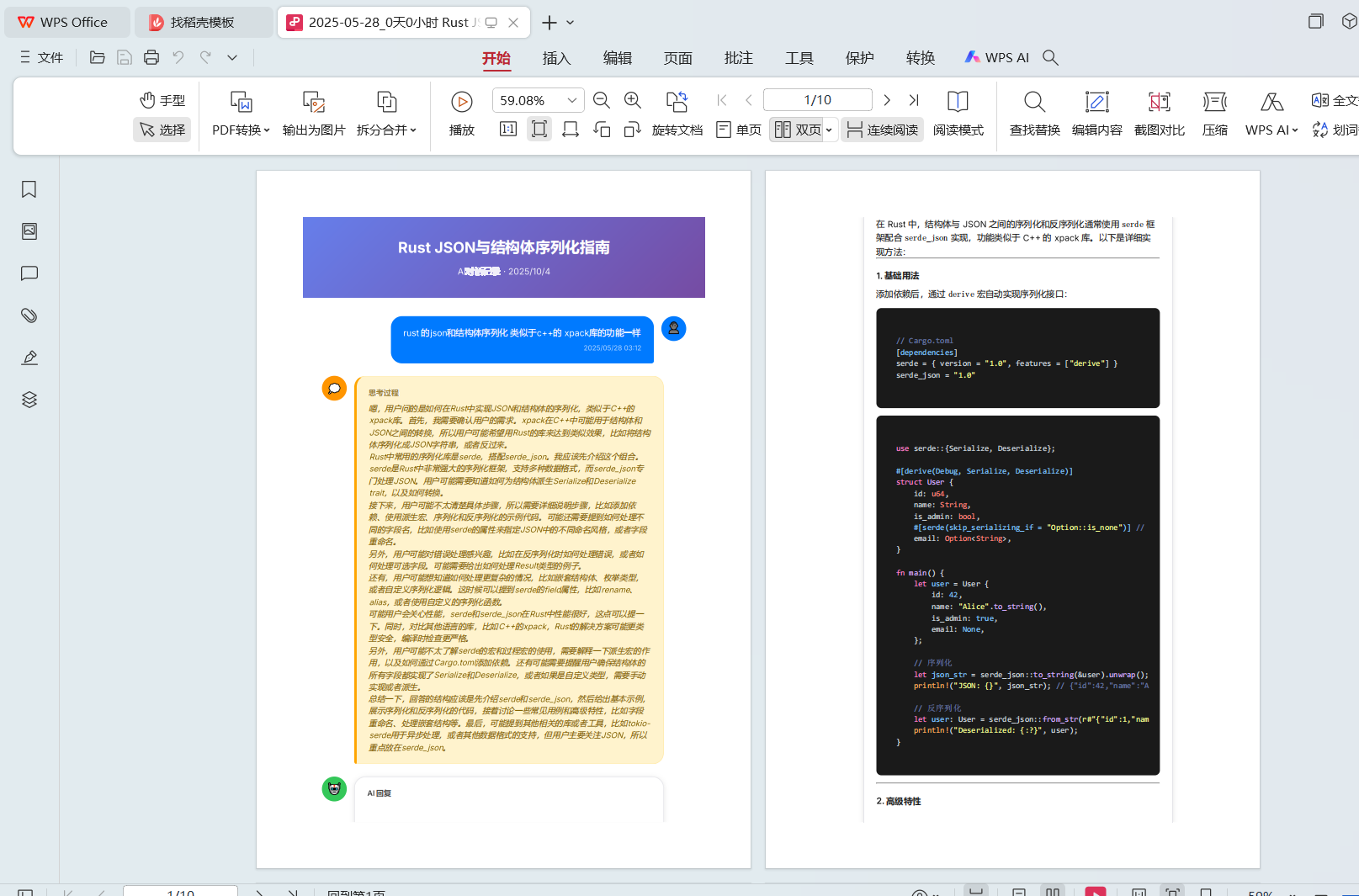
module.exports = DeepSeekRenderer;这样就导出ok了,渲染得到一些pdf
如图
剩下的自己捣鼓吧,如果实在不会,可以找我帮忙弄一下,完事