有趣的故事:快递员小明的包裹保卫战
想象一下,小明是个快递员,负责从仓库(服务器)运送包裹(文件)到客户(Android设备)。但路上有各种意外:
- 数据损坏:就像包裹被雨淋湿
- 网络中断:就像送货路上遇到施工
- 恶意篡改:就像包裹被坏人调包
小明如何确保客户收到的包裹完好无损呢?
核心技术原理
1. 校验和验证(Checksum) - "包裹清单核对"
就像快递员对照清单检查物品数量:
java
// MD5校验 - 快速但安全性较低
public boolean verifyFileMD5(File file, String expectedMD5) {
    try {
        MessageDigest md = MessageDigest.getInstance("MD5");
        FileInputStream fis = new FileInputStream(file);
        byte[] buffer = new byte[8192];
        int length;
        while ((length = fis.read(buffer)) != -1) {
            md.update(buffer, 0, length);
        }
        byte[] digest = md.digest();

        // 转换为十六进制字符串
        StringBuilder sb = new StringBuilder();
        for (byte b : digest) {
            sb.append(String.format("%02x", b));
        }
        String actualMD5 = sb.toString();

        fis.close();
        return actualMD5.equals(expectedMD5.toLowerCase());
    } catch (Exception e) {
        e.printStackTrace();
        return false;
    }
}
2. SHA系列校验 - "高级防伪验证"
java
// SHA-256校验 - 更安全的选择
public boolean verifyFileSHA256(File file, String expectedSHA256) {
    try {
        MessageDigest digest = MessageDigest.getInstance("SHA-256");
        FileInputStream fis = new FileInputStream(file);
        byte[] buffer = new byte[8192];
        int length;
        while ((length = fis.read(buffer)) != -1) {
            digest.update(buffer, 0, length);
        }
        byte[] hash = digest.digest();

        StringBuilder hexString = new StringBuilder();
        for (byte b : hash) {
            String hex = Integer.toHexString(0xff & b);
            if (hex.length() == 1) hexString.append('0');
            hexString.append(hex);
        }

        fis.close();
        return hexString.toString().equals(expectedSHA256.toLowerCase());
    } catch (Exception e) {
        e.printStackTrace();
        return false;
    }
}
3. 完整下载管理器实现
java
public class SecureDownloadManager {
    private Context context;
    private DownloadListener listener;

    public interface DownloadListener {
        void onDownloadProgress(int progress);
        void onDownloadSuccess(File file);
        void onDownloadFailed(String error);
        void onIntegrityCheckFailed();
    }

    public SecureDownloadManager(Context context, DownloadListener listener) {
        this.context = context;
        this.listener = listener;
    }

    public void downloadFileWithVerification(String fileUrl,
                                           String fileName,
                                           String expectedHash,
                                           HashType hashType) {
        new DownloadTask(fileUrl, fileName, expectedHash, hashType).execute();
    }

    private class DownloadTask extends AsyncTask<Void, Integer, Boolean> {
        private String fileUrl;
        private String fileName;
        private String expectedHash;
        private HashType hashType;
        private File downloadedFile;

        public DownloadTask(String fileUrl, String fileName,
                          String expectedHash, HashType hashType) {
            this.fileUrl = fileUrl;
            this.fileName = fileName;
            this.expectedHash = expectedHash;
            this.hashType = hashType;
        }

        @Override
        protected Boolean doInBackground(Void... voids) {
            try {
                // 创建目标文件
                File downloadsDir = context.getExternalFilesDir(Environment.DIRECTORY_DOWNLOADS);
                downloadedFile = new File(downloadsDir, fileName);

                // 开始下载
                URL url = new URL(fileUrl);
                HttpURLConnection connection = (HttpURLConnection) url.openConnection();
                connection.connect();

                // 检查响应码
                if (connection.getResponseCode() != HttpURLConnection.HTTP_OK) {
                    return false;
                }

                // 获取文件大小用于进度计算
                int fileLength = connection.getContentLength();

                // 下载文件
                InputStream input = connection.getInputStream();
                FileOutputStream output = new FileOutputStream(downloadedFile);

                byte[] buffer = new byte[4096];
                long total = 0;
                int count;
                while ((count = input.read(buffer)) != -1) {
                    // 如果用户取消了任务
                    if (isCancelled()) {
                        input.close();
                        output.close();
                        downloadedFile.delete();
                        return false;
                    }
                    total += count;

                    // 发布进度
                    if (fileLength > 0) {
                        publishProgress((int) (total * 100 / fileLength));
                    }

                    output.write(buffer, 0, count);
                }

                output.flush();
                output.close();
                input.close();

                // 验证文件完整性
                return verifyFileIntegrity(downloadedFile, expectedHash, hashType);

            } catch (Exception e) {
                e.printStackTrace();
                if (downloadedFile != null && downloadedFile.exists()) {
                    downloadedFile.delete();
                }
                return false;
            }
        }

        @Override
        protected void onProgressUpdate(Integer... values) {
            if (listener != null) {
                listener.onDownloadProgress(values[0]);
            }
        }

        @Override
        protected void onPostExecute(Boolean success) {
            if (success) {
                if (listener != null) {
                    listener.onDownloadSuccess(downloadedFile);
                }
            } else {
                if (downloadedFile != null && downloadedFile.exists()) {
                    downloadedFile.delete();
                }
                if (listener != null) {
                    listener.onIntegrityCheckFailed();
                }
            }
        }
    }

    private boolean verifyFileIntegrity(File file, String expectedHash, HashType hashType) {
        try {
            String actualHash;
            switch (hashType) {
                case MD5:
                    actualHash = calculateMD5(file);
                    break;
                case SHA256:
                    actualHash = calculateSHA256(file);
                    break;
                case SHA1:
                    actualHash = calculateSHA1(file);
                    break;
                default:
                    actualHash = calculateSHA256(file);
            }
            return actualHash != null && actualHash.equalsIgnoreCase(expectedHash);
        } catch (Exception e) {
            e.printStackTrace();
            return false;
        }
    }

    public enum HashType {
        MD5, SHA1, SHA256
    }
}
4. 使用示例
java
public class MainActivity extends AppCompatActivity {
    private SecureDownloadManager downloadManager;
    private ProgressBar progressBar;
    private TextView statusText;

    @Override
    protected void onCreate(Bundle savedInstanceState) {
        super.onCreate(savedInstanceState);
        setContentView(R.layout.activity_main);

        progressBar = findViewById(R.id.progressBar);
        statusText = findViewById(R.id.statusText);

        downloadManager = new SecureDownloadManager(this, new SecureDownloadManager.DownloadListener() {
            @Override
            public void onDownloadProgress(int progress) {
                runOnUiThread(() -> {
                    progressBar.setProgress(progress);
                    statusText.setText("下载中: " + progress + "%");
                });
            }

            @Override
            public void onDownloadSuccess(File file) {
                runOnUiThread(() -> {
                    statusText.setText("下载完成且文件完整!");
                    Toast.makeText(MainActivity.this, "文件验证成功", Toast.LENGTH_SHORT).show();
                });
            }

            @Override
            public void onDownloadFailed(String error) {
                runOnUiThread(() -> {
                    statusText.setText("下载失败: " + error);
                });
            }

            @Override
            public void onIntegrityCheckFailed() {
                runOnUiThread(() -> {
                    statusText.setText("文件完整性验证失败!");
                    Toast.makeText(MainActivity.this, "文件可能已损坏", Toast.LENGTH_LONG).show();
                });
            }
        });

        // 开始下载
        Button downloadBtn = findViewById(R.id.downloadBtn);
        downloadBtn.setOnClickListener(v -> {
            String fileUrl = "https://example.com/file.zip";
            String expectedSHA256 = "a1b2c3d4e5f6789012345678901234567890123456789012345678901234";

            downloadManager.downloadFileWithVerification(
                fileUrl,
                "myfile.zip",
                expectedSHA256,
                SecureDownloadManager.HashType.SHA256
            );
        });
    }
}
时序图:完整的下载验证流程
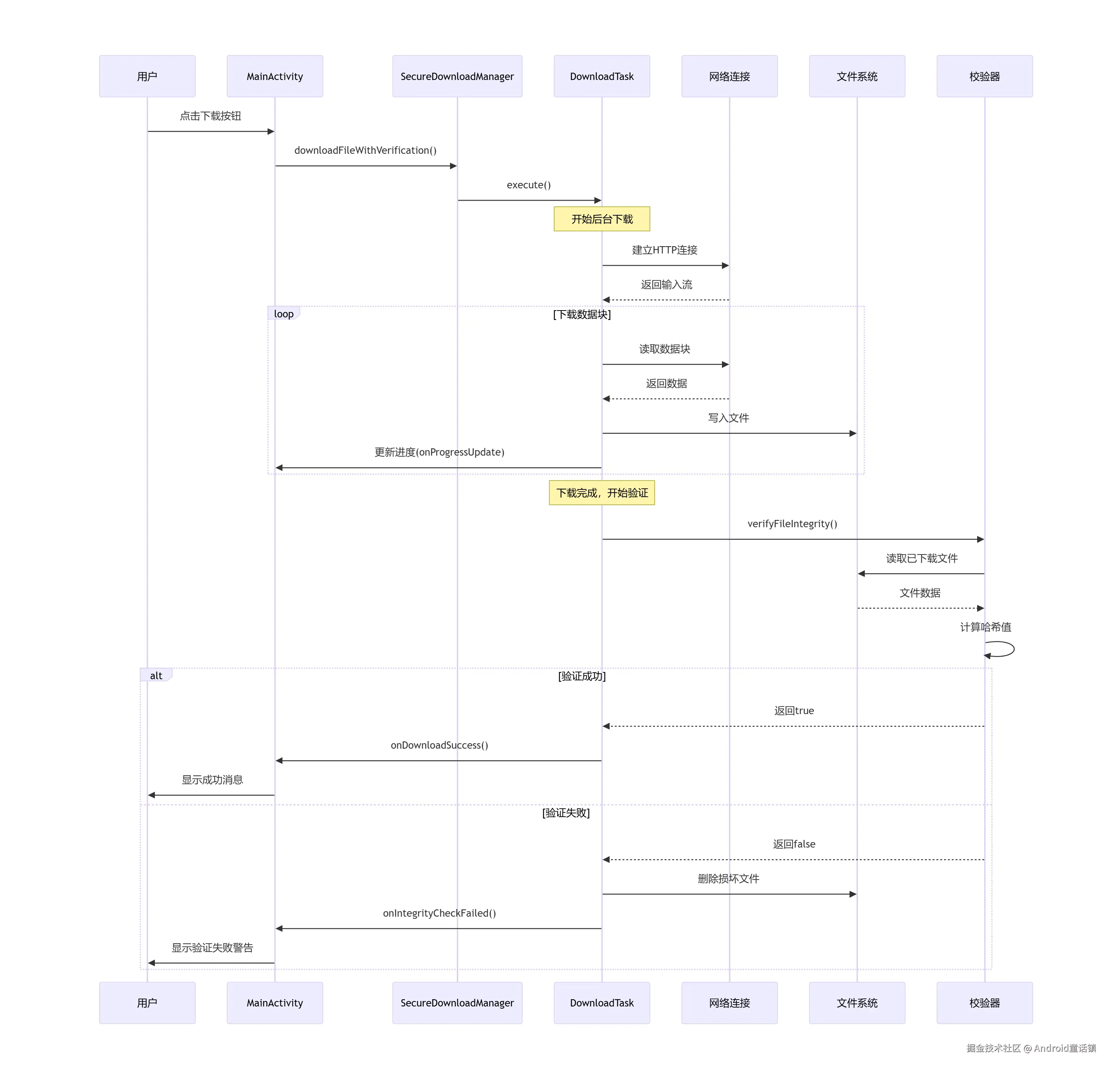
关键要点总结
- 双重保障:下载完成 + 完整性验证 = 安全文件
- 进度反馈:让用户知道下载状态
- 自动清理:验证失败时自动删除损坏文件
- 灵活算法:支持多种哈希算法适应不同场景
- 异常处理:网络中断、文件损坏等情况的妥善处理
就像快递员小明不仅要把包裹送到,还要确保包裹完好无损一样,我们的下载管理器既要完成下载,又要保证文件的完整性!