Blockly串口积木开发
今天出一期关于Blockly串口积木开发的教程,废话不多说,上代码
串口积木
串口积木借鉴mixly,python代码可以参考docs.singtown.com/micropython...
一:构建积木
1,涉及要修改得文件(blocks,serial这个是要自己创建) 2,blocks文件引入serial文件,并在export导出积木 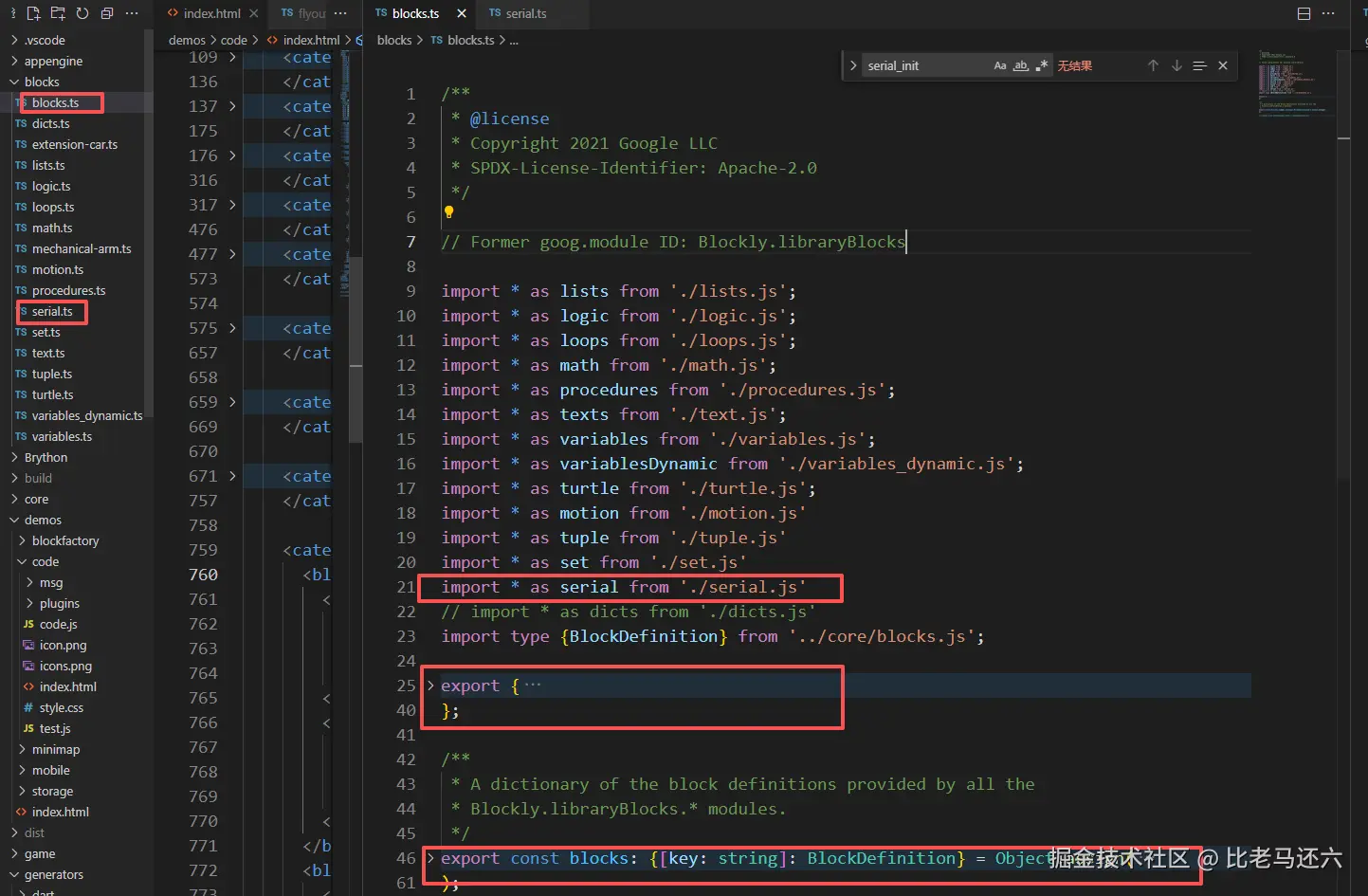
javascript
serial文件

/**
 * @license
 * Copyright 2012 Google LLC
 * SPDX-License-Identifier: Apache-2.0
 */

// Former goog.module ID: Blockly.libraryBlocks.serial
import '../core/field_dropdown.js';
import {
  createBlockDefinitionsFromJsonArray,
  defineBlocks,
} from '../core/common.js';

export const blocks = createBlockDefinitionsFromJsonArray([
    {
        type: 'serial_init',
        style: 'mechanical_arm',
        previousStatement: null,
        nextStatement: null,
        message0: '%{BKY_SERIAL_INIT}',
        args0: [
            {
                type: 'field_dropdown',
                name: 'variable',
                options: [
                    ['uart1', 'uart1'],
                ]
            },
            {
                type: 'input_value',
                name: 'RX',
                value: 0
            },
            {
                type: 'input_value',
                name: 'TX',
                value: 0
            },
            {
                type: 'field_dropdown',
                name: 'baudrate',
                options: [
                    ['115200', '115200'],
                    ['57600', '57600'],
                    ['37400', '37400'],
                    ['31250', '31250'],
                    ['28800', '28800'],
                    ['19200', '19200'],
                    ['14400', '14400'],
                    ['9600', '9600'],
                    ['4800', '4800'],
                    ['2400', '2400'],
                    ['1200', '1200'],
                    ['300', '300']
                ]
            }
        ]
    },
    {
        type: 'serial_print',
        style: 'mechanical_arm',
        previousStatement: null,
        nextStatement: null,
        message0: '%{BKY_SERIAL_PRINT}',
        args0: [
            {
                type: 'field_dropdown',
                name: 'variable',
                options: [
                    ['uart1', 'uart1'],
                ]
            },
            {
                type: 'input_value',
                name: 'TEXT',
                check: 'String'
            }
        ]
    },
    {
        type: 'serial_println',
        style: 'mechanical_arm',
        previousStatement: null,
        nextStatement: null,
        message0: '%{BKY_SERIAL_PRINTLN}',
        args0: [
            {
                type: 'field_dropdown',
                name: 'variable',
                options: [
                    ['uart1', 'uart1'],
                ]
            },
            {
                type: 'input_value',
                name: 'TEXT',
                check: 'String'
            }
        ]
    },
    {
        type: 'serial_println_radix',
        style: 'mechanical_arm',
        previousStatement: null,
        nextStatement: null,
        message0: '%{BKY_SERIAL_PRINTLN_RADIX}',
        args0: [
            {
                type: 'field_dropdown',
                name: 'variable',
                options: [
                    ['uart1', 'uart1'],
                ]
            },
            {
                type: 'field_dropdown',
                name: 'radix',
                options: [
                    ['二进制', 'bin'],
                    ['八进制', 'oct'],
                    ['十进制', 'int'],
                    ['十六进制', 'hex']
                ]
            },
            {
                type: 'input_value',
                name: 'TEXT',
                check: 'String'
            },
        ]
    },
    {
        type: 'serial_send_msg',
        style: 'mechanical_arm',
        previousStatement: null,
        nextStatement: null,
        message0: '%{BKY_SERIAL_SEND_MSG}',
        args0: [
            {
                type: 'field_dropdown',
                name: 'variable',
                options: [
                    ['uart1', 'uart1'],
                ]
            },
            {
                type: 'input_value',
                name: 'codes',
                check: 'String'
            },
            {
                type: 'field_dropdown',
                name: 'repeat',
                options: [
                    ['是', 'True'],
                    ['否', 'False']
                ]
            }
        ]
    },
    {
        type: 'serial_output',
        style: 'mechanical_arm',
        previousStatement: null,
        nextStatement: null,
        message0: '%{BKY_SERIAL_OUTPUT}',
        args0: [
            {
                type: 'field_dropdown',
                name: 'variable',
                options: [
                    ['uart1', 'uart1'],
                ]
            },
            {
                type: 'input_value',
                name: 'TEXT',
                check: 'String'
            }
        ]
    },
    {
        type: 'serial_any',
        style: 'mechanical_arm',
        output: 'Boolean',
        message0: '%{BKY_SERIAL_ANY}',
        args0: [
            {
                type: 'field_dropdown',
                name: 'variable',
                options: [
                    ['uart1', 'uart1'],
                ]
            }
        ]
    },
    {
        type: 'serial_read',
        style: 'mechanical_arm',
        output: 'String',
        message0: '%{BKY_SERIAL_READ}',
        args0: [
            {
                type: 'field_dropdown',
                name: 'variable',
                options: [
                    ['uart1', 'uart1'],
                ]
            }
        ]
    },
    {
        type: 'serial_readline',
        style: 'mechanical_arm',
        output: 'String',
        message0: '%{BKY_SERIAL_READLINE}',
        args0: [
            {
                type: 'field_dropdown',
                name: 'variable',
                options: [
                    ['uart1', 'uart1'],
                ]
            }
        ]
    },
    {
        type: 'serial_read_others',
        style: 'mechanical_arm',
        output: 'String',
        message0: '%{BKY_SERIAL_READ_OTHERS}',
        args0: [
            {
                type: 'field_dropdown',
                name: 'variable',
                options: [
                    ['uart1', 'uart1'],
                ]
            }
        ]
    }
]);

// Register provided blocks.
defineBlocks(blocks);
至此串口积木已经完成,看一下效果图 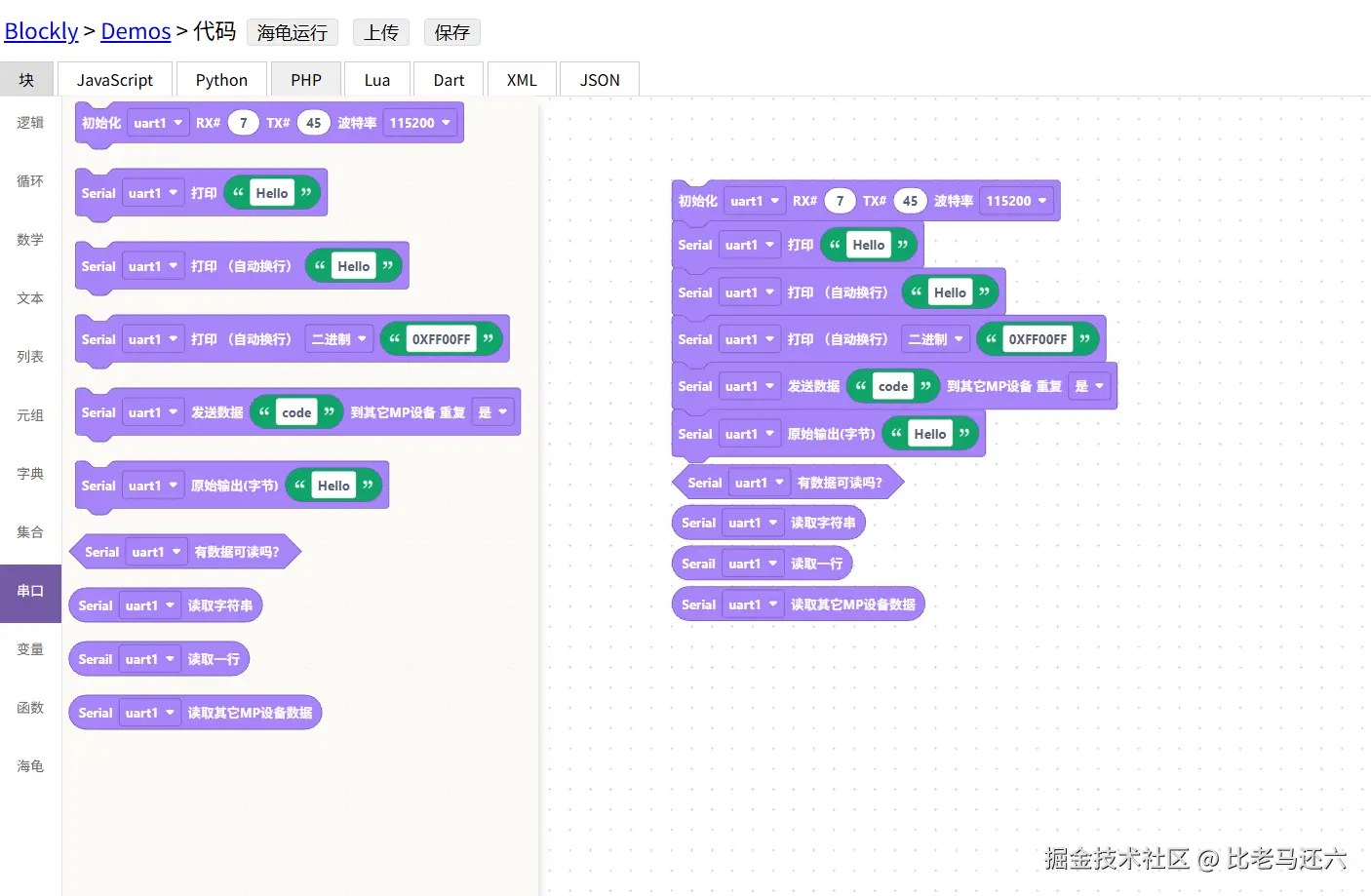
二:构建python
1,涉及要修改得文件(python,serial这个是要自己创建) 2,python文件引入serial文件,并在export导出python代码 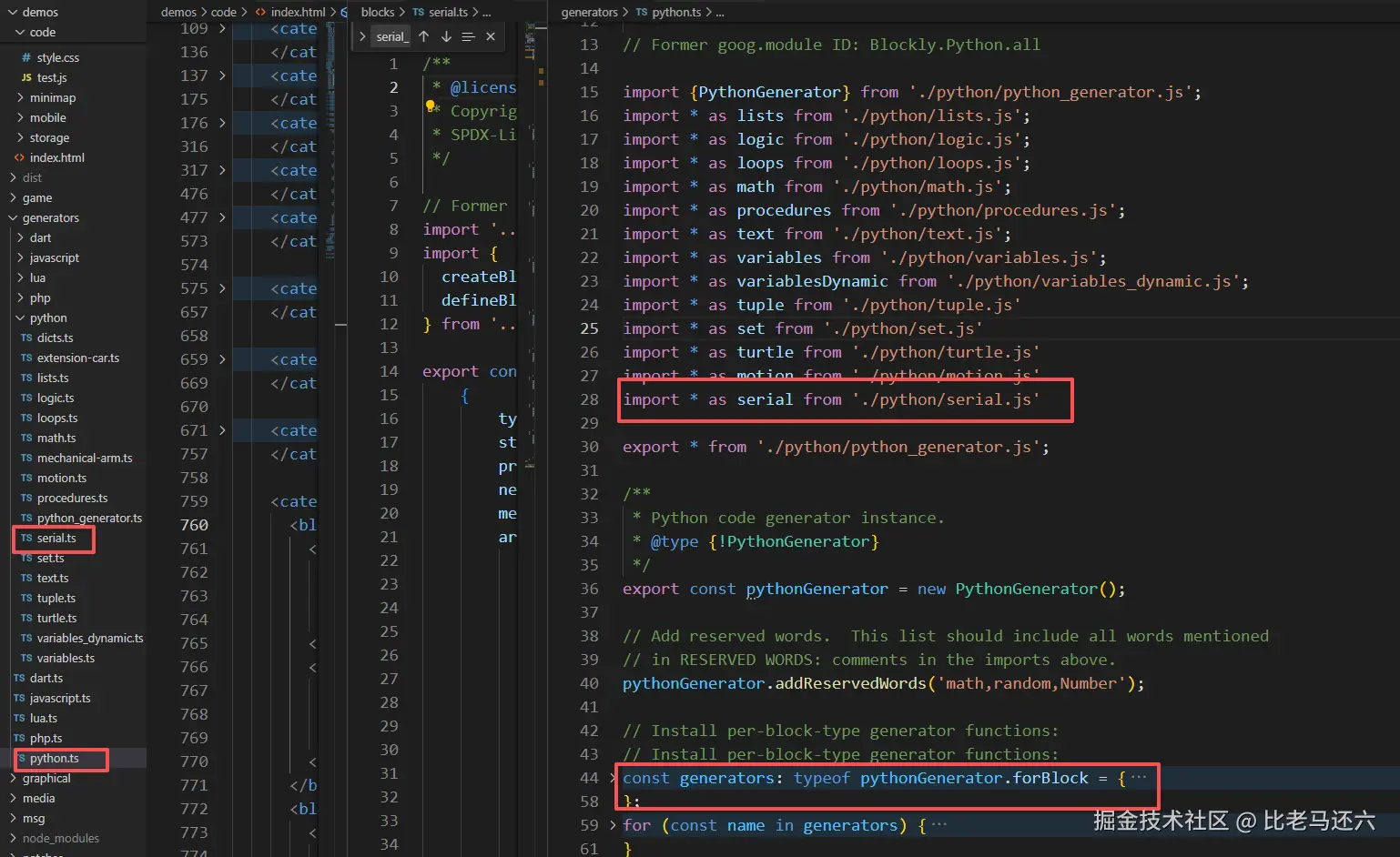
javascript
serial文件

/**
 * @license
 * Copyright 2012 Google LLC
 * SPDX-License-Identifier: Apache-2.0
 */

/**
 * @file Generating Python for serial blocks.
 */

// Former goog.module ID: Blockly.Python.serial

import type {Block} from '../../core/block.js';
import type {PythonGenerator} from './python_generator.js';
import {Order} from './python_generator.js';

export function serial_init(block: Block, generator: PythonGenerator) {
    (generator as AnyDuringMigration).definitions_['import_machine'] = `import machine`

    let variable = block.getFieldValue('variable')
    let RX = generator.valueToCode(block, 'RX', Order.NONE) || 0
    let TX = generator.valueToCode(block, 'TX', Order.NONE) || 0
    let baudrate = block.getFieldValue('baudrate')

    let code = `${variable} = machine.UART(1, tx=${TX}, rx=${RX}, baudrate=${baudrate})\n`
    return code
}
export function serial_print(block: Block, generator: PythonGenerator) {
    (generator as AnyDuringMigration).definitions_['import_machine'] = `import machine`

    let variable = block.getFieldValue('variable')
    let text = generator.valueToCode(block, 'TEXT', Order.NONE) || "''";

    let code = `${variable}.write(str(${text}))\n`
    return code
}
export function serial_println(block: Block, generator: PythonGenerator) {
    (generator as AnyDuringMigration).definitions_['import_machine'] = `import machine`

    let variable = block.getFieldValue('variable')
    let text = generator.valueToCode(block, 'TEXT', Order.NONE) || "''";

    let code = `${variable}.write(str(${text})+'\\r\\n')\n`
    return code
}
export function serial_println_radix(block: Block, generator: PythonGenerator) {
    (generator as AnyDuringMigration).definitions_['import_machine'] = `import machine`

    let variable = block.getFieldValue('variable')
    let radix = block.getFieldValue('radix')
    let text = generator.valueToCode(block, 'TEXT', Order.NONE) || "''";

    let code = `${variable}.write(str(${radix}(${text}))+'\\r\\n')\n`
    return code
}
export function serial_send_msg(block: Block, generator: PythonGenerator) {
    (generator as AnyDuringMigration).definitions_['import_uart_com'] = `import uart_com`

    let variable = block.getFieldValue('variable')
    let codes = block.getFieldValue('codes')
    let repeat = block.getFieldValue('repeat')

    let code = `uart_com.send(${variable}, ${codes}, repeat=${repeat})\n`
    return code
}
export function serial_output(block: Block, generator: PythonGenerator) {
    (generator as AnyDuringMigration).definitions_['import_machine'] = `import machine`

    let variable = block.getFieldValue('variable')
    let text = generator.valueToCode(block, 'TEXT', Order.NONE) || "''";

    let code = `${variable}.write(${text})\n`
    return code
}
export function serial_any(block: Block, generator: PythonGenerator): [string, Order] {
    (generator as AnyDuringMigration).definitions_['import_machine'] = `import machine`

    let variable = block.getFieldValue('variable')

    let code = `${variable}.any()\n`
    return [code, Order.ATOMIC]
}
export function serial_read(block: Block, generator: PythonGenerator): [string, Order] {
    (generator as AnyDuringMigration).definitions_['import_machine'] = `import machine`

    let variable = block.getFieldValue('variable')

    let code = `${variable}.read()\n`
    return [code, Order.ATOMIC]
}
export function serial_readline(block: Block, generator: PythonGenerator): [string, Order] {
    (generator as AnyDuringMigration).definitions_['import_machine'] = `import machine`

    let variable = block.getFieldValue('variable')

    let code = `${variable}.read()\n`
    return [code, Order.ATOMIC]
}
export function serial_read_others(block: Block, generator: PythonGenerator): [string, Order] {
    (generator as AnyDuringMigration).definitions_['import_uart_com'] = `import uart_com`

    let variable = block.getFieldValue('variable')

    let code = `uart_com.recv(${variable})\n`
    return [code, Order.ATOMIC]
}
至此元组python已经完成,看一下效果图 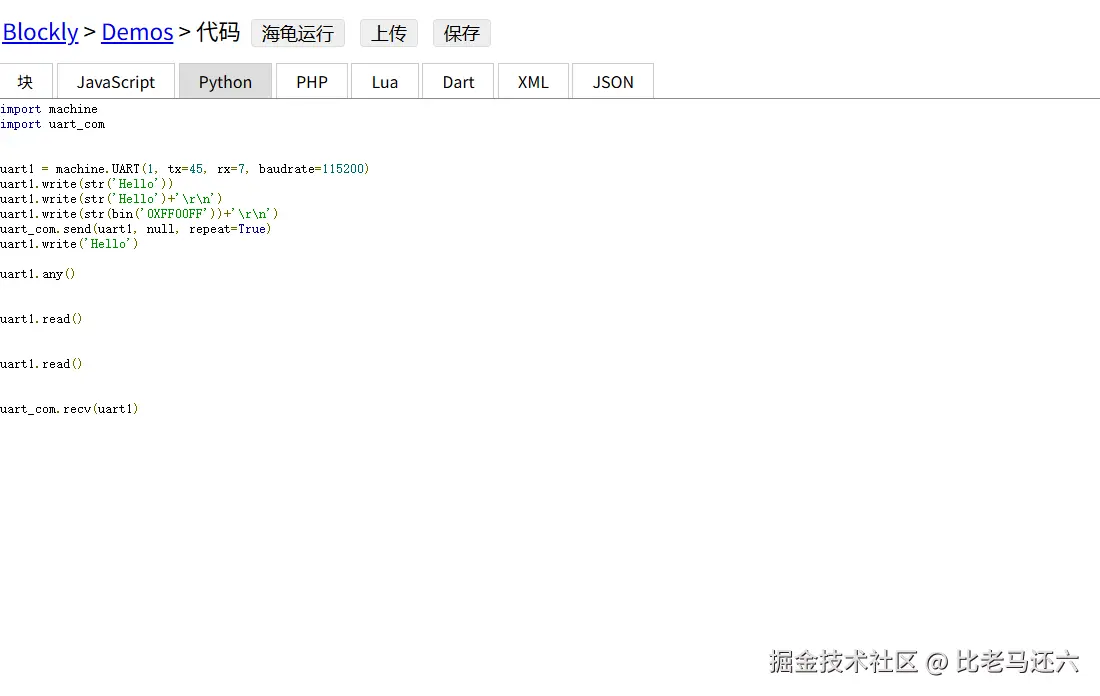 总结:串口积木,python都是依据mixly,库文件不是所有板子都是一样的,更具自己板子去做相应开发