问题描述
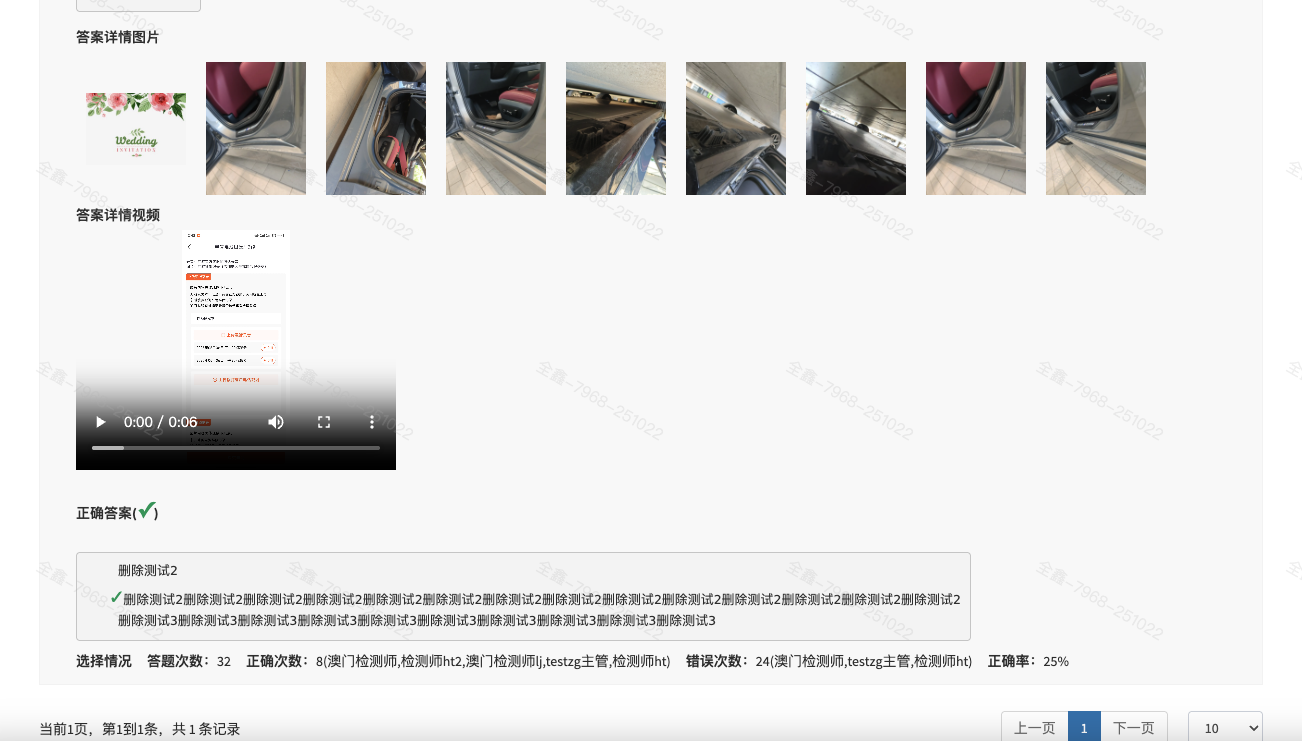
来了一个需求,参考一个页面,想实现如下效果。这效果,一般来说,没法搞。因为参考系统其他页面,也就应了下来。

问题分析
首先。是一个列表,有筛选,有分页;
其此。每条数据,结构比较复杂,有题干、有答案,有视频,有图片。
最后。当然,图片和视频都要去预览。
问题学习
万变不离其宗,还是一个table实现。
表单html部分:
<div style="margin-left: 10%;margin-right:20%;border-radius:5px;">
<table id="dataTable" class="table table-bordered table-striped"></table> 
</table>
</div>js部分:
<script>
let url = "/detectionTestLog/showTopicDetailList";
let paperId = '$paper.id' ;
let typeArr = velocityMapToJson("$topicTypeMap");
$(function () {
searchList();
});
/**
* 点击查询,加载列表数据
*/
function searchList(){
let params = {};
params.paperId = paperId;
params.topicId = $("input[name='topicId']").val();
load("dataTable", columns, url, params);
}
const columns = [
{
data: "classify", title: "", render: function (data, type, row, meta) {
let html = "";
html += "<div class='carImgDiv'> ";
html += "<label>";
html += (meta.row + 1) + "、" + row.content + " <span style='color: #aa7700'>(" + typeArr[row.type] + ")</span></label> ";
html += "题目编号:" + row.topicId + " " ;
if (row.pics) {
let picsArr = row.pics.split(",")
html += '<div class="input-group"style="margin-left:28px"><label>题干图片</label><br>'
for (let j = 0; j < picsArr.length; j++) {
html += '<img loading="lazy" data-src="https://static.chaboshi.cn/' + picsArr[j] + '" width="100px" style="margin: 10px">'
}
html += '</div> '
}
if (row.videos) {
let videosArr = row.videos.split(",")
html += '<div class="input-group"style="margin-left:28px"><label>题干视频</label><br>'
for (let j = 0; j < videosArr.length; j++) {
html += '<video width="320" height="240" controls><source src="https://static.chaboshi.cn/' + videosArr[j] + '" type="video/mp4"></video>'
}
html += '</div> '
}
html += '<div class="input-group">  '
if (row.answerDetail) {
html += '<label>答案详情';
html += '<pre>' + row.answerDetail + '</pre>'
}
html += '</label></div>'
if (row.answerPics) {
let picsArr = row.answerPics.split(",")
html += '<div class="input-group"style="margin-left:28px"><label>答案详情图片</label><br>'
for (let j = 0; j < picsArr.length; j++) {
html += '<img loading="lazy" data-src="https://static.chaboshi.cn/' + picsArr[j] + '" width="100px" style="margin: 10px">'
}
html += '</div>'
}
if (row.answerVideos) {
let videosArr = row.answerVideos.split(",")
html += '<div class="input-group"style="margin-left:28px"><label>答案详情视频</label><br>'
for (let j = 0; j < videosArr.length; j++) {
html += '<video width="320" height="240" controls><source src="https://static.chaboshi.cn/' + videosArr[j] + '" type="video/mp4"></video>'
}
html += '</div> '
}
html += '</div>'
html += '<div class="input-group">  '
html += '<label>正确答案(<span style="color: #19a05e;font-size: 22px;">✓</span>) </label>';
html += '</div>'
let answerIdHtml = '';
if(row.topicAnswers){
for (let j = 0; j < row.topicAnswers.length; j++) {
let htmlContent = notNull(row.topicAnswers[j].content)?row.topicAnswers[j].content:'-';
if (row.topicAnswers[j].rightAnswers == true) {
htmlContent = '<span style="color: #19a05e;font-size: 22px;">✓</span>' + htmlContent
} else {
htmlContent = ' ' + htmlContent
}
answerIdHtml += "<div class=\"input-group\">   " + htmlContent + "</div>"
}
}
html += '<div class="input-group"style="margin-left:28px">  '
html += '<pre>' + answerIdHtml + '</pre>'
html += '</div>'
html += '<div class="input-group">  '
html += '<label>选择情况</label>'
html += '<strong style="margin-left: 15px;">答题次数:</strong><span>'+row.topicSum+'</span>';
html += '<strong style="margin-left: 15px;">正确次数:</strong><span>'+row.rightCount+'</span><span>('+row.rightDesc+')</span>';
html += '<strong style="margin-left: 15px;">错误次数:</strong><span>'+row.errorCount+'</span><span>('+row.errorDesc+')</span>';
html += '<strong style="margin-left: 15px;">正确率:</strong><span>'+row.rightRate+'%</span>';
html += '</div>'

setTimeout(function () {
    $("img[data-src]").each(function () {
        $(this).attr("src", $(this).attr("data-src"));
        $(this).removeAttr("data-src");
    });
    $('.carImgDiv').viewer()
}, 1000)
return html;
}
}
]
</script>看到了吗,利用load("dataTable", columns, url, params);,实现分页的效果。但仅仅定义了一列,里边自定义了一段html片段,实现了这样一个效果,还是让人心里一惊。
这里也可以写setTimeout
html += '</div>'
setTimeout(function () {
$("img[data-src]").each(function () {
$(this).attr("src", $(this).attr("data-src"));
$(this).removeAttr("data-src");
});
$('.carImgDiv').viewer()
}, 1000)这个方法的主要作用是实现图片的延迟加载(懒加载)并初始化图片查看器,具体功能如下: 1. **延迟执行逻辑**:通过 `setTimeout` 设置了1秒(1000毫秒)的延迟,等待1秒后再执行内部代码。 2. **图片加载处理**: - 选择所有带有 `data-src` 属性的 `img` 元素(`("img\[data-src\]")\`)。 - 遍历这些图片,将 \`data-src\` 属性的值赋值给 \`src\` 属性(\`(this).attr("src", (this).attr("data-src"))\`),此时图片才会真正开始加载。 - 移除 \`data-src\` 属性(\`(this).removeAttr("data-src")`),避免重复处理。 3. **初始化图片查看器**:调用 `$('.carImgDiv').viewer()` 方法,为类名为 `carImgDiv` 的元素初始化图片查看器插件(通常用于实现图片放大、预览等功能)。 简单来说,这段代码的目的是:等待1秒后,加载页面中标记为延迟加载的图片(通过 `data-src` 存储真实地址),并初始化对应的图片查看器功能。延迟1秒可能是为了等待页面其他资源加载完成,或配合某些交互场景。
渲染每一行结束,替换变量,实现图片预览的效果。那能不能渲染后,只执行一次呢?理论上当然可以,但是分散到每一行去执行,也不失为一个好办法。体验好、风险低。
完整源代码
<!DOCTYPE html>
<html xmlns="http://www.w3.org/1999/xhtml">
<head>
<meta charset="utf-8"/>
<meta name="viewport" content="width=device-width, initial-scale=1.0"/>
<title>考卷题目详情</title>
#parse("/views/inc/head.vm")
<link rel="stylesheet" href="/kindeditor/default.css"/>
<link rel="stylesheet" href="/kindeditor/prettify.css"/>
<link rel="stylesheet" href="$!{cdn_domain}/css/viewer.css">
<style>
.center {
text-align: center;
border: #8c8c8c;
outline: none;
background-color: #eee;
width: 80px;
margin-top: 5px;
}
</style>
</head>
<body class="$!{skin}">
#parse("/views/inc/nav_top.vm")
<!-- Left side column. contains the logo and sidebar -->
<!-- UEditor -->
<script charset="utf-8" src="/kindeditor/kindeditor-all-min.js"></script>
<script charset="utf-8" src="/kindeditor/zh_CN.js"></script>
<script charset="utf-8" src="/kindeditor/prettify.js"></script>
</head>
#parse("/views/inc/nav_left.vm")
<!-- Main content -->
<section class="content">
<div class="row">
<div class="col-md-12">
<!-- Advanced Tables -->
<div class="panel panel-default">
<div class="panel-body">
<form action="/detectionTestPaper/save" name="paperForm" method="post"
id="topicForm"
class="form-horizontal">
<input type="hidden" id="id" name="id" value="${paper.id}"/>
<input type="hidden" id="topicArr" name="topicArr"/>
<div class="form-group">
<label class="col-sm-2 control-label">题目标题:</label>
<div class="col-sm-4">
<input class="input-css" style="border: #8c8c8c;" value="$!{paper.title}">
</div>
</div> 
<div class="form-group">
<label class="col-sm-2 control-label">考试次数:</label>
<div class="col-sm-8">
<div><label>
<input class="input-css center" readonly value="$!{logCount}"/>  
考试人数:<input class="input-css center" readonly value="$!{testCount}"/> 
</label>
<label>
题目编号: <input class="input-css center" name="topicId" type="number"/> 
</label>
<button class="btn btn-info btn-xs" onclick="searchList(); return false;">查询</button>
</div> 
</div>
</div> 
</form>
<div style="margin-left: 10%;margin-right:20%;border-radius:5px;">
<table id="dataTable" class="table table-bordered table-striped"></table> 
<!-- <thead>-->
<!-- <tr>-->
<!-- <td>序号</td>-->
<!-- <td>题目</td>-->
<!-- <td>题型</td>-->
<!-- <td>答题次数</td>-->
<!-- <td>正确次数</td>-->
<!-- <td>错误次数</td>-->
<!-- <td>正确率</td>-->
<!-- </tr>-->
<!-- </thead>-->
<!-- <tbody>-->
<!-- #if($!topicList.size()>0)-->
<!-- #foreach($e in $!topicList)-->
<!-- <tr>-->
<!-- <td>$foreach.count</td>-->
<!-- <td>$e.content</td>-->
<!-- <td>$!topicTypeMap[$e.type]</td>-->
<!-- <td>$e.topicSum</td>-->
<!-- <td>$e.rightAnswer</td>-->
<!-- <td>$e.errorAnswer</td>-->
<!-- #set($Double = 0.00)-->
<!-- #set($fund= ($Double.parseDouble($e.rightAnswer) / $Double.parseDouble($e.topicSum)) * 100)-->
<!-- <td>$number.format("#0.00", $fund) %</td>-->
<!-- </tr>-->
<!-- #end-->
<!-- #else-->
<!-- <tr><td colspan='7' style="text-align: center;">暂无数据</td></tr>-->
<!-- #end-->
<!-- </tbody>-->
<!-- </table> -->
</div>
</div>
</div>
<!--End Advanced Tables -->
</div>
</div>
</section>
#parse("/views/inc/nav_bottom.vm")
<script src="$!{cdn_domain}/js/viewer.js" type="text/javascript"></script>
<script>
let url = "/detectionTestLog/showTopicDetailList";
let paperId = '$paper.id' ;
let typeArr = velocityMapToJson("$topicTypeMap");
$(function () {
searchList();
});
/**
* 点击查询,加载列表数据
*/
function searchList(){
let params = {};
params.paperId = paperId;
params.topicId = $("input[name='topicId']").val();
load("dataTable", columns, url, params);
}
const columns = [
{
data: "classify", title: "", render: function (data, type, row, meta) {
let html = "";
html += "<div class='carImgDiv'> ";
html += "<label>";
html += (meta.row + 1) + "、" + row.content + " <span style='color: #aa7700'>(" + typeArr[row.type] + ")</span></label> ";
html += "题目编号:" + row.topicId + " " ;
if (row.pics) {
let picsArr = row.pics.split(",")
html += '<div class="input-group"style="margin-left:28px"><label>题干图片</label><br>'
for (let j = 0; j < picsArr.length; j++) {
html += '<img loading="lazy" data-src="https://static.chaboshi.cn/' + picsArr[j] + '" width="100px" style="margin: 10px">'
}
html += '</div> '
}
if (row.videos) {
let videosArr = row.videos.split(",")
html += '<div class="input-group"style="margin-left:28px"><label>题干视频</label><br>'
for (let j = 0; j < videosArr.length; j++) {
html += '<video width="320" height="240" controls><source src="https://static.chaboshi.cn/' + videosArr[j] + '" type="video/mp4"></video>'
}
html += '</div> '
}
html += '<div class="input-group">  '
if (row.answerDetail) {
html += '<label>答案详情';
html += '<pre>' + row.answerDetail + '</pre>'
}
html += '</label></div>'
if (row.answerPics) {
let picsArr = row.answerPics.split(",")
html += '<div class="input-group"style="margin-left:28px"><label>答案详情图片</label><br>'
for (let j = 0; j < picsArr.length; j++) {
html += '<img loading="lazy" data-src="https://static.chaboshi.cn/' + picsArr[j] + '" width="100px" style="margin: 10px">'
}
html += '</div>'
}
if (row.answerVideos) {
let videosArr = row.answerVideos.split(",")
html += '<div class="input-group"style="margin-left:28px"><label>答案详情视频</label><br>'
for (let j = 0; j < videosArr.length; j++) {
html += '<video width="320" height="240" controls><source src="https://static.chaboshi.cn/' + videosArr[j] + '" type="video/mp4"></video>'
}
html += '</div> '
}
html += '</div>'
html += '<div class="input-group">  '
html += '<label>正确答案(<span style="color: #19a05e;font-size: 22px;">✓</span>) </label>';
html += '</div>'
let answerIdHtml = '';
if(row.topicAnswers){
for (let j = 0; j < row.topicAnswers.length; j++) {
let htmlContent = notNull(row.topicAnswers[j].content)?row.topicAnswers[j].content:'-';
if (row.topicAnswers[j].rightAnswers == true) {
htmlContent = '<span style="color: #19a05e;font-size: 22px;">✓</span>' + htmlContent
} else {
htmlContent = ' ' + htmlContent
}
answerIdHtml += "<div class=\"input-group\">   " + htmlContent + "</div>"
}
}
html += '<div class="input-group"style="margin-left:28px">  '
html += '<pre>' + answerIdHtml + '</pre>'
html += '</div>'
html += '<div class="input-group">  '
html += '<label>选择情况</label>'
html += '<strong style="margin-left: 15px;">答题次数:</strong><span>'+row.topicSum+'</span>';
html += '<strong style="margin-left: 15px;">正确次数:</strong><span>'+row.rightCount+'</span><span>('+row.rightDesc+')</span>';
html += '<strong style="margin-left: 15px;">错误次数:</strong><span>'+row.errorCount+'</span><span>('+row.errorDesc+')</span>';
html += '<strong style="margin-left: 15px;">正确率:</strong><span>'+row.rightRate+'%</span>';
html += '</div>'
setTimeout(function () {
$("img[data-src]").each(function () {
$(this).attr("src", $(this).attr("data-src"));
$(this).removeAttr("data-src");
});
$('.carImgDiv').viewer()
}, 1000)
return html;
}
}
]
</script>
</body>
</html>问题总结
天地之大,无所不能,万变不离其宗。没什么不可以;老技术,也可以焕发新魅力。当然,也要非常积极的拥抱新技术。