day18_菜单查询 合并servlet
1配置子路由 共享top和left页面部分
router.js
import { createRouter, createWebHistory } from 'vue-router'
//静态引入
//1先引入组件 2再配置路由对应关系
//import Login from './components/login.vue'
// 创建路由实例并传递 `routes` 配置
const router = createRouter({
history: createWebHistory(import.meta.env.BASE_URL),
routes:[
//配置地址与vue组件的对应关系
//{path:'/login',component:Login}
//动态引入
{path:'/login',component:()=>import('@/views/login.vue')},
{path:'/main',component:()=>import('@/views/main.vue'),
children:[
//控制中心
{path:'/menus',component:()=>import('@/views/controlcenter/menus.vue')},
{path:'/users',component:()=>import('@/views/controlcenter/users.vue')},
]
},
//通过重定向 覆盖根组件路径 (配置欢迎页面)
{path:'/',redirect:'/login'}
]
})
export default router
main组件中 指定显示子路由的位置
<script setup>
import { ref } from 'vue'
import TOP from '@/components/top.vue'
import LEFT from '@/components/left.vue'
/**
* 1.展示上左右结构
* 2.上部有登录成功的用户信息
* 3.左侧有动态菜单
* 4.右侧系统功能主界面
*/
</script>
<template>
<el-container>
<el-header>
<TOP></TOP>
</el-header>
<el-container>
<el-aside width="200px">
<LEFT></LEFT>
</el-aside>
<el-main>
<router-view></router-view>
</el-main>
</el-container>
</el-container>
</template>
<style scoped>
.el-container{
width: 100vw;
height: 100vh;
}
.el-header{
background-image: url("../assets/logo2.png");
height: 96px;
line-height: 96px;
text-align: center;
}
.el-aside{
box-shadow: var(--el-box-shadow-dark);
}
.el-main{
box-shadow: var(--el-box-shadow-dark);
}
</style>
2菜单查询
2.1场景分析
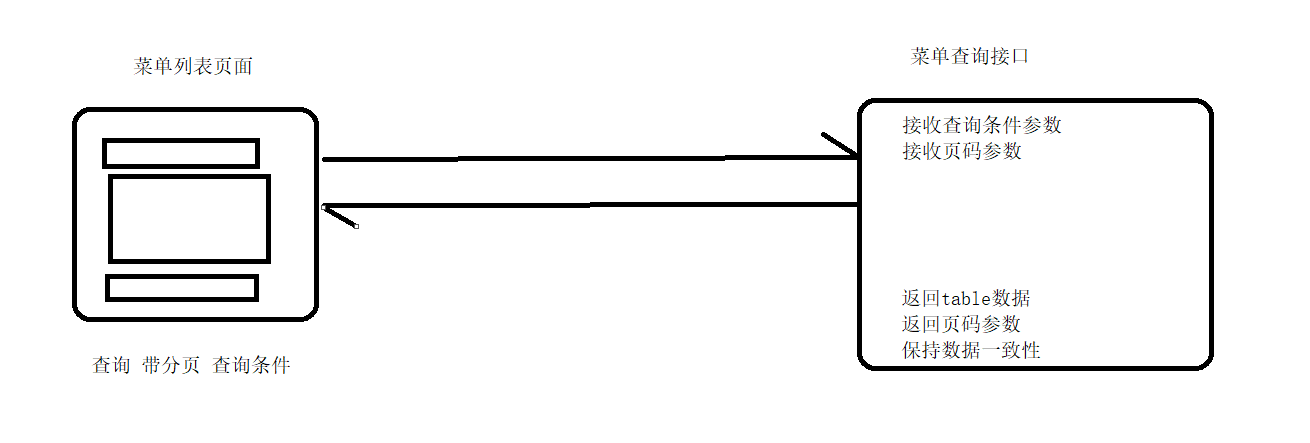
2.2sql分析
查询语句 支持分页 和查询条件
select am1.mid,am1.menuname,am1.pid,am1.url,am1.glyphicon,IFNULL(am2.menuname,'无') as pname
from admin_menu am1
left join admin_menu am2 on am1.pid = am2.mid
where am1.menuname like CONCAT('%','大','%')
and am1.pid = 0
-- pid的值 用所有的一级菜单 和 0
limit 0,5
-- (page-1)pageSize,pageSize
-- 统计总记录数 给分页组件显示使用
-- 查询语句需要带条件 保证是在当前查询条件下的总记录数
select count(1) from admin_menu
where pid = 0
2.3编码
列表查询
dao
//查询菜单信息(支持分页 和动态查询条件)
List<AdminMenu> listMenuByCondition(@Param("inputMenu") AdminMenu inputMenu,
@Param("startIndex")Integer startIndex,
@Param("pageSize")Integer pageSize);
sql映射
<select id="listMenuByCondition" resultMap="AdminMenuMap">
select am1.mid,am1.menuname,am1.pid,am1.url,am1.glyphicon,IFNULL(am2.menuname,'无') as pname
from admin_menu am1
left join admin_menu am2 on am1.pid = am2.mid
<where>
<if test="inputMenu.menuname!=null and inputMenu.menuname!='' ">
and am1.menuname like CONCAT('%',#{inputMenu.menuname},'%')
</if>
<if test="inputMenu.pid!=null">
and am1.pid = #{inputMenu.pid}
</if>
</where>
limit #{startIndex},#{pageSize}
</select>测试类
    @Test
    public void listMenuByConditionTest(){
        SqlSession sqlSession = MyBatisHealper.getSqlSession();
        AdminMenuDao mapper = sqlSession.getMapper(AdminMenuDao.class);
        //这个sql语句执行时 根据程序执行逻辑 不可能出错 所以不需要返回值 也不需要对异常情况做处理
        Integer page = 1;
        Integer pageSize = 10;
        AdminMenu inputMenu = new AdminMenu();
        inputMenu.setPid(0l);
        inputMenu.setMenuname("戏");
        List<AdminMenu> adminMenus = mapper.listMenuByCondition(inputMenu,(page-1)*pageSize,pageSize);
        System.out.println(JSON.toJSONString(adminMenus));
        MyBatisHealper.backSqlSession(sqlSession);
    }
总记录数查询
dao
 //查询当前查询条件下的总记录数
    Integer   countMenuByCondition(@Param("inputMenu") AdminMenu inputMenu);
sql映射
<select id="countMenuByCondition" resultType="java.lang.Integer">
        select count(1) from admin_menu am1
        <where>
            <if test="inputMenu.menuname!=null and inputMenu.menuname!='' ">
                and am1.menuname like CONCAT('%',#{inputMenu.menuname},'%')
            </if>
            <if test="inputMenu.pid!=null">
                and am1.pid = #{inputMenu.pid}
            </if>
        </where>


    </select>
测试类
    @Test
    public void listMenuByConditionTest(){
        SqlSession sqlSession = MyBatisHealper.getSqlSession();
        AdminMenuDao mapper = sqlSession.getMapper(AdminMenuDao.class);
        //这个sql语句执行时 根据程序执行逻辑 不可能出错 所以不需要返回值 也不需要对异常情况做处理
        Integer page = 1;
        Integer pageSize = 10;
        AdminMenu inputMenu = new AdminMenu();
        //inputMenu.setPid(0l);
        //inputMenu.setMenuname("戏");
        Integer i = mapper.countMenuByCondition(inputMenu);
        System.out.println(i);
        List<AdminMenu> adminMenus = mapper.listMenuByCondition(inputMenu,(page-1)*pageSize,pageSize);
        System.out.println(JSON.toJSONString(adminMenus));
        MyBatisHealper.backSqlSession(sqlSession);
    }
注意 :
1.需要查分段记录(加了limit的) 和 统计总记录数
2.分段记录 与统计总记录数 查询条件必须保持一致
listMenu接口入口
package com.javasm.controller;

import com.alibaba.fastjson.JSON;
import com.javasm.entity.AdminMenu;
import com.javasm.entity.PageInfo;
import com.javasm.entity.ReturnCode;
import com.javasm.entity.ReturnResult;
import com.javasm.service.AdminMenuService;
import com.javasm.service.impl.AdminMenuServiceImpl;

import javax.servlet.ServletException;
import javax.servlet.ServletRequest;
import javax.servlet.ServletResponse;
import javax.servlet.annotation.WebServlet;
import javax.servlet.http.HttpServlet;
import javax.servlet.http.HttpServletRequest;
import javax.servlet.http.HttpServletResponse;
import java.io.IOException;
import java.io.PrintWriter;
import java.util.List;

/**
 * @className: ListMenuServlet
 * @author: gfs
 * @date: 2025/10/24 10:36
 * @version: 0.1
 * @since: jdk17
 * @description:
 */
@WebServlet("/listMenu")
public class ListMenuServlet extends HttpServlet {


    @Override
    protected void service(HttpServletRequest req, HttpServletResponse resp) throws ServletException, IOException {
        /* 允许跨域的主机地址*/
        resp.setHeader("Access-Control-Allow-Origin", "http://localhost:5173");
        /* 允许跨域的请求⽅法GET, POST, HEAD 等*/
        resp.setHeader("Access-Control-Allow-Methods", "*");

        /*重新预检验跨域的缓存时间*/
        resp.setHeader("Access-Control-Max-Age", "3600");
        /* 允许跨域的请求头 */
        resp.setHeader("Access-Control-Allow-Headers", "*");
        /* 是否携带cookie */
        resp.setHeader("Access-Control-Allow-Credentials", "true");


        //1接收参数 封装对象
        req.setCharacterEncoding("utf-8");
        String menuname = req.getParameter("menuname");
        String pidStr = req.getParameter("pid");
        String pageStr = req.getParameter("page");
        String pageSizeStr = req.getParameter("pageSize");
        Long pid = null;
        if(pidStr!=null&&!"".equals(pidStr)){
            pid = Long.parseLong(pidStr);
        }
        //查询条件对象
        AdminMenu inputMenu = new AdminMenu(menuname, pid);
        //页码参数
        Integer page = 1;
        Integer pageSize = 10;
        if(pageStr!=null&&!"".equals(pageStr)){
            page = Integer.parseInt(pageStr);
        }
        if(pageSizeStr!=null&&!"".equals(pageSizeStr)){
            pageSize = Integer.parseInt(pageSizeStr);
        }

        //2调用service
        AdminMenuService adminMenuService = new AdminMenuServiceImpl();
        //总记录数
        Integer total = adminMenuService.countMenuByCondition(inputMenu);
        //页码参数对象
        PageInfo pageInfo = new PageInfo(page,pageSize,total);
        //分段记录
        List<AdminMenu> adminMenus = adminMenuService.listMenuByCondition(inputMenu, page, pageSize);

        //3根据结果反馈数据
        ReturnResult returnResult = new ReturnResult();
        if(adminMenus.size()>0){
            //查到数据
            returnResult.setCode(ReturnCode.QUERY_SUCCESS.getCode());
            returnResult.setMsg(ReturnCode.QUERY_SUCCESS.getMsg());
            returnResult.setReturnData(adminMenus);
            returnResult.setPageInfo(pageInfo);
        }else{
            returnResult.setCode(ReturnCode.QUERY_NODATA.getCode());
            returnResult.setMsg(ReturnCode.QUERY_NODATA.getMsg());
        }

        //输出json数据
        resp.setContentType("application/json;charset=utf-8");
        PrintWriter writer = resp.getWriter();
        writer.print(JSON.toJSONString(returnResult));
        writer.close();


    }
}
注意:
1 页码参数PageInfo 封装到一个对象中 方便返回
2 PageInfo 很多模块都会用到 可以直接添加到ReturnResult 方便返回
2.4页面
<script setup>
import { ref,reactive,onMounted } from 'vue'
import axios from 'axios'
import qs from 'qs';

/*变量 */
//table和分页信息
const tableData = reactive({
    // 表格数据
    tableList:[],
    // 分页信息
    pageInfo:{
        page:2,
        pageSize:10,
        total:66
    }
})
//查询表单对象
const queryForm = reactive({
    menuname:'',
    pid:''
})


/*函数*/
//页码改变
const handleCurrentChange = (currentPage)=>{
    tableData.pageInfo.page = currentPage
    // 获取菜单列表
    queryData(qs.stringify(tableData.pageInfo)+'&'+qs.stringify(queryForm))


}
//pageSize改变
const handleSizeChange = (currentPageSize)=>{
     tableData.pageInfo.page = 1
     tableData.pageInfo.pageSize = currentPageSize


     queryData(qs.stringify(tableData.pageInfo)+'&'+qs.stringify(queryForm))

}

//点击查询按钮查询
const querySubmit = ()=>{
    queryData(qs.stringify(queryForm))
}


//公共查询函数
const queryData = (params)=>{
    // 获取菜单列表
    axios.post('http://localhost:8080/baseProj/listMenu',params)
    .then(resp=>{
        //处理接口响应 都需要根据响应状态码 做判断
        if(resp.data.code == 20000){
            tableData.tableList = resp.data.returnData
            tableData.pageInfo = resp.data.pageInfo
        }else if(resp.data.code == 20001){
            tableData.tableList = []
            tableData.pageInfo = {page:1,pageSize:10,total:0}
        }

    })
}


//页面加载结束 查询菜单列表
onMounted(()=>{
    queryData('')
})

</script>

<template>

 <!-- "glyphicon": "Discount",

            "pid": 0,
            "pname": "无",
            "url": "#" -->


   <el-form :inline="true" :model="queryForm" class="demo-form-inline">
    <el-form-item label="菜单名称">
      <el-input style="width: 240px;" v-model="queryForm.menuname" placeholder="menuname" clearable />
    </el-form-item>
    <el-form-item label="上级编号">
      <el-input style="width: 240px;" v-model="queryForm.pid" placeholder="pid" clearable />
    </el-form-item>

    <el-form-item>
      <el-button type="primary" @click="querySubmit">查询</el-button>
    </el-form-item>
  </el-form>
   <el-table height="500" :data="tableData.tableList" style="width: 100%">
    <el-table-column prop="mid" label="菜单编号" width="180" />
    <el-table-column prop="menuname" label="菜单名称" width="180" />
    <el-table-column prop="pid" label="上级编号" width="180" >
        <template  #default="scope">
            <el-tag v-if="scope.row.pid==0" type="success">{{ scope.row.pid }}</el-tag>
            <el-tag v-else type="warning">{{ scope.row.pid }}</el-tag>
        </template>
    </el-table-column>
    <el-table-column prop="pname" label="上级名称" width="180" >
        <template  #default="scope">
            <el-tag v-if="scope.row.pid==0" type="success">{{ scope.row.pname }}</el-tag>
            <el-tag v-else type="warning">{{ scope.row.pname }}</el-tag>
        </template>

    </el-table-column>
    <el-table-column prop="url" label="访问地址" width="180" />
    <el-table-column prop="glyphicon" label="菜单图标" width="180" >
        <template #default="scope">
            <el-tag><el-icon> <component :is="scope.row.glyphicon" /> </el-icon></el-tag>
            <el-tag>{{ scope.row.glyphicon }}</el-tag>
        </template>

    </el-table-column>
  </el-table>

    <el-pagination
      v-model:current-page="tableData.pageInfo.page"
      v-model:page-size="tableData.pageInfo.pageSize"
      :total="tableData.pageInfo.total"
      :page-sizes="[10, 20, 30]"
      layout="total, sizes, prev, pager, next, jumper"
      @current-change="handleCurrentChange"
      @size-change="handleSizeChange"
    />

<!--       @size-change="handleSizeChange"
       -->
</template>

<style scoped>

</style>
注意:
1.函数处理 如果多次调用 需要合并函数
2.接口调用之后 处理反馈时 一定要根据响应码 做不同的分支
3.分页与查询条件一起使用 要注意 翻页时也要传 查询条件
3合并servlet
为了熟悉之后会接触的 通过url对应执行的自定义方法
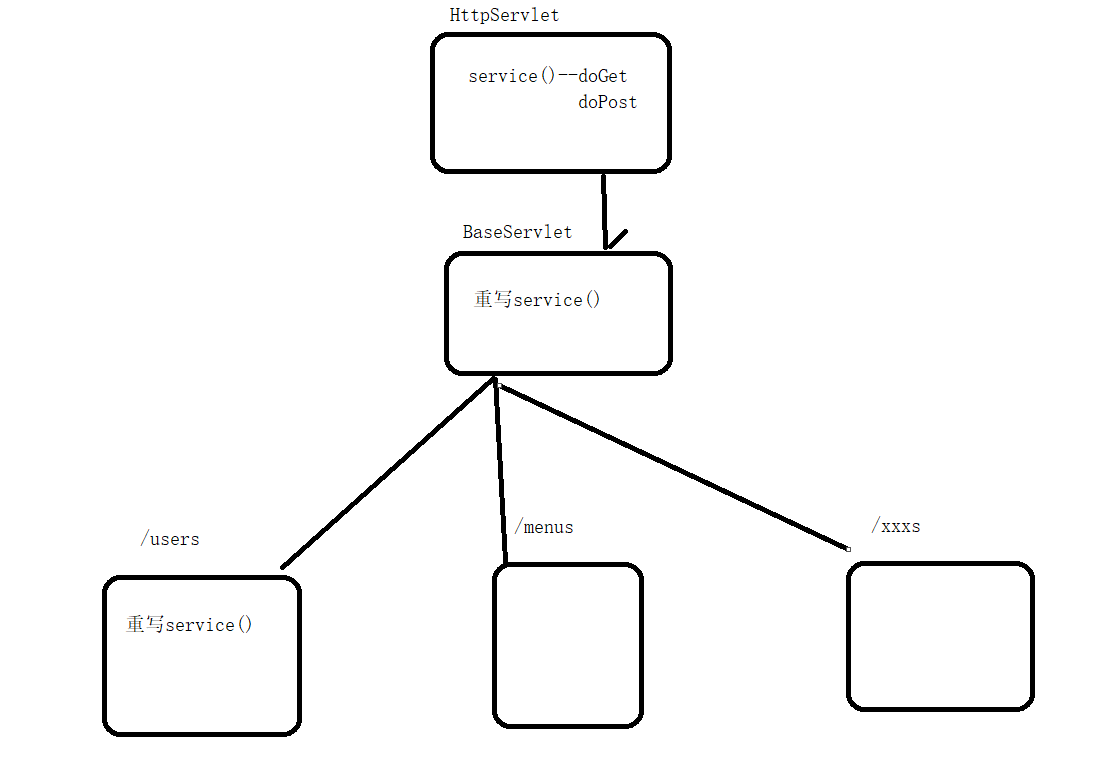
baseServlet
package com.javasm.controller;

import javax.servlet.ServletException;
import javax.servlet.http.HttpServlet;
import javax.servlet.http.HttpServletRequest;
import javax.servlet.http.HttpServletResponse;
import java.io.IOException;
import java.lang.reflect.InvocationTargetException;
import java.lang.reflect.Method;

/**
 * @className: BaseServlet
 * @author: gfs
 * @date: 2025/10/24 15:29
 * @version: 0.1
 * @since: jdk17
 * @description:
 */
public class BaseServlet extends HttpServlet {

        /*
    * 1 http协议中定义的rest风格
    *   get       查询
    *   put       添加
    *   post      修改
    *   delete    删除
    *   请求地址相同 通过分发规则 执行不同的方法
    * 2 service方法中 写自定义请求分发规则
    *   step1 用url地址 去涵盖调用方法的特征
    *   /menus/query  查询   /menus/insert  添加 .....
    *   String requestURI = req.getRequestURI();
        String methodName = requestURI.substring(requestURI.lastIndexOf("/")+1);
        System.out.println(methodName);
        通过url路径 读取出 要执行哪个方法
        step2 通过反射做方法调用的通用方法
    *       //获得当前类型中 指定的方法对象
            Method declaredMethod = this.getClass().getDeclaredMethod(methodName, HttpServletRequest.class, HttpServletResponse.class);
            //设置方法穿透 获得非public 的方法
            declaredMethod.setAccessible(true);
            //执行指定的方法对象
            declaredMethod.invoke(this,req,resp);
    *
    *
    * */

    @Override
    protected void service(HttpServletRequest req, HttpServletResponse resp) throws ServletException, IOException {
        System.out.println("baseServlet........");
        /* 允许跨域的主机地址*/
        resp.setHeader("Access-Control-Allow-Origin", "http://localhost:5173");
        /* 允许跨域的请求⽅法GET, POST, HEAD 等*/
        resp.setHeader("Access-Control-Allow-Methods", "*");

        /*重新预检验跨域的缓存时间*/
        resp.setHeader("Access-Control-Max-Age", "3600");
        /* 允许跨域的请求头 */
        resp.setHeader("Access-Control-Allow-Headers", "*");
        /* 是否携带cookie */
        resp.setHeader("Access-Control-Allow-Credentials", "true");


        //获取请求url
        String requestURI = req.getRequestURI();
        String methodName = requestURI.substring(requestURI.lastIndexOf("/")+1);
        System.out.println(methodName);

        //通过反射 做一个调用指定方法的通用方法
        try {
            //获得当前类型中 指定的方法对象
            Method declaredMethod = this.getClass().getDeclaredMethod(methodName, HttpServletRequest.class, HttpServletResponse.class);
            //设置方法穿透 获得非public 的方法
            declaredMethod.setAccessible(true);
            //执行指定的方法对象
            declaredMethod.invoke(this,req,resp);

        } catch (NoSuchMethodException e) {
            //throw new RuntimeException(e);
            //方法名没对上 报404 方便查错
            resp.sendError(404);

        } catch (InvocationTargetException e) {
            throw new RuntimeException(e);
        } catch (IllegalAccessException e) {
            throw new RuntimeException(e);
        }


    }
}
其他的业务模块类
package com.javasm.controller;

import com.alibaba.fastjson.JSON;
import com.javasm.entity.AdminMenu;
import com.javasm.entity.PageInfo;
import com.javasm.entity.ReturnCode;
import com.javasm.entity.ReturnResult;
import com.javasm.service.AdminMenuService;
import com.javasm.service.impl.AdminMenuServiceImpl;

import javax.servlet.ServletException;
import javax.servlet.annotation.WebServlet;
import javax.servlet.http.HttpServlet;
import javax.servlet.http.HttpServletRequest;
import javax.servlet.http.HttpServletResponse;
import java.io.IOException;
import java.io.PrintWriter;
import java.lang.reflect.InvocationTargetException;
import java.lang.reflect.Method;
import java.util.List;

/**
 * @className: ListMenuServlet
 * @author: gfs
 * @date: 2025/10/24 10:36
 * @version: 0.1
 * @since: jdk17
 * @description:
 */
@WebServlet("/menus/*")
public class MenusServlet extends BaseServlet {


    protected void query(HttpServletRequest req, HttpServletResponse resp)throws ServletException, IOException {
        System.out.println("查table");


        //1接收参数 封装对象
        req.setCharacterEncoding("utf-8");
        String menuname = req.getParameter("menuname");
        String pidStr = req.getParameter("pid");
        String pageStr = req.getParameter("page");
        String pageSizeStr = req.getParameter("pageSize");
        Long pid = null;
        if(pidStr!=null&&!"".equals(pidStr)){
            pid = Long.parseLong(pidStr);
        }
        //查询条件对象
        AdminMenu inputMenu = new AdminMenu(menuname, pid);
        //页码参数
        Integer page = 1;
        Integer pageSize = 10;
        if(pageStr!=null&&!"".equals(pageStr)){
            page = Integer.parseInt(pageStr);
        }
        if(pageSizeStr!=null&&!"".equals(pageSizeStr)){
            pageSize = Integer.parseInt(pageSizeStr);
        }

        //2调用service
        AdminMenuService adminMenuService = new AdminMenuServiceImpl();
        //总记录数
        Integer total = adminMenuService.countMenuByCondition(inputMenu);
        //页码参数对象
        PageInfo pageInfo = new PageInfo(page,pageSize,total);
        //分段记录
        List<AdminMenu> adminMenus = adminMenuService.listMenuByCondition(inputMenu, page, pageSize);

        //3根据结果反馈数据
        ReturnResult returnResult = new ReturnResult();
        if(adminMenus.size()>0){
            //查到数据
            returnResult.setCode(ReturnCode.QUERY_SUCCESS.getCode());
            returnResult.setMsg(ReturnCode.QUERY_SUCCESS.getMsg());
            returnResult.setReturnData(adminMenus);
            returnResult.setPageInfo(pageInfo);
        }else{
            returnResult.setCode(ReturnCode.QUERY_NODATA.getCode());
            returnResult.setMsg(ReturnCode.QUERY_NODATA.getMsg());
        }

        //输出json数据
        resp.setContentType("application/json;charset=utf-8");
        PrintWriter writer = resp.getWriter();
        writer.print(JSON.toJSONString(returnResult));
        writer.close();


    }

    protected void querySelect(HttpServletRequest req, HttpServletResponse resp)throws ServletException, IOException {
        System.out.println("查下拉列表");

        AdminMenuService adminMenuService = new AdminMenuServiceImpl();
        List<AdminMenu> adminMenus = adminMenuService.listMenuLevel1();

        //3根据结果反馈数据
        ReturnResult returnResult = new ReturnResult();
        returnResult.setCode(ReturnCode.QUERY_SUCCESS.getCode());
        returnResult.setMsg(ReturnCode.QUERY_SUCCESS.getMsg());
        returnResult.setReturnData(adminMenus);


        //输出json数据
        resp.setContentType("application/json;charset=utf-8");
        PrintWriter writer = resp.getWriter();
        writer.print(JSON.toJSONString(returnResult));
        writer.close();
    }

}