为什么出现这个问题?
UniApp 在 App 端渲染页面时,用的是一个 原生 WebView(当做浏览器看待,手机系统来展示html界面) + 原生组件混合层:
- 页面(HTML、Vue 组件)在 WebView 层;
<video>、<map>、<canvas>等是 原生控件层;- 原生层始终盖在 WebView 上面;
- CSS 的
z-index、position: fixed、overflow对原生控件层 完全无效。 - 不管你怎么用 z-index 调整,只要视频是原生控件,它永远在最上面。
需求效果
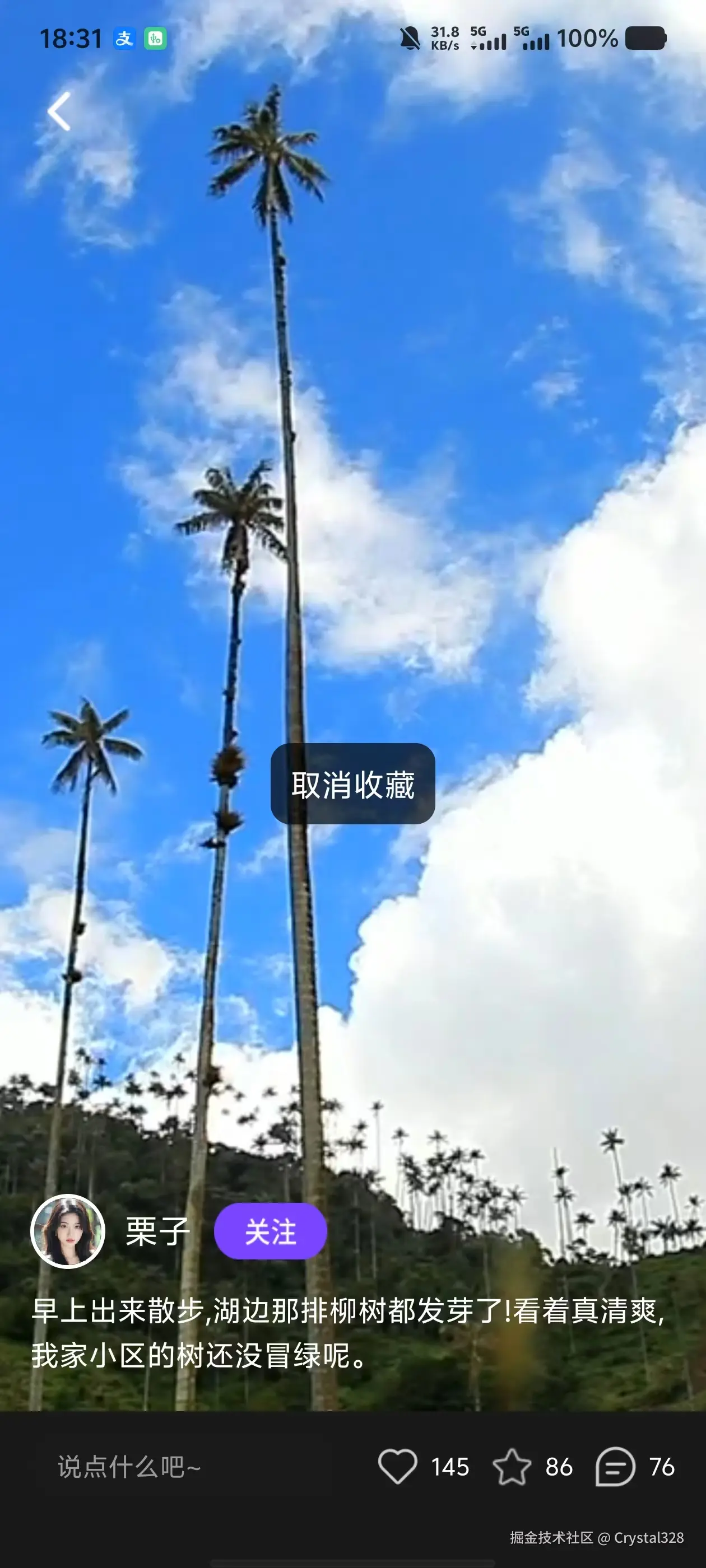
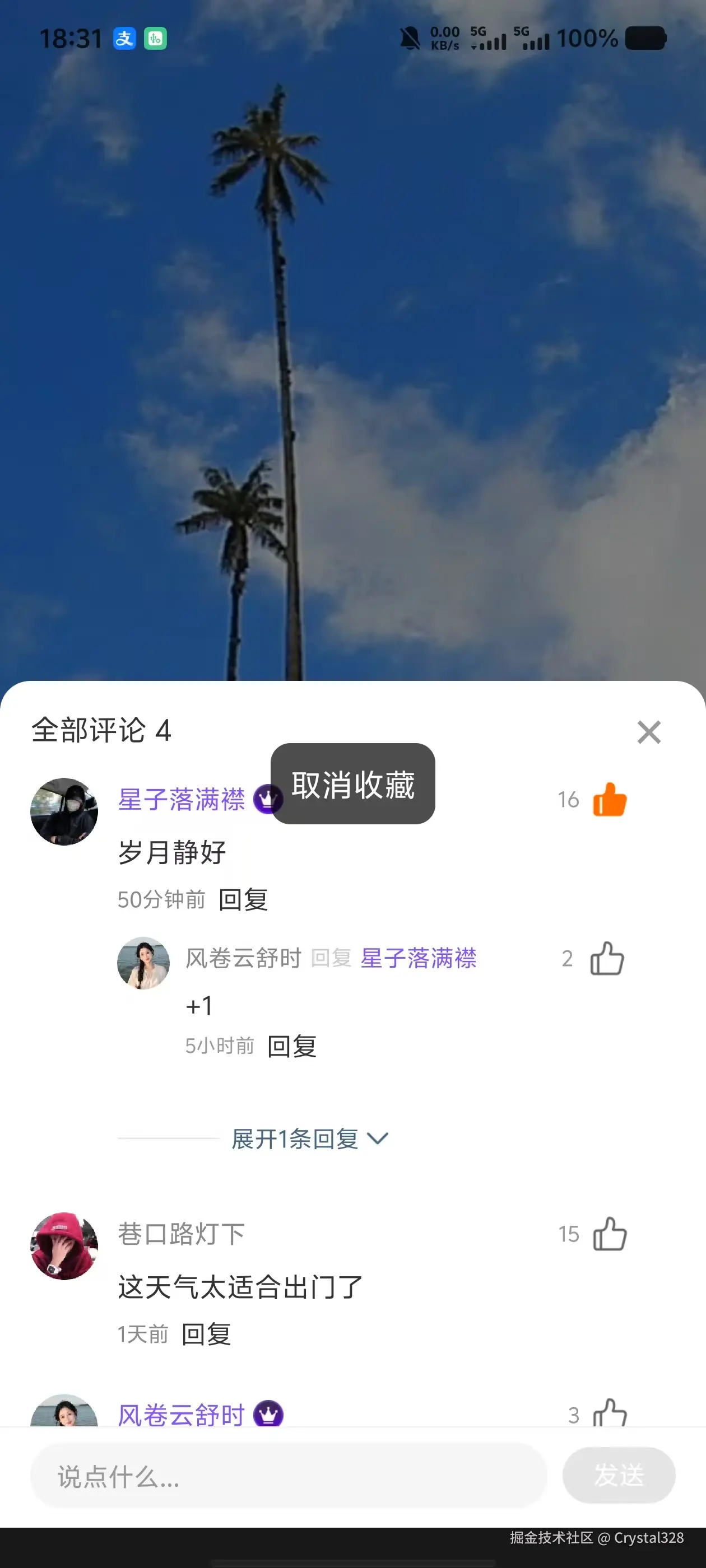
解决方法
使用subNVue原子窗体开发
uni-app subNVue 原生子窗体开发指南 - DCloud问答
pages.json 页面路由 | uni-app官网(ask.dcloud.net.cn/article/359...)
subNVue是 vue 页面的子窗体,它不是全屏页面,就是用于解决 vue 页面中的层级覆盖和原生界面自定义用的。它也不是组件,就是一个原生子窗体
1. 创建主页面和操作栏页面
项目结构
bash
pages/index/
├── index.vue          # 主页面(视频全屏播放层)
└── subNVue/
    ├── overlay.nvue   # 悬浮UI层(顶部导航 + 底部操作栏 + 用户信息)
    └── comment.nvue   # 评论弹出层(评论列表和交互)
2. pages.json 配置
json
 {
  	"path" : "pages/index/index",
    "style": {
      "navigationStyle": "custom",
      "app-plus": {
        "subNVues": [
          {
            "id": "overlay",
            "path": "pages/index/subnvue/overlay",
            "style": {
              "position": "absolute",
              "top": 0,
              "left": 0,
              "width": "100%",
              "height": "100%",
              "background": "transparent"
            }
          },
          {
            "id": "commentPopup",
            "path": "pages/index/subnvue/comment",
            "style": {
              "position": "dock",
              "dock": "bottom",
              "width": "100%",
              "height": "900px",
              "background": "transparent"
            }
          }
        ]
      }
  	}
  }
3. 主页面 index.vue
只保留视频和顶部导航
vue
  <template>
	<view class="video-page">
		<!-- 视频全屏播放层 -->
		<video
			class="video-bg"
			src="/static/video.mp4"
			autoplay
			loop
			:show-fullscreen-btn="false"
			:show-center-play-btn="false"
			:controls="false"
			enable-play-gesture
			objectFit="cover"
		></video>
	</view>
</template>

<script setup>
import { onReady } from '@dcloudio/uni-app'

let overlaySubNVue = null
let commentSubNVue = null

onReady(() => {
	// #ifdef APP-PLUS
	// 获取并显示overlay层
	overlaySubNVue = uni.getSubNVueById('overlay')
	if (overlaySubNVue) {
		overlaySubNVue.show('none')
		console.log('✅ overlay层已显示')
	}

	// 获取comment层
	commentSubNVue = uni.getSubNVueById('commentPopup')
	if (commentSubNVue) {
		// 先显示再立即隐藏,确保层初始化
		commentSubNVue.show('none')
		setTimeout(() => {
			commentSubNVue.hide('none')
			console.log('✅ comment层已初始化并隐藏')
		}, 50)
	}
	// #endif
})
</script>

<style scoped>
.video-page {
	width: 100%;
	height: 100vh;
	background:  rgba(0, 0, 0, 0.9);
}

.video-bg {
	width: 100%;
	height: 90%;
}
</style>
4. 子窗体
4.1 导航栏和底部内容 overlay.nvue
vue
<template>
  <view class="overlay-container">
    <!-- 顶部导航栏 -->
    <view class="top-nav">
      <view class="back-btn" @click="goBack">
        <image src="/static/video/Frame@2x.png" class="back-icon"></image>
      </view>
    </view>

    <!-- 底部内容容器 -->
    <view class="bottom-wrapper">
      <!-- 用户和描述区域 -->
      <view class="content-area">
        <!-- 用户信息 -->
        <view class="user-row">
          <image :src="postData.userAvatar" class="user-avatar" @click="goToUserProfile"></image>
          <text class="user-name" @click="goToUserProfile">{{ postData.username }}</text>
          <view class="btn-follow" :class="{ 'followed': postData.isFollowed }" @click="handleFollow">
            <image
              v-if="!postData.isFollowed"
              src="/static/video/Frame 2033196032@2x.png"
              class="btn-follow-img"
            ></image>
            <text v-else class="btn-follow-text">已关注</text>
          </view>
        </view>

        <!-- 描述文字 -->
        <text class="desc-text">{{ postData.content }}</text>
      </view>
    </view>

    <!-- 底部操作栏(移到最外层) -->
    <view class="bottom-action">
      <view class="input" @click="handleComment">
        <text class="input-placeholder">说点什么吧~</text>
      </view>

      <view class="actions">
        <view class="action" @click="handleLike">
          <image
            :src="postData.isLiked ? '/static/video/喜欢 red@2x.png' : '/static/video/喜欢 (4) 1@2x.png'"
            class="action-icon"
          ></image>
          <text class="action-num">{{ postData.likeCount }}</text>
        </view>

        <view class="action" @click="handleCollect">
          <image
            :src="postData.isCollected ? '/static/home/收藏 (5) 1@2x.png' : '/static/home/收藏.png'"
            class="action-icon"
          ></image>
          <text class="action-num">{{ postData.collectCount }}</text>
        </view>

        <view class="action" @click="handleComment">
          <image src="/static/video/评论 (1) 1@2x.png" class="action-icon"></image>
          <text class="action-num">{{ postData.commentCount }}</text>
        </view>
      </view>
    </view>
  </view>
</template>

<script setup>
import { ref, reactive } from 'vue'

// 容器高度
const containerHeight = ref(500)

// 文章数据
const postData = reactive({
  userAvatar: '/static/video/Ellipse 216@2x.png',
  username: '栗子',
  isFollowed: false,
  content: '早上出来散步,湖边那排柳树都发芽了!看着真清爽,我家小区的树还没冒绿呢。',
  likeCount: 145,
  collectCount: 86,
  commentCount: 76,
  isLiked: false,
  isCollected: false
})

// 返回
const goBack = () => {
  uni.navigateBack()
}

// 跳转个人主页
const goToUserProfile = () => {
  uni.navigateTo({
    url: '/pages/home/home'
  })
}

// 关注/取消关注
const handleFollow = () => {
  postData.isFollowed = !postData.isFollowed
  const title = postData.isFollowed ? '关注成功' : '已取消关注'
  uni.showToast({ title, icon: 'none' })
}

// 点赞
const handleLike = () => {
  postData.isLiked = !postData.isLiked
  postData.likeCount += postData.isLiked ? 1 : -1
}

// 收藏
const handleCollect = () => {
  postData.isCollected = !postData.isCollected
  postData.collectCount += postData.isCollected ? 1 : -1

  if (postData.isCollected) {
    // 收藏成功,显示短时间提示
    uni.showToast({
      title: '收藏成功',
      icon: 'none',
      duration: 1500
    })
  } else {
    // 取消收藏,显示长时间提示(不自动消失需要手动关闭)
    uni.showToast({
      title: '取消收藏',
      icon: 'none',
      duration: 1000 // 1秒后自动消失
    })
  }
}

// 打开评论弹窗
const handleComment = () => {
  // #ifdef APP-PLUS
  // 1. 隐藏overlay层
  const overlaySubNVue = uni.getSubNVueById('overlay')
  if (overlaySubNVue) {
    overlaySubNVue.hide()
    console.log('✅ overlay层已隐藏')
  }

  // 2. 显示评论弹窗
  const commentSubNVue = uni.getSubNVueById('commentPopup')
  if (commentSubNVue) {
    commentSubNVue.show('slide-in-bottom', 300)
    console.log('✅ 评论弹窗已打开')
  } else {
    console.error('❌ 未找到评论弹窗')
  }
  // #endif
}
</script>

<style>
.overlay-container {
  position: absolute;
  top: 0;
  left: 0;
  width: 750rpx;
  height: 1624rpx;
  flex: 1;
}

/* 顶部导航 */
.top-nav {
  position: absolute;
  top: 88rpx;
  left: 32rpx;
  z-index: 100;
}

.back-btn {
  width: 60rpx;
  height: 60rpx;
  justify-content: center;
  align-items: center;
  flex-direction: row;
}

.back-icon {
  width: 64rpx;
  height: 64rpx;
}

/* ==================== 底部容器 ==================== */
.bottom-wrapper {
  position: absolute;
  bottom: 130rpx;
  left: 0;
  width: 750rpx;
  background: linear-gradient(180deg, transparent 0%, rgba(0,0,0,0.6) 30%, rgba(0,0,0,0.85) 100%);
}

/* ==================== 内容区域 ==================== */
.content-area {
  padding: 40rpx 32rpx 30rpx 32rpx;
}

/* 用户信息行 */
.user-row {
  flex-direction: row;
  align-items: center;
  margin-bottom: 20rpx;
}

.user-avatar {
  width: 80rpx;
  height: 80rpx;
  border-radius: 40rpx;
  border-width: 4rpx;
  border-color: #FFFFFF;
}

.user-name {
  margin-left: 20rpx;
  font-size: 36rpx;
  color: #FFFFFF;
  font-weight: 500;
}

.btn-follow {
  margin-left: 24rpx;
  width: 120rpx;
  height: 60rpx;
  flex-direction: row;
  align-items: center;
  justify-content: center;
  border-radius: 30rpx;
}

.btn-follow.followed {
  background-color: rgba(255, 255, 255, 0.3);
  border-width: 2rpx;
  border-color: #FFFFFF;
}

.btn-follow-img {
  width: 120rpx;
  height: 60rpx;
}

.btn-follow-text {
  font-size: 26rpx;
  color: #FFFFFF;
  font-weight: 400;
}

/* 描述文字 */
.desc-text {
  font-size: 32rpx;
  line-height: 48rpx;
  color: #FFFFFF;
}

/* ==================== 底部操作栏 ==================== */
.bottom-action {
  position: absolute;
  bottom: 0;
  left: 0;
  width: 750rpx;
  flex-direction: row;
  align-items: center;
  padding: 20rpx 32rpx 30rpx 32rpx;
  background-color:transparent;
  z-index: 10;
}

/* 输入框 */
.input {
  flex: 1;
  height: 70rpx;
  background-color: rgba(26, 26, 26, 0.8);
  border-radius: 35rpx;
  padding-left: 28rpx;
  padding-right: 28rpx;
  margin-right: 20rpx;
  justify-content: center;
}

.input-placeholder {
  font-size: 28rpx;
  color: #999999;
}

/* 操作按钮组 */
.actions {
  flex-direction: row;
  align-items: center;
}

/* 单个操作 */
.action {
  flex-direction: row;
  align-items: center;
  margin-left: 20rpx;
}

.action-icon {
  width: 50rpx;
  height: 50rpx;
}

.action-num {
  margin-left: 10rpx;
  font-size: 26rpx;
  color: #FFFFFF;
}
</style>
4.2 评论弹窗内容 `comment.nvue
nvue
<template>
  <view class="comment-popup">
    <!-- 遮罩层 -->
    <view class="mask" @click="closePopup"></view>

    <!-- 评论内容区 -->
    <view class="comment-content">
      <!-- 评论头部 -->
      <view class="comment-header">
        <text class="comment-title">全部评论 {{ commentList.length }}</text>
        <view class="close-btn" @click="closePopup">
          <text class="close-icon">×</text>
        </view>
      </view>

      <!-- 评论列表 -->
      <list class="comment-list" @loadmore="loadMoreComments">
        <cell v-for="(comment, index) in commentList" :key="comment.id">
          <view class="comment-item">
            <!-- 主评论 -->
            <view class="comment-main" @click="handleReply(comment)">
              <image :src="comment.avatar" class="comment-avatar"></image>
              <view class="comment-right">
                <view class="comment-user-info">
                  <view class="comment-user-left">
                    <text class="comment-username" :class="{ 'vip-username': comment.isVip }">{{ comment.username }}</text>
                    <image v-if="comment.isVip" src="/static/video/Group 2033195212@2x.png" class="vip-icon"></image>
                  </view>
                  <view class="comment-like" @click.stop="handleCommentLike(comment)">
                    <text class="comment-like-count">{{ comment.likeCount }}</text>
                    <image
                      :src="comment.isLiked ? '/static/video/点赞 (3) 2@2x.png' : '/static/video/点赞 (3) 1@2x.png'"
                      class="like-extra-icon"
                    ></image>
                  </view>
                </view>
                <text class="comment-text">{{ comment.content }}</text>
                <view class="comment-footer">
                  <text class="comment-time">{{ comment.time }}</text>
                  <text class="reply-btn">回复</text>
                </view>

                <!-- 回复列表 -->
                <view class="reply-wrapper" v-if="comment.replies && comment.replies.length > 0" @click.stop>
                  <view class="reply-list" :class="{ 'reply-list-expanded': comment.showAll }">
                    <view class="reply-item" v-for="(reply, rIndex) in comment.showReplies" :key="reply.id" @click="handleReply(reply)">
                      <image :src="reply.avatar" class="reply-avatar"></image>
                      <view class="reply-right">
                        <view class="reply-user-info">
                          <view class="reply-user-left">
                            <text class="reply-username" :class="{ 'vip-username': reply.isVip }">{{ reply.username }}</text>
                            <text class="reply-arrow" v-if="reply.replyToUsername">回复</text>
                            <text class="reply-to-username" v-if="reply.replyToUsername" :class="{ 'vip-username': reply.replyToIsVip }">{{ reply.replyToUsername }}</text>
                            <image v-if="reply.isVip" src="/static/images/huangguan.png" class="vip-icon-small"></image>
                          </view>
                          <view class="reply-like" @click.stop="handleReplyLike(reply)">
                            <text class="like-count">{{ reply.likeCount }}</text>
                            <image
                              :src="reply.isLiked ? '/static/video/点赞 (3) 2@2x.png' : '/static/video/点赞 (3) 1@2x.png'"
                              class="like-extra-icon-small"
                            ></image>
                          </view>
                        </view>
                        <text class="reply-text">{{ reply.content }}</text>
                        <view class="reply-footer">
                          <text class="reply-time">{{ reply.time }}</text>
                          <text class="reply-btn">回复</text>
                        </view>
                      </view>
                    </view>
                  </view>

                  <!-- 展开/收起更多回复 -->
                  <view class="expand-replies" v-if="comment.replies.length > 1" @click.stop="toggleReplies(comment)">
                    <text class="expand-line">------------------</text>
                    <text class="expand-text">{{ comment.showAll ? '收起回复' : '展开' + (comment.replies.length - 1) + '条回复' }}</text>
                    <image src="/static/video/下  拉 1@2x.png" class="expand-arrow" :class="{ 'arrow-up': comment.showAll }"></image>
                  </view>
                </view>
              </view>
            </view>
          </view>
        </cell>

        <!-- 加载状态 -->
        <cell>
          <view class="load-more">
            <text class="load-more-text" v-if="loadingMore">加载中...</text>
            <text class="load-more-text" v-else-if="noMoreData">没有更多了</text>
          </view>
        </cell>
      </list>

      <!-- 底部输入区域 -->
      <view class="bottom-input-area">

        <!-- 评论输入框 -->
        <view class="comment-input-wrapper">
          <input
            class="comment-input"
            :value="inputComment"
            :placeholder="replyPlaceholder"
            placeholder-style="color: #999999"
            @input="onInput"
            @confirm="submitComment"
          />
          <view class="send-btn" :class="{ 'active': inputComment.trim() }" @click="submitComment">
            <text class="send-text">发送</text>
          </view>
        </view>
      </view>
    </view>
  </view>
</template>

<script setup>
import { ref, reactive, onMounted } from 'vue'

// 加载状态
const loadingMore = ref(false)
const noMoreData = ref(false)
const currentPage = ref(1)

// 评论输入
const inputComment = ref('')
const replyingTo = ref(null)
const replyPlaceholder = ref('说点什么...')

// 评论列表
const commentList = reactive([
  {
    id: 1,
    avatar: '/static/video/Ellipse 2206@2x.png',
    username: '星子落满襟',
    isVip: true,
    content: '岁月静好',
    time: '50分钟前',
    likeCount: 16,
    isLiked: true,
    showAll: false,
    replies: [
      {
        id: 11,
        avatar: '/static/video/Ellipse 2207@2x.png',
        username: '风卷云舒时',
        isVip: false,
        content: '+1',
        time: '5小时前',
        likeCount: 2,
        isLiked: false,
        replyToUsername: '星子落满襟',
        replyToIsVip: true
      },
      {
        id: 12,
        avatar: '/static/images/myInsterest/Ellipse 217.png',
        username: '回复用户2',
        isVip: false,
        content: '同意',
        time: '4小时前',
        likeCount: 1,
        isLiked: false,
        replyToUsername: '风卷云舒时',
        replyToIsVip: false
      }
    ],
    showReplies: []
  },
  {
    id: 2,
    avatar: '/static/video/Ellipse 2208@2x.png',
    username: '巷口路灯下',
    isVip: false,
    content: '这天气太适合出门了',
    time: '1天前',
    likeCount: 15,
    isLiked: false,
    showAll: false,
    replies: [],
    showReplies: []
  },
  {
    id: 3,
    avatar: '/static/video/Ellipse 2207@2x.png',
    username: '风卷云舒时',
    isVip: true,
    content: '很棒的分享',
    time: '2天前',
    likeCount: 3,
    isLiked: false,
    showAll: false,
    replies: [],
    showReplies: []
  }
])

// 输入框输入
const onInput = (e) => {
  inputComment.value = e.detail.value
}

// 取消回复
const cancelReply = () => {
  replyingTo.value = null
  replyPlaceholder.value = '说点什么...'
  inputComment.value = ''
}

// 关闭弹窗
const closePopup = () => {
  // 清空输入和回复状态
  inputComment.value = ''
  replyingTo.value = null
  replyPlaceholder.value = '说点什么...'

  // #ifdef APP-PLUS
  // 1. 隐藏评论弹窗
  const wv = plus.webview.currentWebview()
  if (wv) {
    wv.hide('slide-out-bottom', 300)
    console.log('✅ 评论弹窗已关闭')
  }

  // 2. 延迟显示overlay层
  setTimeout(() => {
    const overlaySubNVue = uni.getSubNVueById('overlay')
    if (overlaySubNVue) {
      overlaySubNVue.show('none')
      console.log('✅ overlay层已显示')
    }
  }, 100)
  // #endif
}

// 提交评论或回复
const submitComment = () => {
  if (!inputComment.value.trim()) {
    uni.showToast({ title: '请输入内容', icon: 'none' })
    return
  }

  if (replyingTo.value) {
    // 提交回复
    const comment = commentList.find(c =>
      c.id === replyingTo.value.id ||
      (c.replies && c.replies.some(r => r.id === replyingTo.value.id))
    )

    if (comment) {
      const newReply = {
        id: Date.now(),
        avatar: '/static/video/Ellipse 216@2x.png',
        username: '我',
        isVip: false,
        content: inputComment.value,
        time: '刚刚',
        likeCount: 0,
        isLiked: false,
        replyToUsername: replyingTo.value.username,
        replyToIsVip: replyingTo.value.isVip || false
      }

      if (!comment.replies) {
        comment.replies = []
      }
      comment.replies.push(newReply)

      // 更新显示的回复
      if (!comment.showAll) {
        comment.showReplies = [comment.replies[0]]
      } else {
        comment.showReplies = comment.replies
      }

      uni.showToast({ title: '回复成功', icon: 'success' })
    }
  } else {
    // 提交评论
    const newComment = {
      id: Date.now(),
      avatar: '/static/video/Ellipse 216@2x.png',
      username: '我',
      isVip: false,
      content: inputComment.value,
      time: '刚刚',
      likeCount: 0,
      isLiked: false,
      showAll: false,
      replies: [],
      showReplies: []
    }

    commentList.unshift(newComment)
    uni.showToast({ title: '评论成功', icon: 'success' })
  }

  // 清空输入框和回复状态
  inputComment.value = ''
  replyingTo.value = null
  replyPlaceholder.value = '说点什么...'
}

// 展开/收起回复
const toggleReplies = (comment) => {
  if (comment.showAll) {
    comment.showAll = false
    comment.showReplies = [comment.replies[0]]
  } else {
    comment.showAll = true
    comment.showReplies = comment.replies
  }
}

// 评论点赞
const handleCommentLike = (comment) => {
  comment.isLiked = !comment.isLiked
  comment.likeCount += comment.isLiked ? 1 : -1
}

// 回复点赞
const handleReplyLike = (reply) => {
  reply.isLiked = !reply.isLiked
  reply.likeCount += reply.isLiked ? 1 : -1
}

// 回复评论
const handleReply = (item) => {
  replyingTo.value = item
  replyPlaceholder.value = `回复 ${item.username}:`

  uni.showToast({
    title: `回复 ${item.username}`,
    icon: 'none',
    duration: 1000
  })
}

// 加载更多评论
const loadMoreComments = () => {
  if (loadingMore.value || noMoreData.value) {
    return
  }

  loadingMore.value = true

  setTimeout(() => {
    const newComment = {
      id: commentList.length + 1,
      avatar: '/static/video/Ellipse 2207@2x.png',
      username: '新用户' + (commentList.length + 1),
      isVip: false,
      content: '这是新加载的评论内容',
      time: '刚刚',
      likeCount: Math.floor(Math.random() * 20),
      isLiked: false,
      showAll: false,
      replies: [],
      showReplies: []
    }

    commentList.push(newComment)
    currentPage.value++

    if (currentPage.value >= 5) {
      noMoreData.value = true
    }

    loadingMore.value = false
  }, 1000)
}

// 组件挂载
onMounted(() => {
  // 初始化评论显示的回复
  commentList.forEach(comment => {
    if (comment.replies && comment.replies.length > 0) {
      comment.showReplies = [comment.replies[0]]
    }
  })
})
</script>

<style>
.comment-popup {
  position: absolute;
  top: 0;
  left: 0;
  width: 750rpx;
  height: 1624rpx;
  justify-content: flex-end;
}

.mask {
  position: absolute;
  top: 0;
  left: 0;
  width: 750rpx;
  height: 1624rpx;
  background-color: rgba(0, 0, 0, 0.5);
}

.comment-content {
  width: 750rpx;
  height: 900rpx;
  background-color: #FFFFFF;
  border-top-left-radius: 32rpx;
  border-top-right-radius: 32rpx;
  overflow: hidden;
  flex-direction: column;
}

/* 评论头部 */
.comment-header {
  flex-direction: row;
  align-items: center;
  justify-content: space-between;
  padding: 32rpx 32rpx 16rpx;
  height: 88rpx;
}


/* 评论输入框 */
.comment-input-wrapper {
  flex-direction: row;
  align-items: center;
  padding: 16rpx 32rpx 20rpx 32rpx;
  background-color: #FFFFFF;
}

.comment-input {
  flex: 1;
  height: 70rpx;
  background-color: #F5F5F5;
  border-radius: 35rpx;
  padding-left: 28rpx;
  padding-right: 28rpx;
  font-size: 28rpx;
  color: #333333;
  margin-right: 16rpx;
}

.send-btn {
  width: 120rpx;
  height: 60rpx;
  background-color: #E5E5E5;
  border-radius: 30rpx;
  justify-content: center;
  align-items: center;
}

.send-btn.active {
  background-color: #7E51FF;
}

.send-text {
  font-size: 28rpx;
  color: #fff;
}

.send-btn.active .send-text {
  color: #FFFFFF;
}

.comment-title {
  font-size: 32rpx;
  font-weight: 500;
  color: #333333;
}

.close-btn {
  width: 56rpx;
  height: 56rpx;
  justify-content: center;
  align-items: center;
  flex-direction: row;
}

.close-icon {
  font-size: 56rpx;
  color: #999999;
  line-height: 56rpx;
}

/* 评论列表 */
.comment-list {
  flex: 1;
  height: 0;
  padding-left: 32rpx;
  padding-right: 32rpx;
  padding-bottom: 0rpx;
}

/* 底部输入区域 */
.bottom-input-area {
  width: 750rpx;
  background-color: #FFFFFF;
  border-top-width: 1rpx;
  border-top-color: #F0F0F0;
}

.comment-item {
  padding-top: 24rpx;
  padding-bottom: 24rpx;
}

.comment-main {
  flex-direction: row;
}

.comment-avatar {
  width: 72rpx;
  height: 72rpx;
  border-radius: 36rpx;
}

.comment-right {
  flex: 1;
  margin-left: 20rpx;
}

.comment-user-info {
  flex-direction: row;
  align-items: center;
  justify-content: space-between;
  margin-bottom: 12rpx;
}

.comment-user-left {
  flex-direction: row;
  align-items: center;
}

.comment-username {
  font-size: 28rpx;
  font-weight: 500;
  color: #888888;
}

.vip-username {
  color: #7E51FF;
}

.vip-icon {
  width: 32rpx;
  height: 32rpx;
  margin-left: 8rpx;
}

.comment-text {
  font-size: 30rpx;
  line-height: 44rpx;
  color: #333333;
  margin-bottom: 12rpx;
}

.comment-footer {
  flex-direction: row;
  align-items: center;
}

.comment-time {
  font-size: 24rpx;
  color: #888888;
}

.reply-btn {
  font-size: 28rpx;
  color: #333333;
  margin-left: 12rpx;
}

.comment-like {
  flex-direction: row;
  align-items: center;
  padding-right: 37rpx;
}

.comment-like-count {
  font-size: 24rpx;
  color: #999999;
  margin-right: 2rpx;
}

.like-extra-icon {
  width: 45rpx;
  height: 45rpx;
  margin-left: 8rpx;
  margin-right: 10rpx;
}

/* 回复列表容器 */
.reply-wrapper {
  margin-top: 24rpx;
  margin-bottom: 0rpx;
}

.reply-list {
  height: 200rpx;
  overflow: hidden;
}

.reply-list-expanded {
  height: 600rpx;
}

.reply-item {
  flex-direction: row;
  margin-bottom: 24rpx;
}

.reply-avatar {
  width: 56rpx;
  height: 56rpx;
  border-radius: 28rpx;
}

.reply-right {
  flex: 1;
  margin-left: 16rpx;
}

.reply-user-info {
  flex-direction: row;
  align-items: center;
  justify-content: space-between;
  margin-bottom: 8rpx;
}

.reply-user-left {
  flex-direction: row;
  align-items: center;
}

.reply-username {
  font-size: 26rpx;
  font-weight: 500;
  color: #888888;
}

.reply-arrow {
  font-size: 24rpx;
  color: #CCCCCC;
  margin-left: 8rpx;
  margin-right: 8rpx;
}

.reply-to-username {
  font-size: 26rpx;
  font-weight: 500;
  color: #888888;
}

.vip-icon-small {
  width: 28rpx;
  height: 28rpx;
  margin-left: 6rpx;
}

.reply-text {
  font-size: 28rpx;
  line-height: 40rpx;
  color: #333333;
  margin-bottom: 8rpx;
}

.reply-footer {
  flex-direction: row;
  align-items: center;
}

.reply-time {
  font-size: 22rpx;
  color: #999999;
}

.reply-like {
  flex-direction: row;
  align-items: center;
  padding-right: 40rpx;
}

.like-count {
  font-size: 24rpx;
  color: #999999;
  margin-right: 6rpx;
}

.like-extra-icon-small {
  width: 45rpx;
  height: 45rpx;
  margin-left: 8rpx;
  margin-right: 10rpx;
}

/* 展开更多回复 */
.expand-replies {
  flex-direction: row;
  align-items: center;
  padding-top: 0rpx;
  padding-bottom: 16rpx;
  margin-top: 0rpx;
}

.expand-line {
  font-size: 20rpx;
  color: #E5E5E5;
  margin-right: 12rpx;
}

.expand-text {
  font-size: 26rpx;
  color: #4A6481;
  margin-right: 8rpx;
}

.expand-arrow {
  width: 24rpx;
  height: 24rpx;
}

.arrow-up {
  transform: rotate(180deg);
}

/* 加载更多 */
.load-more {
  padding-top: 32rpx;
  padding-bottom: 32rpx;
  flex-direction: row;
  align-items: center;
  justify-content: center;
}

.load-more-text {
  font-size: 24rpx;
  color: #999999;
}
</style>
5.总结
- 使用subNVue 将页面分为 video 以及 遮罩区域等
- 配置pages.json
- 代码拆解
- 注意nvue的css兼容问题 nvue默认flex布局且默认竖直排列